Solved BIOS: Can access BIOS utility, but cannot change settings.

mikeo56

New member
Local time
2:57 PM
Messages
6
Location
Fort Myers
Hello:

This is my first post here, so hi to everyone.
I just got an ASUS X401a Notebook and I want to use a flash drive to boot from Linux.
I need to change the sequence in the BIOS so that the flash drive is first choice to boot from.
I have no problem accessing the BIOS utility, but it allows me to alter only some settings. Those in blue colored font I can change those in black font I cannot. What drive to boot from first is in black and not adjustable.
I used command line to work as admin and I also set up a password for admin in the BIOS to access the BIOS utility, but still no go; some things are allowed to be changed some aren't.

Any help is appreciated.
 

My Computer My Computer

Computer Manufacturer/Model Number
ASUSTeK Computer Inc X401A1
OS
Windows 7 Home Premium 64 bit, SP 1 Build 7601
CPU
Intel Pentium CPU B970 @ 2.30 GHz, 2 cores, 2 logical proces
Memory
4 GB Ram
Graphics Card(s)
Intel HD Graphics
Monitor(s) Displays
Generic PnP Monitor
Hard Drives
WDC WD3200BPVT-80JJ5T0
Is it asking for a password or something?
 

My Computer My Computer

Computer Manufacturer/Model Number
Advent
OS
Dual-boot: Windows 7 HP 32-bit SP1 & Windows XP Pro 32-bit SP2.
CPU
AMD Phenom X4 9550 2.8Ghz
Motherboard
FOXCONN A6VMX (Socket 940)
Memory
4.0GB RAM
Graphics Card(s)
256MB On-board ATI Radeon X1200 Series
Sound Card
UnKnown
Monitor(s) Displays
19" TFT Mointor
Screen Resolution
1400 by 900
Hard Drives
500GB Western Digital WDC
Keyboard
HP Keyboard
Internet Speed
Dial-up via Mobile phone (Three)
Other Info
80GB External Hard-drive.

Also I have an old Windows XP Laptop for backup/occasional use etc.
Hello, mikeo56.
Welcome to Seven Forums.

Try to disable Boot Booster / Quick Boot in your BIOS and try again. I found it somewhere for How to boot from USB flash drive.

Trinty :)
 

My Computer My Computer

Computer Manufacturer/Model Number
Trinty Self Build 2011
OS
Windows 7 Ultimate x64 - Service Pack 1
CPU
Intel(R) Pentium(R) CPU G620 @ 2.60GHz
Motherboard
ASUSTeK Computer INC. P8H61-M LX2
Memory
Transcend Informations - 2*2048GB DDR3 @ 1066MHz
Graphics Card(s)
ATI Radeon HD 5670 - 1024MB DDR5 - Driver : 19.04.2011
Sound Card
AMD High Definition Audio Device
Monitor(s) Displays
SAMSUNG SyncMaster 2220LM 22"
Screen Resolution
1680x1050
Hard Drives
SAMSUNG HD503HI ATA Device - 500GB
PSU
Don't know for now !
Case
Case MSI
Cooling
Stock
Keyboard
MS Industrial 2.4GHz Wirelees Keyboard
Mouse
MS Industrial 2.4GHz Wirelees Optical Mouse
Internet Speed
Download speed : 6,5Mbps / Upload speed : 1Mpbs
Other Info
BIOS version : BIOS Date: 02/05/10 19:13:52 Ver: 08.00.10
Prime95 (4h) : max. 65°C
DirectX 11 version.
Logitech G13 Advanced Gaming Keyboard.
On an Asus laptop, press ESC immediately when the system boots and you will be offered the boot device menu.

Hope that helps.
 

My Computer My Computer

Computer type
PC/Desktop
Computer Manufacturer/Model Number
Home Built - Jan 2013
OS
Windows 7 64 Bit Home Premium SP1
CPU
i7-3820
Motherboard
Asus P9X79-PRO - Bios 4608
Memory
GSkill F3-14900CL9Q - 16GB
Graphics Card(s)
EVGA GeForce GTX660 - Driver 352.86
Sound Card
On board Realtek ALC898
Monitor(s) Displays
Acer S271HL
Screen Resolution
1920 x 1080
Hard Drives
#1- Samsung 840 Pro Series
#2- Western Digital WD1002FAEX Sata3 Black
#3- Western Digital WD1002FAEX Sata3 Black
PSU
Corsair CMPSU-850TX-V2 - 850 watt (by Seasonic)
Case
Corsair Obsidian 550D
Cooling
Standard 3 120mm case fans, Cooler Master Hyper 212 EVO
Keyboard
MS KC-0405
Mouse
Intellimouse 5-button
Internet Speed
56 Mbits/Sec (on a good day)
Antivirus
Avast & Malwarebytes
Browser
Firefox
Other Info
Asus DVD - DRW-24B1ST 24X
No, Carl a password was not requested by the Bios utility, until I set an admin password in the Bios utility. I restart, F2, get Bios, give password and I am in, but still I cannot change certain items in the Bios and one of them I cannot change is the sequence, putting the flash drive/usb first.

Thanks
 

My Computer My Computer

Computer Manufacturer/Model Number
ASUSTeK Computer Inc X401A1
OS
Windows 7 Home Premium 64 bit, SP 1 Build 7601
CPU
Intel Pentium CPU B970 @ 2.30 GHz, 2 cores, 2 logical proces
Memory
4 GB Ram
Graphics Card(s)
Intel HD Graphics
Monitor(s) Displays
Generic PnP Monitor
Hard Drives
WDC WD3200BPVT-80JJ5T0
TVeblen:
Same thing; I get to the boot menu in Bios but I still am not able to adjust the sequence.

Thanks
 

My Computer My Computer

Computer Manufacturer/Model Number
ASUSTeK Computer Inc X401A1
OS
Windows 7 Home Premium 64 bit, SP 1 Build 7601
CPU
Intel Pentium CPU B970 @ 2.30 GHz, 2 cores, 2 logical proces
Memory
4 GB Ram
Graphics Card(s)
Intel HD Graphics
Monitor(s) Displays
Generic PnP Monitor
Hard Drives
WDC WD3200BPVT-80JJ5T0
No, this would not be the boot menu in the BIOS settings.
This is a separate pop-up window that offers you the boot device menu.

You need to immediately start tapping the ESC key just after you push the power button to turn on the laptop. The same procedure as if you were pressing F2 to get into the BIOS settings. If you see the Asus screen go by it is too late.
 

My Computer My Computer

Computer type
PC/Desktop
Computer Manufacturer/Model Number
Home Built - Jan 2013
OS
Windows 7 64 Bit Home Premium SP1
CPU
i7-3820
Motherboard
Asus P9X79-PRO - Bios 4608
Memory
GSkill F3-14900CL9Q - 16GB
Graphics Card(s)
EVGA GeForce GTX660 - Driver 352.86
Sound Card
On board Realtek ALC898
Monitor(s) Displays
Acer S271HL
Screen Resolution
1920 x 1080
Hard Drives
#1- Samsung 840 Pro Series
#2- Western Digital WD1002FAEX Sata3 Black
#3- Western Digital WD1002FAEX Sata3 Black
PSU
Corsair CMPSU-850TX-V2 - 850 watt (by Seasonic)
Case
Corsair Obsidian 550D
Cooling
Standard 3 120mm case fans, Cooler Master Hyper 212 EVO
Keyboard
MS KC-0405
Mouse
Intellimouse 5-button
Internet Speed
56 Mbits/Sec (on a good day)
Antivirus
Avast & Malwarebytes
Browser
Firefox
Other Info
Asus DVD - DRW-24B1ST 24X
I have been at the wrong place in the Bios utility and am not communicating exactly what is going on. I don't mess with the Bios that often. (Need to try Linux Now). But, In the Bios utility: Under Boot Option Priorities there is "Boot Option 1", "Add New Boot Option" and "Delete Boot Option". Highlight "Boot option" and hit enter, it shows a choice of the "system hard drive", which is active or "disable".
Highlight "Add New Boot Option" and I get three new choices to highlight: "Select Filesystem", "Path For Boot Option" and "Create".
It is not as simple as XP, where your choices are already laid out and you simply pick. I do not know what to enter.
 

My Computer My Computer

Computer Manufacturer/Model Number
ASUSTeK Computer Inc X401A1
OS
Windows 7 Home Premium 64 bit, SP 1 Build 7601
CPU
Intel Pentium CPU B970 @ 2.30 GHz, 2 cores, 2 logical proces
Memory
4 GB Ram
Graphics Card(s)
Intel HD Graphics
Monitor(s) Displays
Generic PnP Monitor
Hard Drives
WDC WD3200BPVT-80JJ5T0
Please stop thrashing about in the BIOS. You just need to follow the instruction.

Also: your operating system has nothing to do with your BIOS.
You are experiencing the new UEFI BIOS that is used on all newer laptops today. Time for the old dog to learn the new tricks.
 

My Computer My Computer

Computer type
PC/Desktop
Computer Manufacturer/Model Number
Home Built - Jan 2013
OS
Windows 7 64 Bit Home Premium SP1
CPU
i7-3820
Motherboard
Asus P9X79-PRO - Bios 4608
Memory
GSkill F3-14900CL9Q - 16GB
Graphics Card(s)
EVGA GeForce GTX660 - Driver 352.86
Sound Card
On board Realtek ALC898
Monitor(s) Displays
Acer S271HL
Screen Resolution
1920 x 1080
Hard Drives
#1- Samsung 840 Pro Series
#2- Western Digital WD1002FAEX Sata3 Black
#3- Western Digital WD1002FAEX Sata3 Black
PSU
Corsair CMPSU-850TX-V2 - 850 watt (by Seasonic)
Case
Corsair Obsidian 550D
Cooling
Standard 3 120mm case fans, Cooler Master Hyper 212 EVO
Keyboard
MS KC-0405
Mouse
Intellimouse 5-button
Internet Speed
56 Mbits/Sec (on a good day)
Antivirus
Avast & Malwarebytes
Browser
Firefox
Other Info
Asus DVD - DRW-24B1ST 24X
Hello:

This is my first post here, so hi to everyone.
I just got an ASUS X401a Notebook and I want to use a flash drive to boot from Linux.
I need to change the sequence in the BIOS so that the flash drive is first choice to boot from.
I have no problem accessing the BIOS utility, but it allows me to alter only some settings. Those in blue colored font I can change those in black font I cannot. What drive to boot from first is in black and not adjustable.
I used command line to work as admin and I also set up a password for admin in the BIOS to access the BIOS utility, but still no go; some things are allowed to be changed some aren't.

Any help is appreciated.

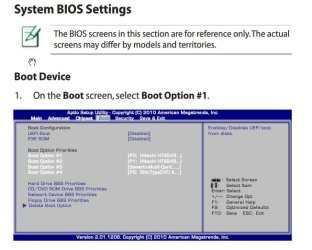
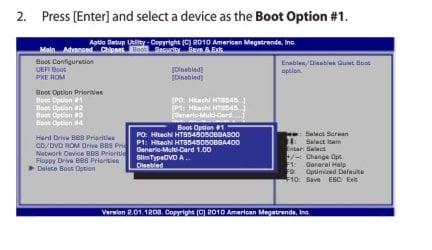
The following images show that you should be able to change the boot settings;
 

Attachments

  • Boot Screen 1.jpg
    Boot Screen 1.jpg
    38.3 KB · Views: 714
  • Boot Screen 2.jpg
    Boot Screen 2.jpg
    31 KB · Views: 672

My Computer My Computer

Computer type
PC/Desktop
Computer Manufacturer/Model Number
Custom Built
OS
Windows 7 Professional x64
CPU
Intel i5 quad processor
Motherboard
DP67BG
Memory
16 GB
Graphics Card(s)
Radeon HD 5770
Sound Card
Realtek High Definition Audio
Monitor(s) Displays
Samsung SyncMaster
Screen Resolution
1920X1080
Hard Drives
WD 2TB (SATA Internal)
WD 1TB (USB External)
PSU
Corsair GS800
Case
Tower (Generic)
Cooling
3 Internal Fans
Keyboard
MS Wireless
Mouse
MS Optical Wired
Internet Speed
54 mbps
Antivirus
Emsisoft
Browser
IE-Version 9, Palemoon-Version 24.2.0
Thanks Sir George

I no longer have the problem of setting the sequence in the BIOS. The USB Flash is now first. I simply restarted with the flashdrive inserted and it came up on the BIOS sequence as an option. My problem now is that when attempting to run Fedora live CD from the Flash drive there is a bug, it will not run. I am using UNetbootin and I figure I'd try some other distro.
 

My Computer My Computer

Computer Manufacturer/Model Number
ASUSTeK Computer Inc X401A1
OS
Windows 7 Home Premium 64 bit, SP 1 Build 7601
CPU
Intel Pentium CPU B970 @ 2.30 GHz, 2 cores, 2 logical proces
Memory
4 GB Ram
Graphics Card(s)
Intel HD Graphics
Monitor(s) Displays
Generic PnP Monitor
Hard Drives
WDC WD3200BPVT-80JJ5T0
Please stop thrashing about in the BIOS. You just need to follow the instruction.

Also: your operating system has nothing to do with your BIOS.
You are experiencing the new UEFI BIOS that is used on all newer laptops today. Time for the old dog to learn the new tricks.

A review of the article cited below seems to contradict your statement;

HTG Explains: Learn How UEFI Will Replace Your PC’s BIOS - How-To Geek

The boot sequence is clearly an option in UEFI from what I see. Am I missing something?
 

My Computer My Computer

Computer type
PC/Desktop
Computer Manufacturer/Model Number
Custom Built
OS
Windows 7 Professional x64
CPU
Intel i5 quad processor
Motherboard
DP67BG
Memory
16 GB
Graphics Card(s)
Radeon HD 5770
Sound Card
Realtek High Definition Audio
Monitor(s) Displays
Samsung SyncMaster
Screen Resolution
1920X1080
Hard Drives
WD 2TB (SATA Internal)
WD 1TB (USB External)
PSU
Corsair GS800
Case
Tower (Generic)
Cooling
3 Internal Fans
Keyboard
MS Wireless
Mouse
MS Optical Wired
Internet Speed
54 mbps
Antivirus
Emsisoft
Browser
IE-Version 9, Palemoon-Version 24.2.0
Thanks Sir George

I no longer have the problem of setting the sequence in the BIOS. The USB Flash is now first. I simply restarted with the flashdrive inserted and it came up on the BIOS sequence as an option. My problem now is that when attempting to run Fedora live CD from the Flash drive there is a bug, it will not run. I am using UNetbootin and I figure I'd try some other distro.

Well, I'm glad you got one problem solved.
 

My Computer My Computer

Computer type
PC/Desktop
Computer Manufacturer/Model Number
Custom Built
OS
Windows 7 Professional x64
CPU
Intel i5 quad processor
Motherboard
DP67BG
Memory
16 GB
Graphics Card(s)
Radeon HD 5770
Sound Card
Realtek High Definition Audio
Monitor(s) Displays
Samsung SyncMaster
Screen Resolution
1920X1080
Hard Drives
WD 2TB (SATA Internal)
WD 1TB (USB External)
PSU
Corsair GS800
Case
Tower (Generic)
Cooling
3 Internal Fans
Keyboard
MS Wireless
Mouse
MS Optical Wired
Internet Speed
54 mbps
Antivirus
Emsisoft
Browser
IE-Version 9, Palemoon-Version 24.2.0
sorry dbl post
 
Last edited:

My Computer My Computer

Computer Manufacturer/Model Number
ASUSTeK Computer Inc X401A1
OS
Windows 7 Home Premium 64 bit, SP 1 Build 7601
CPU
Intel Pentium CPU B970 @ 2.30 GHz, 2 cores, 2 logical proces
Memory
4 GB Ram
Graphics Card(s)
Intel HD Graphics
Monitor(s) Displays
Generic PnP Monitor
Hard Drives
WDC WD3200BPVT-80JJ5T0
Please stop thrashing about in the BIOS. You just need to follow the instruction.

Also: your operating system has nothing to do with your BIOS.
You are experiencing the new UEFI BIOS that is used on all newer laptops today. Time for the old dog to learn the new tricks.

A review of the article cited below seems to contradict your statement;

HTG Explains: Learn How UEFI Will Replace Your PC’s BIOS - How-To Geek

The boot sequence is clearly an option in UEFI from what I see. Am I missing something?

Perhaps. One of the major features of the UEFI BIOS is that is is highly configurable by the system manufacturer. Options and features can be offered or hidden, on or off. It can have a GUI or just the legacy settings screens. It can be pure EFI or a hybrid of legacy BIOS and UEFI (most are hybrids).

It is going to be a headache for folks like us trying to understand each particular setup and give clear instructive answers.
 

My Computer My Computer

Computer type
PC/Desktop
Computer Manufacturer/Model Number
Home Built - Jan 2013
OS
Windows 7 64 Bit Home Premium SP1
CPU
i7-3820
Motherboard
Asus P9X79-PRO - Bios 4608
Memory
GSkill F3-14900CL9Q - 16GB
Graphics Card(s)
EVGA GeForce GTX660 - Driver 352.86
Sound Card
On board Realtek ALC898
Monitor(s) Displays
Acer S271HL
Screen Resolution
1920 x 1080
Hard Drives
#1- Samsung 840 Pro Series
#2- Western Digital WD1002FAEX Sata3 Black
#3- Western Digital WD1002FAEX Sata3 Black
PSU
Corsair CMPSU-850TX-V2 - 850 watt (by Seasonic)
Case
Corsair Obsidian 550D
Cooling
Standard 3 120mm case fans, Cooler Master Hyper 212 EVO
Keyboard
MS KC-0405
Mouse
Intellimouse 5-button
Internet Speed
56 Mbits/Sec (on a good day)
Antivirus
Avast & Malwarebytes
Browser
Firefox
Other Info
Asus DVD - DRW-24B1ST 24X
Back
Top