
BIOS problem

ICIT2LOL

Confusion Therapist
Guru
Gold Member
VIP
Local time
1:59 AM
Messages
20,778
Location
Central West NSW
Don't know if I am in the right spot but have just done a new build with an i5 2500 on a Gigabyte GS-H67A-UD3H-B3 board and have had it going really well.

I rebooted it tonight and turned to reboot the other two computers on an adjacent desk and hit a button (or two perhaps) by accident and didn't take much notice of it - heaven knows what it was and now the builds' BIOS is changed to AHCI? from the usual message that I am running SATA in IDE mode.

Have tried reading the manual but cannot find any mention re resetting it - only on how to change it to the setting AHCI Windows repair screen, system restore, and retsore with system image but cannot get my system back.

Can someone help me with this disaster?? as I am not really that savvy and do not know how I can rest my BIOS to what it was. If it means taking it all apart again then I'll do that - HELP!!
 

My Computer

Computer type
PC/Desktop
Computer Manufacturer/Model Number
Own build (new) Desk1 / Asus ROG Win 7 / Desk2 1st build
OS
Desk1 7 Home Prem / Desk2 10 Pro / Main lap Asus ROG 10 Pro 2 laptop Toshiba 7 Pro Asus P2520 7 & 10
CPU
Desk1 i5 3750K / Laptop i7 GTX 860M / Desk2 i5 2500
Motherboard
Desk1 Asus P877-V / Desk2 Gigabyte H67 UD3H / Laptop ?
Memory
Desk1 8GB (1866) / Desk2 16GB (1333) / Laptop 8Gb DDR3
Graphics Card(s)
Desk 1& 2NVidia GTX 650 & Laptops on board Intel
Sound Card
Desk 1 & 2 -XONAR DG Realtek High Def audio Laptop
Monitor(s) Displays
Desk 1 Benq HD 2450 / Desk2 Philips 24" / Laptop 17.5"
Screen Resolution
1920x1080 D1 & D2 & Laptop 1
Hard Drives
Desk1 Samsung 120GB 830 SSD
Asus ROG 256GB 850 Pro SSD
Desk2 Samsung 840 256 SSD
Toshiba 120GB EVO
PSU
Desk 1 Corsair HX 1050/ Laptop ? / Desk 2 Corsair HX 650
Case
Desk 1 Cooler HAF XM ? Toshiba laptop / Desk2 Coolermaster
Cooling
Fans on all Desk1 -2 Desk2 - all Coolermasters 5 Laptop ?
Keyboard
Desk 1 MS Sidewinder X6 Desk 2 MS Sidewinder X 4
Mouse
Desk 1&2 - Gigabyte MS 900 gamer - laptop - Logitec wireless
Internet Speed
ADSL2+
Other Info
One other Desktop (tester) and spare Toshba laptop both with SSD's
Running Kaspersky 2016 ISS on all machines config'd identically
Logitec audio stereo systems on each machine (x3)
Canon MG5250MFC
Router/modem TP-Link running WPA2SK
AHCI is usually the recommended choice. Is there a particular reason you want to avoid it?

You should be able to reset BIOS to defaults through a specific choice. Going from memory, there is also a choice for "optimized defaults" or something like that.

As a last resort, you could pull the CMOS battery for a half hour.

But first decide if you really want SATA rather than AHCI.
 

My Computer

Computer type
PC/Desktop
Computer Manufacturer/Model Number
Ignatz Special; 4 speed manual gearbox; factory air conditioning; one of one
OS
Windows 7 Home Premium SP1, 64-bit
CPU
Intel Skylake i5-6600K, not overclocked
Motherboard
AsRock Z170M Extreme 4, micro ATX
Memory
8 GB HyperX DDR4-2666 (2 x 4 GB)
Graphics Card(s)
none; graphics are integrated on CPU
Sound Card
onboard: Realtek ALC1150; external: USB Behringer UF0-202
Monitor(s) Displays
Dell S2340M 23 inch IPS
Screen Resolution
1600 x 900
Hard Drives
System: Crucial MX100 series SSD, 128 GB;
Data: Samsung Spinpoint 103SJ, 1 TB;
Backup: WD Caviar Green WD30EZRX-00D8PB0, 3 TB
PSU
Rosewill SilentNight 500 watt fanless, semi-modular
Case
Antec Solo II
Cooling
Noctua NH-U12S; Noctua F12 intake, Noctua S12A exhaust
Keyboard
Microsoft 200 6JH-00001 USB
Mouse
Dell or Microsoft optical wired; USB
Antivirus
Microsoft Security Essentials and Malwarebytes Premium
Browser
Pale Moon
Other Info
All fans PWM; speeds at idle: CPU circa 500 rpm; intake circa 600 rpm; exhaust circa 600 rpm; CPU temps 27 idle and 47 C load in a warm room (27 C/81 F) when running Intel Extreme Tuning Utility stress test.
Don't know if I am in the right spot but have just done a new build with an i5 2500 on a Gigabyte GS-H67A-UD3H-B3 board and have had it going really well.

I rebooted it tonight and turned to reboot the other two computers on an adjacent desk and hit a button (or two perhaps) by accident and didn't take much notice of it - heaven knows what it was and now the builds' BIOS is changed to AHCI? from the usual message that I am running SATA in IDE mode.

Have tried reading the manual but cannot find any mention re resetting it - only on how to change it to the setting AHCI Windows repair screen, system restore, and retsore with system image but cannot get my system back.

Can someone help me with this disaster?? as I am not really that savvy and do not know how I can rest my BIOS to what it was. If it means taking it all apart again then I'll do that - HELP!!

Personally I think AHCI is the best choice, but you may need to re-install the AHCI drivers for the Gigabyte board and set the bios up properly again.

You can do this without damaging the system. Boot with your Windows DVD and when Windows gives you the option to install drivers, install them.

The AHCI drivers for Gigabyte are here;

GIGABYTE - Support & Downloads

I have had this a couple of times on machines with Gigabyte boards after the BIOS has been reset. It's not really a big deal, just annoying.

There is also a good guide here for another way to do it;

http://forums.pcper.com/showthread.php?t=444831

Regards....Mike Connor
 

My Computer

OS
Several, including Windows 7 x64 Ultimate
Hello mate, here's a tutorial on the method to use to enable AHCI after the OS has been installed, at this link below and be sure to post back with any further questions you may have and to keep us informed.


AHCI : Enable in Windows 7 / Vista
 

My Computer

Computer Manufacturer/Model Number
* BFK Customs *
OS
W 7 64-bit Ultimate
CPU
Intel Q9550 Yorkfield
Motherboard
ASUS P5Q Pro
Memory
8GB Dominator 8500C5D
Graphics Card(s)
ATI : XFX 5870
Sound Card
Realtek HD Audio 7-1
Monitor(s) Displays
1x 47" LCD HDMI & 3x 26" LCD HDMI
Screen Resolution
1920x1080P & 1920x1200
Hard Drives
1x 80GB Intel X25-M G2 SSD : 1x 500GB & 1x 640GB WD Caviar Black(s)
PSU
Corsair 620HX
Case
Cooler Master RC-690
Cooling
Tuniq Tower 120, 2x 140mm and 3x 120mm case fans
Keyboard
Microsoft 500
Mouse
Razer Diamondback 3G
Internet Speed
14 Mb/s
Other Info
1x Koutech 3Gb/s SATA HDD Hot Swap Rack
That looks good. Sorry, didn't know there was one available here. Still finding my way around.

Regards....Mike Connor
 

My Computer

OS
Several, including Windows 7 x64 Ultimate
Thanks so much

Hey you fellas I can't thank you enough I thought I was in real trouble - just can't think what I put my clumsy hands on - will have to stop rushing around and concentrate a bit moe.

Anyhow gonna have to do it tomorrow it's been a long one.

Thisis just such a great site and I'm not just saying that because it really is so glad I found out about it.

Plus both you blokes have helped me in the past so once again thanks so much for your time, patience and trouble.
 

My Computer

Computer type
PC/Desktop
Computer Manufacturer/Model Number
Own build (new) Desk1 / Asus ROG Win 7 / Desk2 1st build
OS
Desk1 7 Home Prem / Desk2 10 Pro / Main lap Asus ROG 10 Pro 2 laptop Toshiba 7 Pro Asus P2520 7 & 10
CPU
Desk1 i5 3750K / Laptop i7 GTX 860M / Desk2 i5 2500
Motherboard
Desk1 Asus P877-V / Desk2 Gigabyte H67 UD3H / Laptop ?
Memory
Desk1 8GB (1866) / Desk2 16GB (1333) / Laptop 8Gb DDR3
Graphics Card(s)
Desk 1& 2NVidia GTX 650 & Laptops on board Intel
Sound Card
Desk 1 & 2 -XONAR DG Realtek High Def audio Laptop
Monitor(s) Displays
Desk 1 Benq HD 2450 / Desk2 Philips 24" / Laptop 17.5"
Screen Resolution
1920x1080 D1 & D2 & Laptop 1
Hard Drives
Desk1 Samsung 120GB 830 SSD
Asus ROG 256GB 850 Pro SSD
Desk2 Samsung 840 256 SSD
Toshiba 120GB EVO
PSU
Desk 1 Corsair HX 1050/ Laptop ? / Desk 2 Corsair HX 650
Case
Desk 1 Cooler HAF XM ? Toshiba laptop / Desk2 Coolermaster
Cooling
Fans on all Desk1 -2 Desk2 - all Coolermasters 5 Laptop ?
Keyboard
Desk 1 MS Sidewinder X6 Desk 2 MS Sidewinder X 4
Mouse
Desk 1&2 - Gigabyte MS 900 gamer - laptop - Logitec wireless
Internet Speed
ADSL2+
Other Info
One other Desktop (tester) and spare Toshba laptop both with SSD's
Running Kaspersky 2016 ISS on all machines config'd identically
Logitec audio stereo systems on each machine (x3)
Canon MG5250MFC
Router/modem TP-Link running WPA2SK
Hey you fellas I can't thank you enough I thought I was in real trouble - just can't think what I put my clumsy hands on - will have to stop rushing around and concentrate a bit moe.

Anyhow gonna have to do it tomorrow it's been a long one.

Thisis just such a great site and I'm not just saying that because it really is so glad I found out about it.

Plus both you blokes have helped me in the past so once again thanks so much for your time, patience and trouble.

Glad we could help and if you need further assistance be sure to post back to keep us informed.

That looks good. Sorry, didn't know there was one available here. Still finding my way around.

Regards....Mike Connor

Hello Mike, that's OK mate; there are a lot of tutorials around here and it can be a task to keep up with them.
 

My Computer

Computer Manufacturer/Model Number
* BFK Customs *
OS
W 7 64-bit Ultimate
CPU
Intel Q9550 Yorkfield
Motherboard
ASUS P5Q Pro
Memory
8GB Dominator 8500C5D
Graphics Card(s)
ATI : XFX 5870
Sound Card
Realtek HD Audio 7-1
Monitor(s) Displays
1x 47" LCD HDMI & 3x 26" LCD HDMI
Screen Resolution
1920x1080P & 1920x1200
Hard Drives
1x 80GB Intel X25-M G2 SSD : 1x 500GB & 1x 640GB WD Caviar Black(s)
PSU
Corsair 620HX
Case
Cooler Master RC-690
Cooling
Tuniq Tower 120, 2x 140mm and 3x 120mm case fans
Keyboard
Microsoft 500
Mouse
Razer Diamondback 3G
Internet Speed
14 Mb/s
Other Info
1x Koutech 3Gb/s SATA HDD Hot Swap Rack
Hello again

Hiyya Bare Foot I have just read the tutorial and I have one major problem with it.

It says to install the OS before changing the BIOS settings to AHCI.
However I didn't do this I just let the mobo do as it wanted and got that SATA /IDE message then I installed the OS.

The rest is as they say history and in my haste to swivel round to the other machines resulted in me hitting down on some keys - whatever and I am stuck with a machine that now cannot get past that screen telling me that Windows cannot start because of some changes being made.

I have tried putting in the OS disk and then booting - same thing. There are other options like going through lists of instructions that I just don't understand.

The system repair runs and comes up with some details -
Problem signature01: 6.1.7600.16385
Problem signature02: 6.1.7600.16385
Problem signature03: unknown
Problem signature04: 21200564
Problem signature05: AutoFailover
Problem signature06: 5
Problem signature07: Bad driver
OSversion 6.1.7600.2.0.0.256.1
Locale ID 1033

I am not able to access anything else except the Systems Recovery Options

which I'm sure you know of

Repair, Restore,Image, Memory diags, and command prompt that selects a black command (run) screen with a message
X:\windows\system32> (flashing cursor)

So I might just try taking that battery out as ignaztonic has suggested and looking at that solution of Mike's is daunting to be honest.

Looks like I'm some serious mud slide here - perhaps a new mobo even!?
Just didn't think a) read up about this before I switched the machine on b) was a bit more careful moving aorund.

Thing is my son had no probelms with his and well neither did I it was running fine until my clumsiness last night.
Pity I just cannot clear the thing and start form scratch but getting past the above is not an option.

Still you live and learn - sometimes expensively eh?
 

My Computer

Computer type
PC/Desktop
Computer Manufacturer/Model Number
Own build (new) Desk1 / Asus ROG Win 7 / Desk2 1st build
OS
Desk1 7 Home Prem / Desk2 10 Pro / Main lap Asus ROG 10 Pro 2 laptop Toshiba 7 Pro Asus P2520 7 & 10
CPU
Desk1 i5 3750K / Laptop i7 GTX 860M / Desk2 i5 2500
Motherboard
Desk1 Asus P877-V / Desk2 Gigabyte H67 UD3H / Laptop ?
Memory
Desk1 8GB (1866) / Desk2 16GB (1333) / Laptop 8Gb DDR3
Graphics Card(s)
Desk 1& 2NVidia GTX 650 & Laptops on board Intel
Sound Card
Desk 1 & 2 -XONAR DG Realtek High Def audio Laptop
Monitor(s) Displays
Desk 1 Benq HD 2450 / Desk2 Philips 24" / Laptop 17.5"
Screen Resolution
1920x1080 D1 & D2 & Laptop 1
Hard Drives
Desk1 Samsung 120GB 830 SSD
Asus ROG 256GB 850 Pro SSD
Desk2 Samsung 840 256 SSD
Toshiba 120GB EVO
PSU
Desk 1 Corsair HX 1050/ Laptop ? / Desk 2 Corsair HX 650
Case
Desk 1 Cooler HAF XM ? Toshiba laptop / Desk2 Coolermaster
Cooling
Fans on all Desk1 -2 Desk2 - all Coolermasters 5 Laptop ?
Keyboard
Desk 1 MS Sidewinder X6 Desk 2 MS Sidewinder X 4
Mouse
Desk 1&2 - Gigabyte MS 900 gamer - laptop - Logitec wireless
Internet Speed
ADSL2+
Other Info
One other Desktop (tester) and spare Toshba laptop both with SSD's
Running Kaspersky 2016 ISS on all machines config'd identically
Logitec audio stereo systems on each machine (x3)
Canon MG5250MFC
Router/modem TP-Link running WPA2SK
It's not really that hard to do. You certainly do not need another motherboard. At worst, and if you don't want to try any of the solutions offered, just reinstall Windows.

You can climb out of more or less any rabbit hole! :) Or just take a nip from the magic bottle!
Regards....Mike Connor
 

My Computer

OS
Several, including Windows 7 x64 Ultimate
Have you changed the BIOS back to IDE mode so Windows will boot?
 

My Computer

Computer Manufacturer/Model Number
* BFK Customs *
OS
W 7 64-bit Ultimate
CPU
Intel Q9550 Yorkfield
Motherboard
ASUS P5Q Pro
Memory
8GB Dominator 8500C5D
Graphics Card(s)
ATI : XFX 5870
Sound Card
Realtek HD Audio 7-1
Monitor(s) Displays
1x 47" LCD HDMI & 3x 26" LCD HDMI
Screen Resolution
1920x1080P & 1920x1200
Hard Drives
1x 80GB Intel X25-M G2 SSD : 1x 500GB & 1x 640GB WD Caviar Black(s)
PSU
Corsair 620HX
Case
Cooler Master RC-690
Cooling
Tuniq Tower 120, 2x 140mm and 3x 120mm case fans
Keyboard
Microsoft 500
Mouse
Razer Diamondback 3G
Internet Speed
14 Mb/s
Other Info
1x Koutech 3Gb/s SATA HDD Hot Swap Rack
Hiyya again

No Mike please don't think I don't want to try anything - I just don't know how to get past this damn screen that comes up with Windows cannot start.
I would reinstall if I knew how to how to get past this obstacle.

Oh and Bare Foot another thing I don't know how to reset the BIOS because of the same problem - it all happens so fast when I boot the machine.

I have in the past had to do factory defaults on the laptop - just booting while holding down CTRL+zero etc.

If I could just put in the OS disk and boot and it went through a reinstall sequence or reset that BIOS then I wouldnt be such a pain.

Hey if you blokes have had enough of the result of my stupidity I'd understand ok?
 

My Computer

Computer type
PC/Desktop
Computer Manufacturer/Model Number
Own build (new) Desk1 / Asus ROG Win 7 / Desk2 1st build
OS
Desk1 7 Home Prem / Desk2 10 Pro / Main lap Asus ROG 10 Pro 2 laptop Toshiba 7 Pro Asus P2520 7 & 10
CPU
Desk1 i5 3750K / Laptop i7 GTX 860M / Desk2 i5 2500
Motherboard
Desk1 Asus P877-V / Desk2 Gigabyte H67 UD3H / Laptop ?
Memory
Desk1 8GB (1866) / Desk2 16GB (1333) / Laptop 8Gb DDR3
Graphics Card(s)
Desk 1& 2NVidia GTX 650 & Laptops on board Intel
Sound Card
Desk 1 & 2 -XONAR DG Realtek High Def audio Laptop
Monitor(s) Displays
Desk 1 Benq HD 2450 / Desk2 Philips 24" / Laptop 17.5"
Screen Resolution
1920x1080 D1 & D2 & Laptop 1
Hard Drives
Desk1 Samsung 120GB 830 SSD
Asus ROG 256GB 850 Pro SSD
Desk2 Samsung 840 256 SSD
Toshiba 120GB EVO
PSU
Desk 1 Corsair HX 1050/ Laptop ? / Desk 2 Corsair HX 650
Case
Desk 1 Cooler HAF XM ? Toshiba laptop / Desk2 Coolermaster
Cooling
Fans on all Desk1 -2 Desk2 - all Coolermasters 5 Laptop ?
Keyboard
Desk 1 MS Sidewinder X6 Desk 2 MS Sidewinder X 4
Mouse
Desk 1&2 - Gigabyte MS 900 gamer - laptop - Logitec wireless
Internet Speed
ADSL2+
Other Info
One other Desktop (tester) and spare Toshba laptop both with SSD's
Running Kaspersky 2016 ISS on all machines config'd identically
Logitec audio stereo systems on each machine (x3)
Canon MG5250MFC
Router/modem TP-Link running WPA2SK
No problem. The main trick to get into the BIOS is to tap the key you normally need to use to get into it quite fast while the computer is starting. You will eventually manage this. I know it can be something of a pain.

Anyway, once you get into the BIOS reset the Disks to IDE and Windows will then boot. It wont boot now because it has no drivers for the AHCI you mistakenly set up.

It's not a question of being stupid, not knowing something is not stupid, not knowing something and not asking about it is!

Don't give up. We wont! :)

Back in a sec.....just need to check something...........

OK. Just keep tapping the <DEL> key fairly fast while the machine is booting. That should get you to the BIOS setup. Once there, reset the disk drives to IDE so that windows can boot, and we'll go from there.

Don't lose patience, and try not to get flustered, just keep tapping the key until it works.

Regards....Mike Connor
 

My Computer

OS
Several, including Windows 7 x64 Ultimate
Thaks Mike

Mike I took that battery out for over half an hour flicked it back in and the machine rebooted in IDE mode - am typing on it right now.

Anyway I shall have a go at doing the AHCI thing later anyway it's going thanks to you two fellas you must get fed up with pratts like me.

Like I said I am so appreciative that you fellows are around and that this forum is here - it's a life and mental breakdown saver lol!!

My only problem now is that all the Windows updates are gone and it won't connect to the update site. But at least it's going and you two are going on my list for sure!!

Many many thanks for your help, time, and patience.
Kindest regards
John
 

My Computer

Computer type
PC/Desktop
Computer Manufacturer/Model Number
Own build (new) Desk1 / Asus ROG Win 7 / Desk2 1st build
OS
Desk1 7 Home Prem / Desk2 10 Pro / Main lap Asus ROG 10 Pro 2 laptop Toshiba 7 Pro Asus P2520 7 & 10
CPU
Desk1 i5 3750K / Laptop i7 GTX 860M / Desk2 i5 2500
Motherboard
Desk1 Asus P877-V / Desk2 Gigabyte H67 UD3H / Laptop ?
Memory
Desk1 8GB (1866) / Desk2 16GB (1333) / Laptop 8Gb DDR3
Graphics Card(s)
Desk 1& 2NVidia GTX 650 & Laptops on board Intel
Sound Card
Desk 1 & 2 -XONAR DG Realtek High Def audio Laptop
Monitor(s) Displays
Desk 1 Benq HD 2450 / Desk2 Philips 24" / Laptop 17.5"
Screen Resolution
1920x1080 D1 & D2 & Laptop 1
Hard Drives
Desk1 Samsung 120GB 830 SSD
Asus ROG 256GB 850 Pro SSD
Desk2 Samsung 840 256 SSD
Toshiba 120GB EVO
PSU
Desk 1 Corsair HX 1050/ Laptop ? / Desk 2 Corsair HX 650
Case
Desk 1 Cooler HAF XM ? Toshiba laptop / Desk2 Coolermaster
Cooling
Fans on all Desk1 -2 Desk2 - all Coolermasters 5 Laptop ?
Keyboard
Desk 1 MS Sidewinder X6 Desk 2 MS Sidewinder X 4
Mouse
Desk 1&2 - Gigabyte MS 900 gamer - laptop - Logitec wireless
Internet Speed
ADSL2+
Other Info
One other Desktop (tester) and spare Toshba laptop both with SSD's
Running Kaspersky 2016 ISS on all machines config'd identically
Logitec audio stereo systems on each machine (x3)
Canon MG5250MFC
Router/modem TP-Link running WPA2SK
Hello John.


Good to see you got it running and thanks for keeping us updated; if you don't want to change to AHCI it's not really necessary, it'll run fine just as it is.


Have you had a look at Windows Update in the start menu, all programs to see if the settings have changed in any way?
 

My Computer

Computer Manufacturer/Model Number
* BFK Customs *
OS
W 7 64-bit Ultimate
CPU
Intel Q9550 Yorkfield
Motherboard
ASUS P5Q Pro
Memory
8GB Dominator 8500C5D
Graphics Card(s)
ATI : XFX 5870
Sound Card
Realtek HD Audio 7-1
Monitor(s) Displays
1x 47" LCD HDMI & 3x 26" LCD HDMI
Screen Resolution
1920x1080P & 1920x1200
Hard Drives
1x 80GB Intel X25-M G2 SSD : 1x 500GB & 1x 640GB WD Caviar Black(s)
PSU
Corsair 620HX
Case
Cooler Master RC-690
Cooling
Tuniq Tower 120, 2x 140mm and 3x 120mm case fans
Keyboard
Microsoft 500
Mouse
Razer Diamondback 3G
Internet Speed
14 Mb/s
Other Info
1x Koutech 3Gb/s SATA HDD Hot Swap Rack
Mike I took that battery out for over half an hour flicked it back in and the machine rebooted in IDE mode - am typing on it right now.

Anyway I shall have a go at doing the AHCI thing later anyway it's going thanks to you two fellas you must get fed up with pratts like me.

Like I said I am so appreciative that you fellows are around and that this forum is here - it's a life and mental breakdown saver lol!!

My only problem now is that all the Windows updates are gone and it won't connect to the update site. But at least it's going and you two are going on my list for sure!!

Many many thanks for your help, time, and patience.
Kindest regards
John

Not a problem, why we are here. Don't be too hard on yourself, we all started somewhere and we all made mistakes, we still do now and then, but once you learn a few things it's easier to fix them! :)

The IDE option works alright, but the AHCI is a lot faster and more reliable.

You can run alright using the BIOS defaults though. ( That's what the machine uses when the BIOS is reset, by removing the battery for instance).

The updating is another issue. You don't have to use Windows update site, you can officially get the updates as a complete bundle here;

Winfuture Update Packs for all types of Windows - WinMatrix

These contain all the updates Microsoft has released and you can get SP1 as well. Needless to say, they will only work if you have a valid product key. But they install all the updates in one shot.


You can also get them here;

http://www.wsusoffline.net/


Just download it.

Regards....Mike Connor
 

My Computer

OS
Several, including Windows 7 x64 Ultimate
Hiyya again

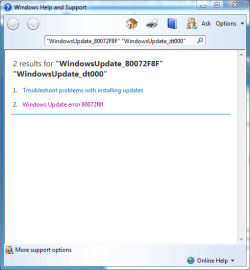
No Bare Foot everything looks ok - updates are running fine on the other machines and in the history there are the previously installed ones just it will not update now - red shield with an error Code 800072F8F.

Just get this when I hit get help.
 

Attachments

  • CaptureWU.PNG
    CaptureWU.PNG
    18.8 KB · Views: 3

My Computer

Computer type
PC/Desktop
Computer Manufacturer/Model Number
Own build (new) Desk1 / Asus ROG Win 7 / Desk2 1st build
OS
Desk1 7 Home Prem / Desk2 10 Pro / Main lap Asus ROG 10 Pro 2 laptop Toshiba 7 Pro Asus P2520 7 & 10
CPU
Desk1 i5 3750K / Laptop i7 GTX 860M / Desk2 i5 2500
Motherboard
Desk1 Asus P877-V / Desk2 Gigabyte H67 UD3H / Laptop ?
Memory
Desk1 8GB (1866) / Desk2 16GB (1333) / Laptop 8Gb DDR3
Graphics Card(s)
Desk 1& 2NVidia GTX 650 & Laptops on board Intel
Sound Card
Desk 1 & 2 -XONAR DG Realtek High Def audio Laptop
Monitor(s) Displays
Desk 1 Benq HD 2450 / Desk2 Philips 24" / Laptop 17.5"
Screen Resolution
1920x1080 D1 & D2 & Laptop 1
Hard Drives
Desk1 Samsung 120GB 830 SSD
Asus ROG 256GB 850 Pro SSD
Desk2 Samsung 840 256 SSD
Toshiba 120GB EVO
PSU
Desk 1 Corsair HX 1050/ Laptop ? / Desk 2 Corsair HX 650
Case
Desk 1 Cooler HAF XM ? Toshiba laptop / Desk2 Coolermaster
Cooling
Fans on all Desk1 -2 Desk2 - all Coolermasters 5 Laptop ?
Keyboard
Desk 1 MS Sidewinder X6 Desk 2 MS Sidewinder X 4
Mouse
Desk 1&2 - Gigabyte MS 900 gamer - laptop - Logitec wireless
Internet Speed
ADSL2+
Other Info
One other Desktop (tester) and spare Toshba laptop both with SSD's
Running Kaspersky 2016 ISS on all machines config'd identically
Logitec audio stereo systems on each machine (x3)
Canon MG5250MFC
Router/modem TP-Link running WPA2SK
Mike

Thanks again Mate I just feel like I'm being a user having to ask constantly - sorry bit old fashioned.

On that note yeh coming up to retirement and am getting into this because my bike riding and woodworking days are over due to a wrecked shoulder joint - prospecting, and I've always had a bit of a bent on electronics (my son's the same) as in the good old vacuum tube and dedicated tranny days lol!!

Seems incredible now I think of using say 2-4 vacuum tubes or 5 - 10 trannies to make an audio system and now we are talking of billions of trannies at sizes that beggers the imagination - like using graphene for atom sized transistors.
I was amazed at Scotty Muellers video when he showed the development through the years of CPU's and RAM for instance. IE. 2Gb RAM at 1981 prices - $8M!!

Anyway beginning to ramble - bad Billy Connolly habit lol!!
 

My Computer

Computer type
PC/Desktop
Computer Manufacturer/Model Number
Own build (new) Desk1 / Asus ROG Win 7 / Desk2 1st build
OS
Desk1 7 Home Prem / Desk2 10 Pro / Main lap Asus ROG 10 Pro 2 laptop Toshiba 7 Pro Asus P2520 7 & 10
CPU
Desk1 i5 3750K / Laptop i7 GTX 860M / Desk2 i5 2500
Motherboard
Desk1 Asus P877-V / Desk2 Gigabyte H67 UD3H / Laptop ?
Memory
Desk1 8GB (1866) / Desk2 16GB (1333) / Laptop 8Gb DDR3
Graphics Card(s)
Desk 1& 2NVidia GTX 650 & Laptops on board Intel
Sound Card
Desk 1 & 2 -XONAR DG Realtek High Def audio Laptop
Monitor(s) Displays
Desk 1 Benq HD 2450 / Desk2 Philips 24" / Laptop 17.5"
Screen Resolution
1920x1080 D1 & D2 & Laptop 1
Hard Drives
Desk1 Samsung 120GB 830 SSD
Asus ROG 256GB 850 Pro SSD
Desk2 Samsung 840 256 SSD
Toshiba 120GB EVO
PSU
Desk 1 Corsair HX 1050/ Laptop ? / Desk 2 Corsair HX 650
Case
Desk 1 Cooler HAF XM ? Toshiba laptop / Desk2 Coolermaster
Cooling
Fans on all Desk1 -2 Desk2 - all Coolermasters 5 Laptop ?
Keyboard
Desk 1 MS Sidewinder X6 Desk 2 MS Sidewinder X 4
Mouse
Desk 1&2 - Gigabyte MS 900 gamer - laptop - Logitec wireless
Internet Speed
ADSL2+
Other Info
One other Desktop (tester) and spare Toshba laptop both with SSD's
Running Kaspersky 2016 ISS on all machines config'd identically
Logitec audio stereo systems on each machine (x3)
Canon MG5250MFC
Router/modem TP-Link running WPA2SK
Yeh so right

Yeh Mike wouldn't mind the paycheck either and he's only about 3 years older than me.

Used to look like him when I was younger with the longer hair - but a little yin though lol!! and I do like the sense of humour too - very much like my own.

Am a Limey as I think you blokes call us and I live in Oz but originally from England.

Now a bit OT but have never been really taken with touring the US but some of them at work do a lot of travel and love it and if I do nothing else I'd like to meet some real US cops -just love those shows COPS and first 48 etc cos you get to see the ordinary bloke in the street and not some glammed up star / celebrity eh?
One always gets the impression of loud raucous individuals who think nothing exists outside of the States and it's so wrong in my mind.

Still ramble ramble I'lll be getting into trouble won't I?
John
 

My Computer

Computer type
PC/Desktop
Computer Manufacturer/Model Number
Own build (new) Desk1 / Asus ROG Win 7 / Desk2 1st build
OS
Desk1 7 Home Prem / Desk2 10 Pro / Main lap Asus ROG 10 Pro 2 laptop Toshiba 7 Pro Asus P2520 7 & 10
CPU
Desk1 i5 3750K / Laptop i7 GTX 860M / Desk2 i5 2500
Motherboard
Desk1 Asus P877-V / Desk2 Gigabyte H67 UD3H / Laptop ?
Memory
Desk1 8GB (1866) / Desk2 16GB (1333) / Laptop 8Gb DDR3
Graphics Card(s)
Desk 1& 2NVidia GTX 650 & Laptops on board Intel
Sound Card
Desk 1 & 2 -XONAR DG Realtek High Def audio Laptop
Monitor(s) Displays
Desk 1 Benq HD 2450 / Desk2 Philips 24" / Laptop 17.5"
Screen Resolution
1920x1080 D1 & D2 & Laptop 1
Hard Drives
Desk1 Samsung 120GB 830 SSD
Asus ROG 256GB 850 Pro SSD
Desk2 Samsung 840 256 SSD
Toshiba 120GB EVO
PSU
Desk 1 Corsair HX 1050/ Laptop ? / Desk 2 Corsair HX 650
Case
Desk 1 Cooler HAF XM ? Toshiba laptop / Desk2 Coolermaster
Cooling
Fans on all Desk1 -2 Desk2 - all Coolermasters 5 Laptop ?
Keyboard
Desk 1 MS Sidewinder X6 Desk 2 MS Sidewinder X 4
Mouse
Desk 1&2 - Gigabyte MS 900 gamer - laptop - Logitec wireless
Internet Speed
ADSL2+
Other Info
One other Desktop (tester) and spare Toshba laptop both with SSD's
Running Kaspersky 2016 ISS on all machines config'd identically
Logitec audio stereo systems on each machine (x3)
Canon MG5250MFC
Router/modem TP-Link running WPA2SK
Y

Still ramble ramble I'lll be getting into trouble won't I?
John

Entirely possible! :)

I am English as well but I haven't lived in England for a long time now.

Regards....Mike Connor
 

My Computer

OS
Several, including Windows 7 x64 Ultimate
Back
Top