Solved BIOS Update - Boot Loader Missing

incurablegeek, how did the install go? Did you get it like you want it? Inquiring minds want to know. And, I don't think you should visit Jack Daniels right now. When you feel like you need it, don't do it. When you are finished and satisfied, it's better then.
 

My Computers

System One System Two

  • Computer type
    PC/Desktop
    Computer Manufacturer/Model Number
    ALWAYS UNDER CONSTRUCTION
    OS
    Windows 11 Pro
    CPU
    Ryzen 9 5900X
    Motherboard
    Asus X570 Crosshair Viii Hero
    Memory
    32GB G Skill DDR4-3600
    Graphics Card(s)
    EVGA RTX 3080 FTW 3 Ultra
    Sound Card
    On Board/Sennheiser PC37X Headset
    Monitor(s) Displays
    3 X Asus 27"
    Screen Resolution
    2560x1440
    Hard Drives
    2 X 1 TB NVME drives
    PSU
    EVGA 850
    Case
    Phanteks Eclipse P400A
    Cooling
    EVGA 280 AIO
    Keyboard
    Logitech G510s/ Logitech G13
    Mouse
    Logitech G502
    Internet Speed
    24/1
    Antivirus
    ESET/MBAM Pro/SAS Pro
    Browser
    Chrome/ Firefox/ Edge
  • Computer type
    Laptop
    System Manufacturer/Model Number
    Dell 16 Plus
    OS
    Windows 11 Pro
    CPU
    Intel Ultra 9 288V
    Memory
    32 GB LPDDR5X 8533
    Monitor(s) Displays
    16" Mini-LED HDR600 Touch 90 Hz
    Screen Resolution
    2560X1600
    Hard Drives
    1 TB NVME
1) Was just joking about the JD, but you are right. You should be in the right frame of mind when you sip a fine TN whiskey.

2) I always report back, especially when people have been as kind to me as in this forum. Kari especially helped me a lot with a Language Bar malfunction, and I still owe him a thank-you PM. Same with gregrocker, who also tried to help with what turned out to be an unsolvable problem (corrupt OS).

3) I wanted to complete my installation, before I report back. As of now, it has gone very smoothly - so much so that I will reinstall on my other computer as well, just to "flush out" all the baddies.

4) Oh, I said I don't like to gamble. Please don't think I'm chicken poop. I don't like being reckless, only that. I have been to Vegas several times for trade shows. Gambled only once on the one-armed bandits. Gave myself $50.00 to play with, ran it up a bit and then lost it all. Walked away from the machine and didn't gamble at all after that. 'Twas enough.

But trust me on this one. I have and will put my money down on a venture when I know that I am the only variable. :cool:

5) 4) I have a couple more questions which I will pose in this thread. As I said before, I believe I am quite useful in that I tend to have lots of problems that people can learn something from. I guess that's a good thing.

I'll just go ahead and ask them now. Who cares if I'm not prepared well enough to be intelligent and thorough? :(

Questions:

A) Why does SATA 1 on the motherboard not automatically come up as Disk 0 in Win 7 Computer Mgmt.? The Disk 0 that I installed the OS on is on SATA 1 but comes up in Computer Management as Disk 4

B) I was going to put a 2nd SSD on for program overflow and saved SATA 2 on the motherboard for that. Seems to be no reason though because MS Windows weewee's all over my nice logical ways.
 

My Computer

OS
Win 7-64
The best answer I can give is because it's a computer. Sometimes it does and sometimes it does not. It does on mine, at least this one. Other boards it does not. But, it does not matter. What matters is the port number on the motherboard it is connected to. Surely someone smarter than me can give a better answer.

I'm really pleased your installation went well and you have it installed the way you wanted. Most of what little I know is because I try a lot of things on my computers and mess them up a lot. I learn by figuring out how to fix what I messed up. So, all is not lost. If everything went as planned, there would be many of us who knew very little about computers. If, as you said, you have lots of problems with computers, think of how much you learned from them. Next time this happens, you will not be nearly as worried.

I hope we will see you around often. You have a lot you can help others with and learn in the process. I can tell you I have learned much more here than any assistance I have given others. Never be afraid to ask questions. The only dumb question is the one you didn't ask. That's why we are here to try to help people find the answers to their questions. Again, I'm glad it went well. Hope you will be back soon. Congratulations for sticking with it.

Also, I'm sure you noticed you do not have the famous 100MB System Reserved.
 

My Computers

System One System Two

  • Computer type
    PC/Desktop
    Computer Manufacturer/Model Number
    ALWAYS UNDER CONSTRUCTION
    OS
    Windows 11 Pro
    CPU
    Ryzen 9 5900X
    Motherboard
    Asus X570 Crosshair Viii Hero
    Memory
    32GB G Skill DDR4-3600
    Graphics Card(s)
    EVGA RTX 3080 FTW 3 Ultra
    Sound Card
    On Board/Sennheiser PC37X Headset
    Monitor(s) Displays
    3 X Asus 27"
    Screen Resolution
    2560x1440
    Hard Drives
    2 X 1 TB NVME drives
    PSU
    EVGA 850
    Case
    Phanteks Eclipse P400A
    Cooling
    EVGA 280 AIO
    Keyboard
    Logitech G510s/ Logitech G13
    Mouse
    Logitech G502
    Internet Speed
    24/1
    Antivirus
    ESET/MBAM Pro/SAS Pro
    Browser
    Chrome/ Firefox/ Edge
  • Computer type
    Laptop
    System Manufacturer/Model Number
    Dell 16 Plus
    OS
    Windows 11 Pro
    CPU
    Intel Ultra 9 288V
    Memory
    32 GB LPDDR5X 8533
    Monitor(s) Displays
    16" Mini-LED HDR600 Touch 90 Hz
    Screen Resolution
    2560X1600
    Hard Drives
    1 TB NVME
The ASUS Crosshair V motherboard BIOS has a uEFI/BIOS firmware.
Windows Boot Manager is add to GPT mode HD Drive or SSD.

Can you post a screen shot of Disk management?

http://www.sevenforums.com/tutorials/9733-screenshots-files-upload-post-seven-forums.html

From what I can see, you have no problems with your Windows 7 boot SSD.

The old BIOS setup was OK.


Questions:
A) Why does SATA 1 on the motherboard not automatically come up as Disk 0 in Win 7 Computer Mgmt.? The Disk 0 that I installed the OS on is on SATA 1 but comes up in Computer Management as Disk 4
B) I was going to put a 2nd SSD on for program overflow and saved SATA 2 on the motherboard for that. Seems to be no reason though because MS Windows weewee's all over my nice logical ways.


Can you post a screen shot of Disk management & new BIOS setup?
 

My Computer

OS
ME/XP/Vista/Win7
Also, I'm sure you noticed you do not have the famous 100MB System Reserved.
Actually that was the first thing I noticed in Computer (Disk) Management. Interesting.

I hope we will see you around often.
Thanks for the invite. Don't fret. I'm not going anywhere. :eek:

I know a good thing when I see it.

Can you post a screen shot of Disk management & new BIOS setup?
Will do.

Actually I have noticed this every time. I am very meticulous about SATA connections, but have never seen all the care I give them reflected in Windows Computer Management. Window CM is always random chaos.
 

My Computer

OS
Win 7-64
Just for curiosity, do you still have the Windows boot manager as an option in BIOS?
 

My Computers

System One System Two

  • Computer type
    PC/Desktop
    Computer Manufacturer/Model Number
    ALWAYS UNDER CONSTRUCTION
    OS
    Windows 11 Pro
    CPU
    Ryzen 9 5900X
    Motherboard
    Asus X570 Crosshair Viii Hero
    Memory
    32GB G Skill DDR4-3600
    Graphics Card(s)
    EVGA RTX 3080 FTW 3 Ultra
    Sound Card
    On Board/Sennheiser PC37X Headset
    Monitor(s) Displays
    3 X Asus 27"
    Screen Resolution
    2560x1440
    Hard Drives
    2 X 1 TB NVME drives
    PSU
    EVGA 850
    Case
    Phanteks Eclipse P400A
    Cooling
    EVGA 280 AIO
    Keyboard
    Logitech G510s/ Logitech G13
    Mouse
    Logitech G502
    Internet Speed
    24/1
    Antivirus
    ESET/MBAM Pro/SAS Pro
    Browser
    Chrome/ Firefox/ Edge
  • Computer type
    Laptop
    System Manufacturer/Model Number
    Dell 16 Plus
    OS
    Windows 11 Pro
    CPU
    Intel Ultra 9 288V
    Memory
    32 GB LPDDR5X 8533
    Monitor(s) Displays
    16" Mini-LED HDR600 Touch 90 Hz
    Screen Resolution
    2560X1600
    Hard Drives
    1 TB NVME
Just for curiosity, do you still have the Windows boot manager as an option in BIOS?
Nope, completely gone.

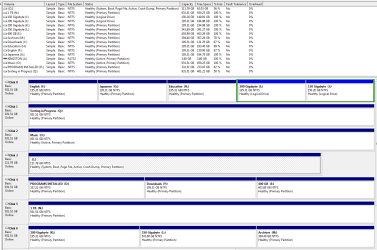
I attached the Computer Management snippet theog requested regarding the screwball SATA 1, 2, 3, 4 =/= Disk 0, 1, 2, 3

Sidebar Comment: I still think the young people today have an advantage over many of us older and more experienced users. Trust me. I know a heckuva lot more about computers than I let on. However, I also realize that much of what I have learned over the years is no longer relevant.

Example: How many of you know that even if you put the slowest in first (correct procedure), mixing different speeds of EDO RAM will disable the onboard SCSI interface of the motherboard?

Oh, I got lots more! :doh:
 

Attachments

  • SATA Mixup.PNG
    SATA Mixup.PNG
    34.8 KB · Views: 5

My Computer

OS
Win 7-64
Was looking good at post 52.


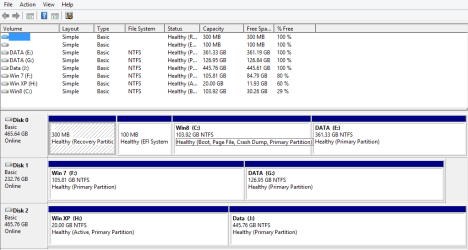
uEFI/BIOS firmware setup.
Win 8-7-XP-boot004444444.PNG
 

My Computer

OS
ME/XP/Vista/Win7
Was looking good at post 52.

Translation?

I see you have installed Win 8. Well, that does it.

You have lost all credibility with me. Ugh! :sa:
 

My Computer

OS
Win 7-64
Actually, some people really like it. I'm not one of those, but I do have it installed on another computer, just to try to learn it so I can help others with it. I have had little success so far, but will keep trying. Some people still hang on to XP, which I kind of liked, but 7 is much better. I just figure, each to his own. Use what suits you best. For me that would be Windows 7.
 

My Computers

System One System Two

  • Computer type
    PC/Desktop
    Computer Manufacturer/Model Number
    ALWAYS UNDER CONSTRUCTION
    OS
    Windows 11 Pro
    CPU
    Ryzen 9 5900X
    Motherboard
    Asus X570 Crosshair Viii Hero
    Memory
    32GB G Skill DDR4-3600
    Graphics Card(s)
    EVGA RTX 3080 FTW 3 Ultra
    Sound Card
    On Board/Sennheiser PC37X Headset
    Monitor(s) Displays
    3 X Asus 27"
    Screen Resolution
    2560x1440
    Hard Drives
    2 X 1 TB NVME drives
    PSU
    EVGA 850
    Case
    Phanteks Eclipse P400A
    Cooling
    EVGA 280 AIO
    Keyboard
    Logitech G510s/ Logitech G13
    Mouse
    Logitech G502
    Internet Speed
    24/1
    Antivirus
    ESET/MBAM Pro/SAS Pro
    Browser
    Chrome/ Firefox/ Edge
  • Computer type
    Laptop
    System Manufacturer/Model Number
    Dell 16 Plus
    OS
    Windows 11 Pro
    CPU
    Intel Ultra 9 288V
    Memory
    32 GB LPDDR5X 8533
    Monitor(s) Displays
    16" Mini-LED HDR600 Touch 90 Hz
    Screen Resolution
    2560X1600
    Hard Drives
    1 TB NVME
I trust that you guys know by now that I joke a lot. I find that humor makes life a bit more comprehensible.

If I might be serious for a moment, I do consider Win 8 to be a huge mistake on the part of MS. It offers nothing that I can see - except something different to learn and more problems to solve. I used to chase the tail of the dragon, sometimes called upgrade fever, but I see both hardware and software to both be in a state of developmental stasis.

AMD hasn't a clue where it's going; and Intel only pretends to know. Linux is, and has been for too many years now, an empty promise. And Apple is nothing more than a hermetically sealed box with proprietary and quite expensive software - all of which has been designed for people who are too afraid to think.

And I would guess that I'm the only one who thinks that SSD's provide nothing exceptional, certainly no blazing speed increase as I expected. Why? Cause the OS and Programs are all bloatware (sorry, but DOS kicked butt).

---------

Note: That might seem a bit harsh. But it's what I feel now and represents my frustration with "Developmental Stasis".

------------------
So I'm holding with Win 7 64 bit Ultimate, my Crosshair V Formula (Extreme turned out to be a lump of overpriced cow dung), AMD 6-core black, and 16 GB of Corsair RAM.

However, I do have a Quantum Computer on order. But 'till then ....
 
Last edited:

My Computer

OS
Win 7-64
You can always buy a new OEM with Windows 8 Pre-installed, & downgrade to Windows 7.
Thanks. I needed that. I must admit I'm a huge fan of British understatement and parody. :D

It's been a rather depressing week. But thanks to you folks, things are starting to head in the right direction.

I much appreciate all of you.

++++++++++

I do find this group a tad depressing though and somewhat hard on my ego. Anyway, it seems that everybody here is an actual "somebody", with me being a rather youngish sounding "junior member". Ah, the price of ignorance ...

gold.png

supporter.png

guru.png


Well, that will be something my psychiatrist and I can discuss in the next session, I guess. :cry:
 

My Computer

OS
Win 7-64
Back
Top