BitLocker Drive Encryption - Unlock a Locked Data or Removable Drive

How to Unlock a Data or Removable Drive Locked by BitLocker Drive Encryption


   Information
This will show you how to unlock a internal data drive or a removable drive (ex: USB flash drive or external) that was locked by BitLocker Drive Encryption in Windows 7, and now cannot be accessed.

These drives normally would be locked after you have either logged off or restarted the computer.

   Warning
If you forgot or lost the password for the data or removable drive, then you must have it's BitLocker recovery key to be able to unlock and gain access to the drive again.

You should have a copy of the BitLocker recovery key if you did what was recommended in step 6 or 11 of OPTION ONE in the tutorial below to either Save the recovery key to file, save and print recovery key again, or write down the recovery key somewhere for safe keeping.

BitLocker Drive Encryption - Internal Data Hard Drives - Turn On or Off


OPTION ONE

To Unlock a Data or Removable Drive Using BitLocker Wizard


1. Do either step 2 or 3 below for what option you would like to use.

2. Open the Control Panel (icons view), click on the BitLocker Drive Encryption icon, and click on the Unlock Drive link for the locked drive that you would like to unlock. (see screenshot below)
Control-Panel.jpg


A) If prompted by UAC, then click on Yes.

B) Close the Control Panel, and go to step 4 or 5.
OR

3. Open the Computer window, right click on the locked drive that you would like to unlock, and click on Unlock Drive.... (see screenshot below)
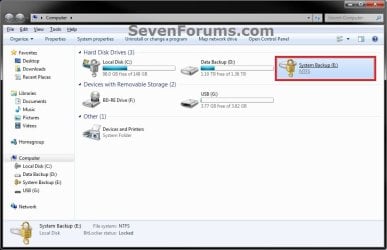
Locked-Internal.jpg


A) If prompted by UAC, then click on Yes.

B) Go to step 4 or 5.
4. To Type in the Password to Unlock this Drive
A) Type in the password, and click on Unlock. (see screenshot below step 5A)
NOTE: The password will be at least 8 letters and/or numbers long.

B) Go to step 6.
5. To Enter the "BitLocker Recovery Key" to Unlock this Drive
NOTE: This step is for if you lost or forgot the password for this drive.
A) Click on the I forgot my password link. (see screenshot below)
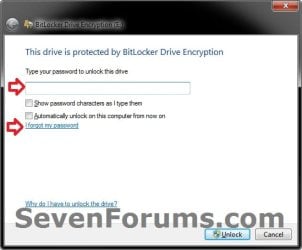
Forgot.jpg
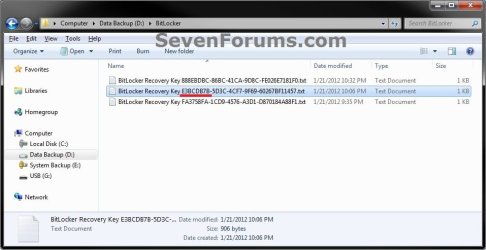
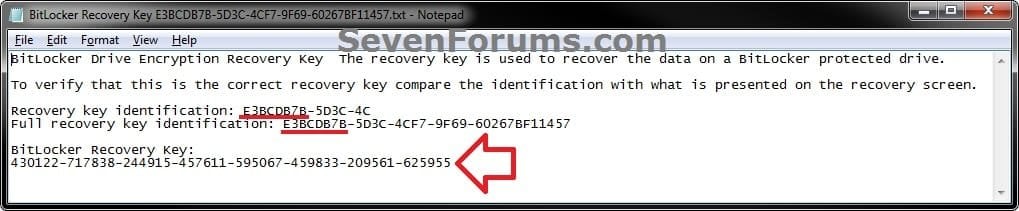
B) Using the provided "recovery key ID" number in the screenshot below, locate the BitLocker recovery key for this drive, and then click on Type the recovery key. (see screenshots below)
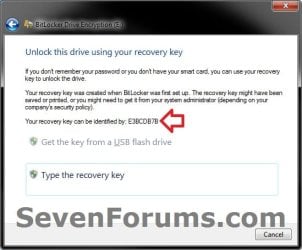
Step1.jpg

Step2A.jpg

Step2B.jpg

C) Type in the long BitLocker recovery key number, and click on Next. (see screenshot below)
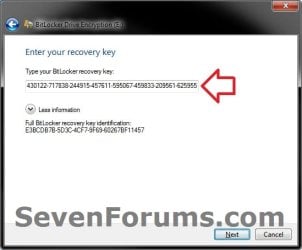
Step3.jpg
D) Click on Finish, and continue on to step 6. (see screenshot below)
NOTE: If you had forgotten the password, then you can now click on Manage BitLocker, and Change password to unlock drive to create a new one to use.
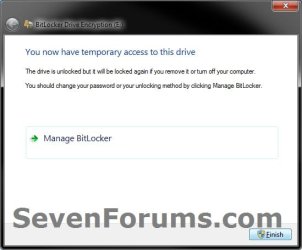
Step4.jpg
6. The drive will now be unlocked until you log off or restart the computer next.
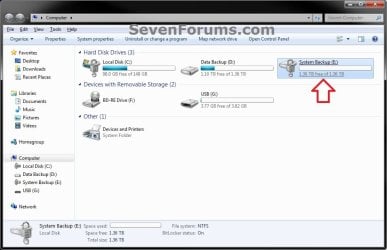
Unlocked_Internal.jpg


OPTION TWO

To Unlock a Data or Removable Drive in a Command Prompt


1. Open a elevated command prompt, then do step 2 or 3 below for what option you would like to use.

2. To Use the Password to Unlock this Drive
A) In the elevated command prompt, type the command below and press Enter. (see screenshot below)
NOTE: Substitute E: in the command below with the drive letter of the locked drive that you wanted to unlock instead.
manage-bde -unlock E: -password
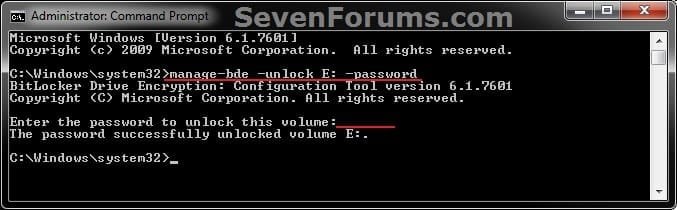
CMD-password.jpg
B) When prompted in the elevated command prompt, type in the password for the drive and press Enter.
NOTE: You will not see the password as you type it. The password will be at least 8 letters and/or numbers long.

C) Go to step 4.
3. To Use the "BitLocker Recovery Key" to Unlock this Drive
NOTE: This step is for if you lost or forgot the password for this drive.
A) Locate the BitLocker recovery key for this drive. (see screenshots below)
Step2A.jpg

Step2B.jpg

B) In the elevated command prompt, type the command below and press Enter. (see screenshot below)
NOTE: Substitute E: in the command below with the drive letter of the locked drive that you wanted to unlock, and substitute BitLocker Recovery Key in the command below with the actual long number recovery key for the drive.
manage-bde -unlock E: -rp BitLocker Recovery Key
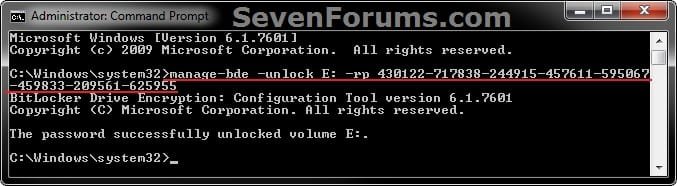
CMD-Recovery_Key.jpg
C) Go to step 4.
4. The drive will now be unlocked until you log off or restart the computer next.
That's it,
Shawn


Last edited:
I have tried to use the recovery ID in the command and it seems to be running , but it has been on 1% for 10 minutes but I am gonna leave it over night and see.
 

My Computer My Computer

At a glance

Windows 7 Enterprise 32 bit
Computer type
PC/Desktop
OS
Windows 7 Enterprise 32 bit
That's good news so far. It can take a long time though.
 

My Computer My Computer

At a glance

64-bit Windows 11 Pro for WorkstationsIntel i7-8700K OC'd to 5 GHz64 GB (4x16GB) G.SKILL TridentZ RGB DDR4 3600...ASUS ROG-STRIX-GTX1080TI-O11G-GAMING
Computer type
PC/Desktop
Computer Manufacturer/Model Number
Self built custom
OS
64-bit Windows 11 Pro for Workstations
CPU
Intel i7-8700K OC'd to 5 GHz
Motherboard
ASUS ROG Maximus XI Formula Z390
Memory
64 GB (4x16GB) G.SKILL TridentZ RGB DDR4 3600 MHz
Graphics Card(s)
ASUS ROG-STRIX-GTX1080TI-O11G-GAMING
Sound Card
Integrated
Monitor(s) Displays
2 x Samsung Odyssey G7 27"
Screen Resolution
2560x1440
Hard Drives
1TB Samsung 990 PRO M.2,
4TB Samsung 990 PRO PRO M.2,
TerraMaster F8 SSD Plus NAS
PSU
Seasonic Prime Titanium 850W
Case
Thermaltake Core P3
Cooling
Corsair Hydro H115i
Keyboard
Logitech wireless K800
Mouse
Logitech MX Master 4
Internet Speed
2 Gb/s Download and 100 Mb/s Upload
Antivirus
Malwarebyte Anti-Malware Premium
Browser
Google Chrome
Other Info
Logitech Z625 speaker system,
Logitech BRIO 4K Pro webcam,
HP Color LaserJet Pro MFP M477fdn,
APC SMART-UPS RT 1000 XL - SURT1000XLI,
Galaxy S23 Plus phone
bitlocker recovery key

Please I need your help I was able to get recovery key identification now need recovery key.
 

My Computer My Computer

At a glance

windows 7 32 bit
Computer type
Laptop
Computer Manufacturer/Model Number
Dell
OS
windows 7 32 bit
Hello francki3, and welcome to Seven Forums. :)

The BitLocker recovery key is something that you would have needed to already have backed up to be able to use to recover with.

If you don't have it, then you will not be able to recover the drive.
 

My Computer My Computer

At a glance

64-bit Windows 11 Pro for WorkstationsIntel i7-8700K OC'd to 5 GHz64 GB (4x16GB) G.SKILL TridentZ RGB DDR4 3600...ASUS ROG-STRIX-GTX1080TI-O11G-GAMING
Computer type
PC/Desktop
Computer Manufacturer/Model Number
Self built custom
OS
64-bit Windows 11 Pro for Workstations
CPU
Intel i7-8700K OC'd to 5 GHz
Motherboard
ASUS ROG Maximus XI Formula Z390
Memory
64 GB (4x16GB) G.SKILL TridentZ RGB DDR4 3600 MHz
Graphics Card(s)
ASUS ROG-STRIX-GTX1080TI-O11G-GAMING
Sound Card
Integrated
Monitor(s) Displays
2 x Samsung Odyssey G7 27"
Screen Resolution
2560x1440
Hard Drives
1TB Samsung 990 PRO M.2,
4TB Samsung 990 PRO PRO M.2,
TerraMaster F8 SSD Plus NAS
PSU
Seasonic Prime Titanium 850W
Case
Thermaltake Core P3
Cooling
Corsair Hydro H115i
Keyboard
Logitech wireless K800
Mouse
Logitech MX Master 4
Internet Speed
2 Gb/s Download and 100 Mb/s Upload
Antivirus
Malwarebyte Anti-Malware Premium
Browser
Google Chrome
Other Info
Logitech Z625 speaker system,
Logitech BRIO 4K Pro webcam,
HP Color LaserJet Pro MFP M477fdn,
APC SMART-UPS RT 1000 XL - SURT1000XLI,
Galaxy S23 Plus phone
HI,
I hope someone can help me.
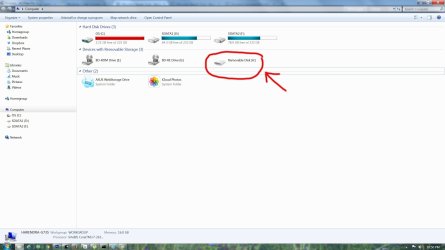
I have a thumb drive locked with bitlocker. I had pulled it out without safely ejecting it, and now everytime i plug it in the computer does not recognize it. It just says "removable disk (H:)" and i cant open it.
I would like to retrieve my files from the thumb drive as soe are quite important.
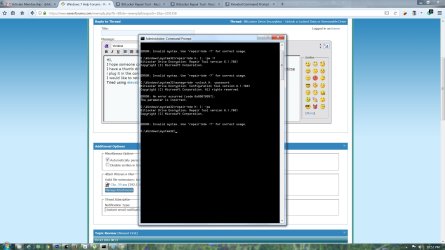
Tried using elevated command prompt and BitLocker Repair Tool from your tutorial but didnt work.

Please help. Thanks
 

Attachments

  • Clip_39.jpg
    Clip_39.jpg
    147.8 KB · Views: 323
  • Clip_38.jpg
    Clip_38.jpg
    226.1 KB · Views: 285

My Computer My Computer

At a glance

Windows 7 Ultimate x64
Computer type
Laptop
Computer Manufacturer/Model Number
Asus G73sw
OS
Windows 7 Ultimate x64
Hello Haren, and welcome to Seven Forums. :)

The drive doesn't appear to be encrypted by BitLocker looking at its icon.

As a test, use the command from the tutorial below to check BitLocker status for the drive.

:ar: manage-bde -status H:

BitLocker Status - Check for Drive in Windows
 

My Computer My Computer

At a glance

64-bit Windows 11 Pro for WorkstationsIntel i7-8700K OC'd to 5 GHz64 GB (4x16GB) G.SKILL TridentZ RGB DDR4 3600...ASUS ROG-STRIX-GTX1080TI-O11G-GAMING
Computer type
PC/Desktop
Computer Manufacturer/Model Number
Self built custom
OS
64-bit Windows 11 Pro for Workstations
CPU
Intel i7-8700K OC'd to 5 GHz
Motherboard
ASUS ROG Maximus XI Formula Z390
Memory
64 GB (4x16GB) G.SKILL TridentZ RGB DDR4 3600 MHz
Graphics Card(s)
ASUS ROG-STRIX-GTX1080TI-O11G-GAMING
Sound Card
Integrated
Monitor(s) Displays
2 x Samsung Odyssey G7 27"
Screen Resolution
2560x1440
Hard Drives
1TB Samsung 990 PRO M.2,
4TB Samsung 990 PRO PRO M.2,
TerraMaster F8 SSD Plus NAS
PSU
Seasonic Prime Titanium 850W
Case
Thermaltake Core P3
Cooling
Corsair Hydro H115i
Keyboard
Logitech wireless K800
Mouse
Logitech MX Master 4
Internet Speed
2 Gb/s Download and 100 Mb/s Upload
Antivirus
Malwarebyte Anti-Malware Premium
Browser
Google Chrome
Other Info
Logitech Z625 speaker system,
Logitech BRIO 4K Pro webcam,
HP Color LaserJet Pro MFP M477fdn,
APC SMART-UPS RT 1000 XL - SURT1000XLI,
Galaxy S23 Plus phone
Hi it says volume does not exist :-(
 

Attachments

  • Clip_40.jpg
    Clip_40.jpg
    226.1 KB · Views: 191

My Computer My Computer

At a glance

Windows 7 Ultimate x64
Computer type
Laptop
Computer Manufacturer/Model Number
Asus G73sw
OS
Windows 7 Ultimate x64
What does Disk Management (diskmgmt.msc) show for the drive?

As a test, try connecting it to a different USB port to see if it may be an issue with this one.

Does it do the same on another PC?
 

My Computer My Computer

At a glance

64-bit Windows 11 Pro for WorkstationsIntel i7-8700K OC'd to 5 GHz64 GB (4x16GB) G.SKILL TridentZ RGB DDR4 3600...ASUS ROG-STRIX-GTX1080TI-O11G-GAMING
Computer type
PC/Desktop
Computer Manufacturer/Model Number
Self built custom
OS
64-bit Windows 11 Pro for Workstations
CPU
Intel i7-8700K OC'd to 5 GHz
Motherboard
ASUS ROG Maximus XI Formula Z390
Memory
64 GB (4x16GB) G.SKILL TridentZ RGB DDR4 3600 MHz
Graphics Card(s)
ASUS ROG-STRIX-GTX1080TI-O11G-GAMING
Sound Card
Integrated
Monitor(s) Displays
2 x Samsung Odyssey G7 27"
Screen Resolution
2560x1440
Hard Drives
1TB Samsung 990 PRO M.2,
4TB Samsung 990 PRO PRO M.2,
TerraMaster F8 SSD Plus NAS
PSU
Seasonic Prime Titanium 850W
Case
Thermaltake Core P3
Cooling
Corsair Hydro H115i
Keyboard
Logitech wireless K800
Mouse
Logitech MX Master 4
Internet Speed
2 Gb/s Download and 100 Mb/s Upload
Antivirus
Malwarebyte Anti-Malware Premium
Browser
Google Chrome
Other Info
Logitech Z625 speaker system,
Logitech BRIO 4K Pro webcam,
HP Color LaserJet Pro MFP M477fdn,
APC SMART-UPS RT 1000 XL - SURT1000XLI,
Galaxy S23 Plus phone
diskmgmt.msc just say "no media", and yes --on all other computers i tried. It was working well just few days ago. This is what i mean by the computer does not recognise it
 

My Computer My Computer

At a glance

Windows 7 Ultimate x64
Computer type
Laptop
Computer Manufacturer/Model Number
Asus G73sw
OS
Windows 7 Ultimate x64
It appears that the USB flash drive may have died on you. :(
 

My Computer My Computer

At a glance

64-bit Windows 11 Pro for WorkstationsIntel i7-8700K OC'd to 5 GHz64 GB (4x16GB) G.SKILL TridentZ RGB DDR4 3600...ASUS ROG-STRIX-GTX1080TI-O11G-GAMING
Computer type
PC/Desktop
Computer Manufacturer/Model Number
Self built custom
OS
64-bit Windows 11 Pro for Workstations
CPU
Intel i7-8700K OC'd to 5 GHz
Motherboard
ASUS ROG Maximus XI Formula Z390
Memory
64 GB (4x16GB) G.SKILL TridentZ RGB DDR4 3600 MHz
Graphics Card(s)
ASUS ROG-STRIX-GTX1080TI-O11G-GAMING
Sound Card
Integrated
Monitor(s) Displays
2 x Samsung Odyssey G7 27"
Screen Resolution
2560x1440
Hard Drives
1TB Samsung 990 PRO M.2,
4TB Samsung 990 PRO PRO M.2,
TerraMaster F8 SSD Plus NAS
PSU
Seasonic Prime Titanium 850W
Case
Thermaltake Core P3
Cooling
Corsair Hydro H115i
Keyboard
Logitech wireless K800
Mouse
Logitech MX Master 4
Internet Speed
2 Gb/s Download and 100 Mb/s Upload
Antivirus
Malwarebyte Anti-Malware Premium
Browser
Google Chrome
Other Info
Logitech Z625 speaker system,
Logitech BRIO 4K Pro webcam,
HP Color LaserJet Pro MFP M477fdn,
APC SMART-UPS RT 1000 XL - SURT1000XLI,
Galaxy S23 Plus phone
OH NO!!!!!!....... anyway i can get my files out of it?
 

My Computer My Computer

At a glance

Windows 7 Ultimate x64
Computer type
Laptop
Computer Manufacturer/Model Number
Asus G73sw
OS
Windows 7 Ultimate x64

My Computer My Computer

At a glance

64-bit Windows 11 Pro for WorkstationsIntel i7-8700K OC'd to 5 GHz64 GB (4x16GB) G.SKILL TridentZ RGB DDR4 3600...ASUS ROG-STRIX-GTX1080TI-O11G-GAMING
Computer type
PC/Desktop
Computer Manufacturer/Model Number
Self built custom
OS
64-bit Windows 11 Pro for Workstations
CPU
Intel i7-8700K OC'd to 5 GHz
Motherboard
ASUS ROG Maximus XI Formula Z390
Memory
64 GB (4x16GB) G.SKILL TridentZ RGB DDR4 3600 MHz
Graphics Card(s)
ASUS ROG-STRIX-GTX1080TI-O11G-GAMING
Sound Card
Integrated
Monitor(s) Displays
2 x Samsung Odyssey G7 27"
Screen Resolution
2560x1440
Hard Drives
1TB Samsung 990 PRO M.2,
4TB Samsung 990 PRO PRO M.2,
TerraMaster F8 SSD Plus NAS
PSU
Seasonic Prime Titanium 850W
Case
Thermaltake Core P3
Cooling
Corsair Hydro H115i
Keyboard
Logitech wireless K800
Mouse
Logitech MX Master 4
Internet Speed
2 Gb/s Download and 100 Mb/s Upload
Antivirus
Malwarebyte Anti-Malware Premium
Browser
Google Chrome
Other Info
Logitech Z625 speaker system,
Logitech BRIO 4K Pro webcam,
HP Color LaserJet Pro MFP M477fdn,
APC SMART-UPS RT 1000 XL - SURT1000XLI,
Galaxy S23 Plus phone
HI,
Tried recuva -- but as u said, it did not work, as the system doesnt recognise the drive. Wondering if i shld format the drive and try recuva after that. Any other suggestions?
Really at a lost here, as everything was fine upto few days ago :-(
 

My Computer My Computer

At a glance

Windows 7 Ultimate x64
Computer type
Laptop
Computer Manufacturer/Model Number
Asus G73sw
OS
Windows 7 Ultimate x64
If you format the drive, it may allow the drive to be used again, but the chances of recovering anything is pretty much gone.
 

My Computer My Computer

At a glance

64-bit Windows 11 Pro for WorkstationsIntel i7-8700K OC'd to 5 GHz64 GB (4x16GB) G.SKILL TridentZ RGB DDR4 3600...ASUS ROG-STRIX-GTX1080TI-O11G-GAMING
Computer type
PC/Desktop
Computer Manufacturer/Model Number
Self built custom
OS
64-bit Windows 11 Pro for Workstations
CPU
Intel i7-8700K OC'd to 5 GHz
Motherboard
ASUS ROG Maximus XI Formula Z390
Memory
64 GB (4x16GB) G.SKILL TridentZ RGB DDR4 3600 MHz
Graphics Card(s)
ASUS ROG-STRIX-GTX1080TI-O11G-GAMING
Sound Card
Integrated
Monitor(s) Displays
2 x Samsung Odyssey G7 27"
Screen Resolution
2560x1440
Hard Drives
1TB Samsung 990 PRO M.2,
4TB Samsung 990 PRO PRO M.2,
TerraMaster F8 SSD Plus NAS
PSU
Seasonic Prime Titanium 850W
Case
Thermaltake Core P3
Cooling
Corsair Hydro H115i
Keyboard
Logitech wireless K800
Mouse
Logitech MX Master 4
Internet Speed
2 Gb/s Download and 100 Mb/s Upload
Antivirus
Malwarebyte Anti-Malware Premium
Browser
Google Chrome
Other Info
Logitech Z625 speaker system,
Logitech BRIO 4K Pro webcam,
HP Color LaserJet Pro MFP M477fdn,
APC SMART-UPS RT 1000 XL - SURT1000XLI,
Galaxy S23 Plus phone
Your also going to run into all kinds of problems if you don't get some more free space on your partition 'C'.

Just a friendly reminder.

Jack
 

My Computer My Computer

At a glance

Windows 10 Pro. 64/ version 1709 Windows 7 Pr...Intel i7-6800K @ 4.3Corsair Platinum 16 gig @2400EVGA GTX 1070 OC
Computer type
PC/Desktop
Computer Manufacturer/Model Number
Home made Desktop
OS
Windows 10 Pro. 64/ version 1709 Windows 7 Pro/64
CPU
Intel i7-6800K @ 4.3
Motherboard
ASUS X-99 Deluxe II
Memory
Corsair Platinum 16 gig @2400
Graphics Card(s)
EVGA GTX 1070 OC
Monitor(s) Displays
Asus 27" LED LCD/VE278Q
Screen Resolution
1920-1080 or 1280-720 HDMI
Hard Drives
INTEL SSD 730-240 Gb Sata 3.0/
PSU
EVGA Platium 1200W
Case
Phanteks Luxe Tempered Glass 8 fans/ one radiator
Cooling
XSPC/ Water Cooled CPU
Keyboard
Das 4 Professional
Mouse
Logitech M705/MX Anywhere 2-S
Internet Speed
100 mbits
Antivirus
Microsoft Security Essentials/ Malwarebytes Premium 3.0/ SAS
Browser
I.E. 11 default/Firefox/ ISP Time Warner Cable/Spectrum
Other Info
LG BluRay Burner/
Sound system-KLipsch-THX/
Icy Dock ssd Hot Swap bays.
Hi,
thanks for all the help -- i was looking at the Recuva and it does say "Recuva can recover files from damaged or newly formatted drives."
Dont know what else i can do.

Layback Bear -- thanks for the reminder. How do i get more space on my C? dont have much on it except OS and few programs. All other files are on D and F.
 

My Computer My Computer

At a glance

Windows 7 Ultimate x64
Computer type
Laptop
Computer Manufacturer/Model Number
Asus G73sw
OS
Windows 7 Ultimate x64

My Computer My Computer

At a glance

64-bit Windows 11 Pro for WorkstationsIntel i7-8700K OC'd to 5 GHz64 GB (4x16GB) G.SKILL TridentZ RGB DDR4 3600...ASUS ROG-STRIX-GTX1080TI-O11G-GAMING
Computer type
PC/Desktop
Computer Manufacturer/Model Number
Self built custom
OS
64-bit Windows 11 Pro for Workstations
CPU
Intel i7-8700K OC'd to 5 GHz
Motherboard
ASUS ROG Maximus XI Formula Z390
Memory
64 GB (4x16GB) G.SKILL TridentZ RGB DDR4 3600 MHz
Graphics Card(s)
ASUS ROG-STRIX-GTX1080TI-O11G-GAMING
Sound Card
Integrated
Monitor(s) Displays
2 x Samsung Odyssey G7 27"
Screen Resolution
2560x1440
Hard Drives
1TB Samsung 990 PRO M.2,
4TB Samsung 990 PRO PRO M.2,
TerraMaster F8 SSD Plus NAS
PSU
Seasonic Prime Titanium 850W
Case
Thermaltake Core P3
Cooling
Corsair Hydro H115i
Keyboard
Logitech wireless K800
Mouse
Logitech MX Master 4
Internet Speed
2 Gb/s Download and 100 Mb/s Upload
Antivirus
Malwarebyte Anti-Malware Premium
Browser
Google Chrome
Other Info
Logitech Z625 speaker system,
Logitech BRIO 4K Pro webcam,
HP Color LaserJet Pro MFP M477fdn,
APC SMART-UPS RT 1000 XL - SURT1000XLI,
Galaxy S23 Plus phone
Awesome. Thanks much guys. This really helped me. I used the "BitLocker Recovery Key" to Unlock the Drive.
I created this account just to say 'thanks a ton'.

With love from India,
Krishna.
 

My Computer My Computer

At a glance

windows 8.1
Computer type
PC/Desktop
OS
windows 8.1
Got the key but does not encrypt

I recently updated my XPS13 2in1 and after that device did not boot anymore with error message : No bootable device found.

Turns out to be a W10 issue as hw is OK. SSD is encrypted with Bitlocker.

Now I put the SSD into a desktop and try to decrypt it - both standard and repair - always get the message wrong key

I then bought m3 data recovery tool and this can access the SSD with my key.

:devil: Any idea what could be the problem ?

Step 2 is now after data is saved to return the SSD into the Dell XPS13 and boot from USB and try do decrypt the SSD from that machine, anyway it will not boot until I reinstall W 10 i assume

:geek: Will I be able to reinstall and keeping my data with the Bitlocker encryption ? Can I access Bitlocker when I boot from USB ?
 

My Computer My Computer

At a glance

W10P
Computer type
PC/Desktop
OS
W10P
Hello tkwetina, and welcome to Seven Forums. :)

Since you area able to access the SSD with the software, I would recommend copying your files to another drive as a backup.

This way you will be able to do a clean install of W10 on the SSD without worrying about losing your files.
 

My Computer My Computer

At a glance

64-bit Windows 11 Pro for WorkstationsIntel i7-8700K OC'd to 5 GHz64 GB (4x16GB) G.SKILL TridentZ RGB DDR4 3600...ASUS ROG-STRIX-GTX1080TI-O11G-GAMING
Computer type
PC/Desktop
Computer Manufacturer/Model Number
Self built custom
OS
64-bit Windows 11 Pro for Workstations
CPU
Intel i7-8700K OC'd to 5 GHz
Motherboard
ASUS ROG Maximus XI Formula Z390
Memory
64 GB (4x16GB) G.SKILL TridentZ RGB DDR4 3600 MHz
Graphics Card(s)
ASUS ROG-STRIX-GTX1080TI-O11G-GAMING
Sound Card
Integrated
Monitor(s) Displays
2 x Samsung Odyssey G7 27"
Screen Resolution
2560x1440
Hard Drives
1TB Samsung 990 PRO M.2,
4TB Samsung 990 PRO PRO M.2,
TerraMaster F8 SSD Plus NAS
PSU
Seasonic Prime Titanium 850W
Case
Thermaltake Core P3
Cooling
Corsair Hydro H115i
Keyboard
Logitech wireless K800
Mouse
Logitech MX Master 4
Internet Speed
2 Gb/s Download and 100 Mb/s Upload
Antivirus
Malwarebyte Anti-Malware Premium
Browser
Google Chrome
Other Info
Logitech Z625 speaker system,
Logitech BRIO 4K Pro webcam,
HP Color LaserJet Pro MFP M477fdn,
APC SMART-UPS RT 1000 XL - SURT1000XLI,
Galaxy S23 Plus phone
Back
Top