blacX duet docking station external hard drive help

bigredandtulips

New member
Local time
7:49 AM
Messages
10
I have an old hard drive I think it is windows xp. i bought the blacX duet docking station so I can access the files on that old hard drive. I cannot figure out how to access the files?

Do I have to initialize the old hard drive? Do I have to create a partition? I thought I would be able to open the files by selecting the external hard drive and the proper file?

Help please, I don't want to do something incorrectly and loose all the files on the old one or fill up the new one by moving them all on to this new smaller hard drive which is windows 7.

I tried to initialize the old hard drive but I get this error instead "Data error Cyclic Redundancy check" ????
 
Last edited:

My Computer My Computer

At a glance

Windows 7 home Premium 64 bitIntel Pentium3.00 GB 2.74 GB usable
Computer Manufacturer/Model Number
Gateway/NV55C
OS
Windows 7 home Premium 64 bit
CPU
Intel Pentium
Memory
3.00 GB 2.74 GB usable
You just stick the disk into the dock and open it like any other USB attached drive. Since it comes from XP, it is probably an IDE disk. I hope you have an IDE dock and not a Sata dock.
 

My Computer My Computer

At a glance

Vista, Windows7, Mint Mate, Zorin, Windows 8from 1.6GHz Duo to i7
Computer Manufacturer/Model Number
HP, Dell, Gateway, Toshiba - 4 laptops and 2 desktops
OS
Vista, Windows7, Mint Mate, Zorin, Windows 8
CPU
from 1.6GHz Duo to i7
Monitor(s) Displays
2x HP w2207
Hard Drives
5x HDD, 7x SSD, 12x Externals
Keyboard
with trackball - no mices
Mouse
Trackball mice
Internet Speed
DSL 6000
You just stick the disk into the dock and open it like any other USB attached drive. Since it comes from XP, it is probably an IDE disk. I hope you have an IDE dock and not a Sata dock.

I agree.

BlacX is likely sata dock. At least my BlacX singles are. If it doesn't come up when you power up the dock then it's likely not a Sata drive. You may be able to get a USB to IDE enclosure cheap if you search. $20 or so including shipping if you're in the US.

http://www.newegg.com/Product/Produ...odeId=1&Description=usb+ide+enclosure&x=0&y=0
 

My Computer My Computer

At a glance

Windows 7 32 bitAMD 5200+ dual core2 GBNVidia GeForce 6150SE 128 MB
Computer Manufacturer/Model Number
HP Media Center
OS
Windows 7 32 bit
CPU
AMD 5200+ dual core
Memory
2 GB
Graphics Card(s)
NVidia GeForce 6150SE 128 MB
Monitor(s) Displays
CRT
Screen Resolution
1280x1024
Hard Drives
500 GB Sata internal :

SIIG USB 3.0 docking stations w/WD Caviar Black 6 Gb/s drives
Keyboard
PS/2
Mouse
PS/2 Wheel Mouse
Other Info
SIIG USB 3.0 PCIexpress card.
IDE dock Sata Dock

Ugh, it is a SATA dock...there is no mention of IDE on the box. I have the wrong dock? Poo! I brought the whole dang computer into Best Buy and the dude never asked me anything about the harddrive I wanted to put in it. They won't take it back opened either. thank you very much for your response.
 

My Computer My Computer

At a glance

Windows 7 home Premium 64 bitIntel Pentium3.00 GB 2.74 GB usable
Computer Manufacturer/Model Number
Gateway/NV55C
OS
Windows 7 home Premium 64 bit
CPU
Intel Pentium
Memory
3.00 GB 2.74 GB usable
I was wrong it is Vista, is that still IDE? How would I find that information? Gosh I have a lot to learn!
 

My Computer My Computer

At a glance

Windows 7 home Premium 64 bitIntel Pentium3.00 GB 2.74 GB usable
Computer Manufacturer/Model Number
Gateway/NV55C
OS
Windows 7 home Premium 64 bit
CPU
Intel Pentium
Memory
3.00 GB 2.74 GB usable

My Computer My Computer

At a glance

Windows 7 home Premium 64 bitIntel Pentium3.00 GB 2.74 GB usable
Computer Manufacturer/Model Number
Gateway/NV55C
OS
Windows 7 home Premium 64 bit
CPU
Intel Pentium
Memory
3.00 GB 2.74 GB usable
How many USB 2 cables are connected? There should be one for each slot in the dock. If you only have one on, try putting the drive in the other slot.

edit: hmmm, I only have BlacX singles. Some dual require a cable per slot but some may not.

What's the model number of the BlacX?
 

My Computer My Computer

At a glance

Windows 7 32 bitAMD 5200+ dual core2 GBNVidia GeForce 6150SE 128 MB
Computer Manufacturer/Model Number
HP Media Center
OS
Windows 7 32 bit
CPU
AMD 5200+ dual core
Memory
2 GB
Graphics Card(s)
NVidia GeForce 6150SE 128 MB
Monitor(s) Displays
CRT
Screen Resolution
1280x1024
Hard Drives
500 GB Sata internal :

SIIG USB 3.0 docking stations w/WD Caviar Black 6 Gb/s drives
Keyboard
PS/2
Mouse
PS/2 Wheel Mouse
Other Info
SIIG USB 3.0 PCIexpress card.
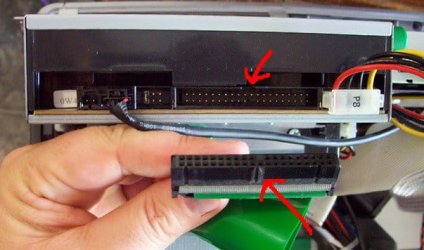
The difference between IDE and SATA is the style of connection between the HDD and the motherboard. The OS that was installed on it will make little difference because it's the type of plug on the back of the HDD itself... not what's on it. The quickest way to tell is look at the back of the HDD. Does it look like the picture? If it does, then it is IDE and might not work with the blacX duet docking station unless you found one with an IDE interface.

Assuming the docking station matches the plugs on the back of the HDD, you should just be able to plug the docking station into a USB and have it show up as an external storage device.
 

Attachments

  • iderom.jpg
    iderom.jpg
    46 KB · Views: 16

My Computer My Computer

At a glance

Windows 7 Professional 64 Bit Service Pack 1Intel i7-2600K OC to 3.8GhzCorsair Vengence 16GB (X4 4GB)X2 EVGA GTX570 SLI
Computer Manufacturer/Model Number
Custom Build
OS
Windows 7 Professional 64 Bit Service Pack 1
CPU
Intel i7-2600K OC to 3.8Ghz
Motherboard
Asus TUF Sabertooth P67
Memory
Corsair Vengence 16GB (X4 4GB)
Graphics Card(s)
X2 EVGA GTX570 SLI
Sound Card
Creative Soundblaster X-FI TI
Monitor(s) Displays
Dual HP 2311 LED Displays
Screen Resolution
1920X1080 single / 3840X1080 desktop
Hard Drives
Crucial Force 3 SSD 120GB 6Gb/s ( OS Drive )
WD Caviar Black 2 TB 6 Gb/s (Data drive)
PSU
Kingwin Mach 1 1000w Modular 80+ Bronze
Case
AZZA solano 1000
Cooling
Zalmen 700 LED CPU, X2 240mm case fans , X3 120mm case fans
Keyboard
Razer Black Widow Mechanical
Mouse
Razer Mamba
Internet Speed
26.7 mb/s Down / 7.39 Up
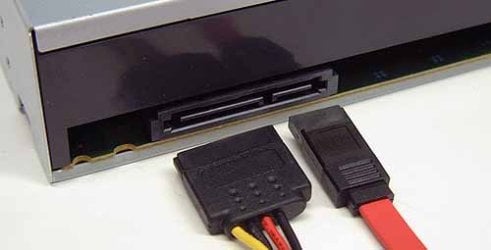
Here is what a SATA looks like.
 

Attachments

  • satarom.jpg
    satarom.jpg
    24.9 KB · Views: 10

My Computer My Computer

At a glance

Windows 7 Professional 64 Bit Service Pack 1Intel i7-2600K OC to 3.8GhzCorsair Vengence 16GB (X4 4GB)X2 EVGA GTX570 SLI
Computer Manufacturer/Model Number
Custom Build
OS
Windows 7 Professional 64 Bit Service Pack 1
CPU
Intel i7-2600K OC to 3.8Ghz
Motherboard
Asus TUF Sabertooth P67
Memory
Corsair Vengence 16GB (X4 4GB)
Graphics Card(s)
X2 EVGA GTX570 SLI
Sound Card
Creative Soundblaster X-FI TI
Monitor(s) Displays
Dual HP 2311 LED Displays
Screen Resolution
1920X1080 single / 3840X1080 desktop
Hard Drives
Crucial Force 3 SSD 120GB 6Gb/s ( OS Drive )
WD Caviar Black 2 TB 6 Gb/s (Data drive)
PSU
Kingwin Mach 1 1000w Modular 80+ Bronze
Case
AZZA solano 1000
Cooling
Zalmen 700 LED CPU, X2 240mm case fans , X3 120mm case fans
Keyboard
Razer Black Widow Mechanical
Mouse
Razer Mamba
Internet Speed
26.7 mb/s Down / 7.39 Up
Don't try to initialize the drive. You'll just end up erasing it!!

What type of cable are you using to connect? In BlacX FAQ it says eSata may not recognize both drives in a dual because the controller does not have multiplex function. It says USB should see both slots using only one cable.

So is the cable an eSata cable or a USB cable?
 

My Computer My Computer

At a glance

Windows 7 32 bitAMD 5200+ dual core2 GBNVidia GeForce 6150SE 128 MB
Computer Manufacturer/Model Number
HP Media Center
OS
Windows 7 32 bit
CPU
AMD 5200+ dual core
Memory
2 GB
Graphics Card(s)
NVidia GeForce 6150SE 128 MB
Monitor(s) Displays
CRT
Screen Resolution
1280x1024
Hard Drives
500 GB Sata internal :

SIIG USB 3.0 docking stations w/WD Caviar Black 6 Gb/s drives
Keyboard
PS/2
Mouse
PS/2 Wheel Mouse
Other Info
SIIG USB 3.0 PCIexpress card.
Initializing the disk will erase it? oh no!

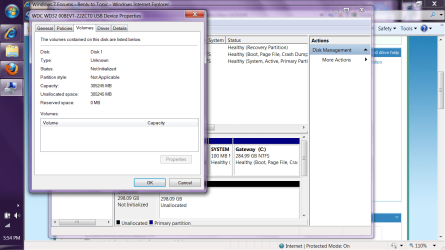
OK, it is definitely a SATA disk and I did try to initialize it but it gave me an error. I can go to the disk..through devices, but I cannot open it? it also says that is has tons of space on it, like all the space on it is available? Oh crap, I think I just erased 4 years of my life! Aw, man, there were 1000's of pictures and 1000's of songs and all my homework and tax returns etc on there! I have included a screen shot of what it says about it...Oh I am just heart sick.
 

Attachments

My Computer My Computer

At a glance

Windows 7 home Premium 64 bitIntel Pentium3.00 GB 2.74 GB usable
Computer Manufacturer/Model Number
Gateway/NV55C
OS
Windows 7 home Premium 64 bit
CPU
Intel Pentium
Memory
3.00 GB 2.74 GB usable
You still don't say how it's connected.
It sounds like you formatted the drive in the first place to be honest. I can't think of any other reason why it would not open in Explorer when plugged in.

Also when you post screen shots please use a standard graphics format. I don't know about anybody else, but I don't download and open attachments from the web.
 
Last edited:

My Computer My Computer

At a glance

Windows 7 32 bitAMD 5200+ dual core2 GBNVidia GeForce 6150SE 128 MB
Computer Manufacturer/Model Number
HP Media Center
OS
Windows 7 32 bit
CPU
AMD 5200+ dual core
Memory
2 GB
Graphics Card(s)
NVidia GeForce 6150SE 128 MB
Monitor(s) Displays
CRT
Screen Resolution
1280x1024
Hard Drives
500 GB Sata internal :

SIIG USB 3.0 docking stations w/WD Caviar Black 6 Gb/s drives
Keyboard
PS/2
Mouse
PS/2 Wheel Mouse
Other Info
SIIG USB 3.0 PCIexpress card.
It was connected by a USB cable as my new computer does not have an eSATA connection. There was only one cable for the unit, not two for each dock. I didn't format anything when I put it in the dock, I couldn't even find the darn thing on my computer for the longest time. sorry about that attachment. Yea, I thought about that, I wouldn't open it either if I were you. :(

Thanks for the feedback. I should have waited until I got to work tomorrow and had one of the IT guys help me with the darn thing.

Silly me for thinking I would be able to dock the hard drive and just open things in it.

It's never that easy.
 

My Computer My Computer

At a glance

Windows 7 home Premium 64 bitIntel Pentium3.00 GB 2.74 GB usable
Computer Manufacturer/Model Number
Gateway/NV55C
OS
Windows 7 home Premium 64 bit
CPU
Intel Pentium
Memory
3.00 GB 2.74 GB usable
maybe this screen shot will work better?
 

Attachments

  • prob with external hard drive.png
    prob with external hard drive.png
    84.8 KB · Views: 58

My Computer My Computer

At a glance

Windows 7 home Premium 64 bitIntel Pentium3.00 GB 2.74 GB usable
Computer Manufacturer/Model Number
Gateway/NV55C
OS
Windows 7 home Premium 64 bit
CPU
Intel Pentium
Memory
3.00 GB 2.74 GB usable
You mean after you plug in the USB from the dock, it doesn't appear in the window that opens when you click Computer , under the Devices with removable storage?
 

My Computer My Computer

At a glance

Windows 7 Professional 64 Bit Service Pack 1Intel i7-2600K OC to 3.8GhzCorsair Vengence 16GB (X4 4GB)X2 EVGA GTX570 SLI
Computer Manufacturer/Model Number
Custom Build
OS
Windows 7 Professional 64 Bit Service Pack 1
CPU
Intel i7-2600K OC to 3.8Ghz
Motherboard
Asus TUF Sabertooth P67
Memory
Corsair Vengence 16GB (X4 4GB)
Graphics Card(s)
X2 EVGA GTX570 SLI
Sound Card
Creative Soundblaster X-FI TI
Monitor(s) Displays
Dual HP 2311 LED Displays
Screen Resolution
1920X1080 single / 3840X1080 desktop
Hard Drives
Crucial Force 3 SSD 120GB 6Gb/s ( OS Drive )
WD Caviar Black 2 TB 6 Gb/s (Data drive)
PSU
Kingwin Mach 1 1000w Modular 80+ Bronze
Case
AZZA solano 1000
Cooling
Zalmen 700 LED CPU, X2 240mm case fans , X3 120mm case fans
Keyboard
Razer Black Widow Mechanical
Mouse
Razer Mamba
Internet Speed
26.7 mb/s Down / 7.39 Up
Correct, it does not show up under devices with removable storage, all that shows there is my dvd/cd reader. That is why I have been so confused by this whole thing.
 

My Computer My Computer

At a glance

Windows 7 home Premium 64 bitIntel Pentium3.00 GB 2.74 GB usable
Computer Manufacturer/Model Number
Gateway/NV55C
OS
Windows 7 home Premium 64 bit
CPU
Intel Pentium
Memory
3.00 GB 2.74 GB usable
Hmm. Then perhaps there is an issue with the dock. Your computer should detect when it is plugged in. Does your machine do the typical found new hardware thing when the USB is plugged in?
 

My Computer My Computer

At a glance

Windows 7 Professional 64 Bit Service Pack 1Intel i7-2600K OC to 3.8GhzCorsair Vengence 16GB (X4 4GB)X2 EVGA GTX570 SLI
Computer Manufacturer/Model Number
Custom Build
OS
Windows 7 Professional 64 Bit Service Pack 1
CPU
Intel i7-2600K OC to 3.8Ghz
Motherboard
Asus TUF Sabertooth P67
Memory
Corsair Vengence 16GB (X4 4GB)
Graphics Card(s)
X2 EVGA GTX570 SLI
Sound Card
Creative Soundblaster X-FI TI
Monitor(s) Displays
Dual HP 2311 LED Displays
Screen Resolution
1920X1080 single / 3840X1080 desktop
Hard Drives
Crucial Force 3 SSD 120GB 6Gb/s ( OS Drive )
WD Caviar Black 2 TB 6 Gb/s (Data drive)
PSU
Kingwin Mach 1 1000w Modular 80+ Bronze
Case
AZZA solano 1000
Cooling
Zalmen 700 LED CPU, X2 240mm case fans , X3 120mm case fans
Keyboard
Razer Black Widow Mechanical
Mouse
Razer Mamba
Internet Speed
26.7 mb/s Down / 7.39 Up
Does the dock drive show up in Disk Management and does it have a drive letter. Also, if it shows, oes it how as "RAW" ??
 

My Computer My Computer

At a glance

Vista, Windows7, Mint Mate, Zorin, Windows 8from 1.6GHz Duo to i7
Computer Manufacturer/Model Number
HP, Dell, Gateway, Toshiba - 4 laptops and 2 desktops
OS
Vista, Windows7, Mint Mate, Zorin, Windows 8
CPU
from 1.6GHz Duo to i7
Monitor(s) Displays
2x HP w2207
Hard Drives
5x HDD, 7x SSD, 12x Externals
Keyboard
with trackball - no mices
Mouse
Trackball mice
Internet Speed
DSL 6000
It did show the message that new hardware had been found, it found the dock but not the hard drive inside it and it did not list the dock in the removable storage area it instead listed it under the computer itself, as if it were a part of the computer. then when I opened the properties of the dock, it listed the hard drive there. Very confusing. and it will not let me open the harddrive there either. I don't know what the deal is with the dock or the harddrive. It's all very strange. I sure do appreciate all of you trying to help me with this.
 

My Computer My Computer

At a glance

Windows 7 home Premium 64 bitIntel Pentium3.00 GB 2.74 GB usable
Computer Manufacturer/Model Number
Gateway/NV55C
OS
Windows 7 home Premium 64 bit
CPU
Intel Pentium
Memory
3.00 GB 2.74 GB usable
Do you have another internal drive to plug in the dock? Either it's a defective dock or the drive has an issue. If you don't have another drive maybe you can get someone else to insert one just to see if it shows up in Explorer.

Is this dock a Best Buy "open box" deal?
You could be killing yourself for a long time if the dock is bad.
 

My Computer My Computer

At a glance

Windows 7 32 bitAMD 5200+ dual core2 GBNVidia GeForce 6150SE 128 MB
Computer Manufacturer/Model Number
HP Media Center
OS
Windows 7 32 bit
CPU
AMD 5200+ dual core
Memory
2 GB
Graphics Card(s)
NVidia GeForce 6150SE 128 MB
Monitor(s) Displays
CRT
Screen Resolution
1280x1024
Hard Drives
500 GB Sata internal :

SIIG USB 3.0 docking stations w/WD Caviar Black 6 Gb/s drives
Keyboard
PS/2
Mouse
PS/2 Wheel Mouse
Other Info
SIIG USB 3.0 PCIexpress card.
Back
Top