

- Local time
- 3:14 AM
- Messages
- 54
Hello all,
I've been wrestling with this problem a while now, and have tried pretty near all the hints and tips on the Forum to no avail.
Having lost one or two DVD's formatting them via the open Explorer folder method and choosing the
'Live File System' or 'Mastered', only to find the DVD un-useable as it's already FULL, ie no free space.
Got to thinking about that, and realised you don't really FORMAT a DVD the way you do a hard drive,
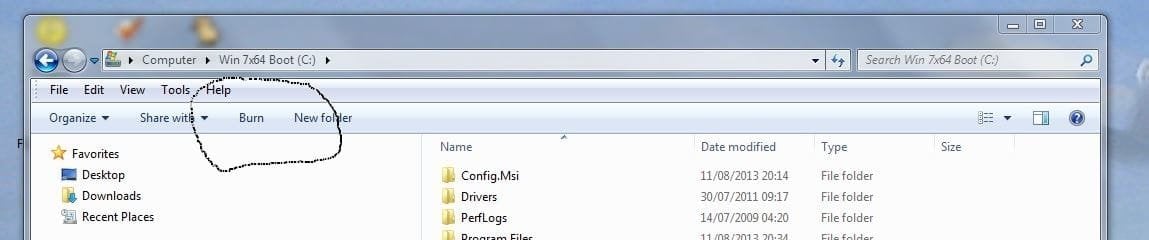
you burn files to it. So I had a look and thought, where is the BURN option on my Windows Explorer
ribbon bar ?
This is what you should see - Mine was missing....
[See attachment - Ribbon Bar 01]
Off to the big Google in the sky to look into this, and found an article showing how to REMOVE the BURN option, so I thought, well if you can remove it, you can put it back.
This is the article, hope the mods don't mind me showing something from another Forum.
How to Remove “Burn” Button from Windows Explorer Command Bar in Windows 7? - Tweaking with Vishal
If you read through it, things are quite straight forward, even though it is a REGISTRY poke about, so
make sure you BACKUP the registry first.
Assuming most of you have either the Home Basic or Home Premium versions of Windows 7, the 2nd part of the article is more relevant.
Following the instructions as if I was going to REMOVE the BURN button, I was surprised to find I had the DWORD 'NoCDBurning' already in my registry !! [How it got there I have no idea] I took the simple step of deleting the whole DWORD entry !!
After a re-boot the results were -
First DVD I put into my drive, up pops the expected FORMAT choice dialogue box.
Step one passed ok.
Dragged a few files and odds and ends to the DVD
The vital thing here is the "Close Session" button appearing.
This is what you should see -
[See attatchment Ribbon Bar 02]
This closes down the burn operation so you can add more files at a later time to the DVD
Step two passed ok.
[I have added files to the same DVD four different times now so things are working ok.]
I'm not sure if this will work for you, but it's worth checking out that DWORD entry and finding out
what the setting is on your machine.
All the best,
Mick C.
P.S. I've been using DVD-R/CD-R and CD-RW for this testing.
I've been wrestling with this problem a while now, and have tried pretty near all the hints and tips on the Forum to no avail.
Having lost one or two DVD's formatting them via the open Explorer folder method and choosing the
'Live File System' or 'Mastered', only to find the DVD un-useable as it's already FULL, ie no free space.
Got to thinking about that, and realised you don't really FORMAT a DVD the way you do a hard drive,
you burn files to it. So I had a look and thought, where is the BURN option on my Windows Explorer
ribbon bar ?
This is what you should see - Mine was missing....
[See attachment - Ribbon Bar 01]
Off to the big Google in the sky to look into this, and found an article showing how to REMOVE the BURN option, so I thought, well if you can remove it, you can put it back.
This is the article, hope the mods don't mind me showing something from another Forum.
How to Remove “Burn” Button from Windows Explorer Command Bar in Windows 7? - Tweaking with Vishal
If you read through it, things are quite straight forward, even though it is a REGISTRY poke about, so
make sure you BACKUP the registry first.
Assuming most of you have either the Home Basic or Home Premium versions of Windows 7, the 2nd part of the article is more relevant.
Following the instructions as if I was going to REMOVE the BURN button, I was surprised to find I had the DWORD 'NoCDBurning' already in my registry !! [How it got there I have no idea] I took the simple step of deleting the whole DWORD entry !!
After a re-boot the results were -
First DVD I put into my drive, up pops the expected FORMAT choice dialogue box.
Step one passed ok.
Dragged a few files and odds and ends to the DVD
The vital thing here is the "Close Session" button appearing.
This is what you should see -
[See attatchment Ribbon Bar 02]
This closes down the burn operation so you can add more files at a later time to the DVD
Step two passed ok.
[I have added files to the same DVD four different times now so things are working ok.]
I'm not sure if this will work for you, but it's worth checking out that DWORD entry and finding out
what the setting is on your machine.
All the best,
Mick C.
P.S. I've been using DVD-R/CD-R and CD-RW for this testing.
Attachments

My Computer
At a glance
Windows 7 Home Premium 64 bit - SP1Intel Core i7 920 (2.66GHz 8MB L2 Cache)6Gb (3 x Kingston 2Gb PC12800 DDR3 1600MHZ)ATI Radeon HD 5850 1Gb
- Computer type
- PC/Desktop
- Computer Manufacturer/Model Number
- Arbico i7 PC
- OS
- Windows 7 Home Premium 64 bit - SP1
- CPU
- Intel Core i7 920 (2.66GHz 8MB L2 Cache)
- Motherboard
- Asus P6X58D-E
- Memory
- 6Gb (3 x Kingston 2Gb PC12800 DDR3 1600MHZ)
- Graphics Card(s)
- ATI Radeon HD 5850 1Gb
- Sound Card
- AMD HIgh Def HDMI
- Monitor(s) Displays
- LG 24EB23 Digital
- Screen Resolution
- 1920x1080 (32bit) (60Hz)
- Hard Drives
- Samsung HD103SJ
Samsung HD5021J
Samsung HD204UI
Samsung M3 External USB 3
- PSU
- Nexus RX-8500 850w
- Case
- NZXT Hush Black ATA
- Cooling
- 3 x Xilence Red Wing 120mm Case Fans
- Keyboard
- Microsoft Wireless Keyboard 6000 v3.0
- Mouse
- Microsoft Wireless Laser Mouse 6000 v 2.0
- Internet Speed
- 60.0 Mbps Average
- Antivirus
- Spybot Search & Destroy
- Browser
- Avant Browser


