
Blu-Ray/DVD-Drive Disappears after Startup

bigred82

New member
Local time
4:43 PM
Messages
20
After I start my computer the blu-ray/dvd drive disappears from "my computer." It has the latest drivers. The BIOS recognizes that the drive is connected and I can see it when I load the bios. Windows does not recognize it in device manager after it disappears. I've tried a lot of the fixes I've read but nothing seems to work and it's about to drive me crazy. Please help!

My specs are:
Windows 7 Professional 64-bit
AMD Phenom 9850 Quad-Core 2.51gHz
Zalman CNPS9000 CPU Fan/heatsink
8.0GB DDR2 RAM
ASUS m4a78-e motherboard
LG BH08LS20 Blu-Ray Burner - connected via SATA cable
1.0TB Western Digital Caviar Black HD (via SATA)
Maxtor 150GB HD (via IDE)
HT Omega Claro Plus+ 7.1 Sound Card
Samsung 23" HDScreen
Saitek Eclipse USB Keyboard
Microsoft Wireless Laser Mouse 6000 v2.0
Antec Nine Hundred Two Case.
 

My Computer My Computer

At a glance

Windows 7 Professional 64bitAMD Phenom 9850 Quad-Core Processor 2.51GhZ8.00GBNVIDIA GeForce 8800GT
Computer Manufacturer/Model Number
Myself
OS
Windows 7 Professional 64bit
CPU
AMD Phenom 9850 Quad-Core Processor 2.51GhZ
Motherboard
ASUS M4A78-E
Memory
8.00GB
Graphics Card(s)
NVIDIA GeForce 8800GT
Sound Card
HT Omega Claro Plus
Monitor(s) Displays
Samsung 26" HDTV
Hard Drives
Western Digital Caviar Black 1TB
Case
Antec Nine Hundred Two
Cooling
Zallman CNPS9900
Welcome to Seven Forums bigred82. It might be better if you listed the things you have tried, as we'll no doubt recommend them again. Such as removing the upper and lower filters. Switching the (SATA?) plug to another connector, etc.

A Guy
 

My Computer My Computer

At a glance

Windows 10 Home x64INTEL Core i5-750 Quad-Core 3.37GHzHyperX Fury Black Series 8GB (2 x 4GB) 1866MhzEVGA GeForce GTX 750 Superclocked 1GB 128-Bit...
Computer type
PC/Desktop
OS
Windows 10 Home x64
CPU
INTEL Core i5-750 Quad-Core 3.37GHz
Motherboard
ASUS P7P55D
Memory
HyperX Fury Black Series 8GB (2 x 4GB) 1866Mhz
Graphics Card(s)
EVGA GeForce GTX 750 Superclocked 1GB 128-Bit GDDR5
Monitor(s) Displays
LG 32MA68HY 32" IPS
Screen Resolution
1920 x 1080
Hard Drives
Samsung 840 Evo 120GB, SEAGATE 500GB Barracuda® 7200.12, SATA 3 Gb/s, 7200 RPM, 16MB cache
PSU
ANTEC TruePower New TP-550, 80 PLUS, 550W
Case
ANTEC Three Hundred Illusion
Cooling
COOLER MASTER Hyper 212 Plus, 4 x 120mm 1 x 140mm Noctua's
Internet Speed
85 + Mbps
Antivirus
Avast
Browser
Vivaldi

My Computer My Computer

At a glance

windows 7 ultimate 64bitIntel Core2 Extreme x9000 2.8GHZ4Gig2 NVidia GeForce 8800M GTX (SLi)
Computer Manufacturer/Model Number
Alienware AREA-51 M17x
OS
windows 7 ultimate 64bit
CPU
Intel Core2 Extreme x9000 2.8GHZ
Motherboard
Asus P965 Intel chipset
Memory
4Gig
Graphics Card(s)
2 NVidia GeForce 8800M GTX (SLi)
Sound Card
onboard
Monitor(s) Displays
17in. built-in, 47in JVC LCD
Screen Resolution
1080p
Hard Drives
2 250Gig Hitachi (RAID 0) @ 7200RPM
Case
17in. laptop
Mouse
touchpad, Logitech Anywhere Mouse cordless laser
Internet Speed
cable
Thanks for the welcome! I'm not sure what you mean by removing the upper and lower filters?

I've tried changing the SATA connection on the motherboard a couple of different times and it still happens. I'm going to check into those links... Thanks for reading and trying to help!
 

My Computer My Computer

At a glance

Windows 7 Professional 64bitAMD Phenom 9850 Quad-Core Processor 2.51GhZ8.00GBNVIDIA GeForce 8800GT
Computer Manufacturer/Model Number
Myself
OS
Windows 7 Professional 64bit
CPU
AMD Phenom 9850 Quad-Core Processor 2.51GhZ
Motherboard
ASUS M4A78-E
Memory
8.00GB
Graphics Card(s)
NVIDIA GeForce 8800GT
Sound Card
HT Omega Claro Plus
Monitor(s) Displays
Samsung 26" HDTV
Hard Drives
Western Digital Caviar Black 1TB
Case
Antec Nine Hundred Two
Cooling
Zallman CNPS9900
I ran both utilities and neither found my missing blu-ray drive... thanks for the links.
 

My Computer My Computer

At a glance

Windows 7 Professional 64bitAMD Phenom 9850 Quad-Core Processor 2.51GhZ8.00GBNVIDIA GeForce 8800GT
Computer Manufacturer/Model Number
Myself
OS
Windows 7 Professional 64bit
CPU
AMD Phenom 9850 Quad-Core Processor 2.51GhZ
Motherboard
ASUS M4A78-E
Memory
8.00GB
Graphics Card(s)
NVIDIA GeForce 8800GT
Sound Card
HT Omega Claro Plus
Monitor(s) Displays
Samsung 26" HDTV
Hard Drives
Western Digital Caviar Black 1TB
Case
Antec Nine Hundred Two
Cooling
Zallman CNPS9900

My Computer My Computer

At a glance

Windows 10 Home x64INTEL Core i5-750 Quad-Core 3.37GHzHyperX Fury Black Series 8GB (2 x 4GB) 1866MhzEVGA GeForce GTX 750 Superclocked 1GB 128-Bit...
Computer type
PC/Desktop
OS
Windows 10 Home x64
CPU
INTEL Core i5-750 Quad-Core 3.37GHz
Motherboard
ASUS P7P55D
Memory
HyperX Fury Black Series 8GB (2 x 4GB) 1866Mhz
Graphics Card(s)
EVGA GeForce GTX 750 Superclocked 1GB 128-Bit GDDR5
Monitor(s) Displays
LG 32MA68HY 32" IPS
Screen Resolution
1920 x 1080
Hard Drives
Samsung 840 Evo 120GB, SEAGATE 500GB Barracuda® 7200.12, SATA 3 Gb/s, 7200 RPM, 16MB cache
PSU
ANTEC TruePower New TP-550, 80 PLUS, 550W
Case
ANTEC Three Hundred Illusion
Cooling
COOLER MASTER Hyper 212 Plus, 4 x 120mm 1 x 140mm Noctua's
Internet Speed
85 + Mbps
Antivirus
Avast
Browser
Vivaldi
there .is a firmware update for that drive. i dont know if that will solve the problem because i couldnt find any documentation stating what it fixes:

LG Product Support for BH08LS20
 

My Computer My Computer

At a glance

windows 7 ultimate 64bitIntel Core2 Extreme x9000 2.8GHZ4Gig2 NVidia GeForce 8800M GTX (SLi)
Computer Manufacturer/Model Number
Alienware AREA-51 M17x
OS
windows 7 ultimate 64bit
CPU
Intel Core2 Extreme x9000 2.8GHZ
Motherboard
Asus P965 Intel chipset
Memory
4Gig
Graphics Card(s)
2 NVidia GeForce 8800M GTX (SLi)
Sound Card
onboard
Monitor(s) Displays
17in. built-in, 47in JVC LCD
Screen Resolution
1080p
Hard Drives
2 250Gig Hitachi (RAID 0) @ 7200RPM
Case
17in. laptop
Mouse
touchpad, Logitech Anywhere Mouse cordless laser
Internet Speed
cable

My Computer My Computer

At a glance

windows 7 ultimate 64bitIntel Core2 Extreme x9000 2.8GHZ4Gig2 NVidia GeForce 8800M GTX (SLi)
Computer Manufacturer/Model Number
Alienware AREA-51 M17x
OS
windows 7 ultimate 64bit
CPU
Intel Core2 Extreme x9000 2.8GHZ
Motherboard
Asus P965 Intel chipset
Memory
4Gig
Graphics Card(s)
2 NVidia GeForce 8800M GTX (SLi)
Sound Card
onboard
Monitor(s) Displays
17in. built-in, 47in JVC LCD
Screen Resolution
1080p
Hard Drives
2 250Gig Hitachi (RAID 0) @ 7200RPM
Case
17in. laptop
Mouse
touchpad, Logitech Anywhere Mouse cordless laser
Internet Speed
cable
Thanks for the link but the microsoft self resolver didn't work, unfortunately.

Thanks for the firmware update for the LG bluray player. I am going to flash with those latest drivers when I restart and the drive appears (for a few short minutes) or else it may damage the drive... or so LG says with their warning:

Never update the firmware if the problem you’re having is the drive
isn't seen by windows, won't write with the included software, or other
interface related problems, unless the firmware specifically states it
fixes the problem you are having. Firmware updates normally don't fix these
types of problems. Trying to update the firmware when there are interface
address these problems can damage the drive's firmware. An error when
updating the firmware is usually caused by a problem with the drive
interface or there is more than one drive connected to that IDE channel.

I've already updated my BIOS on the ASUS motherboard. This is absolutely a horrible problem to have. I'm afraid I may have to buy another drive or motherboard or both?
 

My Computer My Computer

At a glance

Windows 7 Professional 64bitAMD Phenom 9850 Quad-Core Processor 2.51GhZ8.00GBNVIDIA GeForce 8800GT
Computer Manufacturer/Model Number
Myself
OS
Windows 7 Professional 64bit
CPU
AMD Phenom 9850 Quad-Core Processor 2.51GhZ
Motherboard
ASUS M4A78-E
Memory
8.00GB
Graphics Card(s)
NVIDIA GeForce 8800GT
Sound Card
HT Omega Claro Plus
Monitor(s) Displays
Samsung 26" HDTV
Hard Drives
Western Digital Caviar Black 1TB
Case
Antec Nine Hundred Two
Cooling
Zallman CNPS9900
I read somewhere (and someone mentioned here) that deleting the lower and upper filters would be beneficial. How do I do that in regedit? I wouldn't know what I'm looking for to be completely honest.
 

My Computer My Computer

At a glance

Windows 7 Professional 64bitAMD Phenom 9850 Quad-Core Processor 2.51GhZ8.00GBNVIDIA GeForce 8800GT
Computer Manufacturer/Model Number
Myself
OS
Windows 7 Professional 64bit
CPU
AMD Phenom 9850 Quad-Core Processor 2.51GhZ
Motherboard
ASUS M4A78-E
Memory
8.00GB
Graphics Card(s)
NVIDIA GeForce 8800GT
Sound Card
HT Omega Claro Plus
Monitor(s) Displays
Samsung 26" HDTV
Hard Drives
Western Digital Caviar Black 1TB
Case
Antec Nine Hundred Two
Cooling
Zallman CNPS9900

My Computer My Computer

At a glance

Windows 10 Home x64INTEL Core i5-750 Quad-Core 3.37GHzHyperX Fury Black Series 8GB (2 x 4GB) 1866MhzEVGA GeForce GTX 750 Superclocked 1GB 128-Bit...
Computer type
PC/Desktop
OS
Windows 10 Home x64
CPU
INTEL Core i5-750 Quad-Core 3.37GHz
Motherboard
ASUS P7P55D
Memory
HyperX Fury Black Series 8GB (2 x 4GB) 1866Mhz
Graphics Card(s)
EVGA GeForce GTX 750 Superclocked 1GB 128-Bit GDDR5
Monitor(s) Displays
LG 32MA68HY 32" IPS
Screen Resolution
1920 x 1080
Hard Drives
Samsung 840 Evo 120GB, SEAGATE 500GB Barracuda® 7200.12, SATA 3 Gb/s, 7200 RPM, 16MB cache
PSU
ANTEC TruePower New TP-550, 80 PLUS, 550W
Case
ANTEC Three Hundred Illusion
Cooling
COOLER MASTER Hyper 212 Plus, 4 x 120mm 1 x 140mm Noctua's
Internet Speed
85 + Mbps
Antivirus
Avast
Browser
Vivaldi

It didn't work :( I deleted both upper and lower filters. Thanks for your response, though.
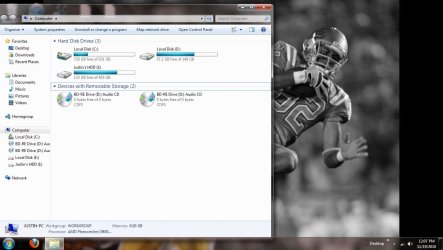
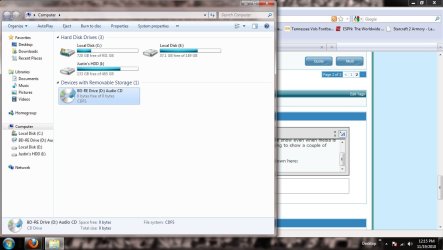
When I first restart the computer I look in the "computer" directory and see my blu-ray drive and the hard drives. When the green bar at the top of the window completes loading the blu-ray drive disappears. It works sometimes... more specifically if I hop into my motherboard's BIOS and then into windows (without even making any changes to the BIOS settings). This is terrible! It seems like a lot of people have this problem, too. I don't understand.
 

My Computer My Computer

At a glance

Windows 7 Professional 64bitAMD Phenom 9850 Quad-Core Processor 2.51GhZ8.00GBNVIDIA GeForce 8800GT
Computer Manufacturer/Model Number
Myself
OS
Windows 7 Professional 64bit
CPU
AMD Phenom 9850 Quad-Core Processor 2.51GhZ
Motherboard
ASUS M4A78-E
Memory
8.00GB
Graphics Card(s)
NVIDIA GeForce 8800GT
Sound Card
HT Omega Claro Plus
Monitor(s) Displays
Samsung 26" HDTV
Hard Drives
Western Digital Caviar Black 1TB
Case
Antec Nine Hundred Two
Cooling
Zallman CNPS9900

My Computer My Computer

At a glance

windows 7 ultimate 64bitIntel Core2 Extreme x9000 2.8GHZ4Gig2 NVidia GeForce 8800M GTX (SLi)
Computer Manufacturer/Model Number
Alienware AREA-51 M17x
OS
windows 7 ultimate 64bit
CPU
Intel Core2 Extreme x9000 2.8GHZ
Motherboard
Asus P965 Intel chipset
Memory
4Gig
Graphics Card(s)
2 NVidia GeForce 8800M GTX (SLi)
Sound Card
onboard
Monitor(s) Displays
17in. built-in, 47in JVC LCD
Screen Resolution
1080p
Hard Drives
2 250Gig Hitachi (RAID 0) @ 7200RPM
Case
17in. laptop
Mouse
touchpad, Logitech Anywhere Mouse cordless laser
Internet Speed
cable

My Computer My Computer

At a glance

windows 7 ultimate 64bitIntel Core2 Extreme x9000 2.8GHZ4Gig2 NVidia GeForce 8800M GTX (SLi)
Computer Manufacturer/Model Number
Alienware AREA-51 M17x
OS
windows 7 ultimate 64bit
CPU
Intel Core2 Extreme x9000 2.8GHZ
Motherboard
Asus P965 Intel chipset
Memory
4Gig
Graphics Card(s)
2 NVidia GeForce 8800M GTX (SLi)
Sound Card
onboard
Monitor(s) Displays
17in. built-in, 47in JVC LCD
Screen Resolution
1080p
Hard Drives
2 250Gig Hitachi (RAID 0) @ 7200RPM
Case
17in. laptop
Mouse
touchpad, Logitech Anywhere Mouse cordless laser
Internet Speed
cable
Thanks for your response! It's still not working, though.

I removed both the upper and lower filters, I applied all three fixes to make the drive show even when media is not in the drive (which there is media in the drive) and it's still disappearing. I'm going to show a couple of screenshots before and after.

When the drive is working, for some reason there are 2 of them in "Computer." Later only one of them is showing - and I uploaded a screen shot of that as well.

Something to note, when I tried to apply the firmware update from LG, the update doesn't even recognize a DVD-rom to flash! It's using a generic Microsoft driver atm.
 

Attachments

  • Image 1.jpg
    Image 1.jpg
    83 KB · Views: 17
  • Image 2.jpg
    Image 2.jpg
    87.1 KB · Views: 14

My Computer My Computer

At a glance

Windows 7 Professional 64bitAMD Phenom 9850 Quad-Core Processor 2.51GhZ8.00GBNVIDIA GeForce 8800GT
Computer Manufacturer/Model Number
Myself
OS
Windows 7 Professional 64bit
CPU
AMD Phenom 9850 Quad-Core Processor 2.51GhZ
Motherboard
ASUS M4A78-E
Memory
8.00GB
Graphics Card(s)
NVIDIA GeForce 8800GT
Sound Card
HT Omega Claro Plus
Monitor(s) Displays
Samsung 26" HDTV
Hard Drives
Western Digital Caviar Black 1TB
Case
Antec Nine Hundred Two
Cooling
Zallman CNPS9900
did you follw these instructions when updating the firmware?

Critical Instructions: (to be followed carefully)
1. Connect the drive at Computer.

2. Download the file BH08LS20_2.00(EW).ZIP to a folder of your choice.
This download includes this "Read me(ew)" text file, as well as the BH08LS20_2.00.EXE
program, which will auto-update your drive's firmware.

3. Close all other programs including: screen saver, antivirus and/or power-down programs.
(If these programs are not closed, they will try to engage the PC, during the updateprocess,
thus interrupting the update and damaging the drive).

4. Check the drive to ensure that there is no disk in the tray
before you start the update procedure.

5. Go into the folder with the update file and double click the BH08LS20_2.00.EXE program
and Firmware upgrade will be automatically started.
When the UPGRADE is complete the screen should indicate "Re Boot" message
and advise you to reboot the system. You will need to reboot your PC

The update will be complete, after you reboot your system.

-. WARNING:
Do not open any programs or start any system functions during the update,
as they will interfere with data transfer and damage the drive.
Do not cancel the operation once it has been started or the drive will
become permanently damaged, as a result.
 

My Computer My Computer

At a glance

windows 7 ultimate 64bitIntel Core2 Extreme x9000 2.8GHZ4Gig2 NVidia GeForce 8800M GTX (SLi)
Computer Manufacturer/Model Number
Alienware AREA-51 M17x
OS
windows 7 ultimate 64bit
CPU
Intel Core2 Extreme x9000 2.8GHZ
Motherboard
Asus P965 Intel chipset
Memory
4Gig
Graphics Card(s)
2 NVidia GeForce 8800M GTX (SLi)
Sound Card
onboard
Monitor(s) Displays
17in. built-in, 47in JVC LCD
Screen Resolution
1080p
Hard Drives
2 250Gig Hitachi (RAID 0) @ 7200RPM
Case
17in. laptop
Mouse
touchpad, Logitech Anywhere Mouse cordless laser
Internet Speed
cable
this firmware update is to specifically address compatibility issues with win7.
 

My Computer My Computer

At a glance

windows 7 ultimate 64bitIntel Core2 Extreme x9000 2.8GHZ4Gig2 NVidia GeForce 8800M GTX (SLi)
Computer Manufacturer/Model Number
Alienware AREA-51 M17x
OS
windows 7 ultimate 64bit
CPU
Intel Core2 Extreme x9000 2.8GHZ
Motherboard
Asus P965 Intel chipset
Memory
4Gig
Graphics Card(s)
2 NVidia GeForce 8800M GTX (SLi)
Sound Card
onboard
Monitor(s) Displays
17in. built-in, 47in JVC LCD
Screen Resolution
1080p
Hard Drives
2 250Gig Hitachi (RAID 0) @ 7200RPM
Case
17in. laptop
Mouse
touchpad, Logitech Anywhere Mouse cordless laser
Internet Speed
cable
this firmware update is to specifically address compatibility issues with win7.

I wish it would recognize it. The firmware update keeps saying "Can't find target drive" and doesn't even list my dvd-drive.

Should I try using Media Code Speed Edit to update the firmware?
 

My Computer My Computer

At a glance

Windows 7 Professional 64bitAMD Phenom 9850 Quad-Core Processor 2.51GhZ8.00GBNVIDIA GeForce 8800GT
Computer Manufacturer/Model Number
Myself
OS
Windows 7 Professional 64bit
CPU
AMD Phenom 9850 Quad-Core Processor 2.51GhZ
Motherboard
ASUS M4A78-E
Memory
8.00GB
Graphics Card(s)
NVIDIA GeForce 8800GT
Sound Card
HT Omega Claro Plus
Monitor(s) Displays
Samsung 26" HDTV
Hard Drives
Western Digital Caviar Black 1TB
Case
Antec Nine Hundred Two
Cooling
Zallman CNPS9900
MCSE doesn't even recognize that my drive is even there. :confused:
 

My Computer My Computer

At a glance

Windows 7 Professional 64bitAMD Phenom 9850 Quad-Core Processor 2.51GhZ8.00GBNVIDIA GeForce 8800GT
Computer Manufacturer/Model Number
Myself
OS
Windows 7 Professional 64bit
CPU
AMD Phenom 9850 Quad-Core Processor 2.51GhZ
Motherboard
ASUS M4A78-E
Memory
8.00GB
Graphics Card(s)
NVIDIA GeForce 8800GT
Sound Card
HT Omega Claro Plus
Monitor(s) Displays
Samsung 26" HDTV
Hard Drives
Western Digital Caviar Black 1TB
Case
Antec Nine Hundred Two
Cooling
Zallman CNPS9900
maybe try switching the SATA cables. and for the time being, dont attach any other drive to that cable/channel.
 

My Computer My Computer

At a glance

windows 7 ultimate 64bitIntel Core2 Extreme x9000 2.8GHZ4Gig2 NVidia GeForce 8800M GTX (SLi)
Computer Manufacturer/Model Number
Alienware AREA-51 M17x
OS
windows 7 ultimate 64bit
CPU
Intel Core2 Extreme x9000 2.8GHZ
Motherboard
Asus P965 Intel chipset
Memory
4Gig
Graphics Card(s)
2 NVidia GeForce 8800M GTX (SLi)
Sound Card
onboard
Monitor(s) Displays
17in. built-in, 47in JVC LCD
Screen Resolution
1080p
Hard Drives
2 250Gig Hitachi (RAID 0) @ 7200RPM
Case
17in. laptop
Mouse
touchpad, Logitech Anywhere Mouse cordless laser
Internet Speed
cable
Back
Top