Bluesoleil?

djumicci

New member
Local time
12:59 AM
Messages
4
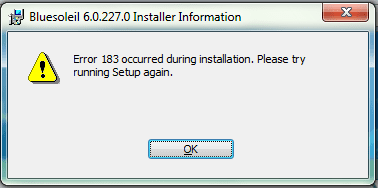
i've tried to instal "BlueSoleil_6.0.227.0" on my Win7 64bit and it says that...(on picture)

i've also tried other versions of bluesoleil but it's allways the same result..:(:(:(

please help :geek:
 

Attachments

  • blu.png
    blu.png
    21.5 KB · Views: 31

My Computer

OS
windows 7 64bit
i've tried to instal "BlueSoleil_6.0.227.0" on my Win7 64bit and it says that...(on picture)

i've also tried other versions of bluesoleil but it's allways the same result..:(:(:(

please help :geek:

I had already install a bluesoleil version and never had any issue with it on x64bits.

Have you enable your bluetooth software before (if built-in bluetooth)?
Should be something like: Fn+F3 or Fn+F5 on your keyboard.

I suppose if you have a BT dongle, you have already plugged in.
 

My Computer

Computer type
PC/Desktop
Computer Manufacturer/Model Number
Custom Build
OS
Windows 7 Professional SP1 - x64 [Non-UEFI Boot]
CPU
Ivy Bridge Core i5 3570K (Delidded)
Motherboard
Asus P8Z77-V LE PLUS
Memory
G.Skill "Ares" DDR3 PC3-12800 - 1600MHz (16Gb)
Graphics Card(s)
Asus Dual-RX480-O4G
Sound Card
Creative Sound Blaster Z w/5.1 sound system
Monitor(s) Displays
Asus IPS 23"
Screen Resolution
16/9
Hard Drives
Internal:
500Go Sata 6Gb/s (x2)
500Go Sata 3Gb/s (x2)
SSD 60Go Sata 6Gb/s
PSU
In Win C 900W Series 80+ Platinum
Case
Thermaltake Chaser A71
Cooling
Custom Water Cooling Loop
Keyboard
Cooler Master QuickFire XTi
Mouse
Razer Imperator 2012 (4G)
Antivirus
MSE
Browser
IE 11.0.xxx Rtm
Other Info
"Raid0" with Intel Smart Response Technology (HDD/SSD)
i'dont think that's a problem. I had installed before bluesoleil on my pc but then i had some problems with bluetooth drivers and i've erased bluesoleil...

now, when i've solved my bluetooth drivers problem i can't install bluesoleil...

it's terribly annoying me :mad::mad::mad:
 

My Computer

OS
windows 7 64bit
i'dont think that's a problem. I had installed before bluesoleil on my pc but then i had some problems with bluetooth drivers and i've erased bluesoleil...

now, when i've solved my bluetooth drivers problem i can't install bluesoleil...

it's terribly annoying me :mad::mad::mad:

Perhaps could you give us a clue...What kind of problem had been solved!

When i did install Bluesoleil Software before, those drivers (see attached thumbnails) installed through Windows Update, and appeared aswell in my Device Manager. Maybe try to remove them from the Control Panel if they do are installed in "Programs & Features".
 

Attachments

  • Capture.PNG
    Capture.PNG
    11.7 KB · Views: 101

My Computer

Computer type
PC/Desktop
Computer Manufacturer/Model Number
Custom Build
OS
Windows 7 Professional SP1 - x64 [Non-UEFI Boot]
CPU
Ivy Bridge Core i5 3570K (Delidded)
Motherboard
Asus P8Z77-V LE PLUS
Memory
G.Skill "Ares" DDR3 PC3-12800 - 1600MHz (16Gb)
Graphics Card(s)
Asus Dual-RX480-O4G
Sound Card
Creative Sound Blaster Z w/5.1 sound system
Monitor(s) Displays
Asus IPS 23"
Screen Resolution
16/9
Hard Drives
Internal:
500Go Sata 6Gb/s (x2)
500Go Sata 3Gb/s (x2)
SSD 60Go Sata 6Gb/s
PSU
In Win C 900W Series 80+ Platinum
Case
Thermaltake Chaser A71
Cooling
Custom Water Cooling Loop
Keyboard
Cooler Master QuickFire XTi
Mouse
Razer Imperator 2012 (4G)
Antivirus
MSE
Browser
IE 11.0.xxx Rtm
Other Info
"Raid0" with Intel Smart Response Technology (HDD/SSD)
Back
Top