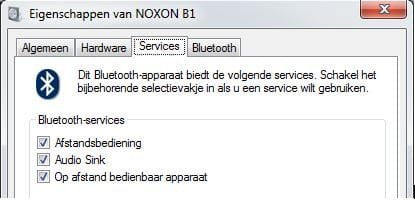
That would be the profiles here:
Notice the [disabled] ones are the Icons with the "tiny" grey circle with the even "tinier" black [downwards pointing arrow] on top of the Icons in the lower right corner of the Icons.
In this dialog screen capture "only" the Icon representing the Profile in the "first row" is not disabled.
Each "Profile" is a Bluetooth "Device Function" in hardware "driver speak" according to Microsoft.. to the rest of the world and the Bluetooth standard they are called "Profiles" -- which are basically contracts, or API's that define "if your going to make a device that offers this type of service" on Bluetooth.. then it should work -- such and such a way, over Bluetooth.
The problem is Profiles tend to be written kind of independently.. as if each Bluetooth device only had one function or purpose.. so first Profile that gets control calls "Shot gun" and all the other Profiles "suffer" the consequences.. basically they get to fight over the left overs..
Look at it this way.. "Hands Free" is like a phone with an on/off switch.. "Audio/Video remote control" is like a TV remote with an on/off switch.. it can't be "both" a Phone and a Remote at the same time.. so {which is it?} the answer is.. which ever comes first.. and the remainder doesn't get to control anything.. including autoconnect the device to the sound system.
You don't "expect" a Phone to autoconnect and provide a "Dial Tone" so that's its behavior.. it connects and doesn't provide a Dial Tone. But when Headphones autoconnects you expect them to immediately begin providing sound so that's its behavior. Whichever gets control of the system first overrides the behavior of the others.
Its just a guess, but I suspect there is a way to assign "priority" or "order of startup" to these profiles and that someone like the device driver writers have figured this out.. and that is why sometimes reinstalling a different driver pack works.. it reinstalls the Profiles in a "different" order or priority.. and things magically start working. But disabling the other Profiles achieves the same thing.. ham fistedly.. and if there isn't another driver pack available.. this might be your only option.
I use my headset mostly for listening to podcasts or music.. so phone functions isn't as important. That's my choice.. but if I can figure out in Windows how to reset or reorder the priorities of the Profiles.. there might be a better way.


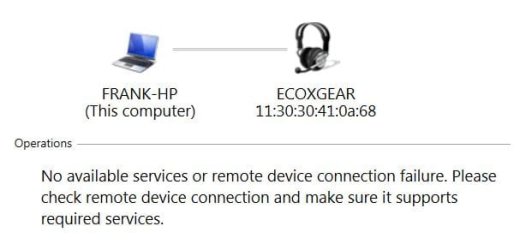


 )
)