

So I'm stuck again. I just bought an official wireless adapter made by Sony to connect my PS4 controller to my PC wirelessly so I may play Rocket League with it without needing a wire, and the adapter and controller appear to pair with each other, but the controller doesn't function in anything but Steam Big Picture.
I looked up stuff and I started the Bluetooth service. It started but searching for change bluetooth settings in the Control Panel still brought up no results. Nothing leading to the settings is found in Devices and Printers either. I found an article here to make a shortcut to the settings, and my adapter nor the controller appear in that window.
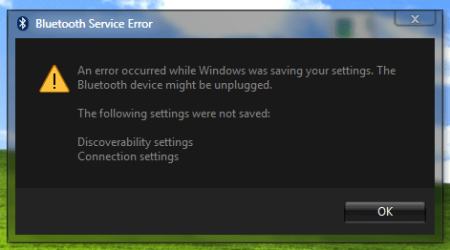
When I click on the Bluetooth settings button in that window and tick the box that would enable devices to discover my PC, it brings up the error box below. What's odd is that my adapter isn't unplugged through the whole process, and the controller appears to be paired with it, as aforementioned above. I don't have a Bluetooth card in my computer, so I opted for the Sony DS4 adapter. However, it detected and installed the drivers for the adapter itself.
If anyone could lend a hand, I'd be eternally grateful.
I looked up stuff and I started the Bluetooth service. It started but searching for change bluetooth settings in the Control Panel still brought up no results. Nothing leading to the settings is found in Devices and Printers either. I found an article here to make a shortcut to the settings, and my adapter nor the controller appear in that window.
When I click on the Bluetooth settings button in that window and tick the box that would enable devices to discover my PC, it brings up the error box below. What's odd is that my adapter isn't unplugged through the whole process, and the controller appears to be paired with it, as aforementioned above. I don't have a Bluetooth card in my computer, so I opted for the Sony DS4 adapter. However, it detected and installed the drivers for the adapter itself.
If anyone could lend a hand, I'd be eternally grateful.
Attachments
My Computer
At a glance
Windows 7 Professional x64 (SP1)AMD FX-6300 Six Core Processor 3.5GHz (Not OC'd)G.Skill Ripjaws - 4x4GB (16GB)MSI GeForce GTX 970 TwinFrozr 4GB
- Computer type
- PC/Desktop
- Computer Manufacturer/Model Number
- MrMiios (Custom Build by Me)
- OS
- Windows 7 Professional x64 (SP1)
- CPU
- AMD FX-6300 Six Core Processor 3.5GHz (Not OC'd)
- Motherboard
- ASROCK 980DE3/US3S
- Memory
- G.Skill Ripjaws - 4x4GB (16GB)
- Graphics Card(s)
- MSI GeForce GTX 970 TwinFrozr 4GB
- Sound Card
- [[Using Onboard HD Audio]]
- Monitor(s) Displays
- HP 27es
- Screen Resolution
- 1920x1080
- Hard Drives
- Western Digital Red 1TB (Internal)
Toshiba Canvio 2TB USB 3.0 Desktop Hard Drive (External)
- PSU
- EVGA 850W 80+ GOLD 220-G2-0850-XR (Fully Modular)
- Case
- DIYPC Ranger-R4-R
- Cooling
- Cooler Master Hyper 212 Evo
- Keyboard
- Dell USB Keyboard
- Mouse
- Red Logitech Wireless Mouse
- Internet Speed
- DL: 95mb/s, UL: 5.9mb/s
- Antivirus
- Norton Security (previous year's)
- Browser
- Google Chrome
- Other Info
- Now Aero SOMETIMES works on start, but everything's sluggish and Aero will usually crash back to Basic. Restarting still resolves the issue. I'll probably clean install later... But what a pain reinstalling the programs will be... ugh...




