
Booting Problem - What to Try First

baumgrenze

New member
Member
VIP
Local time
3:27 AM
Messages
300
Location
Charlottesville, VA
The machine with the boot problem is my GamePC dating from 2008, so it is 17 years old. It is no longer connected to the web

The operating system is on its own SSD. I tried swapping in the other SSD with the same result described below.

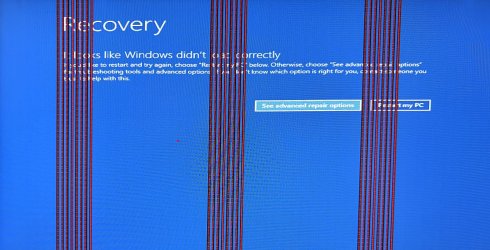
The attached image is quite small. It is also partially obscured by the lines inserted by the boot process. I gave up trying to increase its size.

The error message reads "Looks like Windows didn't load correctly."

The colored vertical stripes appear early in the boot process. They come and go several times. The color varies over the process.

The monitor has been replaced with a 24" HP monitor, HP - 24f 23.8" IPS LED FHD FreeSync Monitor - Natural Silver, Model: 24F, SKU: 6317590.

The System Spec is otherwise up-to-date.

I'm at a loss to explain what part of the system is interfering with the boot process.

I'd much appreciate the help of a Guru in deciding what is preventing its booting.

Thanks
baumgrenze
 

Attachments
  • 2216_iP15_GamePC_2008_BootProblem_IncrSize_112525.jpg
    2216_iP15_GamePC_2008_BootProblem_IncrSize_112525.jpg
    499.9 KB · Views: 3

My Computer

Computer type
PC/Desktop
Computer Manufacturer/Model Number
Custom built by GamePC/Solid Electric - Palo Alto - on 03/10/08
OS
Win 7 Pro 64
CPU
Intel Core 2 Quad Q6600 (2.4 GHz) Quad Core
Motherboard
Gigabyte GA-P35-DS3P Intel P35 ATX (rev. 2.1)
Memory
2 x Crucial 4GB Kit (2GBx2) DDR2 CT2KIT25664AA800
Graphics Card(s)
Sapphire Radeon HD 3870 PCIe 512 Mb
Sound Card
RealTek audio on MOBO + EDIROL UA-1EX
Monitor(s) Displays
Samsung S24A450BW 24" LED monitor
Screen Resolution
1600 x 1200 at 75 Hz
Hard Drives
2 Crucial 128 Gb SSD (CT128M550SSD1)
one mounted and running Win7/Pro x64
one disconnected containing only Win10/Pro upgrade - in process
1 1TB WD Caviar Black (WD1003FZEX-00MK2A0) (Data drive)
1 2TB Seagate 2TB (PN/ 9JB1N3-576 - ST2000DM001-1ER
PSU
Seasonic S12-HT 650W 80% Efficiency Power Supply
Case
Lian Li PC-B25B
Cooling
Gigabyte Silent-Pipe
Keyboard
Dell MS Comfort
Mouse
HP x4000 wireless
Internet Speed
Sonic FTTN @ 23 Mbps
Antivirus
Avast
Browser
SeaMonkey
Other Info
BIOS: Award Software International, Inc. F6 06/18/2009

System Specs - Updated on 09//16/19
Sounds like graphics issues.
 

My Computers

System One System Two

Do I Replace the Monitor

This is a 5-year-old HP monitor. Is that what to expect these days as a service life?
In 2 days is Black Friday.
Should I be shopping for a replacement? Should it be an Acer?

thanks
baumgrenze
 

My Computer

Computer type
PC/Desktop
Computer Manufacturer/Model Number
Custom built by GamePC/Solid Electric - Palo Alto - on 03/10/08
OS
Win 7 Pro 64
CPU
Intel Core 2 Quad Q6600 (2.4 GHz) Quad Core
Motherboard
Gigabyte GA-P35-DS3P Intel P35 ATX (rev. 2.1)
Memory
2 x Crucial 4GB Kit (2GBx2) DDR2 CT2KIT25664AA800
Graphics Card(s)
Sapphire Radeon HD 3870 PCIe 512 Mb
Sound Card
RealTek audio on MOBO + EDIROL UA-1EX
Monitor(s) Displays
Samsung S24A450BW 24" LED monitor
Screen Resolution
1600 x 1200 at 75 Hz
Hard Drives
2 Crucial 128 Gb SSD (CT128M550SSD1)
one mounted and running Win7/Pro x64
one disconnected containing only Win10/Pro upgrade - in process
1 1TB WD Caviar Black (WD1003FZEX-00MK2A0) (Data drive)
1 2TB Seagate 2TB (PN/ 9JB1N3-576 - ST2000DM001-1ER
PSU
Seasonic S12-HT 650W 80% Efficiency Power Supply
Case
Lian Li PC-B25B
Cooling
Gigabyte Silent-Pipe
Keyboard
Dell MS Comfort
Mouse
HP x4000 wireless
Internet Speed
Sonic FTTN @ 23 Mbps
Antivirus
Avast
Browser
SeaMonkey
Other Info
BIOS: Award Software International, Inc. F6 06/18/2009

System Specs - Updated on 09//16/19
No more likely your graphics card however you can try a known good monitor. You might also try a different cable but likely your graphics card is going out.
 

My Computers

System One System Two

Thank You

Many thanks, townsbg.
I now understand why you suggested the graphics card may be the culprit.
I don't need a game capable graphics card.
The CPU is:
[FONT=&quot]Intel Core 2 Quad Q6600 (2.4 GHz)
Am I correct in concluding that it has all the graphics capability I need?
Does it make sense to simply remove the [/FONT]
Sapphire Radeon HD 3870 PCIe 512 Mb? Might this allow the system to boot?

thanks
baumgrenze
 

My Computer

Computer type
PC/Desktop
Computer Manufacturer/Model Number
Custom built by GamePC/Solid Electric - Palo Alto - on 03/10/08
OS
Win 7 Pro 64
CPU
Intel Core 2 Quad Q6600 (2.4 GHz) Quad Core
Motherboard
Gigabyte GA-P35-DS3P Intel P35 ATX (rev. 2.1)
Memory
2 x Crucial 4GB Kit (2GBx2) DDR2 CT2KIT25664AA800
Graphics Card(s)
Sapphire Radeon HD 3870 PCIe 512 Mb
Sound Card
RealTek audio on MOBO + EDIROL UA-1EX
Monitor(s) Displays
Samsung S24A450BW 24" LED monitor
Screen Resolution
1600 x 1200 at 75 Hz
Hard Drives
2 Crucial 128 Gb SSD (CT128M550SSD1)
one mounted and running Win7/Pro x64
one disconnected containing only Win10/Pro upgrade - in process
1 1TB WD Caviar Black (WD1003FZEX-00MK2A0) (Data drive)
1 2TB Seagate 2TB (PN/ 9JB1N3-576 - ST2000DM001-1ER
PSU
Seasonic S12-HT 650W 80% Efficiency Power Supply
Case
Lian Li PC-B25B
Cooling
Gigabyte Silent-Pipe
Keyboard
Dell MS Comfort
Mouse
HP x4000 wireless
Internet Speed
Sonic FTTN @ 23 Mbps
Antivirus
Avast
Browser
SeaMonkey
Other Info
BIOS: Award Software International, Inc. F6 06/18/2009

System Specs - Updated on 09//16/19
Later intel cpu do have gpu builtin but the wikipedia page for that line of processors doesn't specify. I found the link for your listed motherboard and it doesn't specify integrated graphics. Access Denied As far as I can tell you'll have to buy a new card and I don't know enough about current tech to know which one is the latest compatible with Windows 7.
 

My Computers

System One System Two

Purchased NVIDIA GeForce GT 730 Made By Gigabyte

Hello [FONT=&quot]townsbg,

The video card I now have installed is a GIGABYTE GeForce 2GB 74-bit DDR3, GV-N730D3-GI REV3.0 Graphics Card.

My monitor is a HP 24f 23.8" LED 1980 x 1080 pixel. It is connected to the desktop via a HDMI. Does Win7 interpret HDMI? I was using a jerry rigged system to use VGA, the other option on the monitor. One of the adapters refused to plug into the graphics card so I used the HDMI cable I already owned. Is my only choice VGA with Win7? That is what Control Panel>>Display>Screen Resolution seems to want to tell me. It says that it is seeing a Non-PnP Monitor on a Standard VGA Graphics Adapter.

I purchased this desktop from GamePC in Palo Alto, CA in 2008. It is no longer connected to the internet. I am writing this on my more recent GamePC made in 2019.

The video card came with a DVD to update the drivers. I now realize that they were not on the DVD but that I was expected to download them from the web. This appears to be a Catch-22. Can I download the drivers on my 2019 machine and transfer them with a flashcard to the 2008?

Thanks,
baumgrenze


[/FONT]
 

My Computer

Computer type
PC/Desktop
Computer Manufacturer/Model Number
Custom built by GamePC/Solid Electric - Palo Alto - on 03/10/08
OS
Win 7 Pro 64
CPU
Intel Core 2 Quad Q6600 (2.4 GHz) Quad Core
Motherboard
Gigabyte GA-P35-DS3P Intel P35 ATX (rev. 2.1)
Memory
2 x Crucial 4GB Kit (2GBx2) DDR2 CT2KIT25664AA800
Graphics Card(s)
Sapphire Radeon HD 3870 PCIe 512 Mb
Sound Card
RealTek audio on MOBO + EDIROL UA-1EX
Monitor(s) Displays
Samsung S24A450BW 24" LED monitor
Screen Resolution
1600 x 1200 at 75 Hz
Hard Drives
2 Crucial 128 Gb SSD (CT128M550SSD1)
one mounted and running Win7/Pro x64
one disconnected containing only Win10/Pro upgrade - in process
1 1TB WD Caviar Black (WD1003FZEX-00MK2A0) (Data drive)
1 2TB Seagate 2TB (PN/ 9JB1N3-576 - ST2000DM001-1ER
PSU
Seasonic S12-HT 650W 80% Efficiency Power Supply
Case
Lian Li PC-B25B
Cooling
Gigabyte Silent-Pipe
Keyboard
Dell MS Comfort
Mouse
HP x4000 wireless
Internet Speed
Sonic FTTN @ 23 Mbps
Antivirus
Avast
Browser
SeaMonkey
Other Info
BIOS: Award Software International, Inc. F6 06/18/2009

System Specs - Updated on 09//16/19
Windows 7 doesn't care if it's hdmi, vga, dvi, or display port as long as the monitor and card both support it. You should have no problems with hdmi and no problems downloading the drivers from the internet and using a usb drive to get them to your computer.
 

My Computers

System One System Two

Driver Location

I have the driver on a thumb drive.
Common sense tells me I need to specify a location on the 2008 machine to send the driver. Probably on the C: drive.
Am I correct?
thanks
baumgrenze
 

My Computer

Computer type
PC/Desktop
Computer Manufacturer/Model Number
Custom built by GamePC/Solid Electric - Palo Alto - on 03/10/08
OS
Win 7 Pro 64
CPU
Intel Core 2 Quad Q6600 (2.4 GHz) Quad Core
Motherboard
Gigabyte GA-P35-DS3P Intel P35 ATX (rev. 2.1)
Memory
2 x Crucial 4GB Kit (2GBx2) DDR2 CT2KIT25664AA800
Graphics Card(s)
Sapphire Radeon HD 3870 PCIe 512 Mb
Sound Card
RealTek audio on MOBO + EDIROL UA-1EX
Monitor(s) Displays
Samsung S24A450BW 24" LED monitor
Screen Resolution
1600 x 1200 at 75 Hz
Hard Drives
2 Crucial 128 Gb SSD (CT128M550SSD1)
one mounted and running Win7/Pro x64
one disconnected containing only Win10/Pro upgrade - in process
1 1TB WD Caviar Black (WD1003FZEX-00MK2A0) (Data drive)
1 2TB Seagate 2TB (PN/ 9JB1N3-576 - ST2000DM001-1ER
PSU
Seasonic S12-HT 650W 80% Efficiency Power Supply
Case
Lian Li PC-B25B
Cooling
Gigabyte Silent-Pipe
Keyboard
Dell MS Comfort
Mouse
HP x4000 wireless
Internet Speed
Sonic FTTN @ 23 Mbps
Antivirus
Avast
Browser
SeaMonkey
Other Info
BIOS: Award Software International, Inc. F6 06/18/2009

System Specs - Updated on 09//16/19
It's probably a exe file. If that's the case it'll automatically place the drivers in the correct location. Just place the installer wherever you want or leave it on the usb drive. Double click on it and follow all the prompts. Reboot when it says to. Done.
 

My Computers

System One System Two

Back
Top