BSOD after replacing heatsink

LamerGamer

New member
Local time
3:39 PM
Messages
4
Hello,

I was using a stock heatsink in my computer before, and was receiving strange readings of a CPU at 113 degrees Celsius, so I opened it up, installed a better heatsink, and still got the same results. I learned that Speccy is just defaulting to that temperature because it can't read it.

So I decided to keep the heatsink anyway, seeing as it could do nothing but help my computer, but ever since, I've gotten sporadic blue screens. I've only encountered it doing them twice, but I know of two other accounts where it happened while I was away from my computer. Both times I witnessed it, it happened once, rebooted, and then again a few minutes later. After the second BSOD, it would work perfectly fine for a while.

I don't think it's a heating issue as it happened either while gaming, or while idle on the desktop. I'm thinking it may be something with the voltage, seeing as how this is a much bigger heatsink than my previous one. I've gone ahead and attached the logs to this thread, hopefully someone can make heads or tails of it, and give me a confirmation as to what the problem is, as I'd like to avoid opening it in case of further possible damaging.

Thank you.
 

My Computer

Computer type
PC/Desktop
Computer Manufacturer/Model Number
Custom Built
OS
Windows 7 Ultimate x64
CPU
Intel i5 4670K @3.4GHz
Motherboard
ASUSTeK Z87-K (Socket 1150)
Memory
16 GB DDR3 667MHz (9-9-9-24)
Graphics Card(s)
NVIDIA GeForce GTX 770 2GB
Screen Resolution
1920x1080
Hard Drives
Seagate ST2000DM001-1CH164 ATA
111GB SSD2SC120GD1DH16T-T ATA
PSU
750W
Case
Cooler Master HAF 912
Keyboard
Corsair K95
Mouse
UtechSmart Venus
Internet Speed
AT&T Uverse 18 mbps
Antivirus
Avast
Browser
Opera
Have you applied thermal paste before re-seating the heatsink?


The latest crash dump included in the zip is of January, so it should not reflect the present issue.

Report us the situation after re-applying the thermal paste.
 

My Computer

Computer type
PC/Desktop
Computer Manufacturer/Model Number
Self Assembled
OS
Microsoft Windows 10 Pro Insider Preview 64-bit
CPU
Intel(R) Core(TM) i3-4130 CPU @ 3.40GHz
Motherboard
Gigabyte Technology Co., Ltd. B85M-D3H
Memory
Corsair Vengence 4GB x2 (8.00GB Dual-Channel DDR3 @ 798MHz)
Graphics Card(s)
2047MB GeForce GTS 450 (ZOTAC International)
Sound Card
Onboard (Realtek High Definition Audio)
Monitor(s) Displays
LG Flatron E2040T
Screen Resolution
1600x900
Hard Drives
Western Digital 1 TB
Seagate 500 GB
PSU
Corsair VS550
Case
Cooler Master K380
Cooling
Cooler Master Seidon 120V Plus
Keyboard
Logitech MK260r
Mouse
Logitech MK260r
Internet Speed
PMPL Broadband
Antivirus
Windows Defender + MBAM
Browser
Firefox
Other Info
Dell Studio 15" Laptop
I had applied thermal paste during the initial installation. It should be fine.
 

My Computer

Computer type
PC/Desktop
Computer Manufacturer/Model Number
Custom Built
OS
Windows 7 Ultimate x64
CPU
Intel i5 4670K @3.4GHz
Motherboard
ASUSTeK Z87-K (Socket 1150)
Memory
16 GB DDR3 667MHz (9-9-9-24)
Graphics Card(s)
NVIDIA GeForce GTX 770 2GB
Screen Resolution
1920x1080
Hard Drives
Seagate ST2000DM001-1CH164 ATA
111GB SSD2SC120GD1DH16T-T ATA
PSU
750W
Case
Cooler Master HAF 912
Keyboard
Corsair K95
Mouse
UtechSmart Venus
Internet Speed
AT&T Uverse 18 mbps
Antivirus
Avast
Browser
Opera
Ah .. OK!

As it was said earlier, the crash dumps in the zip is months old, so not representing the current issue. If the computer BSODs again, let us see a camera snap of the BSOD screen?

We need to know the bugcheck code at least.

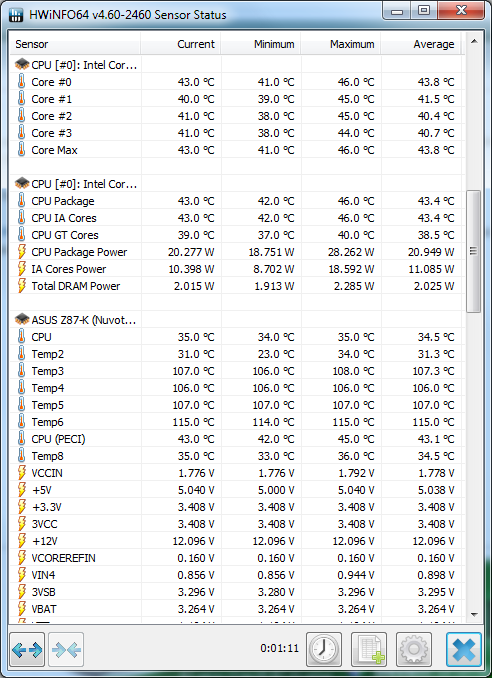
Also, try HWiNFO and report the temps using it. Download and install it, run it as sensors only, scroll down to CPU temps, take a screenshot of the HWiNFO window and upload it here.
 

My Computer

Computer type
PC/Desktop
Computer Manufacturer/Model Number
Self Assembled
OS
Microsoft Windows 10 Pro Insider Preview 64-bit
CPU
Intel(R) Core(TM) i3-4130 CPU @ 3.40GHz
Motherboard
Gigabyte Technology Co., Ltd. B85M-D3H
Memory
Corsair Vengence 4GB x2 (8.00GB Dual-Channel DDR3 @ 798MHz)
Graphics Card(s)
2047MB GeForce GTS 450 (ZOTAC International)
Sound Card
Onboard (Realtek High Definition Audio)
Monitor(s) Displays
LG Flatron E2040T
Screen Resolution
1600x900
Hard Drives
Western Digital 1 TB
Seagate 500 GB
PSU
Corsair VS550
Case
Cooler Master K380
Cooling
Cooler Master Seidon 120V Plus
Keyboard
Logitech MK260r
Mouse
Logitech MK260r
Internet Speed
PMPL Broadband
Antivirus
Windows Defender + MBAM
Browser
Firefox
Other Info
Dell Studio 15" Laptop

My Computer

Computer type
PC/Desktop
Computer Manufacturer/Model Number
Home made Desktop
OS
Windows 10 Pro. 64/ version 1709 Windows 7 Pro/64
CPU
Intel i7-6800K @ 4.3
Motherboard
ASUS X-99 Deluxe II
Memory
Corsair Platinum 16 gig @2400
Graphics Card(s)
EVGA GTX 1070 OC
Monitor(s) Displays
Asus 27" LED LCD/VE278Q
Screen Resolution
1920-1080 or 1280-720 HDMI
Hard Drives
INTEL SSD 730-240 Gb Sata 3.0/
PSU
EVGA Platium 1200W
Case
Phanteks Luxe Tempered Glass 8 fans/ one radiator
Cooling
XSPC/ Water Cooled CPU
Keyboard
Das 4 Professional
Mouse
Logitech M705/MX Anywhere 2-S
Internet Speed
100 mbits
Antivirus
Microsoft Security Essentials/ Malwarebytes Premium 3.0/ SAS
Browser
I.E. 11 default/Firefox/ ISP Time Warner Cable/Spectrum
Other Info
LG BluRay Burner/
Sound system-KLipsch-THX/
Icy Dock ssd Hot Swap bays.
Ah .. OK!

As it was said earlier, the crash dumps in the zip is months old, so not representing the current issue. If the computer BSODs again, let us see a camera snap of the BSOD screen?

We need to know the bugcheck code at least.

Also, try HWiNFO and report the temps using it. Download and install it, run it as sensors only, scroll down to CPU temps, take a screenshot of the HWiNFO window and upload it here.

Apologies. I collected the dump info with the forum tools, but I guess it's not registering the info for these BSOD's. I've attempted to take a picture of the screen many times, however the screen only lasts for, at most, a couple seconds, before it automatically shuts down. If there's a way to prevent automatic shutdown on a BSOD, I'll be happy to take a picture at the next opportunity.

As for the HWiNFO, here's the CPU temperatures listed.

72klCCW.png


Install thermal compound incorrectly can also cause heating problems.

Here is some good information.

http://www.arcticsilver.com/pdf/appmeth/int/vl/intel_app_method_vertical_line_v1.1.pdf


What is the new cpu cooler?

The new heatsink is a Hyper TX3, applied with Arctic Silver 5 thermal paste. My previous one was an Intel e97378-001.

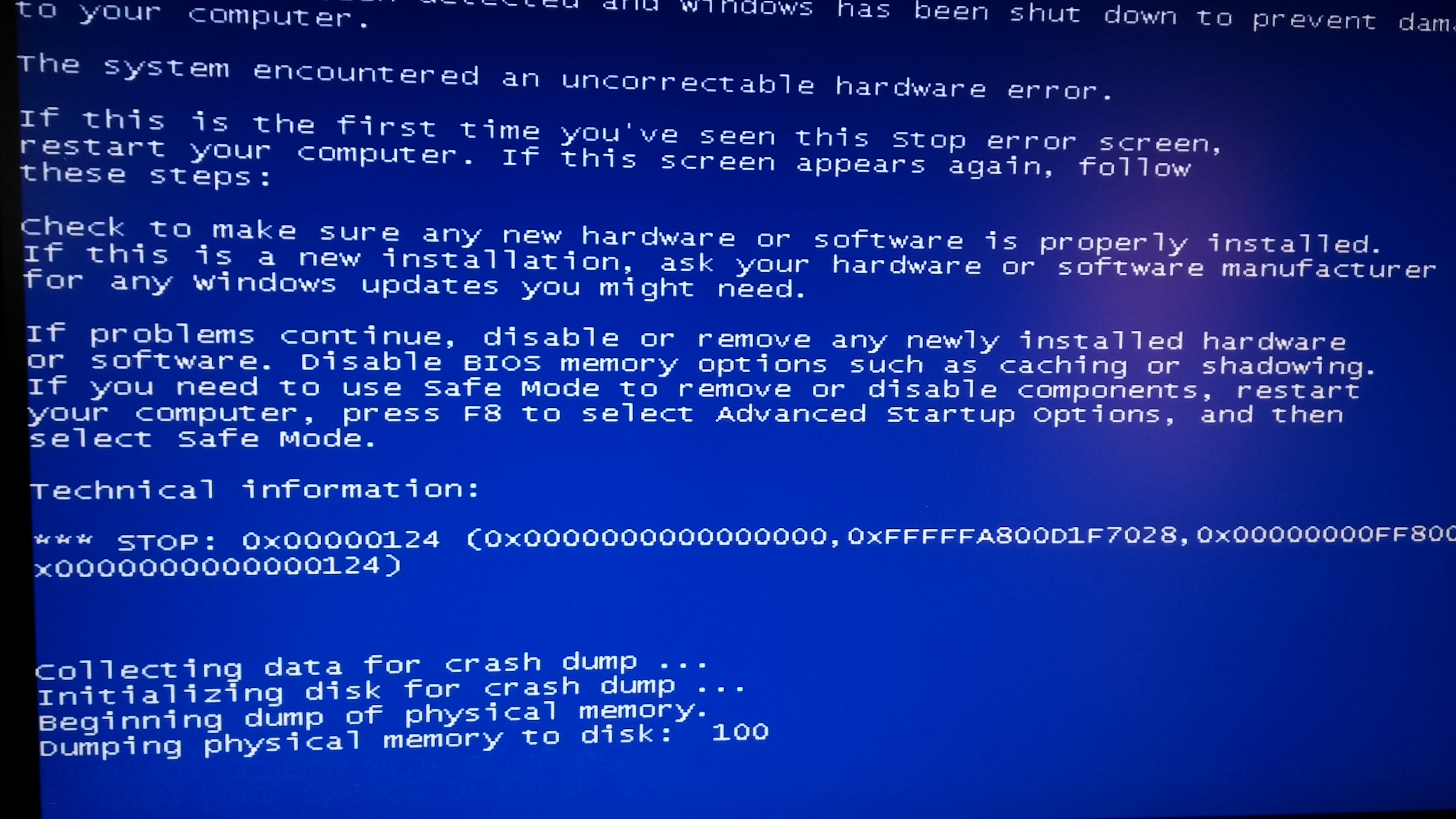
EDIT: I finally managed to snap a picture of the error at the last possible second before it had rebooted. It's blue screened three times in a row, and may even do so again soon. Here is the error.

0TbeSnc.jpg


Apologies it's not the full error, but I'm lucky I got it at all.
 
Last edited:

My Computer

Computer type
PC/Desktop
Computer Manufacturer/Model Number
Custom Built
OS
Windows 7 Ultimate x64
CPU
Intel i5 4670K @3.4GHz
Motherboard
ASUSTeK Z87-K (Socket 1150)
Memory
16 GB DDR3 667MHz (9-9-9-24)
Graphics Card(s)
NVIDIA GeForce GTX 770 2GB
Screen Resolution
1920x1080
Hard Drives
Seagate ST2000DM001-1CH164 ATA
111GB SSD2SC120GD1DH16T-T ATA
PSU
750W
Case
Cooler Master HAF 912
Keyboard
Corsair K95
Mouse
UtechSmart Venus
Internet Speed
AT&T Uverse 18 mbps
Antivirus
Avast
Browser
Opera
Apologies are not needed. You supplied the data at your best .... it is not any of your fault if the data is incomplete itself.

So there is no doubt that the system is burning.
Layback Bear is subscribed to your thread, ha knows the hardware to the depth and I will request him to comment on the temps.

The BSOD is stop 0x124, which is unavoidable in this situation. Those temps must cause a stop 0x124.

Let us hope that we will be able to cool th system down with Layback Bear's guidance. That is the first and foremost at this moment IMHO.
 

My Computer

Computer type
PC/Desktop
Computer Manufacturer/Model Number
Self Assembled
OS
Microsoft Windows 10 Pro Insider Preview 64-bit
CPU
Intel(R) Core(TM) i3-4130 CPU @ 3.40GHz
Motherboard
Gigabyte Technology Co., Ltd. B85M-D3H
Memory
Corsair Vengence 4GB x2 (8.00GB Dual-Channel DDR3 @ 798MHz)
Graphics Card(s)
2047MB GeForce GTS 450 (ZOTAC International)
Sound Card
Onboard (Realtek High Definition Audio)
Monitor(s) Displays
LG Flatron E2040T
Screen Resolution
1600x900
Hard Drives
Western Digital 1 TB
Seagate 500 GB
PSU
Corsair VS550
Case
Cooler Master K380
Cooling
Cooler Master Seidon 120V Plus
Keyboard
Logitech MK260r
Mouse
Logitech MK260r
Internet Speed
PMPL Broadband
Antivirus
Windows Defender + MBAM
Browser
Firefox
Other Info
Dell Studio 15" Laptop
Thank you for the assistance, Arc. I'll checkback to the thread as often as I can, and rep you as well should he provide the proper assistance!
 

My Computer

Computer type
PC/Desktop
Computer Manufacturer/Model Number
Custom Built
OS
Windows 7 Ultimate x64
CPU
Intel i5 4670K @3.4GHz
Motherboard
ASUSTeK Z87-K (Socket 1150)
Memory
16 GB DDR3 667MHz (9-9-9-24)
Graphics Card(s)
NVIDIA GeForce GTX 770 2GB
Screen Resolution
1920x1080
Hard Drives
Seagate ST2000DM001-1CH164 ATA
111GB SSD2SC120GD1DH16T-T ATA
PSU
750W
Case
Cooler Master HAF 912
Keyboard
Corsair K95
Mouse
UtechSmart Venus
Internet Speed
AT&T Uverse 18 mbps
Antivirus
Avast
Browser
Opera
Back
Top