BSOD and help with windows memory diagnostics

rezelute

New member
Member
Local time
11:04 AM
Messages
78
Hi,
I have recently been having random blue screens of death and i downloaded the Windows memory diagnostic tool, ran the diagnostics tool (http://oca.microsoft.com/en/windiag.aspbhttp://oca.microsoft.com/en/windiag.asp) and a few things happened:
1- It threw up a message before the scan saying then memory map could not work with 4gb or something like that (i only have 4gb installed on my system) however it gave me the option to continue with the scan anyways.
First question, is this normal?
2- I continued with the scan and left it overnight for 8 hours, the first half hour i watched what was going on and it kept flagging FAILED messages on every single pass, there wasnt a single SUCCEEDED message which seemed extremely bizarre. I woke up in the morning and the scan was still going on past 64 passes.
Second question: Surely if my pc works most of the time then something would have passed and not just flagged everything as FAILED?!
Third question: How many passes does windows go through, i left the pc on over 8 hours and from what i read the memory scan should only take a few hours...

Thanks for help :)
 

My Computer

OS
Windows 7 64-bit
CPU
Core 2 Duo OC 4GHZ
Motherboard
Asus P5Q SE Plus
Memory
4MB DDR2
Graphics Card(s)
GTX 460
Sound Card
Xonar D1
Monitor(s) Displays
LG 42 inch
Screen Resolution
1980x1020

My Computer

Computer type
PC/Desktop
Computer Manufacturer/Model Number
Custom Built
OS
Windows 10 Pro x64, Windows 8.1 Pro x64, Windows 7 Ultimate x64 SP1,
CPU
INTEL i9-7920X LGA 2066
Motherboard
Gigabyte X299-WU8 F3
Memory
64 GB (4 X 16 GB) G-Skill V Series DDR4 3200 Quad Channel
Graphics Card(s)
EVGA GTX 1060 SC 3 GB
Sound Card
Realtek Onboard ALC1220
Monitor(s) Displays
2 x Samsung S27E310
Screen Resolution
1920x1080
Hard Drives
Samsung 2 x 970 EVO Plus 500 GB NVMe
1 x 6TB WD 6003FZBX SATA
1 x 6TB WD 60EFRX SATA
12 x 3TB WD 30EFRX SATA
PSU
Seasonic X-1050
Case
Thermaltake Armor+
Cooling
Corsair H80i V2 Liquid AOI Cooler
Keyboard
Logitech G510s
Mouse
Logitech MX Master 2S
Internet Speed
200 Mb/s
Antivirus
ESET NOD32 13.1
Browser
EDGE (Dev, Canary, Beta), Chrome
Other Info
ASUS RT-AC68U router
Malwarebytes 4.0.4
Thanks pbcopter, i will download the application and test tonight with full memory sticks in first to see if i get any errors at all, if i do i will remove sticks and test each one individually then post back if necessary.
 

My Computer

OS
Windows 7 64-bit
CPU
Core 2 Duo OC 4GHZ
Motherboard
Asus P5Q SE Plus
Memory
4MB DDR2
Graphics Card(s)
GTX 460
Sound Card
Xonar D1
Monitor(s) Displays
LG 42 inch
Screen Resolution
1980x1020
I use the same test. It can be pretty long testing process. Basically you have to test the ram sticks and the dimm slots. The ram can show errors and the problem is the dimm slot and not the ram. here is a tutorial on memtest86. hope it helps
 

My Computers

System One System Two

  • Computer type
    PC/Desktop
    Computer Manufacturer/Model Number
    ALWAYS UNDER CONSTRUCTION
    OS
    Windows 11 Pro
    CPU
    Ryzen 9 5900X
    Motherboard
    Asus X570 Crosshair Viii Hero
    Memory
    32GB G Skill DDR4-3600
    Graphics Card(s)
    EVGA RTX 3080 FTW 3 Ultra
    Sound Card
    On Board/Sennheiser PC37X Headset
    Monitor(s) Displays
    3 X Asus 27"
    Screen Resolution
    2560x1440
    Hard Drives
    2 X 1 TB NVME drives
    PSU
    EVGA 850
    Case
    Phanteks Eclipse P400A
    Cooling
    EVGA 280 AIO
    Keyboard
    Logitech G510s/ Logitech G13
    Mouse
    Logitech G502
    Internet Speed
    24/1
    Antivirus
    ESET/MBAM Pro/SAS Pro
    Browser
    Chrome/ Firefox/ Edge
  • Computer type
    Laptop
    System Manufacturer/Model Number
    Dell 16 Plus
    OS
    Windows 11 Pro
    CPU
    Intel Ultra 9 288V
    Memory
    32 GB LPDDR5X 8533
    Monitor(s) Displays
    16" Mini-LED HDR600 Touch 90 Hz
    Screen Resolution
    2560X1600
    Hard Drives
    1 TB NVME
Thank you i will follow those steps :)
 

My Computer

OS
Windows 7 64-bit
CPU
Core 2 Duo OC 4GHZ
Motherboard
Asus P5Q SE Plus
Memory
4MB DDR2
Graphics Card(s)
GTX 460
Sound Card
Xonar D1
Monitor(s) Displays
LG 42 inch
Screen Resolution
1980x1020
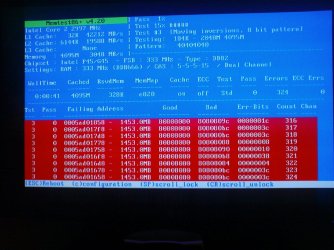
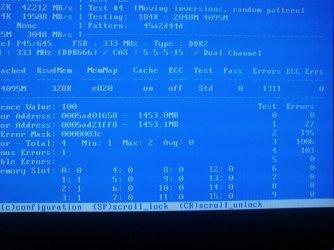
Hi i have attached 2 screenshots of the memory scan while it is still in pass 0, can i assume from the screenshots immediately that something is very wrong with 1311 (and counting lol) errors and that i need to test each one individually now?
 

Attachments

  • DSC04650.JPG
    DSC04650.JPG
    174.6 KB · Views: 97
  • DSC04651.JPG
    DSC04651.JPG
    127.1 KB · Views: 53

My Computer

OS
Windows 7 64-bit
CPU
Core 2 Duo OC 4GHZ
Motherboard
Asus P5Q SE Plus
Memory
4MB DDR2
Graphics Card(s)
GTX 460
Sound Card
Xonar D1
Monitor(s) Displays
LG 42 inch
Screen Resolution
1980x1020
You can do it that way until you find out which stick is creating the errors. Make sure you remember which stick was in which slot. When you find the stick that causes errors, run a known good stick in the slot where the bad stick was. Then run the bad stick in a slot where a good stick was. If the bad stick shows errors no matter which slot it is in, you know the ram is bad. If a known good stick shows errors in the slot that the bad stick was in, it suggests the dimm slot is bad. When you think you have determined the answer run the test with good sticks in for at least 7-8 passes, to make sure they are good. If they all pass, either replace the bad stick with the exact kind or you can replace all sticks. What you are doing is testing the ram and the slo
 

My Computers

System One System Two

  • Computer type
    PC/Desktop
    Computer Manufacturer/Model Number
    ALWAYS UNDER CONSTRUCTION
    OS
    Windows 11 Pro
    CPU
    Ryzen 9 5900X
    Motherboard
    Asus X570 Crosshair Viii Hero
    Memory
    32GB G Skill DDR4-3600
    Graphics Card(s)
    EVGA RTX 3080 FTW 3 Ultra
    Sound Card
    On Board/Sennheiser PC37X Headset
    Monitor(s) Displays
    3 X Asus 27"
    Screen Resolution
    2560x1440
    Hard Drives
    2 X 1 TB NVME drives
    PSU
    EVGA 850
    Case
    Phanteks Eclipse P400A
    Cooling
    EVGA 280 AIO
    Keyboard
    Logitech G510s/ Logitech G13
    Mouse
    Logitech G502
    Internet Speed
    24/1
    Antivirus
    ESET/MBAM Pro/SAS Pro
    Browser
    Chrome/ Firefox/ Edge
  • Computer type
    Laptop
    System Manufacturer/Model Number
    Dell 16 Plus
    OS
    Windows 11 Pro
    CPU
    Intel Ultra 9 288V
    Memory
    32 GB LPDDR5X 8533
    Monitor(s) Displays
    16" Mini-LED HDR600 Touch 90 Hz
    Screen Resolution
    2560X1600
    Hard Drives
    1 TB NVME
Cheers for reconfirming what i read in the post, i will get busy now and get back :p. I feel sorry for anyone who has to test memory for a living lol, such a pain.
 

My Computer

OS
Windows 7 64-bit
CPU
Core 2 Duo OC 4GHZ
Motherboard
Asus P5Q SE Plus
Memory
4MB DDR2
Graphics Card(s)
GTX 460
Sound Card
Xonar D1
Monitor(s) Displays
LG 42 inch
Screen Resolution
1980x1020
You are lucky it found the errors in the first pass. I had problems and had to run it for 8 passes doing 12 tests. Times vary on the computer and how much ram is installed. With my computer it was about 8-10 hours each test. And, until you have run what you think is good ram at least 8 passes without errors, you don't know for sure that those are good sticks. Many run it for 24 hours.

1 bad stick of ram can cause a multitude of problems.
 

My Computers

System One System Two

  • Computer type
    PC/Desktop
    Computer Manufacturer/Model Number
    ALWAYS UNDER CONSTRUCTION
    OS
    Windows 11 Pro
    CPU
    Ryzen 9 5900X
    Motherboard
    Asus X570 Crosshair Viii Hero
    Memory
    32GB G Skill DDR4-3600
    Graphics Card(s)
    EVGA RTX 3080 FTW 3 Ultra
    Sound Card
    On Board/Sennheiser PC37X Headset
    Monitor(s) Displays
    3 X Asus 27"
    Screen Resolution
    2560x1440
    Hard Drives
    2 X 1 TB NVME drives
    PSU
    EVGA 850
    Case
    Phanteks Eclipse P400A
    Cooling
    EVGA 280 AIO
    Keyboard
    Logitech G510s/ Logitech G13
    Mouse
    Logitech G502
    Internet Speed
    24/1
    Antivirus
    ESET/MBAM Pro/SAS Pro
    Browser
    Chrome/ Firefox/ Edge
  • Computer type
    Laptop
    System Manufacturer/Model Number
    Dell 16 Plus
    OS
    Windows 11 Pro
    CPU
    Intel Ultra 9 288V
    Memory
    32 GB LPDDR5X 8533
    Monitor(s) Displays
    16" Mini-LED HDR600 Touch 90 Hz
    Screen Resolution
    2560X1600
    Hard Drives
    1 TB NVME
lol thats some demotivation right there, i find it ironic with all the technology we have now, something as simple as memory in PCs is still such a pain to debug and hasnt really changed much over the years.
 

My Computer

OS
Windows 7 64-bit
CPU
Core 2 Duo OC 4GHZ
Motherboard
Asus P5Q SE Plus
Memory
4MB DDR2
Graphics Card(s)
GTX 460
Sound Card
Xonar D1
Monitor(s) Displays
LG 42 inch
Screen Resolution
1980x1020
lol thats some demotivation right there, i find it ironic with all the technology we have now, something as simple as memory in PCs is still such a pain to debug and hasnt really changed much over the years.

I agree with that. Seems like somebody would. I suspect that people who do this for a living have some very sophisticated equipment that is much faster and easier. It takes a lot of patience for us to do it right, but in the end, it's the only way I know of to be certain that whatever problems you have are not ram related.
 

My Computers

System One System Two

  • Computer type
    PC/Desktop
    Computer Manufacturer/Model Number
    ALWAYS UNDER CONSTRUCTION
    OS
    Windows 11 Pro
    CPU
    Ryzen 9 5900X
    Motherboard
    Asus X570 Crosshair Viii Hero
    Memory
    32GB G Skill DDR4-3600
    Graphics Card(s)
    EVGA RTX 3080 FTW 3 Ultra
    Sound Card
    On Board/Sennheiser PC37X Headset
    Monitor(s) Displays
    3 X Asus 27"
    Screen Resolution
    2560x1440
    Hard Drives
    2 X 1 TB NVME drives
    PSU
    EVGA 850
    Case
    Phanteks Eclipse P400A
    Cooling
    EVGA 280 AIO
    Keyboard
    Logitech G510s/ Logitech G13
    Mouse
    Logitech G502
    Internet Speed
    24/1
    Antivirus
    ESET/MBAM Pro/SAS Pro
    Browser
    Chrome/ Firefox/ Edge
  • Computer type
    Laptop
    System Manufacturer/Model Number
    Dell 16 Plus
    OS
    Windows 11 Pro
    CPU
    Intel Ultra 9 288V
    Memory
    32 GB LPDDR5X 8533
    Monitor(s) Displays
    16" Mini-LED HDR600 Touch 90 Hz
    Screen Resolution
    2560X1600
    Hard Drives
    1 TB NVME
Ok here is what i did: Based on the fact that the memory was failing immediately (within a minute) with 4 sticks of memory (1gb each stick) i theorised that whatever stick (if stick) was causing the problem would fail within the minute so i wouldnt have to perform 8 hour checks on each stick. So i tested each stick individually for 1 minute and when it seemed ok i would replace with another. Took 3 tries and finally the faulty stick showed up within minutes.
I will be replacing this stick but i have a couple of questions about memory:
Question 1:
If i got a 2GB stick to replace the 1GB faulty one (so i have 2gb,1gb,1gb,1gb), would windows/applications/games/etc benefit much from the upgrade? Also im aware that matching pairs of memory are best, may 2GB,1GB cause problems/slowness/etc?

Question 2:
I cant remember if my other sticks are 333,800 MHZ etc. If i got a stick which was 800mhz does 800mhz actually get used or do all the sticks get set to a default of 333?
 
Last edited:

My Computer

OS
Windows 7 64-bit
CPU
Core 2 Duo OC 4GHZ
Motherboard
Asus P5Q SE Plus
Memory
4MB DDR2
Graphics Card(s)
GTX 460
Sound Card
Xonar D1
Monitor(s) Displays
LG 42 inch
Screen Resolution
1980x1020
You can run stcks of different frequecy, but, It can cause stability issues and the memory will only run at the frequency of the lowest stick. And while many will tell you that you can and they have done it, and I'm sure they have, you are better off running matched sticks. When I was having trouble, Tech support at G Skill told me that it is difficult to stabalize ram of different sizes (I wanted to run 2X4GB and 2X2GB). I think this is a good time to increase the ram you have installed if you want to.
 

My Computers

System One System Two

  • Computer type
    PC/Desktop
    Computer Manufacturer/Model Number
    ALWAYS UNDER CONSTRUCTION
    OS
    Windows 11 Pro
    CPU
    Ryzen 9 5900X
    Motherboard
    Asus X570 Crosshair Viii Hero
    Memory
    32GB G Skill DDR4-3600
    Graphics Card(s)
    EVGA RTX 3080 FTW 3 Ultra
    Sound Card
    On Board/Sennheiser PC37X Headset
    Monitor(s) Displays
    3 X Asus 27"
    Screen Resolution
    2560x1440
    Hard Drives
    2 X 1 TB NVME drives
    PSU
    EVGA 850
    Case
    Phanteks Eclipse P400A
    Cooling
    EVGA 280 AIO
    Keyboard
    Logitech G510s/ Logitech G13
    Mouse
    Logitech G502
    Internet Speed
    24/1
    Antivirus
    ESET/MBAM Pro/SAS Pro
    Browser
    Chrome/ Firefox/ Edge
  • Computer type
    Laptop
    System Manufacturer/Model Number
    Dell 16 Plus
    OS
    Windows 11 Pro
    CPU
    Intel Ultra 9 288V
    Memory
    32 GB LPDDR5X 8533
    Monitor(s) Displays
    16" Mini-LED HDR600 Touch 90 Hz
    Screen Resolution
    2560X1600
    Hard Drives
    1 TB NVME
Thanks, i called ebuyer to ask them about different types of memory types to get but your opinion would be good too.
Assuming that all match frequencies, I could either buy all new 2x2GB sticks and replace all so they are matching (downside alittle expensive considering im building a new pc december time). Otherwise i could get 2GBx1GBx1GBx1GB. Ebuyer rep said that its probably not worth spending the extra money to buy all new sticks and run in Dual mode but just stick to 2GBx1GBx1GBx1GB even if it ran in single mode it wouldnt make that much of a difference. What do you think is best?
 

My Computer

OS
Windows 7 64-bit
CPU
Core 2 Duo OC 4GHZ
Motherboard
Asus P5Q SE Plus
Memory
4MB DDR2
Graphics Card(s)
GTX 460
Sound Card
Xonar D1
Monitor(s) Displays
LG 42 inch
Screen Resolution
1980x1020
If you are building a new computer soon, I would not spend any more money than necessary. Whatever you buy now, will probably not be compatibke with the new system. Most new systems use DDR3 ram. If it were me, I would try running with 3x1gb sticks in single chanel mode and see how that works. If you are satisfied, I would save the money for the new system. If you are not happy with it, make a decision then.
 

My Computers

System One System Two

  • Computer type
    PC/Desktop
    Computer Manufacturer/Model Number
    ALWAYS UNDER CONSTRUCTION
    OS
    Windows 11 Pro
    CPU
    Ryzen 9 5900X
    Motherboard
    Asus X570 Crosshair Viii Hero
    Memory
    32GB G Skill DDR4-3600
    Graphics Card(s)
    EVGA RTX 3080 FTW 3 Ultra
    Sound Card
    On Board/Sennheiser PC37X Headset
    Monitor(s) Displays
    3 X Asus 27"
    Screen Resolution
    2560x1440
    Hard Drives
    2 X 1 TB NVME drives
    PSU
    EVGA 850
    Case
    Phanteks Eclipse P400A
    Cooling
    EVGA 280 AIO
    Keyboard
    Logitech G510s/ Logitech G13
    Mouse
    Logitech G502
    Internet Speed
    24/1
    Antivirus
    ESET/MBAM Pro/SAS Pro
    Browser
    Chrome/ Firefox/ Edge
  • Computer type
    Laptop
    System Manufacturer/Model Number
    Dell 16 Plus
    OS
    Windows 11 Pro
    CPU
    Intel Ultra 9 288V
    Memory
    32 GB LPDDR5X 8533
    Monitor(s) Displays
    16" Mini-LED HDR600 Touch 90 Hz
    Screen Resolution
    2560X1600
    Hard Drives
    1 TB NVME
Bril that gives me everything im looking for. I appreciate all your help and detailed answers, rep ++ :)
 

My Computer

OS
Windows 7 64-bit
CPU
Core 2 Duo OC 4GHZ
Motherboard
Asus P5Q SE Plus
Memory
4MB DDR2
Graphics Card(s)
GTX 460
Sound Card
Xonar D1
Monitor(s) Displays
LG 42 inch
Screen Resolution
1980x1020
Back
Top