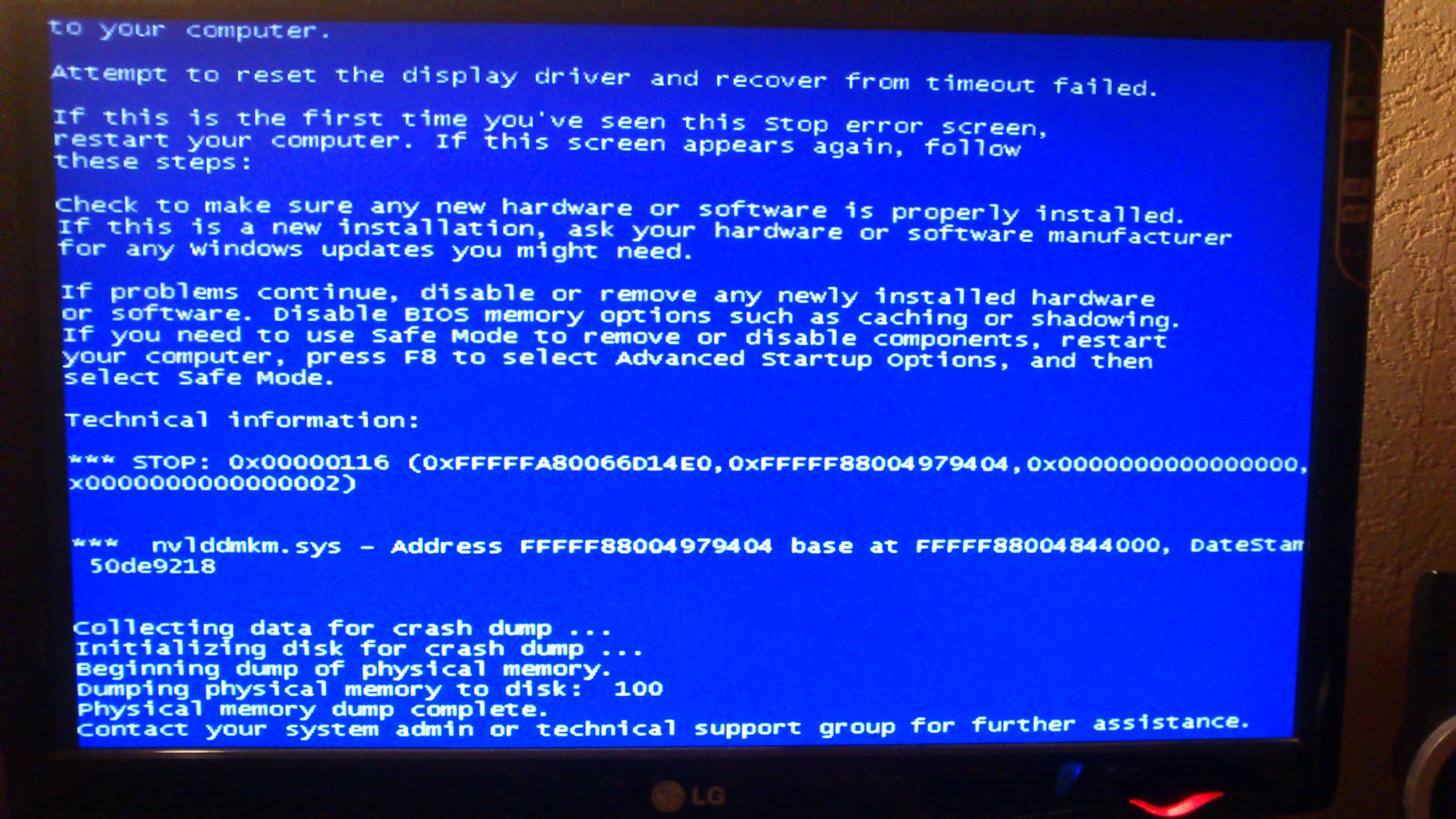
BSOD nvlddmkm.sys Bugcheck code: 0x116

This one. I will have to do this fix and install it
 

My Computer

Computer type
Laptop
Computer Manufacturer/Model Number
Alienware M18xR1
OS
Windows 7 Ultimate x64
CPU
Intel Core i7-2670QM
Motherboard
Alienware M18xR1 Chipset Intel HM67 (Cougar Point) [B3]
Memory
2x 2GB and 2x 4GB all DDR3
Graphics Card(s)
NVIDIA GeForce GTX 675M
Hard Drives
1x Seagate ST1000LM024 HN-M101MBB
Antivirus
BitDefender
Browser
Chrome
Ok you want me to install what ?

I am on custom installation not express

Driver <- cant uncheck that I can uncheck all the others
Nvidia Gefore experience
PhysX system
3D Vision
Sound Hd

which ones to uncheck ? only Nvidia Geforce Experience?

Btw when I tried to change the files my card had a code like this PCI\VEN_10DE&DEV_1212&SUBSYS_048F1028&REV_A1\4&17EB8E33&0&0008
and at the nvidia folder it has 1213 which corresponds to GTX 670m than mine which is 675m
what if my card is not 675m so weird
Just found out I had to mod another text with my card on , just tell me which ones to uncheck
 

My Computer

Computer type
Laptop
Computer Manufacturer/Model Number
Alienware M18xR1
OS
Windows 7 Ultimate x64
CPU
Intel Core i7-2670QM
Motherboard
Alienware M18xR1 Chipset Intel HM67 (Cougar Point) [B3]
Memory
2x 2GB and 2x 4GB all DDR3
Graphics Card(s)
NVIDIA GeForce GTX 675M
Hard Drives
1x Seagate ST1000LM024 HN-M101MBB
Antivirus
BitDefender
Browser
Chrome
Uncheck everything except for PhysX system.
 

My Computer

Computer type
PC/Desktop
Computer Manufacturer/Model Number
Custom build
OS
Windows 10 Pro
CPU
i5-6500
Motherboard
Gigabyte B150-HD3P-CF
Memory
16GB DDR4 2133 Crucial Ballistix Sport LT
Graphics Card(s)
MSI GeForce GTX 1060 GAMING X 6G
Sound Card
Intel Display Audio
Monitor(s) Displays
Liyama ProLite XB2483HSU-B2
Screen Resolution
1920 x 1080
Hard Drives
Crucial MX200 500GB & Toshiba DT01ACA300 3TB
PSU
Corsair RM550x
Case
Fractal Design Define S
Cooling
Cooler Master TX3 i
Keyboard
Func KB-460 (MX Red)
Mouse
Corsair Gaming M65 RGB
Antivirus
Bitdefender Total Security 2016 + MBAM Pro + MBAE Pro
Browser
Google Chrome
Other Info
Creative Sound Blaster Tactic3D Rage V2 headset
A window popped up that the provider is not trusted by windows, I chose as it is and I installed the driver and I am restarting my computer.
Now we wait for the black screen to occur and send you the log? -without lowering the shader clock by the other program?-
 

My Computer

Computer type
Laptop
Computer Manufacturer/Model Number
Alienware M18xR1
OS
Windows 7 Ultimate x64
CPU
Intel Core i7-2670QM
Motherboard
Alienware M18xR1 Chipset Intel HM67 (Cougar Point) [B3]
Memory
2x 2GB and 2x 4GB all DDR3
Graphics Card(s)
NVIDIA GeForce GTX 675M
Hard Drives
1x Seagate ST1000LM024 HN-M101MBB
Antivirus
BitDefender
Browser
Chrome
A black screen is not what we are helping in this section with.

A bluescreen is what we, don't, want.
 

My Computer

Computer type
PC/Desktop
Computer Manufacturer/Model Number
Custom build
OS
Windows 10 Pro
CPU
i5-6500
Motherboard
Gigabyte B150-HD3P-CF
Memory
16GB DDR4 2133 Crucial Ballistix Sport LT
Graphics Card(s)
MSI GeForce GTX 1060 GAMING X 6G
Sound Card
Intel Display Audio
Monitor(s) Displays
Liyama ProLite XB2483HSU-B2
Screen Resolution
1920 x 1080
Hard Drives
Crucial MX200 500GB & Toshiba DT01ACA300 3TB
PSU
Corsair RM550x
Case
Fractal Design Define S
Cooling
Cooler Master TX3 i
Keyboard
Func KB-460 (MX Red)
Mouse
Corsair Gaming M65 RGB
Antivirus
Bitdefender Total Security 2016 + MBAM Pro + MBAE Pro
Browser
Google Chrome
Other Info
Creative Sound Blaster Tactic3D Rage V2 headset
Its a blackscreen and restart (it might be a bluescreen but happens as black screen) what happens is that I get a black screen my pc plays in the background a bit , freezes and restarts by itself then a windows message pops up and says what I ve sent at the start.

http://i45.tinypic.com/3162mid.png

message like that but not with the same codes - used the picture as explanation of what I get after the black/blue screen.
 

My Computer

Computer type
Laptop
Computer Manufacturer/Model Number
Alienware M18xR1
OS
Windows 7 Ultimate x64
CPU
Intel Core i7-2670QM
Motherboard
Alienware M18xR1 Chipset Intel HM67 (Cougar Point) [B3]
Memory
2x 2GB and 2x 4GB all DDR3
Graphics Card(s)
NVIDIA GeForce GTX 675M
Hard Drives
1x Seagate ST1000LM024 HN-M101MBB
Antivirus
BitDefender
Browser
Chrome
Does the message looks like
4441148200_1359562234.jpg
 

My Computer

Computer type
PC/Desktop
Computer Manufacturer/Model Number
Custom build
OS
Windows 10 Pro
CPU
i5-6500
Motherboard
Gigabyte B150-HD3P-CF
Memory
16GB DDR4 2133 Crucial Ballistix Sport LT
Graphics Card(s)
MSI GeForce GTX 1060 GAMING X 6G
Sound Card
Intel Display Audio
Monitor(s) Displays
Liyama ProLite XB2483HSU-B2
Screen Resolution
1920 x 1080
Hard Drives
Crucial MX200 500GB & Toshiba DT01ACA300 3TB
PSU
Corsair RM550x
Case
Fractal Design Define S
Cooling
Cooler Master TX3 i
Keyboard
Func KB-460 (MX Red)
Mouse
Corsair Gaming M65 RGB
Antivirus
Bitdefender Total Security 2016 + MBAM Pro + MBAE Pro
Browser
Google Chrome
Other Info
Creative Sound Blaster Tactic3D Rage V2 headset
No My Screen Turns Black , I can hear the sound or the programms running when it turns black for a short period of time and then the sounds Freeze cuts and the computer restarts and then when it opens again I get the message I sent at the start of the post

On Sat 24/10/2015 10:07:56 πμ GMT your computer crashed
crash dump file: C:\Windows\Minidump\102415-40622-01.dmp
This was probably caused by the following module: nvlddmkm.sys (nvlddmkm+0x833128)
Bugcheck code: 0x116 (0xFFFFFA800FFE9010, 0xFFFFF88005322128, 0xFFFFFFFFC000009A, 0x4)
Error: VIDEO_TDR_ERROR
file path: C:\Windows\system32\drivers\nvlddmkm.sys
product: NVIDIA Windows Kernel Mode Driver, Version 358.50
company: NVIDIA Corporation
description: NVIDIA Windows Kernel Mode Driver, Version 358.50
Bug check description: This indicates that an attempt to reset the display driver and recover from a timeout failed.
A third party driver was identified as the probable root cause of this system error. It is suggested you look for an update for the following driver: nvlddmkm.sys (NVIDIA Windows Kernel Mode Driver, Version 358.50 , NVIDIA Corporation).
Google query: NVIDIA Corporation VIDEO_TDR_ERROR

It is a bluescreen I think but I dont get a bluescreen its black.

 

My Computer

Computer type
Laptop
Computer Manufacturer/Model Number
Alienware M18xR1
OS
Windows 7 Ultimate x64
CPU
Intel Core i7-2670QM
Motherboard
Alienware M18xR1 Chipset Intel HM67 (Cougar Point) [B3]
Memory
2x 2GB and 2x 4GB all DDR3
Graphics Card(s)
NVIDIA GeForce GTX 675M
Hard Drives
1x Seagate ST1000LM024 HN-M101MBB
Antivirus
BitDefender
Browser
Chrome
It happened now , here's what happened. My screen turned black everything kept playing from behind and the laptop didnt restarted so I restarted it manually after I waited for a couple of seconds - first time this happens after I installed the latest driver using DDU.

I recall that happening once, but most of the times it would be like (while playing games). Black Screen Autorestart and the VIDEO TDR windows Message.

Should I move to a Black Screen Specialist? .
 

My Computer

Computer type
Laptop
Computer Manufacturer/Model Number
Alienware M18xR1
OS
Windows 7 Ultimate x64
CPU
Intel Core i7-2670QM
Motherboard
Alienware M18xR1 Chipset Intel HM67 (Cougar Point) [B3]
Memory
2x 2GB and 2x 4GB all DDR3
Graphics Card(s)
NVIDIA GeForce GTX 675M
Hard Drives
1x Seagate ST1000LM024 HN-M101MBB
Antivirus
BitDefender
Browser
Chrome
Please upload new logs by running the DM Log Collector again.
 

My Computer

Computer type
PC/Desktop
Computer Manufacturer/Model Number
Custom Build
OS
W7 Pro x64 SP1 | W10 Pro IP x64 | W8.1 Pro x64 VM | Linux Mint VM
CPU
i7-4790k @ 4GHz (4.4GHz Boost)
Motherboard
ASUS Sabertooth Z87 (BIOS Rev 2004)
Memory
16GB DDR3 Kingston HyperX Fury @ 1600MHz CL 9-9-9-27
Graphics Card(s)
EVGA GTX 980 Classified
Sound Card
Realtek Onboard
Monitor(s) Displays
Samsung S27D390
Screen Resolution
1920 x 1080
Hard Drives
240GB Intel 520 Series SSD |
Samsung 850 EVO 120GB SSD |
2TB WD Caviar Black |
2TB WD Caviar Green
PSU
Corsair HX850-80 Gold Modular
Case
Cooler Master Silencio 650
Cooling
Corsair H80i w/2 x Corsair SP120 | 2 x 120mm Noctua NF-S12B
Keyboard
Microsoft Sidewinder X4
Mouse
Gigabyte M6900 optical
Internet Speed
152mb
Antivirus
F-Secure
Browser
Firefox 38.0
Other Info
Backup Rig: Win 7 Pro 64-bit | AMD A10-5800k | ASUS F2A85-V Pro | 8GB Samsung DDR3 @1600MHz | 120GB Toshiba SDD | 2TB Seagate HDD | Cooler Master Silencio 550
Here's the new log.
 

My Computer

Computer type
Laptop
Computer Manufacturer/Model Number
Alienware M18xR1
OS
Windows 7 Ultimate x64
CPU
Intel Core i7-2670QM
Motherboard
Alienware M18xR1 Chipset Intel HM67 (Cougar Point) [B3]
Memory
2x 2GB and 2x 4GB all DDR3
Graphics Card(s)
NVIDIA GeForce GTX 675M
Hard Drives
1x Seagate ST1000LM024 HN-M101MBB
Antivirus
BitDefender
Browser
Chrome
OK, as previously stated by axe0 you need to update your graphics driver first and foremost. You need to download the latest version for your card from here and save it to your desktop. Then follow http://www.sevenforums.com/tutorials/327414-nvidia-drivers-avoid-problems.html for the cleanest possible install. If you have any questions please ask, it's very important to get a clean install of the latest drivers onto your system before we continue with further troubleshooting.

Please also uninstall Driver Identifier, it is not needed.
 

My Computer

Computer type
PC/Desktop
Computer Manufacturer/Model Number
Custom Build
OS
W7 Pro x64 SP1 | W10 Pro IP x64 | W8.1 Pro x64 VM | Linux Mint VM
CPU
i7-4790k @ 4GHz (4.4GHz Boost)
Motherboard
ASUS Sabertooth Z87 (BIOS Rev 2004)
Memory
16GB DDR3 Kingston HyperX Fury @ 1600MHz CL 9-9-9-27
Graphics Card(s)
EVGA GTX 980 Classified
Sound Card
Realtek Onboard
Monitor(s) Displays
Samsung S27D390
Screen Resolution
1920 x 1080
Hard Drives
240GB Intel 520 Series SSD |
Samsung 850 EVO 120GB SSD |
2TB WD Caviar Black |
2TB WD Caviar Green
PSU
Corsair HX850-80 Gold Modular
Case
Cooler Master Silencio 650
Cooling
Corsair H80i w/2 x Corsair SP120 | 2 x 120mm Noctua NF-S12B
Keyboard
Microsoft Sidewinder X4
Mouse
Gigabyte M6900 optical
Internet Speed
152mb
Antivirus
F-Secure
Browser
Firefox 38.0
Other Info
Backup Rig: Win 7 Pro 64-bit | AMD A10-5800k | ASUS F2A85-V Pro | 8GB Samsung DDR3 @1600MHz | 120GB Toshiba SDD | 2TB Seagate HDD | Cooler Master Silencio 550
I just performed a clean installation of the latest Driver -358.50-.
Deleting my previous Driver using DDU.
And choosing custom intallation. checking only the PhysX option.
as instructed by Axe0.

Also checked the Perform Clean installation box.

I suggest we move on to the next solution.
I have to add that I am also experiencing some Delays meaning that my computer freezes from time to time and responds after 3-4 seconds. I use Nvidia Inspector which is a program that lowers my Shaders Clock Mhz from 1240 to 875 as a partial solution. It helps me not get Black/Blue Screens too often, My GPU might be refurbished 99%.
 

My Computer

Computer type
Laptop
Computer Manufacturer/Model Number
Alienware M18xR1
OS
Windows 7 Ultimate x64
CPU
Intel Core i7-2670QM
Motherboard
Alienware M18xR1 Chipset Intel HM67 (Cougar Point) [B3]
Memory
2x 2GB and 2x 4GB all DDR3
Graphics Card(s)
NVIDIA GeForce GTX 675M
Hard Drives
1x Seagate ST1000LM024 HN-M101MBB
Antivirus
BitDefender
Browser
Chrome
You need to install PhysX and the driver. You did that yes?
 

My Computer

Computer type
PC/Desktop
Computer Manufacturer/Model Number
Custom Build
OS
W7 Pro x64 SP1 | W10 Pro IP x64 | W8.1 Pro x64 VM | Linux Mint VM
CPU
i7-4790k @ 4GHz (4.4GHz Boost)
Motherboard
ASUS Sabertooth Z87 (BIOS Rev 2004)
Memory
16GB DDR3 Kingston HyperX Fury @ 1600MHz CL 9-9-9-27
Graphics Card(s)
EVGA GTX 980 Classified
Sound Card
Realtek Onboard
Monitor(s) Displays
Samsung S27D390
Screen Resolution
1920 x 1080
Hard Drives
240GB Intel 520 Series SSD |
Samsung 850 EVO 120GB SSD |
2TB WD Caviar Black |
2TB WD Caviar Green
PSU
Corsair HX850-80 Gold Modular
Case
Cooler Master Silencio 650
Cooling
Corsair H80i w/2 x Corsair SP120 | 2 x 120mm Noctua NF-S12B
Keyboard
Microsoft Sidewinder X4
Mouse
Gigabyte M6900 optical
Internet Speed
152mb
Antivirus
F-Secure
Browser
Firefox 38.0
Other Info
Backup Rig: Win 7 Pro 64-bit | AMD A10-5800k | ASUS F2A85-V Pro | 8GB Samsung DDR3 @1600MHz | 120GB Toshiba SDD | 2TB Seagate HDD | Cooler Master Silencio 550
Yeap. Driver and PhysX only.
 

My Computer

Computer type
Laptop
Computer Manufacturer/Model Number
Alienware M18xR1
OS
Windows 7 Ultimate x64
CPU
Intel Core i7-2670QM
Motherboard
Alienware M18xR1 Chipset Intel HM67 (Cougar Point) [B3]
Memory
2x 2GB and 2x 4GB all DDR3
Graphics Card(s)
NVIDIA GeForce GTX 675M
Hard Drives
1x Seagate ST1000LM024 HN-M101MBB
Antivirus
BitDefender
Browser
Chrome
OK, test the system under normal usage with new driver installed.
 

My Computer

Computer type
PC/Desktop
Computer Manufacturer/Model Number
Custom Build
OS
W7 Pro x64 SP1 | W10 Pro IP x64 | W8.1 Pro x64 VM | Linux Mint VM
CPU
i7-4790k @ 4GHz (4.4GHz Boost)
Motherboard
ASUS Sabertooth Z87 (BIOS Rev 2004)
Memory
16GB DDR3 Kingston HyperX Fury @ 1600MHz CL 9-9-9-27
Graphics Card(s)
EVGA GTX 980 Classified
Sound Card
Realtek Onboard
Monitor(s) Displays
Samsung S27D390
Screen Resolution
1920 x 1080
Hard Drives
240GB Intel 520 Series SSD |
Samsung 850 EVO 120GB SSD |
2TB WD Caviar Black |
2TB WD Caviar Green
PSU
Corsair HX850-80 Gold Modular
Case
Cooler Master Silencio 650
Cooling
Corsair H80i w/2 x Corsair SP120 | 2 x 120mm Noctua NF-S12B
Keyboard
Microsoft Sidewinder X4
Mouse
Gigabyte M6900 optical
Internet Speed
152mb
Antivirus
F-Secure
Browser
Firefox 38.0
Other Info
Backup Rig: Win 7 Pro 64-bit | AMD A10-5800k | ASUS F2A85-V Pro | 8GB Samsung DDR3 @1600MHz | 120GB Toshiba SDD | 2TB Seagate HDD | Cooler Master Silencio 550

My Computer

Computer type
Laptop
Computer Manufacturer/Model Number
Alienware M18xR1
OS
Windows 7 Ultimate x64
CPU
Intel Core i7-2670QM
Motherboard
Alienware M18xR1 Chipset Intel HM67 (Cougar Point) [B3]
Memory
2x 2GB and 2x 4GB all DDR3
Graphics Card(s)
NVIDIA GeForce GTX 675M
Hard Drives
1x Seagate ST1000LM024 HN-M101MBB
Antivirus
BitDefender
Browser
Chrome
Same thing Happened right now, No Crashes No Restarts Just Screen Turns Black and everythin plays on the Background , game and Youtube.
 

My Computer

Computer type
Laptop
Computer Manufacturer/Model Number
Alienware M18xR1
OS
Windows 7 Ultimate x64
CPU
Intel Core i7-2670QM
Motherboard
Alienware M18xR1 Chipset Intel HM67 (Cougar Point) [B3]
Memory
2x 2GB and 2x 4GB all DDR3
Graphics Card(s)
NVIDIA GeForce GTX 675M
Hard Drives
1x Seagate ST1000LM024 HN-M101MBB
Antivirus
BitDefender
Browser
Chrome
Have you monitored your GPU temperatures at all? A 0x116 can be down to a number of things pertaining to the graphics card, temperature can be one of them.
 

My Computer

Computer type
PC/Desktop
Computer Manufacturer/Model Number
Custom Build
OS
W7 Pro x64 SP1 | W10 Pro IP x64 | W8.1 Pro x64 VM | Linux Mint VM
CPU
i7-4790k @ 4GHz (4.4GHz Boost)
Motherboard
ASUS Sabertooth Z87 (BIOS Rev 2004)
Memory
16GB DDR3 Kingston HyperX Fury @ 1600MHz CL 9-9-9-27
Graphics Card(s)
EVGA GTX 980 Classified
Sound Card
Realtek Onboard
Monitor(s) Displays
Samsung S27D390
Screen Resolution
1920 x 1080
Hard Drives
240GB Intel 520 Series SSD |
Samsung 850 EVO 120GB SSD |
2TB WD Caviar Black |
2TB WD Caviar Green
PSU
Corsair HX850-80 Gold Modular
Case
Cooler Master Silencio 650
Cooling
Corsair H80i w/2 x Corsair SP120 | 2 x 120mm Noctua NF-S12B
Keyboard
Microsoft Sidewinder X4
Mouse
Gigabyte M6900 optical
Internet Speed
152mb
Antivirus
F-Secure
Browser
Firefox 38.0
Other Info
Backup Rig: Win 7 Pro 64-bit | AMD A10-5800k | ASUS F2A85-V Pro | 8GB Samsung DDR3 @1600MHz | 120GB Toshiba SDD | 2TB Seagate HDD | Cooler Master Silencio 550
Happened when I opened the game , my laptop is cold , has 2 coolers and I have a cooling base as well , temp never reached over 70-75 C when heavy gaming, as I said at earlier posts I have high quality cooling paste inside applied 3 months ago.

But I really think thats irrelevant it could happen any time.
 

My Computer

Computer type
Laptop
Computer Manufacturer/Model Number
Alienware M18xR1
OS
Windows 7 Ultimate x64
CPU
Intel Core i7-2670QM
Motherboard
Alienware M18xR1 Chipset Intel HM67 (Cougar Point) [B3]
Memory
2x 2GB and 2x 4GB all DDR3
Graphics Card(s)
NVIDIA GeForce GTX 675M
Hard Drives
1x Seagate ST1000LM024 HN-M101MBB
Antivirus
BitDefender
Browser
Chrome
Back
Top