
BSOD randomly on P370 Clevo laptop when loading random programs

Ryukenwulf

New member
Local time
8:18 PM
Messages
7
The first problem with this issue is that it is erratic, it tends to happen alot, or only once or twice each day.

I basically load up the laptop, load for example Chrome GMAIL and bang BSOD, load it up again, load up Spotify and BANG BSOD. Load it up again and load Chrome and nothing its fine, and then its fine the entire session I use it.

Its a custom built Clevo P370m Laptop using dual Radeon 7970m graphic cards. I have attached a zip of all the files after running.

I just want to give you a brief overview of what I have already tried.

1) All the issues stem from ATIKMDAG.SYS at least thats what BLUESCREENVIEW seems to suggest, see image below:
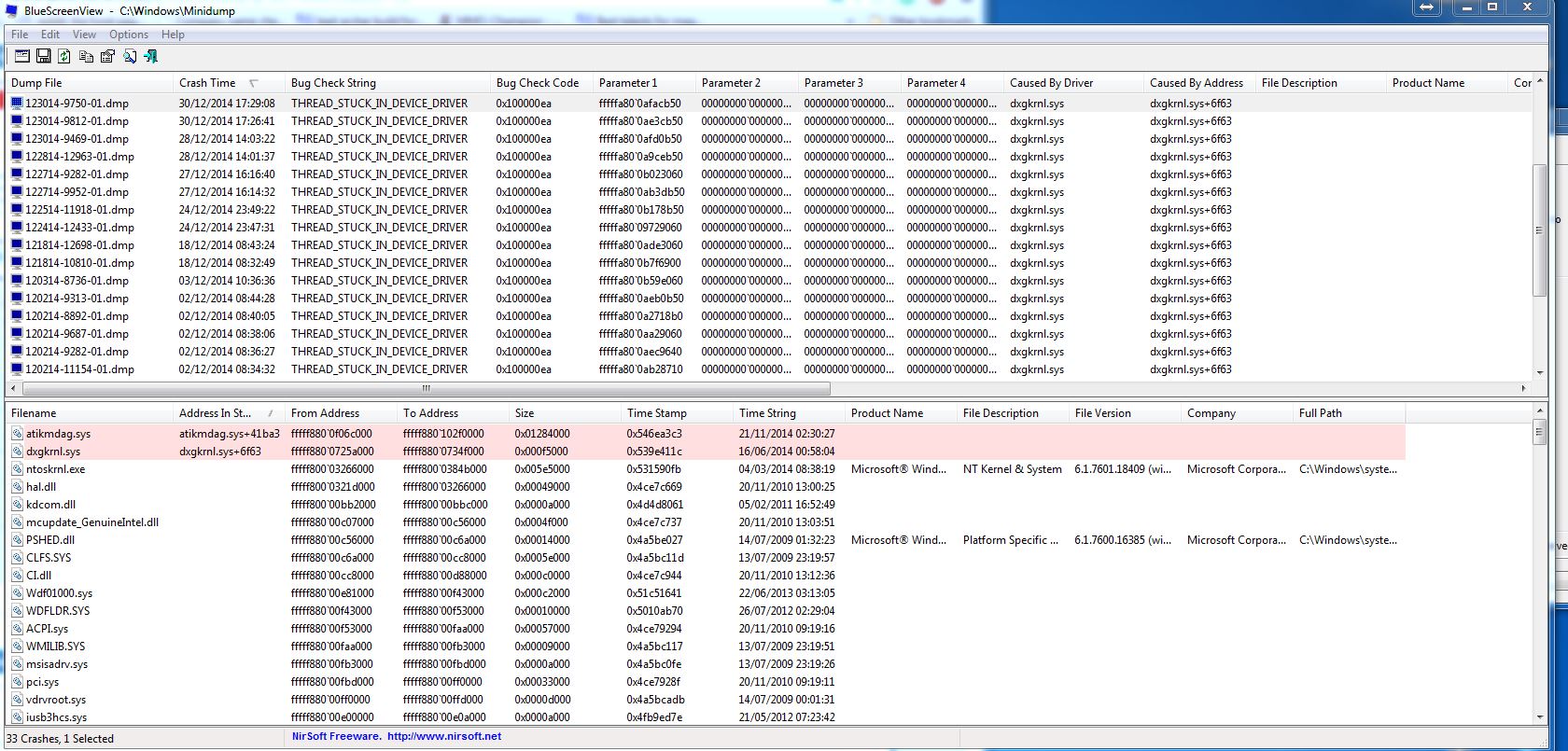
BQ7tlW1.jpg


So I tried following a guide about manually expanding the atikmdag.sy_ file to pull it out and replace the existing file in c:\windows\system32

That didn't work

2) I tried checking some hardware conflicts in the Device Manager so I checked the hardware ID's of my Graphics cards and then compared them to some hardware ID's of some SYSTEM DEVICES I had, audio controllers, they matched so I disabled the audio controllers, and that seems to stop the crashing. See image below:
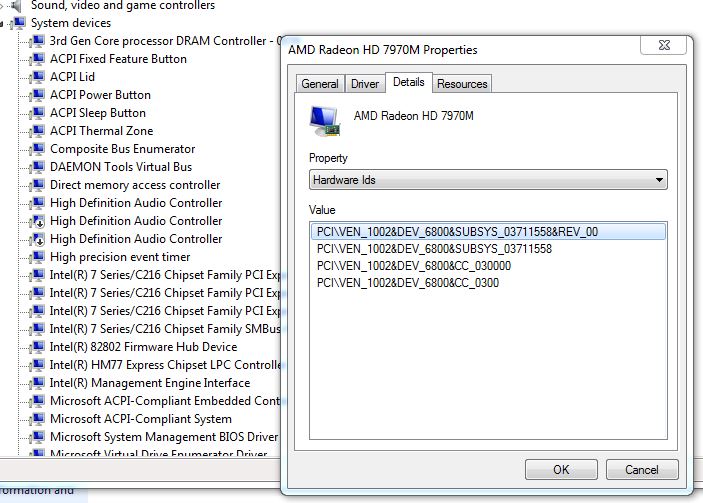
htt4E2Q.jpg


However the audio controllers reactivate and the bluescreen seems to continue.

Conclusions
I believe its a directx conflict with the Radeon drivers, I could be wrong hence the reason I am enquiring with you guys, as this has been going on for a while now and I have just tolerated it as I don't use the laptop as much as my main PC, but its a great laptop and the blue screening seems to be getting worse (or my tolerance for it is getting less)

Any ideas or help would be greatly appreciated!
 

My Computer

Computer type
PC/Desktop
Computer Manufacturer/Model Number
Custom
OS
Windows 7 Professional 64bit
CPU
Intel Core i7-3630QM CPU 2.4ghz
Memory
8gb
Graphics Card(s)
2 x 7970m
Hard Drives
125gb SSD + 1tb HD
Antivirus
Avast
Browser
Chrome
All the recent BSODs are display related, and all those are with the display driver 14.12 Omega.

What was the situation before you updated the display driver? And it was the same with some earlier driver versions, too. So probably the driver does not have anything to do there, at least apparently.

Stress test the Graphics Card using Furmark.Take a screenshot of the furmark window before closing it. Upload the screenshot for us.

Is the computer hot? Report us the heat of the computer after a couple of hours of your normal usage. Upload a screenshot of the summery tab of Speccy. Alternatively, you can publish a Speccy snapshot too: http://www.sevenforums.com/tutorials/311593-speccy-publish-snapshot-your-system-specs.html .

Let us know the results.
_____________________________________________
Code:
BugCheck 100000EA, {fffffa800a108b50, 0, 0, 0}

*** WARNING: Unable to verify timestamp for atikmdag.sys
*** ERROR: Module load completed but symbols could not be loaded for atikmdag.sys
Probably caused by : dxgkrnl.sys ( dxgkrnl!TdrTimedOperationBugcheckOnTimeout+37 )

Followup: MachineOwner
---------
Code:
BugCheck 116, {fffffa800b2b62d0, fffff88007251848, 0, 2}

Unable to load image \SystemRoot\system32\DRIVERS\atikmpag.sys, Win32 error 0n2
*** WARNING: Unable to verify timestamp for atikmpag.sys
*** ERROR: Module load completed but symbols could not be loaded for atikmpag.sys
Probably caused by : atikmpag.sys ( atikmpag+b848 )

Followup: MachineOwner
---------
 

My Computer

Computer type
PC/Desktop
Computer Manufacturer/Model Number
Self Assembled
OS
Microsoft Windows 10 Pro Insider Preview 64-bit
CPU
Intel(R) Core(TM) i3-4130 CPU @ 3.40GHz
Motherboard
Gigabyte Technology Co., Ltd. B85M-D3H
Memory
Corsair Vengence 4GB x2 (8.00GB Dual-Channel DDR3 @ 798MHz)
Graphics Card(s)
2047MB GeForce GTS 450 (ZOTAC International)
Sound Card
Onboard (Realtek High Definition Audio)
Monitor(s) Displays
LG Flatron E2040T
Screen Resolution
1600x900
Hard Drives
Western Digital 1 TB
Seagate 500 GB
PSU
Corsair VS550
Case
Cooler Master K380
Cooling
Cooler Master Seidon 120V Plus
Keyboard
Logitech MK260r
Mouse
Logitech MK260r
Internet Speed
PMPL Broadband
Antivirus
Windows Defender + MBAM
Browser
Firefox
Other Info
Dell Studio 15" Laptop
Thanks I will get those done now, if its any help I just ran Driver VERIFIER and the laptop would just hang after going past the Windows 7 splash screen everytime. Create a restore point before turning Driver Verifier on so just restored back, the settings I turned on to check were:

- Special Pool
- Pool Tracking
- Force IRQL Checking
- Deadlock Detection
- Security Checks
- Miscellaneous Checks

And selected all drivers that were not MICROSOFT CORPORATION signed

Will get those other tests done now
 

My Computer

Computer type
PC/Desktop
Computer Manufacturer/Model Number
Custom
OS
Windows 7 Professional 64bit
CPU
Intel Core i7-3630QM CPU 2.4ghz
Memory
8gb
Graphics Card(s)
2 x 7970m
Hard Drives
125gb SSD + 1tb HD
Antivirus
Avast
Browser
Chrome
Ok here is the video stress test, peaked at 102 and then dropped down to 92, stablising at about 85-86c

And I have attached the SPECCY specs as it were
 

My Computer

Computer type
PC/Desktop
Computer Manufacturer/Model Number
Custom
OS
Windows 7 Professional 64bit
CPU
Intel Core i7-3630QM CPU 2.4ghz
Memory
8gb
Graphics Card(s)
2 x 7970m
Hard Drives
125gb SSD + 1tb HD
Antivirus
Avast
Browser
Chrome
You dont need driver verifier right now, as all the crash dumps identify the failing driver very clearly.
 

My Computer

Computer type
PC/Desktop
Computer Manufacturer/Model Number
Self Assembled
OS
Microsoft Windows 10 Pro Insider Preview 64-bit
CPU
Intel(R) Core(TM) i3-4130 CPU @ 3.40GHz
Motherboard
Gigabyte Technology Co., Ltd. B85M-D3H
Memory
Corsair Vengence 4GB x2 (8.00GB Dual-Channel DDR3 @ 798MHz)
Graphics Card(s)
2047MB GeForce GTS 450 (ZOTAC International)
Sound Card
Onboard (Realtek High Definition Audio)
Monitor(s) Displays
LG Flatron E2040T
Screen Resolution
1600x900
Hard Drives
Western Digital 1 TB
Seagate 500 GB
PSU
Corsair VS550
Case
Cooler Master K380
Cooling
Cooler Master Seidon 120V Plus
Keyboard
Logitech MK260r
Mouse
Logitech MK260r
Internet Speed
PMPL Broadband
Antivirus
Windows Defender + MBAM
Browser
Firefox
Other Info
Dell Studio 15" Laptop
So much temperature within 3 minutes only!! :zip: No doubt that it is fatal.

Apply the graphics cards one by one, test both of them them one by one. See if the heat reports something else. If you see that the temp is exceeding 90 degrees, stop testing then and there.

We need to identify the cause of that extreme heat.
 

My Computer

Computer type
PC/Desktop
Computer Manufacturer/Model Number
Self Assembled
OS
Microsoft Windows 10 Pro Insider Preview 64-bit
CPU
Intel(R) Core(TM) i3-4130 CPU @ 3.40GHz
Motherboard
Gigabyte Technology Co., Ltd. B85M-D3H
Memory
Corsair Vengence 4GB x2 (8.00GB Dual-Channel DDR3 @ 798MHz)
Graphics Card(s)
2047MB GeForce GTS 450 (ZOTAC International)
Sound Card
Onboard (Realtek High Definition Audio)
Monitor(s) Displays
LG Flatron E2040T
Screen Resolution
1600x900
Hard Drives
Western Digital 1 TB
Seagate 500 GB
PSU
Corsair VS550
Case
Cooler Master K380
Cooling
Cooler Master Seidon 120V Plus
Keyboard
Logitech MK260r
Mouse
Logitech MK260r
Internet Speed
PMPL Broadband
Antivirus
Windows Defender + MBAM
Browser
Firefox
Other Info
Dell Studio 15" Laptop
Well they are set as Crossfire, so I will turn that off and try out each one separately and post the results here
 

My Computer

Computer type
PC/Desktop
Computer Manufacturer/Model Number
Custom
OS
Windows 7 Professional 64bit
CPU
Intel Core i7-3630QM CPU 2.4ghz
Memory
8gb
Graphics Card(s)
2 x 7970m
Hard Drives
125gb SSD + 1tb HD
Antivirus
Avast
Browser
Chrome
Ok so I tested GPU 2 and it hit 90c fast see screenshot

I can't seem to isolate GPU 1 to test it, any ideas? I can't see an option in furmark to choose which GPU to use
 

My Computer

Computer type
PC/Desktop
Computer Manufacturer/Model Number
Custom
OS
Windows 7 Professional 64bit
CPU
Intel Core i7-3630QM CPU 2.4ghz
Memory
8gb
Graphics Card(s)
2 x 7970m
Hard Drives
125gb SSD + 1tb HD
Antivirus
Avast
Browser
Chrome
My confusion is that the laptop never BSOD under load even playing graphic intensive games like Skyrim etc

It only bluescreens on the desktop when first booting up, after opening something simple like Chrome or Steam etc, so not sure the temps are an issue.

I do believe it needs to be opened up and cleaned of dust though as I have had it a year or so now
 

My Computer

Computer type
PC/Desktop
Computer Manufacturer/Model Number
Custom
OS
Windows 7 Professional 64bit
CPU
Intel Core i7-3630QM CPU 2.4ghz
Memory
8gb
Graphics Card(s)
2 x 7970m
Hard Drives
125gb SSD + 1tb HD
Antivirus
Avast
Browser
Chrome
I do believe it needs to be opened up and cleaned of dust though as I have had it a year or so now
That will be a good step.

BTW, the speccy screenshot says that Crossfire is disabled.

Let a single card placed in the computer, and then test with furmark, one by one. There is a great chance that either of the cards are not performing properly and causing BSODs.
 

My Computer

Computer type
PC/Desktop
Computer Manufacturer/Model Number
Self Assembled
OS
Microsoft Windows 10 Pro Insider Preview 64-bit
CPU
Intel(R) Core(TM) i3-4130 CPU @ 3.40GHz
Motherboard
Gigabyte Technology Co., Ltd. B85M-D3H
Memory
Corsair Vengence 4GB x2 (8.00GB Dual-Channel DDR3 @ 798MHz)
Graphics Card(s)
2047MB GeForce GTS 450 (ZOTAC International)
Sound Card
Onboard (Realtek High Definition Audio)
Monitor(s) Displays
LG Flatron E2040T
Screen Resolution
1600x900
Hard Drives
Western Digital 1 TB
Seagate 500 GB
PSU
Corsair VS550
Case
Cooler Master K380
Cooling
Cooler Master Seidon 120V Plus
Keyboard
Logitech MK260r
Mouse
Logitech MK260r
Internet Speed
PMPL Broadband
Antivirus
Windows Defender + MBAM
Browser
Firefox
Other Info
Dell Studio 15" Laptop
I opened it up and surprisingly its not that dusty, but I cleaned out what dust there was.

It sounds weird but since performing all the fixes I have done, it doesn't seem to be blue screening, restarted it like 10 times now and tried to open the usual programs that cause it to crash but it just doesn't want to crash.

Do I sound ungrateful that its just not crashing now when I need it to as I don't know whats stopped it hahaha
 

My Computer

Computer type
PC/Desktop
Computer Manufacturer/Model Number
Custom
OS
Windows 7 Professional 64bit
CPU
Intel Core i7-3630QM CPU 2.4ghz
Memory
8gb
Graphics Card(s)
2 x 7970m
Hard Drives
125gb SSD + 1tb HD
Antivirus
Avast
Browser
Chrome
You should not need a crash.

Dismantle sometimes works very good.
 

My Computer

Computer type
PC/Desktop
Computer Manufacturer/Model Number
Self Assembled
OS
Microsoft Windows 10 Pro Insider Preview 64-bit
CPU
Intel(R) Core(TM) i3-4130 CPU @ 3.40GHz
Motherboard
Gigabyte Technology Co., Ltd. B85M-D3H
Memory
Corsair Vengence 4GB x2 (8.00GB Dual-Channel DDR3 @ 798MHz)
Graphics Card(s)
2047MB GeForce GTS 450 (ZOTAC International)
Sound Card
Onboard (Realtek High Definition Audio)
Monitor(s) Displays
LG Flatron E2040T
Screen Resolution
1600x900
Hard Drives
Western Digital 1 TB
Seagate 500 GB
PSU
Corsair VS550
Case
Cooler Master K380
Cooling
Cooler Master Seidon 120V Plus
Keyboard
Logitech MK260r
Mouse
Logitech MK260r
Internet Speed
PMPL Broadband
Antivirus
Windows Defender + MBAM
Browser
Firefox
Other Info
Dell Studio 15" Laptop
Back
Top