BSOD shows up at random

raiderscom

New member
Member
Local time
8:54 PM
Messages
63
Hey BSOD just randomly shows up on my laptop. I don't know what it could be because i not to long ago restored to factary settings. I have the mini dumps files from the diagnostic tool.
 

Attachments

My Computer

Computer Manufacturer/Model Number
Gateway NV53
OS
Windows 7 Home Premium
Memory
4GB
The dumps appear to be related to an out-dated ATI driver:
Code:
fffff800`00b9c6e8  fffff880`04dd01f8 [COLOR=Red][B]atikmdag[/B][/COLOR]+0x31f1f8
fffff800`00b9c808  fffff880`04aceb8c [COLOR=Red][B]atikmdag[/B][/COLOR]+0x1db8c
fffff800`00b9c838  fffff880`04adb79e [COLOR=Red][B]atikmdag[/B][/COLOR]+0x2a79e
fffff800`00b9c850  fffff880`04fb4380 [B][COLOR=Red]atikmdag[/COLOR][/B]+0x503380
fffff800`00b9c868  fffff880`04dd01f8 [B][COLOR=Red]atikmdag[/COLOR][/B]+0x31f1f8
fffff800`00b9c878  fffff880`04dd56cd [B][COLOR=Red]atikmdag[/COLOR][/B]+0x3246cd
fffff800`00b9ca78  fffff880`04dd5c1b [B][COLOR=Red]atikmdag[/COLOR][/B]+0x324c1b
Code:
fffff880`04ab1000 fffff880`050c8000   atikmdag T (no symbols)           
    Loaded symbol image file: atikmdag.sys
    Image path: \SystemRoot\system32\DRIVERS\atikmdag.sys
    Image name: atikmdag.sys
    Timestamp:        [COLOR=Red][U][B]Thu Jul 30 06:33:27 2009[/B][/U][/COLOR] (4A711487)
    CheckSum:         005C4EC3
    ImageSize:        00617000
    Translations:     0000.04b0 0000.04e4 0409.04b0 0409.04e4
Driver Reference Table - atikmdag.sys

  1. Uninstall the current driver using | AMD Catalyst Un-install Utility
  2. Then follow through with a pass of | Driver Sweeper
  3. Install driver version | 13.1 WHQL

  • Important!
    • Do not install, Catalyst Control Center.
    • Install the display driver only.
Potentially problematic drivers, needs to be updated*:
*remove where possible.
 

My Computer

Computer type
PC/Desktop
OS
Windows 10
CPU
Intel Core i5 3570K
Motherboard
Asus P8Z77V-PRO
Memory
16GB 1600Mhz G.Skill
Graphics Card(s)
Gigabyte GTX 970 G1-Gaming
PSU
Seasonic 1000W Platinum
Case
Fractal Design Define R4
Cooling
Noctua NH-D14
uninstall which driver
 

My Computer

Computer Manufacturer/Model Number
Gateway NV53
OS
Windows 7 Home Premium
Memory
4GB
The driver for your GPU (graphics card) ATI Mobility Radeon HD 4200.
 

My Computer

Computer type
PC/Desktop
OS
Windows 10
CPU
Intel Core i5 3570K
Motherboard
Asus P8Z77V-PRO
Memory
16GB 1600Mhz G.Skill
Graphics Card(s)
Gigabyte GTX 970 G1-Gaming
PSU
Seasonic 1000W Platinum
Case
Fractal Design Define R4
Cooling
Noctua NH-D14
ok i tried all the steps when i uninstalled the driver and my screen resolution changed is that normal?
I then installed it back using the software you reccommened and my screen went back to normal. So far no BSOD I'll wait it out a little longer to see if it occurs. Thanks for your help
 

My Computer

Computer Manufacturer/Model Number
Gateway NV53
OS
Windows 7 Home Premium
Memory
4GB
ok i tried all the steps when i uninstalled the driver and my screen resolution changed is that normal?
I then installed it back using the software you reccommened and my screen went back to normal. So far no BSOD I'll wait it out a little longer to see if it occurs. Thanks for your help

Yes that is normal, so far so good!

Keep posting updates :) .
 

My Computer

Computer type
PC/Desktop
OS
Windows 10
CPU
Intel Core i5 3570K
Motherboard
Asus P8Z77V-PRO
Memory
16GB 1600Mhz G.Skill
Graphics Card(s)
Gigabyte GTX 970 G1-Gaming
PSU
Seasonic 1000W Platinum
Case
Fractal Design Define R4
Cooling
Noctua NH-D14
I was just getting ready to post in update and say that i think its ok and then i got a BSOD
 

My Computer

Computer Manufacturer/Model Number
Gateway NV53
OS
Windows 7 Home Premium
Memory
4GB
Do you have the new dump files?
Please run the SFDT again using the Grab All option.
 

My Computer

Computer type
PC/Desktop
OS
Windows 10
CPU
Intel Core i5 3570K
Motherboard
Asus P8Z77V-PRO
Memory
16GB 1600Mhz G.Skill
Graphics Card(s)
Gigabyte GTX 970 G1-Gaming
PSU
Seasonic 1000W Platinum
Case
Fractal Design Define R4
Cooling
Noctua NH-D14
ok heres the new files.
 

Attachments

My Computer

Computer Manufacturer/Model Number
Gateway NV53
OS
Windows 7 Home Premium
Memory
4GB
I dug through your Event Viewer and found a pattern:
Code:
Event[9477]:
  Log Name: System
  Source: Microsoft-Windows-Kernel-Power
  Date: [COLOR=Red][U][B]2013-08-09T21:14:42.976[/B][/U][/COLOR]
  Event ID: 89
  Task: N/A
  Level: Information
  Opcode: Info
  Keyword: N/A
  User: S-1-5-18
  User Name: NT AUTHORITY\SYSTEM
  Computer: Hamputh-PC
  Description: 
ACPI thermal zone ACPI\ThermalZone\TZS1 has been enumerated.             
_PSV = 0K             
_TC1 = 0             
_TC2 = 0             
_TSP = 0ms             
_AC0 = 0K             
_AC1 = 0K             
_AC2 = 0K             
_AC3 = 0K             
_AC4 = 0K             
_AC5 = 0K             
_AC6 = 0K             
_AC7 = 0K             
_AC8 = 0K             
_AC9 = 0K             
[COLOR=Red][U][B]_CRT = 368K[/B][/U][/COLOR]            
_HOT = 0K             
_PSL - see event data.

Event[9478]:
  Log Name: System
  Source: Microsoft-Windows-Kernel-Power
  Date: [COLOR=Red][U][B]2013-08-09T21:14:43.007[/B][/U][/COLOR]
  Event ID: 89
  Task: N/A
  Level: Information
  Opcode: Info
  Keyword: N/A
  User: S-1-5-18
  User Name: NT AUTHORITY\SYSTEM
  Computer: Hamputh-PC
  Description: 
ACPI thermal zone ACPI\ThermalZone\TZS0 has been enumerated.             
_PSV = 0K             
_TC1 = 0             
_TC2 = 0             
_TSP = 0ms             
_AC0 = 0K             
_AC1 = 0K             
_AC2 = 0K             
_AC3 = 0K             
_AC4 = 0K             
_AC5 = 0K             
_AC6 = 0K             
_AC7 = 0K             
_AC8 = 0K             
_AC9 = 0K             
[COLOR=Red][U][B]_CRT = 368K[/B][/U][/COLOR]             
_HOT = 0K             
_PSL - see event data.

Event[9479]:
  Log Name: System
  Source: Microsoft-Windows-FilterManager
  Date: [COLOR=Red][U][B]2013-08-09T21:14:43.475[/B][/U][/COLOR]
  Event ID: 6
  Task: N/A
  Level: Information
  Opcode: Info
  Keyword: N/A
  User: S-1-5-18
  User Name: NT AUTHORITY\SYSTEM
  Computer: Hamputh-PC
  Description: 
File System Filter '[COLOR=Red][U][B]BHDrvx64[/B][/U][/COLOR]' (6.1, ?2013?-?05?-?20T16:47:31.000000000Z) has successfully loaded and registered with Filter Manager.

Event[9480]:
  Log Name: System
  Source: [COLOR=Red][U][B]atikmdag[/B][/U][/COLOR]
  Date: [COLOR=Red][U][B]2013-08-09T21:14:48.982[/B][/U][/COLOR]
  Event ID: 52236
  Task: CPLIB
  Level: Error
  Opcode: N/A
  Keyword: Classic
  User: N/A
  User Name: N/A
  Computer: Hamputh-PC
  Description: 
CPLIB :: General - Invalid Parameter

Event[9481]:
  Log Name: System
  Source: [COLOR=Red][U][B]atikmdag[/B][/U][/COLOR]
  Date: 2013-08-09T21:14:48.982
  Event ID: 43029
  Task: DAL
  Level: Error
  Opcode: N/A
  Keyword: Classic
  User: N/A
  User Name: N/A
  Computer: Hamputh-PC
  Description: 
Display is not active
Code:
Event[10767]:
  Log Name: System
  Source: Microsoft-Windows-Kernel-Power
  Date: [COLOR=Red][U][B]2013-08-12T16:02:21.873[/B][/U][/COLOR]
  Event ID: 41
  Task: N/A
  Level: Critical
  Opcode: Info
  Keyword: N/A
  User: S-1-5-18
  User Name: NT AUTHORITY\SYSTEM
  Computer: Hamputh-PC
  Description: 
[COLOR=Red][U][B]The system has rebooted without cleanly shutting down first. This error could be caused if the system stopped responding, crashed, or lost power unexpectedly.[/B][/U][/COLOR]

Event[10770]:
  Log Name: System
  Source: Microsoft-Windows-Kernel-Power
  Date: [COLOR=Red][U][B]2013-08-12T16:02:34.447[/B][/U][/COLOR]
  Event ID: 89
  Task: N/A
  Level: Information
  Opcode: Info
  Keyword: N/A
  User: S-1-5-18
  User Name: NT AUTHORITY\SYSTEM
  Computer: Hamputh-PC
  Description: 
ACPI thermal zone ACPI\ThermalZone\TZS1 has been enumerated.             
_PSV = 0K             
_TC1 = 0             
_TC2 = 0             
_TSP = 0ms             
_AC0 = 0K             
_AC1 = 0K             
_AC2 = 0K             
_AC3 = 0K             
_AC4 = 0K             
_AC5 = 0K             
_AC6 = 0K             
_AC7 = 0K             
_AC8 = 0K             
_AC9 = 0K             
[COLOR=Red][U][B]_CRT = 368K[/B][/U][/COLOR]             
_HOT = 0K             
_PSL - see event data.

Event[10771]:
  Log Name: System
  Source: Microsoft-Windows-Kernel-Power
  Date: [COLOR=Red][U][B]2013-08-12T16:02:34.447[/B][/U][/COLOR]
  Event ID: 89
  Task: N/A
  Level: Information
  Opcode: Info
  Keyword: N/A
  User: S-1-5-18
  User Name: NT AUTHORITY\SYSTEM
  Computer: Hamputh-PC
  Description: 
ACPI thermal zone ACPI\ThermalZone\TZS0 has been enumerated.             
_PSV = 0K             
_TC1 = 0             
_TC2 = 0             
_TSP = 0ms             
_AC0 = 0K             
_AC1 = 0K             
_AC2 = 0K             
_AC3 = 0K             
_AC4 = 0K             
_AC5 = 0K             
_AC6 = 0K             
_AC7 = 0K             
_AC8 = 0K             
_AC9 = 0K             
[COLOR=Red][U][B]_CRT = 368K[/B][/U][/COLOR]             
_HOT = 0K             
_PSL - see event data.

Event[10772]:
  Log Name: System
  Source: [COLOR=Red][U][B]k57nd60a[/B][/U][/COLOR]
  Date: [COLOR=Red][B][U]2013-08-12T16:02:34.696[/U][/B][/COLOR]
  Event ID: 15
  Task: N/A
  Level: Information
  Opcode: N/A
  Keyword: Classic
  User: N/A
  User Name: N/A
  Computer: Hamputh-PC
  Description: 
[COLOR=Red][U][B]Broadcom NetLink (TM) Gigabit Ethernet: Driver initialized successfully.[/B][/U][/COLOR]

Event[10773]:
  Log Name: System
  Source: Microsoft-Windows-FilterManager
  Date: [COLOR=Red][U][B]2013-08-12T16:02:37.036[/B][/U][/COLOR]
  Event ID: 6
  Task: N/A
  Level: Information
  Opcode: Info
  Keyword: N/A
  User: S-1-5-18
  User Name: NT AUTHORITY\SYSTEM
  Computer: Hamputh-PC
  Description: 
[COLOR=Red][U][B]File System Filter 'BHDrvx64' (6.1, ?2013?-?05?-?20T16:47:31.000000000Z) has successfully loaded and registered with Filter Manager[/B][/U][/COLOR].

Event[10774]:
  Log Name: System
  Source: [COLOR=Red][U][B]k57nd60a[/B][/U][/COLOR]
  Date: [COLOR=Red][U][B]2013-08-12T16:02:38.191[/B][/U][/COLOR]
  Event ID: 4
  Task: N/A
  Level: Warning
  Opcode: N/A
  Keyword: Classic
  User: N/A
  User Name: N/A
  Computer: Hamputh-PC
  Description: 
[COLOR=Red][U][B]Broadcom NetLink (TM) Gigabit Ethernet: The network link is down.  Check to make sure the network cable is properly connected.[/B][/U][/COLOR]

Event[10776]:
  Log Name: System
  Source: EventLog
  Date: [COLOR=Red][U][B]2013-08-12T16:03:05.000[/B][/U][/COLOR]
  Event ID: 6008
  Task: N/A
  Level: Error
  Opcode: N/A
  Keyword: Classic
  User: N/A
  User Name: N/A
  Computer: Hamputh-PC
  Description: 
[COLOR=Red][U][B]The previous system shutdown at 4:00:51 PM on ?8/?12/?2013 was unexpected.[/B][/U][/COLOR]
These events correlate with the bugchecks times, they mean the PC is overheating.
They also all target your Ethernet driver

////////////////////////////////////////////
Before continuing with the cleaning procedure
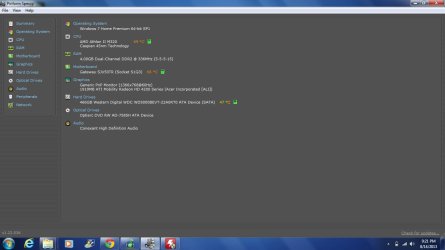
Download Speccy and upload a screenshot.
Monitor your temperature over the course of a two days with normal use with HWMonitor.
\\\\\\\\\\\\\\\\\\\\\\\\\\\\\\\\\\\\\\\\\\\\

Cleaning the PC:

Make sure you can hear or see the fan working, if it is continue with these steps.


-If your PC is under warranty the steps specified below may VOID it!-


  • Shut-Down the PC
  • Unplug from the power brick.
  • Remove the battery.
  • Let the PC cool down for as long as needed until its only warm to the touch or not at all.
  • Buy a can of compressed air.
  • If you have a cover on the bottom that can be unscrewed, remove it for grater access.
  • When using the compressed air, use short bursts and DO NOT! use it upside-down!!
  • First blow into the intake (the grill with the fan) again short bursts.
  • Next do the same to the exhaust.
  • If you have access the opposite side of the fan blow through there as well.
  • Next grab a flashlight and point it inward from the exhaust and look for anything that may be blocking the light from passing through when looking from the intake side (the fan).


My Computer

Computer type
PC/Desktop
OS
Windows 10
CPU
Intel Core i5 3570K
Motherboard
Asus P8Z77V-PRO
Memory
16GB 1600Mhz G.Skill
Graphics Card(s)
Gigabyte GTX 970 G1-Gaming
PSU
Seasonic 1000W Platinum
Case
Fractal Design Define R4
Cooling
Noctua NH-D14
heres the image
 

Attachments

  • Speccy Picture.jpg
    Speccy Picture.jpg
    54 KB · Views: 10

My Computer

Computer Manufacturer/Model Number
Gateway NV53
OS
Windows 7 Home Premium
Memory
4GB
If that is idle you have an overheating issue.


Are you monitoring the temperatures?
Monitor your temperature over the course of a two days of normal use, with HWMonitor.


If you're comfortable and your PC is not under warranty you can follow these steps
below in order to clean the notebook.

Cleaning the PC:

Make sure you can hear or see the fan working, if it is continue with these steps.


-If your PC is under warranty the steps specified below may VOID it!-


  1. Shut-Down the PC
  2. Unplug from the power brick.
  3. Remove the battery.
  4. Let the PC cool down for as long as needed until its only warm to the touch or not at all.
  5. Buy a can of compressed air.
  6. If you have a cover on the bottom that can be unscrewed, remove it for grater access.
  7. When using the compressed air, use short bursts and DO NOT! use it upside-down!!
  8. First blow into the intake (the grill with the fan) again short bursts.
  9. Next do the same to the exhaust.
  10. If you have access the opposite side of the fan blow through there as well.
  11. Next grab a flashlight and point it inward from the exhaust and look for anything that may be blocking the light from passing through when looking from the intake side (the fan).
 

My Computer

Computer type
PC/Desktop
OS
Windows 10
CPU
Intel Core i5 3570K
Motherboard
Asus P8Z77V-PRO
Memory
16GB 1600Mhz G.Skill
Graphics Card(s)
Gigabyte GTX 970 G1-Gaming
PSU
Seasonic 1000W Platinum
Case
Fractal Design Define R4
Cooling
Noctua NH-D14
yea im monitoring the temperatures. do you know what degrees will cause a laptop to shut down
 

My Computer

Computer Manufacturer/Model Number
Gateway NV53
OS
Windows 7 Home Premium
Memory
4GB
Every chip is a little different in that respect, but usually around 90 C and above
the chip will commence a process known as throttling, which in an attempt to cool its self down
the clock will be lowered.
When a critical temperature is hit in order to avoid frying the chip the PC will shutdown or as a side effect a bugcheck will be thrown due to an error.
 

My Computer

Computer type
PC/Desktop
OS
Windows 10
CPU
Intel Core i5 3570K
Motherboard
Asus P8Z77V-PRO
Memory
16GB 1600Mhz G.Skill
Graphics Card(s)
Gigabyte GTX 970 G1-Gaming
PSU
Seasonic 1000W Platinum
Case
Fractal Design Define R4
Cooling
Noctua NH-D14
hey its been a while now and i have been monitoring the temperatures and i have not gotten a BSOD i think my laptop was overheating thanks for your help
 

My Computer

Computer Manufacturer/Model Number
Gateway NV53
OS
Windows 7 Home Premium
Memory
4GB
You're welcome :) .
 

My Computer

Computer type
PC/Desktop
OS
Windows 10
CPU
Intel Core i5 3570K
Motherboard
Asus P8Z77V-PRO
Memory
16GB 1600Mhz G.Skill
Graphics Card(s)
Gigabyte GTX 970 G1-Gaming
PSU
Seasonic 1000W Platinum
Case
Fractal Design Define R4
Cooling
Noctua NH-D14
i got another BSOD and when i was reading it is says something about Memory Management
 

My Computer

Computer Manufacturer/Model Number
Gateway NV53
OS
Windows 7 Home Premium
Memory
4GB

My Computer

Computer type
PC/Desktop
OS
Windows 10
CPU
Intel Core i5 3570K
Motherboard
Asus P8Z77V-PRO
Memory
16GB 1600Mhz G.Skill
Graphics Card(s)
Gigabyte GTX 970 G1-Gaming
PSU
Seasonic 1000W Platinum
Case
Fractal Design Define R4
Cooling
Noctua NH-D14
Hey heres the new SFDT
This morning i got another BSOD then when my laptop restarted about 5 min later anothe BSOD occured. i ve been checking the temperatures and they where around 70C or lower
 

Attachments

My Computer

Computer Manufacturer/Model Number
Gateway NV53
OS
Windows 7 Home Premium
Memory
4GB
Norton Security Suite seems to be causing some issues,
but first scan the PC for infections and corrupt system files:


Download and run the Norton Removal Tool to uninstall Norton Security Suite.
(If you do not wish to stop using Norton completely, do so temporarily for troubleshooting purposes).


Update with the results.
 

My Computer

Computer type
PC/Desktop
OS
Windows 10
CPU
Intel Core i5 3570K
Motherboard
Asus P8Z77V-PRO
Memory
16GB 1600Mhz G.Skill
Graphics Card(s)
Gigabyte GTX 970 G1-Gaming
PSU
Seasonic 1000W Platinum
Case
Fractal Design Define R4
Cooling
Noctua NH-D14
Back
Top