BSOD when playing games/opening many browser tabs

Here are two dumps from today. Normally I force a restart from my computer since it becomes unresponsive for 5+ minutes before it bsods. I tried to play a game tonight and it was crashing after 5-10 minutes, this happened at least 6 times in a row before I decided to disable shadowplay and my computer ran for at least 30 minutes afterwards. Not sure if it's connected but it could be pointing to my video card. All my issues just make me cry when I think about what I could replace that would fix everything.
 

My Computer My Computer

At a glance

Windows 7 Home Premium 64biti7 95012gb of dd3 somethingGTX 770
Computer type
PC/Desktop
Computer Manufacturer/Model Number
Custom Build
OS
Windows 7 Home Premium 64bit
CPU
i7 950
Motherboard
Sabertooth x58
Memory
12gb of dd3 something
Graphics Card(s)
GTX 770
Hard Drives
120gb ssd something
3tb wd
1tb wd
Antivirus
Security Essentials
Browser
Chrome

My Computer My Computer

At a glance

Windows 10 Pro x64AMD Ryzen 5 1600 @ [email protected]G.Skill Flare X 16GB (2x8GB) DDR4-2400 @ 2666MHzSapphire Radeon Vega 56 NITRO+
Computer type
PC/Desktop
Computer Manufacturer/Model Number
me!
OS
Windows 10 Pro x64
CPU
AMD Ryzen 5 1600 @ [email protected]
Motherboard
ASUS B350 PRIME-PLUS
Memory
G.Skill Flare X 16GB (2x8GB) DDR4-2400 @ 2666MHz
Graphics Card(s)
Sapphire Radeon Vega 56 NITRO+
Sound Card
None
Monitor(s) Displays
ASUS VG248QZ
Screen Resolution
1920x1080
Hard Drives
Samsung 850 EVO 250GB*, 1TB Seagate Constellation ES, 2x Samsung 840 250GB in RAID0*

*Thanks ICIT2LOL for supplying me with all of these drives!
PSU
Corsair VS550
Case
Corsair Crystal 460X
Cooling
AMD Wraith Spire
Keyboard
Ducky Shine 6 w/ MX Browns and PBT keycaps
Mouse
Xtrfy M1-Ice
Internet Speed
100MBit/s down, 20MBit/s up
Antivirus
Bitdefender
Browser
Google Chrome
Ran prime 95 for an hour and a half without problems.
 

My Computer My Computer

At a glance

Windows 7 Home Premium 64biti7 95012gb of dd3 somethingGTX 770
Computer type
PC/Desktop
Computer Manufacturer/Model Number
Custom Build
OS
Windows 7 Home Premium 64bit
CPU
i7 950
Motherboard
Sabertooth x58
Memory
12gb of dd3 something
Graphics Card(s)
GTX 770
Hard Drives
120gb ssd something
3tb wd
1tb wd
Antivirus
Security Essentials
Browser
Chrome
I'll send one of our top hardware experts to help you out.
 

My Computer My Computer

At a glance

Windows 10 Pro x64AMD Ryzen 5 1600 @ [email protected]G.Skill Flare X 16GB (2x8GB) DDR4-2400 @ 2666MHzSapphire Radeon Vega 56 NITRO+
Computer type
PC/Desktop
Computer Manufacturer/Model Number
me!
OS
Windows 10 Pro x64
CPU
AMD Ryzen 5 1600 @ [email protected]
Motherboard
ASUS B350 PRIME-PLUS
Memory
G.Skill Flare X 16GB (2x8GB) DDR4-2400 @ 2666MHz
Graphics Card(s)
Sapphire Radeon Vega 56 NITRO+
Sound Card
None
Monitor(s) Displays
ASUS VG248QZ
Screen Resolution
1920x1080
Hard Drives
Samsung 850 EVO 250GB*, 1TB Seagate Constellation ES, 2x Samsung 840 250GB in RAID0*

*Thanks ICIT2LOL for supplying me with all of these drives!
PSU
Corsair VS550
Case
Corsair Crystal 460X
Cooling
AMD Wraith Spire
Keyboard
Ducky Shine 6 w/ MX Browns and PBT keycaps
Mouse
Xtrfy M1-Ice
Internet Speed
100MBit/s down, 20MBit/s up
Antivirus
Bitdefender
Browser
Google Chrome
Hello Subterra mate a few things to start the last dump had graphics problem and again that csrss.exe crops up again
Now if you don't mind stepping back a bit please run these

http://www.sevenforums.com/tutorials/1538-sfc-scannow-command-system-file-checker.html

http://www.sevenforums.com/tutorials/433-disk-check.html< if necessary include the /f and /r in the command line as per Option2 > in safe mode if need be
and then these
http://www.superantispyware.com/

http://www.malwarebytes.org/products/malwarebytes_free/

http://www.bleepingcomputer.com/download/adwcleaner/

ADW download from bleeping computer delete any rubbish found with the malware scans

(If you have Kaspersky security it will rave on about ADW - ignore it or disable it while you are doing the scans .

The memtest I suggest you run overnight again and if possible past 8 passes but AT LEAST 8


MEMTEST

The memtest you will need to make a bootable disk / stick andset the BIOS to boot from the optical or USBand it will take a fair time torun- some leave it overnight. see the attached document.

But one thing is very important you must let the test run for at least 8 passes any less and thefindings are no good. Now if errors come up straight away then you can stop it- see my pics. Now if there are errors and you have more than one stick of RAMin then you will need to test each stick ie remove the sticks and replace stick 1 in slot 1 and test no errors do the same in slot 2 with stick 1no errors then repeat the process with stick 2 - that will show up the faultystick - the other thing is it could be a faulty slot but most unusual.

It is a very lengthy and tedious process but worth it if youhave errors.

The this which I am particularly interested in

Using HW Info
PART A:
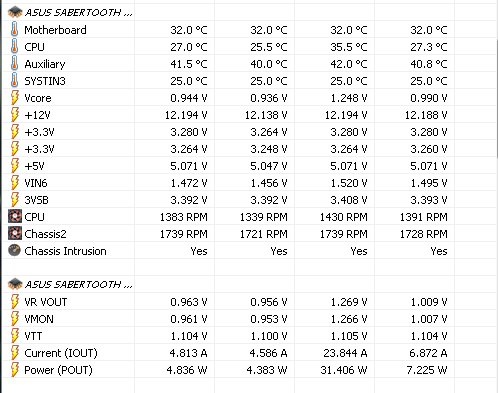
You can test the volts on the PSU with HW Info
HWiNFO, HWiNFO32/64 - Download < download the right bit version and close the right handwindow select Sensors and scroll down to the power section where you will seewhat the volts are doing see my pic. Now the section you want will be labelled- fpr example Asus boards usually have "Nuvoton" and Gigabyte boards"ITE" in any case the section you want will have Vbatt or VBAT in it(dead give away)
The original right hand window shows the machine running and is handy for thatbut for looking at the components in some detail close it and use the main lefthand side panel
FOR OTHER COMPONENTS
PART B:
Open each small square with + in it on the section the components are in andthen click on the individual component/s (it will highlight in blue) - in theright hand side will appear all sorts of details including brands speeds andother essential info that particular device. See pic for example.


The we would like to see what comes up with my little ditty here
 

My Computer My Computer

At a glance

Desk1 7 Home Prem / Desk2 10 Pro / Main lap A...Desk1 i5 3750K / Laptop i7 GTX 860M / Desk2 i...Desk1 8GB (1866) / Desk2 16GB (1333) / Laptop...Desk 1& 2NVidia GTX 650 & Laptops on board Intel
Computer type
PC/Desktop
Computer Manufacturer/Model Number
Own build (new) Desk1 / Asus ROG Win 7 / Desk2 1st build
OS
Desk1 7 Home Prem / Desk2 10 Pro / Main lap Asus ROG 10 Pro 2 laptop Toshiba 7 Pro Asus P2520 7 & 10
CPU
Desk1 i5 3750K / Laptop i7 GTX 860M / Desk2 i5 2500
Motherboard
Desk1 Asus P877-V / Desk2 Gigabyte H67 UD3H / Laptop ?
Memory
Desk1 8GB (1866) / Desk2 16GB (1333) / Laptop 8Gb DDR3
Graphics Card(s)
Desk 1& 2NVidia GTX 650 & Laptops on board Intel
Sound Card
Desk 1 & 2 -XONAR DG Realtek High Def audio Laptop
Monitor(s) Displays
Desk 1 Benq HD 2450 / Desk2 Philips 24" / Laptop 17.5"
Screen Resolution
1920x1080 D1 & D2 & Laptop 1
Hard Drives
Desk1 Samsung 120GB 830 SSD
Asus ROG 256GB 850 Pro SSD
Desk2 Samsung 840 256 SSD
Toshiba 120GB EVO
PSU
Desk 1 Corsair HX 1050/ Laptop ? / Desk 2 Corsair HX 650
Case
Desk 1 Cooler HAF XM ? Toshiba laptop / Desk2 Coolermaster
Cooling
Fans on all Desk1 -2 Desk2 - all Coolermasters 5 Laptop ?
Keyboard
Desk 1 MS Sidewinder X6 Desk 2 MS Sidewinder X 4
Mouse
Desk 1&2 - Gigabyte MS 900 gamer - laptop - Logitec wireless
Internet Speed
ADSL2+
Other Info
One other Desktop (tester) and spare Toshba laptop both with SSD's
Running Kaspersky 2016 ISS on all machines config'd identically
Logitec audio stereo systems on each machine (x3)
Canon MG5250MFC
Router/modem TP-Link running WPA2SK
Suggestion here, these are consistent F4 bugchecks, have you tried different cables on the drives? Tried different ports on the mobo? Updating your controller drivers?
 

My Computer My Computer

At a glance

Win 10 Pro x64Intel I5-2500K @3.3GHz16GB G.Skill Ripjaws X (4x4GB)EVGA GeForce 750 Ti SC 2GB
Computer type
PC/Desktop
Computer Manufacturer/Model Number
Self Built
OS
Win 10 Pro x64
CPU
Intel I5-2500K @3.3GHz
Motherboard
Asrock P67 Extreme4
Memory
16GB G.Skill Ripjaws X (4x4GB)
Graphics Card(s)
EVGA GeForce 750 Ti SC 2GB
Sound Card
ASUS Xonar DG 5.1 Channels 24-bit 96KHz PCI Interface Sound
Monitor(s) Displays
auria eq2367
Screen Resolution
1920 x 1080
Hard Drives
250GB Samsung 850 EVO SSD
1TB WD Blue
1TB Hitachi
PSU
SeaSonic X 650W 80 Plus Gold
Case
Corsair Obsidian 750D
Cooling
Corsair H60, Three 140mm case fans
Keyboard
Logitech Wireless Keyboard K520
Mouse
Logitech Wireless Mouse M310
Internet Speed
Wave Broadband ~ 100 dn 5 up
Antivirus
Windows Defender, Malwarebytes Premium
Browser
Edge, IE11, Chrome
Other Info
Laptop specs: HP g7-1365dx /
CPU: AMD A6-3420M APU with Radeon(tm) HD Graphics /
RAM: Crucial 8Gb (2x4Gb) /
SSD: Crucial M4-CT128M4SSD2 ATA Device/ FW 000F /
GFX: AMD Radeon HD 6520G /
OS: Windows 10 Pro x64
This is what my PSU looks like. It's an AX1200, far more power than I need but I have it for reasons. No vbatt on the list and I'm not sure if everything is in order. I will go through the other tests again and update you with results.
c601092abe.png
 

My Computer My Computer

At a glance

Windows 7 Home Premium 64biti7 95012gb of dd3 somethingGTX 770
Computer type
PC/Desktop
Computer Manufacturer/Model Number
Custom Build
OS
Windows 7 Home Premium 64bit
CPU
i7 950
Motherboard
Sabertooth x58
Memory
12gb of dd3 something
Graphics Card(s)
GTX 770
Hard Drives
120gb ssd something
3tb wd
1tb wd
Antivirus
Security Essentials
Browser
Chrome
SFC ran clean. I should mention that I had a custom theme for windows that does trigger the scan but haven't reapplied it since.
 

My Computer My Computer

At a glance

Windows 7 Home Premium 64biti7 95012gb of dd3 somethingGTX 770
Computer type
PC/Desktop
Computer Manufacturer/Model Number
Custom Build
OS
Windows 7 Home Premium 64bit
CPU
i7 950
Motherboard
Sabertooth x58
Memory
12gb of dd3 something
Graphics Card(s)
GTX 770
Hard Drives
120gb ssd something
3tb wd
1tb wd
Antivirus
Security Essentials
Browser
Chrome
Thanks for that Sub mate the volts look good but just keep in mind sometimes the volts look goof but it doesn't necessarily follow the current is there but it is most unusual - nice PSU I have a HX 1050 in my Ivy Bridge and it is a belter. The Vbatt is probably the 3VSB the CMOS battery in your pic.

Hmm maybe time to lose the theme mate - don't suppose the chkdsk came up with anything?
 

My Computer My Computer

At a glance

Desk1 7 Home Prem / Desk2 10 Pro / Main lap A...Desk1 i5 3750K / Laptop i7 GTX 860M / Desk2 i...Desk1 8GB (1866) / Desk2 16GB (1333) / Laptop...Desk 1& 2NVidia GTX 650 & Laptops on board Intel
Computer type
PC/Desktop
Computer Manufacturer/Model Number
Own build (new) Desk1 / Asus ROG Win 7 / Desk2 1st build
OS
Desk1 7 Home Prem / Desk2 10 Pro / Main lap Asus ROG 10 Pro 2 laptop Toshiba 7 Pro Asus P2520 7 & 10
CPU
Desk1 i5 3750K / Laptop i7 GTX 860M / Desk2 i5 2500
Motherboard
Desk1 Asus P877-V / Desk2 Gigabyte H67 UD3H / Laptop ?
Memory
Desk1 8GB (1866) / Desk2 16GB (1333) / Laptop 8Gb DDR3
Graphics Card(s)
Desk 1& 2NVidia GTX 650 & Laptops on board Intel
Sound Card
Desk 1 & 2 -XONAR DG Realtek High Def audio Laptop
Monitor(s) Displays
Desk 1 Benq HD 2450 / Desk2 Philips 24" / Laptop 17.5"
Screen Resolution
1920x1080 D1 & D2 & Laptop 1
Hard Drives
Desk1 Samsung 120GB 830 SSD
Asus ROG 256GB 850 Pro SSD
Desk2 Samsung 840 256 SSD
Toshiba 120GB EVO
PSU
Desk 1 Corsair HX 1050/ Laptop ? / Desk 2 Corsair HX 650
Case
Desk 1 Cooler HAF XM ? Toshiba laptop / Desk2 Coolermaster
Cooling
Fans on all Desk1 -2 Desk2 - all Coolermasters 5 Laptop ?
Keyboard
Desk 1 MS Sidewinder X6 Desk 2 MS Sidewinder X 4
Mouse
Desk 1&2 - Gigabyte MS 900 gamer - laptop - Logitec wireless
Internet Speed
ADSL2+
Other Info
One other Desktop (tester) and spare Toshba laptop both with SSD's
Running Kaspersky 2016 ISS on all machines config'd identically
Logitec audio stereo systems on each machine (x3)
Canon MG5250MFC
Router/modem TP-Link running WPA2SK
Chkdsk ran clean on the boot drive, should I run it on every partition? I'll sum up some of my other posts where my problems temporarily disappeared. The first time was when I updated my ssd's firmware and the problems disappeared for about 2 days. The second time was when I ran an sfc, the problem disappeared for about 2 days again and I never reapplied my custom theme after the scan.
 

My Computer My Computer

At a glance

Windows 7 Home Premium 64biti7 95012gb of dd3 somethingGTX 770
Computer type
PC/Desktop
Computer Manufacturer/Model Number
Custom Build
OS
Windows 7 Home Premium 64bit
CPU
i7 950
Motherboard
Sabertooth x58
Memory
12gb of dd3 something
Graphics Card(s)
GTX 770
Hard Drives
120gb ssd something
3tb wd
1tb wd
Antivirus
Security Essentials
Browser
Chrome
As general rule I run chkdsk with /f and /r on the whole drive.

Any malware scans come up with anything?
 

My Computer My Computer

At a glance

Desk1 7 Home Prem / Desk2 10 Pro / Main lap A...Desk1 i5 3750K / Laptop i7 GTX 860M / Desk2 i...Desk1 8GB (1866) / Desk2 16GB (1333) / Laptop...Desk 1& 2NVidia GTX 650 & Laptops on board Intel
Computer type
PC/Desktop
Computer Manufacturer/Model Number
Own build (new) Desk1 / Asus ROG Win 7 / Desk2 1st build
OS
Desk1 7 Home Prem / Desk2 10 Pro / Main lap Asus ROG 10 Pro 2 laptop Toshiba 7 Pro Asus P2520 7 & 10
CPU
Desk1 i5 3750K / Laptop i7 GTX 860M / Desk2 i5 2500
Motherboard
Desk1 Asus P877-V / Desk2 Gigabyte H67 UD3H / Laptop ?
Memory
Desk1 8GB (1866) / Desk2 16GB (1333) / Laptop 8Gb DDR3
Graphics Card(s)
Desk 1& 2NVidia GTX 650 & Laptops on board Intel
Sound Card
Desk 1 & 2 -XONAR DG Realtek High Def audio Laptop
Monitor(s) Displays
Desk 1 Benq HD 2450 / Desk2 Philips 24" / Laptop 17.5"
Screen Resolution
1920x1080 D1 & D2 & Laptop 1
Hard Drives
Desk1 Samsung 120GB 830 SSD
Asus ROG 256GB 850 Pro SSD
Desk2 Samsung 840 256 SSD
Toshiba 120GB EVO
PSU
Desk 1 Corsair HX 1050/ Laptop ? / Desk 2 Corsair HX 650
Case
Desk 1 Cooler HAF XM ? Toshiba laptop / Desk2 Coolermaster
Cooling
Fans on all Desk1 -2 Desk2 - all Coolermasters 5 Laptop ?
Keyboard
Desk 1 MS Sidewinder X6 Desk 2 MS Sidewinder X 4
Mouse
Desk 1&2 - Gigabyte MS 900 gamer - laptop - Logitec wireless
Internet Speed
ADSL2+
Other Info
One other Desktop (tester) and spare Toshba laptop both with SSD's
Running Kaspersky 2016 ISS on all machines config'd identically
Logitec audio stereo systems on each machine (x3)
Canon MG5250MFC
Router/modem TP-Link running WPA2SK
Superspyware removed a whole bunch of cookies. The other two were clean. Ran another chkdsk, also clean.
 

My Computer My Computer

At a glance

Windows 7 Home Premium 64biti7 95012gb of dd3 somethingGTX 770
Computer type
PC/Desktop
Computer Manufacturer/Model Number
Custom Build
OS
Windows 7 Home Premium 64bit
CPU
i7 950
Motherboard
Sabertooth x58
Memory
12gb of dd3 something
Graphics Card(s)
GTX 770
Hard Drives
120gb ssd something
3tb wd
1tb wd
Antivirus
Security Essentials
Browser
Chrome
Suggestion here, these are consistent F4 bugchecks, have you tried different cables on the drives? Tried different ports on the mobo? Updating your controller drivers?

Tried any of these yet?
 

My Computer My Computer

At a glance

Win 10 Pro x64Intel I5-2500K @3.3GHz16GB G.Skill Ripjaws X (4x4GB)EVGA GeForce 750 Ti SC 2GB
Computer type
PC/Desktop
Computer Manufacturer/Model Number
Self Built
OS
Win 10 Pro x64
CPU
Intel I5-2500K @3.3GHz
Motherboard
Asrock P67 Extreme4
Memory
16GB G.Skill Ripjaws X (4x4GB)
Graphics Card(s)
EVGA GeForce 750 Ti SC 2GB
Sound Card
ASUS Xonar DG 5.1 Channels 24-bit 96KHz PCI Interface Sound
Monitor(s) Displays
auria eq2367
Screen Resolution
1920 x 1080
Hard Drives
250GB Samsung 850 EVO SSD
1TB WD Blue
1TB Hitachi
PSU
SeaSonic X 650W 80 Plus Gold
Case
Corsair Obsidian 750D
Cooling
Corsair H60, Three 140mm case fans
Keyboard
Logitech Wireless Keyboard K520
Mouse
Logitech Wireless Mouse M310
Internet Speed
Wave Broadband ~ 100 dn 5 up
Antivirus
Windows Defender, Malwarebytes Premium
Browser
Edge, IE11, Chrome
Other Info
Laptop specs: HP g7-1365dx /
CPU: AMD A6-3420M APU with Radeon(tm) HD Graphics /
RAM: Crucial 8Gb (2x4Gb) /
SSD: Crucial M4-CT128M4SSD2 ATA Device/ FW 000F /
GFX: AMD Radeon HD 6520G /
OS: Windows 10 Pro x64
I was thinking that it might be failing SATA cables too, Derek. It's worth checking so check it.
 

My Computer My Computer

At a glance

Windows 10 Pro x64AMD Ryzen 5 1600 @ [email protected]G.Skill Flare X 16GB (2x8GB) DDR4-2400 @ 2666MHzSapphire Radeon Vega 56 NITRO+
Computer type
PC/Desktop
Computer Manufacturer/Model Number
me!
OS
Windows 10 Pro x64
CPU
AMD Ryzen 5 1600 @ [email protected]
Motherboard
ASUS B350 PRIME-PLUS
Memory
G.Skill Flare X 16GB (2x8GB) DDR4-2400 @ 2666MHz
Graphics Card(s)
Sapphire Radeon Vega 56 NITRO+
Sound Card
None
Monitor(s) Displays
ASUS VG248QZ
Screen Resolution
1920x1080
Hard Drives
Samsung 850 EVO 250GB*, 1TB Seagate Constellation ES, 2x Samsung 840 250GB in RAID0*

*Thanks ICIT2LOL for supplying me with all of these drives!
PSU
Corsair VS550
Case
Corsair Crystal 460X
Cooling
AMD Wraith Spire
Keyboard
Ducky Shine 6 w/ MX Browns and PBT keycaps
Mouse
Xtrfy M1-Ice
Internet Speed
100MBit/s down, 20MBit/s up
Antivirus
Bitdefender
Browser
Google Chrome
Look I reckon it might be worth re-seating all cables, cards, sticks and cleaning the slots too.

SLOT CLEANING

Now as for the slots to clean them use a strip of old credit card about1/2 inch wide nip the corners off one end - preferably round them off hold a piece of thin lint free cloth over the end dab on some form ofalcohol - isopropyl alcohol (if you want to be pedantic) but any ethanol basedalcohol even methylated spirits (called rubbing alcohol in the US) are good and GENTLYswipe along the slots.

This can also be done for the GPU slot/s and also the contacts of thesticks or cards - not the stick but some lint free cloth of course. See my picfor the sick but please be very gentle doing it if you are in any doubt -please ask before doing it but I use this all the time and have yet to damageanything. Plus make sure the card/sticks contacts are clean too but begentle
 

My Computer My Computer

At a glance

Desk1 7 Home Prem / Desk2 10 Pro / Main lap A...Desk1 i5 3750K / Laptop i7 GTX 860M / Desk2 i...Desk1 8GB (1866) / Desk2 16GB (1333) / Laptop...Desk 1& 2NVidia GTX 650 & Laptops on board Intel
Computer type
PC/Desktop
Computer Manufacturer/Model Number
Own build (new) Desk1 / Asus ROG Win 7 / Desk2 1st build
OS
Desk1 7 Home Prem / Desk2 10 Pro / Main lap Asus ROG 10 Pro 2 laptop Toshiba 7 Pro Asus P2520 7 & 10
CPU
Desk1 i5 3750K / Laptop i7 GTX 860M / Desk2 i5 2500
Motherboard
Desk1 Asus P877-V / Desk2 Gigabyte H67 UD3H / Laptop ?
Memory
Desk1 8GB (1866) / Desk2 16GB (1333) / Laptop 8Gb DDR3
Graphics Card(s)
Desk 1& 2NVidia GTX 650 & Laptops on board Intel
Sound Card
Desk 1 & 2 -XONAR DG Realtek High Def audio Laptop
Monitor(s) Displays
Desk 1 Benq HD 2450 / Desk2 Philips 24" / Laptop 17.5"
Screen Resolution
1920x1080 D1 & D2 & Laptop 1
Hard Drives
Desk1 Samsung 120GB 830 SSD
Asus ROG 256GB 850 Pro SSD
Desk2 Samsung 840 256 SSD
Toshiba 120GB EVO
PSU
Desk 1 Corsair HX 1050/ Laptop ? / Desk 2 Corsair HX 650
Case
Desk 1 Cooler HAF XM ? Toshiba laptop / Desk2 Coolermaster
Cooling
Fans on all Desk1 -2 Desk2 - all Coolermasters 5 Laptop ?
Keyboard
Desk 1 MS Sidewinder X6 Desk 2 MS Sidewinder X 4
Mouse
Desk 1&2 - Gigabyte MS 900 gamer - laptop - Logitec wireless
Internet Speed
ADSL2+
Other Info
One other Desktop (tester) and spare Toshba laptop both with SSD's
Running Kaspersky 2016 ISS on all machines config'd identically
Logitec audio stereo systems on each machine (x3)
Canon MG5250MFC
Router/modem TP-Link running WPA2SK
Back
Top