Solved BSOD when resuming from Sleep WIN 7 Home ASUS P5n73AM MB

seanh46

New member
Local time
1:09 AM
Messages
5
Location
Tooele County, Utah
I have formatted and re-installed windows, updated my BIOS, checked all of my drivers, disabled Hibernation
Opened up the case, checked the cables, cleaned out the machine. all to no avail

I have included a dump file,
(let me know if I didn't do it right)

I am willing to do anything at this point
just don't know what to do
 

My Computer My Computer

At a glance

windows 7 home premiumintel q 93004 Gb DDR2NVIDIA Nforce 610i/7050
Computer type
PC/Desktop
Computer Manufacturer/Model Number
ZT Machine
OS
windows 7 home premium
CPU
intel q 9300
Motherboard
ASUS P573AM
Memory
4 Gb DDR2
Graphics Card(s)
NVIDIA Nforce 610i/7050
Hard Drives
Seagate 500GB
Antivirus
MS
Browser
CHROME
Welcome to SF Sean :).

A single dump file is usually not enough and I would like to have more to get a better "feel" of the system.
I see you have CCleaner installed, please STOP using it along the troubleshooting procedure
as it deletes the dumps files which we need.

Code:
BugCheck F4, {3, 86948b68, 86948cd4, 82c29eb0}

----- ETW minidump data unavailable-----
Probably caused by : csrss.exe

EXCEPTION_CODE: (NTSTATUS) 0xc0000006 - The instruction at 0x%p referenced memory at 0x%p. The required data was not placed into memory because of an I/O error status of 0x%x.

BUGCHECK_STR:  0xF4_IOERR

Please start by testing the HDD.
   Warning
The Following Method Should NOT Be Performed On An SSD!


Testing the HDD:


  1. Perform a Disk Check | Disk Check- Scroll down to OPTION TWO of the tutorial and use the /R switch in the CHKDSK command | chkdsk C: /R.
  2. Then Post the Disk Check results following | This Tutorial.
  3. Once back in Windows, download Crystal Disk Info and post a screenshot (multiple shots if you have more than one drive).
  4. Download SeaTools for DOS if you don't want to use a CD to test the HDD you can use YUMI – Multiboot USB Creator to create a bootable USB (instructions are found at the bottom of both pages).
  5. If SeaTools for DOS is unable to recognize your HDD:
  6. Visit HDDdiag and follow the instructions | Or follow the instructions below.
If SeaTools For DOS does not recognize the drive;
Boot into the BIOS using the *Fx key.
Look for an entry called SATA Mode (or something similar), it should be set to IDE / AHCI.
It's probably set to AHCI which is why SeaTools doesn't recognize them in the DOS environment.
Set it to IDE then save and exit usually by pressing the F10 key.
Now boot into SeaTools and it should detect the drives.
Start the Long Test and let it run.
Upon completion don't try to boot into Windows as it will only result in a BSOD, go back into the BIOS
and change the SATA setting back to what it was in the first place.


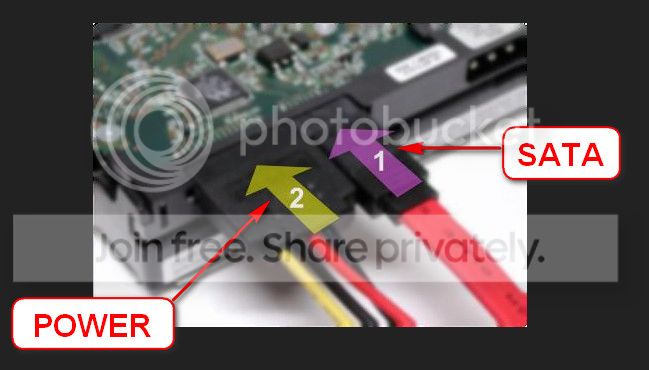
Re-seat the sata and power.

72974453_zps85c47d93.jpg

Let us know the results.
 

My Computer My Computer

At a glance

Windows 10Intel Core i5 3570K16GB 1600Mhz G.SkillGigabyte GTX 970 G1-Gaming
Computer type
PC/Desktop
OS
Windows 10
CPU
Intel Core i5 3570K
Motherboard
Asus P8Z77V-PRO
Memory
16GB 1600Mhz G.Skill
Graphics Card(s)
Gigabyte GTX 970 G1-Gaming
PSU
Seasonic 1000W Platinum
Case
Fractal Design Define R4
Cooling
Noctua NH-D14
thanks

Thanks for checking that out for me, I will generate a few more dumps, and get a file uploaded in the next few days, just FYI, I have ran Sea Tools on my HD and it has passed a long FIX all, but I am willing to do it again and, I will not run CCLEaner until we get this resolved!
 

My Computer My Computer

At a glance

windows 7 home premiumintel q 93004 Gb DDR2NVIDIA Nforce 610i/7050
Computer type
PC/Desktop
Computer Manufacturer/Model Number
ZT Machine
OS
windows 7 home premium
CPU
intel q 9300
Motherboard
ASUS P573AM
Memory
4 Gb DDR2
Graphics Card(s)
NVIDIA Nforce 610i/7050
Hard Drives
Seagate 500GB
Antivirus
MS
Browser
CHROME
Acknowledged, keep us posted.
 

My Computer My Computer

At a glance

Windows 10Intel Core i5 3570K16GB 1600Mhz G.SkillGigabyte GTX 970 G1-Gaming
Computer type
PC/Desktop
OS
Windows 10
CPU
Intel Core i5 3570K
Motherboard
Asus P8Z77V-PRO
Memory
16GB 1600Mhz G.Skill
Graphics Card(s)
Gigabyte GTX 970 G1-Gaming
PSU
Seasonic 1000W Platinum
Case
Fractal Design Define R4
Cooling
Noctua NH-D14
A few more dump files

I ran the SF Diagnostic tool again and got a few more dump files,
I can't thank you guys enough for taking the time to look at it.
Any suggestions you have will be greatly appreciated
 

My Computer My Computer

At a glance

windows 7 home premiumintel q 93004 Gb DDR2NVIDIA Nforce 610i/7050
Computer type
PC/Desktop
Computer Manufacturer/Model Number
ZT Machine
OS
windows 7 home premium
CPU
intel q 9300
Motherboard
ASUS P573AM
Memory
4 Gb DDR2
Graphics Card(s)
NVIDIA Nforce 610i/7050
Hard Drives
Seagate 500GB
Antivirus
MS
Browser
CHROME
So... where are the new files :cool:?
 

My Computer My Computer

At a glance

Windows 10Intel Core i5 3570K16GB 1600Mhz G.SkillGigabyte GTX 970 G1-Gaming
Computer type
PC/Desktop
OS
Windows 10
CPU
Intel Core i5 3570K
Motherboard
Asus P8Z77V-PRO
Memory
16GB 1600Mhz G.Skill
Graphics Card(s)
Gigabyte GTX 970 G1-Gaming
PSU
Seasonic 1000W Platinum
Case
Fractal Design Define R4
Cooling
Noctua NH-D14
Oops!

Here it is
 

My Computer My Computer

At a glance

windows 7 home premiumintel q 93004 Gb DDR2NVIDIA Nforce 610i/7050
Computer type
PC/Desktop
Computer Manufacturer/Model Number
ZT Machine
OS
windows 7 home premium
CPU
intel q 9300
Motherboard
ASUS P573AM
Memory
4 Gb DDR2
Graphics Card(s)
NVIDIA Nforce 610i/7050
Hard Drives
Seagate 500GB
Antivirus
MS
Browser
CHROME
Thanks :).
Unfortunately the new bug check are again indicating of an HDD hardware issue,
what have you manged to complete from the list above?
Did you try a different set of SATA (Data & Power) cables?
Did you try a different SATA Port on the motherboard?

I would also check for malicious software.

Please scan for possible infection and file corruption.

(*Kaspersky Rescue CD from a USB thumbdrive)


My Computer My Computer

At a glance

Windows 10Intel Core i5 3570K16GB 1600Mhz G.SkillGigabyte GTX 970 G1-Gaming
Computer type
PC/Desktop
OS
Windows 10
CPU
Intel Core i5 3570K
Motherboard
Asus P8Z77V-PRO
Memory
16GB 1600Mhz G.Skill
Graphics Card(s)
Gigabyte GTX 970 G1-Gaming
PSU
Seasonic 1000W Platinum
Case
Fractal Design Define R4
Cooling
Noctua NH-D14
You're a Genius!
Changing the SATA Port on the Motherboard fixed it !!!!!
I booted up after changing it, and Windows posted a message saying to reboot for changes to take effect
and PRESTO it worked
THANK YOU SOOOOO MUCH
 

My Computer My Computer

At a glance

windows 7 home premiumintel q 93004 Gb DDR2NVIDIA Nforce 610i/7050
Computer type
PC/Desktop
Computer Manufacturer/Model Number
ZT Machine
OS
windows 7 home premium
CPU
intel q 9300
Motherboard
ASUS P573AM
Memory
4 Gb DDR2
Graphics Card(s)
NVIDIA Nforce 610i/7050
Hard Drives
Seagate 500GB
Antivirus
MS
Browser
CHROME
Haha I appreciate the feedback :) .
Just make sure you remember that the SATA port in question is possibly corrupt ;).

Keep the thread open for a couple of days and if all goes smoothly mark the thread as solved :) .
 

My Computer My Computer

At a glance

Windows 10Intel Core i5 3570K16GB 1600Mhz G.SkillGigabyte GTX 970 G1-Gaming
Computer type
PC/Desktop
OS
Windows 10
CPU
Intel Core i5 3570K
Motherboard
Asus P8Z77V-PRO
Memory
16GB 1600Mhz G.Skill
Graphics Card(s)
Gigabyte GTX 970 G1-Gaming
PSU
Seasonic 1000W Platinum
Case
Fractal Design Define R4
Cooling
Noctua NH-D14
Back
Top