
BSOD when watching flash videos (error code changes?)

ExtremeDude2

New member
Local time
6:05 PM
Messages
18
Hello all, I've joined here today in hopes that I could get some help :D

For the past few months whenever I use youtube or another site that plays videos with flash I will sometimes get a BSOD, it seems that the error code will change everytime. Usually when the BSOD appears it doesn't even make a dump, or it will only dump part way, when I am lucky however I am able to get a dump file (which I have posted in the attachment below). I have run memtest+ and gotten no errors (altho I have added more RAM since then and did not run the test again), and I have also updated my graphics drives a few times (both stable and beta), I am currently running a modest OC (CPU and GPU), but removing it doesn't seem to help, and I assume you can see my spec on my profile :p

I'll bump if I get a different error code and dump
 
Last edited:

My Computer

Computer type
PC/Desktop
Computer Manufacturer/Model Number
custom build
OS
Windows 7 home Premium 64 bit
CPU
AMD 955 BE @ 3.6Ghz
Motherboard
Biostar A770E3
Memory
8GB DDR3 1600MHz
Graphics Card(s)
ATi 5830
Hard Drives
2x500GB
Antivirus
Microsoft Security Essentials
Browser
Google Chrome
Welcome :) .

I would start off by thoroughly scanning the machine, you have some unknown entries
in the loaded modules list.

Please scan for possible infection and file corruption.

(*Kaspersky Rescue CD from a USB thumbdrive)


The MSINFO32 file is corrupt, please upload a new instance.

:orb:Start> Run> Type MSINFO32 then hit [Enter].
In MSINFO32 go to, File> Save> name it your user-name.
Once the file is saved right click it and choose Sent toCompressed (zipped) folder.

Attach the file in your next post.


Very outdated drivers, please update or remove:

Code:
[URL="http://carrona.org/drivers/driver.php?id=VMNetSrv.sys"][U][B]VMNetSrv.sys[/B][/U][/URL] Wed Jan 16 13:52:01 2008
[URL="http://carrona.org/drivers/driver.php?id=LMIRfsDriver.sys"][U][B]LMIRfsDriver.sys[/B][/U][/URL] Mon Jul 14 19:26:56 2008
[URL="http://carrona.org/drivers/driver.php?id=hamachi.sys"][U][B]hamachi.sys[/B][/U][/URL]  Thu Feb 19 12:36:41 2009
[URL="http://carrona.org/drivers/driver.php?id=Rt64win7.sys"][U][B]Rt64win7.sys[/B][/U][/URL] Thu Feb 26 11:04:13 2009
[URL="http://carrona.org/drivers/driver.php?id=vmm.sys"][U][B]vmm.sys[/B][/U][/URL]      Tue Apr 07 16:25:54 2009
[URL="http://carrona.org/drivers/driver.php?id=rtl8192se.sys"][U][B]rtl8192se.sys[/B][/U][/URL] Thu Apr 01 11:51:46 2010
[URL="http://systemexplorer.net/file-database/file/cm10664-sys"][U][B]CM10664.sys[/B][/U][/URL]  Thu Oct 01 13:04:51 2009
Possible infection.

Code:
[COLOR=Red][B]tmpD9CA.tmp[/B][/COLOR]  Sat Jul 26 16:29:37 2008
fffff8800675c000  fffff88006777000  ________________________________________ ????????????????????????????????????????
fffff88002800000  fffff88002810000       __________ ??????????
fffff880029cf000  fffff880029fb000                4 4
fffff880`07b85000 fffff880`07b91000   Unknown_Module_fffff880_07b85000
Bugcheck:

Code:
SYSTEM_SERVICE_EXCEPTION (3b)
An exception happened while executing a system service routine.
Arguments:
Arg1: 00000000c0000005, Exception code that caused the bugcheck
Arg2: fffff800036e3731, Address of the instruction which caused the bugcheck
Arg3: fffff88009f160b0, Address of the context record for the exception that caused the bugcheck
Arg4: 0000000000000000, zero.
Code:
STACK_TEXT:  
fffff880`09f16a90 fffff800`036ce0d2 : nt!KiInsertTimerTable+0x171
fffff880`09f16af0 00fff800`036de392 : nt!KiCommitThreadWait+0x332
fffff880`09f16b80 00000000`05bcf72c : 0x00fff800`036de392
fffff880`09f16b88 00000000`000002d8 : 0x5bcf72c
fffff880`09f16b90 ff000000`000000a4 : 0x2d8
fffff880`09f16b98 00fff800`039d1f16 : 0xff000000`000000a4
fffff880`09f16ba0 ff000000`74462450 : 0x00fff800`039d1f16
fffff880`09f16ba8 00fff880`09f16c30 : 0xff000000`74462450
fffff880`09f16bb0 00000000`74462450 : 0x00fff880`09f16c30
fffff880`09f16bb8 00000000`059cf170 : 0x74462450
fffff880`09f16bc0 00000000`059cfd20 : 0x59cf170
fffff880`09f16bc8 00000000`7ef5f000 : 0x59cfd20
fffff880`09f16bd0 00000000`00000000 : 0x7ef5f000
Code:
THREAD fffffa80072b79f0  Cid 09f8.1240  Teb: 000000007ef5f000 Win32Thread: ff00000000000000 WAIT: (DelayExecution) UserMode Non-Alertable
We see a fair amount of activity comming from user-mode, which leads to a thread wait
(delay executaion).

Code:
fffff880`09f16ae8  fffff800`036ce0d2 nt!KiCommitThreadWait+0x332
fffff880`09f16be8  fffff800`039d0e9e nt!NtDelayExecution+0x59
Code:
!for_each_module s -a @#Base @#End "wait"
fffff800`03b882a6  77 61 69 74 69 6e 67 2c-20 63 6f 6d 6d 61 6e 64  waiting, command
fffff800`03c443fa  77 61 69 74 20 6f 70 65-72 61 74 69 6f 6e 2c 20  wait operation, 
fffff880`00ef8630  77 61 69 74 69 6e 67 20-66 6f 72 20 63 6f 6e 74  waiting for cont
fffff880`00ef906f  77 61 69 74 69 6e 67 20-6f 6e 20 57 44 46 57 4f  [COLOR=Red][U][B]waiting on WDFWO[/B][/U][/COLOR]
fffff880`00efa130  77 61 69 74 69 6e 67 20-66 6f 72 20 74 68 65 20  waiting for the 
fffff880`00efa1d0  77 61 69 74 69 6e 67 20-66 6f 72 20 71 75 65 75  waiting for queu
fffff880`00efa200  77 61 69 74 69 6e 67 20-66 6f 72 20 71 75 65 75  waiting for queu
fffff880`00efa230  77 61 69 74 69 6e 67 20-66 6f 72 20 71 75 65 75  waiting for queu
fffff880`00efa280  77 61 69 74 69 6e 67 20-66 6f 72 20 61 6c 6c 20  waiting for all 
fffff880`00efa2e0  77 61 69 74 69 6e 67 20-66 6f 72 20 61 6c 6c 20  waiting for all 
fffff880`00fbb51f  77 61 69 74 69 6e 67 20-66 6f 72 20 25 77 5a 27  waiting for %wZ'
[COLOR=Blue][B]fffff880`03ef7e54[/B][/COLOR]  77 61 69 74 20 71 75 65-75 65 20 28 25 30 38 78  wait queue (%08x
fffff880`03f2011f  77 61 69 74 69 6e 67 20-66 6f 72 20 74 65 72 6d  waiting for term
fffff880`07b432c8  77 61 69 74 20 6d 75 73-74 20 68 61 76 65 20 61  wait must have a
fffff880`07b43313  77 61 69 74 00 cc cc cc-cc cc cc cc cc 6f 62 6a  wait.........obj
fffff880`07b4332f  77 61 69 74 20 66 61 69-6c 65 64 00 cc cc cc cc  wait failed.....
[B][COLOR=Blue]fffff880`07b73bb8[/COLOR][/B]  77 61 69 74 20 6d 75 73-74 20 68 61 76 65 20 61  wait must have a
[COLOR=Blue][B]fffff880`07b73c03[/B][/COLOR]  77 61 69 74 00 cc cc cc-cc cc cc cc cc 6f 62 6a  wait.........obj
fffff880`07b73c1f  77 61 69 74 20 66 61 69-6c 65 64 00 cc cc cc cc  wait failed.....
Code:
lm a [COLOR=Blue][B]fffff880`00ef906f[/B][/COLOR]
start             end                 module name
fffff880`00ef7000 fffff880`00fb9000   [COLOR=Blue][U][B]Wdf01000[/B][/U][/COLOR]
Code:
lm a [COLOR=Blue][B]fffff880`07b73bb8[/B][/COLOR]
start             end                 module name
fffff880`07b4c000 fffff880`07b82000   [URL="http://carrona.org/drivers/driver.php?id=WudfPf.sys"][COLOR=Blue][U][B]WUDFRd[/B][/U][/COLOR][/URL]
Code:
lm a [B]fffff880`07b73c03[/B]
start             end                 module name
fffff880`07b4c000 fffff880`07b82000   [URL="http://carrona.org/drivers/driver.php?id=WUDFRd.sys"][COLOR=Blue][U][B]WUDFRd[/B][/U][/COLOR][/URL]


Code:
lm a [B][COLOR=Blue]fffff880`03ef7e54[/COLOR][/B]
start             end                 module name
fffff880`03ef2000 fffff880`03f7b000   [URL="http://carrona.org/drivers/driver.php?id=afd.sys"][COLOR=Blue][B][U]afd[/U][/B][/COLOR][/URL]
  • Update the network drivers mentioned above.


Keep us posted :) .
 

My Computer

Computer type
PC/Desktop
OS
Windows 10
CPU
Intel Core i5 3570K
Motherboard
Asus P8Z77V-PRO
Memory
16GB 1600Mhz G.Skill
Graphics Card(s)
Gigabyte GTX 970 G1-Gaming
PSU
Seasonic 1000W Platinum
Case
Fractal Design Define R4
Cooling
Noctua NH-D14
Thanks for the help, I've reattached the MSINFO32 below.

I've also gone and updated as many of those drives that I could and ran all of those scans (except the boot one, yet) and nothing wrong so far, so I guess I'll see if updating the drivers helps :p
 

My Computer

Computer type
PC/Desktop
Computer Manufacturer/Model Number
custom build
OS
Windows 7 home Premium 64 bit
CPU
AMD 955 BE @ 3.6Ghz
Motherboard
Biostar A770E3
Memory
8GB DDR3 1600MHz
Graphics Card(s)
ATi 5830
Hard Drives
2x500GB
Antivirus
Microsoft Security Essentials
Browser
Google Chrome
Hi :) ,
I asked for the MSinfo32 file to have a wider view of the system both hardware and software wise,
unfortunately the new file uploaded is also unreadable. Please try one more time, if that doesn't help
make sure the following is true.

Please confirm you have these services running and active:
Security Center, IP Helper, Windows Management Instrumentation.
:orb:> Services.msc > hit enter.


Keep us posted :) .
 

My Computer

Computer type
PC/Desktop
OS
Windows 10
CPU
Intel Core i5 3570K
Motherboard
Asus P8Z77V-PRO
Memory
16GB 1600Mhz G.Skill
Graphics Card(s)
Gigabyte GTX 970 G1-Gaming
PSU
Seasonic 1000W Platinum
Case
Fractal Design Define R4
Cooling
Noctua NH-D14
I was unable to get the .nfo file working properly, I was however able to get this fancy .txt instead :D
 

My Computer

Computer type
PC/Desktop
Computer Manufacturer/Model Number
custom build
OS
Windows 7 home Premium 64 bit
CPU
AMD 955 BE @ 3.6Ghz
Motherboard
Biostar A770E3
Memory
8GB DDR3 1600MHz
Graphics Card(s)
ATi 5830
Hard Drives
2x500GB
Antivirus
Microsoft Security Essentials
Browser
Google Chrome
:shock: that is a packed text file.
I guess it will do, for now.
How are things since?
 

My Computer

Computer type
PC/Desktop
OS
Windows 10
CPU
Intel Core i5 3570K
Motherboard
Asus P8Z77V-PRO
Memory
16GB 1600Mhz G.Skill
Graphics Card(s)
Gigabyte GTX 970 G1-Gaming
PSU
Seasonic 1000W Platinum
Case
Fractal Design Define R4
Cooling
Noctua NH-D14
No BSOD so far, I hope you can read through all that text XD
 

My Computer

Computer type
PC/Desktop
Computer Manufacturer/Model Number
custom build
OS
Windows 7 home Premium 64 bit
CPU
AMD 955 BE @ 3.6Ghz
Motherboard
Biostar A770E3
Memory
8GB DDR3 1600MHz
Graphics Card(s)
ATi 5830
Hard Drives
2x500GB
Antivirus
Microsoft Security Essentials
Browser
Google Chrome
Good :) .

Have you managed to complete the Kaspersky / SFC scans? the results?
 

My Computer

Computer type
PC/Desktop
OS
Windows 10
CPU
Intel Core i5 3570K
Motherboard
Asus P8Z77V-PRO
Memory
16GB 1600Mhz G.Skill
Graphics Card(s)
Gigabyte GTX 970 G1-Gaming
PSU
Seasonic 1000W Platinum
Case
Fractal Design Define R4
Cooling
Noctua NH-D14
The first Kaspersky and the SFC were both good, but I haven't run the second
 

My Computer

Computer type
PC/Desktop
Computer Manufacturer/Model Number
custom build
OS
Windows 7 home Premium 64 bit
CPU
AMD 955 BE @ 3.6Ghz
Motherboard
Biostar A770E3
Memory
8GB DDR3 1600MHz
Graphics Card(s)
ATi 5830
Hard Drives
2x500GB
Antivirus
Microsoft Security Essentials
Browser
Google Chrome
OK, it's up to you :) .
If the PC acts up again do the rest and report back.
 

My Computer

Computer type
PC/Desktop
OS
Windows 10
CPU
Intel Core i5 3570K
Motherboard
Asus P8Z77V-PRO
Memory
16GB 1600Mhz G.Skill
Graphics Card(s)
Gigabyte GTX 970 G1-Gaming
PSU
Seasonic 1000W Platinum
Case
Fractal Design Define R4
Cooling
Noctua NH-D14
Yeah, I'll probably wait and see since I'm lazy and stuff
 

My Computer

Computer type
PC/Desktop
Computer Manufacturer/Model Number
custom build
OS
Windows 7 home Premium 64 bit
CPU
AMD 955 BE @ 3.6Ghz
Motherboard
Biostar A770E3
Memory
8GB DDR3 1600MHz
Graphics Card(s)
ATi 5830
Hard Drives
2x500GB
Antivirus
Microsoft Security Essentials
Browser
Google Chrome
Well I've gotten 2 crashes (with no BSOD) and another BSOD all without watching any flash videos, the error code was 0x0000001E (all parameters were 0x00000000 from what I can remeber) this time, unfortunately it stop dumping at 95% so I don't have a dump to upload. I guess I'll go ahead and see if I can find a blank CD and run that thingy XD

Edit: Ran the rescue CD and found nothing as well
 
Last edited:

My Computer

Computer type
PC/Desktop
Computer Manufacturer/Model Number
custom build
OS
Windows 7 home Premium 64 bit
CPU
AMD 955 BE @ 3.6Ghz
Motherboard
Biostar A770E3
Memory
8GB DDR3 1600MHz
Graphics Card(s)
ATi 5830
Hard Drives
2x500GB
Antivirus
Microsoft Security Essentials
Browser
Google Chrome
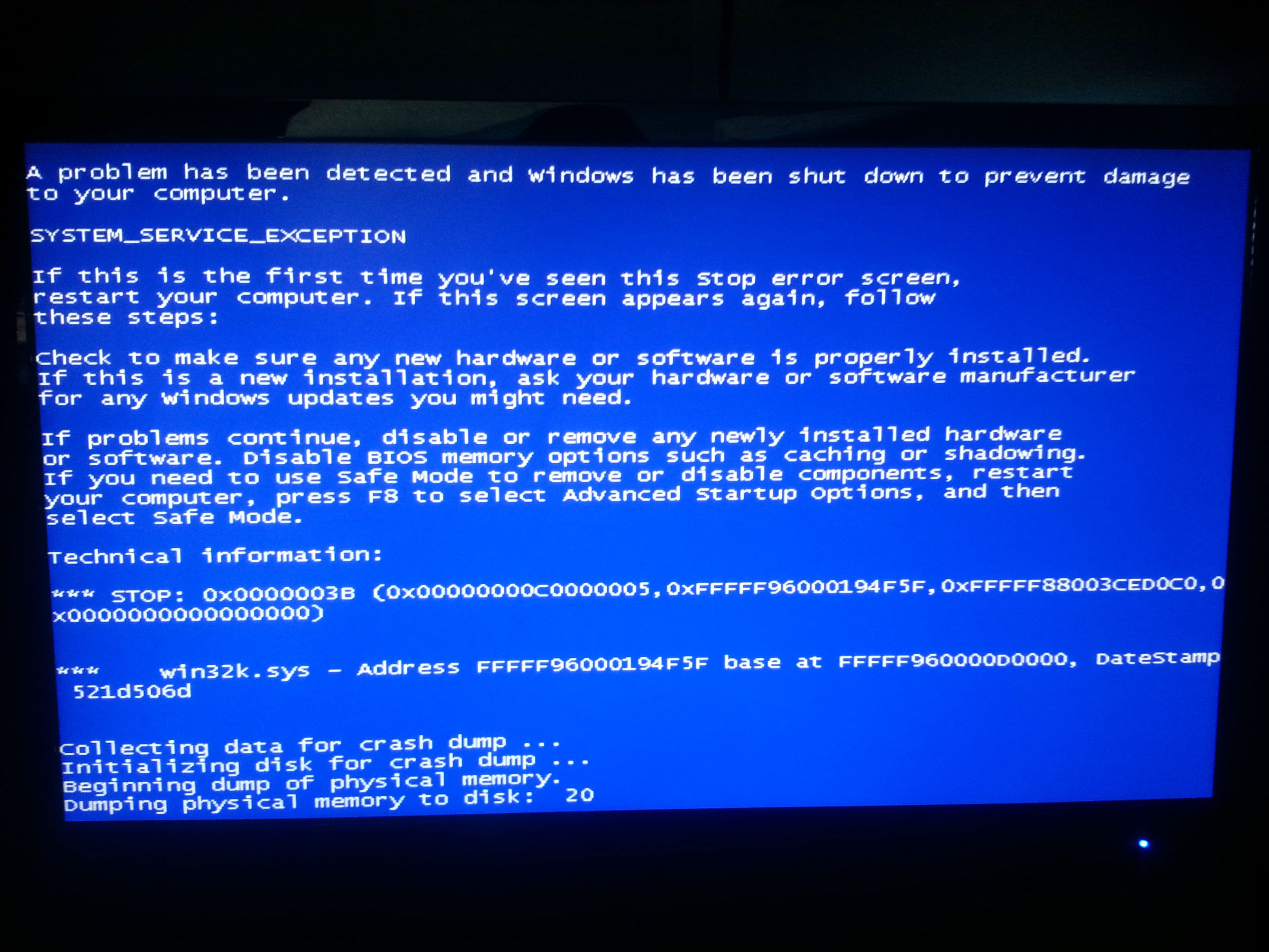
Got another BSOD (error code 0x0000003b), didn't get a dump as it stoped at 20% as seen in the picture

k9mdnbS.jpg
 

My Computer

Computer type
PC/Desktop
Computer Manufacturer/Model Number
custom build
OS
Windows 7 home Premium 64 bit
CPU
AMD 955 BE @ 3.6Ghz
Motherboard
Biostar A770E3
Memory
8GB DDR3 1600MHz
Graphics Card(s)
ATi 5830
Hard Drives
2x500GB
Antivirus
Microsoft Security Essentials
Browser
Google Chrome
Time for some hardware test.

   Warning
The Following Method Should NOT Be Performed On An SSD!


Testing the HDD:


  1. Perform a Disk Check | Disk Check- Scroll down to OPTION TWO of the tutorial and use the /R switch in the CHKDSK command | chkdsk C: /R.
  2. Then Post the Disk Check results following | This Tutorial.
  3. Once back in Windows, download Crystal Disk Info and post a screenshot (multiple shots if you have more than one drive).
  4. Download SeaTools for DOS if you don't want to use a CD to test the HDD you can use YUMI – Multiboot USB Creator to create a bootable USB (instructions are found at the bottom of both pages).
  5. If SeaTools for DOS is unable to recognize your HDD:
  6. Visit HDDdiag and follow the instructions | Or follow the instructions below.
If SeaTools For DOS does not recognize the drive;
Boot into the BIOS using the *Fx key.
Look for an entry called SATA Mode (or something similar), it should be set to IDE / AHCI.
It's probably set to AHCI which is why SeaTools doesn't recognize them in the DOS environment.
Set it to IDE then save and exit usually by pressing the F10 key.
Now boot into SeaTools and it should detect the drives.
Start the Long Test and let it run.
Upon completion don't try to boot into Windows as it will only result in a BSOD, go back into the BIOS
and change the SATA setting back to what it was in the first place.

:ar:When done with the testing procedure take a picture and upload it here.

Re-seat the sata and power.

72974453_zps85c47d93.jpg

Testing the RAM:

Test and Diagnose RAM Issues with Memtest86+:
   Tip

  • :info: Pay close attention to part 3 of the tutorial "If you have errors"
  • :tip: Test the RAM with Memtest86+ for at least 7-10 passes. It may take up to 22 passes to find problems. Make sure to run it once after the system has been on for a few hours and is warm, and then also run it again when the system has been off for a few hours and is cold.
:ar:When done with the testing procedure take a picture and upload it here.

Let us know the results.
 

My Computer

Computer type
PC/Desktop
OS
Windows 10
CPU
Intel Core i5 3570K
Motherboard
Asus P8Z77V-PRO
Memory
16GB 1600Mhz G.Skill
Graphics Card(s)
Gigabyte GTX 970 G1-Gaming
PSU
Seasonic 1000W Platinum
Case
Fractal Design Define R4
Cooling
Noctua NH-D14
I ran memtest with no errors. Going to test my HDD's next, and since you mentioned them I guess I should tell you that when I first installed windows I forgot to change my HDD to AHCI mode and since my mobo defaults IDE I installed windows with it assuming I have IDE drives. And as you know windows does not like it when you switch between IDE and AHCI, despite this a few months later I wanted to run my HDD's in AHCI mode. So I then edited the registry to let me do so, could this be the problem?

Edit: Attached the the CHKDSK and Crystal Disk info below (note that the seccond HDD is refurbished and was likely part of a server before XD [due to its up time])

6l0YOipiUchBbdCN8Nhx3HBGVMA5Q.jpg


6l0YTXMbXLYBkrnpFEOQ8JtEfka9q.jpg
 
Last edited:

My Computer

Computer type
PC/Desktop
Computer Manufacturer/Model Number
custom build
OS
Windows 7 home Premium 64 bit
CPU
AMD 955 BE @ 3.6Ghz
Motherboard
Biostar A770E3
Memory
8GB DDR3 1600MHz
Graphics Card(s)
ATi 5830
Hard Drives
2x500GB
Antivirus
Microsoft Security Essentials
Browser
Google Chrome
Thanks for the update :) .
Well switching between IDE and AHCI mode after the fact is OK depending on how it was carried out.
Can you link or explain as to what was done?

The CHKDSK and CDI looks good to me, what did SeaTools have to say?
How many passes did you let memtest86+ go through?
I'll see what others have to say about the dump flush hanging.
 

My Computer

Computer type
PC/Desktop
OS
Windows 10
CPU
Intel Core i5 3570K
Motherboard
Asus P8Z77V-PRO
Memory
16GB 1600Mhz G.Skill
Graphics Card(s)
Gigabyte GTX 970 G1-Gaming
PSU
Seasonic 1000W Platinum
Case
Fractal Design Define R4
Cooling
Noctua NH-D14
To switch to AHCI all I did was edit the registry value in: HKEY_LOCAL_MACHINE\SYSTEM\CurrentControlSet\services\msahci\Start and set it to 0
As for Memtest+ I only ran it 2 1/2 times (after a cold boot), and I've been meaning to run it more (after a warm boot?)
And I didn't run SeaTools yet because I wanted to see what you had to say about me setting my HDD's to AHCI
 

My Computer

Computer type
PC/Desktop
Computer Manufacturer/Model Number
custom build
OS
Windows 7 home Premium 64 bit
CPU
AMD 955 BE @ 3.6Ghz
Motherboard
Biostar A770E3
Memory
8GB DDR3 1600MHz
Graphics Card(s)
ATi 5830
Hard Drives
2x500GB
Antivirus
Microsoft Security Essentials
Browser
Google Chrome
Event[34931]:
Log Name: System
Source: Service Control Manager
Date: 2013-09-07T14:30:11.295
Event ID: 7000
Task: N/A
Level: Error
Opcode: N/A
Keyword: Classic
User: N/A
User Name: N/A
Computer: Ryan-Desktop
Description:
The WinRing0_1_2_0 service failed to start due to the following error:
The system cannot find the file specified.
Can you tell us about this service? How you have got it? It says it was installed on 03/09/2013.
Event[33653]:
Log Name: System
Source: Service Control Manager
Date: 2013-09-03T08:14:27.473
Event ID: 7045
Task: N/A
Level: Information
Opcode: N/A
Keyword: Classic
User: S-1-5-21-1542785224-2658817956-3129912530-1000
User Name: Ryan-Desktop\Ryan
Computer: Ryan-Desktop
Description:
A service was installed in the system.

Service Name: WinRing0_1_2_0
Service File Name: C:\Users\Ryan\AppData\Local\Temp\tmpF2B7.tmp
Service Type: kernel mode driver
Service Start Type: demand start
Service Account:
But it is there in the even earlier logs, as failure :sarc: :sarc: Please take the virus scans as suggested earlier for one more time, including the boot one.

Upload the list of all the third party drivers Using NirSoft DriverView :

  • Download and execute Driverview
  • View > Hide Microsoft Drivers
  • Edit > Select all
  • File > Save Selected Items
  • In the Save dialog, Set the path to desktop, Put "Driverview" in the name field, and save.
  • Zip the .txt file and upload it.
upload your MSINFO32.txt file.

  1. Click on the start button
  2. Type "msinfo32" (without quotes) in the search bar of the start menu, click the resulting link. It will open the System Information window.
  3. File> Export. In the "File Name" filed, put "MSINFO32" (without Quote), give the save location to desktop, and click the "Save" button.
  4. Give the time for processing, it will save a .nfo file on your desktop.
  5. Zip it, and upload it following the instruction.
We need to know what is the 4th Hard disc, and how it is controlled.

IF you have ASUS/AMD Overdrive installed, uninstall it right now.

Perform a clean startup. http://www.sevenforums.com/tutorial...ation-conflicts-performing-clean-startup.html

Uninstall OpenVPN, at least for testing purpose, for the time being.

Uninstall MSE and reinstall it. Then follow http://www.sevenforums.com/tutorials/91738-windows-update-reset.html.

Also, Test your RAM modules for possible errors.
How to Test and Diagnose RAM Issues with Memtest86+
Run memtest for at least 8 passes, preferably overnight.

If it start showing errors/red lines, stop testing. A single error is enough to determine that something is going bad there.

Long list, but as we have lack of necessary data.

Let us know the results.
 

My Computer

Computer type
PC/Desktop
Computer Manufacturer/Model Number
Self Assembled
OS
Microsoft Windows 10 Pro Insider Preview 64-bit
CPU
Intel(R) Core(TM) i3-4130 CPU @ 3.40GHz
Motherboard
Gigabyte Technology Co., Ltd. B85M-D3H
Memory
Corsair Vengence 4GB x2 (8.00GB Dual-Channel DDR3 @ 798MHz)
Graphics Card(s)
2047MB GeForce GTS 450 (ZOTAC International)
Sound Card
Onboard (Realtek High Definition Audio)
Monitor(s) Displays
LG Flatron E2040T
Screen Resolution
1600x900
Hard Drives
Western Digital 1 TB
Seagate 500 GB
PSU
Corsair VS550
Case
Cooler Master K380
Cooling
Cooler Master Seidon 120V Plus
Keyboard
Logitech MK260r
Mouse
Logitech MK260r
Internet Speed
PMPL Broadband
Antivirus
Windows Defender + MBAM
Browser
Firefox
Other Info
Dell Studio 15" Laptop
Sorry, I don't know what that service is. I've attached the Driverview file below and the MSINFO32 should already be on page 1 (only a .txt couldn't get the .nfo to work). I don't have any more than 2 HDD's so I don't know what "4th" one you are talking about (I do have a DVD drive though). I've also gone ahead and uninstalled AMD overdrive (goodbye my only way to OC D: ) and OpenVPN (I installed that awhile ago to try something that didn't work anyway). I'll get to doing more tests later tonight.
 

My Computer

Computer type
PC/Desktop
Computer Manufacturer/Model Number
custom build
OS
Windows 7 home Premium 64 bit
CPU
AMD 955 BE @ 3.6Ghz
Motherboard
Biostar A770E3
Memory
8GB DDR3 1600MHz
Graphics Card(s)
ATi 5830
Hard Drives
2x500GB
Antivirus
Microsoft Security Essentials
Browser
Google Chrome
Sorry, I don't know what that service is. I've attached the Driverview file below and the MSINFO32 should already be on page 1 (only a .txt couldn't get the .nfo to work). I don't have any more than 2 HDD's so I don't know what "4th" one you are talking about (I do have a DVD drive though). I've also gone ahead and uninstalled AMD overdrive (goodbye my only way to OC D: ) and OpenVPN (I installed that awhile ago to try something that didn't work anyway). I'll get to doing more tests later tonight.
It works. Do what is suggested. We heed information to help you.

You say you have two HDDs only, butyour event log says it detects a controller in Hard Disc 4 Drive 4 .... the MSINFO32 is a must.

If you dont try to export it to text and dont supply it, it is totally your loss only.

EDIT: The little extent of information you have supplied .... we see AMD Overdrive is still present there.
Code:
==================================================
Driver Name       : AODDriver2.sys
Address           : 00000000`07150000
End Address       : 00000000`07182000
Size              : 0x00032000
Load Count        : 1
Index             : 165
File Type         : System Driver
Description       : AMD OverDrive Service Driver
Version           : 4.2.0.0
Company           : Advanced Micro Devices
Product Name      : AMD OverDrive Service Driver
Modified Date     : 5/23/2013 11:48:54 PM
Created Date      : 5/23/2013 11:48:54 PM
Filename          : C:\Program Files (x86)\AMD\OverDrive\amd64\AODDriver2.sys
File Attributes   : A
Service Name      : AODDriver4.2.0
Service Display Name: AODDriver4.2.0
Digital Signature : 
==================================================
Will hope your next reply will let us see that you have performed the suggested steps.
 

My Computer

Computer type
PC/Desktop
Computer Manufacturer/Model Number
Self Assembled
OS
Microsoft Windows 10 Pro Insider Preview 64-bit
CPU
Intel(R) Core(TM) i3-4130 CPU @ 3.40GHz
Motherboard
Gigabyte Technology Co., Ltd. B85M-D3H
Memory
Corsair Vengence 4GB x2 (8.00GB Dual-Channel DDR3 @ 798MHz)
Graphics Card(s)
2047MB GeForce GTS 450 (ZOTAC International)
Sound Card
Onboard (Realtek High Definition Audio)
Monitor(s) Displays
LG Flatron E2040T
Screen Resolution
1600x900
Hard Drives
Western Digital 1 TB
Seagate 500 GB
PSU
Corsair VS550
Case
Cooler Master K380
Cooling
Cooler Master Seidon 120V Plus
Keyboard
Logitech MK260r
Mouse
Logitech MK260r
Internet Speed
PMPL Broadband
Antivirus
Windows Defender + MBAM
Browser
Firefox
Other Info
Dell Studio 15" Laptop
Back
Top
