Solved BSOD's at random times on Alienware M17x R3

And the problem returns. Is this more NVIDIA issues. I recently updated HWinfo and reinstalled my wireless drivers because they crashed. Thanks again for the help arc... you are a life saver.
 

My Computer My Computer

At a glance

Windows 7 64 bit
OS
Windows 7 64 bit
Yes, it is still a nvidia issue.
Code:
Irp is active with 4 stacks 3 is current (= 0xfffffa800792ddf0)
 No Mdl: No System Buffer: Thread 00000000:  Irp stack trace.  
     cmd  flg cl Device   File     Completion-Context
 [  0, 0]   0  0 00000000 00000000 00000000-00000000    

            Args: 00000000 00000000 00000000 00000000
 [  0, 0]   0  0 00000000 00000000 00000000-00000000    

            Args: 00000000 00000000 00000000 00000000
>[ 16, 2]   0 e1 fffffa8008c2c040 00000000 00000000-00000000    pending
          *** WARNING: Unable to verify timestamp for nvlddmkm.sys
*** ERROR: Module load completed but symbols could not be loaded for nvlddmkm.sys
 \Driver\nvlddmkm
            Args: 00000000 00000001 00000004 00000000
 [  0, 0]   0  0 00000000 00000000 00000000-fffffa8009c922d0    

            Args: 00000000 00000000 00000000 00000000
0: kd> !devobj fffffa8008c2c040
Device object (fffffa8008c2c040) is for:
 InfoMask field not found for _OBJECT_HEADER at fffffa8008c2c010
 \Driver\nvlddmkm DriverObject fffffa8008ba1280
Current Irp 00000000 RefCount 0 Type 00000023 Flags 00002004
DevExt fffffa8008c2c190 DevObjExt fffffa8008c2cb48 
ExtensionFlags (0x00000800)  DOE_DEFAULT_SD_PRESENT
Characteristics (0x00000100)  FILE_DEVICE_SECURE_OPEN
AttachedTo (Lower) fffffa8006fc4e40 \Driver\ACPI
Device queue is not busy.
0: kd> lmvm nvlddmkm
start             end                 module name
fffff880`0564d000 fffff880`060eb000   nvlddmkm T (no symbols)           
    Loaded symbol image file: nvlddmkm.sys
    Image path: \SystemRoot\system32\DRIVERS\nvlddmkm.sys
    Image name: nvlddmkm.sys
[COLOR=Red]    Timestamp:        Sat Dec 29 12:17:52 2012[/COLOR] (50DE9218)
    CheckSum:         00A7F96C
    ImageSize:        00A9E000
    Translations:     0000.04b0 0000.04e4 0409.04b0 0409.04e4

The driver is not the latest. Apply the latest version of nVidia display driver.
You may download it directly, from our forum link http://www.sevenforums.com/graphic-cards/602-latest-nvidia-forceware-video-drivers-windows-7-a.html; or you may opt for the Option 2 of Drivers- Download NVIDIA Drivers for “Automatically find drivers for my NVIDIA products” (it requires java installed).

nvidiadisplaydriver_zps0ba1be3b.jpg
 

My Computer My Computer

At a glance

Microsoft Windows 10 Pro Insider Preview 64-bitIntel(R) Core(TM) i3-4130 CPU @ 3.40GHzCorsair Vengence 4GB x2 (8.00GB Dual-Channel ...2047MB GeForce GTS 450 (ZOTAC International)
Computer type
PC/Desktop
Computer Manufacturer/Model Number
Self Assembled
OS
Microsoft Windows 10 Pro Insider Preview 64-bit
CPU
Intel(R) Core(TM) i3-4130 CPU @ 3.40GHz
Motherboard
Gigabyte Technology Co., Ltd. B85M-D3H
Memory
Corsair Vengence 4GB x2 (8.00GB Dual-Channel DDR3 @ 798MHz)
Graphics Card(s)
2047MB GeForce GTS 450 (ZOTAC International)
Sound Card
Onboard (Realtek High Definition Audio)
Monitor(s) Displays
LG Flatron E2040T
Screen Resolution
1600x900
Hard Drives
Western Digital 1 TB
Seagate 500 GB
PSU
Corsair VS550
Case
Cooler Master K380
Cooling
Cooler Master Seidon 120V Plus
Keyboard
Logitech MK260r
Mouse
Logitech MK260r
Internet Speed
PMPL Broadband
Antivirus
Windows Defender + MBAM
Browser
Firefox
Other Info
Dell Studio 15" Laptop
Like always I appreciate it arc! Thanks so much
 

My Computer My Computer

At a glance

Windows 7 64 bit
OS
Windows 7 64 bit
You are welcome mate :)
Let us know for any problem if those come back.
 

My Computer My Computer

At a glance

Microsoft Windows 10 Pro Insider Preview 64-bitIntel(R) Core(TM) i3-4130 CPU @ 3.40GHzCorsair Vengence 4GB x2 (8.00GB Dual-Channel ...2047MB GeForce GTS 450 (ZOTAC International)
Computer type
PC/Desktop
Computer Manufacturer/Model Number
Self Assembled
OS
Microsoft Windows 10 Pro Insider Preview 64-bit
CPU
Intel(R) Core(TM) i3-4130 CPU @ 3.40GHz
Motherboard
Gigabyte Technology Co., Ltd. B85M-D3H
Memory
Corsair Vengence 4GB x2 (8.00GB Dual-Channel DDR3 @ 798MHz)
Graphics Card(s)
2047MB GeForce GTS 450 (ZOTAC International)
Sound Card
Onboard (Realtek High Definition Audio)
Monitor(s) Displays
LG Flatron E2040T
Screen Resolution
1600x900
Hard Drives
Western Digital 1 TB
Seagate 500 GB
PSU
Corsair VS550
Case
Cooler Master K380
Cooling
Cooler Master Seidon 120V Plus
Keyboard
Logitech MK260r
Mouse
Logitech MK260r
Internet Speed
PMPL Broadband
Antivirus
Windows Defender + MBAM
Browser
Firefox
Other Info
Dell Studio 15" Laptop
They are fully updated. This is killing me. :D
 

My Computer My Computer

At a glance

Windows 7 64 bit
OS
Windows 7 64 bit
Exactly the same with the updated display driver.

Actually it is not a display related issue, though the display driver is connected there. The issue is "A device object has been blocking an IRP for too long a time".

The IRP is
Code:
Irp is active with 4 stacks 3 is current (= 0xfffffa8007dda170)
 No Mdl: No System Buffer: Thread 00000000:  Irp stack trace.  
     cmd  flg cl Device   File     Completion-Context
 [  0, 0]   0  0 00000000 00000000 00000000-00000000    

            Args: 00000000 00000000 00000000 00000000
 [  0, 0]   0  0 00000000 00000000 00000000-00000000    

            Args: 00000000 00000000 00000000 00000000
>[ 16, 2]   0 e1 fffffa8008b56040 00000000 00000000-00000000    pending
[COLOR=Red]          *** WARNING: Unable to verify timestamp for nvlddmkm.sys
*** ERROR: Module load completed but symbols could not be loaded for nvlddmkm.sys
 \Driver\nvlddmkm[/COLOR]
            Args: 00000000 00000001 00000004 00000000
 [  0, 0]   0  0 00000000 00000000 00000000-fffffa8007602b90    

            Args: 00000000 00000000 00000000 00000000
And the device object is
Code:
Device object (fffffa8008b56040) is for:
 InfoMask field not found for _OBJECT_HEADER at fffffa8008b56010
 \Driver\nvlddmkm DriverObject fffffa8008aebe70
Current Irp 00000000 RefCount 0 Type 00000023 Flags 00002004
DevExt fffffa8008b56190 DevObjExt fffffa8008b56b48 
ExtensionFlags (0x00000800)  DOE_DEFAULT_SD_PRESENT
Characteristics (0x00000100)  FILE_DEVICE_SECURE_OPEN
[COLOR=Red]AttachedTo (Lower) fffffa8007f59970 \Driver\ACPI[/COLOR]
Device queue is not busy.
So it is connected with Advanced Configuration and Power Interface (ACPI), which is a device configuration / power management setting.

Go to step 5 of http://www.sevenforums.com/tutorials/778-power-plan-settings-change.html. After clicking "change advanced power settings" Expand PCI Express. Expand Link State Power Management. Click on "settings" and choose "off" in the drop down menu. Apply > OK.

20130516131750.jpg


PCI Express, coz the GPU is connected in the PCIe slot. So we should alter its power plan.

After doing it, let us know the results.
 
Last edited:

My Computer My Computer

At a glance

Microsoft Windows 10 Pro Insider Preview 64-bitIntel(R) Core(TM) i3-4130 CPU @ 3.40GHzCorsair Vengence 4GB x2 (8.00GB Dual-Channel ...2047MB GeForce GTS 450 (ZOTAC International)
Computer type
PC/Desktop
Computer Manufacturer/Model Number
Self Assembled
OS
Microsoft Windows 10 Pro Insider Preview 64-bit
CPU
Intel(R) Core(TM) i3-4130 CPU @ 3.40GHz
Motherboard
Gigabyte Technology Co., Ltd. B85M-D3H
Memory
Corsair Vengence 4GB x2 (8.00GB Dual-Channel DDR3 @ 798MHz)
Graphics Card(s)
2047MB GeForce GTS 450 (ZOTAC International)
Sound Card
Onboard (Realtek High Definition Audio)
Monitor(s) Displays
LG Flatron E2040T
Screen Resolution
1600x900
Hard Drives
Western Digital 1 TB
Seagate 500 GB
PSU
Corsair VS550
Case
Cooler Master K380
Cooling
Cooler Master Seidon 120V Plus
Keyboard
Logitech MK260r
Mouse
Logitech MK260r
Internet Speed
PMPL Broadband
Antivirus
Windows Defender + MBAM
Browser
Firefox
Other Info
Dell Studio 15" Laptop
It appears those are already switched in the off state. This is what I saw when i opened them.

I did not change any settings.

rhjZtg6
 

My Computer My Computer

At a glance

Windows 7 64 bit
OS
Windows 7 64 bit
If a device is not losing the power during sleep, it should not cause a driver's power state failure. Also the setting should not be set to be the default for a laptop, it's odd.

I think I need to ask for some more help.
 

My Computer My Computer

At a glance

Microsoft Windows 10 Pro Insider Preview 64-bitIntel(R) Core(TM) i3-4130 CPU @ 3.40GHzCorsair Vengence 4GB x2 (8.00GB Dual-Channel ...2047MB GeForce GTS 450 (ZOTAC International)
Computer type
PC/Desktop
Computer Manufacturer/Model Number
Self Assembled
OS
Microsoft Windows 10 Pro Insider Preview 64-bit
CPU
Intel(R) Core(TM) i3-4130 CPU @ 3.40GHz
Motherboard
Gigabyte Technology Co., Ltd. B85M-D3H
Memory
Corsair Vengence 4GB x2 (8.00GB Dual-Channel DDR3 @ 798MHz)
Graphics Card(s)
2047MB GeForce GTS 450 (ZOTAC International)
Sound Card
Onboard (Realtek High Definition Audio)
Monitor(s) Displays
LG Flatron E2040T
Screen Resolution
1600x900
Hard Drives
Western Digital 1 TB
Seagate 500 GB
PSU
Corsair VS550
Case
Cooler Master K380
Cooling
Cooler Master Seidon 120V Plus
Keyboard
Logitech MK260r
Mouse
Logitech MK260r
Internet Speed
PMPL Broadband
Antivirus
Windows Defender + MBAM
Browser
Firefox
Other Info
Dell Studio 15" Laptop
Hi,

Code:
Stop message [COLOR=red]0x0000009F[/COLOR] Descriptive text: DRIVER_POWER_STATE_FAILURE
Usual cause: A driver is in an inconsistent or invalid power state.
*** WARNING: Unable to verify timestamp for nvlddmkm.sys
*** ERROR: Module load completed but symbols could not be loaded for nvlddmkm.sys
Probably caused by :[COLOR=red] nvlddmkm.sys[/COLOR]

As Arc rightly stated, your Nividia drivers are causing issues:

Please Download and install the 306.23 "stable" version:
Download and Install: :ar: Driver Fusion.
Reboot the computer in :ar: Advanced Boot Options, safe mode.
Search Driver Fusion in your start menu, and remove all components of your nVidia display driver.
If it says the the free version of Driver Fusion cannot remove all the elements, stop there and follow
:ar: Drivers - Clean Left over Files after Uninstalling
Boot normally now. Go to: :ar: Drivers - Download NVIDIA Drivers,
Locate Drivers > Beta and Legacy; search there with your cards particulars for: :ar: GeForce 306.23 Driver
dated 13.9.2012 and install it.

   Note
Ensure you dont have Windows update or the Nividia update utility running or it will
automatically reinstall the latest drivers again.


Please download GPU-Z: :ar: GPU-Z Video card GPU Information Utility and check the
version number/date of your GPU BIOS for: - NVidia GeForce GTX 560M:

If the version is: 269.03, A01 8/2/2011 1:06:55 PM

Then please update the BIOS to this version:

nVidia GeForce GTX 560M, v.70.26.36.00.09 , A02

:ar: Nividia Geforce GTX BIOS A02
   Warning
Please observe all the instructions supplied by your manufacturer


Run SFC to check the integrity of all Windows 7 system files:
  • Click on Start > Type in search cmd
    Right-click cmd after results are displayed and Run as Administrator
    Type SFC /scannow at the prompt
    (Note: There is a space between SFC and /scannow)
:ar: SFC Tutorial


   Note
Select option two. If any problems are found, run the scan 3 times and immediately
reboot the computer after each scan.


cheers

Dave
 

My Computer My Computer

At a glance

Windows 7 Professional 64bitAMD Athlon (tm) X2 5200+ Dual Core 2712 Mhz4GBNividia GeForce 8600 GTS- DIED 25/7/2013 R.I.P
Computer type
PC/Desktop
OS
Windows 7 Professional 64bit
CPU
AMD Athlon (tm) X2 5200+ Dual Core 2712 Mhz
Motherboard
Asus
Memory
4GB
Graphics Card(s)
Nividia GeForce 8600 GTS- DIED 25/7/2013 R.I.P
Sound Card
None
Monitor(s) Displays
22" Yuraku LCD (Dont ask)
Screen Resolution
1280x960
Hard Drives
2TB WD Caviar green
PSU
Windy up type
Case
Scout cm Storm
Cooling
Hair dryer on full cool power ;-)
Keyboard
QWERTY
Mouse
Microsoft Special
Internet Speed
BT Infinity 9.38Mb/s Wheeeeeeeeeeeeeeee!!
Antivirus
MSE
Browser
Internet Explore 10 and Chrome
Other Info
Don't shout...I've got a Hangover!
My bios appear to be updated. I will try to install the earlier version

cwa.png


I have a lingering question about these drivers. What is the difference between downloading the drivers which dell recommends for my computer as opposed to the ones on Nvidia. Is there any difference compatibility wise, or are they the same drivers.

Pcb7PYE


Thanks dave
 

My Computer My Computer

At a glance

Windows 7 64 bit
OS
Windows 7 64 bit
I would leave the latest BIOS installed.

Good question about the drivers, at this point try the stable one, that should tell us if its the card
or the driver, if the stable one holds then you could try the one off the Dell site as the latest Nividia
seems to be causing issues.

Cheers

Dave
 

My Computer My Computer

At a glance

Windows 7 Professional 64bitAMD Athlon (tm) X2 5200+ Dual Core 2712 Mhz4GBNividia GeForce 8600 GTS- DIED 25/7/2013 R.I.P
Computer type
PC/Desktop
OS
Windows 7 Professional 64bit
CPU
AMD Athlon (tm) X2 5200+ Dual Core 2712 Mhz
Motherboard
Asus
Memory
4GB
Graphics Card(s)
Nividia GeForce 8600 GTS- DIED 25/7/2013 R.I.P
Sound Card
None
Monitor(s) Displays
22" Yuraku LCD (Dont ask)
Screen Resolution
1280x960
Hard Drives
2TB WD Caviar green
PSU
Windy up type
Case
Scout cm Storm
Cooling
Hair dryer on full cool power ;-)
Keyboard
QWERTY
Mouse
Microsoft Special
Internet Speed
BT Infinity 9.38Mb/s Wheeeeeeeeeeeeeeee!!
Antivirus
MSE
Browser
Internet Explore 10 and Chrome
Other Info
Don't shout...I've got a Hangover!
Hi,

You have marked this thread as solved, can I ask what the solution was?
As this may help others in the future with similar problems.

cheers

Dave
 

My Computer My Computer

At a glance

Windows 7 Professional 64bitAMD Athlon (tm) X2 5200+ Dual Core 2712 Mhz4GBNividia GeForce 8600 GTS- DIED 25/7/2013 R.I.P
Computer type
PC/Desktop
OS
Windows 7 Professional 64bit
CPU
AMD Athlon (tm) X2 5200+ Dual Core 2712 Mhz
Motherboard
Asus
Memory
4GB
Graphics Card(s)
Nividia GeForce 8600 GTS- DIED 25/7/2013 R.I.P
Sound Card
None
Monitor(s) Displays
22" Yuraku LCD (Dont ask)
Screen Resolution
1280x960
Hard Drives
2TB WD Caviar green
PSU
Windy up type
Case
Scout cm Storm
Cooling
Hair dryer on full cool power ;-)
Keyboard
QWERTY
Mouse
Microsoft Special
Internet Speed
BT Infinity 9.38Mb/s Wheeeeeeeeeeeeeeee!!
Antivirus
MSE
Browser
Internet Explore 10 and Chrome
Other Info
Don't shout...I've got a Hangover!
Oh, I just followed the instructions. I marked it as solved because the blue screens only happen like once or twice a month, so even if it was not solved I wouldn't know for a few weeks ish.

I'll be back if there is trouble brewing up again (or if it seems stable for a decent amount of time). Thanks for your help.
 

My Computer My Computer

At a glance

Windows 7 64 bit
OS
Windows 7 64 bit
Okay, thanks for the feedback.

cheers

Dave
 

My Computer My Computer

At a glance

Windows 7 Professional 64bitAMD Athlon (tm) X2 5200+ Dual Core 2712 Mhz4GBNividia GeForce 8600 GTS- DIED 25/7/2013 R.I.P
Computer type
PC/Desktop
OS
Windows 7 Professional 64bit
CPU
AMD Athlon (tm) X2 5200+ Dual Core 2712 Mhz
Motherboard
Asus
Memory
4GB
Graphics Card(s)
Nividia GeForce 8600 GTS- DIED 25/7/2013 R.I.P
Sound Card
None
Monitor(s) Displays
22" Yuraku LCD (Dont ask)
Screen Resolution
1280x960
Hard Drives
2TB WD Caviar green
PSU
Windy up type
Case
Scout cm Storm
Cooling
Hair dryer on full cool power ;-)
Keyboard
QWERTY
Mouse
Microsoft Special
Internet Speed
BT Infinity 9.38Mb/s Wheeeeeeeeeeeeeeee!!
Antivirus
MSE
Browser
Internet Explore 10 and Chrome
Other Info
Don't shout...I've got a Hangover!
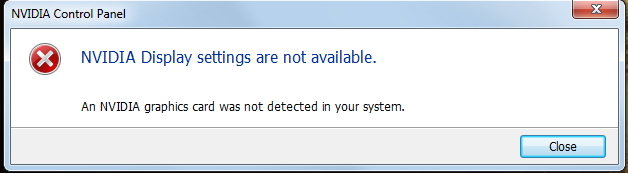
The problem has returned.
I also get this error when attempting to open the nvidia control panel after the crash.
fPlNmYe.png


Thanks so much for any help.
after another restart the above problem about the nvidia control panel has vanished
 
Last edited:

My Computer My Computer

At a glance

Windows 7 64 bit
OS
Windows 7 64 bit
Bumping
 

My Computer My Computer

At a glance

Windows 7 64 bit
OS
Windows 7 64 bit
The same thing ..... display driver ... ACPI ...
Code:
Irp is active with 4 stacks 2 is current (= 0xfffffa800a36a4f8)
 No Mdl: No System Buffer: Thread 00000000:  Irp stack trace.  
     cmd  flg cl Device   File     Completion-Context
 [  0, 0]   0  0 00000000 00000000 00000000-00000000    

            Args: 00000000 00000000 00000000 00000000
>[ 16, 2]   0 e1 fffffa8006fc4040 00000000 fffff8800f1d9fac-fffffa80095a9bf0 Success Error Cancel pending
           \Driver\ACPI    nvlddmkm
            Args: 00000000 00000001 00000001 00000000
 [ 16, 2]   0 e1 fffffa8008958480 00000000 00000000-00000000    pending
           \Driver\nvlddmkm
            Args: 00000000 00000001 00000001 00000000
 [  0, 0]   0  0 00000000 00000000 00000000-fffffa800954d6b0    

            Args: 00000000 00000000 00000000 00000000
Installing the display driver to the latest 320.18 will hopefully detect your GPU back.

Then, http://www.sevenforums.com/tutorials/292971-pcie-link-state-power-management-turn-off-windows.html .... and disable hibernate too.
 

My Computer My Computer

At a glance

Microsoft Windows 10 Pro Insider Preview 64-bitIntel(R) Core(TM) i3-4130 CPU @ 3.40GHzCorsair Vengence 4GB x2 (8.00GB Dual-Channel ...2047MB GeForce GTS 450 (ZOTAC International)
Computer type
PC/Desktop
Computer Manufacturer/Model Number
Self Assembled
OS
Microsoft Windows 10 Pro Insider Preview 64-bit
CPU
Intel(R) Core(TM) i3-4130 CPU @ 3.40GHz
Motherboard
Gigabyte Technology Co., Ltd. B85M-D3H
Memory
Corsair Vengence 4GB x2 (8.00GB Dual-Channel DDR3 @ 798MHz)
Graphics Card(s)
2047MB GeForce GTS 450 (ZOTAC International)
Sound Card
Onboard (Realtek High Definition Audio)
Monitor(s) Displays
LG Flatron E2040T
Screen Resolution
1600x900
Hard Drives
Western Digital 1 TB
Seagate 500 GB
PSU
Corsair VS550
Case
Cooler Master K380
Cooling
Cooler Master Seidon 120V Plus
Keyboard
Logitech MK260r
Mouse
Logitech MK260r
Internet Speed
PMPL Broadband
Antivirus
Windows Defender + MBAM
Browser
Firefox
Other Info
Dell Studio 15" Laptop
I'm confused with your link. Link state power management for both on battery and while plugged in are already on the off toggle, should I switch those?
Hibernate is disabled.

So we don't really know what caused this? The previous blue screen I received I had while on the updated Nvidia driver right? Will updating back to that really help my issue?

Thanks for your time!
 

My Computer My Computer

At a glance

Windows 7 64 bit
OS
Windows 7 64 bit
Last edited:

My Computer My Computer

At a glance

Microsoft Windows 10 Pro Insider Preview 64-bitIntel(R) Core(TM) i3-4130 CPU @ 3.40GHzCorsair Vengence 4GB x2 (8.00GB Dual-Channel ...2047MB GeForce GTS 450 (ZOTAC International)
Computer type
PC/Desktop
Computer Manufacturer/Model Number
Self Assembled
OS
Microsoft Windows 10 Pro Insider Preview 64-bit
CPU
Intel(R) Core(TM) i3-4130 CPU @ 3.40GHz
Motherboard
Gigabyte Technology Co., Ltd. B85M-D3H
Memory
Corsair Vengence 4GB x2 (8.00GB Dual-Channel DDR3 @ 798MHz)
Graphics Card(s)
2047MB GeForce GTS 450 (ZOTAC International)
Sound Card
Onboard (Realtek High Definition Audio)
Monitor(s) Displays
LG Flatron E2040T
Screen Resolution
1600x900
Hard Drives
Western Digital 1 TB
Seagate 500 GB
PSU
Corsair VS550
Case
Cooler Master K380
Cooling
Cooler Master Seidon 120V Plus
Keyboard
Logitech MK260r
Mouse
Logitech MK260r
Internet Speed
PMPL Broadband
Antivirus
Windows Defender + MBAM
Browser
Firefox
Other Info
Dell Studio 15" Laptop
Will mark solved and see what happens in future. thanks arc!
 

My Computer My Computer

At a glance

Windows 7 64 bit
OS
Windows 7 64 bit
Back
Top