Budget Custom Build!

If you're thinking of overclocking, remember that you shouldn't overclock what you can't afford to replace.
 

My Computer

Computer type
PC/Desktop
Computer Manufacturer/Model Number
Mellon Labs (custom build)
OS
Win 7 Pro x64/Win 10 Pro x64 dual boot
CPU
AMD FX 8350 Vishera @ 4200
Motherboard
ASUS M5A97 R2.0
Memory
16 GB Mushkin Blackline DDR3-2400 @ 1866 (9-10-10-10-31)
Graphics Card(s)
XFX Radeon R9 280 Double D Black Edition
Sound Card
Realtek HD Audio on MB. Sounds great.
Monitor(s) Displays
Acer 24", Acer 22"
Screen Resolution
3840 x 1080
Hard Drives
1 x Mushkin Chronos 120 GB SSD (Win 10)
1 x Samsung 850 EVO 250 GB SSD (Win 7)
1 x WD 1TB SATA Blue
1 x WD 1TB SATA Green
PSU
Corsair TX-750
Case
CoolerMaster HAF 912+
Cooling
Coolermaster Seidon 240M Liquid AIO. 6 case fans
Keyboard
Logitech G710+
Mouse
Logitech G500s
Internet Speed
Much better since I got fiber, but still way overpriced.
Antivirus
MSE, Malware Bytes for scanning
Browser
Firefox
Other Info
Corsair VOID USB headphones.

A Mellon Labs X-1 - LCD Smartie driven system status display.

Brought to you by the letter E
I did read it, but guessed that because thrashzone has a K himself, he would know what mobo's are able to overclock..
So final choice, hope i dont get it wrong this time... Going for the msi z170
 

Attachments

  • image.png
    image.png
    41.6 KB · Views: 5

My Computer

Computer type
Laptop
Computer Manufacturer/Model Number
Toshiba
OS
Windows 7 Home Premium 32 Bit
CPU
AMD Sepron(tm) SI-42 2.1GHz
Memory
5GB (unlocked)
Graphics Card(s)
ATI Radeon HD 3200 Graphics
Hard Drives
148GB
Browser
Chrome
If you're thinking of overclocking, remember that you shouldn't overclock what you can't afford to replace.


So your saying its dangerous and you can easily damage the cpu? Ive read alot of sites and they say theres a very low chance of damaging your cpu.. Thats only when you go into extreme overclocking.
 

My Computer

Computer type
Laptop
Computer Manufacturer/Model Number
Toshiba
OS
Windows 7 Home Premium 32 Bit
CPU
AMD Sepron(tm) SI-42 2.1GHz
Memory
5GB (unlocked)
Graphics Card(s)
ATI Radeon HD 3200 Graphics
Hard Drives
148GB
Browser
Chrome
Yep oc'ing is pretty wild stuff,
I mentioned AI Suite 3 for the ASUS board which has many modes for sort of safely oc'ing from default configurations
That was discounted for a lack of the version and the options you'd see in the B150 version opposed to the one I would see if I actually used it
But it did have a gaming mode/ extreme mode and a few other ones I never tried personally

MSI might have a utility similar to asus's ai suite 3 I have not checked :/

Intel cpu's also have a neat little utility one could use if desired which again I have not used this either
I did use ai suite 3 briefly ;)
http://www.sevenforums.com/benchmarks/383341-intel-extreme-tuning-utility-benchmark.html
 

My Computer

Computer type
PC/Desktop
Computer Manufacturer/Model Number
Custom assembled by me :}
OS
Win-7-Pro64bit 7-H-Prem-64bit
CPU
i7-5930K 2nd i9-9940x both water blocked VRM's too
Motherboard
ASUS SABERTOOTH X99 2nd ASUS x299 Apex
Memory
Trident-z 3200C14 2nd Trident-z 3600C16
Graphics Card(s)
EVGA 1080ti ftw3 2nd Titan Xp both water blocked
Sound Card
Built-in Realtek
Monitor(s) Displays
1-AOC G2460PG 24"G-Sync 144Hz/ 2nd 1-ASUS VG248QE 24" 144Hz
Screen Resolution
1920 x 1080 144Hz
Hard Drives
2-Samsung M.2 Evo & Evo Plus
2-Samsung 850 EVO 500GB SSD's/ 3-2.5 W.D. Black 1tb-&3-1tb/3-3.5 WD Black 1tb hdd's
PSU
EVGA SuperNOVA 1000-P2 2nd 1200-P2
Case
2-Corsair Obsidian Series 450D Black ATX Mid Tower
Cooling
Custom water loops
Keyboard
Logitech G710+/ 2nd Logitech G910
Mouse
2-RedDragon M901 Perdition 16400 dpi Gaming mouse = wired
Internet Speed
Comcast Ping 19ms 89.31mbps download speed 6.12mbps upload
Antivirus
Malwarebytes Pro/ Superantispyware Pro
Browser
FireFox & Pale moon
Other Info
2nd ASUS X299 Apex/Intel i9-9940x with Custom water loop/7H-Prem-x64/Corsair 450D case/Ram Trident-z 3600C16 4x8gb / Samsung970Evo plus 500gb SSD/Dual ssd EZ swap evo/PSU EVGA SuperNova 1200w-P2 80+Platinum/GPU Titan Xp /8-ML-140 on push-pull on 2-280GTX rads
How did you go about overclocking and when you did it for your first time what was it like?
 

My Computer

Computer type
Laptop
Computer Manufacturer/Model Number
Toshiba
OS
Windows 7 Home Premium 32 Bit
CPU
AMD Sepron(tm) SI-42 2.1GHz
Memory
5GB (unlocked)
Graphics Card(s)
ATI Radeon HD 3200 Graphics
Hard Drives
148GB
Browser
Chrome
I personally have only use the "EZ tuning wizard" shown on the top rightish which makes it a lot easier and safer to get a little more performance
View attachment 376701
 
Last edited:

My Computer

Computer type
PC/Desktop
Computer Manufacturer/Model Number
Custom assembled by me :}
OS
Win-7-Pro64bit 7-H-Prem-64bit
CPU
i7-5930K 2nd i9-9940x both water blocked VRM's too
Motherboard
ASUS SABERTOOTH X99 2nd ASUS x299 Apex
Memory
Trident-z 3200C14 2nd Trident-z 3600C16
Graphics Card(s)
EVGA 1080ti ftw3 2nd Titan Xp both water blocked
Sound Card
Built-in Realtek
Monitor(s) Displays
1-AOC G2460PG 24"G-Sync 144Hz/ 2nd 1-ASUS VG248QE 24" 144Hz
Screen Resolution
1920 x 1080 144Hz
Hard Drives
2-Samsung M.2 Evo & Evo Plus
2-Samsung 850 EVO 500GB SSD's/ 3-2.5 W.D. Black 1tb-&3-1tb/3-3.5 WD Black 1tb hdd's
PSU
EVGA SuperNOVA 1000-P2 2nd 1200-P2
Case
2-Corsair Obsidian Series 450D Black ATX Mid Tower
Cooling
Custom water loops
Keyboard
Logitech G710+/ 2nd Logitech G910
Mouse
2-RedDragon M901 Perdition 16400 dpi Gaming mouse = wired
Internet Speed
Comcast Ping 19ms 89.31mbps download speed 6.12mbps upload
Antivirus
Malwarebytes Pro/ Superantispyware Pro
Browser
FireFox & Pale moon
Other Info
2nd ASUS X299 Apex/Intel i9-9940x with Custom water loop/7H-Prem-x64/Corsair 450D case/Ram Trident-z 3600C16 4x8gb / Samsung970Evo plus 500gb SSD/Dual ssd EZ swap evo/PSU EVGA SuperNova 1200w-P2 80+Platinum/GPU Titan Xp /8-ML-140 on push-pull on 2-280GTX rads
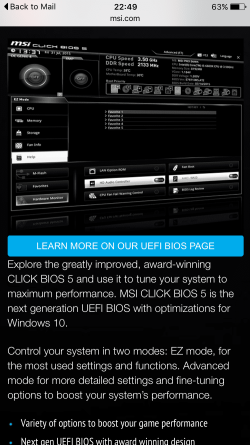
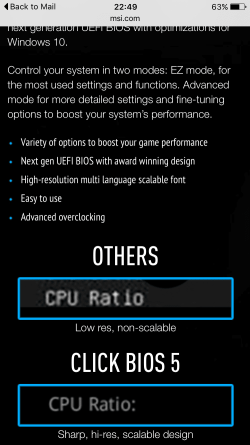
The MSI's bios looks pretty good and im pretty sure it has the same ez mode thing as u do.
image.png
 
Last edited:

My Computer

Computer type
Laptop
Computer Manufacturer/Model Number
Toshiba
OS
Windows 7 Home Premium 32 Bit
CPU
AMD Sepron(tm) SI-42 2.1GHz
Memory
5GB (unlocked)
Graphics Card(s)
ATI Radeon HD 3200 Graphics
Hard Drives
148GB
Browser
Chrome
image.png
 

My Computer

Computer type
Laptop
Computer Manufacturer/Model Number
Toshiba
OS
Windows 7 Home Premium 32 Bit
CPU
AMD Sepron(tm) SI-42 2.1GHz
Memory
5GB (unlocked)
Graphics Card(s)
ATI Radeon HD 3200 Graphics
Hard Drives
148GB
Browser
Chrome
Yea MSI has some good stuff I was looking at some pretty wild laptops they have :)
At least the MSI is just under the budget price but seeing the total so far hopefully doable for you
To me everything looks okay.
 

My Computer

Computer type
PC/Desktop
Computer Manufacturer/Model Number
Custom assembled by me :}
OS
Win-7-Pro64bit 7-H-Prem-64bit
CPU
i7-5930K 2nd i9-9940x both water blocked VRM's too
Motherboard
ASUS SABERTOOTH X99 2nd ASUS x299 Apex
Memory
Trident-z 3200C14 2nd Trident-z 3600C16
Graphics Card(s)
EVGA 1080ti ftw3 2nd Titan Xp both water blocked
Sound Card
Built-in Realtek
Monitor(s) Displays
1-AOC G2460PG 24"G-Sync 144Hz/ 2nd 1-ASUS VG248QE 24" 144Hz
Screen Resolution
1920 x 1080 144Hz
Hard Drives
2-Samsung M.2 Evo & Evo Plus
2-Samsung 850 EVO 500GB SSD's/ 3-2.5 W.D. Black 1tb-&3-1tb/3-3.5 WD Black 1tb hdd's
PSU
EVGA SuperNOVA 1000-P2 2nd 1200-P2
Case
2-Corsair Obsidian Series 450D Black ATX Mid Tower
Cooling
Custom water loops
Keyboard
Logitech G710+/ 2nd Logitech G910
Mouse
2-RedDragon M901 Perdition 16400 dpi Gaming mouse = wired
Internet Speed
Comcast Ping 19ms 89.31mbps download speed 6.12mbps upload
Antivirus
Malwarebytes Pro/ Superantispyware Pro
Browser
FireFox & Pale moon
Other Info
2nd ASUS X299 Apex/Intel i9-9940x with Custom water loop/7H-Prem-x64/Corsair 450D case/Ram Trident-z 3600C16 4x8gb / Samsung970Evo plus 500gb SSD/Dual ssd EZ swap evo/PSU EVGA SuperNova 1200w-P2 80+Platinum/GPU Titan Xp /8-ML-140 on push-pull on 2-280GTX rads
Whats the difference between the two i5 6600k cpus from scan:
1
2
 

My Computer

Computer type
Laptop
Computer Manufacturer/Model Number
Toshiba
OS
Windows 7 Home Premium 32 Bit
CPU
AMD Sepron(tm) SI-42 2.1GHz
Memory
5GB (unlocked)
Graphics Card(s)
ATI Radeon HD 3200 Graphics
Hard Drives
148GB
Browser
Chrome

My Computer

Computer type
PC/Desktop
Computer Manufacturer/Model Number
CoreI7-6700K MrFingerIII Special Builds
OS
Windows 10 Home Premium 64bit sp1
CPU
Intel I7-6700K @ 4.6 Ghz 1.344 volts everyday OC
Motherboard
Asrock Fatality K6 Z170 Socket 1151
Memory
32GB G-Skill TridentZ 3200mhz 16-18-18-38 DDR4
Graphics Card(s)
Sli Gigabyte Windforce GTX 980 G1
Sound Card
AC97 Creative Rage Tactic 3D Headphones Bluetooth
Monitor(s) Displays
27" Asus ROG Swift PG278Q G-Sync 48" Vizio Smart HD TV
Screen Resolution
2560x1440p 27"- 48" Currently Gaming at 2560x1440p Res 2K
Hard Drives
250GB Samsung Evo840SSD Seagate baracuda 500 GB WD Mybook 500Gb 1TB Seagate Barracuda
PSU
HX1050w Corsair Silver 80plus certified crosfire/sli
Case
Enthod Pro Full Tower
Cooling
Corsair H110i GT 280 mm High Performance WaterBlock
Keyboard
Logitech wireless keyboard
Mouse
Logitech wireless mouse
Internet Speed
Cox Cable 100+ mb
Antivirus
WebRoot Spysweeper with Antivirus
Browser
IE-10, Chrome, Opera
Other Info
My Other Rig is a AMD FX8320E @4.6Ghz 16GB Ballistic Sport Ram
Mobo Asrock Fatality 990FX 120GB OCZ SSD 1TB Seagate Barracuda Corsair H75 Cooling PSU Corsair CX750
GPU GTX Gigabyte 970G1
As ignatzatsonic has pointed out several times, you eill not overclock a K CPU without a Z170 board, unless you consider 200MHz overclocking. If you are going to overclock, make sure you get quality components. Overclocking puts extra strain on all components. If they are not quality built, you stand a much better chance of having damage from the extra stress. Never skimp on a PSU, it's the heart of your system. If you are considering a high end GPU and overclock too, I would recommend a decent size PSU. Both overclocking and high end CPUs pull a lot of extra power. You do not want to lock yourself into not being able to buy the GPU and other upgrades because of your PSU, or bring forced to buy another one. Plus, a PSU runs more efficiently at 60-70% of it's capacity. A larger one will run cooler, have less strain on it and produce less heat if you don't continually stress it out, meaning it will probably last longer as well.
 

My Computers

System One System Two

  • Computer type
    PC/Desktop
    Computer Manufacturer/Model Number
    ALWAYS UNDER CONSTRUCTION
    OS
    Windows 11 Pro
    CPU
    Ryzen 9 5900X
    Motherboard
    Asus X570 Crosshair Viii Hero
    Memory
    32GB G Skill DDR4-3600
    Graphics Card(s)
    EVGA RTX 3080 FTW 3 Ultra
    Sound Card
    On Board/Sennheiser PC37X Headset
    Monitor(s) Displays
    3 X Asus 27"
    Screen Resolution
    2560x1440
    Hard Drives
    2 X 1 TB NVME drives
    PSU
    EVGA 850
    Case
    Phanteks Eclipse P400A
    Cooling
    EVGA 280 AIO
    Keyboard
    Logitech G510s/ Logitech G13
    Mouse
    Logitech G502
    Internet Speed
    24/1
    Antivirus
    ESET/MBAM Pro/SAS Pro
    Browser
    Chrome/ Firefox/ Edge
  • Computer type
    Laptop
    System Manufacturer/Model Number
    Dell 16 Plus
    OS
    Windows 11 Pro
    CPU
    Intel Ultra 9 288V
    Memory
    32 GB LPDDR5X 8533
    Monitor(s) Displays
    16" Mini-LED HDR600 Touch 90 Hz
    Screen Resolution
    2560X1600
    Hard Drives
    1 TB NVME

My Computer

Computer type
PC/Desktop
Computer Manufacturer/Model Number
Custom assembled by me :}
OS
Win-7-Pro64bit 7-H-Prem-64bit
CPU
i7-5930K 2nd i9-9940x both water blocked VRM's too
Motherboard
ASUS SABERTOOTH X99 2nd ASUS x299 Apex
Memory
Trident-z 3200C14 2nd Trident-z 3600C16
Graphics Card(s)
EVGA 1080ti ftw3 2nd Titan Xp both water blocked
Sound Card
Built-in Realtek
Monitor(s) Displays
1-AOC G2460PG 24"G-Sync 144Hz/ 2nd 1-ASUS VG248QE 24" 144Hz
Screen Resolution
1920 x 1080 144Hz
Hard Drives
2-Samsung M.2 Evo & Evo Plus
2-Samsung 850 EVO 500GB SSD's/ 3-2.5 W.D. Black 1tb-&3-1tb/3-3.5 WD Black 1tb hdd's
PSU
EVGA SuperNOVA 1000-P2 2nd 1200-P2
Case
2-Corsair Obsidian Series 450D Black ATX Mid Tower
Cooling
Custom water loops
Keyboard
Logitech G710+/ 2nd Logitech G910
Mouse
2-RedDragon M901 Perdition 16400 dpi Gaming mouse = wired
Internet Speed
Comcast Ping 19ms 89.31mbps download speed 6.12mbps upload
Antivirus
Malwarebytes Pro/ Superantispyware Pro
Browser
FireFox & Pale moon
Other Info
2nd ASUS X299 Apex/Intel i9-9940x with Custom water loop/7H-Prem-x64/Corsair 450D case/Ram Trident-z 3600C16 4x8gb / Samsung970Evo plus 500gb SSD/Dual ssd EZ swap evo/PSU EVGA SuperNova 1200w-P2 80+Platinum/GPU Titan Xp /8-ML-140 on push-pull on 2-280GTX rads
Whats the difference between the two i5 6600k cpus from scan:
1
2

The cheaper one is an OEM product, the other is the retail package.

You'd have to contact Scan for the details, but I'd guess the difference in price relates to warranty terms and return privileges. How long after purchase you can return if dissatisfied, whether you'd deal with Scan or Intel if dissatisfied, that type of thing.

The processors themselves should be identical. One may overclock better than the other. That's normal and to be expected. It's called "the silicon lottery". Maybe you get lucky. Maybe you don't. But there's no way to know which will overclock better without actually testing them.

On certain earlier processor generations, OEM processors did not ship with a cooler and the retail versions did have a cooler---but in the case of the 6600K, NEITHER of those will have a cooler.
 

My Computer

Computer type
PC/Desktop
Computer Manufacturer/Model Number
Ignatz Special; 4 speed manual gearbox; factory air conditioning; one of one
OS
Windows 7 Home Premium SP1, 64-bit
CPU
Intel Skylake i5-6600K, not overclocked
Motherboard
AsRock Z170M Extreme 4, micro ATX
Memory
8 GB HyperX DDR4-2666 (2 x 4 GB)
Graphics Card(s)
none; graphics are integrated on CPU
Sound Card
onboard: Realtek ALC1150; external: USB Behringer UF0-202
Monitor(s) Displays
Dell S2340M 23 inch IPS
Screen Resolution
1600 x 900
Hard Drives
System: Crucial MX100 series SSD, 128 GB;
Data: Samsung Spinpoint 103SJ, 1 TB;
Backup: WD Caviar Green WD30EZRX-00D8PB0, 3 TB
PSU
Rosewill SilentNight 500 watt fanless, semi-modular
Case
Antec Solo II
Cooling
Noctua NH-U12S; Noctua F12 intake, Noctua S12A exhaust
Keyboard
Microsoft 200 6JH-00001 USB
Mouse
Dell or Microsoft optical wired; USB
Antivirus
Microsoft Security Essentials and Malwarebytes Premium
Browser
Pale Moon
Other Info
All fans PWM; speeds at idle: CPU circa 500 rpm; intake circa 600 rpm; exhaust circa 600 rpm; CPU temps 27 idle and 47 C load in a warm room (27 C/81 F) when running Intel Extreme Tuning Utility stress test.
So your saying its dangerous and you can easily damage the cpu? Ive read alot of sites and they say theres a very low chance of damaging your cpu.. Thats only when you go into extreme overclocking.
I'm saying that with overclocking, there is always a chance of getting too aggressive for your given CPU (because they are all different), or putting too much strain on your system and causing a catastrophic failure resulting in damage.

You're on a budget that is pretty slim. Can you really afford to replace a $350 to $400 processor if you blow it up? Overclocking can be fun and interesting, and a challenge, but it can be hazardous to hardware if you don't know what you are doing.

It's up to you. You're the one with the limited budget. Today's processors are fast enough that no one really needs to OC anymore. The performance gain is imperceptible by normal humans. The only real reason to do it is for bragging rights, or as a personal challenge. I wouldn't waste my money on a K series processor. I would sink the extra money that you pay for it into a good graphics card. If you want great gaming performance, that is the most crucial part of the equation.

Just my $0.02
 

My Computer

Computer type
PC/Desktop
Computer Manufacturer/Model Number
Mellon Labs (custom build)
OS
Win 7 Pro x64/Win 10 Pro x64 dual boot
CPU
AMD FX 8350 Vishera @ 4200
Motherboard
ASUS M5A97 R2.0
Memory
16 GB Mushkin Blackline DDR3-2400 @ 1866 (9-10-10-10-31)
Graphics Card(s)
XFX Radeon R9 280 Double D Black Edition
Sound Card
Realtek HD Audio on MB. Sounds great.
Monitor(s) Displays
Acer 24", Acer 22"
Screen Resolution
3840 x 1080
Hard Drives
1 x Mushkin Chronos 120 GB SSD (Win 10)
1 x Samsung 850 EVO 250 GB SSD (Win 7)
1 x WD 1TB SATA Blue
1 x WD 1TB SATA Green
PSU
Corsair TX-750
Case
CoolerMaster HAF 912+
Cooling
Coolermaster Seidon 240M Liquid AIO. 6 case fans
Keyboard
Logitech G710+
Mouse
Logitech G500s
Internet Speed
Much better since I got fiber, but still way overpriced.
Antivirus
MSE, Malware Bytes for scanning
Browser
Firefox
Other Info
Corsair VOID USB headphones.

A Mellon Labs X-1 - LCD Smartie driven system status display.

Brought to you by the letter E
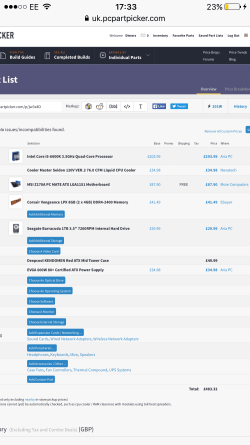
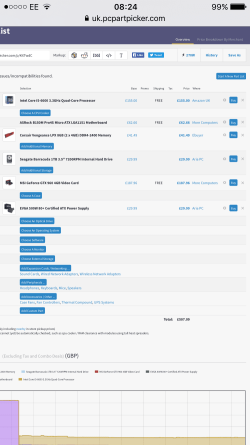
Im having a bad feeling that buying the i5 6600k will be hard to maintain it and after reading that you have to have a higher psu to keep stuff running well it all seems a little too complicated for a starting build. Right? I think 'ill have to change my motherboard and cpu to not overclock and maybe, just maybe fit the gpu in.

GPU will be left out and this case has been chosen.
 

Attachments

  • image.png
    image.png
    45 KB · Views: 2
Last edited:

My Computer

Computer type
Laptop
Computer Manufacturer/Model Number
Toshiba
OS
Windows 7 Home Premium 32 Bit
CPU
AMD Sepron(tm) SI-42 2.1GHz
Memory
5GB (unlocked)
Graphics Card(s)
ATI Radeon HD 3200 Graphics
Hard Drives
148GB
Browser
Chrome
The biggest point I was trying to make is quality is more important than size. Unless you go in for some beast of a graphics card or try some extreme overclocking, what you chose should be just fine, as long as it is a very good quality PSU.
 

My Computers

System One System Two

  • Computer type
    PC/Desktop
    Computer Manufacturer/Model Number
    ALWAYS UNDER CONSTRUCTION
    OS
    Windows 11 Pro
    CPU
    Ryzen 9 5900X
    Motherboard
    Asus X570 Crosshair Viii Hero
    Memory
    32GB G Skill DDR4-3600
    Graphics Card(s)
    EVGA RTX 3080 FTW 3 Ultra
    Sound Card
    On Board/Sennheiser PC37X Headset
    Monitor(s) Displays
    3 X Asus 27"
    Screen Resolution
    2560x1440
    Hard Drives
    2 X 1 TB NVME drives
    PSU
    EVGA 850
    Case
    Phanteks Eclipse P400A
    Cooling
    EVGA 280 AIO
    Keyboard
    Logitech G510s/ Logitech G13
    Mouse
    Logitech G502
    Internet Speed
    24/1
    Antivirus
    ESET/MBAM Pro/SAS Pro
    Browser
    Chrome/ Firefox/ Edge
  • Computer type
    Laptop
    System Manufacturer/Model Number
    Dell 16 Plus
    OS
    Windows 11 Pro
    CPU
    Intel Ultra 9 288V
    Memory
    32 GB LPDDR5X 8533
    Monitor(s) Displays
    16" Mini-LED HDR600 Touch 90 Hz
    Screen Resolution
    2560X1600
    Hard Drives
    1 TB NVME
Im having a bad feeling that buying the i5 6600k will be hard to maintain it and after reading that you have to have a higher psu to keep stuff running well it all seems a little too complicated for a starting build. Right? I think 'ill have to change my motherboard and cpu to not overclock and maybe, just maybe fit the gpu in.

I think that's a pretty good analysis.

You need a quality power supply regardless of K or non-K. Don't go cheap on this piece.

There's no reason you can't and shouldn't get a K if you can afford it and want to overclock. The point is there are things you will have to deal with: budget, learning how to overclock, dealing with the extra heat generated, risk of damaging or shortening the life of a components----all complications.

I normally wouldn't tell a first time builder to jump into overclocking, but it can be done--subject to the complications in the previous paragraph.


Try this:

CPU: Intel i5-6400; this is the least expensive current generation i5 desktop quad-core; not overclockable, but strong.

Motherboard: mid-level ATX or micro ATX socket 1151 motherboard with H170 chipset from Gigabyte, Asus, or Asrock; not an overclocking board, but still good quality.

Cooler: Use the stock cooler included with the CPU. You won't be overclocking, so it's OK for now and can be upgraded if necessary.

RAM: 8 GB (2 sticks of 4) DDR4, 2133 speed, 1.2 volt; Crucial, Hyper X, G Skill, Corsair, or Kingston; RAM is pretty much a commodity at any given speed, so just get a basic set, without heat spreaders.

PSU: 500 to 550 watt high quality unit; semi modular or modular; brands such as Seasonic, XFX, EVGA, or certain units from Corsair or Super Flower.

Case: your choice, make sure all fans are at least 120 mm.

That's a good basic machine that is pretty strong and won't break the bank. And can be upgraded as necessary over years.

You'd still need operating system, hard drive, and video card.

You need to decide if you can omit the video card temporarily till you get more cash.

If you are willing to do that, maybe you can fit in both a standard HD and an SSD right away. In the US, you could do that for $150 or less--say a 1 TB hard drive and a 120 GB or 240 GB SSD. Something like that.

If you are not willing to do that, then go with just a standard hard drive. A good 1 TB unit is maybe 50 to 60 dollars in the US. Blow the remainder of the budget on the strongest possible video card--particularly if this is mostly a gaming setup.

Fiddle with that at PC Part Picker and see where you get.

You probably ought to buy some thermal compound. Arctic Silver is a common decent choice.

No water cooling; no overclocking; no high speed RAM, no Z170 motherboard.

Build it and evaluate it---both for performance and temperatures when gaming. If you don't like the temperatures, re-consider another cooler.

 

My Computer

Computer type
PC/Desktop
Computer Manufacturer/Model Number
Ignatz Special; 4 speed manual gearbox; factory air conditioning; one of one
OS
Windows 7 Home Premium SP1, 64-bit
CPU
Intel Skylake i5-6600K, not overclocked
Motherboard
AsRock Z170M Extreme 4, micro ATX
Memory
8 GB HyperX DDR4-2666 (2 x 4 GB)
Graphics Card(s)
none; graphics are integrated on CPU
Sound Card
onboard: Realtek ALC1150; external: USB Behringer UF0-202
Monitor(s) Displays
Dell S2340M 23 inch IPS
Screen Resolution
1600 x 900
Hard Drives
System: Crucial MX100 series SSD, 128 GB;
Data: Samsung Spinpoint 103SJ, 1 TB;
Backup: WD Caviar Green WD30EZRX-00D8PB0, 3 TB
PSU
Rosewill SilentNight 500 watt fanless, semi-modular
Case
Antec Solo II
Cooling
Noctua NH-U12S; Noctua F12 intake, Noctua S12A exhaust
Keyboard
Microsoft 200 6JH-00001 USB
Mouse
Dell or Microsoft optical wired; USB
Antivirus
Microsoft Security Essentials and Malwarebytes Premium
Browser
Pale Moon
Other Info
All fans PWM; speeds at idle: CPU circa 500 rpm; intake circa 600 rpm; exhaust circa 600 rpm; CPU temps 27 idle and 47 C load in a warm room (27 C/81 F) when running Intel Extreme Tuning Utility stress test.
Oh right, so i should stick with the 6600k and then keep the evga 600w
Let me think about this first.

Check post #96 it has a partlist and the case, not buying the graphics card yet though.
 

My Computer

Computer type
Laptop
Computer Manufacturer/Model Number
Toshiba
OS
Windows 7 Home Premium 32 Bit
CPU
AMD Sepron(tm) SI-42 2.1GHz
Memory
5GB (unlocked)
Graphics Card(s)
ATI Radeon HD 3200 Graphics
Hard Drives
148GB
Browser
Chrome
Dimerz in my opinion over clocking is done because we want to.
It's not necessary with todays hardware to get great performance.
Those of us that do over clock on the most part it's a hobby and some what a challenge.

Over clocking and budgets don't work well together. If one is careful it can be done but their is always a risk.
Even if one buys the best hardware their is still a risk and their will always be.

The Golden Rule in over clocking is; never over clock anything if you can't afford to buy the damaged hardware again.

Over clocking is a strange thing that really can't be put into one size fits all bag. It's trial and error method. If you can't afford the errors I recommend not over clocking.

Many of us answering your thread do over clock and do understand the risk.
Some members have had things go bad and it did cost them. It happens.
Sometimes it's just a BSOD and sometimes it's BSOD and dollars.

Look at other members System Specs that are posting in your thread they are all different. We can only give guide lines and the choices are up to you.

The system in my specs does not need to be over clocked to work great. I over clocked it anyway.
It's a hobby of mine. Like all hobbies they cost extra money.
 

My Computer

Computer type
PC/Desktop
Computer Manufacturer/Model Number
Home made Desktop
OS
Windows 10 Pro. 64/ version 1709 Windows 7 Pro/64
CPU
Intel i7-6800K @ 4.3
Motherboard
ASUS X-99 Deluxe II
Memory
Corsair Platinum 16 gig @2400
Graphics Card(s)
EVGA GTX 1070 OC
Monitor(s) Displays
Asus 27" LED LCD/VE278Q
Screen Resolution
1920-1080 or 1280-720 HDMI
Hard Drives
INTEL SSD 730-240 Gb Sata 3.0/
PSU
EVGA Platium 1200W
Case
Phanteks Luxe Tempered Glass 8 fans/ one radiator
Cooling
XSPC/ Water Cooled CPU
Keyboard
Das 4 Professional
Mouse
Logitech M705/MX Anywhere 2-S
Internet Speed
100 mbits
Antivirus
Microsoft Security Essentials/ Malwarebytes Premium 3.0/ SAS
Browser
I.E. 11 default/Firefox/ ISP Time Warner Cable/Spectrum
Other Info
LG BluRay Burner/
Sound system-KLipsch-THX/
Icy Dock ssd Hot Swap bays.
Back
Top