
Blinque
New member
Hi guys,
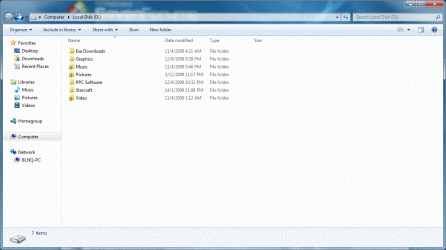
Got a question, noticed that 3 of my folders in an external HDD had padlocks on them (I had performed a clean installation of 7077 yesterday, and after installation I don't remember seeing them there):
Suspected that it probably was an ownership thing as mentioned here:
http://www.sevenforums.com/general-...cons-sahred-disks-confusing-padlock-item.html
So I actually changed the ownership of the 3 folders to me (for some reason it was set to be owned by the Administrators group) but the folder remains padlocked.
Any idea why this is the case?
What makes this 3 folders different from the rest in the screenshot above is that I actually added these 3 folders to part of the library and messed around with Homegroup, so not sure if that caused the padlocks? (I've since removed myself from the Homegroup, and even attempted to remove them from the library but still can't seem to get rid of the padlock)
Any one else here facing a similar situation?
Thanks!
Got a question, noticed that 3 of my folders in an external HDD had padlocks on them (I had performed a clean installation of 7077 yesterday, and after installation I don't remember seeing them there):
Suspected that it probably was an ownership thing as mentioned here:
http://www.sevenforums.com/general-...cons-sahred-disks-confusing-padlock-item.html
So I actually changed the ownership of the 3 folders to me (for some reason it was set to be owned by the Administrators group) but the folder remains padlocked.
Any idea why this is the case?
What makes this 3 folders different from the rest in the screenshot above is that I actually added these 3 folders to part of the library and messed around with Homegroup, so not sure if that caused the padlocks? (I've since removed myself from the Homegroup, and even attempted to remove them from the library but still can't seem to get rid of the padlock)
Any one else here facing a similar situation?
Thanks!
Attachments
My Computer
- OS
- Windows 7 Build 7077
 )
)

 No biggie......
