
Built-in Administrator - Enable from WinRE

How to Enable the Built-in Elevated "Administrator" Account from WinRE

   Information

Theoretically if you don't have any administrator account, the built-in Administrator account should be available in safe mode (see also related articles). Sometimes due to any identified reason, the built-in Administrator may not to be available in safe mode.

This tutorial will help you to log on to the built-in Administrator in this case in Vista and Windows 7. It may also help if you forgot your admin password and you don't have a password reset disk.


METHOD I (work only for 32 bit systems)

1. Download this file enableadmin.exe, save it on your desktop, and unblock it.

2. Open a command prompt at boot.

3. In the command prompt, type diskpart and press Enter. (see screenshot below step 5)

4. In the command prompt, type list volume and press Enter. (see screenshot below step 5)
NOTE: This will let you see what the drive letter is for your Windows 7 drive. It may not always be the C: drive letter at boot.

5. After making note of the drive letter, type exit and press Enter. (see screenshot below)
Command-1.jpg
6. In the command prompt, type:
cd /d <boot partition>:\Users\<your account name>\Desktop

press ENTER

where <boot partition> is the drive letter where you installed Windows 7

and next type in command prompt

enableadmin


example:

here OS is on drive D:,the account name was John where this file has been placed so commands for this example will be:

cd /d D:\Users\John\Desktop

press ENTER

enableadmin

press ENTER
7. Restart computer,log on to build-in Administrator account and now you can try to fix problem dependce from situation -fix your account,reset password for your account or create new admin account.


METHOD II (work for all systems)

1. Open a command prompt at boot.

2. In the command prompt, type the command below and press Enter.
regedit
3. Click on HKEY_LOCAL_MACHINE (or HKEY_USERS - your choose. In this example I've chosen HKEY_LOCAL_MACHINE) .
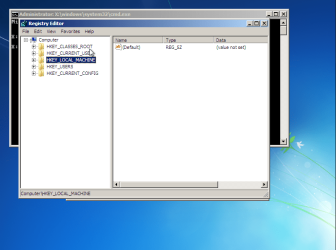
rpp1.png
4. Go to File menu and choose load hive option
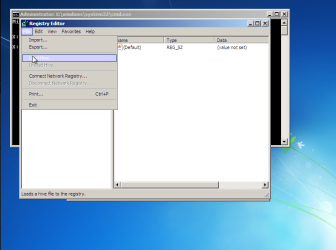
rpp2.png

it will open new window and in that navigate to drive where your OS is installed and go to <boot partition>\Windows\System32\config

in this example it is C:\Windows\System32\config
5. Choose SAM file and click Open
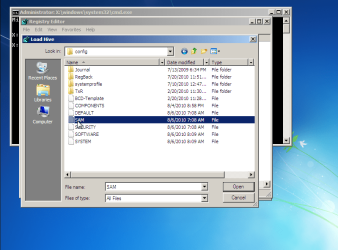
rpp3.png
6. Next appear Key Name box,type the name whatever you want i.e REM_SAM
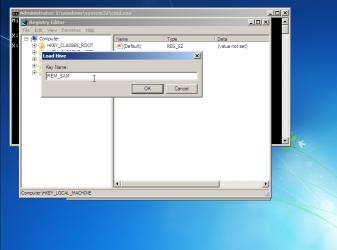
rpp4.png
7. Go to HKEY_LOCAL_MACHINE\REM_SAM\SAM\Domains\Accounts\Users\000001F4 key and double click on string F,
rpp5.png

it will open table with hexadicimal numbers
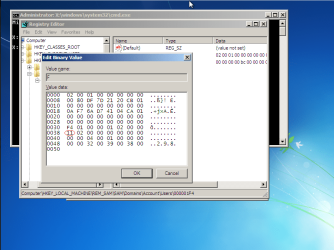
rpp6.png
Build-in Administrator is disabled
8. In this table find 11 number (8th line,first column in table -images),click to the right of it,press backspace and the 11 disappear and insert the 10 in this place
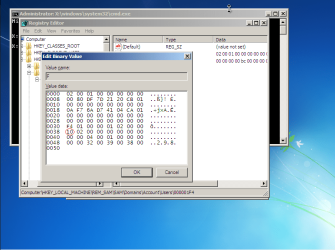
rpp8.png
Build-in Administrator is enabled
9. Close box,the whole regedit and restart computer.

10. Log on to build-in Administrator account and now you can try to fix problem dependce from situation -fix your account,reset password for your account or create new admin account.

   Warning

When finished repair you should disable build-in Administrator account (eventually create password for it).This account shouldn't be used in daily work.


Last edited by a moderator:
Thank you for this :)
Regards
 

My Computer My Computer

Computer Manufacturer/Model Number
Custom
OS
Win7 HP (x64)/Win7 Ultimate (x64)
CPU
Core i7 920
Motherboard
Intel X58
Memory
6 x 2GB Corsair XMS3
Graphics Card(s)
CF HD4890
Sound Card
Asus Xonar
Monitor(s) Displays
Dell 2408WFP
Screen Resolution
1920 x 1200
Hard Drives
2 x 150GB WDC Velociraptors (Raid 0)
1 x 1TB Seagate
1 x 1.5TB Seagate
PSU
Corsair HX1000W
Case
Antec 1200
Keyboard
Razer Lycosa/N52te
Mouse
Razer Lachesis
Flavius,
Great tutorial. I found myself locked out of my system after doing a sys restore using a HD image. Restore went well...untill it asked me for the password-which I had changed since the imaging. I even took the time to make a PW recovery key. NEVER thought I'd need it. And obviously didnt because it wouldnt work! The "key" unlocked it, but when it asked to enter new PW, I got "An error has occurred while resetting your password" Repeatedly. I even booted to dosk and enabled ADMIN THAT WAY TO NO AVAIL. I guess some days are just like that.
:sarc:
 

My Computer My Computer

Computer Manufacturer/Model Number
Custom
OS
Windows 7 ultimate X64
CPU
Core i7 870 Lynnfield
Motherboard
MSI P55-GD55
Memory
4GB Corsair XMS 3 1600Mhz
Graphics Card(s)
GeForce 8800 GTS (for the time being)
Sound Card
Onboard 7.1 digital
Monitor(s) Displays
Dell 19"
Screen Resolution
1280x1024
Hard Drives
Barracuda 750Gb
PSU
Corsair TX 650w
Case
Thermaltake Armour Extreme Edition
Cooling
Corsair H50
Keyboard
Dell XPS slim
Mouse
Dell XPS mouse (only good product)
Internet Speed
100 Mbps +/-
what if the no. was already no. 10?

but still it hangs on welcome screen.
 

My Computer My Computer

Computer Manufacturer/Model Number
Intel_ D945PLNM
OS
windows 7 ultimate 32bit
CPU
Intel(R) Pentium(R) D CPU 2.66Ghz, 2661 Mhz,
Memory
3.00BG
Graphics Card(s)
NVIDIA GeForce 7300GT
Sound Card
High Definition Audio Device
Screen Resolution
1024x168
I cannot get past option 5, it asks me for an account that has administrator rights. All accounts that have administrative rights are disabled!!

This is on a Window 7 Pro X64 machine, so using Method II
 

My Computer My Computer

OS
Win 7 Pro 64
I resolved this using a Windows 7 Repair disk from another Windows 7 x64 PC. Opened a command prompt through that and then was able to load the config and create the REM_SAM, made the change and enable to the Administrator account.

If you need to know how to create a repair cd google it, lots of info on the web about that.

Cheers
 

My Computer My Computer

OS
Win 7 Pro 64

My Computer My Computer

Computer type
PC/Desktop
Computer Manufacturer/Model Number
Self built custom
OS
64-bit Windows 11 Pro for Workstations
CPU
Intel i7-8700K OC'd to 5 GHz
Motherboard
ASUS ROG Maximus XI Formula Z390
Memory
64 GB (4x16GB) G.SKILL TridentZ RGB DDR4 3600 MHz
Graphics Card(s)
ASUS ROG-STRIX-GTX1080TI-O11G-GAMING
Sound Card
Integrated
Monitor(s) Displays
2 x Samsung Odyssey G7 27"
Screen Resolution
2560x1440
Hard Drives
1TB Samsung 990 PRO M.2,
4TB Samsung 990 PRO PRO M.2,
TerraMaster F8 SSD Plus NAS
PSU
Seasonic Prime Titanium 850W
Case
Thermaltake Core P3
Cooling
Corsair Hydro H115i
Keyboard
Logitech wireless K800
Mouse
Logitech MX Master 4
Internet Speed
2 Gb/s Download and 100 Mb/s Upload
Antivirus
Malwarebyte Anti-Malware Premium
Browser
Google Chrome
Other Info
Logitech Z625 speaker system,
Logitech BRIO 4K Pro webcam,
HP Color LaserJet Pro MFP M477fdn,
APC SMART-UPS RT 1000 XL - SURT1000XLI,
Galaxy S23 Plus phone
Hi,
Just registered to say THANK YOU SO MUCH for the enableadmin exe.

Cheers.
 

My Computer My Computer

OS
7 ulti
Great tutorial, very usefull! Thank you a lot!
 

My Computer My Computer

Computer Manufacturer/Model Number
Acer
OS
Windows 7 Ultimate x64
I can't get past step 5, it keeps telling me

Cannot Load X:\Windows\System32\config\SAM: the process cannot access the file because it is being used by another process.

I'm not sure what it means by, but I'm trying to enable the built in admin because my only account on my home PC is locked out
 

My Computer My Computer

Computer type
PC/Desktop
Computer Manufacturer/Model Number
Dell
OS
Windows 7
Thanks...Method 2 save our presentation laptop from locked out.:D
 

My Computer My Computer

Computer type
Laptop
Computer Manufacturer/Model Number
Samsung Ultrabook Series 5
OS
Windows 7 Ultimate
CPU
i5 Intel Quad Core 1.7 GHz
Motherboard
Samsung Electronics Co., LTD
Memory
8GB
Graphics Card(s)
Intel(R)HD Graphics 4000
Hard Drives
128 SSD
Antivirus
Microsoft Security Essentials
Browser
IE 10 & Chrome
Method II worked for me.

Registered just to express my appreciation. Step thru Method II helped me activate the admin account in Win7 Pro x64. Thank you!
 

My Computer My Computer

Computer type
PC/Desktop
OS
Win7 pro x64
I FOUND I WOZ UNDERSTANDING READING THEM GREAT TUTORIALS IM A BEGINER THATS WOT I NEED BRILLIANT [emoji1360][emoji1360] im using windows 7 no didk 32bit iv never attempted booting a disk witch would b recomended
 

My Computer My Computer

OS
Windows 7 32bit

My Computers My Computers

System One System Two

  • Computer type
    PC/Desktop
    OS
    7 X64
    CPU
    i5 8400
    Motherboard
    gigabyte b365m ds3h
    Memory
    2x8gb 3200mhz
    Hard Drives
    various
    PSU
    pure power 11 400w cm
    Case
    Coolermaster
    Cooling
    cryorig m9i
  • Computer type
    PC/Desktop
    OS
    7x64
    CPU
    g5400
    Motherboard
    ga b365m ds3h
    Memory
    8gb ddr4 2400
    PSU
    xfx pro 450w
I go to reset my admin password the reset wizard i get to my HINT its defo my hint i at the time add no clue how to save harddrives its my 1st laptop but it just keeps saying insert disk .... But as i got it my laptop dell 2nd hand i didt get 1 ? Im still trying learn anybody :mad: at myself :o for bing dumb :rolleyes: hope can get sum help
 

My Computer My Computer

OS
Windows 7 32bit
:mad: is that the disk that people get wiv there laptop coz theres so many it can b confusing lol if your not in the knowlage mines dell inspiron 15 45 32
 

My Computer My Computer

OS
Windows 7 32bit
WinRE finding it

:rolleyes:[
Code:
[CODE] my eyes are are going funny winRE i cant find it soddy probably the dumbest ask
[/CODE]
I][/I]
 

My Computer My Computer

OS
Windows 7 32bit
Hello Mizzchic, :-)

I'm sorry, but I'm having a real hard time understanding what you posted. Could you please clarify again in plain English what you are needing to do or having trouble doing that's related to this tutorial?
 

My Computer My Computer

Computer type
PC/Desktop
Computer Manufacturer/Model Number
Self built custom
OS
64-bit Windows 11 Pro for Workstations
CPU
Intel i7-8700K OC'd to 5 GHz
Motherboard
ASUS ROG Maximus XI Formula Z390
Memory
64 GB (4x16GB) G.SKILL TridentZ RGB DDR4 3600 MHz
Graphics Card(s)
ASUS ROG-STRIX-GTX1080TI-O11G-GAMING
Sound Card
Integrated
Monitor(s) Displays
2 x Samsung Odyssey G7 27"
Screen Resolution
2560x1440
Hard Drives
1TB Samsung 990 PRO M.2,
4TB Samsung 990 PRO PRO M.2,
TerraMaster F8 SSD Plus NAS
PSU
Seasonic Prime Titanium 850W
Case
Thermaltake Core P3
Cooling
Corsair Hydro H115i
Keyboard
Logitech wireless K800
Mouse
Logitech MX Master 4
Internet Speed
2 Gb/s Download and 100 Mb/s Upload
Antivirus
Malwarebyte Anti-Malware Premium
Browser
Google Chrome
Other Info
Logitech Z625 speaker system,
Logitech BRIO 4K Pro webcam,
HP Color LaserJet Pro MFP M477fdn,
APC SMART-UPS RT 1000 XL - SURT1000XLI,
Galaxy S23 Plus phone
Was there ever an answer to iFlaco’s message? I’m having the same issue. When opening SAM it tells me “SAM this file is in use. Enter a new name or close the file that’s open in another program” but I just booted in safe more with command promopt and as far as I know there are no other programs running but those that boot in safe mode
 

My Computer My Computer

Computer type
PC/Desktop
Computer Manufacturer/Model Number
Custom build
OS
Windows 7
Back
Top