Built-in OEM Administrator Account Issues

HandsomeP

New member
Member
Local time
9:22 PM
Messages
38
I've read the tutorial here on enabling/disabling built-in user accounts, but I'm still in a bit of a jam here. Here's the situation... My computer is two weeks old and the operating system (Windows 7 Professional 64-bit) was installed by the retailer where I purchased the computer. Since my computer arrived, I've always been logging in to an Administrator user account. Three days ago I received a warning that the password would soon expire. Yesterday the password expired and I entered a new one. Then the fun started...

The next time I logged in, I noticed there were two icons on the login screen, "Administrator" and "Other User" (or something very similar). In addition there was a message in red that the Administrator account has been disabled and to contact the administrator. Well, I am the only one who uses the computer, so I need some outside help, lol.

With the Administrator account disabled, everytime I log in, I either get a message saying that the Administrator account has been disabled, a bit of a nuisance or that "the username or password is incorrect" (if I set a password for the account). Now if I enable the account, when I restart my computer I automatically log in to the built-in Administrator account, and none of my files are there (all my files, desktop, etc. are under my named user account). In addition, in order to access my account, I need to click on Other User and type my name and password (not very convenient).

Ideally I'd like to (all three):
A: stop seeing the message about the Administrator account being disabled.
B: stop Windows from automatically logging in to the built-in Administrator account.
C: see an icon with my name on the login screen that I can click on (as opposed to having to click on the Other User icon and typing my name and password).

(not that I don't really care whether the Administrator user account option is available or not). As far as I can tell there is no documentation on making a certain user account the default, is that correct? Needless to say it's quite unnerving to have these kinds of issues on a 2-week old computer! I realize this is a bit of a specialized problem, but I'm praying that someone here can help.

PS: I tried deleting the Administrator built-in user account but at the last dialog box, Windows stopped me saying that you cannot delete built-in user accounts (in any case I later read that this is not suggested).

PPS: On a side note, I'm really curious how all this happened!!!
 
Last edited:

My Computer My Computer

Computer Manufacturer/Model Number
Digital Storm Desktop 286251
OS
Windows 7 Professional x64
CPU
Intel Core i7 970 3.2 GHz
Motherboard
ASUS Rampage III Extreme (Intel X58 Chipset)
Memory
6GB DDR3 1600 MHz
Graphics Card(s)
1x NVIDIA GeForce GTX 570 1.2GB
Sound Card
Creative Labs X-Fi Titanium Fatal1ty Professional
Monitor(s) Displays
Dell 2001FP
Screen Resolution
1152x864
Hard Drives
250 GB Solid State Intel (Model: 510 Series)
PSU
1200W Corsair Pro Gold Series
Case
Black OPS HailStorm Edition
Cooling
Extreme Cooling H2O Stage 6
Keyboard
Dell Multimedia Keyboard
Mouse
Logitech MX 1000
Internet Speed
Cable
Since you have Professional, then:
:orb: | type LUSRMGR.MSC | ENTER

Now click on "user" in the left-pane.

You will see all users listed in the middle pane.

Here you can enable, disable, change passwords, in fact, everything.

If you log in as the Built-in Administrator, then you can select your normal admin account and change the password, and of course, you can change the time period, in fact, you can disable that time-period.

It appears that someone set, either here or by means of GPEDIT.MSC, your account settings.
 

My Computer My Computer

Computer Manufacturer/Model Number
Toshiba Satellite S875D-S7239 laptop
OS
MS Windows 7 Ultimate SP1 64-bit
CPU
AMD A10-4600M
Motherboard
AMD Pumori (Socket FT1)
Memory
6.00 GB Dual-Channel DDR3 @ 798MHz (11-11-12-28)
Graphics Card(s)
AMD Radeon HD 7660G
Sound Card
High Definition Audio Device
Monitor(s) Displays
Generic PnP Monitor (1600x900@60Hz)
Screen Resolution
1600x900@60Hz
Hard Drives
SSD 119GB Corsair CSSD-V128GB2 ATA Device
Keyboard
Standard PS/2 Keyboard
Mouse
HP Wireless Optical Mobile Mouse Model FHA-3410
Internet Speed
What the local pub, local coffee shop offers.
Other Info
Optical Drive:MATSHITA BD-CMB UJ160B ATA Device


Also have an Asus ha1002xp netbook with Win 7 Ultimate installed.
Thank you, but enabling/disabling accounts and setting/changing passwords is not the issue. The problem is that:

* when the built-in Administrator account is disabled, at startup I receive a message to that effect (the Administrator account has been disabled, please see your administrator)

* when the built-in Administrator account is enabled and no password is set, at startup I am automatically logged in to that account (instead of my named user account with all my programs)

* when the built-in Administrator account is enabled and I have set a password, at startup I see the message "The username or password is incorrect"

Those are the only three scenarios that I am able to produce, all of which are a nuisance. Basically what I would like is to not see any message about the Administrator account being disabled and for my user name to be visible at login so that I can click on it.

If only there was a way to make a certain user account the "default" user account. What's mind-boggling is that everything was running smoothly yesterday, it was only after the built-in Administrator account password expired, and I changed it, that I the login process became so messy. Additionally, it used to take about 10 seconds to get from the Windows splash screen to the desktop, now it takes 30 seconds (there is a long delay with the message "Windows is starting up").
 
Last edited:

My Computer My Computer

Computer Manufacturer/Model Number
Digital Storm Desktop 286251
OS
Windows 7 Professional x64
CPU
Intel Core i7 970 3.2 GHz
Motherboard
ASUS Rampage III Extreme (Intel X58 Chipset)
Memory
6GB DDR3 1600 MHz
Graphics Card(s)
1x NVIDIA GeForce GTX 570 1.2GB
Sound Card
Creative Labs X-Fi Titanium Fatal1ty Professional
Monitor(s) Displays
Dell 2001FP
Screen Resolution
1152x864
Hard Drives
250 GB Solid State Intel (Model: 510 Series)
PSU
1200W Corsair Pro Gold Series
Case
Black OPS HailStorm Edition
Cooling
Extreme Cooling H2O Stage 6
Keyboard
Dell Multimedia Keyboard
Mouse
Logitech MX 1000
Internet Speed
Cable
Using lusrmgr.msc:
1. enable the built-in account

Reboot your computer.

Choose the built-in administrator account to log in.

run lusrmgr.msc

edit password and anything else for you desired admin account, be sure and enable the desired admin account, when finished and lusrmgr closed, then

Reboot your computer.

Now you should be able to log in.

If you still have troubles then:
control panel | User Accounts |
Manage another account (in the middle pane) |
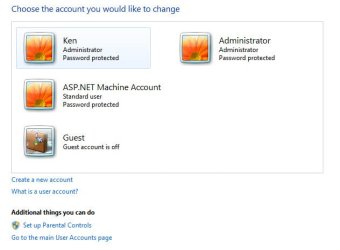
using the snipping tool make a snip of what is shown and attach to your next post.
 

My Computer My Computer

Computer Manufacturer/Model Number
Toshiba Satellite S875D-S7239 laptop
OS
MS Windows 7 Ultimate SP1 64-bit
CPU
AMD A10-4600M
Motherboard
AMD Pumori (Socket FT1)
Memory
6.00 GB Dual-Channel DDR3 @ 798MHz (11-11-12-28)
Graphics Card(s)
AMD Radeon HD 7660G
Sound Card
High Definition Audio Device
Monitor(s) Displays
Generic PnP Monitor (1600x900@60Hz)
Screen Resolution
1600x900@60Hz
Hard Drives
SSD 119GB Corsair CSSD-V128GB2 ATA Device
Keyboard
Standard PS/2 Keyboard
Mouse
HP Wireless Optical Mobile Mouse Model FHA-3410
Internet Speed
What the local pub, local coffee shop offers.
Other Info
Optical Drive:MATSHITA BD-CMB UJ160B ATA Device


Also have an Asus ha1002xp netbook with Win 7 Ultimate installed.
@HandsomeP:


I don't understand why they would have configured the OS this way to begin with they could have simply left it up to you, the buyer to set up your own admin account. You need to contact them and ask about this. This is unacceptable if you ask me. If this can't be easily solved I'd want a new unit.
 

My Computer My Computer

Computer Manufacturer/Model Number
hp pavilion 6680t
OS
win 7 home premium 64 bit
CPU
core i5 760
Motherboard
iona (from MSI)
Memory
6 gb
Graphics Card(s)
ati 5450
Sound Card
real tek 888
@thread starter,

Please simply post a new msg rather than going back and changing a previous msg. This only produces confusion.

We don't go back and review all of the posts each time we check in, but rather we read the new additions to the thread.
 

My Computer My Computer

Computer Manufacturer/Model Number
Toshiba Satellite S875D-S7239 laptop
OS
MS Windows 7 Ultimate SP1 64-bit
CPU
AMD A10-4600M
Motherboard
AMD Pumori (Socket FT1)
Memory
6.00 GB Dual-Channel DDR3 @ 798MHz (11-11-12-28)
Graphics Card(s)
AMD Radeon HD 7660G
Sound Card
High Definition Audio Device
Monitor(s) Displays
Generic PnP Monitor (1600x900@60Hz)
Screen Resolution
1600x900@60Hz
Hard Drives
SSD 119GB Corsair CSSD-V128GB2 ATA Device
Keyboard
Standard PS/2 Keyboard
Mouse
HP Wireless Optical Mobile Mouse Model FHA-3410
Internet Speed
What the local pub, local coffee shop offers.
Other Info
Optical Drive:MATSHITA BD-CMB UJ160B ATA Device


Also have an Asus ha1002xp netbook with Win 7 Ultimate installed.
@legacy7955: I looked up built-in accounts and according to:
Enable and Disable the Built-in Administrator Account

"Original equipment manufacturers (OEMs) and system builders are required to disable the built-in Administrator account before delivering the computers to customers."

For the first two weeks, I was simply logging in as Administrator and it worked fine (although I have read it's recommended not to use the built-in Administrator account for day to day use). Strangely though, when it came to reset the password, that password change spawned a new account with my user name. The user account contained all my stuff which is great, but every restart I was greeted with the message "Your Administrator account has been disabled, please see your administrator" which wasn't pleasant, and additionally, there was no icon with my user name, I had to instead click the "Other User" icon and type my username and password (not the end of the world, but not ideal).

@Karlsnooks: I did as you said, but am greeted by the message "The username or password is incorrect" on restart. This is before I even type a password.

Is there any way to specify a "default" user account in Windows 7? It seems that there should be a very easy fix to this, but barring an easy fix, here are three ideas:

1. If I do a System Restore to a few days ago but at the same time tell Windows that the Administrator password does not expire (without losing that setting during the system restore) that might let me continue as before?

2. Someone mentioned a registry edit here:
Parallels Forums - View Single Post - Windows 7 - The username or password is incorrect

Navigate to: HKEY_LOCAL_MACHINE>SOFTWARE>Microsoft>Windows NT>CurrentVersion>Winlogon
Locate the string value named: AutoAdminLogon, click on it and change the value data to: 0

3. Copy all the files from the named user account to the Administrator account. I am wary of this though, as there may be hidden files, some special files I'm not meant to copy, file permission problems later, etc.

Thanks again for any light you can shed. Idea #2 looks simple and promising. If I change the password for the built-in Administrator account back to no password at all, but disable the automatic login, that would probably solve all my problems I think.
 

My Computer My Computer

Computer Manufacturer/Model Number
Digital Storm Desktop 286251
OS
Windows 7 Professional x64
CPU
Intel Core i7 970 3.2 GHz
Motherboard
ASUS Rampage III Extreme (Intel X58 Chipset)
Memory
6GB DDR3 1600 MHz
Graphics Card(s)
1x NVIDIA GeForce GTX 570 1.2GB
Sound Card
Creative Labs X-Fi Titanium Fatal1ty Professional
Monitor(s) Displays
Dell 2001FP
Screen Resolution
1152x864
Hard Drives
250 GB Solid State Intel (Model: 510 Series)
PSU
1200W Corsair Pro Gold Series
Case
Black OPS HailStorm Edition
Cooling
Extreme Cooling H2O Stage 6
Keyboard
Dell Multimedia Keyboard
Mouse
Logitech MX 1000
Internet Speed
Cable
You can or you can not log on to the computer in questiion.

Which is it?
 

My Computer My Computer

Computer Manufacturer/Model Number
Toshiba Satellite S875D-S7239 laptop
OS
MS Windows 7 Ultimate SP1 64-bit
CPU
AMD A10-4600M
Motherboard
AMD Pumori (Socket FT1)
Memory
6.00 GB Dual-Channel DDR3 @ 798MHz (11-11-12-28)
Graphics Card(s)
AMD Radeon HD 7660G
Sound Card
High Definition Audio Device
Monitor(s) Displays
Generic PnP Monitor (1600x900@60Hz)
Screen Resolution
1600x900@60Hz
Hard Drives
SSD 119GB Corsair CSSD-V128GB2 ATA Device
Keyboard
Standard PS/2 Keyboard
Mouse
HP Wireless Optical Mobile Mouse Model FHA-3410
Internet Speed
What the local pub, local coffee shop offers.
Other Info
Optical Drive:MATSHITA BD-CMB UJ160B ATA Device


Also have an Asus ha1002xp netbook with Win 7 Ultimate installed.
I CAN log on to both my user account and to the Administrator account. The problem is how messy the process has become (error messages, not being able to click on an icon showing my user name). I end up with one of these three scenarios:

* when the built-in Administrator account is disabled, at startup I receive an "error message" to that effect (the Administrator account has been disabled, please see your administrator)

* when the built-in Administrator account is enabled and no password is set, at startup I am automatically logged in to the built-in Administrator account (instead of my named user account with all my programs)

* when the built-in Administrator account is enabled and I have set a password, at startup I see the message "The username or password is incorrect"

Might this have to with the fact that the "User must enter a user name and password to use this computer" is unchecked?
Tip: Auto-Login Your Windows 7 User Account | Cool Stuff | Channel 9
 

My Computer My Computer

Computer Manufacturer/Model Number
Digital Storm Desktop 286251
OS
Windows 7 Professional x64
CPU
Intel Core i7 970 3.2 GHz
Motherboard
ASUS Rampage III Extreme (Intel X58 Chipset)
Memory
6GB DDR3 1600 MHz
Graphics Card(s)
1x NVIDIA GeForce GTX 570 1.2GB
Sound Card
Creative Labs X-Fi Titanium Fatal1ty Professional
Monitor(s) Displays
Dell 2001FP
Screen Resolution
1152x864
Hard Drives
250 GB Solid State Intel (Model: 510 Series)
PSU
1200W Corsair Pro Gold Series
Case
Black OPS HailStorm Edition
Cooling
Extreme Cooling H2O Stage 6
Keyboard
Dell Multimedia Keyboard
Mouse
Logitech MX 1000
Internet Speed
Cable
Autologin should be avoided if you want your system to be securer. If you don't care if every tom, dick, and harry can come up and log on to your computer then go ahead and do auto login.

Yes you should always require a user-name and password.

Before I get further along, I need that snippet I requested.
 

My Computer My Computer

Computer Manufacturer/Model Number
Toshiba Satellite S875D-S7239 laptop
OS
MS Windows 7 Ultimate SP1 64-bit
CPU
AMD A10-4600M
Motherboard
AMD Pumori (Socket FT1)
Memory
6.00 GB Dual-Channel DDR3 @ 798MHz (11-11-12-28)
Graphics Card(s)
AMD Radeon HD 7660G
Sound Card
High Definition Audio Device
Monitor(s) Displays
Generic PnP Monitor (1600x900@60Hz)
Screen Resolution
1600x900@60Hz
Hard Drives
SSD 119GB Corsair CSSD-V128GB2 ATA Device
Keyboard
Standard PS/2 Keyboard
Mouse
HP Wireless Optical Mobile Mouse Model FHA-3410
Internet Speed
What the local pub, local coffee shop offers.
Other Info
Optical Drive:MATSHITA BD-CMB UJ160B ATA Device


Also have an Asus ha1002xp netbook with Win 7 Ultimate installed.
When I suggest the possibliity that the "User must enter a user name and password to use this computer" being unchecked might cause a problem, let me clarify. Originally, there was no password for the built-in Administrator account. Yesterday, the system forced me to change the password, which seemingly spawned (or enabled) my user name account (as opposed to simply changing the password for the built in Administrator account). Now, if I enter no password, I am auto-logged on to the Administrator account which is not want I want (all my documents etc. have been magically moved to my user account) but might be happening because of some kind of autologin set up from before. If I set a password for the built-in Administrator account, it gives me an error message (wrong username or password) perhaps generated because the system is trying to auto-login to the administrator account with no password (as specified by some kind of auto-login registry setting). There are some details here which may be of interest:
Windows 7 Auto Logon Enable | Regedit AutoAdminLogon AutoLogonCount

which begs the question whether I can simply make some registry tweaks to instead login my named user account with a default password as described in the above link? That would be the perfect solution, although I would like to make sure that it's safe first, I don't want to be completely locked out of my system obviously...
 

My Computer My Computer

Computer Manufacturer/Model Number
Digital Storm Desktop 286251
OS
Windows 7 Professional x64
CPU
Intel Core i7 970 3.2 GHz
Motherboard
ASUS Rampage III Extreme (Intel X58 Chipset)
Memory
6GB DDR3 1600 MHz
Graphics Card(s)
1x NVIDIA GeForce GTX 570 1.2GB
Sound Card
Creative Labs X-Fi Titanium Fatal1ty Professional
Monitor(s) Displays
Dell 2001FP
Screen Resolution
1152x864
Hard Drives
250 GB Solid State Intel (Model: 510 Series)
PSU
1200W Corsair Pro Gold Series
Case
Black OPS HailStorm Edition
Cooling
Extreme Cooling H2O Stage 6
Keyboard
Dell Multimedia Keyboard
Mouse
Logitech MX 1000
Internet Speed
Cable
Here's a screenshot
 

Attachments

  • Screenshot.jpg
    Screenshot.jpg
    24.2 KB · Views: 8

My Computer My Computer

Computer Manufacturer/Model Number
Digital Storm Desktop 286251
OS
Windows 7 Professional x64
CPU
Intel Core i7 970 3.2 GHz
Motherboard
ASUS Rampage III Extreme (Intel X58 Chipset)
Memory
6GB DDR3 1600 MHz
Graphics Card(s)
1x NVIDIA GeForce GTX 570 1.2GB
Sound Card
Creative Labs X-Fi Titanium Fatal1ty Professional
Monitor(s) Displays
Dell 2001FP
Screen Resolution
1152x864
Hard Drives
250 GB Solid State Intel (Model: 510 Series)
PSU
1200W Corsair Pro Gold Series
Case
Black OPS HailStorm Edition
Cooling
Extreme Cooling H2O Stage 6
Keyboard
Dell Multimedia Keyboard
Mouse
Logitech MX 1000
Internet Speed
Cable
OK, some good news, basically I did the opposite of what was described here:
Tip: Auto-Login Your Windows 7 User Account | Cool Stuff | Channel 9

I CHECKED the box that says "Users must enter a username and password to use this computer". Now I can have the built-in Administrator account enabled (so no more messages about the account being disabled) and I am not automatically logged into that account.

Now, if I could only figure out why my computer is pausing for an additional 15 seconds or so (compared to a few days ago) while the message "Windows is starting up" is displayed... On a lightning fast, top of the line computer is it normal to see that message for 25 - 30 seconds? Seems to me it used to be more like 10 - 15s before that I would see that message on the screen.
 

My Computer My Computer

Computer Manufacturer/Model Number
Digital Storm Desktop 286251
OS
Windows 7 Professional x64
CPU
Intel Core i7 970 3.2 GHz
Motherboard
ASUS Rampage III Extreme (Intel X58 Chipset)
Memory
6GB DDR3 1600 MHz
Graphics Card(s)
1x NVIDIA GeForce GTX 570 1.2GB
Sound Card
Creative Labs X-Fi Titanium Fatal1ty Professional
Monitor(s) Displays
Dell 2001FP
Screen Resolution
1152x864
Hard Drives
250 GB Solid State Intel (Model: 510 Series)
PSU
1200W Corsair Pro Gold Series
Case
Black OPS HailStorm Edition
Cooling
Extreme Cooling H2O Stage 6
Keyboard
Dell Multimedia Keyboard
Mouse
Logitech MX 1000
Internet Speed
Cable
For some that is a normal thing.

Solving slow startup problems is normally simple.

Attach the startup.txt file as described here:

list of STARTUP PROGRAMS
CCleaner | Tools icon | Startup button |
click on Save to text file button (bottom right side)

Using the PAPER CLIP icon (top panel of a Message Reply),
attach the startup.txt file generated by CCleaner
CCleaner - Optimization and Cleaning - Free Download
 

My Computer My Computer

Computer Manufacturer/Model Number
Toshiba Satellite S875D-S7239 laptop
OS
MS Windows 7 Ultimate SP1 64-bit
CPU
AMD A10-4600M
Motherboard
AMD Pumori (Socket FT1)
Memory
6.00 GB Dual-Channel DDR3 @ 798MHz (11-11-12-28)
Graphics Card(s)
AMD Radeon HD 7660G
Sound Card
High Definition Audio Device
Monitor(s) Displays
Generic PnP Monitor (1600x900@60Hz)
Screen Resolution
1600x900@60Hz
Hard Drives
SSD 119GB Corsair CSSD-V128GB2 ATA Device
Keyboard
Standard PS/2 Keyboard
Mouse
HP Wireless Optical Mobile Mouse Model FHA-3410
Internet Speed
What the local pub, local coffee shop offers.
Other Info
Optical Drive:MATSHITA BD-CMB UJ160B ATA Device


Also have an Asus ha1002xp netbook with Win 7 Ultimate installed.
Just to specify, I am refering to pre-login startup. I don't think any startup programs have a chance to load at that point, I'm thinking it might be more a driver issue? However, I think it might be proper to start a new thread?
 

My Computer My Computer

Computer Manufacturer/Model Number
Digital Storm Desktop 286251
OS
Windows 7 Professional x64
CPU
Intel Core i7 970 3.2 GHz
Motherboard
ASUS Rampage III Extreme (Intel X58 Chipset)
Memory
6GB DDR3 1600 MHz
Graphics Card(s)
1x NVIDIA GeForce GTX 570 1.2GB
Sound Card
Creative Labs X-Fi Titanium Fatal1ty Professional
Monitor(s) Displays
Dell 2001FP
Screen Resolution
1152x864
Hard Drives
250 GB Solid State Intel (Model: 510 Series)
PSU
1200W Corsair Pro Gold Series
Case
Black OPS HailStorm Edition
Cooling
Extreme Cooling H2O Stage 6
Keyboard
Dell Multimedia Keyboard
Mouse
Logitech MX 1000
Internet Speed
Cable
Sounds goodl
 

My Computer My Computer

Computer Manufacturer/Model Number
Toshiba Satellite S875D-S7239 laptop
OS
MS Windows 7 Ultimate SP1 64-bit
CPU
AMD A10-4600M
Motherboard
AMD Pumori (Socket FT1)
Memory
6.00 GB Dual-Channel DDR3 @ 798MHz (11-11-12-28)
Graphics Card(s)
AMD Radeon HD 7660G
Sound Card
High Definition Audio Device
Monitor(s) Displays
Generic PnP Monitor (1600x900@60Hz)
Screen Resolution
1600x900@60Hz
Hard Drives
SSD 119GB Corsair CSSD-V128GB2 ATA Device
Keyboard
Standard PS/2 Keyboard
Mouse
HP Wireless Optical Mobile Mouse Model FHA-3410
Internet Speed
What the local pub, local coffee shop offers.
Other Info
Optical Drive:MATSHITA BD-CMB UJ160B ATA Device


Also have an Asus ha1002xp netbook with Win 7 Ultimate installed.
As previous posts have said, you need to turn off Autologon feature.

If you are using Win 7 Professional you can use lusrmgr.exe to turn off autologon, for Home users, there is a seperate tool called Netplwiz.exe which can be used to turn off autologon.
 

My Computer My Computer

Computer Manufacturer/Model Number
CCL Online OEM
OS
Windows 7 Home Premium 32bit
CPU
Intel Core 2 2.4GHz
Motherboard
Foxconn 946GZ7MA
Memory
4GB
Graphics Card(s)
ATI Radeon 4850
Sound Card
Realtek HD Audio
Monitor(s) Displays
Prolite E2407HDS
Screen Resolution
1920x1080
Hard Drives
2 x WDC 500 GB
Cooling
Fan
Keyboard
Microsoft Digital Media
Mouse
Optical Wheel Mouse
Internet Speed
14Mb/sec
Other Info
Internet ISP: Plusnet
Back
Top