buzz buzzz

Bosslady

Member
HI my pc is making a load buzzing noise I switched it off earlier on because I thought it might blow up :cry: what could it be any help appreciated as usual
thanks
 

My Computer

Computer type
Laptop
Computer Manufacturer/Model Number
acer aspire model number 5532
OS
win 7 x64 bit
Memory
4 gb
Other Info
windows 8 laptop +
samsung tablet
Make and model of computer?
Laptop or Desktop?
Where is the sound coming from?
 

My Computer

Computer type
PC/Desktop
Computer Manufacturer/Model Number
Lenovo IdeaCenter 450
OS
Windows 10 Pro X64
CPU
Intel Quad Core i7-4770 @ 3.4Ghz
Memory
16.0GB PC3-12800 DDR3 SDRAM 1600 MHz
Graphics Card(s)
Intel Integrated HD Graphics
Sound Card
Realtek HD Audio
Monitor(s) Displays
HP 22" LCD
Screen Resolution
1680 x 1050
Hard Drives
250GB Samsung EVO SATA-3 SSD
2TB Seagate ST2000DM001 SATA-2
1.5TB Seagate ST3150041AS SATA
Keyboard
Dell USB
Mouse
Lenovo USB
Internet Speed
Cable via Road Runner 3MB Upload, 30MB Download
Antivirus
Windows Defender, MBAM Pro, MBAE
Browser
Seamonkey
Other Info
UEFI/GPT
PLDS DVD-RW DH16AERSH
Make and model of computer?
Laptop or Desktop?
Where is the sound coming from?

Laptop hp Pavilion g series win 7
The noise is really loud its coming from underneath
Thanks for replying
 

My Computer

Computer type
Laptop
Computer Manufacturer/Model Number
acer aspire model number 5532
OS
win 7 x64 bit
Memory
4 gb
Other Info
windows 8 laptop +
samsung tablet
Underneath, where? Is it coming from the fan area (which is what I would expect).

Try removing the optical drive. It normally has a single screw that holds it in place. Remove that and the drive should slide out easily.

It's possible something got caught in the fan area. You are going to have to take it apart to see what is causing the problem if it's not the optical drive and you can't figure it out by listening at different place on the laptop. If you are not comfortable doing this then take it to a reputable computer repair shop and have them look at it.

There is not much we can do from here for a problem like this.
 

My Computer

Computer type
PC/Desktop
Computer Manufacturer/Model Number
Lenovo IdeaCenter 450
OS
Windows 10 Pro X64
CPU
Intel Quad Core i7-4770 @ 3.4Ghz
Memory
16.0GB PC3-12800 DDR3 SDRAM 1600 MHz
Graphics Card(s)
Intel Integrated HD Graphics
Sound Card
Realtek HD Audio
Monitor(s) Displays
HP 22" LCD
Screen Resolution
1680 x 1050
Hard Drives
250GB Samsung EVO SATA-3 SSD
2TB Seagate ST2000DM001 SATA-2
1.5TB Seagate ST3150041AS SATA
Keyboard
Dell USB
Mouse
Lenovo USB
Internet Speed
Cable via Road Runner 3MB Upload, 30MB Download
Antivirus
Windows Defender, MBAM Pro, MBAE
Browser
Seamonkey
Other Info
UEFI/GPT
PLDS DVD-RW DH16AERSH
Does it make this noise constantly, or only when it has been on awhile and has had time to heat up? The fan/heatsink on that particular model, I believe, is in the upper left hand corner of the laptop. Use your computer normally and put your hand over that area and see if you can notice any excess heat.
 

My Computer

Computer type
PC/Desktop
Computer Manufacturer/Model Number
Custom Built
OS
Windows 7 Professional 64bit SP1
CPU
Intel Core i5-3570K @ 4.5GHz
Motherboard
Asus Sabertooth Z77
Memory
Corsair Vengeance 16GB (4x4) @1866MHz CL 9-9-9-24 1T
Graphics Card(s)
EVGA GTX 750 Ti FTW
Sound Card
Onboard Audio
Monitor(s) Displays
Dell S2309W
Screen Resolution
1920x1080
Hard Drives
Samsung 830 128GB SSD - OS
(4) Seagate 5TB HDD
(1) Seagate 2TB HDD
PSU
Seasonic X750 80+ Gold Full Modular
Case
Antec Eleven Hundred Super Mid Tower
Cooling
Intel Liquid Cooler
Keyboard
Max Nighthawk X8 Mechanical keyboard
Mouse
Mionix Naos 7000
Internet Speed
50 Mbps Down / 10 Mbps Up
Antivirus
Microsoft Security Essentials/Malwarebytes Anti-Malware
Browser
Chrome/Firefox
Other Info
Klipsch ProMedia 2.1's
Asus RT-N66R Wireless Router
Does it make this noise constantly, or only when it has been on awhile and has had time to heat up? The fan/heatsink on that particular model, I believe, is in the upper left hand corner of the laptop. Use your computer normally and put your hand over that area and see if you can notice any excess heat.

Hi it starts making the noise as soon it is switched on and it is coming from the top left hand corner it doesn't seem to be overheating but it seems to take a long time getting onto the desktop loading
 

My Computer

Computer type
Laptop
Computer Manufacturer/Model Number
acer aspire model number 5532
OS
win 7 x64 bit
Memory
4 gb
Other Info
windows 8 laptop +
samsung tablet
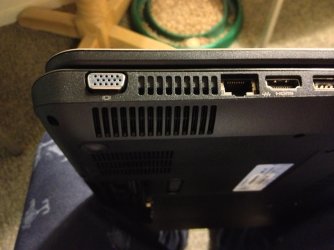
Is this the area you are hearing the noise from?

IMG_0098.jpg


This is from my g7...
 

My Computer

Computer type
PC/Desktop
Computer Manufacturer/Model Number
Self Built
OS
Win 10 Pro x64
CPU
Intel I5-2500K @3.3GHz
Motherboard
Asrock P67 Extreme4
Memory
16GB G.Skill Ripjaws X (4x4GB)
Graphics Card(s)
EVGA GeForce 750 Ti SC 2GB
Sound Card
ASUS Xonar DG 5.1 Channels 24-bit 96KHz PCI Interface Sound
Monitor(s) Displays
auria eq2367
Screen Resolution
1920 x 1080
Hard Drives
250GB Samsung 850 EVO SSD
1TB WD Blue
1TB Hitachi
PSU
SeaSonic X 650W 80 Plus Gold
Case
Corsair Obsidian 750D
Cooling
Corsair H60, Three 140mm case fans
Keyboard
Logitech Wireless Keyboard K520
Mouse
Logitech Wireless Mouse M310
Internet Speed
Wave Broadband ~ 100 dn 5 up
Antivirus
Windows Defender, Malwarebytes Premium
Browser
Edge, IE11, Chrome
Other Info
Laptop specs: HP g7-1365dx /
CPU: AMD A6-3420M APU with Radeon(tm) HD Graphics /
RAM: Crucial 8Gb (2x4Gb) /
SSD: Crucial M4-CT128M4SSD2 ATA Device/ FW 000F /
GFX: AMD Radeon HD 6520G /
OS: Windows 10 Pro x64

My Computer

Computer type
Laptop
Computer Manufacturer/Model Number
acer aspire model number 5532
OS
win 7 x64 bit
Memory
4 gb
Other Info
windows 8 laptop +
samsung tablet

My Computer

Computer type
PC/Desktop
Computer Manufacturer/Model Number
Self Built
OS
Win 10 Pro x64
CPU
Intel I5-2500K @3.3GHz
Motherboard
Asrock P67 Extreme4
Memory
16GB G.Skill Ripjaws X (4x4GB)
Graphics Card(s)
EVGA GeForce 750 Ti SC 2GB
Sound Card
ASUS Xonar DG 5.1 Channels 24-bit 96KHz PCI Interface Sound
Monitor(s) Displays
auria eq2367
Screen Resolution
1920 x 1080
Hard Drives
250GB Samsung 850 EVO SSD
1TB WD Blue
1TB Hitachi
PSU
SeaSonic X 650W 80 Plus Gold
Case
Corsair Obsidian 750D
Cooling
Corsair H60, Three 140mm case fans
Keyboard
Logitech Wireless Keyboard K520
Mouse
Logitech Wireless Mouse M310
Internet Speed
Wave Broadband ~ 100 dn 5 up
Antivirus
Windows Defender, Malwarebytes Premium
Browser
Edge, IE11, Chrome
Other Info
Laptop specs: HP g7-1365dx /
CPU: AMD A6-3420M APU with Radeon(tm) HD Graphics /
RAM: Crucial 8Gb (2x4Gb) /
SSD: Crucial M4-CT128M4SSD2 ATA Device/ FW 000F /
GFX: AMD Radeon HD 6520G /
OS: Windows 10 Pro x64
Do you have a can of compressed air?

Try blowing the dust out of that area, it could just be a chunk of dust built up and rubbing against the fan blade.

This is the type of canned air for computers,

Amazon.com: Compressed Gas Duster, 10oz Can, 2/Pack: Office Products

hi yes i have done already , i kept the computer on a bit longer today it dont seem to be getting any hotter than normal the noise seems like it is coming from the underneath now , im not sure what to do now ,i havent had it very long either ,i probably have to get rid !!!
 

My Computer

Computer type
Laptop
Computer Manufacturer/Model Number
acer aspire model number 5532
OS
win 7 x64 bit
Memory
4 gb
Other Info
windows 8 laptop +
samsung tablet
Back
Top