C Drive reports low disk space repeatedly

kaj

New member
Local time
9:36 PM
Messages
16
Location
UK
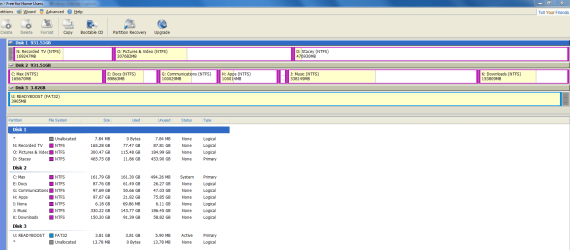
Over the last few days I have repeatedly received a "C Drive is low on disk space" message. The drive WAS a 150 GB partition of a 1TB drive. I increased the space to 160GB and instantly the disk filled up again. :shock: Any case a few days ago it was only a third full...
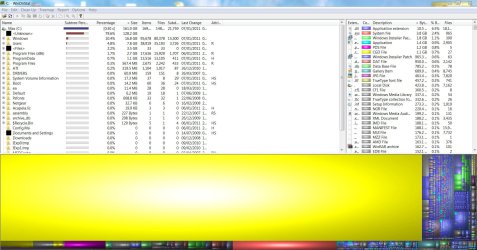
I have done disk clean up, defragged, run system file checker, run Malwarebytes (clean), glary utilities and also WinDirStat. This tells me that <Unknown files> are taking up 128GB of the space!! I have turned off hibernation and deleted the file for that. I have turned off acronis backup in case that's doing it. It has got to the point hwere I can't download CCCleaner because there's not enough room in the temp files I guess. I have on the C drive just Windows, a few apps installed in program files, but just about everything else is stored on other partitions - docs, music, tv, video, downloads, apps etc. Something is clearly writing massive amounts to the drive but I can't find out what because I can't open the <Unknown files> that WinDirStat reports - apparently I, or it, don't have access to them. Incidentally there are no System Restore Points - somehow that was turned off.
I've tried everything I can find on the forums. I really want to avoid a fresh install. I'm thinking of restoring my acronis backup but I'm unsure when this all started.
Can anybody help?
 

Attachments
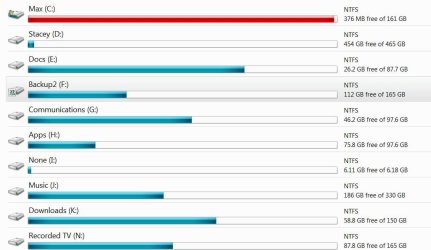
  • Drives.JPG
    Drives.JPG
    64.6 KB · Views: 247
Last edited:

My Computer My Computer

OS
Windows 7
CPU
AMD 64 x 2 6000
Motherboard
Asus M2v
Memory
6gb
Graphics Card(s)
atai radeon 3870
Sound Card
SoundBlaster Audigy
Monitor(s) Displays
Samsung Syncmaster P2450H
Hard Drives
1 x 1TB
1 x 1TB
PSU
500w
Last edited by a moderator:

My Computer My Computer

Computer type
PC/Desktop
Computer Manufacturer/Model Number
Dell XPS 420
OS
Windows 10, Home Clean Install
CPU
Intel Core2 processsor Q8200(2.33Ghz 1333FSB) Quad Core Tech
Motherboard
Dell
Memory
6 gb
Graphics Card(s)
ATI Radeon 256MB HD3650
Sound Card
Intergrated 7.1 Channel Audio
Monitor(s) Displays
Dell SP2009W 20"
Hard Drives
640 GB Serial ATA Hard drive
Cooling
Fan
Keyboard
Dell USB Keyboard
Mouse
Dell Premium Optical USB
Internet Speed
DSL 2.85
Thanks for replying so quickly. I have run full anti virus scans with Malwarebytes and Microsoft Security Essentials. I'm quite fastidious about making sure everything is updated, Windows 7 itself too. Thanks for the link too; I have already worked through that list, which is why I'm getting really frustrated!
Any other suggestions?
 

My Computer My Computer

OS
Windows 7
CPU
AMD 64 x 2 6000
Motherboard
Asus M2v
Memory
6gb
Graphics Card(s)
atai radeon 3870
Sound Card
SoundBlaster Audigy
Monitor(s) Displays
Samsung Syncmaster P2450H
Hard Drives
1 x 1TB
1 x 1TB
PSU
500w
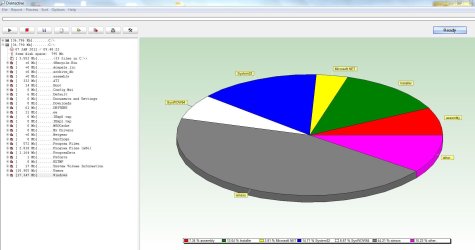
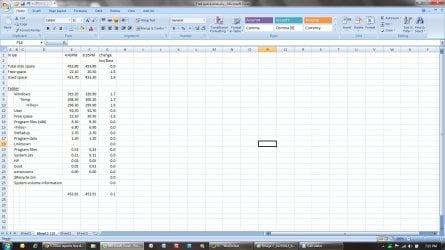
Thanks Mike. Still the same this morning. I ran Disktective as you suggested. It doesn't seem to show anything that isn't quite bona fide, and doen't indicate that the drive is full from what I can see (screenshot attached -tried to generate report but html file refused to upload here- attached). However WinDirStat does report this (also attached). My problem now is, how can I find out what these unknown files are and get rid?
I did try Disk Investigator but Im afraid that's all greek to me!
 

Attachments

  • WinDirStat Jan 7.JPG
    WinDirStat Jan 7.JPG
    227.6 KB · Views: 152
  • Disktective Jan 7.JPG
    Disktective Jan 7.JPG
    128.7 KB · Views: 143
Last edited:

My Computer My Computer

OS
Windows 7
CPU
AMD 64 x 2 6000
Motherboard
Asus M2v
Memory
6gb
Graphics Card(s)
atai radeon 3870
Sound Card
SoundBlaster Audigy
Monitor(s) Displays
Samsung Syncmaster P2450H
Hard Drives
1 x 1TB
1 x 1TB
PSU
500w
Disable System Restore and see if free space comes back?
 

My Computer My Computer

Computer type
PC/Desktop
OS
Microsoft Windows 10 Professional / Windows 7 Professional
CPU
Intel i5-3570
Motherboard
Lenovo Mahobay
Memory
16GB DDR3
Graphics Card(s)
AMD Radeon HD 7850 2GB
Sound Card
(1) Realtek HD Audio (2) AMD HD Audio
Monitor(s) Displays
LG LS192WS
Screen Resolution
1440 x 900 @ 32bit color
Hard Drives
(1) SUV300S37A/120G (2) ST3500413AS SATA Disk Device AHCI mode enabled.
PSU
Corsair HX620
Case
Thermaltake V4 Black Edition
Cooling
Cooler Master Hyper 212 + Artic Silver 5 on CPU/GPU
Keyboard
Dell SK-8115
Mouse
Razer Copperhead with MAPED mat (awesome!)
Internet Speed
100 Mbps up/down
Browser
Chrome
Hmmm....something is obviously generating the 128 GB of stuff.

Working with low level tools is always next to impossible if you don't know much about the stuff.

I would try this;

Best FREE Partition Manager Freeware for Windows 2000/XP/Vista/7 32 bit & 64 bit. EASEUS free Partition Manager Software Home Edition.

<http://www.partition-tool.com/personal.htm>

have a look at the disk with the tool and see what it says.

Make sure you have a backup first.

If ncessary delete the partition and reinitialise it.

Regards....Mike Connor
 

My Computer My Computer

OS
Several, including Windows 7 x64 Ultimate
Disable System Restore and see if free space comes back?
May try tomorrow but I 've only just turned it back on - there's no space left on the drive for it to work.
 

My Computer My Computer

OS
Windows 7
CPU
AMD 64 x 2 6000
Motherboard
Asus M2v
Memory
6gb
Graphics Card(s)
atai radeon 3870
Sound Card
SoundBlaster Audigy
Monitor(s) Displays
Samsung Syncmaster P2450H
Hard Drives
1 x 1TB
1 x 1TB
PSU
500w
Hmmm....something is obviously generating the 128 GB of stuff.

Working with low level tools is always next to impossible if you don't know much about the stuff.

I would try this;

Best FREE Partition Manager Freeware for Windows 2000/XP/Vista/7 32 bit & 64 bit. EASEUS free Partition Manager Software Home Edition.

<http://www.partition-tool.com/personal.htm>

have a look at the disk with the tool and see what it says.

Make sure you have a backup first.

If ncessary delete the partition and reinitialise it.

Regards....Mike Connor

Thanks again Mike. WinDirStat reports <unknown> has gone up to 136GB today!
Easeus just shows C Drive as full basically. I used it the day before yesterday to increase the c drive space by 10GB which was promptly filled.
Tomorrow I may restore an acronis backup & see if that gets rid, failing that a repair install.
 

Attachments

  • Easeus Jan 8.PNG
    Easeus Jan 8.PNG
    38.2 KB · Views: 87

My Computer My Computer

OS
Windows 7
CPU
AMD 64 x 2 6000
Motherboard
Asus M2v
Memory
6gb
Graphics Card(s)
atai radeon 3870
Sound Card
SoundBlaster Audigy
Monitor(s) Displays
Samsung Syncmaster P2450H
Hard Drives
1 x 1TB
1 x 1TB
PSU
500w
C Drive filling up update

As an update, I restored my c drive partition from my acronis backup and the drive is back to its regular size. Of course the same thing may happen again, but if it does I'll actually reinstall.
As a matter of interest after the restore I was having problems with my graphics card driver, and realised the the card wasn't seated properly (probably happened when I changed the monitor last week) ; so whether that could have caused my problem I don't know.
Now all I have to deal with is "Windows cannot load the device driver for this hardware. The driver may be corrupted or missing. (Code 39)" on the UMBus Root Bus Enumerator in Device Manager. Always something sent to try us!
Thanks to both of you for trying to help me out.
 

My Computer My Computer

OS
Windows 7
CPU
AMD 64 x 2 6000
Motherboard
Asus M2v
Memory
6gb
Graphics Card(s)
atai radeon 3870
Sound Card
SoundBlaster Audigy
Monitor(s) Displays
Samsung Syncmaster P2450H
Hard Drives
1 x 1TB
1 x 1TB
PSU
500w
Hi guys and kaj, I am experiencing exactly the same problem. Something is consuming my hard drive space as soon as I freed up some space. For example, I just freed up 10GB 2 hours ago, and now 2.5GB has been filled. This happened within the last 2 hours and the computer was not even being used at all.
This is happening for the past week and driving me crazy. Any help is much appreciated.
 

My Computer My Computer

OS
Windows 7 Home Premium 64bit

My Computer My Computer

Computer type
PC/Desktop
Computer Manufacturer/Model Number
Golden Mk. I.4
OS
Windows 10 Pro x64 ; Xubuntu x64
CPU
Intel i7 860 @ 2.80 GHz O/C'ed to 4.0GHz
Motherboard
Gigabyte P55A-UD3R Rev.1. Award BIOS F13
Memory
16GB Corsair Vengance DDR3 @ 661 MHz Dual Channel (9-9-9-24)
Graphics Card(s)
EVGA NVidia GTX 560 1024MB
Sound Card
Realtek Integrated
Monitor(s) Displays
Dual Samsung SyncMaster 2494HS
Screen Resolution
1920*1080 and 1920*1080
Hard Drives
1*Samsung 840 EVO 120GB SSD;
1*OCZ Vertex 2 60GB SSD;
2*Samsung F3 SpinPoint 1TB in RAID0;
1*Samsung F1 SpinPoint 1TB;
2*Western Digital 1TB External USB 3.0
1*Western Digital 500GB External USB 3.0
1*Seagate 500GB External USB 2.0
PSU
Thermaltake ToughPower QFan 750W
Case
Thermaltake Element S VK60001W2Z
Cooling
Corsair H60 Water Cooling, 2*230mm and 2*80mm case fans
Keyboard
Logitech G110
Mouse
Logitech MX518
Hi Golden, thanks for your reply. Following your instructions, attached is an image of C drive.
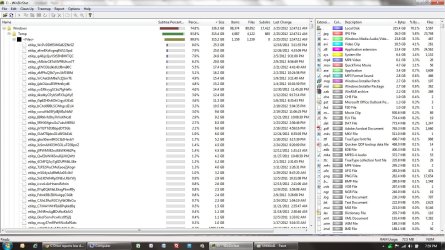
I noticed that there is 315.4GB in Windows Temp folder, so i drilled down a bit more, and found a bunch of files taking up so much space, shown in the second image.
What are these? I used Disk Cleanup this morning but guess these could not be not wiped out by the cleanup.
Could you please let me know how to safely clean these without any damage to other components, and how to stop this from happening?
Am using Windows 7 x64.
Thanks in advance. Really desperate here.
 

Attachments

  • Untitled2.jpg
    Untitled2.jpg
    232.1 KB · Views: 95
  • Untitled1.jpg
    Untitled1.jpg
    178.9 KB · Views: 77

My Computer My Computer

OS
Windows 7 Home Premium 64bit
Hi,

You use FireFox correct? The etilqs files are temporary database files used by Firefox (etilqs = sqlite spelled backwards) and are usually purged when you close FireFox.

Delete them manually after you have closed all instances of FireFox. I'll need to do more research to find out why they aren't being purged automatically.

Regards,
Golden
 

My Computer My Computer

Computer type
PC/Desktop
Computer Manufacturer/Model Number
Golden Mk. I.4
OS
Windows 10 Pro x64 ; Xubuntu x64
CPU
Intel i7 860 @ 2.80 GHz O/C'ed to 4.0GHz
Motherboard
Gigabyte P55A-UD3R Rev.1. Award BIOS F13
Memory
16GB Corsair Vengance DDR3 @ 661 MHz Dual Channel (9-9-9-24)
Graphics Card(s)
EVGA NVidia GTX 560 1024MB
Sound Card
Realtek Integrated
Monitor(s) Displays
Dual Samsung SyncMaster 2494HS
Screen Resolution
1920*1080 and 1920*1080
Hard Drives
1*Samsung 840 EVO 120GB SSD;
1*OCZ Vertex 2 60GB SSD;
2*Samsung F3 SpinPoint 1TB in RAID0;
1*Samsung F1 SpinPoint 1TB;
2*Western Digital 1TB External USB 3.0
1*Western Digital 500GB External USB 3.0
1*Seagate 500GB External USB 2.0
PSU
Thermaltake ToughPower QFan 750W
Case
Thermaltake Element S VK60001W2Z
Cooling
Corsair H60 Water Cooling, 2*230mm and 2*80mm case fans
Keyboard
Logitech G110
Mouse
Logitech MX518
Yes, I use Firefox. I will delete these etliqs files manually.
Looking forward to your research.
Thanks.
 

My Computer My Computer

OS
Windows 7 Home Premium 64bit
Check your Firefox settings. If you can find the bad setting, reset to defaults or uninstall and reinstall the latest version saving only your Favorites exported/reimported as an HTML file.
 
I uninstalled Firefox as suggested. Without reinstalling it, I want to monitor the free space see if this would do the trick. After uninstalling it, I had 28GB free space. 2 hours after, I am at 26.6GB, 1.4GB filled up without doing absolutely anything with the laptop.... Strange.....
 

My Computer My Computer

OS
Windows 7 Home Premium 64bit
Can you track where this extra GB came from? Does WinDirStat show it?
 

My Computer My Computer

Computer type
PC/Desktop
Computer Manufacturer/Model Number
Golden Mk. I.4
OS
Windows 10 Pro x64 ; Xubuntu x64
CPU
Intel i7 860 @ 2.80 GHz O/C'ed to 4.0GHz
Motherboard
Gigabyte P55A-UD3R Rev.1. Award BIOS F13
Memory
16GB Corsair Vengance DDR3 @ 661 MHz Dual Channel (9-9-9-24)
Graphics Card(s)
EVGA NVidia GTX 560 1024MB
Sound Card
Realtek Integrated
Monitor(s) Displays
Dual Samsung SyncMaster 2494HS
Screen Resolution
1920*1080 and 1920*1080
Hard Drives
1*Samsung 840 EVO 120GB SSD;
1*OCZ Vertex 2 60GB SSD;
2*Samsung F3 SpinPoint 1TB in RAID0;
1*Samsung F1 SpinPoint 1TB;
2*Western Digital 1TB External USB 3.0
1*Western Digital 500GB External USB 3.0
1*Seagate 500GB External USB 2.0
PSU
Thermaltake ToughPower QFan 750W
Case
Thermaltake Element S VK60001W2Z
Cooling
Corsair H60 Water Cooling, 2*230mm and 2*80mm case fans
Keyboard
Logitech G110
Mouse
Logitech MX518
Just an update on my situation, which was the original report on this problem. I haven't ever had a re-occurrence since my restore from my acronis backup. But I never got to the bottom of it.
 

My Computer My Computer

OS
Windows 7
CPU
AMD 64 x 2 6000
Motherboard
Asus M2v
Memory
6gb
Graphics Card(s)
atai radeon 3870
Sound Card
SoundBlaster Audigy
Monitor(s) Displays
Samsung Syncmaster P2450H
Hard Drives
1 x 1TB
1 x 1TB
PSU
500w
Sorry, took me longer than expected to do this. I just wanted to make sure I got a good case to show. Below are what I have done and the results. This is a bit long, so please bare with me.
- I ended up with 26GB free space last night after uninstalling Firefox (no reinstalling after that). I used my laptop for couple of hours this morning and lost another 4GB free space to 22.1GB. I did not save or install anything during this time period, just plain web surfing.
- so, 22.1GB free space was the starting point where this exercise began. I also restarted whenever I ran the WinDirStat.
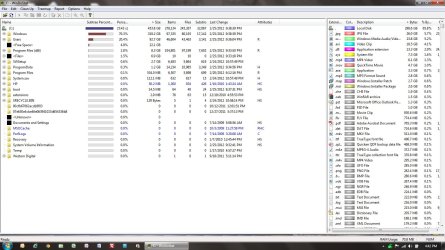
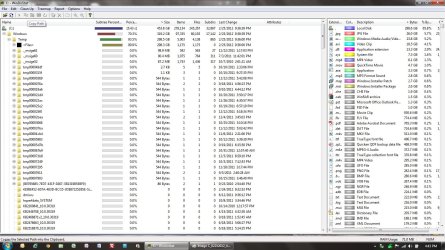
- At 4:43PM, I ran WinDirStat - screen shots attached with *443PM_* in file names
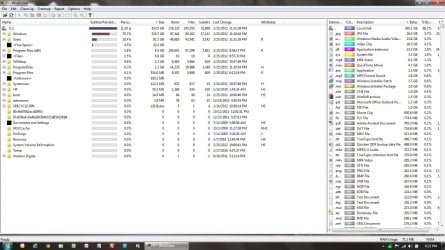
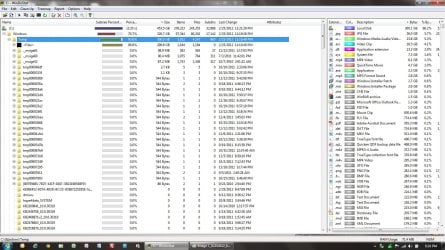
- At 6:24PM, I ran another WnDirStat - screen shots attached with *624PM_* in the file names
- results - another 1.6GB data was used between start and end time, now down to 20.5GB, while "Windows/Temp/<Files>" folder increased by the same GB.
- I tried to figure out which file size increased, but apparently the increase was as a result of increases and decreases in size of many files within this folder, including etilqs files.

I have also attached a screen shot on my analysis...

Let me know if I don't explain properly or anything else I can do. Thanks.
 

Attachments

  • Image C_02252012_443PM_1.jpg
    Image C_02252012_443PM_1.jpg
    176.2 KB · Views: 29
  • Image C_02252012_443PM_2.jpg
    Image C_02252012_443PM_2.jpg
    221.5 KB · Views: 25
  • Image C_02252012_624PM_1.jpg
    Image C_02252012_624PM_1.jpg
    177.7 KB · Views: 21
  • Image C_02252012_624PM_2.jpg
    Image C_02252012_624PM_2.jpg
    225.8 KB · Views: 32
  • Untitled.jpg
    Untitled.jpg
    165 KB · Views: 32

My Computer My Computer

OS
Windows 7 Home Premium 64bit
Back
Top