can not open any .exe files

Bossman7121

New member
Local time
11:06 AM
Messages
3
Hi All,

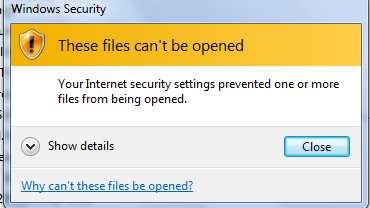
Not sure that this is the right forum, appologies if not. I have been having a few issues, the latest of which has prevented me from installing .exe files. Upon clicking a .exe I get the following message popup box.

Windows Security

Your internet security settings prevented one or more files from being opened

I'm stuck and need to install some software. I should say this happens on all .exe files in any location on my laptop

Thanks all
 

Attachments

  • error.jpg
    error.jpg
    10.8 KB · Views: 10

My Computer My Computer

OS
windows 7

My Computer My Computer

OS
Win7U 64 RTM
CPU
Q9550
Motherboard
GA-EP45-UD3R
Memory
8GB Gskill
Graphics Card(s)
ASUS|EAH4850/HTDI/1GD3/A
Sound Card
xfi Plat
Monitor(s) Displays
Dell 2405fpw
Screen Resolution
1920x1200
Hard Drives
Seagate & WD sata Drives
PSU
Antec
Case
Antec
Keyboard
MS Natural Ergonomic 4000
Mouse
Logitech MX610 USB Cordless
Thanks all,

No good, I am using Firefox and Chrome already, and try not to use IE. The problem seems to have started around the time I had to disable all active-x to see my son at his school ( which didn't work anyway ). I have reset IE and internet options to default, and still get the same message. I have also unplug and disabled defender and anti virus ( avast ) to try and install but no luck. Back to full shields up and still no go. At wits end here.

also tried all the links above, and one of the problems was 256 character file names, but not the case here. Also, someone indicated a defender update, but I can not find the particular KB so don;t think that is the case.

Might wipe out the system and restore, but never got a hard disk for windows 7.


Thanks James, Found a lot of good stuff too for the future. Aggravated with all my OS so far, including Mac and Ubuntu. Want to stay with one, and the forums here are seem like a great source of info.
 
Last edited by a moderator:

My Computer My Computer

OS
windows 7
Did you follow the link James Colbert provided?
And do you have admin privileges?

Re: Internet security settings prevents one or more files from being opened


This is very common error since the release of Windows 7 and Internet Explorer 8; we thought we had a major virus but this turned out not to be the case. There are some security settings that need to be tweaked inside the Internet Options to allow downloads again.
“your internet security settings prevented one or more files from being opened”
Problems Opening Files on LAN

You may get the “these files cannot be opened” error when opening files on a network drive.
Control Panel –> Internet Options –> Security Tab

I unchecked them all and it works! The “your internet security settings prevented one or more files from being opened” didn’t block me and I can now open files on network drives.

Problems opening files in Internet Explorer, Firefox & Windows Explorer

Setting these for both the Internet and Intranet settings should take care of the file open problems. The setting I discovered during my troubleshooting is “Launching applications and unsafe files”. This can be set in two places depending on your network setup.
Change the settings in Internet Options
This is an error from Internet Explorer security settings found under your “Tools” –> “Internet Options” –> “Security” tab –> “Local intranet” or “Internet”.


Make sure you can download files
You may also need to enable File download to get past the “these files can’t be opened” inside the Internet Properties.

Change this is Group Policy
If you operate in a domain you will need to add the settings to a new GPO to remove the “your internet security settings prevented one or more files from being opened” error from all network systems at once. This method worked for me.

Open your Group Policy Management Editor and either create a new IE8 Policy or use an existing one and go to User Configuration –> Policies –> Administrative Templates –> Windows Components –> Internet Explorer –> Internet Control Panel –> Security Page –> Internet Zone –> Launching programs and unsafe files
You should do this for both Internet zone and Intranet zone.
 

My Computer My Computer

OS
Windows 7 Enterprise x64 SP1
just found it...

Shawn M Clarady says:
February 27, 2011 at 7:50 am
If you go to Control Panel / Internet Options then advance. Click on restore advance settings. Under that you see reset Internet Explorer settings. Click on Reset and delete user settings. This will remove your home page but it will fix the issue for sure.
Shawn Michael Clarady
Safe web browsing

Reply

edit: http://www.ilertech.com/2010/05/these-files-cant-be-opened/
Worked perfect. Thank you for the lead !! You ALL ROCK !!
 
Last edited:

My Computer My Computer

OS
windows 7
Back
Top