
Can someone test INSTALLWATCH

Doubtingthomas

New member
Member
Local time
6:22 AM
Messages
31
Hi everyone,
I have been using INSTALLWATCH from Epsilon squared to summarisize installation changes right from Win 98 days. It interfaced beautifully/seamlessly with XP , and also WIN 7 x64 till last week. From last week onwards I have been stuck at a certain key HKLM>SOFTWARE>wow6432node.... While in the ANALYSE mode InstallWatch detects all the entries in the node as ADDED fresh nearly ( 4 lakh) which is not true. Can some expert test this. In fact I have not been able to find a Superlative application like this in its category.

The application is available here.. InstallWatch Download - SoftSea
1.Install the program. IW_2012-12-16_211313-1.gif
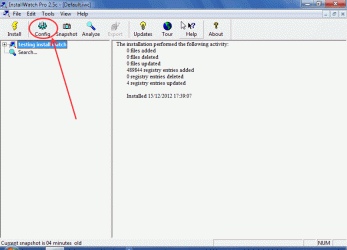
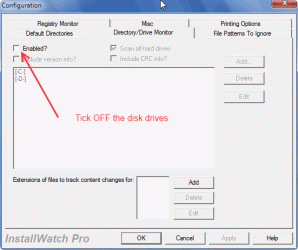
2. In the configure you can disable the disk scan IW_2012-12-16_211329-2.gif
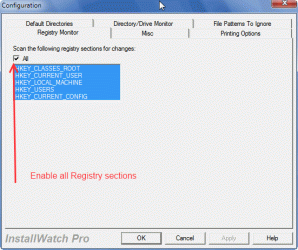
3. Check whether all the Registry is included. IW_2012-12-16_211350-3.gif
4. (if it automatically does not start creating one after config)Press Snapshot to create one.IW_2012-12-16_211313-4.gif
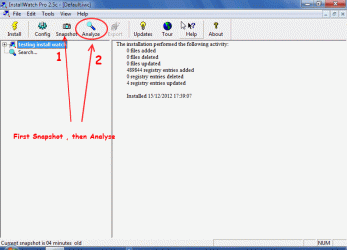
5.Press Analyse immediately. Logic demands that added, deleted, modified registries should be ZERO save one or two.

PS
1. I created two test keys , values , datas in the particular section of the Registry mentioned above before creating a snapshot. After creating it I checked the .iws Snapshot file (using Scintilla Reader) and confirmed that they are indeed present. But annoyingly after analysis the same entries are shown as added fresh.IW_2012-12-14_072952-5.gif
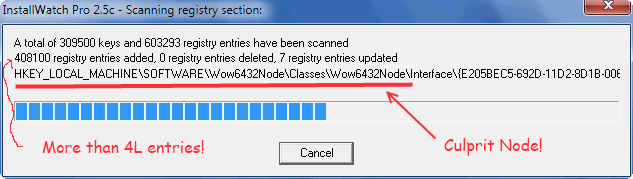
2.This problem I am seeing only since last week, otherwise it operated seamlessly. I am sure the software will adapt to WIN 8 as well;)
 

My Computer

OS
Windows 7 SP1 64
Sorry to Bump. Can anyone confirm that he is using the software without issues
 

My Computer

OS
Windows 7 SP1 64
@ Doubtingthomas,

It seems "InstallWatch" is not 64-bits Registry compatible.
Like ZSoft Uninstaller: "As a 32-bit program itself, it cannot (as standard) 'see', for instance, the 64-bit part of the registry".
So a loop issue could come out in 'Wow6432Node' key [ 4 lakh thing...].
Please see aditional info:
Test 64-bit compatibility:
1- Create a new file with Windows Explorer between snapshots in \windows\system32 (to test file system snapshot);
2- creating a new registry key with Regedit between snapshots directly under KEY_LOCAL_MACHINE\SOFTWARE (to test registry snapshot).
3- If a given snapshot program doesn't list these newly created items in a snapshot comparison, then it can't see the whole 64-bit system.
When using the registry API in a 32-bit application, Wow6432Node acts like a symbolic link that loops back to the same 32-bit hive. It does not map into the 64-bit hive as you might think.

For example, walking the registry tree down to HKLM\Software\Wow6432Node in a 32-bit application loops back to HKLM\Software. The result is infinite recursion: HKLM\Software\Wow6432Node\Wow6432Node\Wow6432Node\..., etc.

If you want to view the 64-bit registry hive in 32-bit code you must open HKLM\Software using KEY_WOW64_64KEY. Do not try to open Wow6432Node; it will not work.

P.S.: If you wants see installation changes you can try 'System Explorer' snapshot feature. It works well with 64-bits based applications.

BTW: You can uncheck the keys: HKEY_CLASSES_ROOT, HKEY_CURRENT_USER and HKEY_CURRENT_CONFIG. In fact they are subkeys from HKEY_LOCAL_MACHINE and HKEY_USERS ...
 

My Computer

OS
Windows 7 Ultimate x64
@majoMO
Thanks for the reply. I would like to clarify on the following:-
1.The program worked perfectly until 2 weeks ago with all the registry included.
2.I created a particular entry before the snap shot , and it does show after the snapshot is created. Please look at my post under PS.
3.Why two sets of behavior, while taking snapshots and while doing analysis. If it did not register the node while taking the snapshot let it not register while doing te analysis, which is not true here.
4.The program is hardly 3.5mb and is vouched safe. CAn you run it personally and confirm...
 

My Computer

OS
Windows 7 SP1 64
@ Doubtingthomas,
I tried in Win 7, 64bits, under 'Toolwiz Time Freeze' virtualization.

- Done like your 2. point and 'PS' info;
- Can't reproduce your problem; none 'node' annoyance; and "entries are shown as added fresh" wasn't reproduced here also.

So can't help to understand your problem.

For your information I can now confirm that "InstallWatch" can do the work if you are installing/analyze 32bits based applications. If an application is 64bits native, it is unable to do an accurate work.
 

My Computer

OS
Windows 7 Ultimate x64
Hi majomo , Can you please test in real environment.If it is working for you , it should also for me. It was doing well till 2 weeks ago..
 

My Computer

OS
Windows 7 SP1 64
It was doing well till 2 weeks ago..
Did you tried in a Win XP system? Since you are working in a 64bits it seems to me that "Wow6432Node" loop issue comes out soon or later. Such behaviour was common with many registry cleaners that couldn't handle with the 64-bit part of the registry: first they worked and some time later they freezed in that 'Node' key...
I don't believe that is needed to work in real environment to change their behaviour, but I'll do that and I'll say something about if reproduced your annoyance.
 

My Computer

OS
Windows 7 Ultimate x64
Hi,
Not tested yet?? Is it with the latest Windows updates??
 

My Computer

OS
Windows 7 SP1 64
C'mon someone. Would you not give it a try. Atleast give a solution. Thanks.
 

My Computer

OS
Windows 7 SP1 64
It appears your machine has some issues causing another issue. Anyone else's testing unknown software would be no help I don't think. For myself I don't understand this InstallWatch not what you are trying to do. :confused:
 

My Computer

Computer type
PC/Desktop
Computer Manufacturer/Model Number
Home Built Desktop By DataTech
OS
Windows 7 Ultimate X64 SP1
CPU
Intel i5-2550K, Differing ~4.4-4.8GHz No built in GPU
Motherboard
ASUS P8Z68-V PRO/GEN3
Memory
16GB G.Skill Sniper 1866MHz @ 2133MHz 2x8GB
Graphics Card(s)
ASUS GTX650TIB-DC2OC-2GD5, (650TI Boost)
Sound Card
Onboard Realtek 5-1
Monitor(s) Displays
Samsung P2570HD
Screen Resolution
1920x1080
Hard Drives
Samsung 840 Pro 256GB SSD for OS, 500GB Seagate Constellation (Enterprise drive) for Data
PSU
Corsair HX650W
Case
Inwin Dragon Rider
Cooling
Hyper 212 EVO w/two Noctua fans, push-pull, @1300 RPM
Keyboard
E-Z Eyes, bright yellow keys with large characters
Mouse
steelseries SENSEI Laser Pro Gaming
Internet Speed
48-51Mbs Mbs down, 11 Mbs up Xfinity Cable
Antivirus
Norton Internet Security 2013
Browser
IE 10, Opera, Pale Moon if needed
Other Info
4 case fans, LG BluRay-RE, ASUS DVD-RW, Mr. Fusion power supply, 1.21 gigawatts.
This is not an unknown software. I am amused by the way it behaves differently while taking a snapshot and during analysis.
 

My Computer

OS
Windows 7 SP1 64
It appears your machine has some issues causing another issue. Anyone else's testing unknown software would be no help I don't think. For myself I don't understand this InstallWatch not what you are trying to do. :confused:

Same here. Never heard of it myself and I've been around a while. To me also it sounds like something besides that particular program is making it do as you describe. Have you tried a restore point/system image to before this happened? Can you tell/see anything else wrong with your machine? Maybe a sfc/scannow would find something but I doubt it.

We try hard here at Sevenforums to give all the help we can, but I'm sorry I draw the line at installing unknown software on my machine for testing purposes. Not that I think it would do any good as every machine is different in some sort of way. I hope you can find the answers you're looking for!
 

My Computer

Computer type
Laptop
Computer Manufacturer/Model Number
MSI GE72VR Apache Pro-416
OS
Windows 10x64 Build 1709
CPU
Intel i7 7700HQ Kaby Lake
Motherboard
Micro-Star Intl. MS-179B (U3C1)
Memory
16 GB DDR4 @2400
Graphics Card(s)
Nvidia Geforce GTX 1060
Screen Resolution
1920x1080 120Hz
Hard Drives
256 GB Nvme M.2 SSD

1TB HDD@7200
Cooling
Cooler Blast 4
Keyboard
Steel Series
Antivirus
Bit Defender Free
Browser
Edge
This is not an unknown software. I am amused by the way it behaves differently while taking a snapshot and during analysis.
OK, maybe you can contact the 13 people who are familiar with it to test for yoiu.:huh:
 

My Computer

Computer type
PC/Desktop
Computer Manufacturer/Model Number
Home Built Desktop By DataTech
OS
Windows 7 Ultimate X64 SP1
CPU
Intel i5-2550K, Differing ~4.4-4.8GHz No built in GPU
Motherboard
ASUS P8Z68-V PRO/GEN3
Memory
16GB G.Skill Sniper 1866MHz @ 2133MHz 2x8GB
Graphics Card(s)
ASUS GTX650TIB-DC2OC-2GD5, (650TI Boost)
Sound Card
Onboard Realtek 5-1
Monitor(s) Displays
Samsung P2570HD
Screen Resolution
1920x1080
Hard Drives
Samsung 840 Pro 256GB SSD for OS, 500GB Seagate Constellation (Enterprise drive) for Data
PSU
Corsair HX650W
Case
Inwin Dragon Rider
Cooling
Hyper 212 EVO w/two Noctua fans, push-pull, @1300 RPM
Keyboard
E-Z Eyes, bright yellow keys with large characters
Mouse
steelseries SENSEI Laser Pro Gaming
Internet Speed
48-51Mbs Mbs down, 11 Mbs up Xfinity Cable
Antivirus
Norton Internet Security 2013
Browser
IE 10, Opera, Pale Moon if needed
Other Info
4 case fans, LG BluRay-RE, ASUS DVD-RW, Mr. Fusion power supply, 1.21 gigawatts.
Now one need not run the program. But why the hell does it behave differently while taking a snapshot and while analysing the software installed. Strange...:sarc:
 

My Computer

OS
Windows 7 SP1 64
Doubtingthomas you have been trying to get someone to install this program on their computer from Dec 16 when this thread started. I don't think it's going to happen.
 

My Computer

Computer type
PC/Desktop
Computer Manufacturer/Model Number
Home made Desktop
OS
Windows 10 Pro. 64/ version 1709 Windows 7 Pro/64
CPU
Intel i7-6800K @ 4.3
Motherboard
ASUS X-99 Deluxe II
Memory
Corsair Platinum 16 gig @2400
Graphics Card(s)
EVGA GTX 1070 OC
Monitor(s) Displays
Asus 27" LED LCD/VE278Q
Screen Resolution
1920-1080 or 1280-720 HDMI
Hard Drives
INTEL SSD 730-240 Gb Sata 3.0/
PSU
EVGA Platium 1200W
Case
Phanteks Luxe Tempered Glass 8 fans/ one radiator
Cooling
XSPC/ Water Cooled CPU
Keyboard
Das 4 Professional
Mouse
Logitech M705/MX Anywhere 2-S
Internet Speed
100 mbits
Antivirus
Microsoft Security Essentials/ Malwarebytes Premium 3.0/ SAS
Browser
I.E. 11 default/Firefox/ ISP Time Warner Cable/Spectrum
Other Info
LG BluRay Burner/
Sound system-KLipsch-THX/
Icy Dock ssd Hot Swap bays.
I do not care to install any software that I have never heard of before. I have been dealing with computers since 1983.
 

My Computer

Computer type
PC/Desktop
Computer Manufacturer/Model Number
Custom Build
OS
Win 10 Pro 64
CPU
Intel Core i7 960 @3.20 GHz
Motherboard
MSI MS7522
Memory
24.0 GB DDR3
Graphics Card(s)
EVGA GTX 750Ti
Monitor(s) Displays
LG E2341 23 Inch
Screen Resolution
1920x1080
Hard Drives
1TB Western Dgital 1002FAEX-00Y9A0
1TB Hitachi HDS721010CLA322
PSU
700 Watt
Case
Haf 912
Cooling
Fans
Keyboard
Logitech MK710
Mouse
Logitech M705
Internet Speed
Cable
Antivirus
AIS 2015 .10.0.2225
Browser
Firefox 49
Other Info
MalwareBytes Anti-Rootkit utility
I do not care to install any software that I have never heard of before. I have been dealing with computers since 1983.
And especially one that does unknown things to the registry. A 32bit program fooling with a 64bit registry is a recipe for disaster.
I would suggest the OP contact the author of the program, if it is no longer supported one will have to admit defeat and use a more modern substitute that is 64 bit aware.
 
Last edited:

My Computer

Computer type
PC/Desktop
Computer Manufacturer/Model Number
Bluethunder II
OS
Windows 7 x64 Ultimate and numerous virtual machines
CPU
AMD FX-8350 Vishera 32nm Technology @ 4.2 GHz default
Motherboard
ASUSTeK COMPUTER INC. SABERTOOTH 990FX R2.0 (Socket 942)
Memory
G Skill 32.0GB Dual-Channel DDR3 @ 1204MHz (11-13-13-31)
Graphics Card(s)
EVGA GeForce GTX 960 4GB Super SC ACX 2.0+ with Back Plate
Sound Card
Creative X-Fi Titanium HD Audiophile PCIe
Monitor(s) Displays
LG L227WTG x 3
Screen Resolution
1680 x 1050 16:10
Hard Drives
238GB Samsung850 PRO SATA Disk Device (SSD)
1863GB Seagate ST2000DM 001-1CH164 (SATA)
1397GB Seagate ST1500DL 003-9VT16L(SATA)
466GB Western Digital WDC WD50 03AZEX-00K1GA0 (SATA) x 2
932GB Seagate ST310005 28AS SATA Disk Device (SATA)
PSU
Enermax Revolution87+ 1000 Watts Gold Certified Power Supply
Case
Rocketfish Full Tower
Cooling
Cooler Master Hyper 212 EVO Push Pull 120mm Fans
Keyboard
Logitech K740
Mouse
Logitech G100S Laser LED + Logitech Gamepad F310
Internet Speed
500 mbs down and 30mbs up
Antivirus
Malwarebytes Pro & Avast and MSE on certain Virtual Machines
Browser
Firefox (Main) Chrome, Internet Explorer (Back Up)
Other Info
Logitech X 230 2.1 Stereo System and 5.1 Yamaha RX V2090
B&W DM6 Monitor Speakers + Center and Surround Speakers
Using Mouse Without Borders (Google it)
Back
Top