Can`t create a restore date

Billnotlob

New member
Local time
10:40 PM
Messages
47
Hi I can`t create a restore date,when i go to system restore,there are no dates,on trying to create one.I get the message (no room on HP recovery disc due to 0x800700.I cant clean it ,the disc is full ,how do i go about it. My system restore settings are, (G) AND (C) are restore settings and previous version of files.

regards Bill.
 
Last edited:

My Computer

Computer type
PC/Desktop
Computer Manufacturer/Model Number
HP
OS
windows 7 64bit
Hello Bill and welcome to Seven Forums.

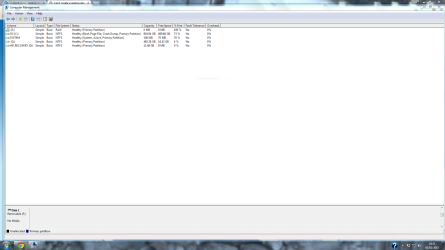
Before trying to solve the restore issue, please post a screenshot of your Disk Management. I'm not entirely sure what you mean when you say your HP recovery disk is full and you can't clean it. Is this a separate partition on your hard disk? Or an external hard drive? Or a separate CD/DVD provided by HP? A screenshot will help.

http://www.sevenforums.com/tutorials/274797-disk-management-post-screen-capture-image.html
 

My Computer

Computer type
Laptop
Computer Manufacturer/Model Number
Sony Vaio VPCEB47GM Laptop
OS
Win 7 Pro 64-bit
CPU
Intel i5 2.4 Ghz
Memory
8GB DDR3
Graphics Card(s)
Intel HD 3000
Sound Card
IDT High Definition
Monitor(s) Displays
15.6 WGXA Anti-Glare LED
Screen Resolution
1280x800
Hard Drives
640Gb 7200rpm
Antivirus
MSE
Browser
Opera (primary) with IE9 backup
Hope i have done this right, thanks
 

My Computer

Computer type
PC/Desktop
Computer Manufacturer/Model Number
HP
OS
windows 7 64bit
Thanks for the screenshot, Bill. It helps. Here's a larger view.

comp mgt.jpg

In looking at the screenshot I see a couple of things that might be causing your System Restore issues. It appears that you have one hard drive with about 1TB total space. That would be your C: drive and it has about 73% free space on it or about 669 GB. You also show an E: drive / partition with no allocated space so nothing can be saved to that location. Then you have a D: drive / partition called HP Recovery. I'm thinking that this is the manufacturer's hidden partition that would allow you to restore your computer to original factory specs just like the day you brought it home from the store. Then there's the G: drive and I'll get to that in a minute.

A 1 TB hard drive (your C: drive / partition) should have about 931.3 GB of usable space (I'm rounding down these numbers.). If you add the existing capacity of 919.9 and the HP Recovery capacity of 11.4 you get 931.3 which seems to be perfect. To put it another way, if your hard drive started out with 931.3 GB of usable space and HP used 11.4 GB to make the Recovery Partition, you're left with 919.9 GB of usable space. The G: drive / partition was set up to have available 465.7 GB of usable space. If you subtract that from the 919.9 available space on the C: drive / partition, you get 454.2 GB of remaining usable space on the C: drive / partition. But your screenshot shows the C: drive / partition has 669.6 GB of available space.

Is the G: drive / partition by chance an external hard drive or a second internal hard drive rather than a partition on the C: drive? If it's not an external hard drive or a second internal hard drive then we need to figure out if my math is wrong or if you have 215 GB of unaccounted for hard drive space.

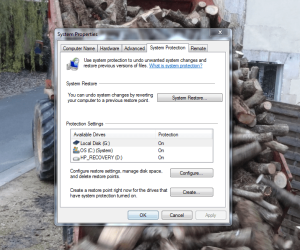
Now that I've confused us both, here's some info about how your System Restore should be set up and how it works. System Restore uses a feature called System Protection to regularly create and save restore points of selected hard disks in your computer. This tutorial explains how to access System Restore through System Protection. I'm thinking that you may have the wrong drive /partition turned on or off.

http://www.sevenforums.com/tutorials/700-system-restore.html
 

My Computer

Computer type
Laptop
Computer Manufacturer/Model Number
Sony Vaio VPCEB47GM Laptop
OS
Win 7 Pro 64-bit
CPU
Intel i5 2.4 Ghz
Memory
8GB DDR3
Graphics Card(s)
Intel HD 3000
Sound Card
IDT High Definition
Monitor(s) Displays
15.6 WGXA Anti-Glare LED
Screen Resolution
1280x800
Hard Drives
640Gb 7200rpm
Antivirus
MSE
Browser
Opera (primary) with IE9 backup
I agree, you must turn off the protection on the recovery partition. #1, Nothing should ever change on the recovery partition therefore there is no reason to have it added to the restore points. #2, Nothing should ever be written to the recovery partition.
Right click My Computer/Properties select the recovery partition and then configure. Turn it off. This will also delete all the extra data that has been written there.

Bill
 

My Computer

Computer type
Laptop
Computer Manufacturer/Model Number
Dell Precision 15 7550 Workstation
OS
Windows 10 22H2 Pro
CPU
Intel(R) Xeon W-10885M
Motherboard
Dell
Memory
2x 32 GB DDR4 ECC memory (128 GB max)
Graphics Card(s)
Intel onboard GPU 1080p - Quadro RTX 5000 Max-Q GPU 4K
Hard Drives
1TB Samsung 9100 Pro main M2 SSD
2x 2TB Samsung 9100 Pro temp storage M2 SSD (6 TB max)
Mouse
Logitech MX-25 Bluetooth
Internet Speed
slow
Antivirus
MS
Browser
Pale Moon 34.x.x - x64 AVX2 build
restore points

Hi
On going into system protection,I can see 3 avail drives.( all are switched on) (G) which is a external. (C) and (HP RECOVERY) If i swich off (G) I t will not allow me to create a restore point.
If i swich off (HP) It will allow me, i create one ,try to restore and get the message(no room 0x800700700.
I f i swich off (G) and ( HP) it will allow me to create ,on trying to restore ,i get the message (no room 0x800700700) I do not know what the settings should be and don`t recall changing anything in the first place,had no need to and would not have known what i was doing??
 

Attachments

  • Capture.PNG
    Capture.PNG
    171.5 KB · Views: 1

My Computer

Computer type
PC/Desktop
Computer Manufacturer/Model Number
HP
OS
windows 7 64bit
I have now turned off the the protection (HP),For a while now i have been getting a message on computer ,that i am running out of space in my recovery.on looking at it. It is full,is this the problem,and how do i free up space. My restore settings for (G) and (C) are (restore settings and previous versions of files)

What is ox800700700 ??

Regards
Bill
 
Last edited:

My Computer

Computer type
PC/Desktop
Computer Manufacturer/Model Number
HP
OS
windows 7 64bit
IMO the only drive that needs to be monitored is the C:\ drive. My Computer/Properties/System Protection/ stop the protection on everything but the C:\ drive. On the configure dialog for the C:\ drive, set the amount of space to be used to No more than 10% of the C:\ drive space. Bill
 

My Computer

Computer type
Laptop
Computer Manufacturer/Model Number
Dell Precision 15 7550 Workstation
OS
Windows 10 22H2 Pro
CPU
Intel(R) Xeon W-10885M
Motherboard
Dell
Memory
2x 32 GB DDR4 ECC memory (128 GB max)
Graphics Card(s)
Intel onboard GPU 1080p - Quadro RTX 5000 Max-Q GPU 4K
Hard Drives
1TB Samsung 9100 Pro main M2 SSD
2x 2TB Samsung 9100 Pro temp storage M2 SSD (6 TB max)
Mouse
Logitech MX-25 Bluetooth
Internet Speed
slow
Antivirus
MS
Browser
Pale Moon 34.x.x - x64 AVX2 build
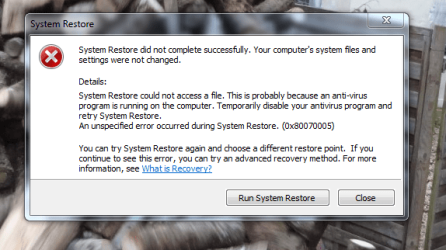
I have shut off (G)and(HP recovery) All that is on now is(C)which is set at 10%.This allows me to create a restore date but when i try to restore i get the message,won`t restore due to no room on the disc (HP RECOVERY) with the number 0x800700700.It asks if i want to free space (this is full) but won`t clean. is it possible to make space and how do i do it, as i am not that computer literate ,i don`t want to mess up.

regards Bill
 

Attachments

  • Capture.PNG
    Capture.PNG
    49.9 KB · Views: 26
Last edited:

My Computer

Computer type
PC/Desktop
Computer Manufacturer/Model Number
HP
OS
windows 7 64bit
Try emptying the Recycle Bin since all of those GB's of restore points went there. The recycle Bin is also mirrored on the Recovery partition. I would suggest lowering the amount of space the Recycle Bin uses to store deleted files. I only have mine set to use 5000 MB for 7 drives and half of that is unneeded. Bill
 

My Computer

Computer type
Laptop
Computer Manufacturer/Model Number
Dell Precision 15 7550 Workstation
OS
Windows 10 22H2 Pro
CPU
Intel(R) Xeon W-10885M
Motherboard
Dell
Memory
2x 32 GB DDR4 ECC memory (128 GB max)
Graphics Card(s)
Intel onboard GPU 1080p - Quadro RTX 5000 Max-Q GPU 4K
Hard Drives
1TB Samsung 9100 Pro main M2 SSD
2x 2TB Samsung 9100 Pro temp storage M2 SSD (6 TB max)
Mouse
Logitech MX-25 Bluetooth
Internet Speed
slow
Antivirus
MS
Browser
Pale Moon 34.x.x - x64 AVX2 build
restore points

Hi


I have emptied the recycle bin,It had less than 1000 in it,now set at 1000
 

My Computer

Computer type
PC/Desktop
Computer Manufacturer/Model Number
HP
OS
windows 7 64bit
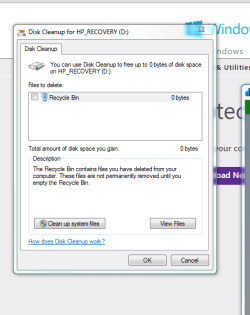
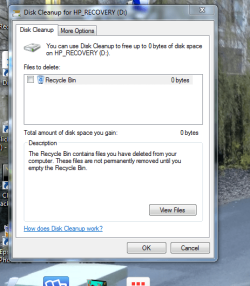
I keep getting a message that i have low disk space on HP recovery (D) it ask`s do i want to go to it ,when i got o it i get this pic.
 

Attachments

  • Capture.PNG
    Capture.PNG
    16.1 KB · Views: 24

My Computer

Computer type
PC/Desktop
Computer Manufacturer/Model Number
HP
OS
windows 7 64bit
If you in that screen for disk clean up of D hit clean system files does it show anything marked restore points and it would show it as a very big file size. If you see it check only it's box and uncheck everything else and hit ok.
 

My Computer

Computer type
PC/Desktop
Computer Manufacturer/Model Number
Custom
OS
10 Pro x64
CPU
Ryzen 9 3900X
Motherboard
Asrock x370 Tachi
Memory
64GB(4x16GB) DDR4
Graphics Card(s)
EVGA 1080ti FTW3
Sound Card
ASUS Xonar Essence STX (V4 Bursons), ODAC rev B, NFB-11, O2
Monitor(s) Displays
3xASUS PB278Q/R, Optoma HD142X
Screen Resolution
3x1440p, 1080p
Hard Drives
512GB 850 EVO(OS, Programs)
4TB (Movies)
3TB (Downloads)
3TB (Programs)
1TB HDD (Games)
2x6TB R1 (videos)
PSU
AX760
Case
Fractal Define R5
Cooling
NH-D15S
Keyboard
Massdrop Ctrl with Box Navy's
Mouse
G903, Alioth XXL Mat
Internet Speed
280/40
Antivirus
MBAM, ESET
Browser
Canary 64 Bit
Other Info
I also own a Thinkpad P50 Xeon 4K, X220T, X1C5
restore points

I will try to get back to get back to file(clean up disk D.in the mean time i will download pics that may be helpful.
 

Attachments

  • Capture.PNG
    Capture.PNG
    67.2 KB · Views: 5

My Computer

Computer type
PC/Desktop
Computer Manufacturer/Model Number
HP
OS
windows 7 64bit
another pic

Another pic
 

Attachments

  • Capture.PNG
    Capture.PNG
    37.1 KB · Views: 4

My Computer

Computer type
PC/Desktop
Computer Manufacturer/Model Number
HP
OS
windows 7 64bit
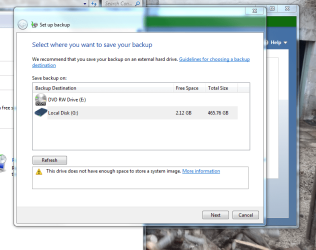
Sorry I left you hanging yesterday. I had to leave for North Carolina to attend my cousins wedding. Which has been an real ordeal. First the cleaners didn't have my suit ready, So ok I'll buy one there. Then in a little remote town in N.C. the fan belt breaks and the car runs hot. Now trying to get a belt for a 572 CI Chevy V8 is almost impossible even in Atlanta. Espesially since there are only about 1000 of those engines in existence The man here at the gas station started calling everyone within 100 miles and after 3 hours found one in South Carolina 97 miles away. He sent his son to get it which took over 5 hours. Got the car fixed and made to my destination. For which I gladly paid the Station owner $600.00. Have since been trying to find a new suit and finally got that done. Have to pick it up 1 hour before the wedding. Finally got a little time to check my mails.

It looks to me from your screen shots that you are trying to make a backup image of your drive. If this is correct then it can't be done except to an external drive because you don't have enough space on the internal drive to do that. If this is what your trying to do then you will have to purchase an external drive at least large enough to hold all the data from all your internal partitions.

I will not be able to respond for some time but I will be back.

Bill
 

My Computer

Computer type
Laptop
Computer Manufacturer/Model Number
Dell Precision 15 7550 Workstation
OS
Windows 10 22H2 Pro
CPU
Intel(R) Xeon W-10885M
Motherboard
Dell
Memory
2x 32 GB DDR4 ECC memory (128 GB max)
Graphics Card(s)
Intel onboard GPU 1080p - Quadro RTX 5000 Max-Q GPU 4K
Hard Drives
1TB Samsung 9100 Pro main M2 SSD
2x 2TB Samsung 9100 Pro temp storage M2 SSD (6 TB max)
Mouse
Logitech MX-25 Bluetooth
Internet Speed
slow
Antivirus
MS
Browser
Pale Moon 34.x.x - x64 AVX2 build
restore

You had quite a busy time. Not really sure what i am doing ,plucking at straws ? I do have external harddrives,i was trying to back up,not sure why, i just want to be able to do a restore to a earlier time,in case i need to do one.but when i try all i get is a message saying not possible as no room on Hp recovery disc. with a error number 0x80070005, what is this number>?
regards Bill
 

My Computer

Computer type
PC/Desktop
Computer Manufacturer/Model Number
HP
OS
windows 7 64bit
restore

On hitting ( clean system files this is what i see.
 

Attachments

  • Capture.PNG
    Capture.PNG
    50.5 KB · Views: 17

My Computer

Computer type
PC/Desktop
Computer Manufacturer/Model Number
HP
OS
windows 7 64bit
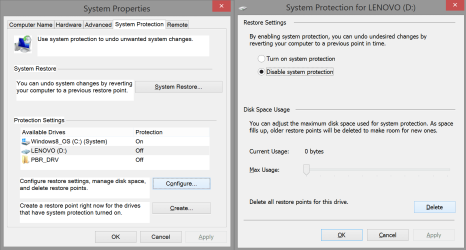
Bill you are talking about different issues but for the restoring from full dead you need a image of your hdd so that is the windows system image backup. The system restore is a way windows keeps recent changes to your machine and can roll back to it if your system is still working when you have small issues (bad driver install or bad windows update). The first one is more what we call a bare metal recovery. I'm at work on windows 8 at the moment so I can not leave a screen shot of the way to do a system image and pick what drive to do it on (seems your's keeps defaulting to D:\ which has no space left and its technically the same hdd so you would not want it there anyway). It does look like from your screenshots you have done a previous backup of your OS on that partition but its hard to tell if its yours or HP's factory recovery part. I would at this point leave it alone and do all backups on another HDD (external).

Below is the what you can click to make sure you did delete the restore points off the of the other partitions. Select the ones not labeled C:\ and configure them then chose the delete button to clean them of the old restore points if any just so your clean as possible.

When I get home I can give you screens for the system image method if you want.

Hope I have not confused you more.
Malcolm

EDIT: @Billmcct that sucks, hope it all went well.
 

Attachments

  • system restore.png
    system restore.png
    56.3 KB · Views: 1

My Computer

Computer type
PC/Desktop
Computer Manufacturer/Model Number
Custom
OS
10 Pro x64
CPU
Ryzen 9 3900X
Motherboard
Asrock x370 Tachi
Memory
64GB(4x16GB) DDR4
Graphics Card(s)
EVGA 1080ti FTW3
Sound Card
ASUS Xonar Essence STX (V4 Bursons), ODAC rev B, NFB-11, O2
Monitor(s) Displays
3xASUS PB278Q/R, Optoma HD142X
Screen Resolution
3x1440p, 1080p
Hard Drives
512GB 850 EVO(OS, Programs)
4TB (Movies)
3TB (Downloads)
3TB (Programs)
1TB HDD (Games)
2x6TB R1 (videos)
PSU
AX760
Case
Fractal Define R5
Cooling
NH-D15S
Keyboard
Massdrop Ctrl with Box Navy's
Mouse
G903, Alioth XXL Mat
Internet Speed
280/40
Antivirus
MBAM, ESET
Browser
Canary 64 Bit
Other Info
I also own a Thinkpad P50 Xeon 4K, X220T, X1C5
Back
Top