Can`t create a restore date

Well you could get another drive. I saw that your C: partition is over 300GB which is much more than the System itself. If there is data there that you care about then it needs to be moved to a backup drive that is rarely used. Personally the 1TB drive you use for the system drive is much more then you need. 300GB is more than enough for a system drive. The 1TB drive would be better used as a backup drive.

Bill
 

My Computer My Computer

Computer type
Laptop
Computer Manufacturer/Model Number
Dell Precision 15 7550 Workstation
OS
Windows 10 22H2 Pro
CPU
Intel(R) Xeon W-10885M
Motherboard
Dell
Memory
2x 32 GB DDR4 ECC memory (128 GB max)
Graphics Card(s)
Intel onboard GPU 1080p - Quadro RTX 5000 Max-Q GPU 4K
Hard Drives
1TB Samsung 9100 Pro main M2 SSD
2x 2TB Samsung 9100 Pro temp storage M2 SSD (6 TB max)
Mouse
Logitech MX-25 Bluetooth
Internet Speed
slow
Antivirus
MS
Browser
Pale Moon 34.x.x - x64 AVX2 build
restore

M biggest problem is in being (not computer literate) not sure what 1TB means,I am learning a lot by talking with you guy`s,I live in France,but don`t speak the language.When i lived in England,i had people around me.I think i need to find a tech as close to me as possible ,so that i can get him to sit in front of my computer.I get so far ,then get lost again.I am going to print off all this chat,i will need it.
Bill
 
Last edited:

My Computer My Computer

Computer type
PC/Desktop
Computer Manufacturer/Model Number
HP
OS
windows 7 64bit
M biggest problem is in being (not computer literate) not sure what 1TB means,I am learning a lot by talking with you guy`s,I live in France,but don`t speak the language.When i lived in England,i had people around me.I think i need to find a tech as close to me as possible ,so that i can get him to sit in front of my computer.I get so far ,then get lost again.I am going to print off all this chat,i will need it.
Bill

That might be your best bet you might want to ask the tech to see what can be safely removed from D but I suggest you do not change the partition size of D as its recovery system may require your partitions to be aligned a certain way and changing its size will break that alignment. You have already ran disk clean up on D correct?
 

My Computer My Computer

Computer type
PC/Desktop
Computer Manufacturer/Model Number
Custom
OS
10 Pro x64
CPU
Ryzen 9 3900X
Motherboard
Asrock x370 Tachi
Memory
64GB(4x16GB) DDR4
Graphics Card(s)
EVGA 1080ti FTW3
Sound Card
ASUS Xonar Essence STX (V4 Bursons), ODAC rev B, NFB-11, O2
Monitor(s) Displays
3xASUS PB278Q/R, Optoma HD142X
Screen Resolution
3x1440p, 1080p
Hard Drives
512GB 850 EVO(OS, Programs)
4TB (Movies)
3TB (Downloads)
3TB (Programs)
1TB HDD (Games)
2x6TB R1 (videos)
PSU
AX760
Case
Fractal Define R5
Cooling
NH-D15S
Keyboard
Massdrop Ctrl with Box Navy's
Mouse
G903, Alioth XXL Mat
Internet Speed
280/40
Antivirus
MBAM, ESET
Browser
Canary 64 Bit
Other Info
I also own a Thinkpad P50 Xeon 4K, X220T, X1C5
1 TB (Terabyte) is the amount of space on the drive. Which is equal to 1024 GB (Gigabyte).
In upward order,
1024 bytes = 1 KB (kilobyte)
1024 KB = 1 MB (Megabyte)
1024 MB = 1 GB (Gigabyte)
1024 GB = 1 TB (Terabyte)

This is how people learn. By asking questions.
The 1TB drive can be shrunken (is that spelled right?) and cloned to a smaller drive. This would allow for less data loss in case of a hard drive failure. Then the larger 1TB drive would make an excellent backup drive with lots of space. This is why I keep a cloned spare hard drive. When my main drive failed a few weeks ago all I had to do was unplug the drive and put in the spare with almost NO data loss. I use two 2TB drives as backups. It would be virtually impossible to try and tell you how to do this. If I was sitting in front of your system and had a spare drive I could do this in less than 2 hours.

Bill
 

My Computer My Computer

Computer type
Laptop
Computer Manufacturer/Model Number
Dell Precision 15 7550 Workstation
OS
Windows 10 22H2 Pro
CPU
Intel(R) Xeon W-10885M
Motherboard
Dell
Memory
2x 32 GB DDR4 ECC memory (128 GB max)
Graphics Card(s)
Intel onboard GPU 1080p - Quadro RTX 5000 Max-Q GPU 4K
Hard Drives
1TB Samsung 9100 Pro main M2 SSD
2x 2TB Samsung 9100 Pro temp storage M2 SSD (6 TB max)
Mouse
Logitech MX-25 Bluetooth
Internet Speed
slow
Antivirus
MS
Browser
Pale Moon 34.x.x - x64 AVX2 build
restore

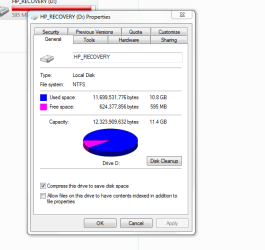
I have tried to clean up (D) a number of times,but has not done anything. Just scanned with AVG,and it came up with 4 item that need attention,from malware to a trojan ,i asked AVG to deal with them,I now have more space,not much,but space i did not have,i would like to think that i will not get the message on my desktop ,that i am not running out of space. pic sent.
Bill
 

Attachments

  • Capture (5).PNG
    Capture (5).PNG
    15.1 KB · Views: 8

My Computer My Computer

Computer type
PC/Desktop
Computer Manufacturer/Model Number
HP
OS
windows 7 64bit
I don't know how that could be. The Recovery partition is a highly compressed and Protected drive. You should not be allowed to delete or even access anything other then user added files. Also seeing the screen shot I noticed the check mark for "Compress this drive to save disk space". I have 3 HP laptops here and checked the properties for all 3 and none of them have that box checked.

Bill
 

My Computer My Computer

Computer type
Laptop
Computer Manufacturer/Model Number
Dell Precision 15 7550 Workstation
OS
Windows 10 22H2 Pro
CPU
Intel(R) Xeon W-10885M
Motherboard
Dell
Memory
2x 32 GB DDR4 ECC memory (128 GB max)
Graphics Card(s)
Intel onboard GPU 1080p - Quadro RTX 5000 Max-Q GPU 4K
Hard Drives
1TB Samsung 9100 Pro main M2 SSD
2x 2TB Samsung 9100 Pro temp storage M2 SSD (6 TB max)
Mouse
Logitech MX-25 Bluetooth
Internet Speed
slow
Antivirus
MS
Browser
Pale Moon 34.x.x - x64 AVX2 build
restore

Should i uncheck this?
 

My Computer My Computer

Computer type
PC/Desktop
Computer Manufacturer/Model Number
HP
OS
windows 7 64bit
Now that's a question I'm afraid to answer. Your Recovery partition is only 11.4 GB. I'm not sure if that is the compressed size or the total size. The two HP laptops I have that are also running Win 7 have 29 GB Recovery partitions. Have you ever made a Recovery disk for the computer. HP allows you to make one disk. If so then backup all your data and uncheck the box.

Bill
 

My Computer My Computer

Computer type
Laptop
Computer Manufacturer/Model Number
Dell Precision 15 7550 Workstation
OS
Windows 10 22H2 Pro
CPU
Intel(R) Xeon W-10885M
Motherboard
Dell
Memory
2x 32 GB DDR4 ECC memory (128 GB max)
Graphics Card(s)
Intel onboard GPU 1080p - Quadro RTX 5000 Max-Q GPU 4K
Hard Drives
1TB Samsung 9100 Pro main M2 SSD
2x 2TB Samsung 9100 Pro temp storage M2 SSD (6 TB max)
Mouse
Logitech MX-25 Bluetooth
Internet Speed
slow
Antivirus
MS
Browser
Pale Moon 34.x.x - x64 AVX2 build
restore

No i have never made a recovery disk,not sure how to,?
 

My Computer My Computer

Computer type
PC/Desktop
Computer Manufacturer/Model Number
HP
OS
windows 7 64bit
Well you would have to use HP Recovery Manager. Click Start and type in Recovery Manager. At the top click Recovery Manager. Look for Recovery Media Creation. Now when the system was new I think it would only copy the Recovery Partition. I have never had to do this since the laptops I have are computers that some of my friends decided not to repair and left with me. Since an DVD is only 4.6 GB you could need as many as 7 to do the backup. Not sure what will happen on a double compressed drive.

Bill
 

My Computer My Computer

Computer type
Laptop
Computer Manufacturer/Model Number
Dell Precision 15 7550 Workstation
OS
Windows 10 22H2 Pro
CPU
Intel(R) Xeon W-10885M
Motherboard
Dell
Memory
2x 32 GB DDR4 ECC memory (128 GB max)
Graphics Card(s)
Intel onboard GPU 1080p - Quadro RTX 5000 Max-Q GPU 4K
Hard Drives
1TB Samsung 9100 Pro main M2 SSD
2x 2TB Samsung 9100 Pro temp storage M2 SSD (6 TB max)
Mouse
Logitech MX-25 Bluetooth
Internet Speed
slow
Antivirus
MS
Browser
Pale Moon 34.x.x - x64 AVX2 build
restore

TOO tired to have a go with this now,i have just looked at a tutorial on u-tube(HP)recovery media creation.Will look again in the morning.

Thanks for all your help.

Bill
 

My Computer My Computer

Computer type
PC/Desktop
Computer Manufacturer/Model Number
HP
OS
windows 7 64bit
restore

Hi
I already have back up disks,(I had forgotten) I remember taking computer to PC world just after i had bought it (with a problem) I requested that they do them.

Before i uncheck t
he box,there are two options.

Option 1,apply changes to (D) drive only

Option 2,apply changes to (D) sub folders and files.

Thought i would check with you first.

Bill
 

My Computer My Computer

Computer type
PC/Desktop
Computer Manufacturer/Model Number
HP
OS
windows 7 64bit
Option 2.
Hopefully that will solve the problem.

Bill
 

My Computer My Computer

Computer type
Laptop
Computer Manufacturer/Model Number
Dell Precision 15 7550 Workstation
OS
Windows 10 22H2 Pro
CPU
Intel(R) Xeon W-10885M
Motherboard
Dell
Memory
2x 32 GB DDR4 ECC memory (128 GB max)
Graphics Card(s)
Intel onboard GPU 1080p - Quadro RTX 5000 Max-Q GPU 4K
Hard Drives
1TB Samsung 9100 Pro main M2 SSD
2x 2TB Samsung 9100 Pro temp storage M2 SSD (6 TB max)
Mouse
Logitech MX-25 Bluetooth
Internet Speed
slow
Antivirus
MS
Browser
Pale Moon 34.x.x - x64 AVX2 build
restore

As it turned out( you simply uncheck the box. The options apply when you are ticking a box. It will restore ,but only if you switch off Avg.
Thanks again.
Bill
 

My Computer My Computer

Computer type
PC/Desktop
Computer Manufacturer/Model Number
HP
OS
windows 7 64bit
I would still like to know if it stops the out of space messages on the D: drive. Let me know.
I personally use Avast free and have no problems.

Bill
 

My Computer My Computer

Computer type
Laptop
Computer Manufacturer/Model Number
Dell Precision 15 7550 Workstation
OS
Windows 10 22H2 Pro
CPU
Intel(R) Xeon W-10885M
Motherboard
Dell
Memory
2x 32 GB DDR4 ECC memory (128 GB max)
Graphics Card(s)
Intel onboard GPU 1080p - Quadro RTX 5000 Max-Q GPU 4K
Hard Drives
1TB Samsung 9100 Pro main M2 SSD
2x 2TB Samsung 9100 Pro temp storage M2 SSD (6 TB max)
Mouse
Logitech MX-25 Bluetooth
Internet Speed
slow
Antivirus
MS
Browser
Pale Moon 34.x.x - x64 AVX2 build
restore

Since i used AVG to give me some space,i have not had a message,i don`t like having to turn off AVG to do a restore,but at least i can do it.I have today been put in touch with a tech.once i contact him ,i will get him to come over and look in my system.I will keep you informed off any findings.

Thanks
Bill
 

My Computer My Computer

Computer type
PC/Desktop
Computer Manufacturer/Model Number
HP
OS
windows 7 64bit
If your worried about turning off AVG, just disconnect from the internet too.

Bill
 

My Computer My Computer

Computer type
Laptop
Computer Manufacturer/Model Number
Dell Precision 15 7550 Workstation
OS
Windows 10 22H2 Pro
CPU
Intel(R) Xeon W-10885M
Motherboard
Dell
Memory
2x 32 GB DDR4 ECC memory (128 GB max)
Graphics Card(s)
Intel onboard GPU 1080p - Quadro RTX 5000 Max-Q GPU 4K
Hard Drives
1TB Samsung 9100 Pro main M2 SSD
2x 2TB Samsung 9100 Pro temp storage M2 SSD (6 TB max)
Mouse
Logitech MX-25 Bluetooth
Internet Speed
slow
Antivirus
MS
Browser
Pale Moon 34.x.x - x64 AVX2 build
restore

Thinking ,it might be worth trying the one that you use.

AVAST.

bILL
 

My Computer My Computer

Computer type
PC/Desktop
Computer Manufacturer/Model Number
HP
OS
windows 7 64bit
Good choice.

Bill
 

My Computer My Computer

Computer type
Laptop
Computer Manufacturer/Model Number
Dell Precision 15 7550 Workstation
OS
Windows 10 22H2 Pro
CPU
Intel(R) Xeon W-10885M
Motherboard
Dell
Memory
2x 32 GB DDR4 ECC memory (128 GB max)
Graphics Card(s)
Intel onboard GPU 1080p - Quadro RTX 5000 Max-Q GPU 4K
Hard Drives
1TB Samsung 9100 Pro main M2 SSD
2x 2TB Samsung 9100 Pro temp storage M2 SSD (6 TB max)
Mouse
Logitech MX-25 Bluetooth
Internet Speed
slow
Antivirus
MS
Browser
Pale Moon 34.x.x - x64 AVX2 build
I scrub my pc one a week and just use MSE along with some tools for adware ect. The biggest defense is common sense.
 

My Computer My Computer

Computer type
PC/Desktop
Computer Manufacturer/Model Number
Custom
OS
10 Pro x64
CPU
Ryzen 9 3900X
Motherboard
Asrock x370 Tachi
Memory
64GB(4x16GB) DDR4
Graphics Card(s)
EVGA 1080ti FTW3
Sound Card
ASUS Xonar Essence STX (V4 Bursons), ODAC rev B, NFB-11, O2
Monitor(s) Displays
3xASUS PB278Q/R, Optoma HD142X
Screen Resolution
3x1440p, 1080p
Hard Drives
512GB 850 EVO(OS, Programs)
4TB (Movies)
3TB (Downloads)
3TB (Programs)
1TB HDD (Games)
2x6TB R1 (videos)
PSU
AX760
Case
Fractal Define R5
Cooling
NH-D15S
Keyboard
Massdrop Ctrl with Box Navy's
Mouse
G903, Alioth XXL Mat
Internet Speed
280/40
Antivirus
MBAM, ESET
Browser
Canary 64 Bit
Other Info
I also own a Thinkpad P50 Xeon 4K, X220T, X1C5
Back
Top