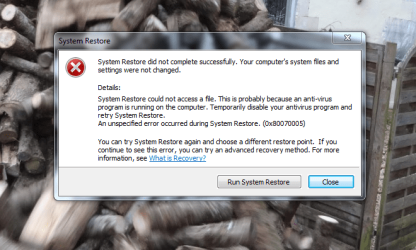
Can`t create a restore date

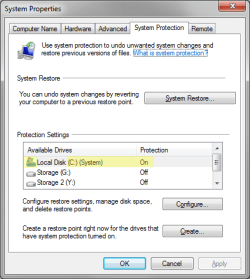
(G) is a external disc. I never switch it off.when creating a restore point ,what should be on in system protection.

It should only be on for the disk with this label and icon, also try doing it with your external disk attached if it gives you an error safely eject your external disk, unplug it and try it again.
 

Attachments
  • restore.png
    restore.png
    15.2 KB · Views: 12

My Computer My Computer

Computer type
PC/Desktop
Computer Manufacturer/Model Number
Custom
OS
10 Pro x64
CPU
Ryzen 9 3900X
Motherboard
Asrock x370 Tachi
Memory
64GB(4x16GB) DDR4
Graphics Card(s)
EVGA 1080ti FTW3
Sound Card
ASUS Xonar Essence STX (V4 Bursons), ODAC rev B, NFB-11, O2
Monitor(s) Displays
3xASUS PB278Q/R, Optoma HD142X
Screen Resolution
3x1440p, 1080p
Hard Drives
512GB 850 EVO(OS, Programs)
4TB (Movies)
3TB (Downloads)
3TB (Programs)
1TB HDD (Games)
2x6TB R1 (videos)
PSU
AX760
Case
Fractal Define R5
Cooling
NH-D15S
Keyboard
Massdrop Ctrl with Box Navy's
Mouse
G903, Alioth XXL Mat
Internet Speed
280/40
Antivirus
MBAM, ESET
Browser
Canary 64 Bit
Other Info
I also own a Thinkpad P50 Xeon 4K, X220T, X1C5
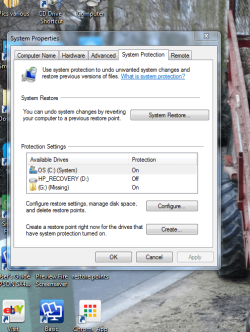
This is what i have done just now
 

Attachments

  • Capture.PNG
    Capture.PNG
    97.1 KB · Views: 12
  • Capture (2).PNG
    Capture (2).PNG
    216.2 KB · Views: 1
  • Capture (3).PNG
    Capture (3).PNG
    76.2 KB · Views: 12

My Computer My Computer

Computer type
PC/Desktop
Computer Manufacturer/Model Number
HP
OS
windows 7 64bit
Okay I have found this on the AVG forums: try disable AVG Self protection (AVG program -> F8 -> AVG Self protection -> Untick Enable AVG Self protection option -> Save new settings.) See if that works for you a simple google search does make it look like your exact error is due to the new avg free and paid versions. I would also still turn off protection for the G drive (one showing missing) since system restore does not mess with files just system settings and installed programs so if your external drive is not used for anything but storage it will not effect it anyways and will just complicate things.
 

My Computer My Computer

Computer type
PC/Desktop
Computer Manufacturer/Model Number
Custom
OS
10 Pro x64
CPU
Ryzen 9 3900X
Motherboard
Asrock x370 Tachi
Memory
64GB(4x16GB) DDR4
Graphics Card(s)
EVGA 1080ti FTW3
Sound Card
ASUS Xonar Essence STX (V4 Bursons), ODAC rev B, NFB-11, O2
Monitor(s) Displays
3xASUS PB278Q/R, Optoma HD142X
Screen Resolution
3x1440p, 1080p
Hard Drives
512GB 850 EVO(OS, Programs)
4TB (Movies)
3TB (Downloads)
3TB (Programs)
1TB HDD (Games)
2x6TB R1 (videos)
PSU
AX760
Case
Fractal Define R5
Cooling
NH-D15S
Keyboard
Massdrop Ctrl with Box Navy's
Mouse
G903, Alioth XXL Mat
Internet Speed
280/40
Antivirus
MBAM, ESET
Browser
Canary 64 Bit
Other Info
I also own a Thinkpad P50 Xeon 4K, X220T, X1C5
restore

I got your last message,but this is where i was up to.

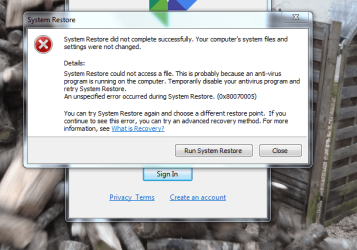
Now only got (C) drive on(windows icon) created a date 8/1/2015. Hit restore and got this (pic 4)
 

Attachments

  • Capture.PNG
    Capture.PNG
    96.9 KB · Views: 10

My Computer My Computer

Computer type
PC/Desktop
Computer Manufacturer/Model Number
HP
OS
windows 7 64bit
Okay did you do in avg what I posted, if you don't avg will cause that to happen.
 

My Computer My Computer

Computer type
PC/Desktop
Computer Manufacturer/Model Number
Custom
OS
10 Pro x64
CPU
Ryzen 9 3900X
Motherboard
Asrock x370 Tachi
Memory
64GB(4x16GB) DDR4
Graphics Card(s)
EVGA 1080ti FTW3
Sound Card
ASUS Xonar Essence STX (V4 Bursons), ODAC rev B, NFB-11, O2
Monitor(s) Displays
3xASUS PB278Q/R, Optoma HD142X
Screen Resolution
3x1440p, 1080p
Hard Drives
512GB 850 EVO(OS, Programs)
4TB (Movies)
3TB (Downloads)
3TB (Programs)
1TB HDD (Games)
2x6TB R1 (videos)
PSU
AX760
Case
Fractal Define R5
Cooling
NH-D15S
Keyboard
Massdrop Ctrl with Box Navy's
Mouse
G903, Alioth XXL Mat
Internet Speed
280/40
Antivirus
MBAM, ESET
Browser
Canary 64 Bit
Other Info
I also own a Thinkpad P50 Xeon 4K, X220T, X1C5
restore

About to have ago
 

My Computer My Computer

Computer type
PC/Desktop
Computer Manufacturer/Model Number
HP
OS
windows 7 64bit
restore

Sorry not clear with your instructions. do i start by pressing (F8) nothing happens,or do i go to avg and press options .
 

My Computer My Computer

Computer type
PC/Desktop
Computer Manufacturer/Model Number
HP
OS
windows 7 64bit
I just posted that from the AVG forums but it may be for an older version of the program just go to options and find that area for avg self protection and turn it off (it will probably be mad that's okay for testing) and save your settings then create a new restore point and try to restore it, the old ones I don't think will work.
 

My Computer My Computer

Computer type
PC/Desktop
Computer Manufacturer/Model Number
Custom
OS
10 Pro x64
CPU
Ryzen 9 3900X
Motherboard
Asrock x370 Tachi
Memory
64GB(4x16GB) DDR4
Graphics Card(s)
EVGA 1080ti FTW3
Sound Card
ASUS Xonar Essence STX (V4 Bursons), ODAC rev B, NFB-11, O2
Monitor(s) Displays
3xASUS PB278Q/R, Optoma HD142X
Screen Resolution
3x1440p, 1080p
Hard Drives
512GB 850 EVO(OS, Programs)
4TB (Movies)
3TB (Downloads)
3TB (Programs)
1TB HDD (Games)
2x6TB R1 (videos)
PSU
AX760
Case
Fractal Define R5
Cooling
NH-D15S
Keyboard
Massdrop Ctrl with Box Navy's
Mouse
G903, Alioth XXL Mat
Internet Speed
280/40
Antivirus
MBAM, ESET
Browser
Canary 64 Bit
Other Info
I also own a Thinkpad P50 Xeon 4K, X220T, X1C5
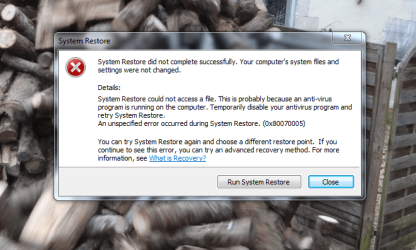
restore

I think i may have done this earlier. I open AVG then options ,disable protection,go to system protection and create a date( can this be a date ,say 9/1/2015 ,when i had no problems,and attempt to restore (not sure what you mean by save settings, i will do this if i have got it right.
 

My Computer My Computer

Computer type
PC/Desktop
Computer Manufacturer/Model Number
HP
OS
windows 7 64bit
restore

I went into AVG,disabled protection.Then went to system protection,created a restore point 9/1/2015.Hit restore,it restored to today and not the date that i created.Avg protection now back on.
 

My Computer My Computer

Computer type
PC/Desktop
Computer Manufacturer/Model Number
HP
OS
windows 7 64bit
restore

I then created a date with AVG on 10/1/2015. Hit restore and got this pic,then tried restore without creating a date,and got the same pic.
 

Attachments

  • Capture.PNG
    Capture.PNG
    96.9 KB · Views: 13

My Computer My Computer

Computer type
PC/Desktop
Computer Manufacturer/Model Number
HP
OS
windows 7 64bit
Since you have effectively deleted all of your past restore points you can only restore to a system or user set date in the present.
My Computer/Properties/System Restore/ "check show more restore points" these will be the only times you can restore to. You can set as many restore points in a day as you wish. At the end of the day try restoring to one of the earlier points and as "rvcjew" has stated with the G: drive disconnected and AVG disabled. ( Frankly I have not heard much good about AVG free) You stated in post 50 that it restored to Today. It doesn't matter what date you give the point as a name it was created on a specific date and time and will not restore to an earlier point. It seems to me that Restore is working correctly if indeed it restored to your previous set restore point as stated in post 50. Give it a couple of days install and uninstall some software maybe update Windows as these installs and uninstalls will set System automatic Restore Points. Then try to restore to the day before.

Bill
 

My Computer My Computer

Computer type
Laptop
Computer Manufacturer/Model Number
Dell Precision 15 7550 Workstation
OS
Windows 10 22H2 Pro
CPU
Intel(R) Xeon W-10885M
Motherboard
Dell
Memory
2x 32 GB DDR4 ECC memory (128 GB max)
Graphics Card(s)
Intel onboard GPU 1080p - Quadro RTX 5000 Max-Q GPU 4K
Hard Drives
1TB Samsung 9100 Pro main M2 SSD
2x 2TB Samsung 9100 Pro temp storage M2 SSD (6 TB max)
Mouse
Logitech MX-25 Bluetooth
Internet Speed
slow
Antivirus
MS
Browser
Pale Moon 34.x.x - x64 AVX2 build
restore

Thanks for all help and info,what started me off on this quest was ,that i keep getting messages in my taskbar saying that i am running out of space in HP recovery,thinking that it had something to do with restore,not sure what HP recovery is,and do not know how to free up space. I also thought that you can restore to any date that you create. I have never had to disable AVG in order to do a system restore,and (G) and HP recovery have always been switched on along with (C) in system restore.

Bill
 
Last edited:

My Computer My Computer

Computer type
PC/Desktop
Computer Manufacturer/Model Number
HP
OS
windows 7 64bit
From the screen shot in post 36 there is only 3.42 MB's left on D:\. That's not much, however there should never be anything writing to that partition to use the remaining space. The size of that partition can be increased using most any partition software to shrink the C: drive and then increase the D: drive. I see you are using a 1 TB drive and there is plenty of extra space on C: that could be used. Now my question is, are you still getting the messages in the taskbar related to space on the D: drive?

HP Recovery is a partition to recover your system "if all else fails" to a factory new condition. As long as the hard drive hasn't failed you can access the recovery partition by booting using the F11 key. In this process the hard drive will be reformatted and Windows will be reloaded. This effectively wipes the C: partition and you will lose anything on it.


Bill
 

My Computer My Computer

Computer type
Laptop
Computer Manufacturer/Model Number
Dell Precision 15 7550 Workstation
OS
Windows 10 22H2 Pro
CPU
Intel(R) Xeon W-10885M
Motherboard
Dell
Memory
2x 32 GB DDR4 ECC memory (128 GB max)
Graphics Card(s)
Intel onboard GPU 1080p - Quadro RTX 5000 Max-Q GPU 4K
Hard Drives
1TB Samsung 9100 Pro main M2 SSD
2x 2TB Samsung 9100 Pro temp storage M2 SSD (6 TB max)
Mouse
Logitech MX-25 Bluetooth
Internet Speed
slow
Antivirus
MS
Browser
Pale Moon 34.x.x - x64 AVX2 build
restore

Yes i am still getting message (re space) one came as i read your post.
 

My Computer My Computer

Computer type
PC/Desktop
Computer Manufacturer/Model Number
HP
OS
windows 7 64bit
That's very odd,
You can use this:
Free Partition Manager Software
to increase the space and it is quite safe as long as you "READ ALL THE INSTRUCTIONS". Sorry that may seem as if I'm yelling but you could easily destroy your C: drive and then have to use the Recovery option. Please Backup any important data before attempting this. If you don't feel comfortable doing this then you may have to take it to a local Tech.

Bill
 

My Computer My Computer

Computer type
Laptop
Computer Manufacturer/Model Number
Dell Precision 15 7550 Workstation
OS
Windows 10 22H2 Pro
CPU
Intel(R) Xeon W-10885M
Motherboard
Dell
Memory
2x 32 GB DDR4 ECC memory (128 GB max)
Graphics Card(s)
Intel onboard GPU 1080p - Quadro RTX 5000 Max-Q GPU 4K
Hard Drives
1TB Samsung 9100 Pro main M2 SSD
2x 2TB Samsung 9100 Pro temp storage M2 SSD (6 TB max)
Mouse
Logitech MX-25 Bluetooth
Internet Speed
slow
Antivirus
MS
Browser
Pale Moon 34.x.x - x64 AVX2 build
One more thing, Check the D: drive properties when you get these messages and see if the space is actually changing. I actually don't think it is. You had 3.42 MB's see if that shrinks.

Bill
 

My Computer My Computer

Computer type
Laptop
Computer Manufacturer/Model Number
Dell Precision 15 7550 Workstation
OS
Windows 10 22H2 Pro
CPU
Intel(R) Xeon W-10885M
Motherboard
Dell
Memory
2x 32 GB DDR4 ECC memory (128 GB max)
Graphics Card(s)
Intel onboard GPU 1080p - Quadro RTX 5000 Max-Q GPU 4K
Hard Drives
1TB Samsung 9100 Pro main M2 SSD
2x 2TB Samsung 9100 Pro temp storage M2 SSD (6 TB max)
Mouse
Logitech MX-25 Bluetooth
Internet Speed
slow
Antivirus
MS
Browser
Pale Moon 34.x.x - x64 AVX2 build
Restore

Thank`s for everything,it has been a learning curve.


Thank`s again.

Bill
 

My Computer My Computer

Computer type
PC/Desktop
Computer Manufacturer/Model Number
HP
OS
windows 7 64bit
After rereading some of this thread I realized a few things. Your G:\ drive is almost full leaving little space to backup to. Also you stated you never turn off the G:\ drive. That's not good. If you allow the system to sleep (as you should) then the internal hard drive stops spinning and the monitor is turned off however any drives connected to a USB or eSATA port never shuts down. I personally never shutdown my desktop but I do unplug all external drives when not in use otherwise they would spin 24/7/365 days a year which would lead to drive failure very quickly.

Bill
 

My Computer My Computer

Computer type
Laptop
Computer Manufacturer/Model Number
Dell Precision 15 7550 Workstation
OS
Windows 10 22H2 Pro
CPU
Intel(R) Xeon W-10885M
Motherboard
Dell
Memory
2x 32 GB DDR4 ECC memory (128 GB max)
Graphics Card(s)
Intel onboard GPU 1080p - Quadro RTX 5000 Max-Q GPU 4K
Hard Drives
1TB Samsung 9100 Pro main M2 SSD
2x 2TB Samsung 9100 Pro temp storage M2 SSD (6 TB max)
Mouse
Logitech MX-25 Bluetooth
Internet Speed
slow
Antivirus
MS
Browser
Pale Moon 34.x.x - x64 AVX2 build
restore

This could be the problem,G drive is now unplugged,anything i can do to rectify.I only use the external G drive for storing pics.
 
Last edited:

My Computer My Computer

Computer type
PC/Desktop
Computer Manufacturer/Model Number
HP
OS
windows 7 64bit
Back
Top