Can you "refresh" your LAN?

TVeblen

Building Stuff
Guru
Gold Member
VIP
Local time
1:11 AM
Messages
6,239
Location
In The Woods
I have a 4 puter LAN through a router, one W7, one Vista, two XP. Often, my W7 computer cannot "see" my XP computer when I turn it on (often from standby). I have to reboot to get the W7 puter to "see" the XP puter. It would be great if there was a way to "refresh" the network discovery process at the click of a mouse. Possible?
Any ideas on what causes this symptom? User error?
 

My Computer

Computer type
PC/Desktop
Computer Manufacturer/Model Number
Home Built - Jan 2013
OS
Windows 7 64 Bit Home Premium SP1
CPU
i7-3820
Motherboard
Asus P9X79-PRO - Bios 4608
Memory
GSkill F3-14900CL9Q - 16GB
Graphics Card(s)
EVGA GeForce GTX660 - Driver 352.86
Sound Card
On board Realtek ALC898
Monitor(s) Displays
Acer S271HL
Screen Resolution
1920 x 1080
Hard Drives
#1- Samsung 840 Pro Series
#2- Western Digital WD1002FAEX Sata3 Black
#3- Western Digital WD1002FAEX Sata3 Black
PSU
Corsair CMPSU-850TX-V2 - 850 watt (by Seasonic)
Case
Corsair Obsidian 550D
Cooling
Standard 3 120mm case fans, Cooler Master Hyper 212 EVO
Keyboard
MS KC-0405
Mouse
Intellimouse 5-button
Internet Speed
56 Mbits/Sec (on a good day)
Antivirus
Avast & Malwarebytes
Browser
Firefox
Other Info
Asus DVD - DRW-24B1ST 24X
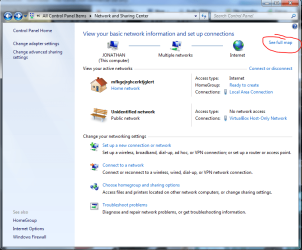
You may see if Displaying the full network map helps.

Capture.PNG

Other than that, have you tried updating your network drivers?
 

My Computer

Computer Manufacturer/Model Number
Custom
OS
Windows 7 Professional x64
CPU
Intel i7 2600K OC'd @ 4620 MHz
Motherboard
Asus P8Z68-V Pro
Memory
16GB GSkill Sniper 2133 Mhz (4x4GB)
Graphics Card(s)
EVGA GeForce GTX 480 SuperClocked+
Sound Card
Realtek High Definition Audio
Monitor(s) Displays
2x Acer S273HLbmii 27"
Screen Resolution
2 x 1920x1080
Hard Drives
64GB Crucial M4 SSD

Storage: Hitachi 1TB 5400RPM, Samsung 1.5TB 5400RPM
PSU
Corsair HW Series 750w (modular)
Case
Cooler Master HAF 932 Advanced Blue Edition
Cooling
CM Hyper 212+ CPU cooler, 3x 230mm + 1x 140mm case fans
Keyboard
Logitech MK320 (wireless)
Mouse
Logitech MK320 (wireless)
Internet Speed
30 Mb/s : 2 Mb/s
I have a 4 puter LAN through a router, one W7, one Vista, two XP. Often, my W7 computer cannot "see" my XP computer when I turn it on (often from standby). I have to reboot to get the W7 puter to "see" the XP puter. It would be great if there was a way to "refresh" the network discovery process at the click of a mouse. Possible?

Any ideas on what causes this symptom? User error?​

Do you have the Computer Browser and Network Location Awareness services running on all your computers?

If so then just open your network folder and click the "refresh" icon to the right of the address bar.
 

My Computer

Computer Manufacturer/Model Number
Homebrew
OS
XP Pro SP3 X86 / Win7 Pro X86
CPU
Amd 64 x2 4200 (2.4ghz)
Motherboard
Asus M2N-MX SE Plus
Memory
Kingston DDR2 800 2gb
Graphics Card(s)
Nvidia GF-8400
Sound Card
Realtek on Motherboard
Monitor(s) Displays
Acer x-193bw
Screen Resolution
1440 x 900
Hard Drives
Western Digital 500g
PSU
350watt In-Win
Case
In-Win
Cooling
Air
Keyboard
yes
Mouse
yes
Internet Speed
5mpbs
Other Info
Also ASRock ION 330 as HTPC (on XP).
Acer Aspire as GP netbook (on XP).
Do you have the Computer Browser and Network Location Awareness services running on all your computers?

If so then just open your network folder and click the "refresh" icon to the right of the address bar.

And there it is! Thanks for pointing that out to me - I was being quite dense:o.

And I do need to check the Computer Browser services on the XP machines. I may have disabled them a while back when I was trying to eliminated the Master Browser war from the Event Viewer and never switched them back. That would explain some things.

Thanks for the brain poke!
 

My Computer

Computer type
PC/Desktop
Computer Manufacturer/Model Number
Home Built - Jan 2013
OS
Windows 7 64 Bit Home Premium SP1
CPU
i7-3820
Motherboard
Asus P9X79-PRO - Bios 4608
Memory
GSkill F3-14900CL9Q - 16GB
Graphics Card(s)
EVGA GeForce GTX660 - Driver 352.86
Sound Card
On board Realtek ALC898
Monitor(s) Displays
Acer S271HL
Screen Resolution
1920 x 1080
Hard Drives
#1- Samsung 840 Pro Series
#2- Western Digital WD1002FAEX Sata3 Black
#3- Western Digital WD1002FAEX Sata3 Black
PSU
Corsair CMPSU-850TX-V2 - 850 watt (by Seasonic)
Case
Corsair Obsidian 550D
Cooling
Standard 3 120mm case fans, Cooler Master Hyper 212 EVO
Keyboard
MS KC-0405
Mouse
Intellimouse 5-button
Internet Speed
56 Mbits/Sec (on a good day)
Antivirus
Avast & Malwarebytes
Browser
Firefox
Other Info
Asus DVD - DRW-24B1ST 24X

My Computer

Computer Manufacturer/Model Number
Homebrew
OS
XP Pro SP3 X86 / Win7 Pro X86
CPU
Amd 64 x2 4200 (2.4ghz)
Motherboard
Asus M2N-MX SE Plus
Memory
Kingston DDR2 800 2gb
Graphics Card(s)
Nvidia GF-8400
Sound Card
Realtek on Motherboard
Monitor(s) Displays
Acer x-193bw
Screen Resolution
1440 x 900
Hard Drives
Western Digital 500g
PSU
350watt In-Win
Case
In-Win
Cooling
Air
Keyboard
yes
Mouse
yes
Internet Speed
5mpbs
Other Info
Also ASRock ION 330 as HTPC (on XP).
Acer Aspire as GP netbook (on XP).
Arrgghh. I spoke too soon! It took this long for the situation to come up again and the "Refresh Network and Sharing Center" button did not solve the behavior.

Neither did "Show Full Map" - I get a "no other computers found" message.

I am running the most current LAN driver for the "Realtek PCIe GBE Family Controller" - 7.12.1218.2009 dated 12/18/2009.

Everything works. This seems to be a sort of GUI issue (the computer is there, I just can't see it).
This is exactly what I am doing: I use an old P4-XP machine as a DVR. I transfer the videos to the i7-W7 machine to use the faster hard drive and more space for playback.
The W7 is on when I start and then I hit a key to bring the XP machine out of standby, then go to Windows Explorer to cut and paste the files. On the W7 machine In Explorer, under Network, only the W7 computer is showing. If I switch to the XP machine, go to and expand the Network, only the XP machine is showing. But the XP machine has a network shortcut to the VIDEOS folder on W7. I can move the files from XP to W7 using the shortcut even though W7 does not show. Once a file is being transfered, if I switch back to the W7 machine, the XP machine is now showing under Network in WE.

The Computer Browser service and Network Awareness service are started on both computers.

If I reboot either computer they can see each other. It would be cool if I could refresh the Network Discovery process without rebooting. Possible? or is that a suggestion for Windows 8?
 
Last edited:

My Computer

Computer type
PC/Desktop
Computer Manufacturer/Model Number
Home Built - Jan 2013
OS
Windows 7 64 Bit Home Premium SP1
CPU
i7-3820
Motherboard
Asus P9X79-PRO - Bios 4608
Memory
GSkill F3-14900CL9Q - 16GB
Graphics Card(s)
EVGA GeForce GTX660 - Driver 352.86
Sound Card
On board Realtek ALC898
Monitor(s) Displays
Acer S271HL
Screen Resolution
1920 x 1080
Hard Drives
#1- Samsung 840 Pro Series
#2- Western Digital WD1002FAEX Sata3 Black
#3- Western Digital WD1002FAEX Sata3 Black
PSU
Corsair CMPSU-850TX-V2 - 850 watt (by Seasonic)
Case
Corsair Obsidian 550D
Cooling
Standard 3 120mm case fans, Cooler Master Hyper 212 EVO
Keyboard
MS KC-0405
Mouse
Intellimouse 5-button
Internet Speed
56 Mbits/Sec (on a good day)
Antivirus
Avast & Malwarebytes
Browser
Firefox
Other Info
Asus DVD - DRW-24B1ST 24X
If I reboot either computer they can see each other. It would be cool if I could refresh the Network Discovery process without rebooting. Possible? or is that a suggestion for Windows 8?

Does the XP machine spend a lot of time in standby?
If so your router might ben removing it from the DNS list.

If you type it's name into the address bar of the network folder will it pick up the maching and show you it's shares?
That means the system is there, it's just not being indexed in network enumeration.

Make sure you have "Register with DNS" checked in all network adaptors.
The Network folder won't show any machine that's not known to your Router's DNS.

It sucks but sometimes it can take up to 10 minutes for a machine to show up in the Network folder... Don't know why... it just does.

Finally... is your win7 machine using HomeGroup or Workgroup sharing... HomeGroups don't work wirth soggy dirt with mixed OSs on the network. I have XP and Ubuntu machines on my LAN and couldn't connect to any of them until I switched back to conventional XP style Workgroup sharing and disabled IPV6 in my network adaptors.
 

My Computer

Computer Manufacturer/Model Number
Homebrew
OS
XP Pro SP3 X86 / Win7 Pro X86
CPU
Amd 64 x2 4200 (2.4ghz)
Motherboard
Asus M2N-MX SE Plus
Memory
Kingston DDR2 800 2gb
Graphics Card(s)
Nvidia GF-8400
Sound Card
Realtek on Motherboard
Monitor(s) Displays
Acer x-193bw
Screen Resolution
1440 x 900
Hard Drives
Western Digital 500g
PSU
350watt In-Win
Case
In-Win
Cooling
Air
Keyboard
yes
Mouse
yes
Internet Speed
5mpbs
Other Info
Also ASRock ION 330 as HTPC (on XP).
Acer Aspire as GP netbook (on XP).
this is a dumb question - but doesnt 'register with dns' require a dns server that accepts dynamic client updates?

else it'll just throw registration failure attempts in the event viewer.

of course, for a small home network, one can just 'cheat' by having static IP's and stuffing the host ip mapping in the hosts file.

ps: guessing the network folder uses browser adverts and broadcasts (think 15 mins used to be the old number for cache updates and refreshes)
 

My Computer

OS
Windows 7 Ultimate x64
CPU
Core i7 960
Motherboard
ASUS P6TD Deluxe
Memory
Corsair XMS3 DDR3-1600 - 12 GB
Graphics Card(s)
eVGA GTX 275 1792 MB
Sound Card
Onboard HD etc
Monitor(s) Displays
Dell SP2208WFP
Hard Drives
Western Digital Caviar Black 1 TB x 2 (RAID-1)
PSU
BFG EX-1200
Case
CoolerMaster HAF 922
Cooling
Thermalright Ultra 120 Extreme with Noctua NH-12 Fan
Keyboard
MS Natural (you know, like the ones you find in nature...)
Mouse
MS Intellimouse Explorer
Does the XP machine spend a lot of time in standby?
If so your router might ben removing it from the DNS list.

If you type it's name into the address bar of the network folder will it pick up the maching and show you it's shares?
That means the system is there, it's just not being indexed in network enumeration.

Make sure you have "Register with DNS" checked in all network adaptors.
The Network folder won't show any machine that's not known to your Router's DNS.

It sucks but sometimes it can take up to 10 minutes for a machine to show up in the Network folder... Don't know why... it just does.

Finally... is your win7 machine using HomeGroup or Workgroup sharing... HomeGroups don't work wirth soggy dirt with mixed OSs on the network. I have XP and Ubuntu machines on my LAN and couldn't connect to any of them until I switched back to conventional XP style Workgroup sharing and disabled IPV6 in my network adaptors.
Yes- stays in standby most of the time.
I'll try the address bar. I'm betting it will work fine.
I'll time it!
I'm using workgroups and sharing is fine.
Thanks for the info!
 

My Computer

Computer type
PC/Desktop
Computer Manufacturer/Model Number
Home Built - Jan 2013
OS
Windows 7 64 Bit Home Premium SP1
CPU
i7-3820
Motherboard
Asus P9X79-PRO - Bios 4608
Memory
GSkill F3-14900CL9Q - 16GB
Graphics Card(s)
EVGA GeForce GTX660 - Driver 352.86
Sound Card
On board Realtek ALC898
Monitor(s) Displays
Acer S271HL
Screen Resolution
1920 x 1080
Hard Drives
#1- Samsung 840 Pro Series
#2- Western Digital WD1002FAEX Sata3 Black
#3- Western Digital WD1002FAEX Sata3 Black
PSU
Corsair CMPSU-850TX-V2 - 850 watt (by Seasonic)
Case
Corsair Obsidian 550D
Cooling
Standard 3 120mm case fans, Cooler Master Hyper 212 EVO
Keyboard
MS KC-0405
Mouse
Intellimouse 5-button
Internet Speed
56 Mbits/Sec (on a good day)
Antivirus
Avast & Malwarebytes
Browser
Firefox
Other Info
Asus DVD - DRW-24B1ST 24X
this is a dumb question - but doesnt 'register with dns' require a dns server that accepts dynamic client updates?

else it'll just throw registration failure attempts in the event viewer.

of course, for a small home network, one can just 'cheat' by having static IP's and stuffing the host ip mapping in the hosts file.

ps: guessing the network folder uses browser adverts and broadcasts (think 15 mins used to be the old number for cache updates and refreshes)
I've toyed with the idea of static addresses. Now it's just a matter of deciding if the annoyance is worth the trouble.

So if I wait 15m the network may refresh by itself?
Thanks
 

My Computer

Computer type
PC/Desktop
Computer Manufacturer/Model Number
Home Built - Jan 2013
OS
Windows 7 64 Bit Home Premium SP1
CPU
i7-3820
Motherboard
Asus P9X79-PRO - Bios 4608
Memory
GSkill F3-14900CL9Q - 16GB
Graphics Card(s)
EVGA GeForce GTX660 - Driver 352.86
Sound Card
On board Realtek ALC898
Monitor(s) Displays
Acer S271HL
Screen Resolution
1920 x 1080
Hard Drives
#1- Samsung 840 Pro Series
#2- Western Digital WD1002FAEX Sata3 Black
#3- Western Digital WD1002FAEX Sata3 Black
PSU
Corsair CMPSU-850TX-V2 - 850 watt (by Seasonic)
Case
Corsair Obsidian 550D
Cooling
Standard 3 120mm case fans, Cooler Master Hyper 212 EVO
Keyboard
MS KC-0405
Mouse
Intellimouse 5-button
Internet Speed
56 Mbits/Sec (on a good day)
Antivirus
Avast & Malwarebytes
Browser
Firefox
Other Info
Asus DVD - DRW-24B1ST 24X
Here are commands to refresh your LAN connection. Use these in the command prompt (doesn't need to be elevated):

- ipconfig /release - will release your internet connection

- ipconfig /renew - will refresh your internet connection by reacquiring an IP address from your router. You don't need to run ipconfig /release before using this command.

- flushdns - will reacquire DNS information
 

My Computer

OS
Windows 7 Enterprise 64-bit
CPU
AMD Phenom II X4 3.0GHz
Motherboard
ASUS M5A97
Memory
8GB G-Skill Ripjaws DDR3 1333
Graphics Card(s)
PNY GeForce 460 GTX 1GB OC - Enthusiast Edition
Sound Card
VIA High Definition Audio
Monitor(s) Displays
Dell 19"
Screen Resolution
1280x1024
Hard Drives
1TB - Primary
160GB - Secondary
250GB - External backup for important files
PSU
OCZ Fata1ty 700W Modular PSU
Case
ASUS
Keyboard
Microsoft Wireless Keyboard 2000
Mouse
Microsoft Wireless Mouse 2000
Internet Speed
3 Mbps/768 kbps

My Computer

OS
Windows 7 Ultimate x64
CPU
Core i7 960
Motherboard
ASUS P6TD Deluxe
Memory
Corsair XMS3 DDR3-1600 - 12 GB
Graphics Card(s)
eVGA GTX 275 1792 MB
Sound Card
Onboard HD etc
Monitor(s) Displays
Dell SP2208WFP
Hard Drives
Western Digital Caviar Black 1 TB x 2 (RAID-1)
PSU
BFG EX-1200
Case
CoolerMaster HAF 922
Cooling
Thermalright Ultra 120 Extreme with Noctua NH-12 Fan
Keyboard
MS Natural (you know, like the ones you find in nature...)
Mouse
MS Intellimouse Explorer
Here are commands to refresh your LAN connection. Use these in the command prompt (doesn't need to be elevated):

- ipconfig /release - will release your internet connection

- ipconfig /renew - will refresh your internet connection by reacquiring an IP address from your router. You don't need to run ipconfig /release before using this command.

- flushdns - will reacquire DNS information
Yes that does work, as does resetting the router, but rebooting is then the faster choice, plus you can refill your coffee while you do it!
I'm just checking to see if I'm missing something obvious and simple.
 

My Computer

Computer type
PC/Desktop
Computer Manufacturer/Model Number
Home Built - Jan 2013
OS
Windows 7 64 Bit Home Premium SP1
CPU
i7-3820
Motherboard
Asus P9X79-PRO - Bios 4608
Memory
GSkill F3-14900CL9Q - 16GB
Graphics Card(s)
EVGA GeForce GTX660 - Driver 352.86
Sound Card
On board Realtek ALC898
Monitor(s) Displays
Acer S271HL
Screen Resolution
1920 x 1080
Hard Drives
#1- Samsung 840 Pro Series
#2- Western Digital WD1002FAEX Sata3 Black
#3- Western Digital WD1002FAEX Sata3 Black
PSU
Corsair CMPSU-850TX-V2 - 850 watt (by Seasonic)
Case
Corsair Obsidian 550D
Cooling
Standard 3 120mm case fans, Cooler Master Hyper 212 EVO
Keyboard
MS KC-0405
Mouse
Intellimouse 5-button
Internet Speed
56 Mbits/Sec (on a good day)
Antivirus
Avast & Malwarebytes
Browser
Firefox
Other Info
Asus DVD - DRW-24B1ST 24X
this is a dumb question - but doesnt 'register with dns' require a dns server that accepts dynamic client updates?

else it'll just throw registration failure attempts in the event viewer.

of course, for a small home network, one can just 'cheat' by having static IP's and stuffing the host ip mapping in the hosts file.

ps: guessing the network folder uses browser adverts and broadcasts (think 15 mins used to be the old number for cache updates and refreshes)

Most routers have DNS servers in them, these days.

My solution to the problem was to simply make my own network shortcuts right in my home folder... One for each computer. The shortcuts have the added advantage that clicking them will actually wake the computer from standby...
 

My Computer

Computer Manufacturer/Model Number
Homebrew
OS
XP Pro SP3 X86 / Win7 Pro X86
CPU
Amd 64 x2 4200 (2.4ghz)
Motherboard
Asus M2N-MX SE Plus
Memory
Kingston DDR2 800 2gb
Graphics Card(s)
Nvidia GF-8400
Sound Card
Realtek on Motherboard
Monitor(s) Displays
Acer x-193bw
Screen Resolution
1440 x 900
Hard Drives
Western Digital 500g
PSU
350watt In-Win
Case
In-Win
Cooling
Air
Keyboard
yes
Mouse
yes
Internet Speed
5mpbs
Other Info
Also ASRock ION 330 as HTPC (on XP).
Acer Aspire as GP netbook (on XP).

My Computer

Computer type
PC/Desktop
Computer Manufacturer/Model Number
Home Built - Jan 2013
OS
Windows 7 64 Bit Home Premium SP1
CPU
i7-3820
Motherboard
Asus P9X79-PRO - Bios 4608
Memory
GSkill F3-14900CL9Q - 16GB
Graphics Card(s)
EVGA GeForce GTX660 - Driver 352.86
Sound Card
On board Realtek ALC898
Monitor(s) Displays
Acer S271HL
Screen Resolution
1920 x 1080
Hard Drives
#1- Samsung 840 Pro Series
#2- Western Digital WD1002FAEX Sata3 Black
#3- Western Digital WD1002FAEX Sata3 Black
PSU
Corsair CMPSU-850TX-V2 - 850 watt (by Seasonic)
Case
Corsair Obsidian 550D
Cooling
Standard 3 120mm case fans, Cooler Master Hyper 212 EVO
Keyboard
MS KC-0405
Mouse
Intellimouse 5-button
Internet Speed
56 Mbits/Sec (on a good day)
Antivirus
Avast & Malwarebytes
Browser
Firefox
Other Info
Asus DVD - DRW-24B1ST 24X
Most routers have DNS servers in them, these days.

My solution to the problem was to simply make my own network shortcuts right in my home folder... One for each computer. The shortcuts have the added advantage that clicking them will actually wake the computer from standby...
That sounds like a practical solution. I'll give it a go.
 

My Computer

Computer type
PC/Desktop
Computer Manufacturer/Model Number
Home Built - Jan 2013
OS
Windows 7 64 Bit Home Premium SP1
CPU
i7-3820
Motherboard
Asus P9X79-PRO - Bios 4608
Memory
GSkill F3-14900CL9Q - 16GB
Graphics Card(s)
EVGA GeForce GTX660 - Driver 352.86
Sound Card
On board Realtek ALC898
Monitor(s) Displays
Acer S271HL
Screen Resolution
1920 x 1080
Hard Drives
#1- Samsung 840 Pro Series
#2- Western Digital WD1002FAEX Sata3 Black
#3- Western Digital WD1002FAEX Sata3 Black
PSU
Corsair CMPSU-850TX-V2 - 850 watt (by Seasonic)
Case
Corsair Obsidian 550D
Cooling
Standard 3 120mm case fans, Cooler Master Hyper 212 EVO
Keyboard
MS KC-0405
Mouse
Intellimouse 5-button
Internet Speed
56 Mbits/Sec (on a good day)
Antivirus
Avast & Malwarebytes
Browser
Firefox
Other Info
Asus DVD - DRW-24B1ST 24X
This is a typical problem which is easily fixed.

Solution is really easy just modify one key in registry:
HKEY_LOCAL_MACHINE\SOFTWARE\Microsoft\Windows\CurrentVersion\Policies\System
create or modify 32-bit DWORD: LocalAccountTokenFilterPolicy
set the value to: 1

The link below shows you how it works and will answer any other questions you might have.

http://www.sevenforums.com/network-sharing/62116-networking-7-xp-issue.html
 

My Computer

Computer type
PC/Desktop
Computer Manufacturer/Model Number
Home built
OS
Windows 7 Ult, Windows 8.1 Pro,
CPU
Q9650-4.275GHz, E8600 4.5GHz, E6750-3.8GHz
Motherboard
Evga 780i FTW
Memory
G.Skill PC2 9600 1200Mhz 5 5 5 15 2T
Graphics Card(s)
GTX480
Sound Card
Asus Xonar D2
Monitor(s) Displays
HannsG
Screen Resolution
1680X1050
Hard Drives
GSkill Phoenix Pro 120GB SSD
PSU
ThermalTake Toughpower 1000Watt modular
Case
ThermalTake XaserV
Cooling
Xigmatek S1283
Keyboard
Logitech G15
Mouse
Logitech G9
Internet Speed
T1
Hey Chev - Thanks for the reply.

I've just finished reading some stuff about LocalAccountTokenFilterPolicy and it seems that what this does is disable the UAC Remote Restrictions, allowing unlimited network access to administrative shares.

Do you think that this fix creates a potential security vulnerability?
 

My Computer

Computer type
PC/Desktop
Computer Manufacturer/Model Number
Home Built - Jan 2013
OS
Windows 7 64 Bit Home Premium SP1
CPU
i7-3820
Motherboard
Asus P9X79-PRO - Bios 4608
Memory
GSkill F3-14900CL9Q - 16GB
Graphics Card(s)
EVGA GeForce GTX660 - Driver 352.86
Sound Card
On board Realtek ALC898
Monitor(s) Displays
Acer S271HL
Screen Resolution
1920 x 1080
Hard Drives
#1- Samsung 840 Pro Series
#2- Western Digital WD1002FAEX Sata3 Black
#3- Western Digital WD1002FAEX Sata3 Black
PSU
Corsair CMPSU-850TX-V2 - 850 watt (by Seasonic)
Case
Corsair Obsidian 550D
Cooling
Standard 3 120mm case fans, Cooler Master Hyper 212 EVO
Keyboard
MS KC-0405
Mouse
Intellimouse 5-button
Internet Speed
56 Mbits/Sec (on a good day)
Antivirus
Avast & Malwarebytes
Browser
Firefox
Other Info
Asus DVD - DRW-24B1ST 24X

My Computers

System One System Two

  • Computer type
    PC/Desktop
    Computer Manufacturer/Model Number
    ChillBlast - Custom to my design
    OS
    Windows 11 Pro x64 [Latest Release and Release Preview]
    CPU
    Ryzen 9 5950X, 3.8 - 5.2 MHz
    Motherboard
    Asus Prime X570-Pro
    Memory
    64GB [2 x 32GB] DDR4 3200MHz
    Graphics Card(s)
    4GB NVIDIA GEFORCE GTX 1650 Ti
    Sound Card
    On-board SPDIF to 5.1 System + HDMI [5.1 system]
    Monitor(s) Displays
    32" UHD 32 Bit HDR Monitor + 43" UHD 4K 32Bit HDR TV
    Screen Resolution
    2 x 3840 x 2160 @60Hz
    Hard Drives
    1TB M2 SSD OS, 500GB Fast Access SSD, 2 x 8TB Data + Various Externals from 1TB to 4TB, 10TB NAS
    PSU
    NZXT C750 80 PLUS Gold 750W Modular PSU
    Case
    Workstation Case [Matt Black]
    Cooling
    NZXT Kraken X63 280mm CPU Cooler +2x Quiet Case fans
    Keyboard
    Logitech Wireless MX Keys & K400 + others
    Mouse
    Logitech Wireless MX Master 3S
    Internet Speed
    920 MB Down 50 MB Up
    Antivirus
    BitDefender Total Security Pro
    Browser
    Chrome (always run latest Non-Beta)
    Other Info
    Also run ...
    Laptop - Quad 8GB - Windows 10 Pro x64
    Nexus 7 Android tablet x2
    Samsung 10.2" tablet
    Blackview TAB 8 4G Android Tablet c/w Keyboard
    Wacom Intuos Pro Medium Pen Pad
    Wacom Intuos Pro Small Pen Pad
    Wacom Expresskeys Remote
    Loopdeck+ Graphics Controller
    Shuttle Pro v2 Control
  • Computer type
    Laptop
    System Manufacturer/Model Number
    Dell XPS 17 10750H
    OS
    Windows 11 Pro x64 Latest RP
    CPU
    Intel I7 10750H 5.0GHz
    Motherboard
    Dell XPS
    Memory
    32GB [2x16GB] DDR4 2933 MHz
    Graphics Card(s)
    nVidia GTX1650Ti 4 GB GDDR6
    Sound Card
    Stock [Realtek] 4 Speaker
    Monitor(s) Displays
    17" IPS UHD+ Infinity Edge Touchscreen
    Screen Resolution
    3840 x 2400
    Hard Drives
    2TB M2 NVMe, 4TB External + various 500GB & 1TB External NVMe (also have access to spinner HDD from
    PSU
    Stock
    Case
    Stock XPS Aluminium & Carbon Fibre
    Cooling
    Stock - Active Fan Control
    Keyboard
    Backlit + Various Logitech
    Mouse
    Stock Track Pad + Logitech MX Trackball
    Internet Speed
    72 MB Down 18MB Up
    Browser
    Chrome
    Other Info
    Also run ...
    Laptop - Quad 8GB - Windows 10 Pro x64
    Nexus 7 Android tablet x2
    10.2" tablet
    Sony Z3 Android Smartphone
    Wacom Intuos Pro Medium Pen Pad
    Wacom Intuos Pro Small Pen Pad
    Wacom Expresskeys Remote
    Loopdeck+ Graphics Controller
    Shuttle Pro v2 Control Pad
    10TB NAS
I have XP-SP3 on all with all updates.
 

My Computer

Computer type
PC/Desktop
Computer Manufacturer/Model Number
Home Built - Jan 2013
OS
Windows 7 64 Bit Home Premium SP1
CPU
i7-3820
Motherboard
Asus P9X79-PRO - Bios 4608
Memory
GSkill F3-14900CL9Q - 16GB
Graphics Card(s)
EVGA GeForce GTX660 - Driver 352.86
Sound Card
On board Realtek ALC898
Monitor(s) Displays
Acer S271HL
Screen Resolution
1920 x 1080
Hard Drives
#1- Samsung 840 Pro Series
#2- Western Digital WD1002FAEX Sata3 Black
#3- Western Digital WD1002FAEX Sata3 Black
PSU
Corsair CMPSU-850TX-V2 - 850 watt (by Seasonic)
Case
Corsair Obsidian 550D
Cooling
Standard 3 120mm case fans, Cooler Master Hyper 212 EVO
Keyboard
MS KC-0405
Mouse
Intellimouse 5-button
Internet Speed
56 Mbits/Sec (on a good day)
Antivirus
Avast & Malwarebytes
Browser
Firefox
Other Info
Asus DVD - DRW-24B1ST 24X
Back
Top