Cannot access bios after SSD upgrade

Check the 3v battery on the motherboard. When these start losing power all kinds of strange things start happening.

It just sounds like the MB is not retaining settings, and a weak 3v battery is a likely cause. You can get a new CR3032 3v battery almost anywhere.
 

My Computer

Computer type
PC/Desktop
Computer Manufacturer/Model Number
Home Built - Jan 2013
OS
Windows 7 64 Bit Home Premium SP1
CPU
i7-3820
Motherboard
Asus P9X79-PRO - Bios 4608
Memory
GSkill F3-14900CL9Q - 16GB
Graphics Card(s)
EVGA GeForce GTX660 - Driver 352.86
Sound Card
On board Realtek ALC898
Monitor(s) Displays
Acer S271HL
Screen Resolution
1920 x 1080
Hard Drives
#1- Samsung 840 Pro Series
#2- Western Digital WD1002FAEX Sata3 Black
#3- Western Digital WD1002FAEX Sata3 Black
PSU
Corsair CMPSU-850TX-V2 - 850 watt (by Seasonic)
Case
Corsair Obsidian 550D
Cooling
Standard 3 120mm case fans, Cooler Master Hyper 212 EVO
Keyboard
MS KC-0405
Mouse
Intellimouse 5-button
Internet Speed
56 Mbits/Sec (on a good day)
Antivirus
Avast & Malwarebytes
Browser
Firefox
Other Info
Asus DVD - DRW-24B1ST 24X
I tried replacing the battery, enabled usb keyboard/mouse. Mouse stops working and no internet(whether or not should it make any difference to that).

I was thinking that would the bios update be too old for SSD? Would the newest release, 2 years later published, be better with ssd?
 

My Computer

OS
7 ultimate 64bit
Sometimes you can answer that question by reading the fixes included in each subsequent BIOS release.

Other than that it is just a crap shoot. You hope the update contains improvements to system performance.

Given that your motherboard is exhibiting multiple symptoms (assuming the NIC is on the motherboard and not an add-on card) then you have little to lose. You have done everything you can do to reset the settings in BIOS so we have to assume now that the problem is with the hardware itself.
 

My Computer

Computer type
PC/Desktop
Computer Manufacturer/Model Number
Home Built - Jan 2013
OS
Windows 7 64 Bit Home Premium SP1
CPU
i7-3820
Motherboard
Asus P9X79-PRO - Bios 4608
Memory
GSkill F3-14900CL9Q - 16GB
Graphics Card(s)
EVGA GeForce GTX660 - Driver 352.86
Sound Card
On board Realtek ALC898
Monitor(s) Displays
Acer S271HL
Screen Resolution
1920 x 1080
Hard Drives
#1- Samsung 840 Pro Series
#2- Western Digital WD1002FAEX Sata3 Black
#3- Western Digital WD1002FAEX Sata3 Black
PSU
Corsair CMPSU-850TX-V2 - 850 watt (by Seasonic)
Case
Corsair Obsidian 550D
Cooling
Standard 3 120mm case fans, Cooler Master Hyper 212 EVO
Keyboard
MS KC-0405
Mouse
Intellimouse 5-button
Internet Speed
56 Mbits/Sec (on a good day)
Antivirus
Avast & Malwarebytes
Browser
Firefox
Other Info
Asus DVD - DRW-24B1ST 24X
What is the brand and model of motherboard?
 

My Computer

Computer type
PC/Desktop
Computer Manufacturer/Model Number
Home Built - Jan 2013
OS
Windows 7 64 Bit Home Premium SP1
CPU
i7-3820
Motherboard
Asus P9X79-PRO - Bios 4608
Memory
GSkill F3-14900CL9Q - 16GB
Graphics Card(s)
EVGA GeForce GTX660 - Driver 352.86
Sound Card
On board Realtek ALC898
Monitor(s) Displays
Acer S271HL
Screen Resolution
1920 x 1080
Hard Drives
#1- Samsung 840 Pro Series
#2- Western Digital WD1002FAEX Sata3 Black
#3- Western Digital WD1002FAEX Sata3 Black
PSU
Corsair CMPSU-850TX-V2 - 850 watt (by Seasonic)
Case
Corsair Obsidian 550D
Cooling
Standard 3 120mm case fans, Cooler Master Hyper 212 EVO
Keyboard
MS KC-0405
Mouse
Intellimouse 5-button
Internet Speed
56 Mbits/Sec (on a good day)
Antivirus
Avast & Malwarebytes
Browser
Firefox
Other Info
Asus DVD - DRW-24B1ST 24X
OK a couple of things:

Have you already selected "Load Optimized Defaults" in BIOS? If not, do so.
I would also try "Fail Safe Defaults" just for kicks and grins.

I do not install Beta BIOS versions, personally. That means the newest BIOS upgrade I would install is F8. If you are brave you could try F9E.

The safest way to flash a BIOS is from the BIOS Utility, not from an OS.
For that you would use Q-Flash.
I assume you do not have a floppy disk drive and/or floppy disks.
Because you can not access a USB stick in BIOS I would place the BIOS update download file on the hard disk and access it from there. To do this you need to:

  • Create a partition on your hard drive, temporarily, of any size, that is formated FAT32. You can not use a NTFS partition for this.
  • Label the partition something unique and 8 characters or less. "DIRT" would work.
  • Put the BIOS update download on that partition (with nothing else on it).
Read and carefully follow the instructions for navigating and using Q-Flash on page 66 of your manual here:
http://download.gigabyte.us/FileList/Manual/motherboard_manual_ga-ma78g-ds3h_e.pdf


Good Luck!
 

My Computer

Computer type
PC/Desktop
Computer Manufacturer/Model Number
Home Built - Jan 2013
OS
Windows 7 64 Bit Home Premium SP1
CPU
i7-3820
Motherboard
Asus P9X79-PRO - Bios 4608
Memory
GSkill F3-14900CL9Q - 16GB
Graphics Card(s)
EVGA GeForce GTX660 - Driver 352.86
Sound Card
On board Realtek ALC898
Monitor(s) Displays
Acer S271HL
Screen Resolution
1920 x 1080
Hard Drives
#1- Samsung 840 Pro Series
#2- Western Digital WD1002FAEX Sata3 Black
#3- Western Digital WD1002FAEX Sata3 Black
PSU
Corsair CMPSU-850TX-V2 - 850 watt (by Seasonic)
Case
Corsair Obsidian 550D
Cooling
Standard 3 120mm case fans, Cooler Master Hyper 212 EVO
Keyboard
MS KC-0405
Mouse
Intellimouse 5-button
Internet Speed
56 Mbits/Sec (on a good day)
Antivirus
Avast & Malwarebytes
Browser
Firefox
Other Info
Asus DVD - DRW-24B1ST 24X
This brings up a good point, what format does the USB drive have?
It needs to be Fat32.
 

My Computer

Computer type
PC/Desktop
Computer Manufacturer/Model Number
76~2.0
OS
Windows 7 Ult x64 - SP1/ Windows 8 Pro x64
CPU
Intel Core i5-3570K 4.6GHz
Motherboard
Gigabyte GA-Z77X UD3H, f18
Memory
8GB (2X4GB) DDR3 1600 Corsair Vengeance CL8 1.5v
Graphics Card(s)
Sapphire HD 7770 Vapor-X OC 1GB DDR5
Sound Card
Onboard VIA VT2021
Monitor(s) Displays
22" LCD Dell
Screen Resolution
1680x1050
Hard Drives
Samsung 840Pro 128GB SSD,
Seagate Barracuda 500GB SATA2 7200rpm 32MB cache, Seagate Barracuda 1TB SATA2 7200rpm 32MB cache,
PSU
Corsair HX650W
Case
Cooler Master Storm Scout
Cooling
Corsair H80 2x12cm Noctua NF P12 , 2x14cm case fans
Keyboard
Logitech Wave
Mouse
CM Sentinel
Internet Speed
Dismal
Antivirus
Avast
Browser
Opera Next
Other Info
Haswell laptop: HP Envy 17t-j, i7-4700MQ, GeForce 740M 2GB DDR3, 17.3" Full HD 1920x1080, 16GB RAM, Samsung 840 Pro 128GB, 1TB Hitachi 7200 HDD,
Desktop: eSATA ports,
External eSATA Seagate 500GB SATA2 7200rpm,
External WD USB 500GB
My usb stick was fat32 formatted. Another point, why is there not fat32 option in formatting harddisk partition in windows?

Whew. I almost lost hope totally, but today I tried that "load fail safe defaults", got to windows, and my internet is working!
 

My Computer

OS
7 ultimate 64bit
Updating the chipset drivers from the computer manufacturer or motherboard manufacturer may resolve the USB issue.
 

My Computer

Computer Manufacturer/Model Number
HP Compaq 6715B
OS
Windows 7 Ultimate x64
CPU
AMD turion 64x2 TL-64 2.2Ghz
Motherboard
HC030
Memory
Sodimm DDR2 4GB
Graphics Card(s)
ATI Radeon 1250 128MB IGP
Hard Drives
Fujitsu Siemens 500GB sata 3.0 Gb/s
Installing a Samsung 830 SSD onto a Gigabyte GA-MA78G-DS3H Rev 2.0

I hope that some of you smart and helpful guys are still following this thread because (if I can muster the knowledge and courage) I hope to soon install a Samsung 830 Series SSD onto a Gigabyte GA-MA78G-DS3H Rev 2.0 motherboard. (That's almost or exactly the same motherboard as the originator of this thread.) Then I will be gladly saying goodbye (don't come back!) to Vista and installing Windows 7 Pro. SP1 (OEM).

I am scared to death and so am trying to plan carefully and to know as best I can what I am getting into.

One of the (many) things I am confused about is drivers. The Gigabyte page for driver downloads has an entry for Windows 7 but not for Windows 7 SP1. Do I need all 6 of the drivers listed - even though some go back to August of 2009? I've noted that 4 weeks ago TVeblen said not to install the Gigabyte AHCI driver (because once I get Windows 7 up I will be installing the Samsung driver, right?). Is that the only Gigabyte driver I should ignore? If I don't plan to configure any RAID drives can I ignore the Gigabyte RAID driver?

How will I make sure that the SSD drive is the C drive? I know I'd be able to boot from it even if is wasn't the C drive but I'd really like it to be the C drive. Is that a BIOS setting or is it determined by which of the 6 SATA connectors I use? (I haven't seen this mentioned in the motherboard manual.)

Thanks for whatever help you can offer. I will appreciate it (and need it!).

Bob
 

My Computer

OS
Win7 x64
CPU
AMD Phenom
Motherboard
Gigabyte GA-MA78G-DS3H
Memory
8G
I assume you are referring to post #4. Please note the words "during installation".

This is not the same thing as "do not install the Gigabyte Drivers" after installation.

I'm not playing with SSDs yet, so I can't comment on which AHCI driver would be best, Gigabyte or Samsung, but if forced at gunpoint I'd guess the Gigabyte driver!
 

My Computer

Computer type
PC/Desktop
Computer Manufacturer/Model Number
Home Built - Jan 2013
OS
Windows 7 64 Bit Home Premium SP1
CPU
i7-3820
Motherboard
Asus P9X79-PRO - Bios 4608
Memory
GSkill F3-14900CL9Q - 16GB
Graphics Card(s)
EVGA GeForce GTX660 - Driver 352.86
Sound Card
On board Realtek ALC898
Monitor(s) Displays
Acer S271HL
Screen Resolution
1920 x 1080
Hard Drives
#1- Samsung 840 Pro Series
#2- Western Digital WD1002FAEX Sata3 Black
#3- Western Digital WD1002FAEX Sata3 Black
PSU
Corsair CMPSU-850TX-V2 - 850 watt (by Seasonic)
Case
Corsair Obsidian 550D
Cooling
Standard 3 120mm case fans, Cooler Master Hyper 212 EVO
Keyboard
MS KC-0405
Mouse
Intellimouse 5-button
Internet Speed
56 Mbits/Sec (on a good day)
Antivirus
Avast & Malwarebytes
Browser
Firefox
Other Info
Asus DVD - DRW-24B1ST 24X
You do not need to designate SP1, just 32 bit or 64 bit. I am assuming you are 64 bit.

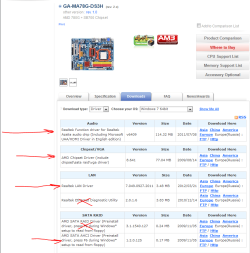
You need to install all of the Gigabyte drivers for the on-board devices.
These are the ones you need:
Capture.PNG

The best way to assure that Windows will install to the correct physical hard disk drive (and to assure that the installed partition is C: is to disconnect all other hard disk drives and only have the SSD connected. Then the process is truly foolproof.
 

My Computer

Computer type
PC/Desktop
Computer Manufacturer/Model Number
Home Built - Jan 2013
OS
Windows 7 64 Bit Home Premium SP1
CPU
i7-3820
Motherboard
Asus P9X79-PRO - Bios 4608
Memory
GSkill F3-14900CL9Q - 16GB
Graphics Card(s)
EVGA GeForce GTX660 - Driver 352.86
Sound Card
On board Realtek ALC898
Monitor(s) Displays
Acer S271HL
Screen Resolution
1920 x 1080
Hard Drives
#1- Samsung 840 Pro Series
#2- Western Digital WD1002FAEX Sata3 Black
#3- Western Digital WD1002FAEX Sata3 Black
PSU
Corsair CMPSU-850TX-V2 - 850 watt (by Seasonic)
Case
Corsair Obsidian 550D
Cooling
Standard 3 120mm case fans, Cooler Master Hyper 212 EVO
Keyboard
MS KC-0405
Mouse
Intellimouse 5-button
Internet Speed
56 Mbits/Sec (on a good day)
Antivirus
Avast & Malwarebytes
Browser
Firefox
Other Info
Asus DVD - DRW-24B1ST 24X
Welcome to Seven Forums Bob.

AMD AHCI is the driver for your SSD/HDDs, there is no Samsung 'Driver' for a SSD/HDD.
The Samsung SSD will only have Firmware, which runs the SSD processor.

I wouldn't install the 2009/11/05 AHCI driver from the Gigabyte site, that is pretty old, get the newest Win7 AHCI driver from AMD.
AMD Chipset Drivers

AMD Chipset Drivers 25.9 MB 12.6 6/28/2012
Description:
This package is for motherboards with 700 series or newer AMD chipsets, and includes:
AMD Chipset Drivers
AMD AHCI Driver
AMD USB 3.0 Driver

As TVeblen mentioned, disconnect all other hard disk drives and only have the SSD connected.
Best to connect the SSD to SATA port0, check your motherboard manual.
GA-MA78G-DS3H (rev. 2.x)

Windows will call any partition that an OS is booted to and running as Drive 'C', no need to worry about it.
Leave your wired internet connection plugged in and Win7 will install most of the drivers you need.
Just be sure your BIOS is set to AHCI mode before you install Win7 on your SSD.
If it is set to IDE or RAID, let us know before you change anything, as it will crash if you change it and re-boot without the proper driver.

Your manual pg 48.
OnChip SATA Type (SATA2_0~SATA2_3 connectors)
Configures the operating mode of the integrated SATA2_0~SATA2_3 controller.
  • Native IDE
    Allows the SATA controller to operate in Native IDE mode. (Default)
    Enable Native IDE mode if you wish to install operating systems that
    support Native mode.​
  • RAID
    Enables RAID for the SATA controller.​
  • AHCI
    Configures the SATA controller to AHCI mode. Advanced Host Controller
    Interface (AHCI) is an interface specification that allows the storage driver to
    enable advanced Serial ATA features such as Native Command Queuing
    and hot plug.​

Your motherboard only has SATA2 (3Gb/s) connectors, the Samsung 830 Series is a SATA3 (6Gb/s) device, and is SATA2 compatible.
It won't be able to run at it's full, advertised, speed.
It will run very fast, you will see a huge performance increase compared to the old HDD.
And it will run at full speed if you ever decide to upgrade your motherboard or add a SATA3 card.
 
Last edited:

My Computer

Computer type
PC/Desktop
Computer Manufacturer/Model Number
76~2.0
OS
Windows 7 Ult x64 - SP1/ Windows 8 Pro x64
CPU
Intel Core i5-3570K 4.6GHz
Motherboard
Gigabyte GA-Z77X UD3H, f18
Memory
8GB (2X4GB) DDR3 1600 Corsair Vengeance CL8 1.5v
Graphics Card(s)
Sapphire HD 7770 Vapor-X OC 1GB DDR5
Sound Card
Onboard VIA VT2021
Monitor(s) Displays
22" LCD Dell
Screen Resolution
1680x1050
Hard Drives
Samsung 840Pro 128GB SSD,
Seagate Barracuda 500GB SATA2 7200rpm 32MB cache, Seagate Barracuda 1TB SATA2 7200rpm 32MB cache,
PSU
Corsair HX650W
Case
Cooler Master Storm Scout
Cooling
Corsair H80 2x12cm Noctua NF P12 , 2x14cm case fans
Keyboard
Logitech Wave
Mouse
CM Sentinel
Internet Speed
Dismal
Antivirus
Avast
Browser
Opera Next
Other Info
Haswell laptop: HP Envy 17t-j, i7-4700MQ, GeForce 740M 2GB DDR3, 17.3" Full HD 1920x1080, 16GB RAM, Samsung 840 Pro 128GB, 1TB Hitachi 7200 HDD,
Desktop: eSATA ports,
External eSATA Seagate 500GB SATA2 7200rpm,
External WD USB 500GB
Installing a Samsung 830 SSD onto a Gigabyte GA-MA78G-DS3H Rev 2.0

Thanks very much TVeblen and Dave76! What a great forum this is!

A general question: Does Windows ever include manufacturer specific drivers on its install disks or only its own generic drivers?

TVeblen - I am curious about why you eliminated the Realtec Ethernet Diagnostic Utility?

The BIOS must currently say RAID because I have a RAID 0 C/D (it's partitioned) drive. But I'll be removing the two drives which constitute the RAID 0 C/D drive when I install the SSD drive.

I still have to work out all of the detail but the plan I have so far is to ...

power down,
remove the two drives which constitute the RAID 0 C/D drive (but I do not yet know how to figure out which two they are!),
disconnect all other drives,
replace the battery because this is a good opportunity to do so,
make the AHCI BIOS change,
install the SSD drive,
power up and install Windows 7 (OEM),
update drivers,
connect the other hard drives,
reinstall all of the applications I will have lost,
if all's gone well sacrifice my firstborn to the gods!,
report my success here with thanks for all of the assistance (I'm sure I'll need more before this is done),
have a beer! maybe two!

Have I missed anything?

I've just discovered the AMD Away issue and I am currently researching that. I hope that there is some solution because I really like hibernate mode. I can't use it currently because I don't have enough free space on my C drive and when the machine is in sleep mode it reboots after a power failure!

Thanks again, Bob
 

My Computer

OS
Win7 x64
CPU
AMD Phenom
Motherboard
Gigabyte GA-MA78G-DS3H
Memory
8G
Because it is not a driver.

You may want to use it (it is a Diagnostic Utility) if you had Ethernet/Connectivity problems, or just to see what it does, but it is not required or necessary (as far as I know) to install the OS or run the system.

One note on your current RAID array: You will want to "break the RAID" on those drives before you disconnect them. I do not play with RAID so I can't tell you the exact procedure, but I've seen plenty of posts on this forum from people having trouble trying to use drives that were previously in a RAID when the RAID was not broken first.
Perhaps someone else here knows more.
 

My Computer

Computer type
PC/Desktop
Computer Manufacturer/Model Number
Home Built - Jan 2013
OS
Windows 7 64 Bit Home Premium SP1
CPU
i7-3820
Motherboard
Asus P9X79-PRO - Bios 4608
Memory
GSkill F3-14900CL9Q - 16GB
Graphics Card(s)
EVGA GeForce GTX660 - Driver 352.86
Sound Card
On board Realtek ALC898
Monitor(s) Displays
Acer S271HL
Screen Resolution
1920 x 1080
Hard Drives
#1- Samsung 840 Pro Series
#2- Western Digital WD1002FAEX Sata3 Black
#3- Western Digital WD1002FAEX Sata3 Black
PSU
Corsair CMPSU-850TX-V2 - 850 watt (by Seasonic)
Case
Corsair Obsidian 550D
Cooling
Standard 3 120mm case fans, Cooler Master Hyper 212 EVO
Keyboard
MS KC-0405
Mouse
Intellimouse 5-button
Internet Speed
56 Mbits/Sec (on a good day)
Antivirus
Avast & Malwarebytes
Browser
Firefox
Other Info
Asus DVD - DRW-24B1ST 24X
Because it is a RAID 0 array I believe you will need to:

  • Copy all of your (needed) data (user files) to another backup hard drive.
  • Go into BIOS and disable the RAID array
  • Reboot - you will now have 2 independent drives
  • Copy all your backed up data to one of the two drives
  • Erase the second drive.
That is how I understand it.
 

My Computer

Computer type
PC/Desktop
Computer Manufacturer/Model Number
Home Built - Jan 2013
OS
Windows 7 64 Bit Home Premium SP1
CPU
i7-3820
Motherboard
Asus P9X79-PRO - Bios 4608
Memory
GSkill F3-14900CL9Q - 16GB
Graphics Card(s)
EVGA GeForce GTX660 - Driver 352.86
Sound Card
On board Realtek ALC898
Monitor(s) Displays
Acer S271HL
Screen Resolution
1920 x 1080
Hard Drives
#1- Samsung 840 Pro Series
#2- Western Digital WD1002FAEX Sata3 Black
#3- Western Digital WD1002FAEX Sata3 Black
PSU
Corsair CMPSU-850TX-V2 - 850 watt (by Seasonic)
Case
Corsair Obsidian 550D
Cooling
Standard 3 120mm case fans, Cooler Master Hyper 212 EVO
Keyboard
MS KC-0405
Mouse
Intellimouse 5-button
Internet Speed
56 Mbits/Sec (on a good day)
Antivirus
Avast & Malwarebytes
Browser
Firefox
Other Info
Asus DVD - DRW-24B1ST 24X
You will get some of your non-wMS drivers when you install Win7, you must have the internet wired connection plugged in during the install to do this.

Go to your BIOS, look in your motherboard manual I linked above on page 48 it will show you where to look, to find out what the setting is.
You can't have RAID on one hard drive with two partitions, do you have two hard drives installed?

In the Windows 7 start menu search box type diskmgmt.msc then click it.
Post a snip of the full Disk Managament window.

For posting the information , enter 'Snipping tool' in the Start button > Search box, hit enter. Select the area you want to post and save to a convenient place.
How to Post a Screenshot in Seven Forums
 

My Computer

Computer type
PC/Desktop
Computer Manufacturer/Model Number
76~2.0
OS
Windows 7 Ult x64 - SP1/ Windows 8 Pro x64
CPU
Intel Core i5-3570K 4.6GHz
Motherboard
Gigabyte GA-Z77X UD3H, f18
Memory
8GB (2X4GB) DDR3 1600 Corsair Vengeance CL8 1.5v
Graphics Card(s)
Sapphire HD 7770 Vapor-X OC 1GB DDR5
Sound Card
Onboard VIA VT2021
Monitor(s) Displays
22" LCD Dell
Screen Resolution
1680x1050
Hard Drives
Samsung 840Pro 128GB SSD,
Seagate Barracuda 500GB SATA2 7200rpm 32MB cache, Seagate Barracuda 1TB SATA2 7200rpm 32MB cache,
PSU
Corsair HX650W
Case
Cooler Master Storm Scout
Cooling
Corsair H80 2x12cm Noctua NF P12 , 2x14cm case fans
Keyboard
Logitech Wave
Mouse
CM Sentinel
Internet Speed
Dismal
Antivirus
Avast
Browser
Opera Next
Other Info
Haswell laptop: HP Envy 17t-j, i7-4700MQ, GeForce 740M 2GB DDR3, 17.3" Full HD 1920x1080, 16GB RAM, Samsung 840 Pro 128GB, 1TB Hitachi 7200 HDD,
Desktop: eSATA ports,
External eSATA Seagate 500GB SATA2 7200rpm,
External WD USB 500GB
I completed my project (substituting an SSD for a RAID array and upgrading to Win7 in one shot) several weeks ago and have been wanting to report back that all went pretty well. Thanks in no small measure to the help I received here. And Gigabyte was good about responding to questions sent to them. (Although often not very specific.)

ONE PROBLEM I had is that I hadn't experimented to make sure I knew how to boot from a DVD drive. The motherboard manual provided two ways to do that and neither worked for me! I forget the details now but finally I figured out how to make one of the methods work.

I also had a number of hard drives installed, all of which were identical, and it took a while to get them all sorted out.

I really don't know where I stand on drivers. Either Win7 found and downloaded what was needed or I didn't need any.

The SSD drive is very nice. Machine boots very fast.

I wish I had changed the battery but it just wasn't at all obvious how to remove the existing one and the motherboard manual was of no help. I should have sent that question to Gigabyte but did not.

I have a minot power management question but I don't think that this thread is the best place for it.

Thanks again to all of those who provided assistance. Bob
 

My Computer

OS
Win7 x64
CPU
AMD Phenom
Motherboard
Gigabyte GA-MA78G-DS3H
Memory
8G
Back
Top