Cannot access files within USB flash drive

yildizabdullah

New member
Member
Local time
6:10 PM
Messages
53
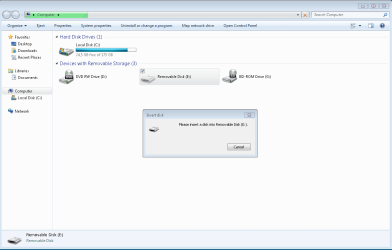
When I place the device to the USB port, it is displayed under Devices with Removable Storage section of Computer window but I cannot access the files within the device.

How can I recover the data within the device in such a case?
 

Attachments

  • Capture.PNG
    Capture.PNG
    18.6 KB · Views: 2

My Computer

Computer type
Laptop
OS
Windows 7 Home Premium 64-bit
One possible reason for this is a drive letter conflict. This will be the easiest to resolve and so it goes first :).

Shut down your PC. Plug in your flash drive and then boot.

You should now run this on the administrator account or your account should have administrator privileges.

Right click on "Computer" > Manage > Disk Management.

Right click on the Removable Drive Partition > Change Drive Letter and Paths > Change > assign any other free drive letter > OK

In effect you will be changing the drive letter to any other free drive letter. Make sure you map a drive letter that is not in use, preferably x,y,z. If that works you can still change it to another drive letter easily.

If that does not work check whether the manufacturer of your Flash drive has any recovery program available. Make sure that such a recovery program does not format your drive. Since you did not give details of your flash drive like manufacturer, Model etc., you have to find it out yourself. (" My Flash drive/ device" and I do not have clairvoyant power or extrasensory perception :))
 

My Computer

OS
Windows 7 Home Premium 32 bit
Does another computer treat this flash drive the same way?
 

My Computer

Computer type
PC/Desktop
Computer Manufacturer/Model Number
Antec desktop; Acer Aspire laptops
OS
Windows 7 Professional 64-bit
CPU
Desktop i5; Acers i5 & i7
Memory
desktop 16GB; 1 Acer 8GB & 1 Acer 16GB
Hard Drives
1TB split into 2 equal partitions [OS and data] usable by RJS
Internet Speed
AT&T DSL
Browser
FF, GChrome, msIE
Other Info
Windows 7 Firewall, Emsisoft AM/AV, MSE [scan-only], SpywareBlaster, Ruiware/BillP combine
One possible reason for this is a drive letter conflict. This will be the easiest to resolve and so it goes first :).

Shut down your PC. Plug in your flash drive and then boot.

You should now run this on the administrator account or your account should have administrator privileges.

Right click on "Computer" > Manage > Disk Management.

Right click on the Removable Drive Partition > Change Drive Letter and Paths > Change > assign any other free drive letter > OK

In effect you will be changing the drive letter to any other free drive letter. Make sure you map a drive letter that is not in use, preferably x,y,z. If that works you can still change it to another drive letter easily.

If that does not work check whether the manufacturer of your Flash drive has any recovery program available. Make sure that such a recovery program does not format your drive. Since you did not give details of your flash drive like manufacturer, Model etc., you have to find it out yourself. (" My Flash drive/ device" and I do not have clairvoyant power or extrasensory perception :))

Trying to recover the data using the tools of the manufacturer did not work either.
 

My Computer

Computer type
Laptop
OS
Windows 7 Home Premium 64-bit
Is it a SD card reader or a pendrive?
Right click on "Computer" > Manage > Disk Management. Expand the columns and with sniping tool take a snapshot. Post it here as an attachment.
Disk Management - Post a Screen Capture Image
 

My Computers

System One System Two

  • Computer type
    PC/Desktop
    Computer Manufacturer/Model Number
    custom build
    OS
    Windows 7 HP 64
    CPU
    i5 6600K - 800MHz to 4200MHz
    Motherboard
    GA-Z170-HD3P
    Memory
    4+4G GSkill DDR4 3000
    Graphics Card(s)
    IG - Intel 530
    Monitor(s) Displays
    Samsung 226BW
    Screen Resolution
    1680x1050
    Hard Drives
    (1) -1 SM951 – 128GB M.2 AHCI PCIe SSD drive for Windows 7 and Lubuntu
    (2) -1 WD SATA 3 - 1T for Data
    (3) -1 WD SATA 3 - 1T for backup
    PSU
    Thermaltake 450W TR2 gold
    Keyboard
    Old and good Chicony mechanical keyboard
    Mouse
    Logitech mX performance - 9 buttons (had to disable some)
    Internet Speed
    500Mb/s
    Browser
    Firefox 64
    Other Info
    TinyWall firewall
  • Computer type
    Laptop
    System Manufacturer/Model Number
    Asus Q550LF
    OS
    Windows 7 Pro
    CPU
    i7-4500U 800MHz to 3.0GHz
    Motherboard
    Asus Q550LF
    Memory
    (4+4)G DDR3 1600
    Graphics Card(s)
    IG intel 4400 + NVIDIA GeForce GT 745M
    Sound Card
    Realtek
    Monitor(s) Displays
    LG Display LP156WF4-SPH1
    Screen Resolution
    1920 x 1080
    Hard Drives
    BX500 120G SSD for Windows and programs +
    1T HDD for data
    Internet Speed
    500 Mb/s
    Browser
    Firefox
    Other Info
    TinyWall firewall
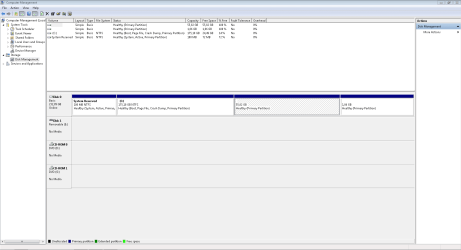
Here is the snapshot of Disk Management window.
 

Attachments

  • Capture.PNG
    Capture.PNG
    21.7 KB · Views: 7

My Computer

Computer type
Laptop
OS
Windows 7 Home Premium 64-bit
Was this flash drive ever accidentally removed without the benefit of Safely Remove Hardware and Eject Media?
I did that once, probably during a write operation, the flash drive was lost to me forever. Nothing worked to recover the contents. Didn't even read or register with Explorer.exe.
 

My Computer

Computer type
PC/Desktop
Computer Manufacturer/Model Number
Antec desktop; Acer Aspire laptops
OS
Windows 7 Professional 64-bit
CPU
Desktop i5; Acers i5 & i7
Memory
desktop 16GB; 1 Acer 8GB & 1 Acer 16GB
Hard Drives
1TB split into 2 equal partitions [OS and data] usable by RJS
Internet Speed
AT&T DSL
Browser
FF, GChrome, msIE
Other Info
Windows 7 Firewall, Emsisoft AM/AV, MSE [scan-only], SpywareBlaster, Ruiware/BillP combine

My Computers

System One System Two

  • Computer type
    PC/Desktop
    Computer Manufacturer/Model Number
    custom build
    OS
    Windows 7 HP 64
    CPU
    i5 6600K - 800MHz to 4200MHz
    Motherboard
    GA-Z170-HD3P
    Memory
    4+4G GSkill DDR4 3000
    Graphics Card(s)
    IG - Intel 530
    Monitor(s) Displays
    Samsung 226BW
    Screen Resolution
    1680x1050
    Hard Drives
    (1) -1 SM951 – 128GB M.2 AHCI PCIe SSD drive for Windows 7 and Lubuntu
    (2) -1 WD SATA 3 - 1T for Data
    (3) -1 WD SATA 3 - 1T for backup
    PSU
    Thermaltake 450W TR2 gold
    Keyboard
    Old and good Chicony mechanical keyboard
    Mouse
    Logitech mX performance - 9 buttons (had to disable some)
    Internet Speed
    500Mb/s
    Browser
    Firefox 64
    Other Info
    TinyWall firewall
  • Computer type
    Laptop
    System Manufacturer/Model Number
    Asus Q550LF
    OS
    Windows 7 Pro
    CPU
    i7-4500U 800MHz to 3.0GHz
    Motherboard
    Asus Q550LF
    Memory
    (4+4)G DDR3 1600
    Graphics Card(s)
    IG intel 4400 + NVIDIA GeForce GT 745M
    Sound Card
    Realtek
    Monitor(s) Displays
    LG Display LP156WF4-SPH1
    Screen Resolution
    1920 x 1080
    Hard Drives
    BX500 120G SSD for Windows and programs +
    1T HDD for data
    Internet Speed
    500 Mb/s
    Browser
    Firefox
    Other Info
    TinyWall firewall
Was this flash drive ever accidentally removed without the benefit of Safely Remove Hardware and Eject Media?
I did that once, probably during a write operation, the flash drive was lost to me forever. Nothing worked to recover the contents. Didn't even read or register with Explorer.exe.

I don't remember. It seems that the drive is dead.
 

My Computer

Computer type
Laptop
OS
Windows 7 Home Premium 64-bit
Back
Top