Solved Cannot boot after deleting old windows7 partition.. White cursor

so since it won't let me click next after selecting my operating system, I just choose the other option about the system image and press cancel a time or two and I get to the system recovery options with the command prompt as an option. It says at the top that my operating system is unknown on local disk unknown (I assume this is because it won't let me choose my operating system

after entering "attrib c:\bootmgr" it says "File not found - C:\bootmgr"
 

My Computer My Computer

At a glance

Windows 7 Home Premium 64bitIntel Core i5-2500K 3.3 GHz16GB (4GBx4) DDR3/1600MHz (Corsair Vengeance)AMD Radeon HD 6970 2GB
OS
Windows 7 Home Premium 64bit
CPU
Intel Core i5-2500K 3.3 GHz
Motherboard
Asus P8Z68-V LX
Memory
16GB (4GBx4) DDR3/1600MHz (Corsair Vengeance)
Graphics Card(s)
AMD Radeon HD 6970 2GB
Sound Card
HD On Board Audio
Monitor(s) Displays
1920x1080 Asus VS247H-P LCD
Hard Drives
60GB OCZ Agility 3 SATA III 6.0Gb/s SSD
2TB SATA-III 6.0Gb/s 64MB Cache 7200rpm HDD
PSU
800 Watts - XtremeGear
Case
CoolerMaster Elite 430 Mid-Tower
Cooling
Asetek 510LC Liquid Cooling System
OK and I entered your next set of code and got no errors on either command. I restarted and still got "bootmgr is missing"
 

My Computer My Computer

At a glance

Windows 7 Home Premium 64bitIntel Core i5-2500K 3.3 GHz16GB (4GBx4) DDR3/1600MHz (Corsair Vengeance)AMD Radeon HD 6970 2GB
OS
Windows 7 Home Premium 64bit
CPU
Intel Core i5-2500K 3.3 GHz
Motherboard
Asus P8Z68-V LX
Memory
16GB (4GBx4) DDR3/1600MHz (Corsair Vengeance)
Graphics Card(s)
AMD Radeon HD 6970 2GB
Sound Card
HD On Board Audio
Monitor(s) Displays
1920x1080 Asus VS247H-P LCD
Hard Drives
60GB OCZ Agility 3 SATA III 6.0Gb/s SSD
2TB SATA-III 6.0Gb/s 64MB Cache 7200rpm HDD
PSU
800 Watts - XtremeGear
Case
CoolerMaster Elite 430 Mid-Tower
Cooling
Asetek 510LC Liquid Cooling System
Double check that the Win7 SSD is set to boot first in BIOS setup. Unplug all other HD's and peripherals to run repairs.

Make sure to Mark Win7 Partition Active before running Startup Repair - Run 3 Separate Times . You never acknowledged this critical step before that Win7 or it's 100mb System Reserved partition are marked Active first.

Try using the latest installer w/SP1 for repairs: Windows 7 SP1 ISO from Digital River « My Digital Life
Windows 7 USB-DVD Download Tool

If it won't repair copy out your files as shown in Step 3 note to Clean Reinstall - Factory OEM Windows 7
 
So i guess maybe the root of the problem is that, although I do startup repairs, I never successfully selected my operating system so they are doing nothing. I'll try burning a new disk and using that
 

My Computer My Computer

At a glance

Windows 7 Home Premium 64bitIntel Core i5-2500K 3.3 GHz16GB (4GBx4) DDR3/1600MHz (Corsair Vengeance)AMD Radeon HD 6970 2GB
OS
Windows 7 Home Premium 64bit
CPU
Intel Core i5-2500K 3.3 GHz
Motherboard
Asus P8Z68-V LX
Memory
16GB (4GBx4) DDR3/1600MHz (Corsair Vengeance)
Graphics Card(s)
AMD Radeon HD 6970 2GB
Sound Card
HD On Board Audio
Monitor(s) Displays
1920x1080 Asus VS247H-P LCD
Hard Drives
60GB OCZ Agility 3 SATA III 6.0Gb/s SSD
2TB SATA-III 6.0Gb/s 64MB Cache 7200rpm HDD
PSU
800 Watts - XtremeGear
Case
CoolerMaster Elite 430 Mid-Tower
Cooling
Asetek 510LC Liquid Cooling System
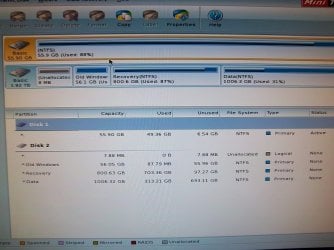
yes, I made the SSD active, here is the drive map from PWCD when I still had my HDD connected earlier (now, Disk 1 is the only Disk shown in PW and is set to Active).

I'm downloading the ISO for a new installer with SP1, I'll post how it goes after I try all this stuff with a new CD

Thanks again guys
 

Attachments

  • 019a.jpg
    019a.jpg
    114.9 KB · Views: 5

My Computer My Computer

At a glance

Windows 7 Home Premium 64bitIntel Core i5-2500K 3.3 GHz16GB (4GBx4) DDR3/1600MHz (Corsair Vengeance)AMD Radeon HD 6970 2GB
OS
Windows 7 Home Premium 64bit
CPU
Intel Core i5-2500K 3.3 GHz
Motherboard
Asus P8Z68-V LX
Memory
16GB (4GBx4) DDR3/1600MHz (Corsair Vengeance)
Graphics Card(s)
AMD Radeon HD 6970 2GB
Sound Card
HD On Board Audio
Monitor(s) Displays
1920x1080 Asus VS247H-P LCD
Hard Drives
60GB OCZ Agility 3 SATA III 6.0Gb/s SSD
2TB SATA-III 6.0Gb/s 64MB Cache 7200rpm HDD
PSU
800 Watts - XtremeGear
Case
CoolerMaster Elite 430 Mid-Tower
Cooling
Asetek 510LC Liquid Cooling System
just put bootmgr on C:\
do you need x64 or x86 one? someone can post it here
 

My Computer My Computer

At a glance

Microsoft Windows 7 Home Premium 64-bits 7601...Intel(R) Core(TM) i3 CPU M 370 @ 2.40GHz4,00 GBATI Mobility Radeon HD 5400 Series
Computer type
Laptop
Computer Manufacturer/Model Number
ACER ASPIRE 5742G
OS
Microsoft Windows 7 Home Premium 64-bits 7601 Multiprocessor Free Service Pack 1
CPU
Intel(R) Core(TM) i3 CPU M 370 @ 2.40GHz
Motherboard
Acer Aspire 5742G
Memory
4,00 GB
Graphics Card(s)
ATI Mobility Radeon HD 5400 Series
Sound Card
(1) AMD High Definition Audio Device (2) Realtek High Defi
Screen Resolution
1366 x 768 x 32 bits (4294967296 colors) @ 60 Hz
Hard Drives
WDC WD5000BEVT-22ZAT0
could it really be that simple? I'm on 64bit

I am currently trying to make the windows install USB-DVD with my laptop and having issues
 

My Computer My Computer

At a glance

Windows 7 Home Premium 64bitIntel Core i5-2500K 3.3 GHz16GB (4GBx4) DDR3/1600MHz (Corsair Vengeance)AMD Radeon HD 6970 2GB
OS
Windows 7 Home Premium 64bit
CPU
Intel Core i5-2500K 3.3 GHz
Motherboard
Asus P8Z68-V LX
Memory
16GB (4GBx4) DDR3/1600MHz (Corsair Vengeance)
Graphics Card(s)
AMD Radeon HD 6970 2GB
Sound Card
HD On Board Audio
Monitor(s) Displays
1920x1080 Asus VS247H-P LCD
Hard Drives
60GB OCZ Agility 3 SATA III 6.0Gb/s SSD
2TB SATA-III 6.0Gb/s 64MB Cache 7200rpm HDD
PSU
800 Watts - XtremeGear
Case
CoolerMaster Elite 430 Mid-Tower
Cooling
Asetek 510LC Liquid Cooling System
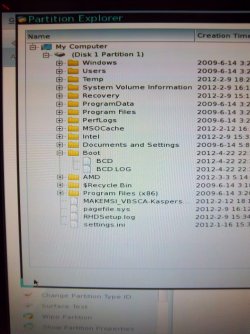
Does this help at all?

I just went into the Partition Explorer in PW and took this picture of my C: drive with the boot folder expanded
 

Attachments

  • 100_0091.JPG
    100_0091.JPG
    123.9 KB · Views: 4

My Computer My Computer

At a glance

Windows 7 Home Premium 64bitIntel Core i5-2500K 3.3 GHz16GB (4GBx4) DDR3/1600MHz (Corsair Vengeance)AMD Radeon HD 6970 2GB
OS
Windows 7 Home Premium 64bit
CPU
Intel Core i5-2500K 3.3 GHz
Motherboard
Asus P8Z68-V LX
Memory
16GB (4GBx4) DDR3/1600MHz (Corsair Vengeance)
Graphics Card(s)
AMD Radeon HD 6970 2GB
Sound Card
HD On Board Audio
Monitor(s) Displays
1920x1080 Asus VS247H-P LCD
Hard Drives
60GB OCZ Agility 3 SATA III 6.0Gb/s SSD
2TB SATA-III 6.0Gb/s 64MB Cache 7200rpm HDD
PSU
800 Watts - XtremeGear
Case
CoolerMaster Elite 430 Mid-Tower
Cooling
Asetek 510LC Liquid Cooling System
OK I got the USB-DVD to work. Turns out you just have to extract the files from the ISO and copy them to the USB. Then boot from the USB in the BIOS. Now in recovery options I can select my operating system without error!! Big step.

I have run startup repair 3x with reboots now (the second time took a couple minutes, the third time it did not detect a problem).

Now I am getting the Blue Screen. I'm going to run disk checks with my new boot-usb now
 

My Computer My Computer

At a glance

Windows 7 Home Premium 64bitIntel Core i5-2500K 3.3 GHz16GB (4GBx4) DDR3/1600MHz (Corsair Vengeance)AMD Radeon HD 6970 2GB
OS
Windows 7 Home Premium 64bit
CPU
Intel Core i5-2500K 3.3 GHz
Motherboard
Asus P8Z68-V LX
Memory
16GB (4GBx4) DDR3/1600MHz (Corsair Vengeance)
Graphics Card(s)
AMD Radeon HD 6970 2GB
Sound Card
HD On Board Audio
Monitor(s) Displays
1920x1080 Asus VS247H-P LCD
Hard Drives
60GB OCZ Agility 3 SATA III 6.0Gb/s SSD
2TB SATA-III 6.0Gb/s 64MB Cache 7200rpm HDD
PSU
800 Watts - XtremeGear
Case
CoolerMaster Elite 430 Mid-Tower
Cooling
Asetek 510LC Liquid Cooling System
iso contains bootmgr as well!
What error on bsod?
 

My Computer My Computer

At a glance

Microsoft Windows 7 Home Premium 64-bits 7601...Intel(R) Core(TM) i3 CPU M 370 @ 2.40GHz4,00 GBATI Mobility Radeon HD 5400 Series
Computer type
Laptop
Computer Manufacturer/Model Number
ACER ASPIRE 5742G
OS
Microsoft Windows 7 Home Premium 64-bits 7601 Multiprocessor Free Service Pack 1
CPU
Intel(R) Core(TM) i3 CPU M 370 @ 2.40GHz
Motherboard
Acer Aspire 5742G
Memory
4,00 GB
Graphics Card(s)
ATI Mobility Radeon HD 5400 Series
Sound Card
(1) AMD High Definition Audio Device (2) Realtek High Defi
Screen Resolution
1366 x 768 x 32 bits (4294967296 colors) @ 60 Hz
Hard Drives
WDC WD5000BEVT-22ZAT0
the bsod error I'm getting is "*** STOP: 0x0000007B (0xFFFFF880009A97E8, 0xFFFFFFFFC0000034, 0x0000000000, 0x0000000000)

when I do the "attrib c:\bootmgr" command now it says "A SHR C:\bootmgr"
 

My Computer My Computer

At a glance

Windows 7 Home Premium 64bitIntel Core i5-2500K 3.3 GHz16GB (4GBx4) DDR3/1600MHz (Corsair Vengeance)AMD Radeon HD 6970 2GB
OS
Windows 7 Home Premium 64bit
CPU
Intel Core i5-2500K 3.3 GHz
Motherboard
Asus P8Z68-V LX
Memory
16GB (4GBx4) DDR3/1600MHz (Corsair Vengeance)
Graphics Card(s)
AMD Radeon HD 6970 2GB
Sound Card
HD On Board Audio
Monitor(s) Displays
1920x1080 Asus VS247H-P LCD
Hard Drives
60GB OCZ Agility 3 SATA III 6.0Gb/s SSD
2TB SATA-III 6.0Gb/s 64MB Cache 7200rpm HDD
PSU
800 Watts - XtremeGear
Case
CoolerMaster Elite 430 Mid-Tower
Cooling
Asetek 510LC Liquid Cooling System
What is the SATA controller setting in BIOS?

Have you caught up with all the steps yet? What happened with PW CD "Rebuild MBR" command?
 
My SATA controller setting is ACHI,

I reset the BIOS settings to their optimized defaults a couple days ago
 

My Computer My Computer

At a glance

Windows 7 Home Premium 64bitIntel Core i5-2500K 3.3 GHz16GB (4GBx4) DDR3/1600MHz (Corsair Vengeance)AMD Radeon HD 6970 2GB
OS
Windows 7 Home Premium 64bit
CPU
Intel Core i5-2500K 3.3 GHz
Motherboard
Asus P8Z68-V LX
Memory
16GB (4GBx4) DDR3/1600MHz (Corsair Vengeance)
Graphics Card(s)
AMD Radeon HD 6970 2GB
Sound Card
HD On Board Audio
Monitor(s) Displays
1920x1080 Asus VS247H-P LCD
Hard Drives
60GB OCZ Agility 3 SATA III 6.0Gb/s SSD
2TB SATA-III 6.0Gb/s 64MB Cache 7200rpm HDD
PSU
800 Watts - XtremeGear
Case
CoolerMaster Elite 430 Mid-Tower
Cooling
Asetek 510LC Liquid Cooling System
OK so just to be sure I've done all the steps:

-HDD is physically disconnected
-in PWCD only the SSD is present now, and the status is set to "Active"
-selected the only disk available now (the SSD) and ran "rebuild mbr"
-My boot order is:
#1: Blu-ray Drive
#2: SSD
#3: empty
-ran CHKDSK C: and got no errors
-when I run startup repair now it says it could not detect a problem
-I ran the memory diagnostics tool but need to be able to log in to see if there are any errors I think
-I ran Kaktussoft's bootsector commands and it completed successfully, I not longer get the "missing bootmgr" error. Also I can see that bootmgr is in c: when I use PW to explore the partition, it wasn't there before

now I just get this damn BSOD
 

My Computer My Computer

At a glance

Windows 7 Home Premium 64bitIntel Core i5-2500K 3.3 GHz16GB (4GBx4) DDR3/1600MHz (Corsair Vengeance)AMD Radeon HD 6970 2GB
OS
Windows 7 Home Premium 64bit
CPU
Intel Core i5-2500K 3.3 GHz
Motherboard
Asus P8Z68-V LX
Memory
16GB (4GBx4) DDR3/1600MHz (Corsair Vengeance)
Graphics Card(s)
AMD Radeon HD 6970 2GB
Sound Card
HD On Board Audio
Monitor(s) Displays
1920x1080 Asus VS247H-P LCD
Hard Drives
60GB OCZ Agility 3 SATA III 6.0Gb/s SSD
2TB SATA-III 6.0Gb/s 64MB Cache 7200rpm HDD
PSU
800 Watts - XtremeGear
Case
CoolerMaster Elite 430 Mid-Tower
Cooling
Asetek 510LC Liquid Cooling System
Update:

When I enter "bootrec.exe /ScanOs" into the command prompt it say there are 0 identified Windows installations
 

My Computer My Computer

At a glance

Windows 7 Home Premium 64bitIntel Core i5-2500K 3.3 GHz16GB (4GBx4) DDR3/1600MHz (Corsair Vengeance)AMD Radeon HD 6970 2GB
OS
Windows 7 Home Premium 64bit
CPU
Intel Core i5-2500K 3.3 GHz
Motherboard
Asus P8Z68-V LX
Memory
16GB (4GBx4) DDR3/1600MHz (Corsair Vengeance)
Graphics Card(s)
AMD Radeon HD 6970 2GB
Sound Card
HD On Board Audio
Monitor(s) Displays
1920x1080 Asus VS247H-P LCD
Hard Drives
60GB OCZ Agility 3 SATA III 6.0Gb/s SSD
2TB SATA-III 6.0Gb/s 64MB Cache 7200rpm HDD
PSU
800 Watts - XtremeGear
Case
CoolerMaster Elite 430 Mid-Tower
Cooling
Asetek 510LC Liquid Cooling System
Is there any chance the SATA controller had been set to IDE or other before you reset BIOS to defaults? Do you remember the setting when you installed to SSD?

Try shrinking the SSD by 200mb from the left using PW CD, create a Primary NTFS partition labeled System Reserved, mark Active, then run the 3 separate repairs.

Make sure SSD is set first to boot and HD unplugged.
 
My SATA controller setting is ACHI,

I reset the BIOS settings to their optimized defaults a couple days ago
Did win7 boot succesfully after changing the settings?
change that setting to IDE or ATA (temporary) and test if it boots now
 
Last edited:

My Computer My Computer

At a glance

Microsoft Windows 7 Home Premium 64-bits 7601...Intel(R) Core(TM) i3 CPU M 370 @ 2.40GHz4,00 GBATI Mobility Radeon HD 5400 Series
Computer type
Laptop
Computer Manufacturer/Model Number
ACER ASPIRE 5742G
OS
Microsoft Windows 7 Home Premium 64-bits 7601 Multiprocessor Free Service Pack 1
CPU
Intel(R) Core(TM) i3 CPU M 370 @ 2.40GHz
Motherboard
Acer Aspire 5742G
Memory
4,00 GB
Graphics Card(s)
ATI Mobility Radeon HD 5400 Series
Sound Card
(1) AMD High Definition Audio Device (2) Realtek High Defi
Screen Resolution
1366 x 768 x 32 bits (4294967296 colors) @ 60 Hz
Hard Drives
WDC WD5000BEVT-22ZAT0
Update:

When I enter "bootrec.exe /ScanOs" into the command prompt it say there are 0 identified Windows installations
Quite normal. win7 is already in bootmenu and starts. But .... ends in bsod
 

My Computer My Computer

At a glance

Microsoft Windows 7 Home Premium 64-bits 7601...Intel(R) Core(TM) i3 CPU M 370 @ 2.40GHz4,00 GBATI Mobility Radeon HD 5400 Series
Computer type
Laptop
Computer Manufacturer/Model Number
ACER ASPIRE 5742G
OS
Microsoft Windows 7 Home Premium 64-bits 7601 Multiprocessor Free Service Pack 1
CPU
Intel(R) Core(TM) i3 CPU M 370 @ 2.40GHz
Motherboard
Acer Aspire 5742G
Memory
4,00 GB
Graphics Card(s)
ATI Mobility Radeon HD 5400 Series
Sound Card
(1) AMD High Definition Audio Device (2) Realtek High Defi
Screen Resolution
1366 x 768 x 32 bits (4294967296 colors) @ 60 Hz
Hard Drives
WDC WD5000BEVT-22ZAT0
Back
Top