Solved Cannot boot my windows after using GParted

maafia95

Member
Local time
5:40 PM
Messages
13
I converted my dynamic disk to basic. Then i used Disk Management to see my partition sequence. What can i see was my BOOT partition is lost and became unallocated which size of 200MB (the BOOT partition is located at the left side of Windows 7 partition). But i still can boot my Windows 7. So i decided to move the Windows 7 partition to the left so that there are no gap (unallocated) on the left side if Windows 7 partition using GParted. Finally, i CANNOT boot my Windows 7. I'm so desperate!:cry:
Is there any way to fix this problem? Help me..:(

Any suggestions, I appreciate it.
Sorry for the broken English.
 

My Computer

OS
Windows 7 Professional 32bit
The bootmenu-entry points the the disk and partition where the operating system resides. but it isn't there anymore because you changed the starting sector of that partition! Fixed very easily.

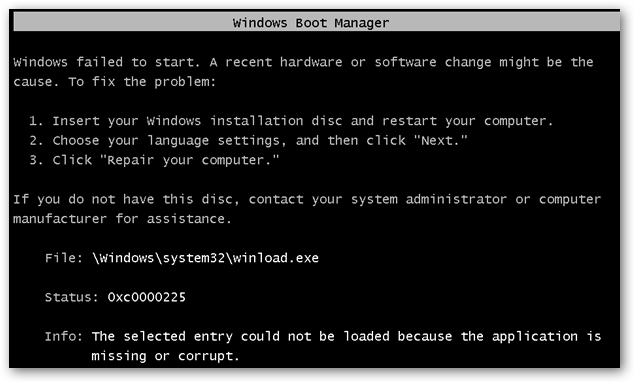
Is this the error? (so does it say \Windows\system32\winload.exe)
recent hardware or software change might be the cause.”
File: \Windows\system32\winload.exe
Status: 0xc0000225
Info: The selected entry could not be loaded because the application is missing or corrupt.
Here’s a screenshot of the error, but don’t worry, we’ll fix it.
image48.png
 

My Computer

Computer type
Laptop
Computer Manufacturer/Model Number
ACER ASPIRE 5742G
OS
Microsoft Windows 7 Home Premium 64-bits 7601 Multiprocessor Free Service Pack 1
CPU
Intel(R) Core(TM) i3 CPU M 370 @ 2.40GHz
Motherboard
Acer Aspire 5742G
Memory
4,00 GB
Graphics Card(s)
ATI Mobility Radeon HD 5400 Series
Sound Card
(1) AMD High Definition Audio Device (2) Realtek High Defi
Screen Resolution
1366 x 768 x 32 bits (4294967296 colors) @ 60 Hz
Hard Drives
WDC WD5000BEVT-22ZAT0
Other question: Do you have a win7 repair disk or win7 install dvd? It's needed to fix the error
 

My Computer

Computer type
Laptop
Computer Manufacturer/Model Number
ACER ASPIRE 5742G
OS
Microsoft Windows 7 Home Premium 64-bits 7601 Multiprocessor Free Service Pack 1
CPU
Intel(R) Core(TM) i3 CPU M 370 @ 2.40GHz
Motherboard
Acer Aspire 5742G
Memory
4,00 GB
Graphics Card(s)
ATI Mobility Radeon HD 5400 Series
Sound Card
(1) AMD High Definition Audio Device (2) Realtek High Defi
Screen Resolution
1366 x 768 x 32 bits (4294967296 colors) @ 60 Hz
Hard Drives
WDC WD5000BEVT-22ZAT0
Is this the error? (so does it say \Windows\system32\winload.exe)
recent hardware or software change might be the cause.”
File: \Windows\system32\winload.exe
Status: 0xc0000225
Info: The selected entry could not be loaded because the application is missing or corrupt.​
 

My Computer

Computer type
Laptop
Computer Manufacturer/Model Number
ACER ASPIRE 5742G
OS
Microsoft Windows 7 Home Premium 64-bits 7601 Multiprocessor Free Service Pack 1
CPU
Intel(R) Core(TM) i3 CPU M 370 @ 2.40GHz
Motherboard
Acer Aspire 5742G
Memory
4,00 GB
Graphics Card(s)
ATI Mobility Radeon HD 5400 Series
Sound Card
(1) AMD High Definition Audio Device (2) Realtek High Defi
Screen Resolution
1366 x 768 x 32 bits (4294967296 colors) @ 60 Hz
Hard Drives
WDC WD5000BEVT-22ZAT0

My Computer

Computer type
Laptop
Computer Manufacturer/Model Number
ACER ASPIRE 5742G
OS
Microsoft Windows 7 Home Premium 64-bits 7601 Multiprocessor Free Service Pack 1
CPU
Intel(R) Core(TM) i3 CPU M 370 @ 2.40GHz
Motherboard
Acer Aspire 5742G
Memory
4,00 GB
Graphics Card(s)
ATI Mobility Radeon HD 5400 Series
Sound Card
(1) AMD High Definition Audio Device (2) Realtek High Defi
Screen Resolution
1366 x 768 x 32 bits (4294967296 colors) @ 60 Hz
Hard Drives
WDC WD5000BEVT-22ZAT0

My Computer

Computer type
Laptop
Computer Manufacturer/Model Number
ACER ASPIRE 5742G
OS
Microsoft Windows 7 Home Premium 64-bits 7601 Multiprocessor Free Service Pack 1
CPU
Intel(R) Core(TM) i3 CPU M 370 @ 2.40GHz
Motherboard
Acer Aspire 5742G
Memory
4,00 GB
Graphics Card(s)
ATI Mobility Radeon HD 5400 Series
Sound Card
(1) AMD High Definition Audio Device (2) Realtek High Defi
Screen Resolution
1366 x 768 x 32 bits (4294967296 colors) @ 60 Hz
Hard Drives
WDC WD5000BEVT-22ZAT0
I followed the guide from howtogeek, click on 'repair and restart'. then the checkdisk not run. i was greeted by flashed BSOD. i boot the DVD again. repeat the step from howtogeek. it didn't work. the Windows 7 partition lost and managed to recover the partition. i stuck again to boot my Windows 7.
 

My Computer

OS
Windows 7 Professional 32bit
I followed the guide from howtogeek, click on 'repair and restart'. then the checkdisk not run. i was greeted by flashed BSOD. i boot the DVD again. repeat the step from howtogeek. it didn't work. the Windows 7 partition lost and managed to recover the partition. i stuck again to boot my Windows 7.
I'm not english, so maybe I understand you wrong(?) Still getting exactly the same BSOD-error?

If so, do a "startup repair" and tell me what is wrong!!
You can click on "view details" or "view diagnostics" or something like that. Status 0x0 means no problem.
 

My Computer

Computer type
Laptop
Computer Manufacturer/Model Number
ACER ASPIRE 5742G
OS
Microsoft Windows 7 Home Premium 64-bits 7601 Multiprocessor Free Service Pack 1
CPU
Intel(R) Core(TM) i3 CPU M 370 @ 2.40GHz
Motherboard
Acer Aspire 5742G
Memory
4,00 GB
Graphics Card(s)
ATI Mobility Radeon HD 5400 Series
Sound Card
(1) AMD High Definition Audio Device (2) Realtek High Defi
Screen Resolution
1366 x 768 x 32 bits (4294967296 colors) @ 60 Hz
Hard Drives
WDC WD5000BEVT-22ZAT0

My Computer

Computer type
Laptop
Computer Manufacturer/Model Number
ACER ASPIRE 5742G
OS
Microsoft Windows 7 Home Premium 64-bits 7601 Multiprocessor Free Service Pack 1
CPU
Intel(R) Core(TM) i3 CPU M 370 @ 2.40GHz
Motherboard
Acer Aspire 5742G
Memory
4,00 GB
Graphics Card(s)
ATI Mobility Radeon HD 5400 Series
Sound Card
(1) AMD High Definition Audio Device (2) Realtek High Defi
Screen Resolution
1366 x 768 x 32 bits (4294967296 colors) @ 60 Hz
Hard Drives
WDC WD5000BEVT-22ZAT0
Is this the error? (so does it say \Windows\system32\winload.exe)
recent hardware or software change might be the cause.”
File: \Windows\system32\winload.exe
Status: 0xc0000225
Info: The selected entry could not be loaded because the application is missing or corrupt.
please answer this question
 

My Computer

Computer type
Laptop
Computer Manufacturer/Model Number
ACER ASPIRE 5742G
OS
Microsoft Windows 7 Home Premium 64-bits 7601 Multiprocessor Free Service Pack 1
CPU
Intel(R) Core(TM) i3 CPU M 370 @ 2.40GHz
Motherboard
Acer Aspire 5742G
Memory
4,00 GB
Graphics Card(s)
ATI Mobility Radeon HD 5400 Series
Sound Card
(1) AMD High Definition Audio Device (2) Realtek High Defi
Screen Resolution
1366 x 768 x 32 bits (4294967296 colors) @ 60 Hz
Hard Drives
WDC WD5000BEVT-22ZAT0
I followed the guide from howtogeek, click on 'repair and restart'. then the checkdisk not run. i was greeted by flashed BSOD. i boot the DVD again. repeat the step from howtogeek. it didn't work. the Windows 7 partition lost and managed to recover the partition. i stuck again to boot my Windows 7.
Was the win7 partition lost? So you mean it wasn't there anymore in win7 recovery environment? An was it still visible in gparted?

How did you recover it?
 

My Computer

Computer type
Laptop
Computer Manufacturer/Model Number
ACER ASPIRE 5742G
OS
Microsoft Windows 7 Home Premium 64-bits 7601 Multiprocessor Free Service Pack 1
CPU
Intel(R) Core(TM) i3 CPU M 370 @ 2.40GHz
Motherboard
Acer Aspire 5742G
Memory
4,00 GB
Graphics Card(s)
ATI Mobility Radeon HD 5400 Series
Sound Card
(1) AMD High Definition Audio Device (2) Realtek High Defi
Screen Resolution
1366 x 768 x 32 bits (4294967296 colors) @ 60 Hz
Hard Drives
WDC WD5000BEVT-22ZAT0
Sorry because missed out ur questions..

1. After using GParted, i got the error msg exactly the same like the snapshot of yours.
2. I booted my CD and click on 'repair and restart' button. After restart, the bluescreen flash out and my computer restart automaticly, still cannot boot.
3. I booted the CD again. What was on the operating system is 'Windows 7 (recovered)'. I clicked on 'Windows 7 (recovered)' and 'Next'. I selected the 'Command prompt', ran bootrec.exe with these options -/fixmbr, /fixboot, /rebuildbcd. Restart and still no boot.
4. I booted the CD again but this time no operating system was listed. I checked whether the Windows partition is ok using GParted. What i found was the Windows partition became unallocated.
5. I booted the Minitool Partition Wizard to attempt partition recovery and the result i got back the Windows partition.
6. I booted the CD, 'Windows 7' is listed then selected the 'Startup repair' and also the bootrec.exe. The problem still the same. No boot. Only blinking cursor (not mouse cursor).

*Windows partition is marked as active.
*when i click the 'view details', all of them were 0x0
 

My Computer

OS
Windows 7 Professional 32bit
Don't fully understand. You sill have \Windows\system32\winload.exe error?
Start win7 recovery environment and select win7 and enter "command prompt".
Now do:
bcdedit /enum all

Is your win7 listed? Is it pointing to right partition? Does \Windows\system32\winload.exe exist on that partition?
 

My Computer

Computer type
Laptop
Computer Manufacturer/Model Number
ACER ASPIRE 5742G
OS
Microsoft Windows 7 Home Premium 64-bits 7601 Multiprocessor Free Service Pack 1
CPU
Intel(R) Core(TM) i3 CPU M 370 @ 2.40GHz
Motherboard
Acer Aspire 5742G
Memory
4,00 GB
Graphics Card(s)
ATI Mobility Radeon HD 5400 Series
Sound Card
(1) AMD High Definition Audio Device (2) Realtek High Defi
Screen Resolution
1366 x 768 x 32 bits (4294967296 colors) @ 60 Hz
Hard Drives
WDC WD5000BEVT-22ZAT0
Don't fully understand. You sill have \Windows\system32\winload.exe error?
Start win7 recovery environment and select win7 and enter "command prompt".
Now do:
bcdedit /enum all

Is your win7 listed? Is it pointing to right partition? Does \Windows\system32\winload.exe exist on that partition?

i have ran the command recommended by you, and the result is the same. black screen with blinking cursor.

yes. it is listed and the winload.exe is on that partition. i browse it using ubuntu live cd.

just now i remember what was shown on the screen before i got the bluescreen flash. it was "chkdsk program not found" something like that.

sorry if i troubling you.
 

My Computer

OS
Windows 7 Professional 32bit
just now i remember what was shown on the screen before i got the bluescreen flash. it was "chkdsk program not found" something like that.
=>next time read carefully!! Error messages are important.
I think it was winload.exe is not found. Or are you sure?

Do a "startup repair" again. No errors? Can you start in "safe mode"? If not ... where does it crash or freeze?
 

My Computer

Computer type
Laptop
Computer Manufacturer/Model Number
ACER ASPIRE 5742G
OS
Microsoft Windows 7 Home Premium 64-bits 7601 Multiprocessor Free Service Pack 1
CPU
Intel(R) Core(TM) i3 CPU M 370 @ 2.40GHz
Motherboard
Acer Aspire 5742G
Memory
4,00 GB
Graphics Card(s)
ATI Mobility Radeon HD 5400 Series
Sound Card
(1) AMD High Definition Audio Device (2) Realtek High Defi
Screen Resolution
1366 x 768 x 32 bits (4294967296 colors) @ 60 Hz
Hard Drives
WDC WD5000BEVT-22ZAT0
So checkdisk didn't start after gparted... hmm strange. Start it manually.
  • enter recovery environment and select "command prompt"
  • DIR C: or DIR D: . Now you know what your windows driveletter is in recovery environment. It isn't always C!
CHKDSK /F Y:

replace Y with actual driveletter. Any errors? Are they corrected?
 

My Computer

Computer type
Laptop
Computer Manufacturer/Model Number
ACER ASPIRE 5742G
OS
Microsoft Windows 7 Home Premium 64-bits 7601 Multiprocessor Free Service Pack 1
CPU
Intel(R) Core(TM) i3 CPU M 370 @ 2.40GHz
Motherboard
Acer Aspire 5742G
Memory
4,00 GB
Graphics Card(s)
ATI Mobility Radeon HD 5400 Series
Sound Card
(1) AMD High Definition Audio Device (2) Realtek High Defi
Screen Resolution
1366 x 768 x 32 bits (4294967296 colors) @ 60 Hz
Hard Drives
WDC WD5000BEVT-22ZAT0
just now i remember what was shown on the screen before i got the bluescreen flash. it was "chkdsk program not found" something like that.
=>next time read carefully!! Error messages are important.
I think it was winload.exe is not found. Or are you sure?

Do a "startup repair" again. No errors? Can you start in "safe mode"? If not ... where does it crash or freeze?
okay..i will remember that.

no errors after finished the "startup repair". i have no choice to boot in "safe mode" because no text or windows boot logo like the attachment appears on the screen. only the blinking cursor at its static position (top left of screen).

So checkdisk didn't start after gparted... hmm strange. Start it manually.
  • enter recovery environment and select "command prompt"
  • DIR C: or DIR D: . Now you know what your windows driveletter is in recovery environment. It isn't always C!
CHKDSK /F Y:

replace Y with actual driveletter. Any errors? Are they corrected?
after the chkdsk completed, it says "Windows has checked the file system and found no problems."
 

Attachments

  • vista_boot_screen_1.gif
    vista_boot_screen_1.gif
    3.1 KB · Views: 6

My Computer

OS
Windows 7 Professional 32bit
please give a summary:
  • how did you do "startup repair"? form repair disk, form installation dvd or from F8 and then "repair your computer"?
  • power on your computer and tap F8 multiple times with about 1 second in between. What happens?
 

My Computer

Computer type
Laptop
Computer Manufacturer/Model Number
ACER ASPIRE 5742G
OS
Microsoft Windows 7 Home Premium 64-bits 7601 Multiprocessor Free Service Pack 1
CPU
Intel(R) Core(TM) i3 CPU M 370 @ 2.40GHz
Motherboard
Acer Aspire 5742G
Memory
4,00 GB
Graphics Card(s)
ATI Mobility Radeon HD 5400 Series
Sound Card
(1) AMD High Definition Audio Device (2) Realtek High Defi
Screen Resolution
1366 x 768 x 32 bits (4294967296 colors) @ 60 Hz
Hard Drives
WDC WD5000BEVT-22ZAT0
if you ust power on your computer, you see a BIOS screen. What happens afterwards? No menu, no starting windows, no winload.exe error anymore? Tell me exact what happens. and after how many seconds
 

My Computer

Computer type
Laptop
Computer Manufacturer/Model Number
ACER ASPIRE 5742G
OS
Microsoft Windows 7 Home Premium 64-bits 7601 Multiprocessor Free Service Pack 1
CPU
Intel(R) Core(TM) i3 CPU M 370 @ 2.40GHz
Motherboard
Acer Aspire 5742G
Memory
4,00 GB
Graphics Card(s)
ATI Mobility Radeon HD 5400 Series
Sound Card
(1) AMD High Definition Audio Device (2) Realtek High Defi
Screen Resolution
1366 x 768 x 32 bits (4294967296 colors) @ 60 Hz
Hard Drives
WDC WD5000BEVT-22ZAT0
Back
Top