Cannot connect to internet on Windows 7

dkaykov5

New member
Local time
2:07 AM
Messages
5
I currently use a Macbook, on which I have two operating systems: Mac OS X 10.6 (Snow Leopard) and Windows 7. When I use the Snow Leopard partition, it connects to the internet quickly and using it is not a problem. However, Windows 7 does not let me connect to the internet at all. I usually use the house router for internet connection, which comes from a Westell VersaLink DSL. What should I do to get the internet up and running on Windows 7?

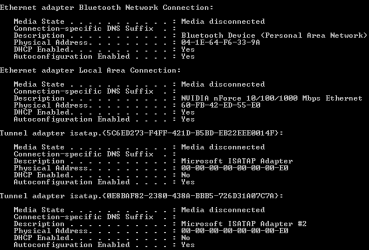
PS: I followed Dinesh's internet tutorial in order to fix the problem, and nothing worked. When using cmd.exe, the section called 'Ethernet adapter Local Area Connection' contained a media state that is disconnected and had no IPV4 address.

Any help? Thanks in advance.
 

My Computer

OS
Mac OS X
I currently use a Macbook, on which I have two operating systems: Mac OS X 10.6 (Snow Leopard) and Windows 7. When I use the Snow Leopard partition, it connects to the internet quickly and using it is not a problem. However, Windows 7 does not let me connect to the internet at all. I usually use the house router for internet connection, which comes from a Westell VersaLink DSL. What should I do to get the internet up and running on Windows 7?

PS: I followed Dinesh's internet tutorial in order to fix the problem, and nothing worked. When using cmd.exe, the section called 'Ethernet adapter Local Area Connection' contained a media state that is disconnected and had no IPV4 address.

Any help? Thanks in advance.


When you set up win did you use the homegroup model for networking? If so IPv6 may have an addy and IP? let us know


Ken J+
 

My Computer

Computer Manufacturer/Model Number
HP Pavillion dv-7 1005 Tx
OS
Win 8 Release candidate 8400
CPU
[email protected]
Memory
4 gigs
Graphics Card(s)
Nvidia 9600M
Sound Card
HD built-in
Monitor(s) Displays
17" Wxga
Screen Resolution
1440x900
Cooling
none
Internet Speed
45Mb down 5Mb up
During the setup, the only thing that showed up during the Homegroup model for networking was just a password that should be used to connect other computers. Where can I find the IPv6 address and IP? Also, is it possible that wireless could just be disabled in the computer itself? If so, how can I find out? I tried using the different troubleshooting methods to find out the problem and none of them work. Even after I updated the network adapter because it was missing, wireless networks (mine or my neighbors) are not found by the laptop at all.
 

My Computer

OS
Mac OS X
During the setup, the only thing that showed up during the Homegroup model for networking was just a password that should be used to connect other computers. Where can I find the IPv6 address and IP? Also, is it possible that wireless could just be disabled in the computer itself? If so, how can I find out? I tried using the different troubleshooting methods to find out the problem and none of them work. Even after I updated the network adapter because it was missing, wireless networks (mine or my neighbors) are not found by the laptop at all.

type cmd in your search bar at the windows orb and then type ipconfig /all (observe the space) you will get all your ip info including if your dhcp server and dns are enabled :geek:

to check if your wireless adapter is installed goto device manager (use the same search function) and then see if you have a wireless adapter installed or if you have any error marks such as a question mark or exclamation mark ?
 

My Computer

Computer Manufacturer/Model Number
built my own
OS
win7 ultimate / virtual box
CPU
Intel Core i7 3770K,1155, Ivy Bridge
Motherboard
MSI Z77A-G43
Memory
GSkill Ripjaws Z Series 1600 CL 9.0 16GB
Graphics Card(s)
KFA2 GeForce GTX 670 EX OC 2048MB GDDR5 PCI-E gfx card
Sound Card
onboard Nvidia HDMI audio
Monitor(s) Displays
ASUS VK222H 22" widescreen LCD monitor
Screen Resolution
1680x1050
Hard Drives
Kingston 128gb SSD
OCZ Vertex 90gb SSD
500GB WDCaviar 16mb 5000KS
320GB WDCaviar 16mb 3200AAKS sata 2
1TB Samsung 16mb HD103SJ sata 2
PSU
Corsair HX 750W ATX2.2 Modular
Cooling
Antec 25 Kuhler H2O 620
Keyboard
logitech
Mouse
logitech MX518
Internet Speed
7mb adsl
Thank you for replying :D

cmd.png
I attached a screenshot of what was found in cmd.exe.

In the device manager, the network controller has a yellow triangle with an exclamation point on it. Does this mean it's missing?

So what should I do now?
 

My Computer

OS
Mac OS X
Thank you for replying :D

View attachment 44795
I attached a screenshot of what was found in cmd.exe.

In the device manager, the network controller has a yellow triangle with an exclamation point on it. Does this mean it's missing?

So what should I do now?

ahhh looks like your device isnt installed properly yet :(

a question mark means windows doesnt know what it is
an exclamation mark means it has a conflict such as dma address etc (set by driver)
a red X means it is disabled

so you need to find a driver that will get your network card working properly without conflict :party:

do you know the exact name and model number of your network card ?
 

My Computer

Computer Manufacturer/Model Number
built my own
OS
win7 ultimate / virtual box
CPU
Intel Core i7 3770K,1155, Ivy Bridge
Motherboard
MSI Z77A-G43
Memory
GSkill Ripjaws Z Series 1600 CL 9.0 16GB
Graphics Card(s)
KFA2 GeForce GTX 670 EX OC 2048MB GDDR5 PCI-E gfx card
Sound Card
onboard Nvidia HDMI audio
Monitor(s) Displays
ASUS VK222H 22" widescreen LCD monitor
Screen Resolution
1680x1050
Hard Drives
Kingston 128gb SSD
OCZ Vertex 90gb SSD
500GB WDCaviar 16mb 5000KS
320GB WDCaviar 16mb 3200AAKS sata 2
1TB Samsung 16mb HD103SJ sata 2
PSU
Corsair HX 750W ATX2.2 Modular
Cooling
Antec 25 Kuhler H2O 620
Keyboard
logitech
Mouse
logitech MX518
Internet Speed
7mb adsl
I agree with Ickymay- I am not trained for Mac support but drivers are a common issue. If you can find the name and model number of your network card you can go to the manufacturer's website and download the updated driver if they have one.

Cheers,
Tara
Windows Outreach Team
 

My Computer

OS
Windows 7
In theory by booting into Snow Leopard you should be able to identify the network card name and model number to use for your googling :geek:

it's very likely to be intel so if it is you could use there Intel® Device Update Utility from within windows:)
 

My Computer

Computer Manufacturer/Model Number
built my own
OS
win7 ultimate / virtual box
CPU
Intel Core i7 3770K,1155, Ivy Bridge
Motherboard
MSI Z77A-G43
Memory
GSkill Ripjaws Z Series 1600 CL 9.0 16GB
Graphics Card(s)
KFA2 GeForce GTX 670 EX OC 2048MB GDDR5 PCI-E gfx card
Sound Card
onboard Nvidia HDMI audio
Monitor(s) Displays
ASUS VK222H 22" widescreen LCD monitor
Screen Resolution
1680x1050
Hard Drives
Kingston 128gb SSD
OCZ Vertex 90gb SSD
500GB WDCaviar 16mb 5000KS
320GB WDCaviar 16mb 3200AAKS sata 2
1TB Samsung 16mb HD103SJ sata 2
PSU
Corsair HX 750W ATX2.2 Modular
Cooling
Antec 25 Kuhler H2O 620
Keyboard
logitech
Mouse
logitech MX518
Internet Speed
7mb adsl
Unfortunately, I don't know the name of the network card. Is there a program that can scan the computer for the name and model of the network card? I looked in the System Profiler on Mac and all I found was, which I doubt is the correct name:

Card Type: AirPort Extreme (0x14E4, 0x93)
Firmware Version: Broadcom BCM43xx 1.0 (5.10.131.6 )
 

My Computer

OS
Mac OS X
Unfortunately, I don't know the name of the network card. Is there a program that can scan the computer for the name and model of the network card? I looked in the System Profiler on Mac and all I found was, which I doubt is the correct name:

Card Type: AirPort Extreme (0x14E4, 0x93)
Firmware Version: Broadcom BCM43xx 1.0 (5.10.131.6 )

I found some windows drivers here for the Broadcom BCM43xx 1.0 , the download speed is painfully slow but maybe worth a try :)
 

My Computer

Computer Manufacturer/Model Number
built my own
OS
win7 ultimate / virtual box
CPU
Intel Core i7 3770K,1155, Ivy Bridge
Motherboard
MSI Z77A-G43
Memory
GSkill Ripjaws Z Series 1600 CL 9.0 16GB
Graphics Card(s)
KFA2 GeForce GTX 670 EX OC 2048MB GDDR5 PCI-E gfx card
Sound Card
onboard Nvidia HDMI audio
Monitor(s) Displays
ASUS VK222H 22" widescreen LCD monitor
Screen Resolution
1680x1050
Hard Drives
Kingston 128gb SSD
OCZ Vertex 90gb SSD
500GB WDCaviar 16mb 5000KS
320GB WDCaviar 16mb 3200AAKS sata 2
1TB Samsung 16mb HD103SJ sata 2
PSU
Corsair HX 750W ATX2.2 Modular
Cooling
Antec 25 Kuhler H2O 620
Keyboard
logitech
Mouse
logitech MX518
Internet Speed
7mb adsl
So I downloaded the drivers from the link provided and the wireless internet now works. Thank you SO much for your help :D

The problem is now resolved!
 

My Computer

OS
Mac OS X
So I downloaded the drivers from the link provided and the wireless internet now works. Thank you SO much for your help :D

The problem is now resolved!

excellent glad your sorted :party:
 

My Computer

Computer Manufacturer/Model Number
built my own
OS
win7 ultimate / virtual box
CPU
Intel Core i7 3770K,1155, Ivy Bridge
Motherboard
MSI Z77A-G43
Memory
GSkill Ripjaws Z Series 1600 CL 9.0 16GB
Graphics Card(s)
KFA2 GeForce GTX 670 EX OC 2048MB GDDR5 PCI-E gfx card
Sound Card
onboard Nvidia HDMI audio
Monitor(s) Displays
ASUS VK222H 22" widescreen LCD monitor
Screen Resolution
1680x1050
Hard Drives
Kingston 128gb SSD
OCZ Vertex 90gb SSD
500GB WDCaviar 16mb 5000KS
320GB WDCaviar 16mb 3200AAKS sata 2
1TB Samsung 16mb HD103SJ sata 2
PSU
Corsair HX 750W ATX2.2 Modular
Cooling
Antec 25 Kuhler H2O 620
Keyboard
logitech
Mouse
logitech MX518
Internet Speed
7mb adsl
Unfortunately, I don't know the name of the network card. Is there a program that can scan the computer for the name and model of the network card? I looked in the System Profiler on Mac and all I found was, which I doubt is the correct name:

Card Type: AirPort Extreme (0x14E4, 0x93)
Firmware Version: Broadcom BCM43xx 1.0 (5.10.131.6 )

i have the same problem and that is what my my network card is. do you have any suggestions??
 

My Computer

OS
Windows 7
Unfortunately, I don't know the name of the network card. Is there a program that can scan the computer for the name and model of the network card? I looked in the System Profiler on Mac and all I found was, which I doubt is the correct name:

Card Type: AirPort Extreme (0x14E4, 0x93)
Firmware Version: Broadcom BCM43xx 1.0 (5.10.131.6 )

i have the same problem and that is what my my network card is. do you have any suggestions??

try the driver from the link in my post here as it covers the "Broadcom BCM43xx 1.0 (5.10.131.6 )" :geek:
 

My Computer

Computer Manufacturer/Model Number
built my own
OS
win7 ultimate / virtual box
CPU
Intel Core i7 3770K,1155, Ivy Bridge
Motherboard
MSI Z77A-G43
Memory
GSkill Ripjaws Z Series 1600 CL 9.0 16GB
Graphics Card(s)
KFA2 GeForce GTX 670 EX OC 2048MB GDDR5 PCI-E gfx card
Sound Card
onboard Nvidia HDMI audio
Monitor(s) Displays
ASUS VK222H 22" widescreen LCD monitor
Screen Resolution
1680x1050
Hard Drives
Kingston 128gb SSD
OCZ Vertex 90gb SSD
500GB WDCaviar 16mb 5000KS
320GB WDCaviar 16mb 3200AAKS sata 2
1TB Samsung 16mb HD103SJ sata 2
PSU
Corsair HX 750W ATX2.2 Modular
Cooling
Antec 25 Kuhler H2O 620
Keyboard
logitech
Mouse
logitech MX518
Internet Speed
7mb adsl
Back
Top