Cannot connect to network

mollydoggy1971

New member
Local time
11:44 AM
Messages
18
I am running Windows 7 Ultimate x64. I have all my drives shared on my network, but when I try to access the network on another machine, I can see the computer, but cannot connect to the computer, as it asks for a username and password. I have homegroup turned off on this machine, and also have user names and passwords disabled. Can anyone help me get things working? I had it working before I had to do a reinstall, and now I can't figure it out. Thanks in advance for your help!
 

My Computer

OS
Windows 7 Ultimate x64
CPU
AMD Athlon II x4 620
Motherboard
Gigabyte
Memory
8GB
Graphics Card(s)
EVGA 1GB
Monitor(s) Displays
Acer 23"
Hard Drives
12TB
Case
CoolerMaster
Keyboard
Bamboo
Mouse
Bamboo
Can anyone please help me here? I am desperately seeking a good answer!
 

My Computer

OS
Windows 7 Ultimate x64
CPU
AMD Athlon II x4 620
Motherboard
Gigabyte
Memory
8GB
Graphics Card(s)
EVGA 1GB
Monitor(s) Displays
Acer 23"
Hard Drives
12TB
Case
CoolerMaster
Keyboard
Bamboo
Mouse
Bamboo
If memory serves me correct….. Microsoft changed the way network connections work; you MUST have a password in order to make a network connection. HomeGroup uses a password to connect, if you disabled passwords this may be why it does not work.
 

My Computer

Computer type
PC/Desktop
Computer Manufacturer/Model Number
Dell OP7010
OS
Windows 7 Enterprise (x64); Windows Server 2008 R2 (x64)
Memory
16GB
Monitor(s) Displays
4 Dell 24" LCD
Screen Resolution
1280x1024
Keyboard
Dell
Mouse
Dell Optical
Internet Speed
40meg
Simply provide a password for your user profile and then try to connect.
 

My Computer

Computer Manufacturer/Model Number
MacBook Pro
OS
Lion
CPU
i5
Memory
4GB
Graphics Card(s)
Intel
Screen Resolution
1200x800
Hard Drives
Seagate FreeAgent GO 250GB Ext. HDD
I did try using a password, but it did not work. I am 100% certain that you do not have to use passwords, because I had it up and running two weeks ago, on my previous install. I was forced to do a complete reinstall, however, and am missing something, but I can't for the life of me figure out what.
 

My Computer

OS
Windows 7 Ultimate x64
CPU
AMD Athlon II x4 620
Motherboard
Gigabyte
Memory
8GB
Graphics Card(s)
EVGA 1GB
Monitor(s) Displays
Acer 23"
Hard Drives
12TB
Case
CoolerMaster
Keyboard
Bamboo
Mouse
Bamboo
Homegroup does require you to have a "group" password for all the computers to work. I am sure that if you use "workgroup" you dont need a password.

How many computers are you trying to connect together and what are their OS? That way we can see what we can do about narrowing down the problem.
 

My Computer

Computer Manufacturer/Model Number
HP Pavilion Elite HPE-410f
OS
Windows 7 Ultimate x64
CPU
AMD Phenom x6 1045t
Motherboard
N/A
Memory
8 GB
Graphics Card(s)
ATI Radeon HD 5570
Sound Card
Realtek Highdefinition Audio / 5.1 Dolby Setup
Monitor(s) Displays
HP w2207h Widescreen
Screen Resolution
1680*1050
Hard Drives
1 TB (fixed), 320 Portable maxtor, Server Hard drives
PSU
350 Watt
Case
HP CASE
Cooling
Bass
Keyboard
Logitech MX 5500
Mouse
Logitech MX 5500
Internet Speed
ROAD RUNNER 16MB D/512 U
If you are using a WORKGROUP and all computers have the same username and password, say Username = Admin and Password = Pa$$w0rd you can connect to any computer without the need to enter a password because the password will be passed in the background. Maybe that is what you were doing 2 weeks ago????
 

My Computer

Computer type
PC/Desktop
Computer Manufacturer/Model Number
Dell OP7010
OS
Windows 7 Enterprise (x64); Windows Server 2008 R2 (x64)
Memory
16GB
Monitor(s) Displays
4 Dell 24" LCD
Screen Resolution
1280x1024
Keyboard
Dell
Mouse
Dell Optical
Internet Speed
40meg
that is actually how i have my computer. I just have to turn on my computers, enter the password for the protection and then lock the windows with Windows Key + L.... other than that i have full access to everything.

net user administrator /active:yes

it is the best thing since slice bread!
 

My Computer

Computer Manufacturer/Model Number
HP Pavilion Elite HPE-410f
OS
Windows 7 Ultimate x64
CPU
AMD Phenom x6 1045t
Motherboard
N/A
Memory
8 GB
Graphics Card(s)
ATI Radeon HD 5570
Sound Card
Realtek Highdefinition Audio / 5.1 Dolby Setup
Monitor(s) Displays
HP w2207h Widescreen
Screen Resolution
1680*1050
Hard Drives
1 TB (fixed), 320 Portable maxtor, Server Hard drives
PSU
350 Watt
Case
HP CASE
Cooling
Bass
Keyboard
Logitech MX 5500
Mouse
Logitech MX 5500
Internet Speed
ROAD RUNNER 16MB D/512 U
What happens when you type this from the command prompt?:

net use * \\computername\c$ <enter>
 

My Computer

Computer type
PC/Desktop
Computer Manufacturer/Model Number
Dell OP7010
OS
Windows 7 Enterprise (x64); Windows Server 2008 R2 (x64)
Memory
16GB
Monitor(s) Displays
4 Dell 24" LCD
Screen Resolution
1280x1024
Keyboard
Dell
Mouse
Dell Optical
Internet Speed
40meg
Microsoft Windows [Version 6.1.7600]
Copyright (c) 2009 Microsoft Corporation. All rights reserved.
C:\Users\Administrator>net use
New connections will be remembered.
There are no entries in the list.

C:\Users\Administrator>net use * \\server-pc\c$
Drive Z: is now connected to \\server-pc\c$.
The command completed successfully.

C:\Users\Administrator>
 

My Computer

Computer Manufacturer/Model Number
HP Pavilion Elite HPE-410f
OS
Windows 7 Ultimate x64
CPU
AMD Phenom x6 1045t
Motherboard
N/A
Memory
8 GB
Graphics Card(s)
ATI Radeon HD 5570
Sound Card
Realtek Highdefinition Audio / 5.1 Dolby Setup
Monitor(s) Displays
HP w2207h Widescreen
Screen Resolution
1680*1050
Hard Drives
1 TB (fixed), 320 Portable maxtor, Server Hard drives
PSU
350 Watt
Case
HP CASE
Cooling
Bass
Keyboard
Logitech MX 5500
Mouse
Logitech MX 5500
Internet Speed
ROAD RUNNER 16MB D/512 U
So that works, but using Windows Explorer does not???
 

My Computer

Computer type
PC/Desktop
Computer Manufacturer/Model Number
Dell OP7010
OS
Windows 7 Enterprise (x64); Windows Server 2008 R2 (x64)
Memory
16GB
Monitor(s) Displays
4 Dell 24" LCD
Screen Resolution
1280x1024
Keyboard
Dell
Mouse
Dell Optical
Internet Speed
40meg
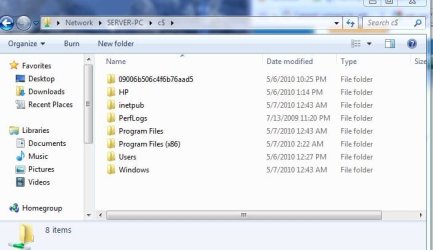
Actually that works too!


Just when i did it from the Command Prompt... it automatically mapped the drive for me.
 

Attachments

  • Server.JPG
    Server.JPG
    51.1 KB · Views: 3

My Computer

Computer Manufacturer/Model Number
HP Pavilion Elite HPE-410f
OS
Windows 7 Ultimate x64
CPU
AMD Phenom x6 1045t
Motherboard
N/A
Memory
8 GB
Graphics Card(s)
ATI Radeon HD 5570
Sound Card
Realtek Highdefinition Audio / 5.1 Dolby Setup
Monitor(s) Displays
HP w2207h Widescreen
Screen Resolution
1680*1050
Hard Drives
1 TB (fixed), 320 Portable maxtor, Server Hard drives
PSU
350 Watt
Case
HP CASE
Cooling
Bass
Keyboard
Logitech MX 5500
Mouse
Logitech MX 5500
Internet Speed
ROAD RUNNER 16MB D/512 U
What about disabling firewall in all machine and check?
 

My Computer

Computer Manufacturer/Model Number
MacBook Pro
OS
Lion
CPU
i5
Memory
4GB
Graphics Card(s)
Intel
Screen Resolution
1200x800
Hard Drives
Seagate FreeAgent GO 250GB Ext. HDD
Yes the command prompt does map the drive and that is a permanent map (i.e. New connections will be remembered) so you will have to disconnect that if you don't want it to be permanent
 

My Computer

Computer type
PC/Desktop
Computer Manufacturer/Model Number
Dell OP7010
OS
Windows 7 Enterprise (x64); Windows Server 2008 R2 (x64)
Memory
16GB
Monitor(s) Displays
4 Dell 24" LCD
Screen Resolution
1280x1024
Keyboard
Dell
Mouse
Dell Optical
Internet Speed
40meg
I am not understanding the question???

Disable the firewall in "all machine"

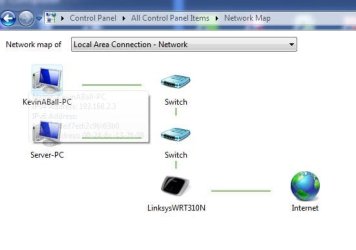
my firewalls are actually UP when i am doing this.. I am using NIS 2010 and going through a router.

Maybe going through switches but definitly the server and my computer have software firewalls enabled.

I also included my map.
 

Attachments

  • map.JPG
    map.JPG
    29.8 KB · Views: 3

My Computer

Computer Manufacturer/Model Number
HP Pavilion Elite HPE-410f
OS
Windows 7 Ultimate x64
CPU
AMD Phenom x6 1045t
Motherboard
N/A
Memory
8 GB
Graphics Card(s)
ATI Radeon HD 5570
Sound Card
Realtek Highdefinition Audio / 5.1 Dolby Setup
Monitor(s) Displays
HP w2207h Widescreen
Screen Resolution
1680*1050
Hard Drives
1 TB (fixed), 320 Portable maxtor, Server Hard drives
PSU
350 Watt
Case
HP CASE
Cooling
Bass
Keyboard
Logitech MX 5500
Mouse
Logitech MX 5500
Internet Speed
ROAD RUNNER 16MB D/512 U
I meant it for the OP
 

My Computer

Computer Manufacturer/Model Number
MacBook Pro
OS
Lion
CPU
i5
Memory
4GB
Graphics Card(s)
Intel
Screen Resolution
1200x800
Hard Drives
Seagate FreeAgent GO 250GB Ext. HDD
I did try using a password, but it did not work. I am 100% certain that you do not have to use passwords, because I had it up and running two weeks ago, on my previous install. I was forced to do a complete reinstall, however, and am missing something, but I can't for the life of me figure out what.
I have an idea.... Open the Network and Sharing Center, on the left click on Change advanced sharing settings, and depending on whether you're connecting to a Home or Work or a Public network (shown in Network and Sharing Center) disable the Password protected sharing feature.

I used to have the same problem, and that sorted it out for me.
 

My Computer

Computer type
PC/Desktop
OS
Win 10 x64 Pro x64 / Ubuntu 15.10 x64
CPU
Intel i7-4960X
Motherboard
Asus Rampage IV Black Edition
Memory
4x8GB Corsair Dominator Platinum @2400MHz 10-12-12-31
Graphics Card(s)
2x MSI GTX780Ti 3GB (SLI)
Sound Card
Onboard SupremeFX (Cirrus Logic CS4398)
Monitor(s) Displays
3x LG Cinema 27" IPS LED (27MP65)
Screen Resolution
[1920x1080]x3
Hard Drives
Crucial M500 120GB, Crucial M500 480GB, Toshiba DT01ACA200 2TB
PSU
CoolerMaster V1000
Case
Corsair Obsidian 750D
Cooling
ThermalTake Water 3.0 Extreme, 4xSP120, 3xAF120
Keyboard
Moshi Luna
Mouse
Logitech G700s / Roccat Tyon
Internet Speed
4Mb uncapped ADSL (Afrihost)
Antivirus
MS Security Essentials
Browser
Chrome... Duh. (:
Okay, now I'm just confused. I'll answer first the question that I understand best. I am using Windows 7 Ultimate x64, and am trying to connect to the shared drives with an Ubuntu Linux (Lucid Lynx) system. When I had things running before, I had to enter no special commands at any time. It was all done through the GUI on the Windows machine.

Now, when I enter that command, I get the following:
Microsoft Windows [Version 6.1.7600]
Copyright (c) 2009 Microsoft Corporation. All rights reserved.

C:\Users\Mollydog>net use * \\mollydog-pc\c$
Drive Z: is now connected to \\mollydog-pc\c$.

The command completed successfully.


C:\Users\Mollydog>

I have no idea what that did, or why you had me type it, but there you go.

Now, I am NOT using Homegroup. I do not WANT to use Homegroup. I do not know how, nor do I really care to learn how to use Ipv6. It's far too complicated for what I want to do, which is simply transfer files from the Ubuntu machine to the archives on the Windows machine without having to use a flash drive. When I connect to Network on my Ubuntu machine, I see "Windows Network," which I click to access. It then shows "Mollydog-PC" and "Ubuntu-PC." I click on the Mollydog-PC and it says I need to enter a username and password. So, I set up a Username and Password on the Windows machine. Still no access, it says invalid username or password.

I hope this information clears things up. If not, please tell me what else I need to add/do, and I will give it a shot. I have never had such difficulty in setting up my network before. I don't understand why it's such a chore this time. Thanks again for your help!
 

My Computer

OS
Windows 7 Ultimate x64
CPU
AMD Athlon II x4 620
Motherboard
Gigabyte
Memory
8GB
Graphics Card(s)
EVGA 1GB
Monitor(s) Displays
Acer 23"
Hard Drives
12TB
Case
CoolerMaster
Keyboard
Bamboo
Mouse
Bamboo
More info, as I just saw the whole second page of postings. Password protected sharing is turned OFF. Although I have File and Printer sharing allowed in the firewall, I turned it off, and it made no difference. I don't have a firewall running on the Ubuntu machine. I also removed that mapped drive one of you had me make, as it's unnecessary, and inaccessible on the network. Hope this helps as well!
 

My Computer

OS
Windows 7 Ultimate x64
CPU
AMD Athlon II x4 620
Motherboard
Gigabyte
Memory
8GB
Graphics Card(s)
EVGA 1GB
Monitor(s) Displays
Acer 23"
Hard Drives
12TB
Case
CoolerMaster
Keyboard
Bamboo
Mouse
Bamboo
Anyone have any ideas for me to try? I think some people are trying to make this more difficult than it needs to be. I've never had to do anything too involved to make my shared drives and printer accessible on the network. It's generally been pretty simple, which leads me to believe that I'm missing something basic.
 

My Computer

OS
Windows 7 Ultimate x64
CPU
AMD Athlon II x4 620
Motherboard
Gigabyte
Memory
8GB
Graphics Card(s)
EVGA 1GB
Monitor(s) Displays
Acer 23"
Hard Drives
12TB
Case
CoolerMaster
Keyboard
Bamboo
Mouse
Bamboo
Back
Top