Solved Cannot create system partition.

davidmn

New member
Local time
7:50 PM
Messages
13
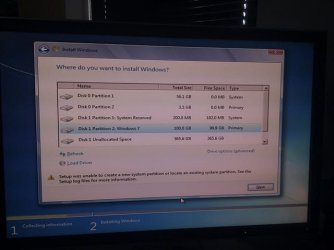
I'm trying to install W7 on a new machine but when selecting the install location I get the error "cannot create system partition". In the past I've managed to get past this but without the system partition I cannot install SP1.

What do I do? What are the specs of a System Partition so I can just make one in Linux because W7 is clearly incapable of doing anything itself.
 

My Computer

Computer Manufacturer/Model Number
Hand Built
OS
Fedora
CPU
Intel i5 2500
Motherboard
Asus P8P67 (Revision 3)
Memory
2x2GB Crucial DDR3 1333MHz
Graphics Card(s)
Geforce GTX 460
Sound Card
Motherboard's On board Sound Card
Monitor(s) Displays
24" Dell
Screen Resolution
1920x1200
Hard Drives
2 x Crucial C300 64GB
2 x 1TB
1 x 500GB
PSU
Coolermaster Silent Pro M 700W
Case
Coolermaster HAF 922
Cooling
Stock
Keyboard
Emprex 6310U
Mouse
Razer Krait
Internet Speed
~2Mbs
are you trying to boot from the sp1 update disc?
You run the disc from inside of windows.
 

My Computer

Computer Manufacturer/Model Number
Insane hobo technologies. ;-)
OS
Windows 7 x64
CPU
Intel i7 2600k
Motherboard
Asrock z68 extreme 4 gen 3
Memory
G.skill Ripjaw 16gigs @ 1866
Graphics Card(s)
Nvidia gtx580 (evga)
Sound Card
Integrated HD audio + hdmi
Monitor(s) Displays
24" ASUS widescreen + 42" insignia
Screen Resolution
1080p (1920x1080)
Hard Drives
128 Samsung 830
256 Samsung 840
3 x 1tb storage drive (various)
1 western digital 1tb (eSATA)
1 Seagate 1tb (eSATA)
PSU
1 kilowatt SLI/Crossfire rated Silverstone modular
Case
NZXT Phantom + additional 220 fan
Cooling
Zalmann
Keyboard
Microsoft wireless 3000 (v2)
Mouse
MS - wireless 5000 (bluetrack)
Internet Speed
depends on if you ask me or my provider.
Other Info
The above information is provided as is, and the author assumes no responsibility for issues it may cause with your sanity or fanboyism.
No no no. I currently don't have W7 installed. I did have it installed but without a system partition meaning I couldn't apply the update. I am trying to do a fresh install this time with a system partition so I can apply SP1 once it's up and running.
 

My Computer

Computer Manufacturer/Model Number
Hand Built
OS
Fedora
CPU
Intel i5 2500
Motherboard
Asus P8P67 (Revision 3)
Memory
2x2GB Crucial DDR3 1333MHz
Graphics Card(s)
Geforce GTX 460
Sound Card
Motherboard's On board Sound Card
Monitor(s) Displays
24" Dell
Screen Resolution
1920x1200
Hard Drives
2 x Crucial C300 64GB
2 x 1TB
1 x 500GB
PSU
Coolermaster Silent Pro M 700W
Case
Coolermaster HAF 922
Cooling
Stock
Keyboard
Emprex 6310U
Mouse
Razer Krait
Internet Speed
~2Mbs
Hello davidmn, welcome to Seven Forums!


Perhaps you would have better success if you do a complete wipe secure erase of the entire Hard Disk Drive first and then start the clean install process from there, have a look at Step Two #3 of the Optimize tutorial below to see how to create a "System" System Reserved partition and the reasons for its use and be sure to post back with any further questions you may have and to keep us informed.


My Computer

Computer Manufacturer/Model Number
* BFK Customs *
OS
W 7 64-bit Ultimate
CPU
Intel Q9550 Yorkfield
Motherboard
ASUS P5Q Pro
Memory
8GB Dominator 8500C5D
Graphics Card(s)
ATI : XFX 5870
Sound Card
Realtek HD Audio 7-1
Monitor(s) Displays
1x 47" LCD HDMI & 3x 26" LCD HDMI
Screen Resolution
1920x1080P & 1920x1200
Hard Drives
1x 80GB Intel X25-M G2 SSD : 1x 500GB & 1x 640GB WD Caviar Black(s)
PSU
Corsair 620HX
Case
Cooler Master RC-690
Cooling
Tuniq Tower 120, 2x 140mm and 3x 120mm case fans
Keyboard
Microsoft 500
Mouse
Razer Diamondback 3G
Internet Speed
14 Mb/s
Other Info
1x Koutech 3Gb/s SATA HDD Hot Swap Rack
Did you not have a System partition because you were using GRUB boot loader to boot Win7?

If so, wipe the HD as specified and reinstall Win7 without the GRUB corruption. If you need to install Linux distro I would put it on another HD booted via BIOS Boot menu to avoid corrupting Win7.

If it wasn't because of GRUB then please explain more fully how you were without a System (contains boot files) partition and how this interfered with SP1 install.
 
I don't have GRUB on this drive.

I think Barefoot Kid's post contains the solution. I'll have a go once I come back from Ikea.
 

My Computer

Computer Manufacturer/Model Number
Hand Built
OS
Fedora
CPU
Intel i5 2500
Motherboard
Asus P8P67 (Revision 3)
Memory
2x2GB Crucial DDR3 1333MHz
Graphics Card(s)
Geforce GTX 460
Sound Card
Motherboard's On board Sound Card
Monitor(s) Displays
24" Dell
Screen Resolution
1920x1200
Hard Drives
2 x Crucial C300 64GB
2 x 1TB
1 x 500GB
PSU
Coolermaster Silent Pro M 700W
Case
Coolermaster HAF 922
Cooling
Stock
Keyboard
Emprex 6310U
Mouse
Razer Krait
Internet Speed
~2Mbs
Be sure to post back here with an update.
 

My Computer

Computer Manufacturer/Model Number
* BFK Customs *
OS
W 7 64-bit Ultimate
CPU
Intel Q9550 Yorkfield
Motherboard
ASUS P5Q Pro
Memory
8GB Dominator 8500C5D
Graphics Card(s)
ATI : XFX 5870
Sound Card
Realtek HD Audio 7-1
Monitor(s) Displays
1x 47" LCD HDMI & 3x 26" LCD HDMI
Screen Resolution
1920x1080P & 1920x1200
Hard Drives
1x 80GB Intel X25-M G2 SSD : 1x 500GB & 1x 640GB WD Caviar Black(s)
PSU
Corsair 620HX
Case
Cooler Master RC-690
Cooling
Tuniq Tower 120, 2x 140mm and 3x 120mm case fans
Keyboard
Microsoft 500
Mouse
Razer Diamondback 3G
Internet Speed
14 Mb/s
Other Info
1x Koutech 3Gb/s SATA HDD Hot Swap Rack
No joy!

I have created a partition on the drive I want to install it to called System Reserved, it's 200MB. Then I created a 100GB partition called Windows 7 to install the OS to.

When try to install to the Windows 7 partition I get the same message:

"Setup was unable to create a new system partition or locate an existing system partition. See the Setup log files for more information"

Where are these log files?
 

My Computer

Computer Manufacturer/Model Number
Hand Built
OS
Fedora
CPU
Intel i5 2500
Motherboard
Asus P8P67 (Revision 3)
Memory
2x2GB Crucial DDR3 1333MHz
Graphics Card(s)
Geforce GTX 460
Sound Card
Motherboard's On board Sound Card
Monitor(s) Displays
24" Dell
Screen Resolution
1920x1200
Hard Drives
2 x Crucial C300 64GB
2 x 1TB
1 x 500GB
PSU
Coolermaster Silent Pro M 700W
Case
Coolermaster HAF 922
Cooling
Stock
Keyboard
Emprex 6310U
Mouse
Razer Krait
Internet Speed
~2Mbs
There is no need for the 100MB (or 200MB) partition. Just define your 100GB partition. But you have to make it "active" - else the MBR will not find it.

When you have a predefines partition where you install, the bootmgr will be set into that partition.

Two ways to do that. Either with Partition Wizard bootable CD (last entry on webpage). Or you define the partition with Command Prompt on your installation CD. The commands are:

Diskpart
List disk
Select disk n (where n is the number of the disk where you want to define)
Create partition primary size=100000
Active
Exit

Note: the size must always be given in MBs - thus the 100000
 
Last edited:

My Computer

Computer Manufacturer/Model Number
HP, Dell, Gateway, Toshiba - 4 laptops and 2 desktops
OS
Vista, Windows7, Mint Mate, Zorin, Windows 8
CPU
from 1.6GHz Duo to i7
Monitor(s) Displays
2x HP w2207
Hard Drives
5x HDD, 7x SSD, 12x Externals
Keyboard
with trackball - no mices
Mouse
Trackball mice
Internet Speed
DSL 6000
Where did you get Win7? Did you burn the DVD yourself? If so, try burning another using ImgBurn at 4x speed, after verifying the ISO integrity.

You can also write the ISO to flash stick by installing UltraISO trial version, on File tab Open ISO or DVD, on Bootable tab Write Disk Image, Format, Write. Boot under USB or HD's.

Have you wiped the HD using Diskpart "Clean " command given by BFK earlier? Then try creating your partition with installer.

Try resetting the CMOS: Clear CMOS - 3 Ways to Clear the CMOS - Reset BIOS
While in BIOS setup, set SATA controller to AHCI to try install.
 
Here we go, a "screenshot".


I did use the clean all command in cmd.
 

Attachments

  • IMG_20110716_175351.jpg
    IMG_20110716_175351.jpg
    40 KB · Views: 184

My Computer

Computer Manufacturer/Model Number
Hand Built
OS
Fedora
CPU
Intel i5 2500
Motherboard
Asus P8P67 (Revision 3)
Memory
2x2GB Crucial DDR3 1333MHz
Graphics Card(s)
Geforce GTX 460
Sound Card
Motherboard's On board Sound Card
Monitor(s) Displays
24" Dell
Screen Resolution
1920x1200
Hard Drives
2 x Crucial C300 64GB
2 x 1TB
1 x 500GB
PSU
Coolermaster Silent Pro M 700W
Case
Coolermaster HAF 922
Cooling
Stock
Keyboard
Emprex 6310U
Mouse
Razer Krait
Internet Speed
~2Mbs
Unplug the separate HD Disk0, move it's cable to the Win7 target HD so it becomes Win7 install target HD.

Make sure it is still set as first HD to boot in BIOS setup, after DVD drive.

Later after install plug back in other HD, boot it using one-time BIOS Boot Menu key at avoid having to use GRUB on Win7.
 
Disk 0 is my SSD with Fedora on it. Formatted as Ext4.

Also I bought a serial of tinternet and I burned my own disk. I'll burn a different one now and see if that works.
 

My Computer

Computer Manufacturer/Model Number
Hand Built
OS
Fedora
CPU
Intel i5 2500
Motherboard
Asus P8P67 (Revision 3)
Memory
2x2GB Crucial DDR3 1333MHz
Graphics Card(s)
Geforce GTX 460
Sound Card
Motherboard's On board Sound Card
Monitor(s) Displays
24" Dell
Screen Resolution
1920x1200
Hard Drives
2 x Crucial C300 64GB
2 x 1TB
1 x 500GB
PSU
Coolermaster Silent Pro M 700W
Case
Coolermaster HAF 922
Cooling
Stock
Keyboard
Emprex 6310U
Mouse
Razer Krait
Internet Speed
~2Mbs
Unplug the separate HD Disk0, move it's cable to the Win7 target HD so it becomes Win7 install target HD.

Make sure it is still set as first HD to boot in BIOS setup, after DVD drive.

Later after install plug back in other HD, boot it using one-time BIOS Boot Menu key at avoid having to use GRUB on Win7.
Go with Greg's advice.
 

My Computer

OS
ME/XP/Vista/Win7
Ok I've unplugged all drives apart from the target one. I'm also using a new disk.
 

My Computer

Computer Manufacturer/Model Number
Hand Built
OS
Fedora
CPU
Intel i5 2500
Motherboard
Asus P8P67 (Revision 3)
Memory
2x2GB Crucial DDR3 1333MHz
Graphics Card(s)
Geforce GTX 460
Sound Card
Motherboard's On board Sound Card
Monitor(s) Displays
24" Dell
Screen Resolution
1920x1200
Hard Drives
2 x Crucial C300 64GB
2 x 1TB
1 x 500GB
PSU
Coolermaster Silent Pro M 700W
Case
Coolermaster HAF 922
Cooling
Stock
Keyboard
Emprex 6310U
Mouse
Razer Krait
Internet Speed
~2Mbs
Woo! I've got it installing. However changing two variables means I can't tell what did it but woo none the less. Thanks for your help guys. I'll let you know how installing SP1 goes.
 

My Computer

Computer Manufacturer/Model Number
Hand Built
OS
Fedora
CPU
Intel i5 2500
Motherboard
Asus P8P67 (Revision 3)
Memory
2x2GB Crucial DDR3 1333MHz
Graphics Card(s)
Geforce GTX 460
Sound Card
Motherboard's On board Sound Card
Monitor(s) Displays
24" Dell
Screen Resolution
1920x1200
Hard Drives
2 x Crucial C300 64GB
2 x 1TB
1 x 500GB
PSU
Coolermaster Silent Pro M 700W
Case
Coolermaster HAF 922
Cooling
Stock
Keyboard
Emprex 6310U
Mouse
Razer Krait
Internet Speed
~2Mbs
Yeah. I had them on the same physical drive once. You have to install Windows first because it's bootloader will overwrite GRUB which is a pain. So once this has installed I'll go into GRUB on linux and add an entry for windows so I can continue to boot from the SSD goodness.
 

My Computer

Computer Manufacturer/Model Number
Hand Built
OS
Fedora
CPU
Intel i5 2500
Motherboard
Asus P8P67 (Revision 3)
Memory
2x2GB Crucial DDR3 1333MHz
Graphics Card(s)
Geforce GTX 460
Sound Card
Motherboard's On board Sound Card
Monitor(s) Displays
24" Dell
Screen Resolution
1920x1200
Hard Drives
2 x Crucial C300 64GB
2 x 1TB
1 x 500GB
PSU
Coolermaster Silent Pro M 700W
Case
Coolermaster HAF 922
Cooling
Stock
Keyboard
Emprex 6310U
Mouse
Razer Krait
Internet Speed
~2Mbs
Back
Top