Cannot format usb flash drive

cimage

New member
Member
Local time
4:35 AM
Messages
38
I have migrated from XP to Win 7 Ultimate recently. I am unable to format 1GB Simple tech USB Flash drive. The formatting process starts as usual, towards the end “Windows cannot format usb flash drive " and everything stops.

Under Properties>general no file system is displayed.

I download " HP USB Disk Storage Format Tool " and when activated it displays "write protected message"

Any help will be greatly appreciated.
 

My Computer

Computer type
PC/Desktop
Computer Manufacturer/Model Number
custom
OS
win7 Home Premium 64 bit
CPU
core2quad q8200
Motherboard
Gigabyte EP45-UD3P
Memory
8GB
Graphics Card(s)
ZOTAC ZT-60403-10L GeForce GT 630 2GB 128-bit DDR3 PCI
Hard Drives
Hard Disk 4 numbers

Attachments

  • Capture.JPG
    Capture.JPG
    52.1 KB · Views: 16,323
Last edited by a moderator:

My Computer

OS
ME/XP/Vista/Win7
Another solution is to download "MBRFIX". This is a little DOS utility you can run from a command prompt. It has rescued several USB flash drives for me. I used it to wipe out the partition table on the flash drive. Look at the "clean" command parameters (mbrfix /?). Be absolutely certain you designate the correct drive number for your flash drive or you'll wipe out all partitions on the wrong drive. Usually /drive 0 is your hard drive and /drive 1 is the flash drive. There are other commands to help you determine this on the command help menu (mbrfix /?). Just Google mbrfix to find it... it's a freebie.
 

My Computer

Computer Manufacturer/Model Number
Acer Aspire One 532h
OS
Windows 7 Ultimate x86 and Ubuntu Linux 9.10
CPU
Intel Atom N450
Memory
2GB
Graphics Card(s)
GMA3150
Hard Drives
Western Digital Scorpio Blue 250GB
theog

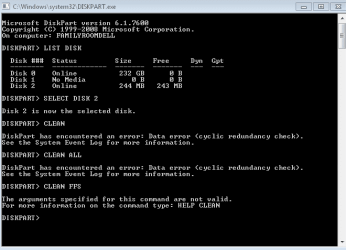
After selecting pen drive and returns following error.

"DiskPart has encountered an error: Data error (cyclic redundancy check)"

raydabruce

Clean command returns following error.

" Function failed. Error 5: Access is denied.


Do I have any other option ?
 

My Computer

Computer type
PC/Desktop
Computer Manufacturer/Model Number
custom
OS
win7 Home Premium 64 bit
CPU
core2quad q8200
Motherboard
Gigabyte EP45-UD3P
Memory
8GB
Graphics Card(s)
ZOTAC ZT-60403-10L GeForce GT 630 2GB 128-bit DDR3 PCI
Hard Drives
Hard Disk 4 numbers
Hell Cimage,

According to your USB flash drive's manual (PDF file), you have a write protect switch that needs to be turned off first. Afterwards, you should be able to format it.

Disk write protection switch to protect your files/data from being mistakenly overwritten.

Hope this helps,
Shawn
 

My Computer

Computer type
PC/Desktop
Computer Manufacturer/Model Number
Self built custom
OS
64-bit Windows 11 Pro for Workstations
CPU
Intel i7-8700K OC'd to 5 GHz
Motherboard
ASUS ROG Maximus XI Formula Z390
Memory
64 GB (4x16GB) G.SKILL TridentZ RGB DDR4 3600 MHz
Graphics Card(s)
ASUS ROG-STRIX-GTX1080TI-O11G-GAMING
Sound Card
Integrated
Monitor(s) Displays
2 x Samsung Odyssey G7 27"
Screen Resolution
2560x1440
Hard Drives
1TB Samsung 990 PRO M.2,
4TB Samsung 990 PRO PRO M.2,
TerraMaster F8 SSD Plus NAS
PSU
Seasonic Prime Titanium 850W
Case
Thermaltake Core P3
Cooling
Corsair Hydro H115i
Keyboard
Logitech wireless K800
Mouse
Logitech MX Master 4
Internet Speed
2 Gb/s Download and 100 Mb/s Upload
Antivirus
Malwarebyte Anti-Malware Premium
Browser
Google Chrome
Other Info
Logitech Z625 speaker system,
Logitech BRIO 4K Pro webcam,
HP Color LaserJet Pro MFP M477fdn,
APC SMART-UPS RT 1000 XL - SURT1000XLI,
Galaxy S23 Plus phone
Thanks for responding Brink.

The model of pen drive I own doesn't possess write protection switch. i have been using this drive since last couple years without any issue. After upgrading to Windows 7 read function went on without any hitch. Only when I tried to format, towards the end of the process error msg returns “Windows cannot format usb flash drive " and everything stops.
 

My Computer

Computer type
PC/Desktop
Computer Manufacturer/Model Number
custom
OS
win7 Home Premium 64 bit
CPU
core2quad q8200
Motherboard
Gigabyte EP45-UD3P
Memory
8GB
Graphics Card(s)
ZOTAC ZT-60403-10L GeForce GT 630 2GB 128-bit DDR3 PCI
Hard Drives
Hard Disk 4 numbers
Cimage,

If you haven't already tried it, see if you can use the Clean All command above using a command prompt at boot using your Windows 7 installation disk instead of from within Windows 7.
 

My Computer

Computer type
PC/Desktop
Computer Manufacturer/Model Number
Self built custom
OS
64-bit Windows 11 Pro for Workstations
CPU
Intel i7-8700K OC'd to 5 GHz
Motherboard
ASUS ROG Maximus XI Formula Z390
Memory
64 GB (4x16GB) G.SKILL TridentZ RGB DDR4 3600 MHz
Graphics Card(s)
ASUS ROG-STRIX-GTX1080TI-O11G-GAMING
Sound Card
Integrated
Monitor(s) Displays
2 x Samsung Odyssey G7 27"
Screen Resolution
2560x1440
Hard Drives
1TB Samsung 990 PRO M.2,
4TB Samsung 990 PRO PRO M.2,
TerraMaster F8 SSD Plus NAS
PSU
Seasonic Prime Titanium 850W
Case
Thermaltake Core P3
Cooling
Corsair Hydro H115i
Keyboard
Logitech wireless K800
Mouse
Logitech MX Master 4
Internet Speed
2 Gb/s Download and 100 Mb/s Upload
Antivirus
Malwarebyte Anti-Malware Premium
Browser
Google Chrome
Other Info
Logitech Z625 speaker system,
Logitech BRIO 4K Pro webcam,
HP Color LaserJet Pro MFP M477fdn,
APC SMART-UPS RT 1000 XL - SURT1000XLI,
Galaxy S23 Plus phone
Brink

Unfortunately, I am no geek just a intense PC user. Can you please give me the steps as to how should I go about using command prompt at boot.

Thanks
 

My Computer

Computer type
PC/Desktop
Computer Manufacturer/Model Number
custom
OS
win7 Home Premium 64 bit
CPU
core2quad q8200
Motherboard
Gigabyte EP45-UD3P
Memory
8GB
Graphics Card(s)
ZOTAC ZT-60403-10L GeForce GT 630 2GB 128-bit DDR3 PCI
Hard Drives
Hard Disk 4 numbers

My Computer

Computer type
PC/Desktop
Computer Manufacturer/Model Number
Self built custom
OS
64-bit Windows 11 Pro for Workstations
CPU
Intel i7-8700K OC'd to 5 GHz
Motherboard
ASUS ROG Maximus XI Formula Z390
Memory
64 GB (4x16GB) G.SKILL TridentZ RGB DDR4 3600 MHz
Graphics Card(s)
ASUS ROG-STRIX-GTX1080TI-O11G-GAMING
Sound Card
Integrated
Monitor(s) Displays
2 x Samsung Odyssey G7 27"
Screen Resolution
2560x1440
Hard Drives
1TB Samsung 990 PRO M.2,
4TB Samsung 990 PRO PRO M.2,
TerraMaster F8 SSD Plus NAS
PSU
Seasonic Prime Titanium 850W
Case
Thermaltake Core P3
Cooling
Corsair Hydro H115i
Keyboard
Logitech wireless K800
Mouse
Logitech MX Master 4
Internet Speed
2 Gb/s Download and 100 Mb/s Upload
Antivirus
Malwarebyte Anti-Malware Premium
Browser
Google Chrome
Other Info
Logitech Z625 speaker system,
Logitech BRIO 4K Pro webcam,
HP Color LaserJet Pro MFP M477fdn,
APC SMART-UPS RT 1000 XL - SURT1000XLI,
Galaxy S23 Plus phone
Thanks Brink, I am currently traveling, I will try this on Monday when I get back.

Once again thanks for your help.
 

My Computer

Computer type
PC/Desktop
Computer Manufacturer/Model Number
custom
OS
win7 Home Premium 64 bit
CPU
core2quad q8200
Motherboard
Gigabyte EP45-UD3P
Memory
8GB
Graphics Card(s)
ZOTAC ZT-60403-10L GeForce GT 630 2GB 128-bit DDR3 PCI
Hard Drives
Hard Disk 4 numbers
You're most welcome Cimage. Please let us know how it went for you. :)
 

My Computer

Computer type
PC/Desktop
Computer Manufacturer/Model Number
Self built custom
OS
64-bit Windows 11 Pro for Workstations
CPU
Intel i7-8700K OC'd to 5 GHz
Motherboard
ASUS ROG Maximus XI Formula Z390
Memory
64 GB (4x16GB) G.SKILL TridentZ RGB DDR4 3600 MHz
Graphics Card(s)
ASUS ROG-STRIX-GTX1080TI-O11G-GAMING
Sound Card
Integrated
Monitor(s) Displays
2 x Samsung Odyssey G7 27"
Screen Resolution
2560x1440
Hard Drives
1TB Samsung 990 PRO M.2,
4TB Samsung 990 PRO PRO M.2,
TerraMaster F8 SSD Plus NAS
PSU
Seasonic Prime Titanium 850W
Case
Thermaltake Core P3
Cooling
Corsair Hydro H115i
Keyboard
Logitech wireless K800
Mouse
Logitech MX Master 4
Internet Speed
2 Gb/s Download and 100 Mb/s Upload
Antivirus
Malwarebyte Anti-Malware Premium
Browser
Google Chrome
Other Info
Logitech Z625 speaker system,
Logitech BRIO 4K Pro webcam,
HP Color LaserJet Pro MFP M477fdn,
APC SMART-UPS RT 1000 XL - SURT1000XLI,
Galaxy S23 Plus phone

My Computer

OS
Windows 7 Enterprise
CPU
Intel Pentium Dual E2200 @2.2GHz
Motherboard
Gigabyte II-G31
Memory
4GB
Graphics Card(s)
Palit GForce 9500GT 1GB
Sound Card
onBoard
Hard Drives
WesternDigital: 250GB + 1TB + 1TB + 2TB
PSU
450W
Case
CoolerMaster CM690
Cooling
Corsair H50
Mouse
Logitech MX518
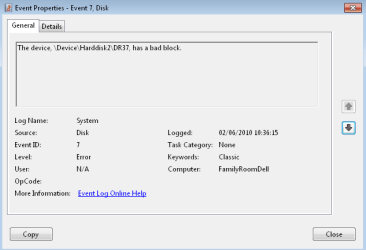
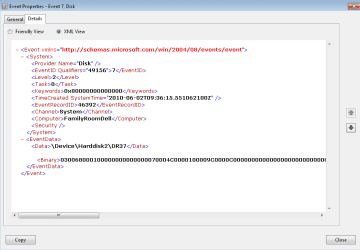
hey, I tried what you said and received this error then in the event log for my details I found this CONFUSED
 

Attachments

  • Capture.PNG
    Capture.PNG
    6.7 KB · Views: 654
  • CaptureEEEEEE.PNG
    CaptureEEEEEE.PNG
    7 KB · Views: 427
  • RRRRRRRRRRRRRRRRRRRRRRRRRRRRRRRRRRRRRRRRRRRRRR.PNG
    RRRRRRRRRRRRRRRRRRRRRRRRRRRRRRRRRRRRRRRRRRRRRR.PNG
    9.8 KB · Views: 359

My Computer

Computer Manufacturer/Model Number
Dell
OS
Windows 7
CPU
2GHz
Memory
3 GB
Graphics Card(s)
Internal
Monitor(s) Displays
HP w22
Hello Adi, and welcome to Seven Forums.

It looks like you have a bad block/sector on the hard drive. You might see if running check disk on the drive may help it and allow you to clean it afterwards.

Hope this helps,
Shawn
 

My Computer

Computer type
PC/Desktop
Computer Manufacturer/Model Number
Self built custom
OS
64-bit Windows 11 Pro for Workstations
CPU
Intel i7-8700K OC'd to 5 GHz
Motherboard
ASUS ROG Maximus XI Formula Z390
Memory
64 GB (4x16GB) G.SKILL TridentZ RGB DDR4 3600 MHz
Graphics Card(s)
ASUS ROG-STRIX-GTX1080TI-O11G-GAMING
Sound Card
Integrated
Monitor(s) Displays
2 x Samsung Odyssey G7 27"
Screen Resolution
2560x1440
Hard Drives
1TB Samsung 990 PRO M.2,
4TB Samsung 990 PRO PRO M.2,
TerraMaster F8 SSD Plus NAS
PSU
Seasonic Prime Titanium 850W
Case
Thermaltake Core P3
Cooling
Corsair Hydro H115i
Keyboard
Logitech wireless K800
Mouse
Logitech MX Master 4
Internet Speed
2 Gb/s Download and 100 Mb/s Upload
Antivirus
Malwarebyte Anti-Malware Premium
Browser
Google Chrome
Other Info
Logitech Z625 speaker system,
Logitech BRIO 4K Pro webcam,
HP Color LaserJet Pro MFP M477fdn,
APC SMART-UPS RT 1000 XL - SURT1000XLI,
Galaxy S23 Plus phone
hey Shawn, thanks for the reply :-)
I tried that and apparently there are no problems... I've done it on two computers, one bought with Windows 7, one upgraded to it from Vista. Neither works. I've tried a USB stick and 3 micro SD cards with a USB converter, nothing works :'(
could it be a problem with 7??? It's just I swear it all worked with previous versions of Windows.
 

My Computer

Computer Manufacturer/Model Number
Dell
OS
Windows 7
CPU
2GHz
Memory
3 GB
Graphics Card(s)
Internal
Monitor(s) Displays
HP w22
Adi,

I must admit that I'm not sure what may be wrong with it. Are you able to format it normally? Do you have any write protection enabled on the USB? Give it a try on another computer. If it still will not work, then the USB flash key may be bad.
 

My Computer

Computer type
PC/Desktop
Computer Manufacturer/Model Number
Self built custom
OS
64-bit Windows 11 Pro for Workstations
CPU
Intel i7-8700K OC'd to 5 GHz
Motherboard
ASUS ROG Maximus XI Formula Z390
Memory
64 GB (4x16GB) G.SKILL TridentZ RGB DDR4 3600 MHz
Graphics Card(s)
ASUS ROG-STRIX-GTX1080TI-O11G-GAMING
Sound Card
Integrated
Monitor(s) Displays
2 x Samsung Odyssey G7 27"
Screen Resolution
2560x1440
Hard Drives
1TB Samsung 990 PRO M.2,
4TB Samsung 990 PRO PRO M.2,
TerraMaster F8 SSD Plus NAS
PSU
Seasonic Prime Titanium 850W
Case
Thermaltake Core P3
Cooling
Corsair Hydro H115i
Keyboard
Logitech wireless K800
Mouse
Logitech MX Master 4
Internet Speed
2 Gb/s Download and 100 Mb/s Upload
Antivirus
Malwarebyte Anti-Malware Premium
Browser
Google Chrome
Other Info
Logitech Z625 speaker system,
Logitech BRIO 4K Pro webcam,
HP Color LaserJet Pro MFP M477fdn,
APC SMART-UPS RT 1000 XL - SURT1000XLI,
Galaxy S23 Plus phone
tried 3 computers, all running 7, no access to anything but 7 at the moment. In total have tried 11 USB sockets split between the various computers. I would try and find out if it have write protection... but the computers won't let me access it :O arh well
 

My Computer

Computer Manufacturer/Model Number
Dell
OS
Windows 7
CPU
2GHz
Memory
3 GB
Graphics Card(s)
Internal
Monitor(s) Displays
HP w22
HELP!!

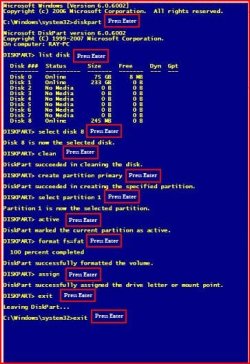
http://www.sevenforums.com/tutorials/52129-disk-clean-clean-all-diskpart-command.html

Open command prompt.

Type in command line

DISKPART
LIST DISK
SELECT DISK # (USB Stick)
CLEAN ALL
CREATE PARTITION PRIMARY
SELECT PARTITION 1
ACTIVE
FORMAT FS=FAT32
ASSIGN
EXIT
EXIT


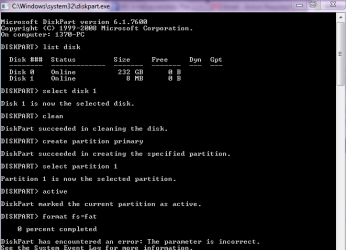
I don't know if i'm too late to this thread but I have a problem with my USB.
I need to format it but I keep getting an error saying windows cannot preform this task. I tried your method but when i get to "format fs=fat" it says 0% complete.
It then says that the parameter is incorrect.
I don't know what to do can anyone help?
 

Attachments

  • Capture.PNG
    Capture.PNG
    11.5 KB · Views: 319
Last edited by a moderator:

My Computer

OS
Windows 7

My Computer

Computer type
PC/Desktop
Computer Manufacturer/Model Number
Self built custom
OS
64-bit Windows 11 Pro for Workstations
CPU
Intel i7-8700K OC'd to 5 GHz
Motherboard
ASUS ROG Maximus XI Formula Z390
Memory
64 GB (4x16GB) G.SKILL TridentZ RGB DDR4 3600 MHz
Graphics Card(s)
ASUS ROG-STRIX-GTX1080TI-O11G-GAMING
Sound Card
Integrated
Monitor(s) Displays
2 x Samsung Odyssey G7 27"
Screen Resolution
2560x1440
Hard Drives
1TB Samsung 990 PRO M.2,
4TB Samsung 990 PRO PRO M.2,
TerraMaster F8 SSD Plus NAS
PSU
Seasonic Prime Titanium 850W
Case
Thermaltake Core P3
Cooling
Corsair Hydro H115i
Keyboard
Logitech wireless K800
Mouse
Logitech MX Master 4
Internet Speed
2 Gb/s Download and 100 Mb/s Upload
Antivirus
Malwarebyte Anti-Malware Premium
Browser
Google Chrome
Other Info
Logitech Z625 speaker system,
Logitech BRIO 4K Pro webcam,
HP Color LaserJet Pro MFP M477fdn,
APC SMART-UPS RT 1000 XL - SURT1000XLI,
Galaxy S23 Plus phone
amjo,
You can also format fs=ntfs

Depending on my intended use of the usb, i either format as fat 32 or ntfs and the vast majority of the time I use ntfs.

My Win7 DVD is on a ntfs formatted stick. My Win 7PE likewise and my Win 7 Repair Disc is also ntfs.
 

My Computer

Computer Manufacturer/Model Number
Toshiba Satellite S875D-S7239 laptop
OS
MS Windows 7 Ultimate SP1 64-bit
CPU
AMD A10-4600M
Motherboard
AMD Pumori (Socket FT1)
Memory
6.00 GB Dual-Channel DDR3 @ 798MHz (11-11-12-28)
Graphics Card(s)
AMD Radeon HD 7660G
Sound Card
High Definition Audio Device
Monitor(s) Displays
Generic PnP Monitor (1600x900@60Hz)
Screen Resolution
1600x900@60Hz
Hard Drives
SSD 119GB Corsair CSSD-V128GB2 ATA Device
Keyboard
Standard PS/2 Keyboard
Mouse
HP Wireless Optical Mobile Mouse Model FHA-3410
Internet Speed
What the local pub, local coffee shop offers.
Other Info
Optical Drive:MATSHITA BD-CMB UJ160B ATA Device


Also have an Asus ha1002xp netbook with Win 7 Ultimate installed.
Back
Top