Cannot Initialize HDD in Computer Management Window

monskaye

New member
Local time
5:44 AM
Messages
6
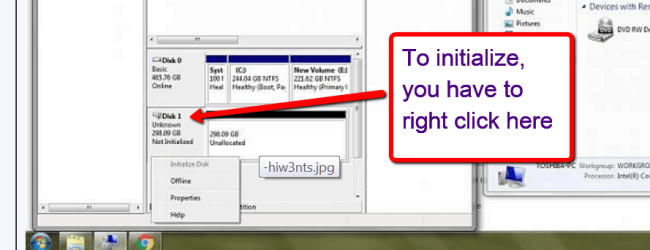
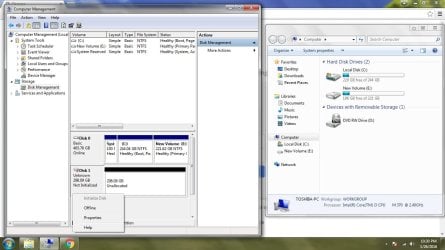
So okay, I just bought a new HDD because the original HDD of my laptop can’t be formatted anymore. I was able to retrieve my files using EaseUS DR. After that, I tried to format all the disks/partitions so I can use it as an external hdd or usb but it says it cant be formatted. So what I did, I deleted the other two volumes, resulting into this.

The disk isn’t detected in the Computer window but as you can see it shows in the Computer management but I cant initialize it. How do I fix this so that I can use this as an external hdd/usb? I don’t think theres a problem with the enclosure. Thanks for the help!
 

Attachments
  • hIW3ntS.jpg
    hIW3ntS.jpg
    205.9 KB · Views: 5

My Computer

Computer type
Laptop
Computer Manufacturer/Model Number
Toshiba
OS
Windows 7 Professional 32-bit
Hard Drives
Seagate 500GB
Antivirus
SMADAV
Browser
Google Chrome

My Computer

Computer type
PC/Desktop
Computer Manufacturer/Model Number
Custom assembled by me :}
OS
Win-7-Pro64bit 7-H-Prem-64bit
CPU
i7-5930K 2nd i9-9940x both water blocked VRM's too
Motherboard
ASUS SABERTOOTH X99 2nd ASUS x299 Apex
Memory
Trident-z 3200C14 2nd Trident-z 3600C16
Graphics Card(s)
EVGA 1080ti ftw3 2nd Titan Xp both water blocked
Sound Card
Built-in Realtek
Monitor(s) Displays
1-AOC G2460PG 24"G-Sync 144Hz/ 2nd 1-ASUS VG248QE 24" 144Hz
Screen Resolution
1920 x 1080 144Hz
Hard Drives
2-Samsung M.2 Evo & Evo Plus
2-Samsung 850 EVO 500GB SSD's/ 3-2.5 W.D. Black 1tb-&3-1tb/3-3.5 WD Black 1tb hdd's
PSU
EVGA SuperNOVA 1000-P2 2nd 1200-P2
Case
2-Corsair Obsidian Series 450D Black ATX Mid Tower
Cooling
Custom water loops
Keyboard
Logitech G710+/ 2nd Logitech G910
Mouse
2-RedDragon M901 Perdition 16400 dpi Gaming mouse = wired
Internet Speed
Comcast Ping 19ms 89.31mbps download speed 6.12mbps upload
Antivirus
Malwarebytes Pro/ Superantispyware Pro
Browser
FireFox & Pale moon
Other Info
2nd ASUS X299 Apex/Intel i9-9940x with Custom water loop/7H-Prem-x64/Corsair 450D case/Ram Trident-z 3600C16 4x8gb / Samsung970Evo plus 500gb SSD/Dual ssd EZ swap evo/PSU EVGA SuperNova 1200w-P2 80+Platinum/GPU Titan Xp /8-ML-140 on push-pull on 2-280GTX rads

Attachments

  • partition wizard.jpg
    partition wizard.jpg
    247 KB · Views: 5

My Computer

Computer type
Laptop
Computer Manufacturer/Model Number
Toshiba
OS
Windows 7 Professional 32-bit
Hard Drives
Seagate 500GB
Antivirus
SMADAV
Browser
Google Chrome
Maybe you did not do it right


2016-01-31_2117.png
 

My Computer

Computer Manufacturer/Model Number
HP, Dell, Gateway, Toshiba - 4 laptops and 2 desktops
OS
Vista, Windows7, Mint Mate, Zorin, Windows 8
CPU
from 1.6GHz Duo to i7
Monitor(s) Displays
2x HP w2207
Hard Drives
5x HDD, 7x SSD, 12x Externals
Keyboard
with trackball - no mices
Mouse
Trackball mice
Internet Speed
DSL 6000

My Computer

Computer type
PC/Desktop
Computer Manufacturer/Model Number
Custom assembled by me :}
OS
Win-7-Pro64bit 7-H-Prem-64bit
CPU
i7-5930K 2nd i9-9940x both water blocked VRM's too
Motherboard
ASUS SABERTOOTH X99 2nd ASUS x299 Apex
Memory
Trident-z 3200C14 2nd Trident-z 3600C16
Graphics Card(s)
EVGA 1080ti ftw3 2nd Titan Xp both water blocked
Sound Card
Built-in Realtek
Monitor(s) Displays
1-AOC G2460PG 24"G-Sync 144Hz/ 2nd 1-ASUS VG248QE 24" 144Hz
Screen Resolution
1920 x 1080 144Hz
Hard Drives
2-Samsung M.2 Evo & Evo Plus
2-Samsung 850 EVO 500GB SSD's/ 3-2.5 W.D. Black 1tb-&3-1tb/3-3.5 WD Black 1tb hdd's
PSU
EVGA SuperNOVA 1000-P2 2nd 1200-P2
Case
2-Corsair Obsidian Series 450D Black ATX Mid Tower
Cooling
Custom water loops
Keyboard
Logitech G710+/ 2nd Logitech G910
Mouse
2-RedDragon M901 Perdition 16400 dpi Gaming mouse = wired
Internet Speed
Comcast Ping 19ms 89.31mbps download speed 6.12mbps upload
Antivirus
Malwarebytes Pro/ Superantispyware Pro
Browser
FireFox & Pale moon
Other Info
2nd ASUS X299 Apex/Intel i9-9940x with Custom water loop/7H-Prem-x64/Corsair 450D case/Ram Trident-z 3600C16 4x8gb / Samsung970Evo plus 500gb SSD/Dual ssd EZ swap evo/PSU EVGA SuperNova 1200w-P2 80+Platinum/GPU Titan Xp /8-ML-140 on push-pull on 2-280GTX rads
Theres nothing on the disk atm as I had retrieve the files I need. I cannot do the tutorial, the HDD cannot be viewed in the Computer window :( is there any chance that I cannot use this HDD anymore ?
 

My Computer

Computer type
Laptop
Computer Manufacturer/Model Number
Toshiba
OS
Windows 7 Professional 32-bit
Hard Drives
Seagate 500GB
Antivirus
SMADAV
Browser
Google Chrome
Hi,
From what I noticed it is read only not sure what's up with that but the take ownership may solve that quirk :/
After than it might make things different as far as reformatting... ?

Why can't you do the tutorial ?
 

My Computer

Computer type
PC/Desktop
Computer Manufacturer/Model Number
Custom assembled by me :}
OS
Win-7-Pro64bit 7-H-Prem-64bit
CPU
i7-5930K 2nd i9-9940x both water blocked VRM's too
Motherboard
ASUS SABERTOOTH X99 2nd ASUS x299 Apex
Memory
Trident-z 3200C14 2nd Trident-z 3600C16
Graphics Card(s)
EVGA 1080ti ftw3 2nd Titan Xp both water blocked
Sound Card
Built-in Realtek
Monitor(s) Displays
1-AOC G2460PG 24"G-Sync 144Hz/ 2nd 1-ASUS VG248QE 24" 144Hz
Screen Resolution
1920 x 1080 144Hz
Hard Drives
2-Samsung M.2 Evo & Evo Plus
2-Samsung 850 EVO 500GB SSD's/ 3-2.5 W.D. Black 1tb-&3-1tb/3-3.5 WD Black 1tb hdd's
PSU
EVGA SuperNOVA 1000-P2 2nd 1200-P2
Case
2-Corsair Obsidian Series 450D Black ATX Mid Tower
Cooling
Custom water loops
Keyboard
Logitech G710+/ 2nd Logitech G910
Mouse
2-RedDragon M901 Perdition 16400 dpi Gaming mouse = wired
Internet Speed
Comcast Ping 19ms 89.31mbps download speed 6.12mbps upload
Antivirus
Malwarebytes Pro/ Superantispyware Pro
Browser
FireFox & Pale moon
Other Info
2nd ASUS X299 Apex/Intel i9-9940x with Custom water loop/7H-Prem-x64/Corsair 450D case/Ram Trident-z 3600C16 4x8gb / Samsung970Evo plus 500gb SSD/Dual ssd EZ swap evo/PSU EVGA SuperNova 1200w-P2 80+Platinum/GPU Titan Xp /8-ML-140 on push-pull on 2-280GTX rads
Hello sir! sorry if it took me a long time to reply. I cant understand how to use this 'take ownership' if the HDD cant be shown in the computer window?
 

My Computer

Computer type
Laptop
Computer Manufacturer/Model Number
Toshiba
OS
Windows 7 Professional 32-bit
Hard Drives
Seagate 500GB
Antivirus
SMADAV
Browser
Google Chrome
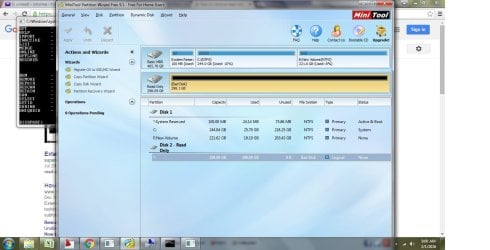
First thing I would do is to define a partition with a drive letter on it. That can be done in disk management - or with Partition Wizard if you prefer.
 

My Computer

Computer Manufacturer/Model Number
HP, Dell, Gateway, Toshiba - 4 laptops and 2 desktops
OS
Vista, Windows7, Mint Mate, Zorin, Windows 8
CPU
from 1.6GHz Duo to i7
Monitor(s) Displays
2x HP w2207
Hard Drives
5x HDD, 7x SSD, 12x Externals
Keyboard
with trackball - no mices
Mouse
Trackball mice
Internet Speed
DSL 6000
First thing I would do is to define a partition with a drive letter on it. That can be done in disk management - or with Partition Wizard if you prefer.

I cannot set a letter for this device, i cannot see any option to do it when i do a right click on computer management or in partition wizard sir
 

My Computer

Computer type
Laptop
Computer Manufacturer/Model Number
Toshiba
OS
Windows 7 Professional 32-bit
Hard Drives
Seagate 500GB
Antivirus
SMADAV
Browser
Google Chrome
Are you beating a dead snake?

Please run the HDD manufacturer's diagnostic/repair utility and check the status of your drive.

If it does not recognise the drive or having recognised the drive fails the Short Test and Extended Test scrap it. You can't bring a dead snake alive.
 

My Computer

OS
Windows 7 Home Premium 32 bit
Hello monskaye!

So this drive is completely empty, there is no data you may need from it?

You say you've bought a new HDD as the old laptop HDD can't be formatted any more, you have used a software to retrieve your data but you wish to be bale to format this old laptop drive, which is in this case the problematic one? I see two drives in the Disk Management, is this still a laptop or are these connected to a desktop? Are both drives internally connected or is the older drive externally connected, perhaps?

For now it is shown as a “bad disk”, still, I would suggest you change its cable(s), make sure it(they) is(are) correctly and firmly connected. Then boot up again and again check Disk Management. If the drive is showing up the same way, go to diskpart:

1. Open the Start Menu, type diskpart, press Enter
2. Type list disk, press Enter
3. Type select disk X (where X is the number the certain drive if it shows up), press Enter
4. Type clean, press Enter
5. Type create partition primary, press Enter
6. Type format quick fs=ntfs, press Enter
7. Type assign letter=X, press Enter
8. Type exit, press Enter

This should clean and then repartition and reformat your drive in basic NTFS file system.

In either way of this outcome, the drive may truly be too damaged to be used and it wouldn't be advised to store your data. If it fails, you will lose the data. :/

Good luck! :)

CK_WD
 

My Computer

Computer type
PC/Desktop
OS
Windows 7 Home Premium x64
Back
Top