Cannot Install Microsoft Update Extension.

kadz

New member
Local time
4:25 PM
Messages
6
Hi,


Please Help!

Please refer to this post at step 7:
7. Get a "Microsoft Update" for other Microsoft Products
http://www.sevenforums.com/tutorials/2797-windows-update-settings-change.html


I am having trouble installing the microsoft update extension for windows update, listed in step 7 in the link above.


Here is an image of my settings in windows updates.
Note: There is no setting for Microsoft Update.

View attachment 258844


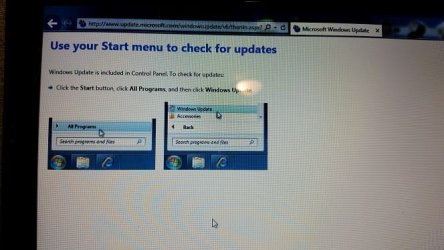
When I click on the "Find out more" link to get updates for other microsoft products and change the setting from - "You receive updates: For Microsoft Windows only" to "You receive updates: For Windows and other products from Microsoft Update", The website does not give me the option to install the extension. Rather I am directed via the website to go to Windows Update from the start menu on my computer.

See screen shots below:


1. I want to acivate the Microsoft Update Extension. So I click on the Link "Find Out More"

View attachment 258845

I am taken to this website:

http://go.microsoft.com/fwlink/?LinkId=70156

Which then redirects me to this website http://update.microsoft.com/microsoftupdate/v6/vistadefault.aspx?ln=en-us


2. This is what the website shows me:
View attachment 258846

I am not given the option to install the Microsoft Update Extension. as listed in step 7 from this link - http://www.sevenforums.com/tutorials/2797-windows-update-settings-change.html .

Please Help me to install the Microsoft Update Extension.

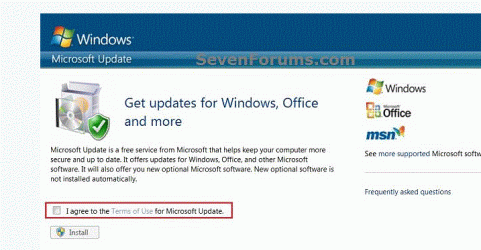
I should be getting the option depicted below, when I clink on the "Find Out More" link in windows update:
View attachment 258847
 

My Computer

Computer type
PC/Desktop
Computer Manufacturer/Model Number
Dell Vostro
OS
Windows 7 Professional 64 bit
CPU
i5
Memory
4Gb
Do you actually have any MS products other than Windows installed?
Office and MSE would be the obvious ones.

Unless you do, the option for Microsoft Updates can't be activated.


Forget that - I got it wrong.

more later.
 
Last edited:

My Computer

Computer type
Laptop
Computer Manufacturer/Model Number
Asus K52F or Lenovo B51-80
OS
Win 7 x64 Home Premium (and x86 VirtualBox VM)/Win10
CPU
i3 370M/i7 6500U
Motherboard
Asus/Lenovo
Memory
8GB - finally :)/8GB
Graphics Card(s)
it's an i3, dude!/dual Intel&nVidia
Sound Card
onboard
Monitor(s) Displays
15.6" built-in
Screen Resolution
1366x768/1920x1080
Hard Drives
750GB Seagate internal
Sundry external drives attached to other computers on the local network
1TB SSD on the Lenovo
PSU
n/a
Internet Speed
as much as I can get - usually on a dongle/phone, so <1MB/s
Antivirus
MSE/Defender
Browser
IE11/12/Edge/Chrome/FF(if I must)
Do you actually have any MS products other than Windows installed?
Office and MSE would be the obvious ones.
Unless you do, the option for Microsoft Updates can't be activated.

Hi,

Thank you for your response.

I do have Both Office 2010 Pro, and MSE installed.
 

My Computer

Computer type
PC/Desktop
Computer Manufacturer/Model Number
Dell Vostro
OS
Windows 7 Professional 64 bit
CPU
i5
Memory
4Gb

My Computer

Computer type
Laptop
Computer Manufacturer/Model Number
Employer provided Dell Latitude
OS
W7 Pro SP1 64bit
CPU
i7
Memory
8GB
Graphics Card(s)
Intel HD Graphics
Hard Drives
crappy SSD
Antivirus
Employer mandated Symantec Endpoint Protection
Browser
Pale Moon 64bit, IE11 64bit & Chrome 64bit
If it matters - this is a duplicate post and the original post has better images :-)
http://www.sevenforums.com/tutorials/2797-windows-update-settings-change.html#post2313581

The link above is a tutorial on how to change the Windows Update Settings.
I originally posted my question as a response to this tutorial. I did not get any responses, so I created a new thread with the focus of this thread being solving the problem I am experiencing, and not a tutorial for changing windows update settings.
 

My Computer

Computer type
PC/Desktop
Computer Manufacturer/Model Number
Dell Vostro
OS
Windows 7 Professional 64 bit
CPU
i5
Memory
4Gb
Please post an MGADiag report- it is likely that your system is misreporting the Browser or OS to the website, and therefore getting the wrong feedback.
Please also go to UserAgentString.com - Netscape version 4.0 and copy the string in the box at the top of the page to your reply.

What is your default browser? - try changing it to Internet Explorer temporarily, then attempting the switch to MS updates.


(for comparison, this is my data from useragentstring - Mozilla/5.0 (compatible; MSIE 10.0; Windows NT 6.1; WOW64; Trident/6.0; MAAU) )
 
Last edited:

My Computer

Computer type
Laptop
Computer Manufacturer/Model Number
Asus K52F or Lenovo B51-80
OS
Win 7 x64 Home Premium (and x86 VirtualBox VM)/Win10
CPU
i3 370M/i7 6500U
Motherboard
Asus/Lenovo
Memory
8GB - finally :)/8GB
Graphics Card(s)
it's an i3, dude!/dual Intel&nVidia
Sound Card
onboard
Monitor(s) Displays
15.6" built-in
Screen Resolution
1366x768/1920x1080
Hard Drives
750GB Seagate internal
Sundry external drives attached to other computers on the local network
1TB SSD on the Lenovo
PSU
n/a
Internet Speed
as much as I can get - usually on a dongle/phone, so <1MB/s
Antivirus
MSE/Defender
Browser
IE11/12/Edge/Chrome/FF(if I must)
If it matters - this is a duplicate post and the original post has better images :-)
http://www.sevenforums.com/tutorials/2797-windows-update-settings-change.html#post2313581

The link above is a tutorial on how to change the Windows Update Settings.
I originally posted my question as a response to this tutorial. I did not get any responses, so I created a new thread with the focus of this thread being solving the problem I am experiencing, and not a tutorial for changing windows update settings.
I probably should have left out the comment about the duplicate post. I was not concerned about the duplicate posting (since you did not get an answer in 6 days). I was just making sure that people could get to a better view of your screenshots. The screenshots in this thread are tiny (at least they are for me). It looks like you took a screenshot of the thumbnails from your original post. But even that does not explain some of what I'm seeing.

...just trying to help others to help you.

I don't have a clue why you cannot do what you need to do; but Noel does :-)
 

My Computer

Computer type
Laptop
Computer Manufacturer/Model Number
Employer provided Dell Latitude
OS
W7 Pro SP1 64bit
CPU
i7
Memory
8GB
Graphics Card(s)
Intel HD Graphics
Hard Drives
crappy SSD
Antivirus
Employer mandated Symantec Endpoint Protection
Browser
Pale Moon 64bit, IE11 64bit & Chrome 64bit
Please post an MGADiag report- it is likely that your system is misreporting the Browser or OS to the website, and therefore getting the wrong feedback.
Please also go to UserAgentString.com - Netscape version 4.0 and copy the string in the box at the top of the page to your reply.

What is your default browser? - try changing it to Internet Explorer temporarily, then attempting the switch to MS updates.


(for comparison, this is my data from useragentstring - Mozilla/5.0 (compatible; MSIE 10.0; Windows NT 6.1; WOW64; Trident/6.0; MAAU) )

Not possible. I only have IE9 Installed.
Anyway, the string in the box is:
Mozilla/5.0 (compatible; MSIE 9.0; Windows NT 6.1; WOW64; Trident/5.0)

Note: I previously had the Microsoft Update Extension option installed and working.
My updates were working fine, and included microsoft updates.
I then had some issues with windows updates not installing, and uninstalled(unchecked) the microsoft update option thinking that I can easily restore it later. But I am now unable to do so.
 

My Computer

Computer type
PC/Desktop
Computer Manufacturer/Model Number
Dell Vostro
OS
Windows 7 Professional 64 bit
CPU
i5
Memory
4Gb
Please post an MGADiag report- it is likely that your system is misreporting the Browser or OS to the website, and therefore getting the wrong feedback.
Please also go to UserAgentString.com - Netscape version 4.0 and copy the string in the box at the top of the page to your reply.

What is your default browser? - try changing it to Internet Explorer temporarily, then attempting the switch to MS updates.


(for comparison, this is my data from useragentstring - Mozilla/5.0 (compatible; MSIE 10.0; Windows NT 6.1; WOW64; Trident/6.0; MAAU) )

Not possible. I only have IE9 Installed.
Anyway, the string in the box is:
Mozilla/5.0 (compatible; MSIE 9.0; Windows NT 6.1; WOW64; Trident/5.0)

Note: I previously had the Microsoft Update Extension option installed and working.
My updates were working fine, and included microsoft updates.
I then had some issues with windows updates not installing, and uninstalled(unchecked) the microsoft update option thinking that I can easily restore it later. But I am now unable to do so.

Here is the MGADiag report:


Diagnostic Report (1.9.0027.0):
-----------------------------------------
Windows Validation Data-->
Validation Code: 0
Cached Online Validation Code: 0x0
Windows Product Key: *****-*****-M3DJT-4J3WC-733WD
Windows Product Key Hash: xo+ajVSpae7/4VoZjS7m6JL0f3A=
Windows Product ID: 00371-OEM-8992671-00524
Windows Product ID Type: 2
Windows License Type: OEM SLP
Windows OS version: 6.1.7600.2.00010100.0.0.048
ID: {1576B5C1-2AE8-4E48-ACA5-4D11ADB4E44B}(1)
Is Admin: Yes
TestCab: 0x0
LegitcheckControl ActiveX: N/A, hr = 0x80070002
Signed By: N/A, hr = 0x80070002
Product Name: Windows 7 Professional
Architecture: 0x00000009
Build lab: 7600.win7_gdr.130104-1435
TTS Error:
Validation Diagnostic:
Resolution Status: N/A
Vista WgaER Data-->
ThreatID(s): N/A, hr = 0x80070002
Version: N/A, hr = 0x80070002
Windows XP Notifications Data-->
Cached Result: N/A, hr = 0x80070002
File Exists: No
Version: N/A, hr = 0x80070002
WgaTray.exe Signed By: N/A, hr = 0x80070002
WgaLogon.dll Signed By: N/A, hr = 0x80070002
OGA Notifications Data-->
Cached Result: N/A, hr = 0x80070002
Version: N/A, hr = 0x80070002
OGAExec.exe Signed By: N/A, hr = 0x80070002
OGAAddin.dll Signed By: N/A, hr = 0x80070002
OGA Data-->
Office Status: 109 N/A
OGA Version: N/A, 0x80070002
Signed By: N/A, hr = 0x80070002
Office Diagnostics: 025D1FF3-364-80041010_025D1FF3-229-80041010_025D1FF3-230-1_025D1FF3-517-80040154_025D1FF3-237-80040154_025D1FF3-238-2_025D1FF3-244-80070002_025D1FF3-258-3
Browser Data-->
Proxy settings: N/A
User Agent: Mozilla/4.0 (compatible; MSIE 8.0; Win32)
Default Browser: C:\Program Files (x86)\Internet Explorer\iexplore.exe
Download signed ActiveX controls: Prompt
Download unsigned ActiveX controls: Disabled
Run ActiveX controls and plug-ins: Allowed
Initialize and script ActiveX controls not marked as safe: Disabled
Allow scripting of Internet Explorer Webbrowser control: Disabled
Active scripting: Allowed
Script ActiveX controls marked as safe for scripting: Allowed
File Scan Data-->
Other data-->
Office Details: <GenuineResults><MachineData><UGUID>{1576B5C1-2AE8-4E48-ACA5-4D11ADB4E44B}</UGUID><Version>1.9.0027.0</Version><OS>6.1.7600.2.00010100.0.0.048</OS><Architecture>x64</Architecture><PKey>*****-*****-*****-*****-733WD</PKey><PID>00371-OEM-8992671-00524</PID><PIDType>2</PIDType><SID>S-1-5-21-3210433682-2465137829-4141940376</SID><SYSTEM><Manufacturer>Dell Inc.</Manufacturer><Model>Vostro 3500</Model></SYSTEM><BIOS><Manufacturer>Dell Inc.</Manufacturer><Version>A07 </Version><SMBIOSVersion major="2" minor="6"/><Date>20100804000000.000000+000</Date></BIOS><HWID>CBBB3607018400FC</HWID><UserLCID>1C09</UserLCID><SystemLCID>0409</SystemLCID><TimeZone>South Africa Standard Time(GMT+02:00)</TimeZone><iJoin>0</iJoin><SBID><stat>3</stat><msppid></msppid><name></name><model></model></SBID><OEM><OEMID>DELL </OEMID><OEMTableID>WN09 </OEMTableID></OEM><GANotification/></MachineData><Software><Office><Result>109</Result><Products/><Applications/></Office></Software></GenuineResults>
Spsys.log Content: 0x80070002
Licensing Data-->
Software licensing service version: 6.1.7600.16385
Name: Windows(R) 7, Professional edition
Description: Windows Operating System - Windows(R) 7, OEM_SLP channel
Activation ID: 50e329f7-a5fa-46b2-85fd-f224e5da7764
Application ID: 55c92734-d682-4d71-983e-d6ec3f16059f
Extended PID: 00371-00178-926-700524-02-1033-7600.0000-2692010
Installation ID: 021716520531811945908816946954152546598970913930386774
Processor Certificate URL: http://go.microsoft.com/fwlink/?LinkID=88338
Machine Certificate URL: http://go.microsoft.com/fwlink/?LinkID=88339
Use License URL: http://go.microsoft.com/fwlink/?LinkID=88341
Product Key Certificate URL: http://go.microsoft.com/fwlink/?LinkID=88340
Partial Product Key: 733WD
License Status: Licensed
Remaining Windows rearm count: 3
Trusted time: 2013/03/11 04:59:27 PM
Windows Activation Technologies-->
HrOffline: 0x00000000
HrOnline: 0x00000000
HealthStatus: 0x0000000000000000
Event Time Stamp: 2:27:2013 15:48
ActiveX: Registered, Version: 7.1.7600.16395
Admin Service: Registered, Version: 7.1.7600.16395
HealthStatus Bitmask Output:

HWID Data-->
HWID Hash Current: LAAAAAEAAQABAAEAAAABAAAAAgABAAEA6GFeeOzyrHvyVPKFFkuo+Ur7XF0=
OEM Activation 1.0 Data-->
N/A
OEM Activation 2.0 Data-->
BIOS valid for OA 2.0: yes
Windows marker version: 0x20001
OEMID and OEMTableID Consistent: yes
BIOS Information:
ACPI Table Name OEMID Value OEMTableID Value
APIC DELL WN09
FACP DELL WN09
HPET DELL WN09
MCFG DELL WN09
SSDT AMICPU PROC
SLIC DELL WN09
OSFR DELL M08
SSDT AMICPU PROC
 

My Computer

Computer type
PC/Desktop
Computer Manufacturer/Model Number
Dell Vostro
OS
Windows 7 Professional 64 bit
CPU
i5
Memory
4Gb

My Computer

Computer type
Laptop
Computer Manufacturer/Model Number
Asus K52F or Lenovo B51-80
OS
Win 7 x64 Home Premium (and x86 VirtualBox VM)/Win10
CPU
i3 370M/i7 6500U
Motherboard
Asus/Lenovo
Memory
8GB - finally :)/8GB
Graphics Card(s)
it's an i3, dude!/dual Intel&nVidia
Sound Card
onboard
Monitor(s) Displays
15.6" built-in
Screen Resolution
1366x768/1920x1080
Hard Drives
750GB Seagate internal
Sundry external drives attached to other computers on the local network
1TB SSD on the Lenovo
PSU
n/a
Internet Speed
as much as I can get - usually on a dongle/phone, so <1MB/s
Antivirus
MSE/Defender
Browser
IE11/12/Edge/Chrome/FF(if I must)
I know this is a really old thread and am sorry to bring it back to the top but the solution to this issue is beyond stupid and very easy and I am sure others are searching for a solution. For some reason Microsoft has not built their page to be compatible with their current browser. Simply adding Microsoft.com to your Compatibility List will fix this issue and you will be able to install Microsoft Update.
 

My Computer

Computer type
PC/Desktop
OS
Windows 7 64 bit
Most MS pages are designed to run in any IE version from IE7 up - and many of the relevant pages are still perfectly viewable even in earlier versions of IE ( such as IE6 for ME)

Please define what you are experiencing:
1) give an example of a 'problem' page
2) What version of IE are you using? - on what OS?
3) What exactly are you seeing? - please post screenshots.
 

My Computer

Computer type
Laptop
Computer Manufacturer/Model Number
Asus K52F or Lenovo B51-80
OS
Win 7 x64 Home Premium (and x86 VirtualBox VM)/Win10
CPU
i3 370M/i7 6500U
Motherboard
Asus/Lenovo
Memory
8GB - finally :)/8GB
Graphics Card(s)
it's an i3, dude!/dual Intel&nVidia
Sound Card
onboard
Monitor(s) Displays
15.6" built-in
Screen Resolution
1366x768/1920x1080
Hard Drives
750GB Seagate internal
Sundry external drives attached to other computers on the local network
1TB SSD on the Lenovo
PSU
n/a
Internet Speed
as much as I can get - usually on a dongle/phone, so <1MB/s
Antivirus
MSE/Defender
Browser
IE11/12/Edge/Chrome/FF(if I must)
This was not my issue, I stumbled across this while looking for something else, you need to read the OP problem. He did a fresh install of Windows 7, when he went to upgrade to "Microsoft Update" to obtain updates for other Microsoft products he could not (he posted the screenshot). What happens is a web page opens and simply says to get Windows Updates by clicking Windows Update in the Control Panel. Once you add Microsoft to the Compatibility list the page renders properly and allows you to "upgrade" to Microsoft Update....I offer the solution for others who have this issue, simple, stupid and absolutely a Microsoft issue....
 

My Computer

Computer type
PC/Desktop
OS
Windows 7 64 bit
Windows 7 does not go anywhere near any version of IE to access Windows Update - or Microsoft Update.

The Web page is deliberately designed to point people at the Control Panel - for all versions of IE, where the OS is Vista or higher.

Using compatibility mode probably forces the browser to issue a useragentstring for IE6, which then produces the results you see.
As such it may work - whether it completely eliminates the problem, I don't know.
 

My Computer

Computer type
Laptop
Computer Manufacturer/Model Number
Asus K52F or Lenovo B51-80
OS
Win 7 x64 Home Premium (and x86 VirtualBox VM)/Win10
CPU
i3 370M/i7 6500U
Motherboard
Asus/Lenovo
Memory
8GB - finally :)/8GB
Graphics Card(s)
it's an i3, dude!/dual Intel&nVidia
Sound Card
onboard
Monitor(s) Displays
15.6" built-in
Screen Resolution
1366x768/1920x1080
Hard Drives
750GB Seagate internal
Sundry external drives attached to other computers on the local network
1TB SSD on the Lenovo
PSU
n/a
Internet Speed
as much as I can get - usually on a dongle/phone, so <1MB/s
Antivirus
MSE/Defender
Browser
IE11/12/Edge/Chrome/FF(if I must)
No offense but you obviously do not understand the issue....for the last time and so no one gets confused. If you install Windows 7 and use Windows Update to obtain all the latest updates including IE11 and the decide that you want to "upgrade" to Microsoft Update you click the link in the Windows Update page that says, "To receive updates for other Microsoft Products click here" it opens up IE and takes you to a web page where normally you can just accept a TOS and the Microsoft Update engine is installed over Windows Update. If you do not list Microsoft.com in Compatibility view you do not get that option, just a notice that you can get updates by clicking Windows Update in Control Panel, not sure how to make that any more clear to you. I will post some pictures momentarily as I noticed that you can recreate the issue by taking Microsoft.com out of your list....
 

My Computer

Computer type
PC/Desktop
OS
Windows 7 64 bit
OK, so, when you click on the link in the first picture to get "Microsoft Update" you should get the website as shown in picture 2, but if you do not have Microsoft.com added to your compatibility list you will instead see picture 3...Make sense now?
 

Attachments

  • 1.GIF
    1.GIF
    40.7 KB · Views: 19
  • 2.GIF
    2.GIF
    55.2 KB · Views: 3
  • 3.jpg
    3.jpg
    100 KB · Views: 20

My Computer

Computer type
PC/Desktop
OS
Windows 7 64 bit
Images got flopped, the one in the middle is number 1, top is number 2 and bottom is number 3...
 

My Computer

Computer type
PC/Desktop
OS
Windows 7 64 bit
Hi, I registered just now to confirm what you're saying, when I addded site to compatibility it went normal and offered me to install the thing, I would never find that out alone :thumbsup:
 

My Computer

Computer type
PC/Desktop
OS
Windows 7 Ultimate x64
Alternative Solution

Hi Guys,
Just wanted to let you know what worked for me. Open an administrative command prompt and type in "net user Administrator /active:yes" and hit enter. If you see "Command completed successfully", log off the pc and log back on with the new account that shows up called Administrator. Open windows update and try to install Microsoft Update again. Should do the trick. After you've done this, log out and back on to your normal account, then repeat the command, except use /active:no and that will shut the admin account back off. Happy Windowsing.
 

My Computer

Computer type
Laptop
Computer Manufacturer/Model Number
HP Envy M6 (2012)
OS
Windows 10 Pro x64
CPU
AMD A10-5750M
Motherboard
HP ?
Memory
16GB DDR3L 1600
Graphics Card(s)
Radeon HD 8000 Series (APU)
Hard Drives
480GB Sandisk Ultra II SSD
Antivirus
None. I fly solo.
Browser
Chrome
Back
Top