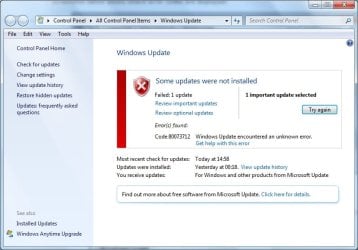
Cannot install update kb3072630, error 80073712

welshgaffer

New member
Local time
12:47 AM
Messages
4
Hello,

I've been pulling my hair out and hoping somebody can help me!

I've run sfc /scannow and SUR on my Windows 7 Professional x64 machine. I've also tried installing the update manually (everything with admin privileges of course). Whatever I do, I can't get the little blighter to install and, over months, I've been seeing gigabytes of logs files being generated which is what led me to here!

I can see in the log file there are errors, and I'm hoping some wizard on here can work their magic and help me! I hope I've included everything in the attachments that's needed. I had to delete one or two files as they were massive, and no amount of compression would get them on here.

Thank you!

Hello,

Is there anybody who can help? I've seen lots of similar problems like this fixed on here, but have had no response! :cry:
 

Attachments

  • error.jpg
    error.jpg
    51.4 KB · Views: 0
Last edited by a moderator:

My Computer

Computer type
PC/Desktop
OS
Windows 7 Professional x64
Last edited:

My Computer

Computer type
PC/Desktop
Computer Manufacturer/Model Number
Custom build
OS
Windows 7 Home Premium
CPU
i5-3570k
Motherboard
ASUS Sabertooth z77
Memory
16 GB DDR3 G Skill Sniper
Graphics Card(s)
GIGABYTE GeForce GTX 970 GV-N970WF3OC-4GD
Monitor(s) Displays
ASUS ROG PG278Q
Screen Resolution
2560x1440@60Hz/120Hz/144Hz
Hard Drives
56GB KINGSTON SVP200S37A60G
512GB Crucial MX100
1863GB Seagate ST2000DM001-1CH164
2795GB Seagate ST3000DM001-9YN166
PSU
Corsair GS800
Case
Storm Trooper Stryker White
Keyboard
Logitech G910 Orion Spark
Mouse
Logitech G502
Antivirus
MSE
Browser
Firefox/Chrome
Other Info
Logitech G633
Logitech Mouse Matt
No luck!

Hi Boris,

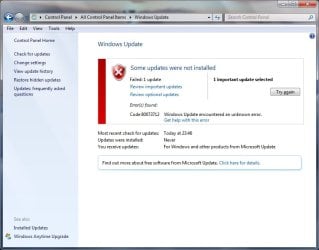
Thank you for helping me, it is very appreciated. I ran the Windows Update Reset tool given in the link above and it worked for a while, then told me it had fixed a few issues. I closed it and ran Windows Update again. it took a while to check the system, and then gave me one important update to run - the same update that's causing the problems. Unfortunately, the same error occurred and I've attached a snapshot.

I guess you didn't need me to run SFC again for info. as I've already provided. Do you have any ideas on how to help further please!?

Thanks
 

Attachments

  • error2.jpg
    error2.jpg
    50.9 KB · Views: 0

My Computer

Computer type
PC/Desktop
OS
Windows 7 Professional x64
Anybody have any ideas please?
 

My Computer

Computer type
PC/Desktop
OS
Windows 7 Professional x64
I'm sorry, I have no fix for you. I am interested as I don't have this update on my system and it's not hidden. That tells me I was never notified about it, but then this system is X64 HP. Curious. There are quite a few hits on this update searching for it. Most of them seem related to the app. Solidworks though. Here's one from this forum back in August, shortly after the update was released. Don't know if it helps you.

http://www.sevenforums.com/windows-updates-activation/379188-wu-kb3072630-wont-install-3.html
 

My Computer

Computer type
PC/Desktop
Computer Manufacturer/Model Number
ASUS
OS
Windows 7 Home Premium 64 bit SP1
CPU
i5-2320 @3.00 GHz
Memory
6GB
Graphics Card(s)
NVIDIA GeForce 7300 LE
Monitor(s) Displays
Acer S200HQL 19.5 LED
Screen Resolution
1280 x 800 (1900 x 900 max)
Hard Drives
Drive 1: 1 TB SATA internal: C drive
Drive 2: 250 GB SATA internal: User Data Backup
Drive 3: 500 GB SATA USB: Full System Backup 1, Father
Drive 4: 500 GB SATA USB: Full System Backup 2, Son
Drive 5: 40 GB IDE USB: Kindle, ASUS Tabl
Keyboard
ASUS KB34211
Mouse
Logitech m325 cordless
Internet Speed
27Mb down, 3 Mb up cable modem w/Netgear R6400 WiFi
Antivirus
NIS, Spybot S&D, CCleaner, Malwarebytes, MSERT, MRT
Browser
FF v44.0.2;IE11 v11.0.9600.18015,uv11.0.23;Chrome v44.0.2403
Other Info
FF has AdBlockPlus and Ghostery plugins,
Thanks for your help. I was hoping to avoid a repair as detailed in the link above. I guess I have run out of other options though!

I may upgrade to Windows 10 soon which may make the issue redundant.

Thanks
 

My Computer

Computer type
PC/Desktop
OS
Windows 7 Professional x64
Back
Top