Solved Cannot install updates

When you ran the readiness tool checksur, what did it say?

Having Problems Installing Windows Updates? Use Update Readiness Tool by Britec - YouTube

unfortunately i dont think the troubleshooters are available now.


The other thing is to try a repair install using media that already includes sp1.
X17-59463.iso
or
en_windows_7_ultimate_with_sp1_x86_dvd_u_677460.iso

they are identical

Extract the installation iso that already includes sp1 to a spare partition/usb stck

adjust the sources\cversion.ini
[HostBuild]
MinClient=7601.0
MinServer=7601.0

to
[HostBuild]
MinClient=7600.0
MinServer=7600.0

run

sources\setup.exe

I have done this succesfully, so it should work unless there is serious problem on your current system that prevents it.
 

My Computers

System One System Two

  • Computer type
    PC/Desktop
    OS
    7 X64
    CPU
    i5 8400
    Motherboard
    gigabyte b365m ds3h
    Memory
    2x8gb 3200mhz
    Hard Drives
    various
    PSU
    pure power 11 400w cm
    Case
    Coolermaster
    Cooling
    cryorig m9i
  • Computer type
    PC/Desktop
    OS
    7x64
    CPU
    g5400
    Motherboard
    ga b365m ds3h
    Memory
    8gb ddr4 2400
    PSU
    xfx pro 450w
The tool said nothing; "initializing" for a few minutes, "installing" for a couple of minutes, then done; I clicked finish (or OK, or whatever) and the window disappeared.

Where do I find those iso files?
 

My Computers

System One System Two

  • Computer type
    PC/Desktop
    Computer Manufacturer/Model Number
    custom
    OS
    win7 Pro SP1 x86
    CPU
    64x2 6000+
    Motherboard
    winfast
    Memory
    2gig
    Graphics Card(s)
    GTX950
    Antivirus
    Avast
    Browser
    Brave
  • Computer type
    PC/Desktop
    Antivirus
    Avast
check your pm
 

My Computers

System One System Two

  • Computer type
    PC/Desktop
    OS
    7 X64
    CPU
    i5 8400
    Motherboard
    gigabyte b365m ds3h
    Memory
    2x8gb 3200mhz
    Hard Drives
    various
    PSU
    pure power 11 400w cm
    Case
    Coolermaster
    Cooling
    cryorig m9i
  • Computer type
    PC/Desktop
    OS
    7x64
    CPU
    g5400
    Motherboard
    ga b365m ds3h
    Memory
    8gb ddr4 2400
    PSU
    xfx pro 450w
Still no luck.
Created partition on secondary drive, extracted iso there; edited cversion.ini, ran setup, checked TOS, did not opt for "look for updates", only options next were "custom" or "upgrade" (nothing about repair). Select upgrade, immediately get popup "Upgrade was canceled", another popup over that "Windows installation encountered an unknown error and cannot continue".
 

My Computers

System One System Two

  • Computer type
    PC/Desktop
    Computer Manufacturer/Model Number
    custom
    OS
    win7 Pro SP1 x86
    CPU
    64x2 6000+
    Motherboard
    winfast
    Memory
    2gig
    Graphics Card(s)
    GTX950
    Antivirus
    Avast
    Browser
    Brave
  • Computer type
    PC/Desktop
    Antivirus
    Avast
Restore your vista from the windows.old folder . Make sure vista is running ok - I suggest doing chkdsk and sfc scan.

FYI It is possible to get vista updates using the most recent version of dism++, which many people are not aware of.

Then do the upgrade install using the win7 sp1 media you now have. I presume you have a valid license you can use.

Upgrade and repair install are the same thing. It is called repair when you use the media to upgrade to itself (e.g. running win7 "upgrade" install on an os that is already win7 ), thereby replacing any broken system files with the originals from the installation media.
 

My Computers

System One System Two

  • Computer type
    PC/Desktop
    OS
    7 X64
    CPU
    i5 8400
    Motherboard
    gigabyte b365m ds3h
    Memory
    2x8gb 3200mhz
    Hard Drives
    various
    PSU
    pure power 11 400w cm
    Case
    Coolermaster
    Cooling
    cryorig m9i
  • Computer type
    PC/Desktop
    OS
    7x64
    CPU
    g5400
    Motherboard
    ga b365m ds3h
    Memory
    8gb ddr4 2400
    PSU
    xfx pro 450w
I see no "windows.old" folder anywhere (hidden files/folders enabled); made a backup of Vista with Macrium but no idea if that will work in this situation.
 

My Computers

System One System Two

  • Computer type
    PC/Desktop
    Computer Manufacturer/Model Number
    custom
    OS
    win7 Pro SP1 x86
    CPU
    64x2 6000+
    Motherboard
    winfast
    Memory
    2gig
    Graphics Card(s)
    GTX950
    Antivirus
    Avast
    Browser
    Brave
  • Computer type
    PC/Desktop
    Antivirus
    Avast
Restore from windows.old:

Replace the namespace folders on the root of the os partition with the namespace folders from the windows.old folder.

In English:

boot into some kind of pe ( it can also be done from linux boot media )

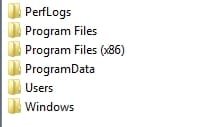
Check the windows.old has the complete namespace folders, which are these guys:

namespace folders.jpg

( Only x64 os has the program files (x86) folder )

1. Delete the namespace folders currently on the root of the partition

2. MOVE the above namespace folders from windows.old to the root.

(The paranoid could create a folder called anything and move the current namespace folders into that, instead of deleting them.)

It is lot easier to use boot media that has some kind of explorer - otherwise it means faffing with commands.

You can borrow this boot media 17514x86.iso
 

My Computers

System One System Two

  • Computer type
    PC/Desktop
    OS
    7 X64
    CPU
    i5 8400
    Motherboard
    gigabyte b365m ds3h
    Memory
    2x8gb 3200mhz
    Hard Drives
    various
    PSU
    pure power 11 400w cm
    Case
    Coolermaster
    Cooling
    cryorig m9i
  • Computer type
    PC/Desktop
    OS
    7x64
    CPU
    g5400
    Motherboard
    ga b365m ds3h
    Memory
    8gb ddr4 2400
    PSU
    xfx pro 450w
Should I currently see a "windows.old" folder in explorer? or is this only visible booting from optical drive or flashdrive?

Also, would it be more likely to work if I create a bootable flashdrive from the contents of that iso, boot from that and try a repair?
 

My Computers

System One System Two

  • Computer type
    PC/Desktop
    Computer Manufacturer/Model Number
    custom
    OS
    win7 Pro SP1 x86
    CPU
    64x2 6000+
    Motherboard
    winfast
    Memory
    2gig
    Graphics Card(s)
    GTX950
    Antivirus
    Avast
    Browser
    Brave
  • Computer type
    PC/Desktop
    Antivirus
    Avast
I havent got it in front of me right now. Cant remember if windows.old is a hidden folder because I always have hidden and protected folders showing - but I dont think it is.

If you havent got windows.old you are sol unless you made an image before your first botched upgrade with the wrong ( i.e sp0 ) media.

If there arent any 3rd party programs/ settings etc on the original vista you need to keep, you could just install fresh with the win7 media inc sp1 you now have. Presumably you have a license key for it. It should also be a lot quicker and easier than the whole upgrade then update malarkey.


made a backup of Vista with Macrium but no idea if that will work in this situation.

If there are a lot of progarms and settings in vista that you need - Restore that backup image from boot media and then do chkdsk and sfc. If all is well, do the upgrade with the media inc sp1 you now have.
 

My Computers

System One System Two

  • Computer type
    PC/Desktop
    OS
    7 X64
    CPU
    i5 8400
    Motherboard
    gigabyte b365m ds3h
    Memory
    2x8gb 3200mhz
    Hard Drives
    various
    PSU
    pure power 11 400w cm
    Case
    Coolermaster
    Cooling
    cryorig m9i
  • Computer type
    PC/Desktop
    OS
    7x64
    CPU
    g5400
    Motherboard
    ga b365m ds3h
    Memory
    8gb ddr4 2400
    PSU
    xfx pro 450w
Can find no "windows.old" on any drive (my systems always set to show all files and folders).

"Wrong" media? A valid Win7 Ultimate x32 x64; last used to install on this old laptop about four years ago, did all updates including SP1, but that was when still available from MS.

The registered software on the Vista system is why I was trying to revive it, but issues with java and trying to keep compatible AV and browsers was increasingly troublesome; otherwise I'd have put its PS and vid card in a different desktop (ASUS mobo, 8gig RAM, new 500gig SSD) and installed Win7 x64. I then planned to go ahead with that but leave the Vista install intact and convert it to a VM in that system, but was completely unfamiliar with that procedure so went for a simpler solution - try the Win7 over Vista install ...and here we are, lol.

Guess I could still go the VM route, but wonder if this would entail the same issues with updating. (And the CPU in that system, Phenom 2 quad 2.3gig, would have less single core performance than this ex-Vista system with Athlon 64x2 6000+ ...though I'm told could swap the Athlon over, both cpus AM2 socket.)
 

My Computers

System One System Two

  • Computer type
    PC/Desktop
    Computer Manufacturer/Model Number
    custom
    OS
    win7 Pro SP1 x86
    CPU
    64x2 6000+
    Motherboard
    winfast
    Memory
    2gig
    Graphics Card(s)
    GTX950
    Antivirus
    Avast
    Browser
    Brave
  • Computer type
    PC/Desktop
    Antivirus
    Avast
If you have the program installers and license keys, you could install win7 then put those on.

Or, if you only have few licensed programs you could probably find the licenses in the vista registry - most likely the software hive, or the ntuser hive. There are programs to retrieve that kind of thing, or you can have a look yourself by loading the hives and searching for likely names.
 

My Computers

System One System Two

  • Computer type
    PC/Desktop
    OS
    7 X64
    CPU
    i5 8400
    Motherboard
    gigabyte b365m ds3h
    Memory
    2x8gb 3200mhz
    Hard Drives
    various
    PSU
    pure power 11 400w cm
    Case
    Coolermaster
    Cooling
    cryorig m9i
  • Computer type
    PC/Desktop
    OS
    7x64
    CPU
    g5400
    Motherboard
    ga b365m ds3h
    Memory
    8gb ddr4 2400
    PSU
    xfx pro 450w
If you have the program installers and license keys, you could install win7 then put those on.

Or, if you only have few licensed programs you could probably find the licenses in the vista registry - most likely the software hive, or the ntuser hive. There are programs to retrieve that kind of thing, or you can have a look yourself by loading the hives and searching for likely names.

SIW2, can OP do a Repair install using the Win 7 32 SP1 you provided?
If he did a Vista to Win 7 upgrade he must have the Win 7 license.
 

My Computers

System One System Two

  • Computer type
    PC/Desktop
    Computer Manufacturer/Model Number
    custom build
    OS
    Windows 7 HP 64
    CPU
    i5 6600K - 800MHz to 4200MHz
    Motherboard
    GA-Z170-HD3P
    Memory
    4+4G GSkill DDR4 3000
    Graphics Card(s)
    IG - Intel 530
    Monitor(s) Displays
    Samsung 226BW
    Screen Resolution
    1680x1050
    Hard Drives
    (1) -1 SM951 – 128GB M.2 AHCI PCIe SSD drive for Windows 7 and Lubuntu
    (2) -1 WD SATA 3 - 1T for Data
    (3) -1 WD SATA 3 - 1T for backup
    PSU
    Thermaltake 450W TR2 gold
    Keyboard
    Old and good Chicony mechanical keyboard
    Mouse
    Logitech mX performance - 9 buttons (had to disable some)
    Internet Speed
    500Mb/s
    Browser
    Firefox 64
    Other Info
    TinyWall firewall
  • Computer type
    Laptop
    System Manufacturer/Model Number
    Asus Q550LF
    OS
    Windows 7 Pro
    CPU
    i7-4500U 800MHz to 3.0GHz
    Motherboard
    Asus Q550LF
    Memory
    (4+4)G DDR3 1600
    Graphics Card(s)
    IG intel 4400 + NVIDIA GeForce GT 745M
    Sound Card
    Realtek
    Monitor(s) Displays
    LG Display LP156WF4-SPH1
    Screen Resolution
    1920 x 1080
    Hard Drives
    BX500 120G SSD for Windows and programs +
    1T HDD for data
    Internet Speed
    500 Mb/s
    Browser
    Firefox
    Other Info
    TinyWall firewall
Don't write me off yet, I'm still working on this.

Am leery of trying to restore Vista from Macrium; my understanding of this backup is that it is to restore that OS in case of catastrophic failure ....but what would happen in my situation of backup Vista, upgrade Vista to Win7, restore Vista backup over Win7? Would this be a complete restoration of Vista or could i end up with some weird Vista/Win7 hybrid (which may not even boot)?

And, yes, my Win7 is licensed/verified/authenticated/registered/whatever.

I have in the past inquired about software to determine what registry entries were used by any particular program, the usual response is to be accused of wanting to pirate software. But that is why I've tried to keep this Vista system going. Some of this software "hides" its registry data by using no easily identifiable text; in some cases the installer itself is apparently edited, I tried to install on a completely different computer only to get "this program has already been installed".

Another alternative, for which I originally made the Vista backup, is to strip this install down to just the OS and the software I cannot easily replace and "convert" (is that the term) to a VM state, and move the HD to another system with Win7 x64. I then have a better system and still retain the registered software.
 

My Computers

System One System Two

  • Computer type
    PC/Desktop
    Computer Manufacturer/Model Number
    custom
    OS
    win7 Pro SP1 x86
    CPU
    64x2 6000+
    Motherboard
    winfast
    Memory
    2gig
    Graphics Card(s)
    GTX950
    Antivirus
    Avast
    Browser
    Brave
  • Computer type
    PC/Desktop
    Antivirus
    Avast
For starters Uninstall Malwarebytes, it has different pre-requistes for Vista/W7

When you carried out the Upgrade it should have automatically installed W7 SP1, it will allways take the latest available version
(all the upgrade does is install additional files) The CORE is the same

i would like you to run this tool, MGAdiag it will tell me if the upgrade was successfull- theres an upgrade specific entry,
Download Microsoft Genuine Advantage Diagnostic Tool - MajorGeeks


from your earlier post,
"Wrong" media? A valid Win7 Ultimate x32 x64; last used to install on this old laptop about four years ago, did all updates including SP1, but that was when still available from MS.

CONTRADICTS EVERYTHING you have said, a reinstall of an upgraded Vista system requires a NON standard installation


My Computer

Computer type
PC/Desktop
Computer Manufacturer/Model Number
medionl/Aspire 6930G/acer x55a
OS
W7 home premium 32bit/W7HP 64bit/w10 tp insider ring
CPU
E5300 dual core
Motherboard
medion MS7366
Memory
3gb
Graphics Card(s)
Nvidia Geforce 7100 Nforce 630i
Monitor(s) Displays
avixc
Internet Speed
n (isp resticted to 72)
Antivirus
mse/pands
Browser
palemoon
Other Info
Belkin Fd7050 n USB using Railink RT2870 drivers, more upto date
Malwarebytes was removed during Win7 install. It told me I needed to install a new version, but that version wouldn't install, complaining that I needed a couple of security updates first ...but those wouldn't install either.

Contradicts?
I have a Win7 Ultimate disk with both 32 bit and 64 bit. I installed Win7 x32 on this old laptop four years ago (it was originally Vista but had W10 when I bought it; I formatted and a clean Win7 install), activated it, it did all its updating then and has had no problems since. But the vid card in this old warhorse is dieing and not worth replacing with another ten year old card which may not last a week. So I try to resurrect the Vista system. I used the same disk to upgrade Vista on the desktop system, but online updates are no longer available from MS. It is activated with an upgrade code.
 

My Computers

System One System Two

  • Computer type
    PC/Desktop
    Computer Manufacturer/Model Number
    custom
    OS
    win7 Pro SP1 x86
    CPU
    64x2 6000+
    Motherboard
    winfast
    Memory
    2gig
    Graphics Card(s)
    GTX950
    Antivirus
    Avast
    Browser
    Brave
  • Computer type
    PC/Desktop
    Antivirus
    Avast
You can get vista updates ( and win7 updates ) with dism++ provided you have an internet connection.

http://gh.api.99988866.xyz/github.c...s/download/v10.1.1002.1/Dism++10.1.1002.1.zip

It can take quite a while with an old mechanical disk. Suggest installing about 30 at a time then reboot.

Or you can borrow my vista install media which already has the updates to eol and usb3 ( except netframe 4 which can be added later)
 

My Computers

System One System Two

  • Computer type
    PC/Desktop
    OS
    7 X64
    CPU
    i5 8400
    Motherboard
    gigabyte b365m ds3h
    Memory
    2x8gb 3200mhz
    Hard Drives
    various
    PSU
    pure power 11 400w cm
    Case
    Coolermaster
    Cooling
    cryorig m9i
  • Computer type
    PC/Desktop
    OS
    7x64
    CPU
    g5400
    Motherboard
    ga b365m ds3h
    Memory
    8gb ddr4 2400
    PSU
    xfx pro 450w
NO disc is required to update from Vista to W7, all you had to do was input the key into the Windows Anytime Upgrade option in the Control panel

there is no reason why your system should not be updating automatically... MS servers are still live

please post the results of MGAdiag
 

My Computer

Computer type
PC/Desktop
Computer Manufacturer/Model Number
medionl/Aspire 6930G/acer x55a
OS
W7 home premium 32bit/W7HP 64bit/w10 tp insider ring
CPU
E5300 dual core
Motherboard
medion MS7366
Memory
3gb
Graphics Card(s)
Nvidia Geforce 7100 Nforce 630i
Monitor(s) Displays
avixc
Internet Speed
n (isp resticted to 72)
Antivirus
mse/pands
Browser
palemoon
Other Info
Belkin Fd7050 n USB using Railink RT2870 drivers, more upto date

My Computers

System One System Two

  • Computer type
    PC/Desktop
    OS
    7 X64
    CPU
    i5 8400
    Motherboard
    gigabyte b365m ds3h
    Memory
    2x8gb 3200mhz
    Hard Drives
    various
    PSU
    pure power 11 400w cm
    Case
    Coolermaster
    Cooling
    cryorig m9i
  • Computer type
    PC/Desktop
    OS
    7x64
    CPU
    g5400
    Motherboard
    ga b365m ds3h
    Memory
    8gb ddr4 2400
    PSU
    xfx pro 450w
Well; thoroughly confusing. This report says the licensing data is invalid; if so, why did windows accept it and show it is activated? (CP>system page - "Windows is activated".)


Diagnostic Report (1.9.0027.0):-----------------------------------------Windows Validation Data-->Validation Code: 0Cached Online Validation Code: N/A, hr = 0xc004f012Windows Product Key: *****-*****-X92GV-V7DCV-P4K27Windows Product Key Hash: aU2z1/fnhnLHmhBm699qYZT2E6s=Windows Product ID: 00426-OEM-8992662-00400Windows Product ID Type: 2Windows License Type: OEM SLPWindows OS version: 6.1.7600.2.00010100.0.0.001ID: {A50AAA1A-C719-4CF6-A127-A0343E116313}(3)Is Admin: YesTestCab: 0x0LegitcheckControl ActiveX: N/A, hr = 0x80070002Signed By: N/A, hr = 0x80070002Product Name: Windows 7 UltimateArchitecture: 0x00000000Build lab: 7600.win7_rtm.090713-1255TTS Error: Validation Diagnostic: Resolution Status: N/AVista WgaER Data-->ThreatID(s): N/A, hr = 0x80070002Version: N/A, hr = 0x80070002Windows XP Notifications Data-->Cached Result: N/A, hr = 0x80070002File Exists: NoVersion: N/A, hr = 0x80070002WgaTray.exe Signed By: N/A, hr = 0x80070002WgaLogon.dll Signed By: N/A, hr = 0x80070002OGA Notifications Data-->Cached Result: N/A, hr = 0x80070002Version: N/A, hr = 0x80070002OGAExec.exe Signed By: N/A, hr = 0x80070002OGAAddin.dll Signed By: N/A, hr = 0x80070002OGA Data-->Office Status: 109 N/AOGA Version: N/A, 0x80070002Signed By: N/A, hr = 0x80070002Office Diagnostics: B4D0AA8B-604-645_025D1FF3-364-80041010_025D1FF3-229-80041010_025D1FF3-230-1_025D1FF3-517-80040154_025D1FF3-237-80040154_025D1FF3-238-2_025D1FF3-244-80070002_025D1FF3-258-3Browser Data-->Proxy settings: N/AUser Agent: Mozilla/4.0 (compatible; MSIE 8.0; Win32)Default Browser: C:\Program Files\Mozilla Firefox59\firefox.exeDownload signed ActiveX controls: PromptDownload unsigned ActiveX controls: DisabledRun ActiveX controls and plug-ins: AllowedInitialize and script ActiveX controls not marked as safe: DisabledAllow scripting of Internet Explorer Webbrowser control: DisabledActive scripting: AllowedScript ActiveX controls marked as safe for scripting: AllowedFile Scan Data-->File Mismatch: C:\Windows\system32\wat\watadminsvc.exe[Hr = 0x80070003]File Mismatch: C:\Windows\system32\wat\npwatweb.dll[Hr = 0x80070003]File Mismatch: C:\Windows\system32\wat\watux.exe[Hr = 0x80070003]File Mismatch: C:\Windows\system32\wat\watweb.dll[Hr = 0x80070003]Other data-->Office Details: <GenuineResults><MachineData><UGUID>{A50AAA1A-C719-4CF6-A127-A0343E116313}</UGUID><Version>1.9.0027.0</Version><OS>6.1.7600.2.00010100.0.0.001</OS><Architecture>x32</Architecture><PKey>*****-*****-*****-*****-P4K27</PKey><PID>00426-OEM-8992662-00400</PID><PIDType>2</PIDType><SID>S-1-5-21-3867056976-849016701-749785769</SID><SYSTEM><Manufacturer>Gateway</Manufacturer><Model>T5246</Model></SYSTEM><BIOS><Manufacturer>Phoenix Technologies, LTD</Manufacturer><Version>6.00 PG</Version><SMBIOSVersion major="2" minor="4"/><Date>20071110000000.000000+000</Date></BIOS><HWID>7FE20100010000F6</HWID><UserLCID>0409</UserLCID><SystemLCID>0409</SystemLCID><TimeZone>Eastern Standard Time(GMT-05:00)</TimeZone><iJoin>0</iJoin><SBID><stat>3</stat><msppid></msppid><name></name><model></model></SBID><OEM><OEMID>DELL </OEMID><OEMTableID>QA09 </OEMTableID></OEM><GANotification/></MachineData><Software><Office><Result>109</Result><Products/><Applications/></Office></Software></GenuineResults> Spsys.log Content: 0x80070002Licensing Data-->C:\Windows\system32\slmgr.vbs(1333, 5) (null): The data is invalid. Windows Activation Technologies-->HrOffline: 0x00000000HrOnline: N/AHealthStatus: 0x0000000000000000Event Time Stamp: N/AActiveX: Not Registered - 0x80040154Admin Service: Not Registered - 0x80040154HealthStatus Bitmask Output:HWID Data-->N/A, hr = 0x8007000dOEM Activation 1.0 Data-->N/AOEM Activation 2.0 Data-->BIOS valid for OA 2.0: yesWindows marker version: 0x20001OEMID and OEMTableID Consistent: yesBIOS Information: ACPI Table Name OEMID Value OEMTableID Value APIC GATEWA SYSTEM FACP GATEWA SYSTEM HPET GATEWA SYSTEM MCFG GATEWA SYSTEM SLIC DELL QA09 SSDT PTLTD POWERNOW

 

My Computers

System One System Two

  • Computer type
    PC/Desktop
    Computer Manufacturer/Model Number
    custom
    OS
    win7 Pro SP1 x86
    CPU
    64x2 6000+
    Motherboard
    winfast
    Memory
    2gig
    Graphics Card(s)
    GTX950
    Antivirus
    Avast
    Browser
    Brave
  • Computer type
    PC/Desktop
    Antivirus
    Avast
there is no reason why your system should not be updating automatically

Ever heard of

Discontinued.PNG

?

A fresh install of win7 also does not update out of the box
This is true by all accounts BUT it is important to make a distinction between Windows 7 RTM and Windows 7 Service Pack 1 now.

On Windows 7 RTM the failure is due to "SHA-1 based endpoints discontinued".

On Windows 7 Service Pack 1 it is due to "Automatic Selfupdate of the Windows Update Client discontinued".

Those issues are not related and have started at different times. The confusing part is that in both cases the error code is the same for different reasons.
 
Last edited:

My Computer

Computer type
PC/Desktop
OS
Windows 7 Home Premium
Back
Top