
Solved Cannot install updates

Hi

thats an open statement to address.
so look at it this way
We licence from MS the ability to use the system, for which they will provide amendments, ie Updates for improved service and security. The product key is the way they identify who is eligable
a non genuine OS will not receive these.
Its a fact of life, if i can get it cheaper or for free then theres someone who can provide it
In your case you have unwittingly purchased, via that boot sale, a Non-Standard MS installation disc which has been modified to fool MS into thinking it is genuine, but its failed.
You may own the computer but not the operating system you in effect lease it for a one-off payment
FYI Windows 7 was the most faked item in its time
 

My Computer

Computer type
PC/Desktop
Computer Manufacturer/Model Number
medionl/Aspire 6930G/acer x55a
OS
W7 home premium 32bit/W7HP 64bit/w10 tp insider ring
CPU
E5300 dual core
Motherboard
medion MS7366
Memory
3gb
Graphics Card(s)
Nvidia Geforce 7100 Nforce 630i
Monitor(s) Displays
avixc
Internet Speed
n (isp resticted to 72)
Antivirus
mse/pands
Browser
palemoon
Other Info
Belkin Fd7050 n USB using Railink RT2870 drivers, more upto date
"A non genuine OS will not receive these"

As of late any Windows 7 RTM will not receive these no matter how legit.

Also no matter how illicit, any Windows 7 SP1 still will receive important updates.
 

My Computer

Computer type
PC/Desktop
OS
Windows 7 Home Premium
I must admit to some confusion here. If the key is not valid why did windows accept it and say it is activated? For example at the end of the upgrade install on the desktop I was unsure which key it wanted so first used the one from the sticker on the case, it immediately rejected that as invalid then readily accepted the "bogus"(?) key. In the past I've installed windows without a key and it isn't long before getting black wallpaper and windows whining about "not genuine", necessitating that "hat in hand" call to MS for a new key.

Why did the install on the laptop upgrade to SP1 and do all the updates without problems ...or is the upgrade install to the Vista system the culprit as opposed to the clean install on the laptop.

But most importantly, is there anything I can do now to get this desktop fully functional?

(I assume that Win7 Ultimate disk is a coaster now; was going to use it for an x64 install on system I'm slowly building. But, somewhere I have a "Windows 7 Pro 64bit Anytime Upgrade" disk which I've read will do a full install to an empty drive; if so, would a call to MS get me a valid key for it?)
 

My Computers

System One System Two

  • Computer type
    PC/Desktop
    Computer Manufacturer/Model Number
    custom
    OS
    win7 Pro SP1 x86
    CPU
    64x2 6000+
    Motherboard
    winfast
    Memory
    2gig
    Graphics Card(s)
    GTX950
    Antivirus
    Avast
    Browser
    Brave
  • Computer type
    PC/Desktop
    Antivirus
    Avast
Why did the install on the laptop upgrade to SP1 and do all the updates without problems
Because it was done prior to Microsoft discontinuing SHA-1 based endpoints, thus discontinuing Windows Update in Windows 7 RTM.

You need to get Service Pack 1 installed one way or another.
 

My Computer

Computer type
PC/Desktop
OS
Windows 7 Home Premium

My Computers

System One System Two

  • Computer type
    PC/Desktop
    OS
    7 X64
    CPU
    i5 8400
    Motherboard
    gigabyte b365m ds3h
    Memory
    2x8gb 3200mhz
    Hard Drives
    various
    PSU
    pure power 11 400w cm
    Case
    Coolermaster
    Cooling
    cryorig m9i
  • Computer type
    PC/Desktop
    OS
    7x64
    CPU
    g5400
    Motherboard
    ga b365m ds3h
    Memory
    8gb ddr4 2400
    PSU
    xfx pro 450w
.... it looks like you will have to do a custom install rather than an upgrade/repair install.....


Which means losing all installed software, exactly what I've been trying to avoid. Otherwise I'd have wiped the HD and done a clean install of Win7 from the start. (A pox upon the miscreant who devised the registry.)

- - - Updated - - -


Interesting, thanks. Downloaded it, reading up before running it.

- - - Updated - - -

Because it was done prior to Microsoft discontinuing SHA-1 based endpoints, thus discontinuing Windows Update in Windows 7 RTM.

You need to get Service Pack 1 installed one way or another.


That makes sense, it was nearly five years ago. (Though I shall now have to search SHA and RTM, lol.)
 

My Computers

System One System Two

  • Computer type
    PC/Desktop
    Computer Manufacturer/Model Number
    custom
    OS
    win7 Pro SP1 x86
    CPU
    64x2 6000+
    Motherboard
    winfast
    Memory
    2gig
    Graphics Card(s)
    GTX950
    Antivirus
    Avast
    Browser
    Brave
  • Computer type
    PC/Desktop
    Antivirus
    Avast

My Computer

Computer type
PC/Desktop
OS
Windows 7 Home Premium
Installing SP1, via MS Update requires a valid system as designated by THEM, we allready know its not recognised as such via the Mgadiag results.............

and as the SP1 KB update was released before the SHA requirement kb it takes pressidence
 

My Computer

Computer type
PC/Desktop
Computer Manufacturer/Model Number
medionl/Aspire 6930G/acer x55a
OS
W7 home premium 32bit/W7HP 64bit/w10 tp insider ring
CPU
E5300 dual core
Motherboard
medion MS7366
Memory
3gb
Graphics Card(s)
Nvidia Geforce 7100 Nforce 630i
Monitor(s) Displays
avixc
Internet Speed
n (isp resticted to 72)
Antivirus
mse/pands
Browser
palemoon
Other Info
Belkin Fd7050 n USB using Railink RT2870 drivers, more upto date
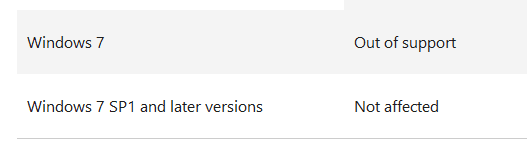
Do you understand that Service Pack 1 is categorically unavailable at Windows Update because Windows Update has become unavailable in Windows 7 RTM?

There is no installing SP1 via MS Update anymore.


My Computer

Computer type
PC/Desktop
OS
Windows 7 Home Premium
really, as of 1 minute ago,

READ what i said, he will not be offered it for a DIFFERENT reason, even if he downloads it from the catalogue it will FAIL
 

Attachments

  • sp1.PNG
    sp1.PNG
    226.5 KB · Views: 1

My Computer

Computer type
PC/Desktop
Computer Manufacturer/Model Number
medionl/Aspire 6930G/acer x55a
OS
W7 home premium 32bit/W7HP 64bit/w10 tp insider ring
CPU
E5300 dual core
Motherboard
medion MS7366
Memory
3gb
Graphics Card(s)
Nvidia Geforce 7100 Nforce 630i
Monitor(s) Displays
avixc
Internet Speed
n (isp resticted to 72)
Antivirus
mse/pands
Browser
palemoon
Other Info
Belkin Fd7050 n USB using Railink RT2870 drivers, more upto date
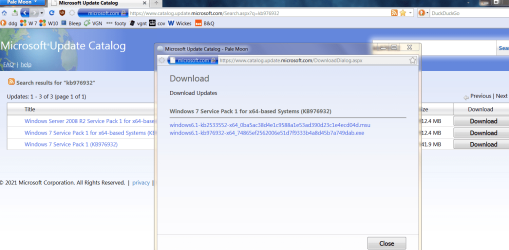
So when you're talking about MS Update, it could mean the Catalog, too. :confused:

- - - Updated - - -

he will not be offered it for a DIFFERENT reason

He will not be offered it at any rate, and neither will you or anybody else. It's unavailable in 2021. At Windows Update.
 

My Computer

Computer type
PC/Desktop
OS
Windows 7 Home Premium
So this 550meg exe of kb976932 is useless to me?
 

My Computers

System One System Two

  • Computer type
    PC/Desktop
    Computer Manufacturer/Model Number
    custom
    OS
    win7 Pro SP1 x86
    CPU
    64x2 6000+
    Motherboard
    winfast
    Memory
    2gig
    Graphics Card(s)
    GTX950
    Antivirus
    Avast
    Browser
    Brave
  • Computer type
    PC/Desktop
    Antivirus
    Avast
No. It's exactly what you need.
 

My Computer

Computer type
PC/Desktop
OS
Windows 7 Home Premium
So, I

-run the "fixit" file
-reboot
-run the SP1 (kb976932) update
-reboot
-run the UpdatePack7R2
-reboot
?

and I should end up with an updated activated Win7? (maybe not fully "activated/registered/validated/etc." to MS standards, but usable)
?

I also have the following files downloaded per instructions, are any/all of them still required? if so, where do they fall in installation order?

-kb947821 (233meg)
-kb3138612 (2.6meg)
-kb4474419 (35meg)
-kb4490628 (4meg)
 
Last edited:

My Computers

System One System Two

  • Computer type
    PC/Desktop
    Computer Manufacturer/Model Number
    custom
    OS
    win7 Pro SP1 x86
    CPU
    64x2 6000+
    Motherboard
    winfast
    Memory
    2gig
    Graphics Card(s)
    GTX950
    Antivirus
    Avast
    Browser
    Brave
  • Computer type
    PC/Desktop
    Antivirus
    Avast
Have done nothing further, lest i make the situation worse.

But now a new issue - the optical drive is not recognized; checking Device Manager for driver status I find Device Manager is blank.

Following instructions from Device Manager Empty or Blank in Windows? all is well (everything already matches what they recommend) til the last step, "[FONT=&quot]selecting [/FONT][FONT=Roboto Slab, sans-serif][/FONT]Reset permission entries on all child objects with entries shown here that apply to child objects", I check that box, click OK, and get a popup "Unable to save permission changes on Enum. Access is denied". (Doing this from clean Admin account.)

Then read this - Solved – Device Manager blank. Nothing shows up in Device Manager folder. | IT by Mitch; same instructions til the end where the author mentions "this is what worked for me". In safe mode, admin account, registry search reveals no instance of the string he recommends deleting.

Moved on to [SOLVED] Device Manager is Blank | Tech Support Forum; basically the same until post #22. The download they list is now 404, and the instructions in that post are somewhat confusing to me.

Am thinking this issue and my problem with updating Win7 here are related, if not identical, since a common theme seems to be registry permissions.
 

My Computers

System One System Two

  • Computer type
    PC/Desktop
    Computer Manufacturer/Model Number
    custom
    OS
    win7 Pro SP1 x86
    CPU
    64x2 6000+
    Motherboard
    winfast
    Memory
    2gig
    Graphics Card(s)
    GTX950
    Antivirus
    Avast
    Browser
    Brave
  • Computer type
    PC/Desktop
    Antivirus
    Avast
I just did a clean install of Windows 7 Home Premium 64-bit over the weekend.

When I tried to activate Windows 7 I got: Error Code 0x80072EFE

I tried phone activation. I could have done that but as an alternative it suggested I do the activation using my cell-phone. The link in the text message provided the codes that I typed in the computer to complete the activation. This time the activation was a success.

I got an error message when I tried to run Windows update. I solved that by installing Windows 7 SP1 (windows6.1-KB976932-X64.exe).

When that was done I did the unofficial rollups (aka SP2).

Since then I selected "Check for Updates" which produced even more updates. I repeated that maybe 10 times before it could find no more updates.

When the updates were done I installed Malwarebytes.

====================================================================

Windows 7 SP1
32-bit: windows6.1-KB976932-X86.exe
64-bit: windows6.1-KB976932-X64.exe

Windows 7 SP2 (Rollup)

1. Prerequistes
32-bit: Windows6.1-KB3020369-x86.msu
64-bit: Windows6.1-KB3020369-x64.msu

2. Download
32-bit: windows6.1-kb3125574-v4-x86_ba1ff5537312561795cc04db0b02fbb0a74b2cbd.msu
64-bit: windows6.1-kb3125574-v4-x64_2dafb1d203c8964239af3048b5dd4b1264cd93b9.msu

How to obtain and install Windows 7 SP2
https://answers.microsoft.com/en-us...ws-7-sp2/c2c7009f-3a10-4199-9c89-48e1e883051e

====================================================================

Note I also have a computer that I installed Windows 7 Ultimate Upgrade. It was a newly built computer that never has an O/S. What Microsoft did not advertise was that Windows 7 Upgrade media did not check for a previous version of Windows so could be used just like a full version of Windows 7. I started with Windows 7 Ult. 32-bit a few years later reinstalled using the 64-bit Windows 7 Ult. DVD that was included. That computer received the free Windows 10 Pro 64-bit upgrade a couple years ago.
 

My Computers

System One System Two

  • Computer type
    PC/Desktop
    Computer Manufacturer/Model Number
    Custom build
    OS
    Windows 7 Home Premium 64-bits
    CPU
    AMD FX-8350
    Motherboard
    Gigabyte GA-990FXA-UD3 (AM3+)
    Memory
    GSKILL Ripjaw-X PC3 12800 8GB (2x4GB)
    Graphics Card(s)
    ASUS ROG STRIX GTX 1060 6GB
    Sound Card
    Integrated
    Monitor(s) Displays
    Asus VE228H (21.5-in)
    Screen Resolution
    1920x1080 60Hz
    Hard Drives
    SAMSUNG 870 EVO 2.5 Inch SATA SSD (1TB)
    SAMSUNG 870 EVO 2.5 Inch SATA SSD (1TB)
    SAMSUNG 870 EVO 2.5 Inch SATA SSD (1TB)
    PSU
    Corsair RM750x (750 watts)
    Case
    Corsair Carbide Series 200R
    Cooling
    Corsair Hydro Series H60 (CWCH60)
    Keyboard
    Logitech Elite
    Mouse
    Logitech M510 Wireless Mouse
    Internet Speed
    Comcast Gigabit Extra (1200Mbps down / 35Mbps up)
    Antivirus
    Malwarebytes
    Browser
    Firefox, Edge, Chrome
    Other Info
    ASUS DRW-24B1ST DVD-RW (24X) optical drive
    Seagate Expansion Desk (5TB) external SATA/USB HDD
    Comcast XB8 Internet Gateway
  • Computer type
    PC/Desktop
    System Manufacturer/Model Number
    Custom
    OS
    Windows 7 Pro (64-bit)
    CPU
    AMD Phenom II 960T X4
    Motherboard
    ASUS M4N82 Deluxe
    Memory
    Corsair XMS2 DDR2-800 8GB (4x2GB)
    Graphics Card(s)
    ASUS ENGTX560 DCII OC/2DI/1GD5 1GB
    Monitor(s) Displays
    Samsung 930B 19-inch LCD
    Screen Resolution
    1280x1024
    Hard Drives
    Samsung SSD 870 EVO 1000 GB (Windows 10)
    Seagate ST1000DM003 1000 GB (Windows 7)
    PSU
    Antec TruePower (new) TP-650
    Case
    Antec Three Hundred
    Cooling
    AMD stock cooler from FX8350
    Mouse
    Logitech M100
    Internet Speed
    Xfinity Gigabit Extra 1200/35 Mbps
Thanks for all the input. Guess i'm on my own now, wish me luck.
 

My Computers

System One System Two

  • Computer type
    PC/Desktop
    Computer Manufacturer/Model Number
    custom
    OS
    win7 Pro SP1 x86
    CPU
    64x2 6000+
    Motherboard
    winfast
    Memory
    2gig
    Graphics Card(s)
    GTX950
    Antivirus
    Avast
    Browser
    Brave
  • Computer type
    PC/Desktop
    Antivirus
    Avast
Thanks for all the input. Guess i'm on my own now, wish me luck.
Did you read my post? I just did a clean install of Windows 7 a few days ago. Note I waited to install Malwarebytes until after I updated Windows 7 to SP2.

Microsoft no longer has SP1 for download but that is OK because I already had it.

The unofficial update to Roll-up update (aka SP2) I had didn't work. The link I gave in my post is still valid and has files to update Windows 7 SP1 to the unofficial Windows 7 SP2.

I wouldn't waste any more time on your current Windows 7 installation because all the fixes you have done so far probably messed something up. Your best bet is to do a clean install of Windows 7.
 

My Computers

System One System Two

  • Computer type
    PC/Desktop
    Computer Manufacturer/Model Number
    Custom build
    OS
    Windows 7 Home Premium 64-bits
    CPU
    AMD FX-8350
    Motherboard
    Gigabyte GA-990FXA-UD3 (AM3+)
    Memory
    GSKILL Ripjaw-X PC3 12800 8GB (2x4GB)
    Graphics Card(s)
    ASUS ROG STRIX GTX 1060 6GB
    Sound Card
    Integrated
    Monitor(s) Displays
    Asus VE228H (21.5-in)
    Screen Resolution
    1920x1080 60Hz
    Hard Drives
    SAMSUNG 870 EVO 2.5 Inch SATA SSD (1TB)
    SAMSUNG 870 EVO 2.5 Inch SATA SSD (1TB)
    SAMSUNG 870 EVO 2.5 Inch SATA SSD (1TB)
    PSU
    Corsair RM750x (750 watts)
    Case
    Corsair Carbide Series 200R
    Cooling
    Corsair Hydro Series H60 (CWCH60)
    Keyboard
    Logitech Elite
    Mouse
    Logitech M510 Wireless Mouse
    Internet Speed
    Comcast Gigabit Extra (1200Mbps down / 35Mbps up)
    Antivirus
    Malwarebytes
    Browser
    Firefox, Edge, Chrome
    Other Info
    ASUS DRW-24B1ST DVD-RW (24X) optical drive
    Seagate Expansion Desk (5TB) external SATA/USB HDD
    Comcast XB8 Internet Gateway
  • Computer type
    PC/Desktop
    System Manufacturer/Model Number
    Custom
    OS
    Windows 7 Pro (64-bit)
    CPU
    AMD Phenom II 960T X4
    Motherboard
    ASUS M4N82 Deluxe
    Memory
    Corsair XMS2 DDR2-800 8GB (4x2GB)
    Graphics Card(s)
    ASUS ENGTX560 DCII OC/2DI/1GD5 1GB
    Monitor(s) Displays
    Samsung 930B 19-inch LCD
    Screen Resolution
    1280x1024
    Hard Drives
    Samsung SSD 870 EVO 1000 GB (Windows 10)
    Seagate ST1000DM003 1000 GB (Windows 7)
    PSU
    Antec TruePower (new) TP-650
    Case
    Antec Three Hundred
    Cooling
    AMD stock cooler from FX8350
    Mouse
    Logitech M100
    Internet Speed
    Xfinity Gigabit Extra 1200/35 Mbps
Read the entire thread; a complete reinstall of windows is not a viable option because I want to retain the registered software. Calling MS for activation is out because I apparently have a bogus Win7 disk - which, from what I read here, is why SP2 will not now install ...and nothing else will install (including Malwarebytes) until SP2 is in place. (And from my understanding SP2 and all other updates at the time I did the install on this old laptop, from the same Win7 disk, went smoothly because Windows Update could grab them straight from MS website, which can no longer be done for the desktop.)

Post 75 delineates what has been recommended, I'm just not sure of sequence so sought verification, "is this what I should do? and is this the proper order?" It also seems a permissions issue in the registry could be blocking the install.

I'm not completely computer illiterate, been cursing at them for over forty years, but all these update issues and registry permissions are beyond my knowledge (my concept of permissions is "this is my computer, and there is a five pound hammer in a nearby toolbox that says I have access to everything on it"; "Access Denied" should be nullified completely by the admin account).
 

My Computers

System One System Two

  • Computer type
    PC/Desktop
    Computer Manufacturer/Model Number
    custom
    OS
    win7 Pro SP1 x86
    CPU
    64x2 6000+
    Motherboard
    winfast
    Memory
    2gig
    Graphics Card(s)
    GTX950
    Antivirus
    Avast
    Browser
    Brave
  • Computer type
    PC/Desktop
    Antivirus
    Avast
Back
Top