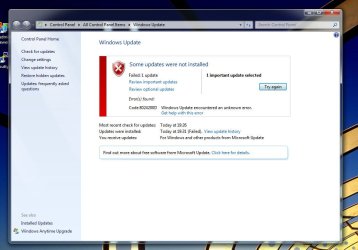
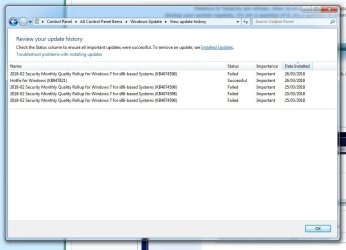
Cannot install windows update KB4074598

Grilo

New member
Local time
11:07 AM
Messages
6
Hello friends,

I am having issues with windows updates, more specifically the "2018-02 Security Monthly Quality Rollup for Windows 7 for x64-based Systems (KB4074598)l". My computer is freshly formatted where I installed my OS on my SSD drive.

I have tried several attempts at resolving this issue by myself like resetting windows update and manually downloading windows update, but with zero success.

So exactly what happens is when I head to windows update and click install, it attempts to download and install then fails. Sometimes trying to update will crash my computer.

Here is the information that is requested while posting in windows update :

Error codes: 8024200D
Log collection: CBS.zip - Google Drive

What am I looking at? Could someone help me resolve this issue plz? Any help is greatly appreciated.

Grilo
 

My Computer

Computer type
PC/Desktop
Computer Manufacturer/Model Number
custom build
OS
Windows 7 Ultimate x64
CPU
AMD FX-6300
Motherboard
Gigabyte ga-970a-d3
Memory
Corsair Vengeance LP 8GB DDR3 1600MHz
Graphics Card(s)
eVGA Geforce GTX 650 Ti Boost
Hard Drives
Seagate 1TB Barracuda SATA III w/ 64MB Cache
ADATA Premier SP550 Solid State Drive, 240GB
Antivirus
Avast free
Browser
Firefox
Hi Grilo,

Please do the following:

Remove Updates Manually

1. Click on the Start button and in the search box, type Command Prompt
2. When you see Command Prompt on the list, right-click on it and select Run as administrator
3. When command prompt opens, copy and paste the following commands into it, press enter

wusa /uninstall /KB:4038803

Keep track successful or errors (write down error message)

Do the same for:

wusa /uninstall /KB:4074598

Keep track successful or errors (write down error message)

Post your results after you do both of them

Thank you
 

My Computer

Computer type
PC/Desktop
Computer Manufacturer/Model Number
HP Desktop & Compaq Laptop
OS
Win 10 x64, Linux Lite, Win 7 x64, BlackArch, & Kali
Hard Drives
Samsung 850 Pro 256Gb,
Hitachi HDD 1Tb,
Crucial MX SSD 250Gb
Segate 3Tb USB 3.0 Ext. Backup HDD
Internet Speed
150Mbps dn, 20Mbps up
Antivirus
Avast Free, Malwarebytes Anti-Exploit & Anti-Ransomware
Browser
Firefox, Chrome, Opera, & VPN
Hi and thanks for the help.

I followed your procedure and was giving the following messages.

wusa /uninstall /KB:4038803 : "The update KB4038803 is not installed on the computer"

wusa /uninstall /KB:4074598 : "The update KB4074598 is not installed on the computer"
 

My Computer

Computer type
PC/Desktop
Computer Manufacturer/Model Number
custom build
OS
Windows 7 Ultimate x64
CPU
AMD FX-6300
Motherboard
Gigabyte ga-970a-d3
Memory
Corsair Vengeance LP 8GB DDR3 1600MHz
Graphics Card(s)
eVGA Geforce GTX 650 Ti Boost
Hard Drives
Seagate 1TB Barracuda SATA III w/ 64MB Cache
ADATA Premier SP550 Solid State Drive, 240GB
Antivirus
Avast free
Browser
Firefox
Ok,

You may have an orphaned registry key

If you don't have CCleaner download and install it. Run the registry cleaner, leave all default settings, when offered, yes to backup registry. When the scan completes Fix Issues, Fix all issues. Repeat process again.

Reboot, try manually installing KB4074598

This one:

2018-02 Security Monthly Quality Rollup for Windows 7 for x64-based Systems (KB4074598)
 
Last edited:

My Computer

Computer type
PC/Desktop
Computer Manufacturer/Model Number
HP Desktop & Compaq Laptop
OS
Win 10 x64, Linux Lite, Win 7 x64, BlackArch, & Kali
Hard Drives
Samsung 850 Pro 256Gb,
Hitachi HDD 1Tb,
Crucial MX SSD 250Gb
Segate 3Tb USB 3.0 Ext. Backup HDD
Internet Speed
150Mbps dn, 20Mbps up
Antivirus
Avast Free, Malwarebytes Anti-Exploit & Anti-Ransomware
Browser
Firefox, Chrome, Opera, & VPN
Alright,

I ran the registry cleaner twice and fixed all issues both times. Here are the saved files from the scan. Their names are "CCleaner_backup" and "CCleaner_backup2" :

https://drive.google.com/open?id=15mVmDVCa84Ynbd-GEmm570vLg5xXe_Px

I got this message after trying to install the "2018-02 Security Monthly Quality Rollup for Windows 7 for x64-based Systems (KB4074598)" update :

Some updates where not installed. Security update for KB4074598
 

My Computer

Computer type
PC/Desktop
Computer Manufacturer/Model Number
custom build
OS
Windows 7 Ultimate x64
CPU
AMD FX-6300
Motherboard
Gigabyte ga-970a-d3
Memory
Corsair Vengeance LP 8GB DDR3 1600MHz
Graphics Card(s)
eVGA Geforce GTX 650 Ti Boost
Hard Drives
Seagate 1TB Barracuda SATA III w/ 64MB Cache
ADATA Premier SP550 Solid State Drive, 240GB
Antivirus
Avast free
Browser
Firefox
Ok,

I checked in my list of installed updates and could not find the KB4075211 package. So I went and found the KB4075211 update at this website https://www.catalog.update.microsoft.com/Search.aspx?q=2018-02 and manually installed the windows 7 64 bit KB4075211.

Unfortunately I received the same message from before which is some update where not installed : update for windows KB4075211.

Ill try the rest after work when I have more time

Thanks
 

My Computer

Computer type
PC/Desktop
Computer Manufacturer/Model Number
custom build
OS
Windows 7 Ultimate x64
CPU
AMD FX-6300
Motherboard
Gigabyte ga-970a-d3
Memory
Corsair Vengeance LP 8GB DDR3 1600MHz
Graphics Card(s)
eVGA Geforce GTX 650 Ti Boost
Hard Drives
Seagate 1TB Barracuda SATA III w/ 64MB Cache
ADATA Premier SP550 Solid State Drive, 240GB
Antivirus
Avast free
Browser
Firefox
Hi Grilo,
My computer is freshly formatted where I installed my OS on my SSD drive.

You say your computer is freshly formatted and installed!

Did you install all the necessary updates PRIOR to trying to install the "2018-02 Security Monthly Quality Rollup for Windows 7 for x64-based Systems (KB4074598)?

Just thought I would ask.
 

My Computer

Computer type
Laptop
Computer Manufacturer/Model Number
Fujitsu LIFEBOOK
OS
Win 7 HP SP1 64-bit Vista HB SP2 32-bit Linux Mint 18.3
CPU
Intel(R) Pentium(R) CPU P6200 @ 2.13GHz
Motherboard
FUJITSU FJNBB06
Memory
4.00 GB
Graphics Card(s)
Intel(R) Graphics Media Accelerator HD
Sound Card
[1] Realtek High Definition Audio [2] Intel(R) Display Audio
Screen Resolution
1366 x 768 x 32 bits (4294967296 colors) @ 59 Hz
Hard Drives
TOSHIBA MK5076GSX
Antivirus
AVG FREE
Believe I've found a solution,
Please unzip and run attachment

:ar: Windows Update - Reset - Windows 7 Help Forums

Didn't post the above with yellow arrow and hyperlink following. The batch file I attached is authored by Shaun Brink, totally as he wrote it, which I obtained from SevenForums Windows Update - Reset - Windows 7 Help Forum.

I attach batch files zipped, as errors occur when attachment is downloaded and run without zipping!
 

Attachments

Last edited:

My Computer

Computer type
PC/Desktop
Computer Manufacturer/Model Number
HP Desktop & Compaq Laptop
OS
Win 10 x64, Linux Lite, Win 7 x64, BlackArch, & Kali
Hard Drives
Samsung 850 Pro 256Gb,
Hitachi HDD 1Tb,
Crucial MX SSD 250Gb
Segate 3Tb USB 3.0 Ext. Backup HDD
Internet Speed
150Mbps dn, 20Mbps up
Antivirus
Avast Free, Malwarebytes Anti-Exploit & Anti-Ransomware
Browser
Firefox, Chrome, Opera, & VPN
ok,

I followed the steps on the yellow arrow link and did a reset on windows update. I assumed it work because when I checked on windows update "Most recent check for updates" and "Updates where installed" they both say "never".

So then I ran "check for update" and got the "2018-02 Security Monthly Quality Rollup for Windows 7 for x64-based Systems (KB4074598)". I tried to installed it and it got trough the download but failed the install portion. That is the only update it gave me to install.

And M. Black for your question, I am not sure of the the necessary updatesprior to trying to install the "2018-02 Security Monthly Quality Rollup for Windows 7 for x64-based Systems (KB4074598), but I currently have 183 Microsoft updates and 3 Microsoft.net framework 4.7.1 updates.

I hope this helps, your help is greatly appreciated.
 

My Computer

Computer type
PC/Desktop
Computer Manufacturer/Model Number
custom build
OS
Windows 7 Ultimate x64
CPU
AMD FX-6300
Motherboard
Gigabyte ga-970a-d3
Memory
Corsair Vengeance LP 8GB DDR3 1600MHz
Graphics Card(s)
eVGA Geforce GTX 650 Ti Boost
Hard Drives
Seagate 1TB Barracuda SATA III w/ 64MB Cache
ADATA Premier SP550 Solid State Drive, 240GB
Antivirus
Avast free
Browser
Firefox
Hummm...

Here's a few suggestions you can work through:

Windows Update Troubleshooter

If you’re having problems with Windows Update, make sure you're connected to the Internet, and then download and run the Windows Update Troubleshooter for your version of Windows.


Download troubleshooter for Windows 7 and Windows 8


After the troubleshooter is done, try running Windows Update again and install any available updates.


Fix Windows Update Errors

When you tried manual install, did you temporarily stop win update?

Callendar post #4

Copy and paste into CMD is preferred (eliminate typos) To paste into CMD:
CTRL + v doesn't work, cmd prompt > you'll see blinking cursor there, right-click, choose paste.

To open CMD, start ORB, type cmd, right-click, choose run as administrator (elevated command prompt)

How to stop Windows update service

Do the following

  1. Open elevated command prompt
  2. Run the below command
net stop wuauserv
You can either leave CMD open or close it, if you wish to close it, type exit at > press enter

How to start windows update


  1. Open elevated command prompt
  2. Run the below command.
net start wuauserv​
 
Last edited:

My Computer

Computer type
PC/Desktop
Computer Manufacturer/Model Number
HP Desktop & Compaq Laptop
OS
Win 10 x64, Linux Lite, Win 7 x64, BlackArch, & Kali
Hard Drives
Samsung 850 Pro 256Gb,
Hitachi HDD 1Tb,
Crucial MX SSD 250Gb
Segate 3Tb USB 3.0 Ext. Backup HDD
Internet Speed
150Mbps dn, 20Mbps up
Antivirus
Avast Free, Malwarebytes Anti-Exploit & Anti-Ransomware
Browser
Firefox, Chrome, Opera, & VPN
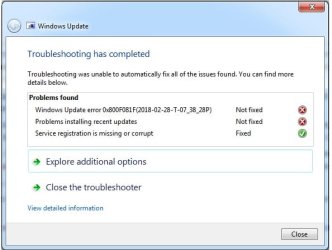
Hi, sorry its been a few days... I attached images of some of my results if you cant see them in my post. Here is my result after running troubleshooter :

Windows Update error: 0x800f081f (2018-02-28-T-07-38-28P NOT FIXED
Problem instaling recent updates NOT FIXED

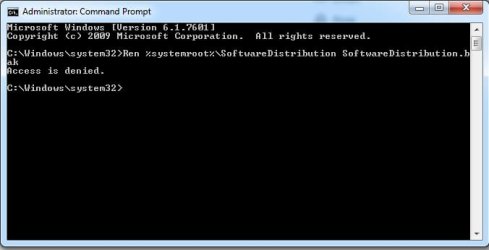
After I tried the window update error and I got stuck entering this command "Ren %systemroot%\SoftwareDistribution SoftwareDistribution.bak" in command and ran as Admin:

Access denied

finally stopping windows update gave me the same result "code 8024200D"

I hope this info helps
 

Attachments

  • Troubleshoot.jpg
    Troubleshoot.jpg
    29.5 KB · Views: 44
  • Rename software distribution backup folders.jpg
    Rename software distribution backup folders.jpg
    18.7 KB · Views: 44

My Computer

Computer type
PC/Desktop
Computer Manufacturer/Model Number
custom build
OS
Windows 7 Ultimate x64
CPU
AMD FX-6300
Motherboard
Gigabyte ga-970a-d3
Memory
Corsair Vengeance LP 8GB DDR3 1600MHz
Graphics Card(s)
eVGA Geforce GTX 650 Ti Boost
Hard Drives
Seagate 1TB Barracuda SATA III w/ 64MB Cache
ADATA Premier SP550 Solid State Drive, 240GB
Antivirus
Avast free
Browser
Firefox
I too can not install the monthly updates, KB4074598 being the last one that fails.
I have renamed the SoftwareDistribution folder and windows said it had never been updated before.
The next update took some time to complete and it found I needed the KB4074598 update, it downloaded it, did a system restore point and started to install, but upon completion is said it failed to install.

Ccleaner reports no problems, but still can't do the monthly updates like KB4074598.

Any ideas why I can't install the monthly updates?
Any help would be very much appreciated.

Windows 7, 32 bit, 8 gb ram and so much free disk space.

Regards,
K.


My Computer

Computer type
PC/Desktop
Computer Manufacturer/Model Number
ASUS
OS
32 bit Windows7 Home Permium
Memory
8GB
Hard Drives
12TB
Antivirus
BullGuard
Grilo,

Can you run System Update Readiness Tool x64 version and post logs please
Logs at: C:\Windows\Logs\CBS
Only need CheckSUR.log and CheckSUR.persist.log. Compress/zip them and attach.
 

My Computer

Computer type
PC/Desktop
Computer Manufacturer/Model Number
HP Desktop & Compaq Laptop
OS
Win 10 x64, Linux Lite, Win 7 x64, BlackArch, & Kali
Hard Drives
Samsung 850 Pro 256Gb,
Hitachi HDD 1Tb,
Crucial MX SSD 250Gb
Segate 3Tb USB 3.0 Ext. Backup HDD
Internet Speed
150Mbps dn, 20Mbps up
Antivirus
Avast Free, Malwarebytes Anti-Exploit & Anti-Ransomware
Browser
Firefox, Chrome, Opera, & VPN
Hi flextel,

SevenForums Admins frown on hijacking threads. Please start a new thread and we will be happy to assist you.

FYI, when you rename SoftwareDistribution folder, it is saved as SoftwareDistribution.old, that is if you used Shawn's Batch File.
Your history is in that folder, the new folder Windows creates is initially blank, therefore Win Update, in checking update history, reports never been updated.
When you start a new thread, please follow Windows Update Posting Instructions
 

My Computer

Computer type
PC/Desktop
Computer Manufacturer/Model Number
HP Desktop & Compaq Laptop
OS
Win 10 x64, Linux Lite, Win 7 x64, BlackArch, & Kali
Hard Drives
Samsung 850 Pro 256Gb,
Hitachi HDD 1Tb,
Crucial MX SSD 250Gb
Segate 3Tb USB 3.0 Ext. Backup HDD
Internet Speed
150Mbps dn, 20Mbps up
Antivirus
Avast Free, Malwarebytes Anti-Exploit & Anti-Ransomware
Browser
Firefox, Chrome, Opera, & VPN
I got the message that "this update is not applicable to your computer".
My PC being 32 bit Windows 7 and not the 64 bit that the link suggests.

ADMIN - I'm not trying to hijack a thread, just new to forums and desperate for help, I thought it completely pointless to go to all the trouble to describe what some one else had already described and explain the results of what some one else has already explained when my problem is identical to this one...!

Do you wish me to open a new topic and list everything on this topic yet again somewhere else?

Regards,
K.
 

My Computer

Computer type
PC/Desktop
Computer Manufacturer/Model Number
ASUS
OS
32 bit Windows7 Home Permium
Memory
8GB
Hard Drives
12TB
Antivirus
BullGuard
Down loaded and ran the 32 bit version.
Results attached;

TIA
K.
 

Attachments

My Computer

Computer type
PC/Desktop
Computer Manufacturer/Model Number
ASUS
OS
32 bit Windows7 Home Permium
Memory
8GB
Hard Drives
12TB
Antivirus
BullGuard
Personally, it's not a problem for me. We'll see what Admins do, sometimes they move posts, sometimes not. We'll proceed here and see what happens.

SURT on the other post was for x64 Win7. Good work on your part with the 32 bit version.
Logs are clean! I'm giving @torchwood a jingle for further assistance. He's really good with Win Update issues.

Run [FONT=&quot]Windows[/FONT] Update Troubleshooter
After the troubleshooter is done, try running Windows Update again and install any available updates.
 
Last edited:

My Computer

Computer type
PC/Desktop
Computer Manufacturer/Model Number
HP Desktop & Compaq Laptop
OS
Win 10 x64, Linux Lite, Win 7 x64, BlackArch, & Kali
Hard Drives
Samsung 850 Pro 256Gb,
Hitachi HDD 1Tb,
Crucial MX SSD 250Gb
Segate 3Tb USB 3.0 Ext. Backup HDD
Internet Speed
150Mbps dn, 20Mbps up
Antivirus
Avast Free, Malwarebytes Anti-Exploit & Anti-Ransomware
Browser
Firefox, Chrome, Opera, & VPN
Logs look good, giving @torchwood, a shout for addition assistance.
In the meantime download and run UltraVirusKiller
In FindaFix/app searchbox type windows update. There are two choices Windows Update Troubleshooter and Fix & enable Window Update.
Run first entry WUT first. reboot, run the other, reboot and try win update again.
 
Last edited:

My Computer

Computer type
PC/Desktop
Computer Manufacturer/Model Number
HP Desktop & Compaq Laptop
OS
Win 10 x64, Linux Lite, Win 7 x64, BlackArch, & Kali
Hard Drives
Samsung 850 Pro 256Gb,
Hitachi HDD 1Tb,
Crucial MX SSD 250Gb
Segate 3Tb USB 3.0 Ext. Backup HDD
Internet Speed
150Mbps dn, 20Mbps up
Antivirus
Avast Free, Malwarebytes Anti-Exploit & Anti-Ransomware
Browser
Firefox, Chrome, Opera, & VPN
As I'd expect no problems, because the updates are down loaded OK, it's after they finish installing that the PC reports the problem.
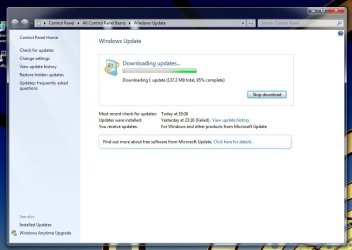
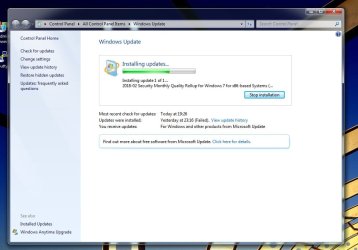
Four images;
1. Down loading update
2. Creating restore point
3. Installing
4. Failed
FYI they download, they install, then the install fails at the end.
 

Attachments

  • down loading.jpg
    down loading.jpg
    53.8 KB · Views: 0
  • restore point.jpg
    restore point.jpg
    55.7 KB · Views: 0
  • installing.jpg
    installing.jpg
    57 KB · Views: 0
  • failed.jpg
    failed.jpg
    64.4 KB · Views: 0

My Computer

Computer type
PC/Desktop
Computer Manufacturer/Model Number
ASUS
OS
32 bit Windows7 Home Permium
Memory
8GB
Hard Drives
12TB
Antivirus
BullGuard
LAst one is updates installed (keep in mind I renamed the SoftwareDistributionfolder);
 

Attachments

  • updated installed.jpg
    updated installed.jpg
    60.9 KB · Views: 0

My Computer

Computer type
PC/Desktop
Computer Manufacturer/Model Number
ASUS
OS
32 bit Windows7 Home Permium
Memory
8GB
Hard Drives
12TB
Antivirus
BullGuard
Back
Top