Cannot log into XP Mode

crimson

New member
Power User
VIP
Local time
3:36 PM
Messages
178
I installed XP Mode.
(Downloaded from MS page: Download Windows XP Mode)
On my first run, I activated Administrator in "Local Users and Groups".
Then I logged off, and tried to log in as Administrator. It gave me this error.
37006d1258313850-virtual-xp-mode-how-become-administrator-capture.jpg
http://www.sevenforums.com/attachme...-xp-mode-how-become-administrator-capture.jpg

So I logged back in as XPMUser by entering my password.
Then I went to User Accounts, and removed the password.
Then I switched to full screen, and it took me to the logon screen.
Now it is giving me the same error that it did earlier when I tried to logon as Administrator.
I get this same error whether I try to login as XPMUser or Administrator:

What happen?

It won't allow me to get out of fullscreen.
37184d1258412543-virtual-xp-mode-how-become-administrator-capture.jpg
http://www.sevenforums.com/attachme...-xp-mode-how-become-administrator-capture.jpg
 

My Computer

OS
Windows 7 Retail
XP Mode does not allow user accounts without password. You have to use a password. If you want to use limited accounts, they have to also be added to user group Remote Desktop Users (read the tutorial here).

If you have removed your password from the default XPMuser account and you don't have any other administrator account, you have to reinstall XP Mode.

Kari

EDIT, almost a year later: The above mentioned is not true. Sorry. Please read this post for correct information.
 
Last edited:

My Computer

Computer type
Laptop
Computer Manufacturer/Model Number
HP ENVY 17-1150eg
OS
Windows 10 Pro x64 EN-GB
CPU
1.6 GHz Intel Core i7-720QM Processor
Memory
6 GB
Graphics Card(s)
ATI Mobility Radeon HD 5850 Graphics
Sound Card
Beats sound system with integrated subwoofer
Monitor(s) Displays
17" laptop display, 22" LED and 32" Full HD TV through HDMI
Screen Resolution
1600*900 (1), 1920*1080 (2&3)
Hard Drives
Internal: 2 x 500 GB SATA Hard Disk Drive 7200 rpm
External: 2TB for backups, 3TB USB3 network drive for media
Cooling
As Envy runs a bit warm, I have it on a Cooler Master pad
Keyboard
Logitech diNovo Media Desktop Laser (bluetooth)
Mouse
Logitech Performance Mouse MX
Internet Speed
50/10 Mbps VDSL
Antivirus
Windows Defender 4.3.9431.0
Browser
Maxthon 3.5.2., IE11
OK. Thank you.
 

My Computer

OS
Windows 7 Retail
But don't worry because it saves your username and password for you. :)
 

My Computer

Computer Manufacturer/Model Number
Cyberpower, Inc.
OS
Windows 7 Professional (x64)
CPU
AMD Phenom II X4 955 Black Edition
Motherboard
Gigabyte AMD MA770T-UD3P AM3 DDR3 1666+/1333/1066
Memory
6GB (3 x 2GB) Kingston DDR3 1333 SDRAM
Graphics Card(s)
NVIDIA GeForce GTX 260
Sound Card
Onboard 7.1 Sound
Monitor(s) Displays
Samsung 24" SyncMaster 2422
Screen Resolution
1920 x 1200
Hard Drives
500GB Sata II 3.0GB 16MB 7200RPM,
Western Digital 1TB USB 2.0 External Hard Drive
PSU
Kingwin 700 Watt Power Supply
Case
Silver X-Cruiser 2 Mid No Power
Cooling
Asetek 120MM Watercooler
Keyboard
HTK-1001
Mouse
Razer Viper
Internet Speed
Incoming: 2496 kbps, Outgoing: 512 kbps
Yes, if you only use the default XPMuser account the credentials are saved. If you add more accounts, you have to assign a password to each account. If there's no account with a valid password you have to reinstall.

Kari
 

My Computer

Computer type
Laptop
Computer Manufacturer/Model Number
HP ENVY 17-1150eg
OS
Windows 10 Pro x64 EN-GB
CPU
1.6 GHz Intel Core i7-720QM Processor
Memory
6 GB
Graphics Card(s)
ATI Mobility Radeon HD 5850 Graphics
Sound Card
Beats sound system with integrated subwoofer
Monitor(s) Displays
17" laptop display, 22" LED and 32" Full HD TV through HDMI
Screen Resolution
1600*900 (1), 1920*1080 (2&3)
Hard Drives
Internal: 2 x 500 GB SATA Hard Disk Drive 7200 rpm
External: 2TB for backups, 3TB USB3 network drive for media
Cooling
As Envy runs a bit warm, I have it on a Cooler Master pad
Keyboard
Logitech diNovo Media Desktop Laser (bluetooth)
Mouse
Logitech Performance Mouse MX
Internet Speed
50/10 Mbps VDSL
Antivirus
Windows Defender 4.3.9431.0
Browser
Maxthon 3.5.2., IE11
This is a huge problem. If somebody installs XPMode, then goes in to User Accounts to turn off the password, the whole application crashes beyond repair. This should never haapen.
 

My Computer

OS
Windows 7 Retail
Crimson, it's true what you say. However, XP Mode is intented to business users and in the business world nobody can even think of using Windows without the password. What I mean is you can only blame yourself if this happens; if you dont want to use any passwords then don't create any additional accounts and XP Mode logs you always automatically in with the default XPMuser credentials.

There is a way to use XP Mode without the password. You just have to disable the integration features. If you do so, then my question is why do you need the XP Mode? Without the integration features it's just a toy.

Using computer without a password is like sex without the protection; it's nice, easy and fast but often leads to problems.

Kari
 

My Computer

Computer type
Laptop
Computer Manufacturer/Model Number
HP ENVY 17-1150eg
OS
Windows 10 Pro x64 EN-GB
CPU
1.6 GHz Intel Core i7-720QM Processor
Memory
6 GB
Graphics Card(s)
ATI Mobility Radeon HD 5850 Graphics
Sound Card
Beats sound system with integrated subwoofer
Monitor(s) Displays
17" laptop display, 22" LED and 32" Full HD TV through HDMI
Screen Resolution
1600*900 (1), 1920*1080 (2&3)
Hard Drives
Internal: 2 x 500 GB SATA Hard Disk Drive 7200 rpm
External: 2TB for backups, 3TB USB3 network drive for media
Cooling
As Envy runs a bit warm, I have it on a Cooler Master pad
Keyboard
Logitech diNovo Media Desktop Laser (bluetooth)
Mouse
Logitech Performance Mouse MX
Internet Speed
50/10 Mbps VDSL
Antivirus
Windows Defender 4.3.9431.0
Browser
Maxthon 3.5.2., IE11
................if you do so, then my question is why do you need the XP Mode? Without the integration features it's just a toy.

..............................
Kari

Hi Kari

not quite true as it is a way of running XP in a VM without having to get a Key.

I prefer currently vmware over MS virtual pc and find the UNITY feature in vmware streets ahead of MS in performance etc - but the idea is good. Perhaps after a few "upgrades" where decent graphics and considerably enhanced performance will be delivered this product will actually be fine for business users.

(With VMWARE UNITY you still need to have an Activated copy of Windows XP - I'm messing around converting a XP MODE vm to vmware format and seeing what happens).

Cheers
jimbo
 

My Computer

Computer type
PC/Desktop
Computer Manufacturer/Model Number
Custom built, several laptops HP/ASUS
OS
Linux CENTOS 7 / various Windows OS'es and servers
CPU
Intel i7 Intel i5
Memory
8GB, 16GB
Graphics Card(s)
On Motherboard
Sound Card
Realtek HD audio
Monitor(s) Displays
Apple Cinema display, Samsung LCD
Screen Resolution
1920 X 1080
Hard Drives
4 X 1TB SATA
Mouse
Toshiba wireless laser
Internet Speed
> 20MB up
...
With VMWARE UNITY you still need to have an Activated copy of Windows XP - I'm messing around converting a XP MODE vm to vmware format and seeing what happens.

Cheers
jimbo
I'm interested in hearing how it goes? Do you need to convert both XP Mode base and vhd or just vhd?

Kari
 

My Computer

Computer type
Laptop
Computer Manufacturer/Model Number
HP ENVY 17-1150eg
OS
Windows 10 Pro x64 EN-GB
CPU
1.6 GHz Intel Core i7-720QM Processor
Memory
6 GB
Graphics Card(s)
ATI Mobility Radeon HD 5850 Graphics
Sound Card
Beats sound system with integrated subwoofer
Monitor(s) Displays
17" laptop display, 22" LED and 32" Full HD TV through HDMI
Screen Resolution
1600*900 (1), 1920*1080 (2&3)
Hard Drives
Internal: 2 x 500 GB SATA Hard Disk Drive 7200 rpm
External: 2TB for backups, 3TB USB3 network drive for media
Cooling
As Envy runs a bit warm, I have it on a Cooler Master pad
Keyboard
Logitech diNovo Media Desktop Laser (bluetooth)
Mouse
Logitech Performance Mouse MX
Internet Speed
50/10 Mbps VDSL
Antivirus
Windows Defender 4.3.9431.0
Browser
Maxthon 3.5.2., IE11
Hi there
just got one BSOD at boot so far by just converting the vhd with vmware converter .
need to do a bit more research

what I might have a go at next is to backup the Virtual PC (not in integration mode) with Acronis and then restore it with the "Universal restore" feature which allows you to restore an OS on to dissimilar hardware.

Another ploy might be to to a V2P and then a P2V conversion.
I've got a few meetings this morning so it'll be a little while before I can get back to some "Real Work" again. :cry:

Cheers
jimbo
 

My Computer

Computer type
PC/Desktop
Computer Manufacturer/Model Number
Custom built, several laptops HP/ASUS
OS
Linux CENTOS 7 / various Windows OS'es and servers
CPU
Intel i7 Intel i5
Memory
8GB, 16GB
Graphics Card(s)
On Motherboard
Sound Card
Realtek HD audio
Monitor(s) Displays
Apple Cinema display, Samsung LCD
Screen Resolution
1920 X 1080
Hard Drives
4 X 1TB SATA
Mouse
Toshiba wireless laser
Internet Speed
> 20MB up
Crimson, it's true what you say. However, XP Mode is intented to business users and in the business world nobody can even think of using Windows without the password.
Wrong. In business or for whatever use. If somebody does exactly what I did disabling password in user accounts, XP mode basically becomes unusable. Therefore, it is an issue with XP mode. Not the user. Users whether in business or not should have the option to disable passwords without problem. If not, then the ability to disable the password should not be there. Eithe way, the option to disble password is there, and messes XP Mode up when you do it. That is a glitch.


don't create any additional accounts and XP Mode logs you always automatically in with the default XPMuser credentials.
I never created additional accounts. I only disabled passwrd for XPMuser.


There is a way to use XP Mode without the password. You just have to disable the integration features. If you do so, then my question is why do you need the XP Mode? Without the integration features it's just a toy.
XP Mode is important in order to install and run XP software that isn't compatible with W7.
It doesn't matter if you're using XP, Vista, or W7, when you install the OS, they always force you to create a default user instead of give you the choice. This is probably meant for users who don't know what they're doing. Ever since I started using XP, I always installed it, logged in as Administrator, and delete the default user and whatever folders are associated with it. Same goes for W7. I use only Administrator with no users. If I do have a password, it's to prevent my psycho roommate from sneaking into my room and reading my diary which is also password protected. Otherwise, I leave the password off so that Windows logs on automatically when I boot my computer up. I have never ever ever used anything other than Administrator as my main and only account. It's pointless to have any other account unless you have other people using the same computer that you want to setup extra user accounts for. If you're the only user, it is a totally pointless waste of time to use any account other than Administrator.
 

My Computer

OS
Windows 7 Retail
You have to understand the way XP Mode and the Integration features work. They use Remote Desktop to create the integration between host and guest. As it is, to connect to a Windows machine the user account must have a password or the setting it Local Security Policy must be changed. Not a glitch or bug, the way it always worked.

If you turn off the Integration features it can be used like a traditional virtual machine guest. And then you can access the machine without a password.
 

My Computer

Computer type
PC/Desktop
Computer Manufacturer/Model Number
Alienware Aurora ALX R4
OS
Windows 10 Pro (x64)
CPU
Intel Core i7-3930K (3.2GHz - 4.5GHz)
Motherboard
Alienware Aurora-R4 x79
Memory
4x Samsung 4GB PC3-12800 DDR3 (16GB 1600MHz)
Graphics Card(s)
Nvidia Geforce GTX 690
Sound Card
SteelSeries Siberia Elite
Monitor(s) Displays
Dell UltraSharp U3011
Screen Resolution
2560x1600
Hard Drives
Samsung 850 Pro 256 GB, Seagate 1TB Desktop Hybrid HDD, 2x Western Digital 4TB Green HDD
PSU
875W Some Dell PSU <.<
Case
Alienware Aurora ALX
Cooling
Custom Liquid Cooling (EK CPU & GPU blocks) dual EK 480RAD
Keyboard
Logitech G710+ Mechanical
Mouse
Logitech G700s
Internet Speed
Verizon Fios (50 mbps average)
Other Info
Server: Intel NUC D54250WYK: i5-4250U, 16GB, 256 GB mSATA, Windows Server 2012 R2
Of course it is a glitch. I logged into XP Mode. Then, I turned off the password. Then it stopped working. That should not happen. I don't care if it uses remote desktop or not. This should not happen. It should either allow me to take off the password without crashing. Or if that is not possible, there should be no option to do remove the password. If, removing password causes it to crash while integration is enabled, why have the option to remove it? Because it is a glitch.

I might make a software where the user clicks a button, and a picture of a ball pops up. Why not make it so that the user clicks the button, and the software crashes? That is what is going on here. User clicks a button, and XP Mode crashes. Glitch. You're claiming that it is not a glitch because the user is not supposed to click the button. Not realistic. Anything that causes a software to crash when the user does something should not be there.

This is the first time I'm hearing about changing a setting in Local Security Policy. What do you mean? So what is the purpose of having integration features on? If I can do everything with it off, I might as well just turn it off.
 

My Computer

OS
Windows 7 Retail
Of course it is a glitch. I logged into XP Mode. Then, I turned off the password. Then it stopped working. That should not happen. I don't care if it uses remote desktop or not. This should not happen. It should either allow me to take off the password without crashing. Or if that is not possible, there should be no option to do remove the password. If, removing password causes it to crash while integration is enabled, why have the option to remove it? Because it is a glitch.

Because it cannot stop you. It is not a glitch to change a setting you have permission to change. Just like it is not a security threat to shutdown the computer if you have permission to shutdown the computer. The computer cannot stop you from harming the computer.

I mentioned the Local Security Policy setting here:
http://www.sevenforums.com/383096-post11.html
 

My Computer

Computer type
PC/Desktop
Computer Manufacturer/Model Number
Alienware Aurora ALX R4
OS
Windows 10 Pro (x64)
CPU
Intel Core i7-3930K (3.2GHz - 4.5GHz)
Motherboard
Alienware Aurora-R4 x79
Memory
4x Samsung 4GB PC3-12800 DDR3 (16GB 1600MHz)
Graphics Card(s)
Nvidia Geforce GTX 690
Sound Card
SteelSeries Siberia Elite
Monitor(s) Displays
Dell UltraSharp U3011
Screen Resolution
2560x1600
Hard Drives
Samsung 850 Pro 256 GB, Seagate 1TB Desktop Hybrid HDD, 2x Western Digital 4TB Green HDD
PSU
875W Some Dell PSU <.<
Case
Alienware Aurora ALX
Cooling
Custom Liquid Cooling (EK CPU & GPU blocks) dual EK 480RAD
Keyboard
Logitech G710+ Mechanical
Mouse
Logitech G700s
Internet Speed
Verizon Fios (50 mbps average)
Other Info
Server: Intel NUC D54250WYK: i5-4250U, 16GB, 256 GB mSATA, Windows Server 2012 R2
Glitch or not glitch. Whatever you want to call it. There is an option to remove the password. And this option causes the software to crash. Either the software shoult not crash when this option is chosen. Or this option should not be there. It is a glitch or whatever you want to call it to give users an option for something that causes the program to crash.

Other than that, you're saying that changing this Local Security Policy setting will allow me to turn the password off without crashing the program?
 

My Computer

OS
Windows 7 Retail
I also made this same mistake when first using XPM. I've since moved on to the much faster VMware Player 3.0 and have not looked back. You can configure Player to log on without a password as well as do things XPM never could such as play games or use 3D acceleration. It also uses up less space with the same amount of programs installed.

Edit: Someone else has said that you will be able to log in and change the password back if you disable integration features.
 
Last edited:

My Computer

Computer Manufacturer/Model Number
Cyberpower, Inc.
OS
Windows 7 Professional (x64)
CPU
AMD Phenom II X4 955 Black Edition
Motherboard
Gigabyte AMD MA770T-UD3P AM3 DDR3 1666+/1333/1066
Memory
6GB (3 x 2GB) Kingston DDR3 1333 SDRAM
Graphics Card(s)
NVIDIA GeForce GTX 260
Sound Card
Onboard 7.1 Sound
Monitor(s) Displays
Samsung 24" SyncMaster 2422
Screen Resolution
1920 x 1200
Hard Drives
500GB Sata II 3.0GB 16MB 7200RPM,
Western Digital 1TB USB 2.0 External Hard Drive
PSU
Kingwin 700 Watt Power Supply
Case
Silver X-Cruiser 2 Mid No Power
Cooling
Asetek 120MM Watercooler
Keyboard
HTK-1001
Mouse
Razer Viper
Internet Speed
Incoming: 2496 kbps, Outgoing: 512 kbps
Hi,
I have 3 or 4 posts here now but hopefully Kari will notice. I have the virtual machine running, the xp mode running. I can add in new xp mode users so i have xp mode 1, 2, etc. I cannot get the sucker to open to the xp desktop. I read the posts here and the only user in my system is me. I dont have a XPMuser account? So how do i start XP mode? It is there, it is running or hibernating but i cant get it to open up?
Thanks for any help.
 

My Computer

Computer Manufacturer/Model Number
Dell 546MT
OS
Win 7
CPU
AMD Athlon II X4 620 at 2.60 ghz
Motherboard
amd
Memory
4 gigs
Graphics Card(s)
Radeon HD 4350
Sound Card
High Def Audio
Monitor(s) Displays
Dell
Hard Drives
600 Gig
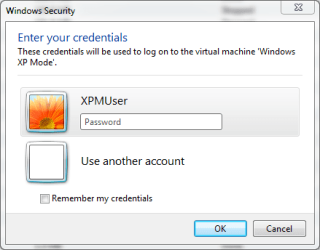
XPMUser is an user account automatically created when installing XP Mode. If no logon credentials are saved, you should see this when starting XP Mode:

XPMUser.PNG

Just give the password you chose when installing XP Mode.

I do not understand what you mean with this:
I can add in new xp mode users so i have xp mode 1, 2, etc.
Only way to add XP Mode users is to start XP Mode, go to XP's Control Panel and add user accounts there. If you have done this, click Use another account when logon window opens (see the image above) and give that username and password.

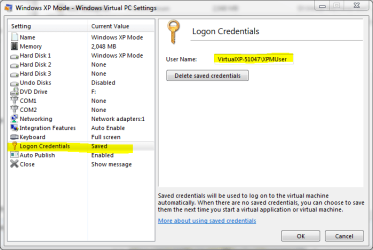
To see which logon credentials are saved, if any, check the settings of XP Mode.

XPM_logon_credentials.PNG

Kari
 

My Computer

Computer type
Laptop
Computer Manufacturer/Model Number
HP ENVY 17-1150eg
OS
Windows 10 Pro x64 EN-GB
CPU
1.6 GHz Intel Core i7-720QM Processor
Memory
6 GB
Graphics Card(s)
ATI Mobility Radeon HD 5850 Graphics
Sound Card
Beats sound system with integrated subwoofer
Monitor(s) Displays
17" laptop display, 22" LED and 32" Full HD TV through HDMI
Screen Resolution
1600*900 (1), 1920*1080 (2&3)
Hard Drives
Internal: 2 x 500 GB SATA Hard Disk Drive 7200 rpm
External: 2TB for backups, 3TB USB3 network drive for media
Cooling
As Envy runs a bit warm, I have it on a Cooler Master pad
Keyboard
Logitech diNovo Media Desktop Laser (bluetooth)
Mouse
Logitech Performance Mouse MX
Internet Speed
50/10 Mbps VDSL
Antivirus
Windows Defender 4.3.9431.0
Browser
Maxthon 3.5.2., IE11
Hi there, I am back. Ok, did a full format, reloaded things exactly as I was told and XP mode worked. Loaded in programs to XP, they worked. Next day I could access them, they worked. Today I added in my office programs for Win 7 programs, etc, and suddenly XP does not want to work anymore. It does not come out of hibernation, just like before. This is a major drag for me as I need both systems for my work. Any new ideas of commentaries out there with this problem?
JS
 

My Computer

Computer Manufacturer/Model Number
Dell 546MT
OS
Win 7
CPU
AMD Athlon II X4 620 at 2.60 ghz
Motherboard
amd
Memory
4 gigs
Graphics Card(s)
Radeon HD 4350
Sound Card
High Def Audio
Monitor(s) Displays
Dell
Hard Drives
600 Gig
What is the error message you get?
 

My Computer

Computer type
Laptop
Computer Manufacturer/Model Number
HP ENVY 17-1150eg
OS
Windows 10 Pro x64 EN-GB
CPU
1.6 GHz Intel Core i7-720QM Processor
Memory
6 GB
Graphics Card(s)
ATI Mobility Radeon HD 5850 Graphics
Sound Card
Beats sound system with integrated subwoofer
Monitor(s) Displays
17" laptop display, 22" LED and 32" Full HD TV through HDMI
Screen Resolution
1600*900 (1), 1920*1080 (2&3)
Hard Drives
Internal: 2 x 500 GB SATA Hard Disk Drive 7200 rpm
External: 2TB for backups, 3TB USB3 network drive for media
Cooling
As Envy runs a bit warm, I have it on a Cooler Master pad
Keyboard
Logitech diNovo Media Desktop Laser (bluetooth)
Mouse
Logitech Performance Mouse MX
Internet Speed
50/10 Mbps VDSL
Antivirus
Windows Defender 4.3.9431.0
Browser
Maxthon 3.5.2., IE11
Back
Top