Cannot overclock 1055T via BIOS

BashirSabeel

New member
Member
Local time
2:55 AM
Messages
83
Location
England
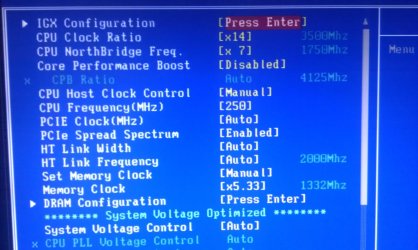
Hi, I have decided to overclock my AMD X6 1055T from 2.8GHz to 3.5GHz using a video tutorial on youtube (How to Overclock the AMD Phenom II X6 1055T 1075T - YouTube), I have followed all the instructions but when I have the settings to CMOS and restart to Windows it still says 2.8GHz and the BIOS will say 3500MHz:confused:. I dont understand why this is and cant seem to find anything on this, I have purchased a Corsair H100 and temps start at 17 idle so heat is not an issue. I have taken a picture of the BIOS screen. Any help is very appreciated. Thanks.
 

Attachments

  • IMAG0014.jpg
    IMAG0014.jpg
    251.2 KB · Views: 21

My Computer

Computer type
PC/Desktop
Computer Manufacturer/Model Number
Custom
OS
Windows 7 Professional 64 bit
CPU
Intel Core i7 2600K OC @ 4.00GHz
Motherboard
Gigabyte Technology Z77X-UD5H
Memory
Corsair Vengance 16.0GB DDR3 (1600MHz)
Graphics Card(s)
Gigabyte AMD Radeon HD 7970
Sound Card
ASUS Xonar DG PCI Card
Monitor(s) Displays
AOC I2369VM 23 inch 1080p LED Monitors X2
Screen Resolution
1920X1080
Hard Drives
250GB Samsung SSD 840 EVO - Windows 7 and Software
2TB SATA Drive - Games
4TB SATA Drive - Personal Files
PSU
Corsair AX760
Case
Corsair 600T (Black with side mesh)
Cooling
120mm Exaust Fan, 2 120mm Exaust Fans (CPU),200mm Intake Fan
Keyboard
Corsair Vengeance K90
Mouse
Corsair Vengeance M60
Internet Speed
30MB Fiber Optic (Virgin Media)
Antivirus
Avast (Free)
Browser
Firefox
Other Info
AVerMedia Freeview TV Tuner Card and HD Capture Card (PCI)
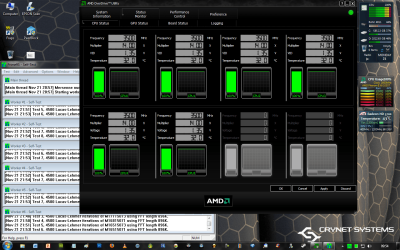
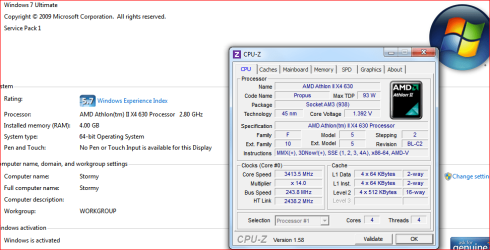
First idle temps mean nothing, load temps are what matter. Second don't take what Windows says it is at, if you overclock and have Cool and Quiet enabled then Windows won't report the correct speed. Here is mine overclocked from 2.8 GHz stock to 3.4 GHz,

clockspeed.PNG

and Windows doesn't (and never has) report mine correctly when overclocked either.
 

My Computer

Computer type
PC/Desktop
Computer Manufacturer/Model Number
Me
OS
Win 7 Ultimate x64
CPU
FX-8350 @ 4.6 GHz so far
Motherboard
Asus M5A97 EVO
Memory
ADATA XPG V1 Series Black 8GB DDR3 1600
Graphics Card(s)
Sapphire R9 270x Dual-X
Sound Card
Xonar DGX w/ Corsair Vengence 1300
Monitor(s) Displays
Acer S232HL Abid
Screen Resolution
1920x1080
Hard Drives
120 GB OCZ Vertex 3
500 GB Seagate 7200.12
PSU
Antec Earthwatts 650W Green
Case
Antec Three Hundred
Cooling
Cooler Master 212 EVO
Keyboard
Logitech G510
Mouse
Logitech G500s
Internet Speed
35000/3000
Thanks for the reply, I overclocked back to the 3.5GHz and booted into Windows and check the speed with AMD Overdrive and it reported 3500MHz. But having another problem, seem to go into BSOD randomly. My RAM is 1333MHz before and after the overclock 1332MHz so it cant be that can it? Any idea why this is? :confused:
 

My Computer

Computer type
PC/Desktop
Computer Manufacturer/Model Number
Custom
OS
Windows 7 Professional 64 bit
CPU
Intel Core i7 2600K OC @ 4.00GHz
Motherboard
Gigabyte Technology Z77X-UD5H
Memory
Corsair Vengance 16.0GB DDR3 (1600MHz)
Graphics Card(s)
Gigabyte AMD Radeon HD 7970
Sound Card
ASUS Xonar DG PCI Card
Monitor(s) Displays
AOC I2369VM 23 inch 1080p LED Monitors X2
Screen Resolution
1920X1080
Hard Drives
250GB Samsung SSD 840 EVO - Windows 7 and Software
2TB SATA Drive - Games
4TB SATA Drive - Personal Files
PSU
Corsair AX760
Case
Corsair 600T (Black with side mesh)
Cooling
120mm Exaust Fan, 2 120mm Exaust Fans (CPU),200mm Intake Fan
Keyboard
Corsair Vengeance K90
Mouse
Corsair Vengeance M60
Internet Speed
30MB Fiber Optic (Virgin Media)
Antivirus
Avast (Free)
Browser
Firefox
Other Info
AVerMedia Freeview TV Tuner Card and HD Capture Card (PCI)
Probably need to bump the vcore up a little bit. Despite what may be shown in the Youtube video or any guides elsewhere, you have to remember that each CPU is different and what worked for one won't work for another.
 

My Computer

Computer type
PC/Desktop
Computer Manufacturer/Model Number
Me
OS
Win 7 Ultimate x64
CPU
FX-8350 @ 4.6 GHz so far
Motherboard
Asus M5A97 EVO
Memory
ADATA XPG V1 Series Black 8GB DDR3 1600
Graphics Card(s)
Sapphire R9 270x Dual-X
Sound Card
Xonar DGX w/ Corsair Vengence 1300
Monitor(s) Displays
Acer S232HL Abid
Screen Resolution
1920x1080
Hard Drives
120 GB OCZ Vertex 3
500 GB Seagate 7200.12
PSU
Antec Earthwatts 650W Green
Case
Antec Three Hundred
Cooling
Cooler Master 212 EVO
Keyboard
Logitech G510
Mouse
Logitech G500s
Internet Speed
35000/3000
Ok, I think I got it working on 3.5GHz without voltage increase. Ran Prime95 for about 1 hour temps didn't go above 33. I think it was something to do with the North Bridge frequency...but anyway one more question, because I am getting these low temps do you think if I put it to 4GHz it would be safe? So will putting this higher reduce the life of my component(s)? Again that's for the help you gave me:)
 

Attachments

  • CPU Temps.png
    CPU Temps.png
    179.6 KB · Views: 41

My Computer

Computer type
PC/Desktop
Computer Manufacturer/Model Number
Custom
OS
Windows 7 Professional 64 bit
CPU
Intel Core i7 2600K OC @ 4.00GHz
Motherboard
Gigabyte Technology Z77X-UD5H
Memory
Corsair Vengance 16.0GB DDR3 (1600MHz)
Graphics Card(s)
Gigabyte AMD Radeon HD 7970
Sound Card
ASUS Xonar DG PCI Card
Monitor(s) Displays
AOC I2369VM 23 inch 1080p LED Monitors X2
Screen Resolution
1920X1080
Hard Drives
250GB Samsung SSD 840 EVO - Windows 7 and Software
2TB SATA Drive - Games
4TB SATA Drive - Personal Files
PSU
Corsair AX760
Case
Corsair 600T (Black with side mesh)
Cooling
120mm Exaust Fan, 2 120mm Exaust Fans (CPU),200mm Intake Fan
Keyboard
Corsair Vengeance K90
Mouse
Corsair Vengeance M60
Internet Speed
30MB Fiber Optic (Virgin Media)
Antivirus
Avast (Free)
Browser
Firefox
Other Info
AVerMedia Freeview TV Tuner Card and HD Capture Card (PCI)
Back
Top