Cannot paste to any library folders

Camineet

New member
Local time
5:03 AM
Messages
26
I find this to be so lame! I don't exactly get why libraries are so useful, but for whatever reason, they appear to be what MS wants me to use when working with folders because it's a heckuva lot easier to navigate my library folders in the left-side Windows Explorer navigation pane than it is to drill down to those same folders through Computer/Users/etc.

So when I'm working with folders in libraries, it is impossible to paste a file into any folder that resides hierarchically under a library folder by right clicking on the folder. You can only choose cut or copy. In order to paste a file into a folder to which you have navigated by going the library route, you have to actually open the folder and right click somewhere in the white space of the open folder.

This is so lame! You can right click and paste into any of those same folders as long as you access them by going the Computer router. It's the same folder for god's sake!

What do you guys think about this? Is it a bug, or some kind of 'feature' of which I am somehow failing to see the benefit?
 

My Computer

OS
Build 7000
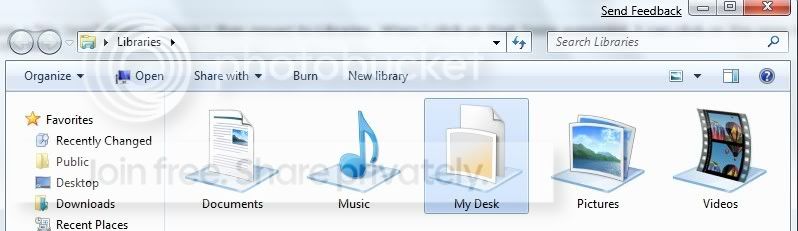
I made a "My Desk" folder .. which I then moved to Libraries. When I click on that folder expanded, I can click on the ones that I use the most.
mydesk-1.jpg
 

My Computer

Computer type
PC/Desktop
Computer Manufacturer/Model Number
Bruce ... somewhere in his 40's
OS
Windows 7 Ultimate 32bit SP1
CPU
Intel(R) Core(TM)2 Quad CPU @ 2.40GHz, 2400 MHz
Motherboard
INTEL/D975XBX2
Memory
4 GB
Graphics Card(s)
ATI Radeon HD 2600 Pro
Monitor(s) Displays
Samsung SyncMaster 914v
Screen Resolution
1280 x 1024
Hard Drives
2/500GB each ... ST3500630AS ATA Device.
One is not connected
PSU
Rocketfish 700 W
Case
G.Skill Gigabyte Chassis
Keyboard
Standard PS/2 Keyboard
Mouse
Microsoft PS/2 Mouse
Internet Speed
DSL
Antivirus
Avira Internet Security
Browser
IE 11
Other Info
ATI HDMI Audio
Hmmm...I haven't seen that behaviour yet, I'll have to test that and let you know.

Edit - I have no problem copy/pasting to folders in the Libraries window. I made a test document and put it in My Docs and then opened the Libraries - Documents Library, opened the folder with the file, copied it, went back to the Library main window and opened another folder from there and pasted into it with no issues.
Then I tried a picture file and it also worked.
So, you're not getting the Paste option in the context menu?

The Libraries are actually a Brilliant idea and I find them extremely useful. I can add whatever folders I have scattered about into whatever Library they may fit into, and I don't have to go searching about for different folders anymore to find my related files. I've also stripped certain xml data to rebuild & fix broken libraries for our folks here, and we have some ideas to use this xml in other sorts of ways that I'm working on some.
At first I didn't see allot of functionality to them either, but after working in them a bit the real power of them came into clear view.
 

My Computer

Computer Manufacturer/Model Number
Personal Build
OS
Vista Ult 64bit - Windows 7 Ult 7264 64bit
CPU
Intel Core 2 Duo E6750
Motherboard
Asus Commando
Memory
4 G's Crucial Ballistix Tracer
Graphics Card(s)
BFG Nvidia 8800 GTS 340
Sound Card
Creative Sound Blaster X-FI Platinum FATAL1TY
Monitor(s) Displays
2-22" HP W2207 LCD
Screen Resolution
1920 x 1080
Hard Drives
3 x 500G WD Caviar SATA II
PSU
Enermax Noise Taker II 600W
Case
NZXT Lexa Classic (dual doored & windowed)
Cooling
Zalman 9700 CPU cooler - 4 x 120mm, 1 x 90mm fans
Keyboard
Logitech MX 5500
Mouse
Logitech MX Revolution
Internet Speed
Blazing...
I made a "My Desk" folder .. which I then moved to Libraries. When I click on that folder expanded, I can click on the ones that I use the most.
mydesk-1.jpg

Thanks for your response, but I need more details because I'm not clear on what you're trying to say.

Ok, I can see that you made a folder called My Desk, and that you put it into Libraries.

"When I click on that folder expanded, I can click on the ones that I use the most."

What does this mean? What does this have to do with being able to right click and paste to a folder to which one has navigated from the libraries hierarchy in the left-side navigation pane?
 

My Computer

OS
Build 7000
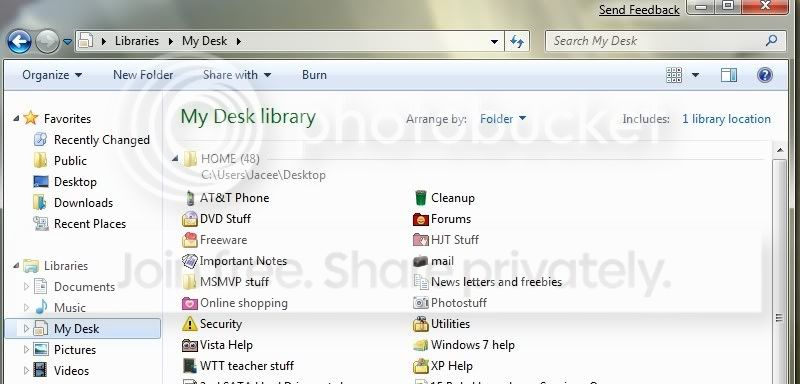
This is a snippet of the folders in "My Desk".
You see I can acess each folder that I've made from one folder in my 'expanded' libraries folder.
foldersinmydesk.jpg
 

My Computer

Computer type
PC/Desktop
Computer Manufacturer/Model Number
Bruce ... somewhere in his 40's
OS
Windows 7 Ultimate 32bit SP1
CPU
Intel(R) Core(TM)2 Quad CPU @ 2.40GHz, 2400 MHz
Motherboard
INTEL/D975XBX2
Memory
4 GB
Graphics Card(s)
ATI Radeon HD 2600 Pro
Monitor(s) Displays
Samsung SyncMaster 914v
Screen Resolution
1280 x 1024
Hard Drives
2/500GB each ... ST3500630AS ATA Device.
One is not connected
PSU
Rocketfish 700 W
Case
G.Skill Gigabyte Chassis
Keyboard
Standard PS/2 Keyboard
Mouse
Microsoft PS/2 Mouse
Internet Speed
DSL
Antivirus
Avira Internet Security
Browser
IE 11
Other Info
ATI HDMI Audio
So when I'm working with folders in libraries, it is impossible to paste a file into any folder
That's because this library folders are no real folders. They are only a collected view of other real folders (or files). The real folders can reside on other drives (e.g. drive D:) or external USB drives or even network drives. So: If you want to paste a file into a library Windows don’t knew where to store this file. In what physical place should Windows store this file? Other drives, e.g. D:? External USB drive? Or network drive?
 

My Computer

OS
Windows XP and 7
Well guess what unawave? You have concisely and completely explained this problem. Good show.
 

My Computer

OS
Build 7000
That's because this library folders are no real folders. They are only a collected view of other real folders (or files). The real folders can reside on other drives (e.g. drive D:) or external USB drives or even network drives. So: If you want to paste a file into a library Windows don’t knew where to store this file. In what physical place should Windows store this file? Other drives, e.g. D:? External USB drive? Or network drive?

Thanks unawave, I get it now. Library folder is just a collection of other like folders on the system. lm
 

My Computer

Computer Manufacturer/Model Number
Gateway GT5692
OS
Windows 7 Ulti. x64
CPU
AMD Phenom 8450 triple-core 2.10 ghz
Memory
4GB
Graphics Card(s)
ATI Radion HD 3200
Monitor(s) Displays
Gateway FPD1775W
Screen Resolution
1280x720
Hard Drives
465.6613 Gibibytes
unawave,

I have just realized that although I agree with your explanation, that there is still an issue in question.

When then am I able to open a library and paste to it by right clicking somewhere in the white space of the folder and choosing paste? How would Windows know where exactly to place the pasted file if the library folder is just a virtual space representing one or more other folders?

Hah! answer that one if you can:D
 

My Computer

OS
Build 7000
Untrue, you can copy paste within any subfolder under the Library's directory, I do it all the time.

The Library itself is a virtual environment but when you enter any folder in that environment, you enter the real folder and not a virtualized one, so all functions will operate normally. Also, the virtual Library folder maintains it's subdirectories by their seperate parent directories so when you copy or paste something directly into the Library's subdirectories or subfolders, the data is transfered to the real one.
It's a virtual environment but you can work in any subfolder or subdirectory as you would in the actual folder or parent directory.
 

My Computer

Computer Manufacturer/Model Number
Personal Build
OS
Vista Ult 64bit - Windows 7 Ult 7264 64bit
CPU
Intel Core 2 Duo E6750
Motherboard
Asus Commando
Memory
4 G's Crucial Ballistix Tracer
Graphics Card(s)
BFG Nvidia 8800 GTS 340
Sound Card
Creative Sound Blaster X-FI Platinum FATAL1TY
Monitor(s) Displays
2-22" HP W2207 LCD
Screen Resolution
1920 x 1080
Hard Drives
3 x 500G WD Caviar SATA II
PSU
Enermax Noise Taker II 600W
Case
NZXT Lexa Classic (dual doored & windowed)
Cooling
Zalman 9700 CPU cooler - 4 x 120mm, 1 x 90mm fans
Keyboard
Logitech MX 5500
Mouse
Logitech MX Revolution
Internet Speed
Blazing...
Chappy,

"So when I'm working with folders in libraries, it is impossible to paste a file into any folder that resides hierarchically under a library folder by right clicking on the folder. You can only choose cut or copy. In order to paste a file into a folder to which you have navigated by going the library route, you have to actually open the folder and right click somewhere in the white space of the open folder."

Yes, I also paste to them all the time as well. But as I stated in my original post, I cannot right click on the folder and choose paste as it is unavailable. I have to click the folder itself causing it to open, and then I have to right click somewhere in the white space of the open folder and choose paste.

So the question still remains outstanding and unanswered: Why can I not right click on a folder within a library and choose paste? If I can paste to it by opening the folder and right clicking somewhere in the white space of the folder and choosing paste, then I should be able to right click on the folder without opening it and choose paste:sarc:
 

My Computer

OS
Build 7000
I can right-click a folder in the root of Library and go paste with no problem but if I use the actual 'Edit' menu with the same folder still selected its greyed out.. (bld 7048 x64) :confused:

Maybe its in MS's 'todo' list...
 

My Computer

Computer Manufacturer/Model Number
Self Built
OS
XP Pro SP3 x86/Vista SP2 x64/Win7 x64 Triple-boot
CPU
AMD64 X2 AM2 5000+
Motherboard
Asus MSN-X Plus
Memory
Corsair TWX 2Gb (2x1Gb) DDR2 800Mhz
Graphics Card(s)
PCI-X 2.0 Inno3D (NVidia) 9500GT 1Gb DDR2
Sound Card
Onboard Realtec ALC662-GR
Monitor(s) Displays
Relisys 17' CRT (model unknown)
Screen Resolution
1024x768
Hard Drives
750Gb Samsung 7200-3Gb/s 32Mb Cache SATA
PSU
500W
Cooling
Standard AMD CPU Fan, One side, front and rear case fan.
Keyboard
Microsoft Multimedia Keyboard
Mouse
Samsung Optical
Internet Speed
10M
Hah, I just checked my build 7000 and I can paste if I go the 'Edit' route. This is obviously just a beta bug.
 

My Computer

OS
Build 7000
lol, strange little bug! (and for it to be opposite way round now.)

they must have just done a 'quick-fix' in the newer builds just for now. time to use the 'send feedback' link again I think..
 

My Computer

Computer Manufacturer/Model Number
Self Built
OS
XP Pro SP3 x86/Vista SP2 x64/Win7 x64 Triple-boot
CPU
AMD64 X2 AM2 5000+
Motherboard
Asus MSN-X Plus
Memory
Corsair TWX 2Gb (2x1Gb) DDR2 800Mhz
Graphics Card(s)
PCI-X 2.0 Inno3D (NVidia) 9500GT 1Gb DDR2
Sound Card
Onboard Realtec ALC662-GR
Monitor(s) Displays
Relisys 17' CRT (model unknown)
Screen Resolution
1024x768
Hard Drives
750Gb Samsung 7200-3Gb/s 32Mb Cache SATA
PSU
500W
Cooling
Standard AMD CPU Fan, One side, front and rear case fan.
Keyboard
Microsoft Multimedia Keyboard
Mouse
Samsung Optical
Internet Speed
10M
Back
Top