Solved Cannot rename a folder "My Documents"

StupidDude

New member
Member
Local time
8:24 AM
Messages
59
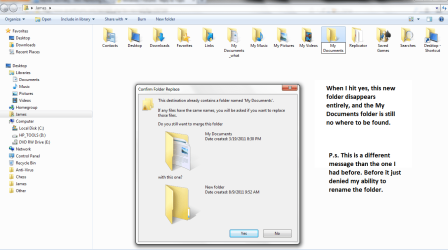
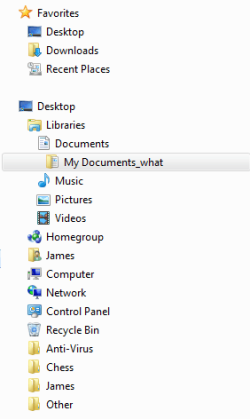
I kept deleting my My Documents folder, because I was playing around with modifications on it. Well after I deleted it, I cannot rename it My Documents. Look at my pic, in order to get a new Documents folder I had to name it My Documents_what. When I try to name it My Documents, it says that a folder with this name already exists. Please some help.
 

Attachments
  • Chart1.png
    Chart1.png
    7.4 KB · Views: 7

My Computer

Computer type
Laptop
Computer Manufacturer/Model Number
HP EliteBook 8730W
OS
Windows 7 Home (64bit)
Hard Drives
SSD Intel 520
It appears that you are creating a Library, and not dealing with the actual folders.
 

My Computer

OS
Windows 7 Ultimate x64 SP1
CPU
Intel Core i7-2600
Motherboard
Gigabyte GA-P67A-UD3P-B3
Memory
12 GB Patriot Extreme DDR3-1333
Graphics Card(s)
Nvidia GTX 470
Monitor(s) Displays
Dell UltraSharp 2209WA
Hard Drives
OCZ Agility3 240 GB, WD5001AALS, WD7501AALS
PSU
OCZ ModStream 700W
Case
CoolerMaster HAF 912 Advanced
Cooling
CoolerMaster Hyper 212 Plus
It appears that you are creating a Library, and not dealing with the actual folders.


Not sure how to read that information. Please, treat me like I'm slow. I got no idea what you said, or how it helps.
 

My Computer

Computer type
Laptop
Computer Manufacturer/Model Number
HP EliteBook 8730W
OS
Windows 7 Home (64bit)
Hard Drives
SSD Intel 520
What Deacon means is, that you are dealing with what is known as a "Library". A Library isn't really a folder, it is a pointer to many different folders. In essence... it's like a giant Dewey Decimal system, but on your computer.

The numbers in the Dewey Decimal system mean nothing, but they show you where to look. Likewise a Library on your computer shows Windows where to look.

Could you please navigate to C:\Users\<Your Username> and post a screenshot?

Thanks,
Martin.
 

My Computer

Computer type
PC/Desktop
Computer Manufacturer/Model Number
Medion Erazer (note to self: insert model number) - with custom additions
OS
Windows 10 Pro x64
CPU
Intel Core i5 7400 @ 3.00GHz
Motherboard
OEM supllied with PC
Memory
8GB 2133Mhz DDR4 (OEM supplied)
Graphics Card(s)
Gygabyte Windforce GTX 1050Ti (Factory Overclocked)
Sound Card
Realtek
Monitor(s) Displays
Acer Al1980 + HKC
Screen Resolution
1360*768(HKC) / 1280*1024(Acer)
Hard Drives
1TB Toshiba
1TB WD Caviar Green
120GB Samsung Evo 840
PSU
OEM supplied (no power rating on case)
Case
OEM Supplied
Cooling
Stock
Keyboard
Logitech Wireless
Mouse
Logitect Wireless
Internet Speed
40Mb/s Down 10Mb/s Up
Antivirus
Defender
Browser
Firefox
Could you please navigate to C:\Users\<Your Username> and post a screenshot?


Thanks Martin, here is the screen shot. A different message is no appearing for some reason.
 

Attachments

  • Chart1.png
    Chart1.png
    63.9 KB · Views: 79

My Computer

Computer type
Laptop
Computer Manufacturer/Model Number
HP EliteBook 8730W
OS
Windows 7 Home (64bit)
Hard Drives
SSD Intel 520
Ah right, I see your problem. You are confusing Windows.

Rename your folder to Documents. Not My Documents, just Documents.

Then right click My Documents_what and click Properties. Go to the Location Tab and change the path to C:\Users\James\Documents when it asks you if you want to move/merge them click Yes. Then make sure everything has moved and delete My Documents_what Refresh the Window and it SHOULD rename it to My Documents
 

My Computer

Computer type
PC/Desktop
Computer Manufacturer/Model Number
Medion Erazer (note to self: insert model number) - with custom additions
OS
Windows 10 Pro x64
CPU
Intel Core i5 7400 @ 3.00GHz
Motherboard
OEM supllied with PC
Memory
8GB 2133Mhz DDR4 (OEM supplied)
Graphics Card(s)
Gygabyte Windforce GTX 1050Ti (Factory Overclocked)
Sound Card
Realtek
Monitor(s) Displays
Acer Al1980 + HKC
Screen Resolution
1360*768(HKC) / 1280*1024(Acer)
Hard Drives
1TB Toshiba
1TB WD Caviar Green
120GB Samsung Evo 840
PSU
OEM supplied (no power rating on case)
Case
OEM Supplied
Cooling
Stock
Keyboard
Logitech Wireless
Mouse
Logitect Wireless
Internet Speed
40Mb/s Down 10Mb/s Up
Antivirus
Defender
Browser
Firefox
Ah right, I see your problem. You are confusing Windows.

Rename your folder to Documents. Not My Documents, just Documents.

Then right click My Documents_what and click Properties. Go to the Location Tab and change the path to C:\Users\James\Documents when it asks you if you want to move/merge them click Yes. Then make sure everything has moved and delete My Documents_what Refresh the Window and it SHOULD rename it to My Documents


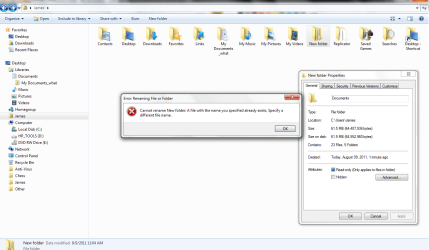
Here is the message I was getting before, now I am getting that message again. It will not let my name this folder Documents like you suggest.
 

Attachments

  • Chart1.png
    Chart1.png
    60.8 KB · Views: 40

My Computer

Computer type
Laptop
Computer Manufacturer/Model Number
HP EliteBook 8730W
OS
Windows 7 Home (64bit)
Hard Drives
SSD Intel 520
Weird... what happens if you name it something random, like I don't know... shoe?
 

My Computer

Computer type
PC/Desktop
Computer Manufacturer/Model Number
Medion Erazer (note to self: insert model number) - with custom additions
OS
Windows 10 Pro x64
CPU
Intel Core i5 7400 @ 3.00GHz
Motherboard
OEM supllied with PC
Memory
8GB 2133Mhz DDR4 (OEM supplied)
Graphics Card(s)
Gygabyte Windforce GTX 1050Ti (Factory Overclocked)
Sound Card
Realtek
Monitor(s) Displays
Acer Al1980 + HKC
Screen Resolution
1360*768(HKC) / 1280*1024(Acer)
Hard Drives
1TB Toshiba
1TB WD Caviar Green
120GB Samsung Evo 840
PSU
OEM supplied (no power rating on case)
Case
OEM Supplied
Cooling
Stock
Keyboard
Logitech Wireless
Mouse
Logitect Wireless
Internet Speed
40Mb/s Down 10Mb/s Up
Antivirus
Defender
Browser
Firefox

My Computer

Computer type
PC/Desktop
Computer Manufacturer/Model Number
Self built custom
OS
64-bit Windows 11 Pro for Workstations
CPU
Intel i7-8700K OC'd to 5 GHz
Motherboard
ASUS ROG Maximus XI Formula Z390
Memory
64 GB (4x16GB) G.SKILL TridentZ RGB DDR4 3600 MHz
Graphics Card(s)
ASUS ROG-STRIX-GTX1080TI-O11G-GAMING
Sound Card
Integrated
Monitor(s) Displays
2 x Samsung Odyssey G7 27"
Screen Resolution
2560x1440
Hard Drives
1TB Samsung 990 PRO M.2,
4TB Samsung 990 PRO PRO M.2,
TerraMaster F8 SSD Plus NAS
PSU
Seasonic Prime Titanium 850W
Case
Thermaltake Core P3
Cooling
Corsair Hydro H115i
Keyboard
Logitech wireless K800
Mouse
Logitech MX Master 4
Internet Speed
2 Gb/s Download and 100 Mb/s Upload
Antivirus
Malwarebyte Anti-Malware Premium
Browser
Google Chrome
Other Info
Logitech Z625 speaker system,
Logitech BRIO 4K Pro webcam,
HP Color LaserJet Pro MFP M477fdn,
APC SMART-UPS RT 1000 XL - SURT1000XLI,
Galaxy S23 Plus phone
Weird... what happens if you name it something random, like I don't know... shoe?

Lol, if you look at my posts you will see I did rename it, I can rename it everything except My Documents.

Hello Dude,

Backup the contents of your My Documents_what folder to another location, delete it, then see if doing Option Two in the tutorial below to restore the default location of your My Documents folder. Once restored, you can copy the backed up contents into the restored My Documents folder.

http://www.sevenforums.com/tutorials/18583-user-folders-restore-default-location.html

Hope this helps,
Shawn


Muhahahaahh, thank you sir. This worked.
 

My Computer

Computer type
Laptop
Computer Manufacturer/Model Number
HP EliteBook 8730W
OS
Windows 7 Home (64bit)
Hard Drives
SSD Intel 520
You're most welcome. I'm happy to hear that it's working again for you. :)
 

My Computer

Computer type
PC/Desktop
Computer Manufacturer/Model Number
Self built custom
OS
64-bit Windows 11 Pro for Workstations
CPU
Intel i7-8700K OC'd to 5 GHz
Motherboard
ASUS ROG Maximus XI Formula Z390
Memory
64 GB (4x16GB) G.SKILL TridentZ RGB DDR4 3600 MHz
Graphics Card(s)
ASUS ROG-STRIX-GTX1080TI-O11G-GAMING
Sound Card
Integrated
Monitor(s) Displays
2 x Samsung Odyssey G7 27"
Screen Resolution
2560x1440
Hard Drives
1TB Samsung 990 PRO M.2,
4TB Samsung 990 PRO PRO M.2,
TerraMaster F8 SSD Plus NAS
PSU
Seasonic Prime Titanium 850W
Case
Thermaltake Core P3
Cooling
Corsair Hydro H115i
Keyboard
Logitech wireless K800
Mouse
Logitech MX Master 4
Internet Speed
2 Gb/s Download and 100 Mb/s Upload
Antivirus
Malwarebyte Anti-Malware Premium
Browser
Google Chrome
Other Info
Logitech Z625 speaker system,
Logitech BRIO 4K Pro webcam,
HP Color LaserJet Pro MFP M477fdn,
APC SMART-UPS RT 1000 XL - SURT1000XLI,
Galaxy S23 Plus phone
Back
Top